
Prime Video Download in 2026: Official Limits + MP4 Workflow Guide [Safe&Legal]
Table of Contents
The short version "Prime Video download" can mean two different things. The first is installing the Prime Video app — that lives in the App Store, Google Play, Microsoft Store, Mac App Store, or at
primevideo.com/getapp. The second is using that app to save a title for offline viewing. The official downloads work, but they are not files in the usual sense: they cap at 720p on the official ceiling, expire 30 days after you save them (or 48 hours after you press Play), live only inside the Prime Video app, and cannot be transferred to a USB drive, an external hard drive, or a smart TV. A permanent MP4 workflow exists as a separate path; the trade-offs are covered in the second half.
Downloaded the night before. Won't play at 35,000 feet. Here's why — and how to avoid it.
Prime Video Download Means Two Different Things — Here's Which One You Want
"Prime Video download" collapses two unrelated tasks into one search query. One is installing the Amazon Prime Video app on your device. The other is saving a title for offline playback inside that app.
Path 1: Installing the Prime Video app on your device
On iPhone and iPad, install from the App Store. On Android, install from Google Play. On Windows 10 or 11, install Prime Video for Windows from the Microsoft Store. On Mac, install from the Mac App Store (macOS 13 Ventura or later). On Fire tablets and Fire TV, the app is pre-installed. Amazon's shortcut primevideo.com/getapp forwards you to the right store for your device.
Path 2: Saving Prime Video titles for offline watching
You already have the Prime Video app, you have an active Prime subscription, and you want to save a title to play without an internet connection. The app supports this on most devices, with caveats that fill the rest of this article.
For a focused look at device compatibility and offline playback settings, our guide to watch Amazon Prime Video offline covers what the app page doesn't spell out.
Why every guide blurs these two — and how to tell them apart in five seconds
Open the Prime Video app and tap any movie. If you see a downward-arrow download icon below the title, you are on Path 2 and need no new install. If the app won't open at all, you are on Path 1.
Can You Download from Amazon Prime Video? Yes — With Five Rules That Will Bite You
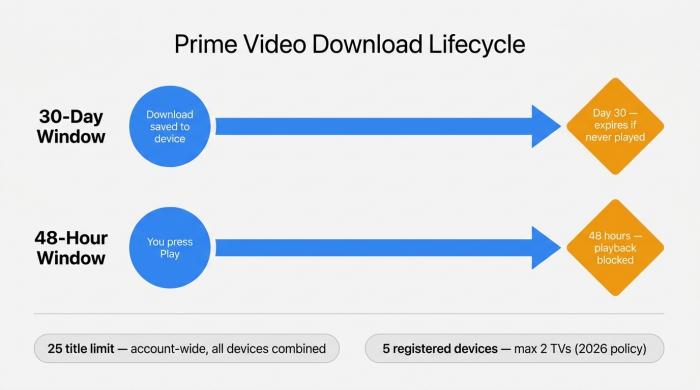
Two independent clocks govern every Prime Video download. Missing either window stops playback entirely.
Yes — Amazon Prime Video supports offline downloads on iPhone, iPad, Android phones and tablets, Fire devices, Windows 10/11, and macOS 13 Ventura or later. The rules around it are where most readers run aground.
Rule 1: Downloads live only inside the Prime Video app (no Chromecast, no AirPlay, no USB)
Per Amazon's Prime Video Help Center, downloaded titles play only inside the Prime Video app on the device that downloaded them. They cannot be cast to Chromecast, mirrored to AirPlay, or copied to a USB stick, external hard drive, or smart TV. The file is encrypted and bound to the app's playback environment.
Rule 2: The 30-day start clock and 48-hour finish clock
Per Amazon's usage rules at primevideo.com/usage, a downloaded title remains playable for up to 30 days from the moment you save it. Once you press Play, a second clock starts: you have 48 hours to finish before it expires. Both clocks run independently of your subscription status.
Rule 3: 25 titles total across all your devices (not per device)
The download cap is account-wide. Across every iPhone, iPad, Android phone, Fire tablet, Windows PC, and Mac registered to your Amazon account, you can hold a combined total of up to 25 downloaded titles at one time. If you have a couple of phones and a tablet, you will hit the cap faster than you expect.
Rule 4: 5 registered devices, only 2 can be TVs (tightened in 2026)
In early 2026 Amazon tightened its registered-device policy. An account can now hold up to 5 active devices, with no more than 2 of those being TVs. If you sign in on a sixth device, the app prompts you to remove an existing registration before continuing.
Rule 5: Quality tiers — Good (480p), Better (720p), Best (1080p) — and what "Best" actually costs in GB
The download-quality selector offers three tiers. Good corresponds to roughly 480p and consumes around 0.38 GB per hour. Better corresponds to 720p and consumes around 1.40 GB per hour. Best is nominally 1080p and consumes around 6.84 GB per hour, putting a two-hour film in the neighborhood of 13–14 GB on disk. If you are saving for a flight, pick Better unless fidelity is the priority. Note that "Best" does not always deliver 1080p — more on that in the hidden-limits section.
How to Download Prime Video on Mobile, Tablet, and Fire Devices (Official Steps)
The instructions below assume the latest stable version of the Prime Video app and an active Amazon Prime subscription.
iPhone and iPad (iOS / iPadOS)
- Open the Prime Video app and sign in.
- Find a title with the downward-arrow download icon — not every title is downloadable per studio licensing agreements.
- Tap the download icon. For series, tap at the season level to queue every episode.
- Tap the gear icon, choose Good, Better, or Best. iOS shows the file size before you commit.
- Completed downloads appear under My Stuff → Downloads.
- For offline playback, enable Airplane Mode, open Prime Video, go to My Stuff → Downloads, and tap the title.
Downloads are stored inside the Prime Video app sandbox; removing the app removes its downloads.
Android phones and tablets
- Open the Prime Video app and sign in.
- Find a downloadable title (same download-arrow icon).
- Tap Download. The app may prompt you to choose internal storage or SD card — pick whichever has more free space.
- Choose a quality tier under the gear icon.
- Completed files live under Downloads in the Prime Video app. Files on SD card cannot be played outside the app; encryption still applies.
Amazon Fire tablets
- Open the pre-installed Prime Video app and confirm sign-in.
- Tap the title, tap Download, choose a quality.
- Downloads appear under the Downloads section of the app and in the Downloads row on the Fire OS home screen.
- SD-card behavior matches Android: files play only inside the app.
Finding, playing, and deleting your downloads
Across every device: open Prime Video, go to My Stuff (or Downloads), and saved titles are listed there. To free storage, swipe a title or tap Edit and delete — the slot reopens under your 25-title cap. The Downloads view shows remaining days and hours for each file.
How to Download Prime Video on Windows PC and Mac (and Why the Browser Won't Work)
The obvious entry point — opening primevideo.com in a browser — does not work. There is no download button on the website. Downloads require a separate app gated by your operating system.
Windows 10 and 11: install the Microsoft Store app first
- Open the Microsoft Store and search for Prime Video, or use the Store link from Amazon's help page.
- Install the app (free) and launch it.
- Sign in with the same Amazon account as your subscription.
- Browse to a downloadable title, click the download icon, choose a quality.
- Downloaded titles appear under the Downloads tab inside the app.
macOS 13 Ventura or later: install from the Mac App Store
In early 2026 Amazon raised the macOS floor to macOS 13 Ventura.
For a full walkthrough including storage settings and the Mac App Store install, see our guide to download Amazon Prime Video on Mac.
Need a step-by-step walkthrough with screenshots? Our dedicated guide on how to download Amazon Prime Video to your PC covers both Windows 10 and Windows 11 in detail.
- Open the Mac App Store, search for Prime Video, and install.
- Launch and sign in.
- Find a downloadable title, click the download icon, choose a quality.
- Downloads appear under My Stuff → Downloads.
Why your browser refuses to show the download button
The download surface requires a hardware-and-OS-backed DRM environment (a higher Widevine security level) that the browser version of Prime Video does not negotiate. The packaged app can present that higher-trust environment; the browser cannot. No browser extension or developer-mode setting turns the download button on at primevideo.com.
Older Macs (Monterey 12 or earlier): no official path
Macs running macOS 12 Monterey or earlier cannot install the current Prime Video Mac app and have no first-party path to offline downloads. The options are: upgrade macOS where hardware supports it, download on a different device, or use the permanent MP4 workflow described later in this article.
Hidden Limits Most Guides Skip: 720p Caps, DRM Phone-Home, Expired Files
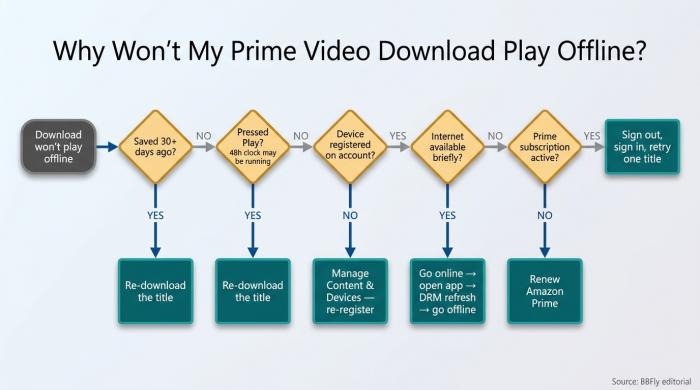
Work through these five checks in order. Most offline-playback failures are resolved at step 3 or 4.
The hidden 720p cap on certain devices (even when you picked "Best")
The "Best" tier is documented as up to 1080p, but in independent tutorial-site testing, a non-trivial number of titles cap at 720p regardless of which tier you selected. The selector reports "Best" and the download proceeds; the file plays back at 720p. There is no warning and no public list of affected titles or devices. Do not assume "Best" means 1080p.
The DRM "phone home" check — why offline isn't really offline
A downloaded Prime Video title is an encrypted package whose play permission is verified against Amazon's license servers on a recurring basis. If you are offline when the check triggers — mid-flight, in a basement, on a train through rural Spain — the title refuses to play with no manual override. The app displays "we need to verify your subscription"; in practice, offline mode is gated by online availability you may not have.
Other playback failures — including numbered errors that appear at launch or mid-stream — are documented in our reference on Amazon Prime error codes.
False download-limit errors when you're nowhere near the cap
The app sometimes returns a "download limit reached" error well below 25 titles. This is typically a sync glitch between the app's local state and Amazon's account-level inventory. Standard triage: sign out and back in, force-close the app, or unregister and re-register the device under Manage Your Content and Devices.
If the issue persists beyond these steps, our troubleshooting guide covering common Prime Video not working fixes walks through deeper diagnostics including network, account, and app-state resets.
What happens to your downloads when your subscription ends
If your Amazon Prime subscription lapses, downloaded titles stop playing the next time the DRM license check fails. The encrypted files remain on disk, but the app cannot grant playback permission. A download that survives cancellation in any meaningful sense is one not bound to the DRM check — and Amazon's app does not produce one.
How to Save Prime Video as a Permanent MP4 — The Workflow Around the Limits
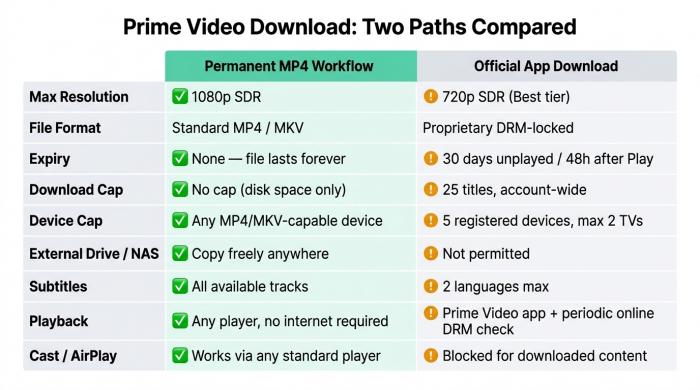
Nine dimensions where the two download paths diverge. Expiry and device caps matter most for frequent travelers; external drive access matters most for library collectors.
This is for personal, non-commercial use only and assumes an active Prime subscription giving you legitimate access to the title.
Note that rental titles operate under separate licensing rules — if you've rented rather than purchased, see our guide on download Amazon Prime Video rental offline before proceeding.
Why people want permanent, DRM-free files
Three reasons recur consistently: unreliable connectivity (the DRM phone-home check fails on multi-day no-signal trips); content churn (Amazon's library rotates, pulling titles and language tracks before you expect); and the subscription-end problem (every official download stops playing if your Prime membership lapses).
What a permanent MP4 workflow actually does (and what it doesn't)
A third-party desktop tool fetches the original video and audio streams from Amazon's servers while you are signed into your subscription, then remuxes them into a standard MP4 or MKV container — playable in VLC, Infuse, Plex, or any standard player. The tool authenticates against your account the same way the Prime Video app does. It does not redistribute content or provide access without a paid subscription.
Resolution ceiling in 2026: 1080p — the Widevine L3 reality
Every third-party Amazon Prime Video downloader available in 2026 caps at 1080p. Amazon serves 4K and HDR streams to higher-trust hardware-backed Widevine paths (L1); third-party desktop tools operate on the software path (L3), which tops out at 1080p SDR. The lift from the official app's SDR 720p to a third-party tool's 1080p is meaningful — roughly double the perceptual detail — but below the 4K HDR available on a native Fire TV or smart TV. Any product claiming 4K HDR Amazon downloads from a desktop third-party tool is misrepresenting the underlying technology.
If you want to browse which titles are actually available in 4K before committing to a download method, our catalog of 4K movies on Amazon Prime lists the current library.
Three technical approaches: what the marketing pages don't tell you
Native download — the tool retrieves the original streams and remuxes them without decoding the picture. Output bitrate, frame rate, and audio codec match the source. Cleanest path.
Recording — the tool captures playback in real time at one-times speed. A one-hour show takes at least one hour to "download." Dropouts become permanent artifacts. AnandTech's user forum documents recording-mode tools producing SD-quality fragments inside nominally 720p captures.
If you prefer the recording route, see our dedicated guide on how to record Amazon Prime Video without a black screen — it covers the DRM detection issue most screen-capture tools run into.
Re-encode — the tool decodes and recompresses before writing the file. The output is labeled 1080p but is not the platform's 1080p. VideoHelp's forum has documented one such tool converting a 29.97 fps source to 23.976 fps output, and re-encoding quietly drops higher-fidelity audio formats.
Two products with the same "1080p MP4 output" headline can deliver three very different files. The technical path is the question to ask.
For a hands-on breakdown of one native-download tool that passes this test, read our BBFly Amazon Prime Downloader review.
Storing permanent downloads on an external hard drive or NAS
Once the output is a standard MP4 or MKV, you can drag it to an external hard drive, copy it to a NAS, or place it in a Plex library. The official app blocks every one of these — Amazon's terms forbid transferring app-bound downloads to USB drives or smart TVs — but a remuxed MP4 is a regular filesystem file with no such restriction.
Table — Amazon Prime Video: Official App Download vs. Permanent MP4 Workflow
| Dimension | Official App | BBFly Permanent MP4 Workflow |
| Max resolution | SDR 720p (official ceiling) | 1080p (Widevine L3 industry ceiling in 2026) |
| File format | Proprietary, app-only (DRM-locked container) | Standard MP4 / MKV |
| Expiry window | 30 days unplayed / 48 hours after Play | None — file lives until you delete it |
| Account-wide download cap | 25 titles total across all devices | No cap (limited by disk space) |
| Device cap | 5 registered devices, only 2 TVs (2026 tightening) | Any device that plays MP4/MKV |
| USB / external drive / NAS | Not permitted; transfer blocked | Free to copy anywhere |
| Subtitle languages preserved | Up to 2 languages | All available subtitle tracks |
| Playback prerequisites | Prime Video app + active subscription + periodic online DRM check | Any standard player (VLC / Infuse / Plex), no network required |
| Cast / AirPlay / Chromecast | Blocked for downloaded content | Standard file — works wherever your player does |
Source: Amazon Prime Video Help Center (primevideo.com/help); Amazon usage policy (primevideo.com/usage); BBFly product specification (as of 2026-05).
BBFly Amazon Downloader: Specs, Pricing, and Where It Sits Among the Alternatives
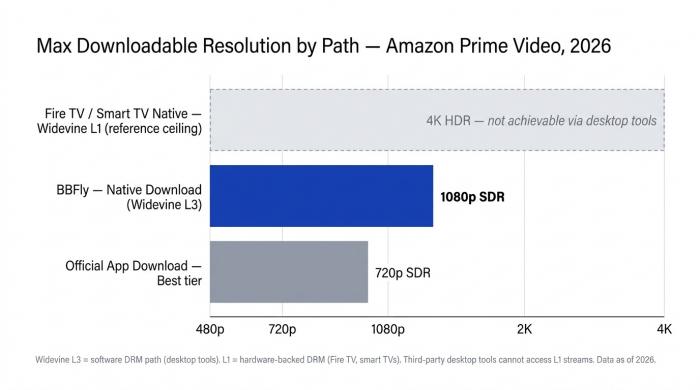
The 1080p ceiling is a Widevine L3 constraint every third-party desktop tool shares in 2026. The gap versus the official app's 720p is real and measurable.
What BBFly does on Amazon (native download, not screen recording)
BBFly Amazon Downloader is a desktop tool for Windows and Mac. While signed into your Prime Video subscription, it requests the original video and audio streams from Amazon's servers and remuxes them into a standard MP4 or MKV file — no decode-and-re-encode step, no screen capture. The Amazon-specific breakthrough is the jump from the official app's SDR 720p ceiling to 1080p via the native download path.
Verified specs: 1080p, MP4/MKV, EAC3 5.1, full subtitle tracks
| Spec | Detail |
| Platforms | Windows, Mac |
| Max resolution | 1080p (Widevine L3 ceiling) |
| Video codecs | H.264, H.265 |
| Audio codecs | EAC3 5.1, AAC 2.0 |
| Output containers | MP4, MKV |
| Subtitle download | Yes — all available tracks (vs. Amazon app's 2-language cap) |
| Batch download | Yes |
| Series tracking | Yes — new episodes added to queue |
| Metadata write | Yes — title, season, episode, year |
Pricing: monthly, annual, and lifetime (with 3-PC license)
- Monthly: $29.90, 1 PC.
- Annual: $99.90, 1 PC.
- Lifetime: $199.90 one-time, 3 PCs.
The lifetime tier's 3-PC authorization is an outlier in this category — most competing tools offer single-device lifetime licenses only.
Key differentiators and honest limitations
What BBFly delivers on Amazon: 1080p versus the official app's 720p ceiling; standard MP4/MKV output free to move to any external drive, NAS, or smart TV player; all subtitle tracks preserved; no 30-day or 48-hour expiry; no 25-title cap; no registered-device tie. The free trial covers 3 complete titles — enough to verify resolution, subtitle sync, batch behavior, and portability before paying.
Honest limitations: 1080p is the ceiling on Amazon — below the platform's native 4K HDR on Fire TV and smart TV. This is the Widevine L3 reality every third-party tool shares. Desktop-only: Windows and Mac, no mobile clients. Requires an active Amazon Prime subscription throughout.
Amazon Prime Video Download FAQ
How long do Amazon Prime downloads last?
Per the official usage rules, a downloaded title remains playable for up to 30 days from the moment you save it. Once you press Play, you have 48 hours to finish before the file expires. Clocks reset only if you re-download after expiry.
Can you download a rented movie on Amazon Prime?
Yes, but a rental can be downloaded to one device at a time, versus two devices for a Prime-included title and four devices for a purchased title. The 30-day and 48-hour clocks apply, plus the rental window runs independently — if the rental period closes before the 30-day download window does, the rental window ends playback.
Does Amazon Prime Video need internet to play downloaded content?
Partially. The app requires a periodic DRM license check against Amazon's servers. Between checks, playback is offline. Pure multi-day, no-signal offline is not guaranteed. A permanent MP4 file produced by a third-party workflow has no such check.
Can you download Amazon Prime Video to an external hard drive?
The official Prime Video app does not permit it — Amazon's policy explicitly blocks transferring downloaded files to a USB drive, external hard drive, or smart TV. A permanent MP4 workflow produces a standard file that copies to any drive, including external and network storage.
Do Amazon Prime downloads expire after you cancel your subscription?
Yes, in practice. Encrypted files remain on disk, but the DRM license check fails once your subscription lapses and the app refuses playback. The only durable download against cancellation is a permanent MP4 saved while the subscription is still active.
Why won't my Prime Video download play offline?
Work through these in order: the 30-day window has expired; the 48-hour play window started when you previewed the title; the device is no longer on your registered-device list; the DRM license needs a refresh (go online briefly and reopen the app); cached license is stale (sign out, sign back in). These five checks resolve the majority of "downloaded but won't play" complaints.
How can I save Amazon Prime Video permanently as MP4?
A third-party desktop downloader running on Windows or Mac, signed into your active Amazon subscription, can fetch a title's original streams and remux them into a permanent MP4 or MKV. BBFly Amazon Downloader uses a native download path (not screen recording or re-encoding) and delivers 1080p output — the honest ceiling given Widevine L3 constraints — with full subtitle tracks and no expiry.
What if Amazon Prime Video download is not working at all?
Five-step triage: confirm the device appears in Manage Your Content and Devices; confirm the OS is supported (Windows 10/11, macOS 13 Ventura or later, current iOS or Android); confirm you have not hit the 25-title account-wide cap; go online briefly to force a DRM license refresh; sign out, sign back in, and try a single title. If all five fail, try a different title to determine whether the issue is content-specific.