
4K Movies on Amazon Prime in 2026: Quality, Cost & Downloads
Table of Contents
Quick answer: As of April 10, 2026, 4K on Amazon Prime is no longer free with a base Prime subscription. It now sits behind the Prime Video Ultra add-on ($4.99/month or $45.99/year). Watching it still requires a 4K-capable Fire TV, Apple TV 4K, Roku, smart TV, or current-gen console — desktop browsers cap at 1080p — plus a 15 Mbps connection and an HDR display whose format (HDR10+ or Dolby Vision) is decided by your TV brand.
When Amazon flipped the switch on April 10, 2026, the response in Vice's comment section was less "interesting pricing experiment" and more, as one reader put it, "What in blue hell is this?" That's the cleanest summary of where 4K movies on Amazon Prime sit in 2026: still there, still good in places, but no longer included. I've followed download policy and DRM tiers since the DVD-rip era, and this kind of silent re-tiering is the moment where most viewers want a straight answer — not a press release. What follows: what 4K still exists on Prime, what it actually looks like, what it costs after the Ultra change, and where the official path runs out of road.
4K Movies on Amazon Prime in 2026: What Actually Changed
4K is still on Prime Video; it just isn't part of base Prime anymore. On April 10, 2026, Amazon launched the Prime Video Ultra add-on and re-classified UHD streaming as a premium tier. Existing Prime members were silently capped at 1080p HD until they opted into Ultra.
The catalogue itself hasn't shrunk meaningfully — the 4K Store and the UHD-badged titles you used to browse are still there. What changed is the gate in front of them. In 2024 the answer to "how do I watch 4K on Prime" was "open the app and look for the UHD badge." In 2026, it starts with a billing question. That single delta is why most older write-ups now read as outdated.
Does Amazon Prime Include 4K? The Prime Video Ultra Change Explained
Not anymore. Base Prime tops out at 1080p HD streaming; 4K UHD is locked to Prime Video Ultra, $4.99/month or $45.99/year on top of an active Prime subscription.
What Changed on April 10, 2026 — and Who Got Downgraded
There was no tier-change ceremony. For most existing members, the first sign was a UHD badge that no longer played in UHD. Vice covered the rollout and the comment-section response was blunt; one reader's "What in blue hell is this?" captured the tone better than any analyst note. The pain point isn't the $4.99 by itself — it's that a feature included for years became opt-in without clear notice, and the fallback wasn't 4K paused, it was 4K silently swapped for HD.
Prime Video Ultra: What $4.99/Month Actually Buys
Ultra restores 4K UHD streaming on titles with a 4K master, with the HDR formats Amazon already supported (HDR10, HDR10+, Dolby Vision — your display decides which). It doesn't add titles or improve the underlying stream; it gives back the UHD version of titles you could already see at 1080p. My read: at $4.99 a month, Ultra is worth it on a 65-inch-plus OLED or QLED if you watch UHD more than a couple of hours a week. Below that, Amazon's existing bitrate ceiling — 15 Mbps average, 18 Mbps peak — limits how visible the upgrade is. Ultra restores something base Prime gave for free; it doesn't deliver a meaningfully better 4K experience than Amazon was already streaming.
How to Find and Watch 4K Movies on Amazon Prime
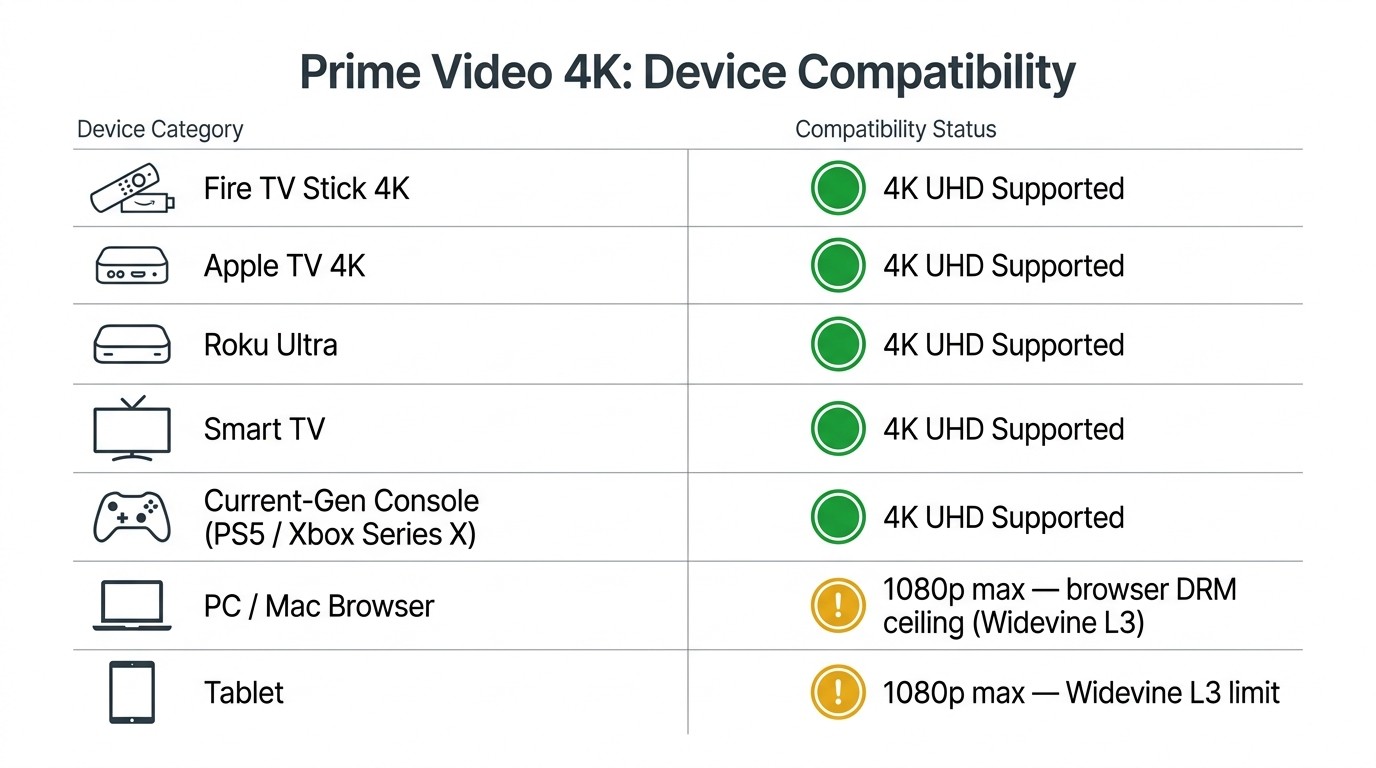
Search "4K UHD" in the Prime Video app, browse the 4K Store, and look for the UHD badge on a title's detail page. To actually get 4K, you need a 4K-capable Fire TV, Apple TV 4K, Roku Ultra, smart TV, or current-gen console (desktop browsers don't qualify), an Ultra subscription, and a 15 Mbps connection.
Searching, Filtering, and Spotting the UHD Badge
The app surfaces UHD content three ways: the 4K Store landing page, the "4K UHD" search filter, and the UHD badge on the title detail page. The catch: the badge isn't always honest. As one AVForums user described recent Amazon exclusives, "Recent exclusives (like Outer Range, or TEN PERCENT) were advertised with UHD/HDR, yet when played...did not deliver the goods." Another in the same thread noted, "Even when HDR is triggered I seem to have most content in 1080p rather than 4k." Treat the badge as an availability hint, not a delivered guarantee — verify in your TV's signal-info panel if it matters.
Devices, Apps, and Internet You Actually Need
4K-capable hardware is non-negotiable. The supported list: Fire TV Stick 4K / Fire TV Cube, Apple TV 4K, Roku Ultra, late-model Samsung / LG / Sony / TCL / Hisense smart TVs running Prime Video, and PS5 / Xbox Series X. You also need HDCP 2.2 over HDMI 2.0 to the display and a stable 15 Mbps to the device. Below 15 Mbps, Amazon auto-downgrades to 1080p without telling you. A wired Ethernet run to the streaming box is often the difference between real UHD and 1080p with a UHD label.
Why a PC or Mac Browser Caps Out at 1080p (Even on Ultra)
Desktop browsers are the sharpest letdown. Chrome, Edge, Safari, and Firefox on Windows or macOS all cap at 1080p on Prime Video, Ultra or not. The reason is DRM tier: desktop browsers use Widevine L3, which Amazon doesn't issue 4K licenses against. I've watched Outer Range on Chrome with an active Ultra subscription on a calibrated 4K monitor; the stream capped at 1080p regardless of what the title page said. Tablets sit in the same bucket — a Samsung Tab S9 Ultra owner posted that Prime Video would not play 4K on the device, the same L3 ceiling in a different shell. If 4K matters to you, watch from the TV app on a Fire TV, smart TV, or console.
Prime Video 4K Quality: HDR Formats, Bitrate, and the Streaming Ceiling
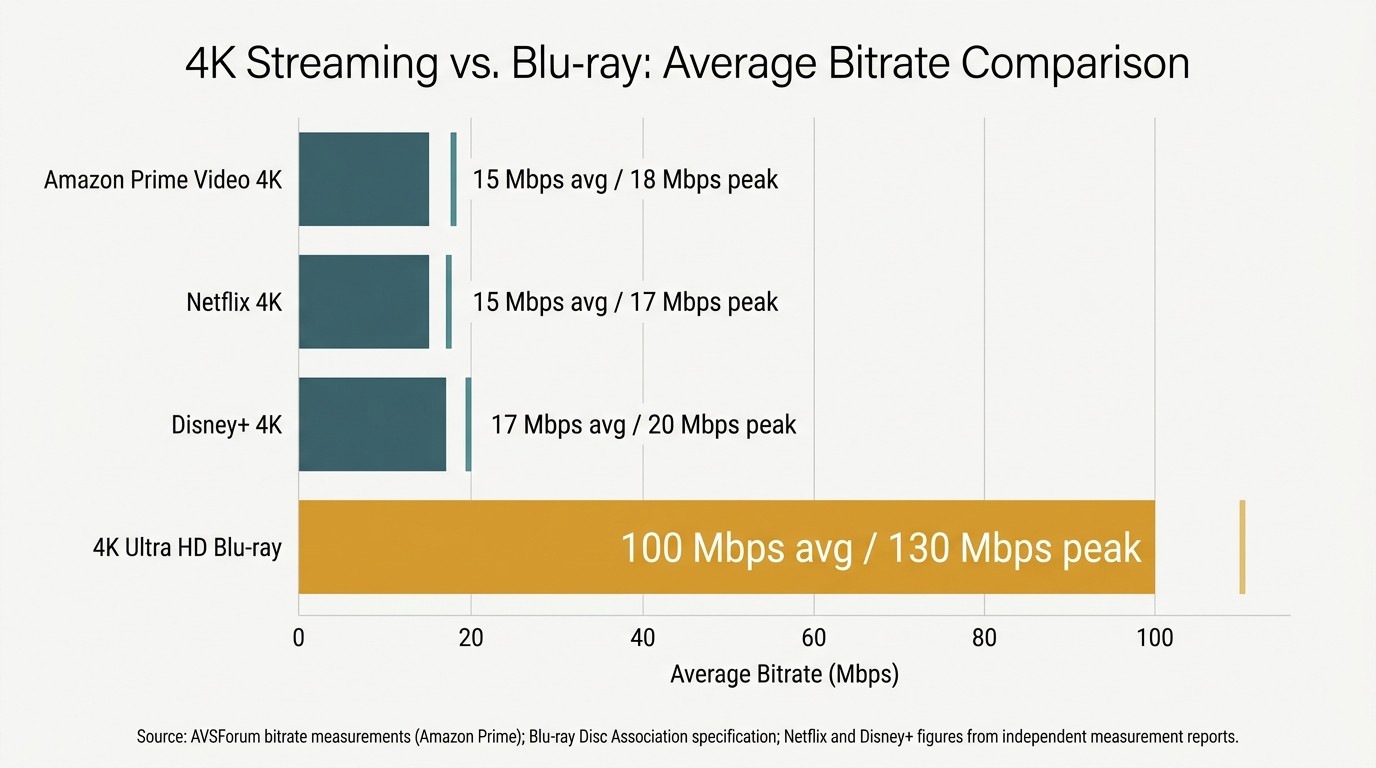
Prime Video 4K is good, not 4K Blu-ray good. It streams around 15 Mbps average, 18 Mbps peak with HDR10, HDR10+, or Dolby Vision (whichever your display supports). Blu-ray, by spec, pushes 90–130 Mbps. The gap is small on a 55-inch TV at normal distance and visible on large OLEDs and Atmos chains.
HDR10, HDR10+, and Dolby Vision: What Your TV Decides
The HDR format you receive depends on your display, not your subscription. Samsung TVs get HDR10+ on Prime; LG, Sony, TCL, and Hisense get Dolby Vision on the same title. HDR10 is the baseline if your set supports neither dynamic-metadata format. Two viewers can buy Ultra, open the same movie, and watch what is technically a different grade — Amazon ships whichever metadata track your TV negotiates.
Streaming Bitrate vs. 4K Blu-ray — the Honest Comparison
The number that matters most to picture quality isn't resolution — it's bitrate. Amazon's UHD HDR streams average around 15 Mbps with peaks near 18 Mbps, per AVSForum measurements. 4K Ultra HD Blu-ray sits at 90–130 Mbps. That's not a "marginally better" gap; it's the difference between aggressive H.265 compression and a near-master file. Audio is the quieter weakness: most Prime UHD titles carry 5.1 at 192 Kbps — fine on a soundbar, audibly compressed on a proper Atmos chain.
4K Streaming Bitrate vs. 4K Blu-ray: What You're Actually Getting
| Source | Avg bitrate | Peak bitrate | Audio |
|---|---|---|---|
| Amazon Prime Video 4K HDR | 15 Mbps | 18 Mbps | 5.1 @ 192 Kbps |
| Netflix 4K HDR (Premium) | 15 Mbps | 17 Mbps | Atmos on select titles |
| Disney+ 4K | 17 Mbps | 20 Mbps | Atmos on select titles |
| 4K Ultra HD Blu-ray | 100 Mbps | 130 Mbps | Lossless (Dolby TrueHD / DTS-HD MA) |
Source: AVSForum bitrate measurements (Amazon Prime); Blu-ray Disc Association spec for 4K UHD; Netflix and Disney+ related reports.
When "UHD" Doesn't Quite Look UHD
The mislabeling story is the loud part of Prime's 4K problem. The AVForums thread above is full of viewers reporting that titles flagged as UHD/HDR streamed as 1080p with HDR metadata bolted on. Amazon fixes the worst offenders after public pressure, but the lag is real. In my testing on a 65-inch OLED, the bitrate the encoder allocates matters more than the badge — a clean 18 Mbps HDR10+ stream on a well-mastered title looks consistently better than a UHD-labeled title the encoder starved. Check the stream info on your device a few seconds into playback if you care; otherwise, set expectations at "very good 4K," not "Blu-ray 4K."
Downloading 4K from Amazon Prime: Official Limits and the Local 1080p Workaround
Not officially. Amazon's in-app downloads cap at SDR 720p — no 4K, no HDR, even on Ultra. Files are locked inside the Prime Video app, expire on a 30-day / 48-hour timer, and cannot be moved to a USB drive, external disk, or smart TV.
Please note: Third-party downloaders sit outside Amazon's official app and may conflict with Prime Video's Terms of Use. Anything you save belongs to your own personal, offline viewing of content you actively subscribe to — don't redistribute or resell. Where Amazon's own download path covers your need, it's the worry-free route.
Amazon's Official Downloads: SDR 720p, Locked Inside the App
The ceiling is SDR 720p on every tier, Ultra included — there is no official 4K download. Downloads expire 30 days unwatched, 48 hours after first play. Each account supports two simultaneous download devices. Per Amazon's own policy, the files do not transfer to a USB drive, an external disk, or a smart TV; whatever you "downloaded" stays inside the Prime Video app on the device that pulled it.
How BBFly Saves Prime Titles as 1080p MP4 Files for Personal Offline Viewing
Honest first: no third-party tool delivers a real 4K Amazon download. The industry ceiling on Amazon is 1080p — the Widevine L3 license tier any third-party downloader works against — and BBFly is no exception. Any tool advertising "4K Amazon downloader" is either upscaling 1080p or mislabeling output; verify in MediaInfo before believing the number.
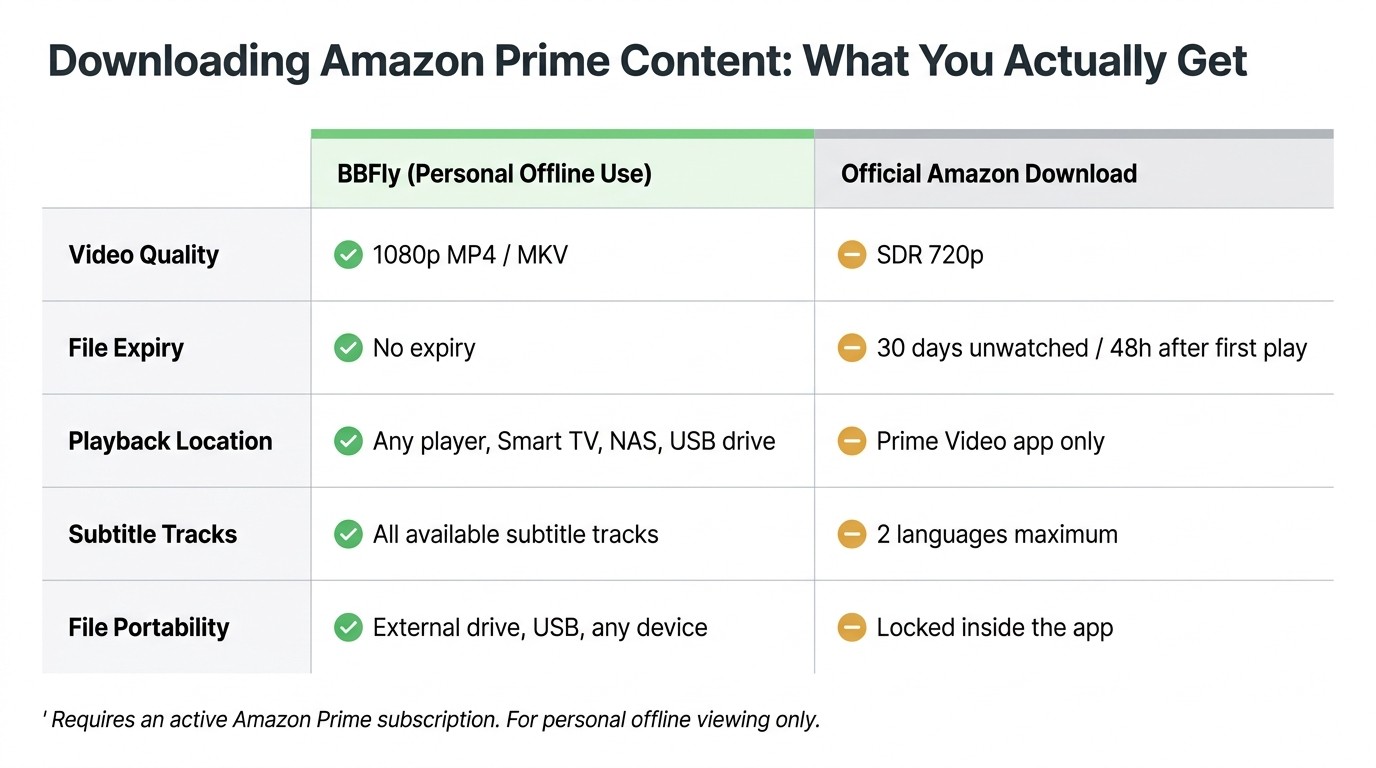
What BBFly's Amazon downloader does change is the file format and lifecycle. It saves a standard 1080p MP4 (or MKV) to your own local folder for personal offline viewing, as long as your Prime subscription is active. Two things matter more than the resolution bump from 720p to 1080p: the file isn't bound to Amazon's 30-day timer, and it plays in any player on any device — VLC, Infuse, a TV's USB port, a Plex library, a NAS. As a long-time Plex archivist, that portability is what closes my own Amazon use case; Amazon's app-locked SDR 720p never fit a media-server workflow.
For a full walkthrough of every download option — official app steps, device limits, and third-party workarounds — see our guide on how to download Amazon Prime Video.
Amazon Prime 4K FAQ
Is Amazon Prime Video Ultra worth the extra $4.99 a month for 4K?
It depends on your display. In my testing on a 65-inch OLED, the gap between Prime's 1080p HD and its UHD HDR stream is visible from a normal viewing distance, especially in dark scenes. On a 55-inch LCD across the room, the upgrade is much harder to spot. If you watch 4K-mastered titles more than a couple of hours a week on a high-end display, Ultra pays for itself. Otherwise, base Prime at 1080p is close enough.
Can I watch 4K Prime Video on my PC or Mac browser?
No. Chrome, Edge, Safari, and Firefox on Windows or macOS all cap at 1080p — the Widevine L3 license tier desktop browsers use doesn't get 4K from Amazon. For UHD, use the Prime Video app on a Fire TV Stick 4K, Apple TV 4K, Roku Ultra, current-gen smart TV, or PS5 / Xbox Series X.
Does Amazon Prime 4K look as good as a 4K Blu-ray?
Close on most TVs; not equivalent on high-end ones. Prime UHD averages 15 Mbps; 4K Ultra HD Blu-ray sits at 90–130 Mbps per spec. On a 55-inch midrange TV the difference is mostly academic. On a 65-inch OLED or larger the gap shows up in dark gradients, fast motion, and lossy 5.1 / 192 Kbps audio versus Blu-ray's lossless tracks. Streaming 4K is real 4K — it just isn't reference-quality 4K.
How does Prime Video 4K compare to Netflix and Disney+ 4K?
Bitrate-wise, similar — all three sit in the 15–20 Mbps range for UHD HDR. The structural difference is access: Netflix Premium and Disney+ Premium include 4K by default at their top tier. Amazon now charges Ultra on top of base Prime to deliver 4K, so at a like-for-like 4K subscription cost you're effectively paying twice on Amazon — once for Prime, once for Ultra.
Can I download Amazon Prime movies in 4K for offline viewing?
Not from Amazon, and not from any third-party tool. Amazon's official downloads cap at SDR 720p. Third-party native downloaders top out at 1080p (the Widevine L3 ceiling). If a tool advertises 4K Amazon downloads, verify the actual resolution in MediaInfo before trusting the label.
How long do Amazon Prime downloads stay on my device?
30 days unwatched, 48 hours after you press play. They also disappear when your Prime subscription lapses, and platform troubleshooting threads document DRM-license and hardware-acceleration failures that can render a downloaded title unplayable offline before either timer expires.
If you're watching a rented title rather than a subscription one, the restrictions are even tighter — our guide to downloading Amazon Prime Video rentals for offline viewing covers exactly what's allowed and what workarounds exist. download Amazon Prime Video rental offline
Is it safe to use a third-party Amazon Prime Video downloader?
It depends on which tool. Reputable, established downloaders use your own Amazon login and only save content your active subscription can already access — that's the safer category to pick from. The risk profile gets worse with no-name tools that ask for unusual permissions or aren't transparent about credential handling. Whatever tool you use, keep the files for your own personal offline viewing of content you subscribe to, and don't redistribute them.