
How to Record on Paramount Plus in 2026: 3 Methods, No DVR
Table of Contents
You opened Paramount+, looked for a record button, and found nothing — that's because the platform is video-on-demand only, with no DVR. The three paths that actually work in 2026 are: free screen recording (quality capped at your monitor), HDMI capture (extra hardware), and a native streaming downloader for permanent MP4 files. Each one loses something different.
A reader on Skopemag described the common trigger: "a movie I started on a Friday was unavailable to finish on Monday — the 48-hour playback window had expired." Paramount+'s official download path isn't built for the way people actually watch. I've spent fifteen years tracking platform download policies, and Paramount+ leans harder on time-locks than most. The question stops being "can I record this?" and becomes "which workaround pays the smallest tax in quality, money, or time?"
Can You Record on Paramount Plus? Why There's No DVR
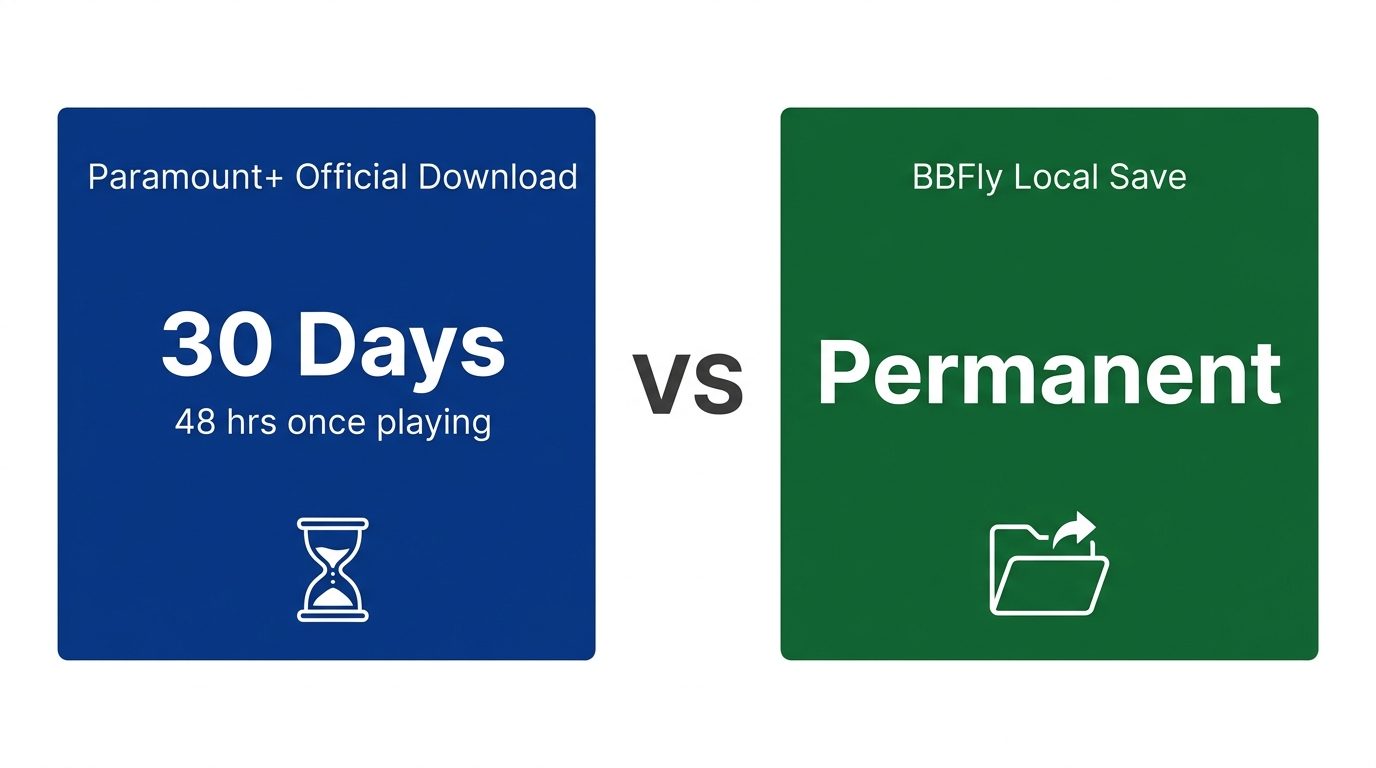
No, Paramount+ has no built-in DVR, no record button, and no cloud DVR. It's a video-on-demand service, not a live-TV replacement. The closest official feature is the in-app download on iOS and Android, and that file expires in 30 days, or 48 hours after you press play, whichever comes first. Anything beyond that requires a third-party workaround.
Why Paramount+ Is VOD-Only, Not a DVR Service
Paramount+ launched as a streaming catalog, not a virtual cable box. Its licensing doesn't permit cloud DVR the way YouTube TV, Fubo, or Hulu + Live TV operate — those services pay separately for time-shift rights on linear channels. Paramount+ pays for video-on-demand streaming rights only. If you arrived expecting a "Record series" toggle, you're confusing two product categories. It isn't an oversight; it's an entirely different deal with the studios.
Live TV, NFL, and Sports: The Time-Shift Problem
Live content makes the missing DVR sting most. NFL games on Paramount+, UEFA Champions League soccer, the CBS simulcast — they all stream live only. The cabletv.com NFL review puts it plainly: "NFL games on Paramount+ are only available to watch live, not on demand." There is no scheduled recording and no rewind from the start of an in-progress livestream. If you want to time-shift live sports on Paramount+, your only option is to capture in real time while it's airing.
Paramount+ Built-In Limits: Downloads, Screens, and Picture-in-Picture
The official Paramount+ download feature is mobile-only (iOS and Android), capped at 25 titles per account, with files that expire 30 days after you save them or 48 hours after you press play. A "ghost limit" sync bug can lock you out before you actually hit 25. Concurrent streams are capped by plan tier. Confirm current figures on Paramount Plus's Help Center.
Mobile-Only, 30-Day Shelf Life, 48-Hour Playback Window
Per Paramount Plus's Help Center, downloads live only inside the iOS and Android apps — no Windows or Mac path. You also need a Premium-tier plan; the ad-supported Essential plan can't download at all. Once you press play, a 48-hour clock starts; if you never start, the file expires after 30 days. The Skopemag account illustrates this exactly: a Friday-night start, a Monday attempt to finish, a dead file.
The 25-Item Cap and the "Ghost Limit" Bug
The documented cap is 25 titles per account across all devices. KeepStreams documented the "ghost limit" bug: "if you delete a downloaded episode while offline, the app's local cache fails to sync — you might only have 5 videos saved, but the system thinks you're maxed out at 25." Reconnect to Wi-Fi and the count usually corrects itself. Usually.
Screen Limit and Picture-in-Picture on iPhone
Paramount+ caps concurrent streams by plan tier — Essential and Premium differ on simultaneous-device limits (confirm current numbers on Paramount Plus's Help Center; tier rules have shifted twice in two years). Picture-in-picture on iPhone runs through iOS's native control: swipe up while a video is playing and it minimizes to the corner. The Paramount+ app doesn't expose a separate PiP toggle.
The practical upshot: 25 titles, a 30-day shelf, a 48-hour playback window, and a ghost-limit bug. That combination is why I stopped treating the official download as a real long-term offline option. It's fine for tonight's plane ride — not a library.
How to Record on Paramount Plus: Three Methods Compared
Three methods cover almost everything readers actually try: screen recording with built-in OS tools, HDMI capture with a card and HDCP-stripping splitter, and a native streaming downloader that fetches the encoded stream Paramount+'s servers already send.
Please note: the third-party methods in this section can run up against Paramount+'s Terms of Use. Keep any local copy strictly for personal offline viewing — not for redistribution, public screening, or resale. Where the official Paramount+ download fits your use case, that is the most worry-free route.
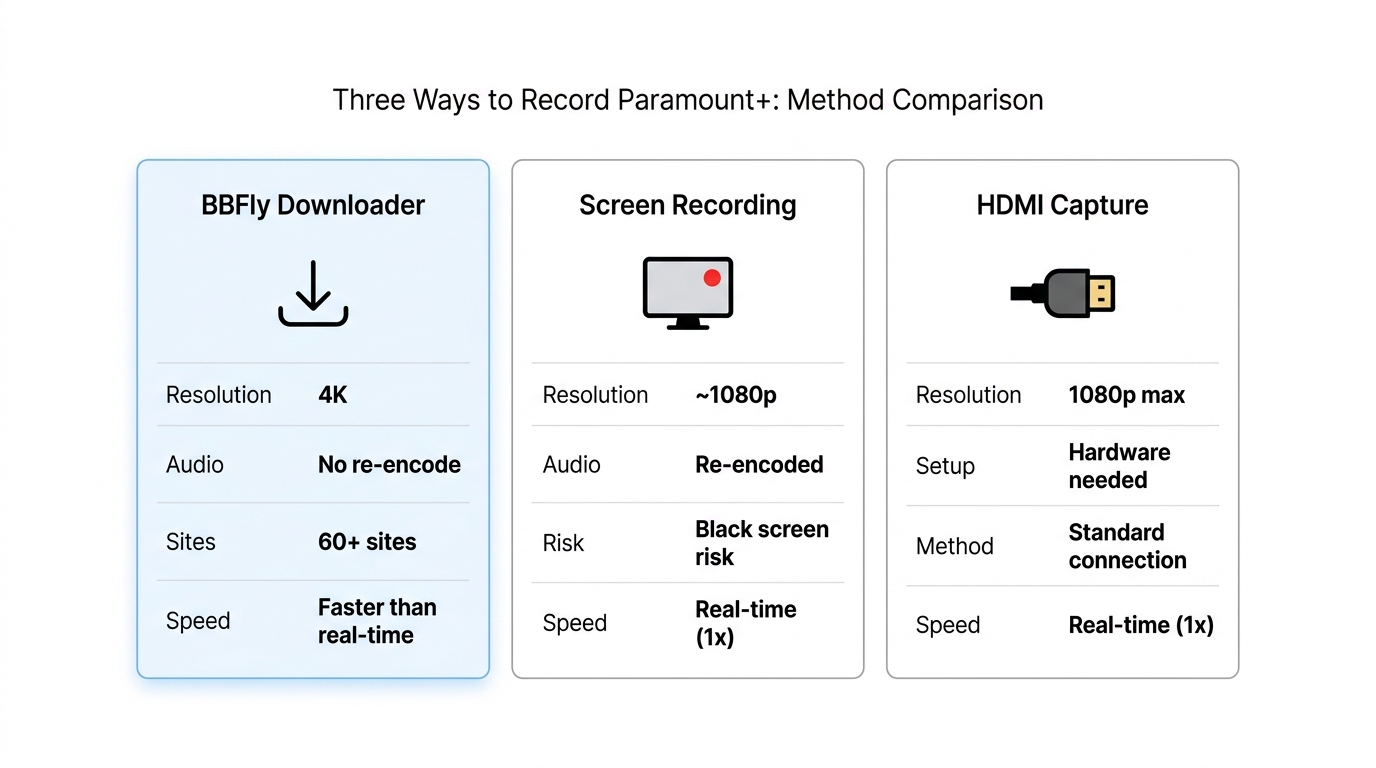
Three Ways to Record Paramount Plus: Quality, Cost, and What Each Method Loses
| Method | Max resolution | Audio | Output file | Speed | Cost | Main limit |
|---|---|---|---|---|---|---|
| Screen recording (Xbox Game Bar / QuickTime / OBS) | Monitor resolution, typically 1080p | Stereo system mixdown | MP4, permanent local file | Real-time (1×) | Free | Black screen if hardware acceleration is on; quality capped at display |
| HDMI capture card | Up to 4K, depends on card | HDMI passthrough | MP4, permanent local file | Real-time (1×) | $100–500 hardware + capture software | Requires HDCP-stripping splitter; hardware setup overhead |
| BBFly Paramount Plus Downloader | Up to 4K (H.264 / H.265, HDR10+ and Dolby Vision) | Original Dolby Atmos, EAC3 5.1, or AAC 2.0 preserved | Permanent MP4 / MKV (Windows + Mac) | Faster than real-time | Subscription ($29.90/mo) or lifetime ($199.90, 3 PCs); active Paramount+ subscription required | Personal use only; requires valid Paramount+ subscription |
Source: BBFly's official BBFly Paramount Plus Downloader product page and Paramount Plus's official Help Center.
Method 1: Screen Recording (Free, Display-Capped Quality)
Best for one-off short clips on a tight budget. Xbox Game Bar on Windows, QuickTime on Mac, OBS on either. Quality is capped at your monitor's output (typically 1080p) and audio comes through as a stereo system mix, so any 5.1 or Atmos gets folded down. Real-time only: a 90-minute movie costs 90 minutes to record. The black-screen DRM problem is what most readers hit first — the next H2 walks through the fix.
Method 2: HDMI Capture (Hardware-Heavy, Legacy Workflow)
Only worth it if you already own the gear. A capture card plus an HDCP-stripping HDMI splitter can take a 4K signal off a Paramount+-capable streaming stick and feed it into OBS at higher quality than screen-grabbing a laptop. But you're spending $100–$500 on hardware, you're still bound to real-time, and you need a splitter that handles HDCP — a category some retailers won't ship to the US. Not my first pick for anyone starting from scratch.
Method 3: Native Streaming Downloader (Best Quality, Subscription Required)
When building a library where quality matters, this is the path I reach for. The tool talks to Paramount+'s servers directly and saves the encoded video stream — the same stream the app would have played — straight to a local MP4 or MKV without re-encoding. Output runs up to 4K with original Dolby Atmos preserved. Works on Windows and Mac.
Screen Recording Paramount Plus: Fixing the Black Screen
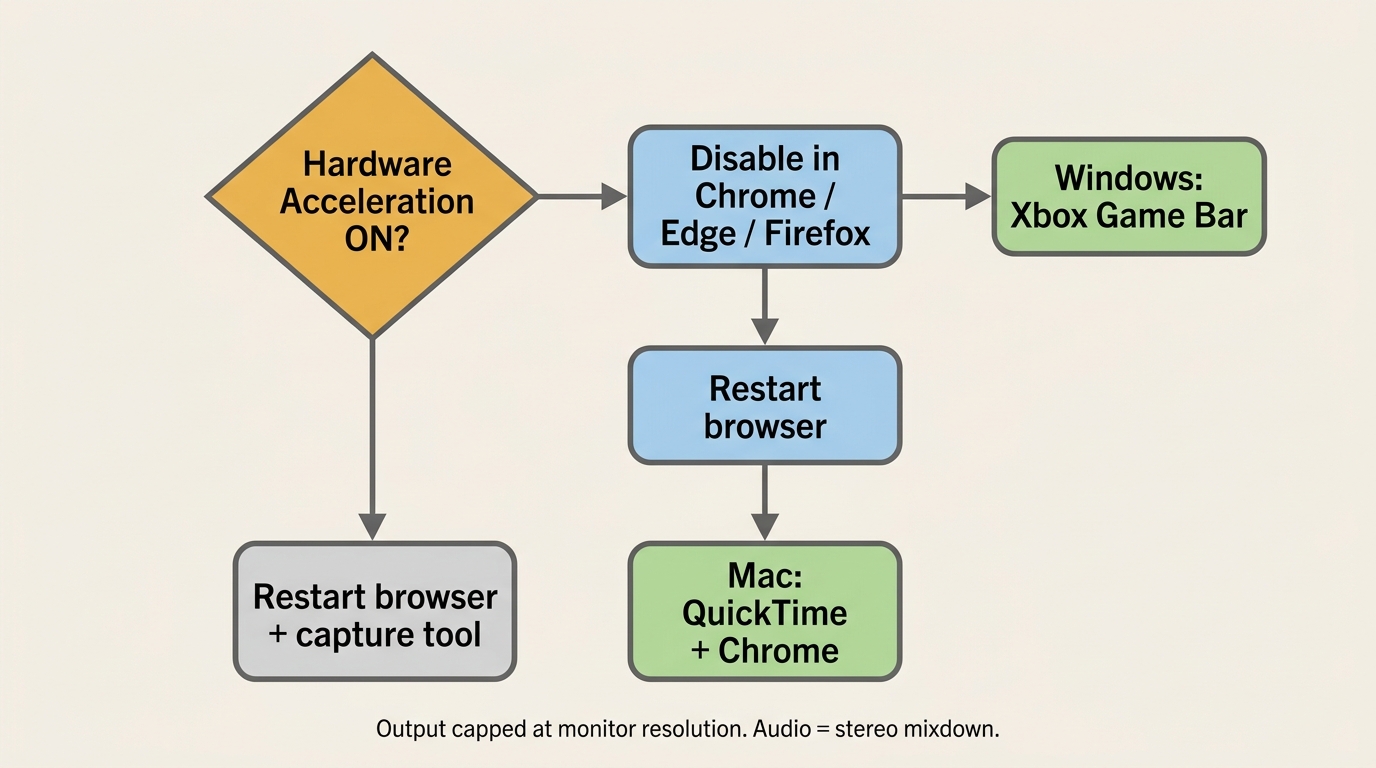
The black screen is DRM working as designed, not a bug. Paramount+ uses Widevine, which blanks the frame buffer to any capture tool when hardware acceleration is on. To screen-record successfully, disable hardware acceleration in your browser, then capture with Xbox Game Bar on Windows or QuickTime on Mac. Quality caps at your monitor's resolution and audio drops to a stereo mix — the tradeoff for getting a recordable picture.
Why DRM Causes the Black Screen on Paramount+
Streaming services use Widevine (or Apple's FairPlay, or Microsoft's PlayReady) to keep premium video on a protected path between the GPU and the display. With hardware acceleration on, the decoded frame lives in GPU memory that user-level capture tools can't read — so Xbox Game Bar or OBS reads black. Disable hardware acceleration and the decode moves to CPU memory, where the recorder can see it. The platform may also drop to a lower playback resolution depending on the title.
Step 1: Disable Hardware Acceleration in Your Browser
- Chrome / Edge: Settings → System → toggle off "Use graphics acceleration when available" → restart.
- Firefox: Settings → General → Performance → uncheck "Use recommended performance settings" → uncheck "Use hardware acceleration when available" → restart.
- Safari (Mac): no user-facing toggle. Safari's protected media path is tighter; QuickTime usually still returns black. Switch to Chrome on Mac for screen recording.
On older laptops, expect Paramount+ playback to stutter slightly without GPU acceleration.
Step 2: Record with Xbox Game Bar on Windows
- Press Win + G to open Xbox Game Bar with Paramount+ playing in your browser.
- Click the Capture widget and press the record button (or Win + Alt + R).
- Files land in Videos → Captures, encoded as MP4 at up to 1080p.
Game Bar captures system audio by default. The file is a permanent local MP4. What you lose is original 5.1 or Atmos surround, downmixed to stereo on the way out.
Step 3: Record on Mac with QuickTime (and What QuickTime Can't Do)
- Open QuickTime Player → File → New Screen Recording.
- Pick the area, hit record, then play Paramount+ in Chrome (not Safari).
- For system audio, route through a virtual audio device — BlackHole (free) or Loopback (paid) — configured in Audio MIDI Setup.
Honest take: the Mac screen-recording path is one I've stopped using. Safari's media path stays opaque even with hardware acceleration off, and QuickTime plus Chrome plus BlackHole has enough setup friction that a downloader is preferable. OBS with BlackHole is more reliable than QuickTime if you must record on Mac, but the quality ceiling and stereo mixdown are the same.
BBFly Paramount Plus Downloader: Native 4K Download for Permanent MP4 Files
A native streaming downloader pulls the encoded video and audio stream Paramount+'s server already sent and saves it to a local MP4 or MKV without re-encoding. I switched off screen recording for Paramount+ when a QuickTime capture turned my Atmos track into thin stereo through the receiver — there was no recovering what the system mix had collapsed. That's the gap a native downloader closes.
Native Download vs Screen Capture: What You Actually Keep
The download fetches what Paramount+'s server already sent: H.264 or H.265 video at the title's actual resolution (up to 4K per BBFly Paramount Plus Downloader), HDR10+ and Dolby Vision metadata intact, and the original Dolby Atmos, EAC3 5.1, or AAC 2.0 audio. Screen recording captures whatever the monitor renders plus a downmixed stereo. The output is a permanent local MP4 or MKV — no 48-hour clock, no 30-day shelf, no app prison. It plays in VLC, Infuse, or Plex, off a NAS, or from a USB stick into a Smart TV. Windows and Mac both supported.
Free Trial and Personal-Use Boundaries
The trial covers three full titles per platform within a 30-day window — full movies or episodes, not previews. An active Paramount+ subscription is required; BBFly is a tool for subscribers who want a permanent local file for personal offline viewing, not a route around the subscription itself. Pricing as of June 2026: $29.90/month or $99.90/year for one PC, $199.90 lifetime for three PCs.
- Best for: building a personal library, archiving series at risk of catalog removal, multi-device households.
- Not ideal for: someone who only needs one episode for tonight's flight and doesn't already subscribe (the official mobile download handles that case).
- Suits: subscribers who care about audio fidelity and want files that survive a cancelled subscription.
FAQs About Recording on Paramount Plus
Is it legal to record Paramount Plus shows for personal viewing?
The honest answer separates two things. Saving Paramount+ content for your own personal offline viewing — not for redistribution, public screening, or commercial use — is what most subscribers and third-party documentation treat as the personal-use standard. The Terms of Use side and the copyright side are different categories of risk: the first is between you and Paramount+, the second is governed by local copyright law. Consult applicable local law for definitive guidance. Shorter rule: keep it personal, don't share or resell.
How long do Paramount Plus downloads actually last?
Per Paramount Plus's Help Center (as of June 2026), the official download runs on two clocks: 30 days from when you save the file, and 48 hours once you press play — whichever expires first wins. Files also disappear if you cancel your subscription or sign out of the app. A permanent local MP4 from a native downloader sidesteps all three: no clock, no subscription tether, no app prison.
Can you screen share Paramount Plus on Discord without a black screen?
Same DRM mechanism as screen recording. Discord's stream view passes through black because Widevine blanks the buffer for any capture path. Turn off hardware acceleration in both Discord (Settings → Advanced → Hardware Acceleration) and your browser, then start the share with Paramount+ playing in Chrome. Quality will be modest; this is for synchronous watch parties, not archiving content.
Can you record Paramount Plus on a smart TV?
Practically, no. Smart TV apps don't expose a record function, and HDMI capture needs an HDCP-stripping splitter. The workable TV path is the inverse: download or record on a Windows or Mac computer, then play the MP4 on the TV via USB stick, DLNA, or a media server like Plex.
How can I save Paramount Plus shows permanently to watch on any device?
Three options, three tradeoffs. Screen recording gives you a permanent file with quality loss and real-time effort. HDMI capture raises possible quality but adds hardware overhead. A native streaming downloader gives you a permanent MP4 or MKV with original encoded quality, multi-device portability, and faster-than-real-time speed — at the cost of a paid tool plus an active Paramount+ subscription. Pick the method whose tradeoffs you can live with.