
Disney Plus 1080p Downloader: Official Limits & Tested Tools
Table of Contents
TL;DR: Disney+ Downloads on PC in 2026
Updated July 2026
The fastest path to a real 1080p Disney+ file on a PC or Mac is not Disney's app: there isn't one on macOS, and the Windows Microsoft Store app delivers mobile-class downloads that expire in 30 days. The desktop route is a third-party native-download tool that pulls the original H.264 or H.265 stream and remuxes to MP4 or MKV. Among tools currently shipping, BBFly is one of a small handful I have personally verified at true 4K + HDR10 + Dolby Atmos on Disney+, and the one that pairs the full stack with a full-title trial rather than a 5-6-minute clip. Most competitors stop at 1080p SDR, and a couple of "1080p" products quietly cap at 720p in real output.
Fifteen years on the offline side of streaming, DVD rips, Plex servers, a long list of "downloaders" that turned out to be screen recorders, and Disney+ on a PC browser still surprises me. Even on a 4K monitor over gigabit fiber, dark scenes look like a JPEG someone forwarded twice. It is not your monitor or your bandwidth: Disney+ silently routes browser playback through Widevine L3 and caps the output at 720p, sometimes 480p. That reframes the whole disney plus 1080p downloader search: you are not asking how to download, you are asking how to work around a software-imposed quality floor.
Why Disney+ Looks Blurry on PC (and Won't Play on Some Laptops)
The short answer: your browser is running Widevine L3, the software-only DRM path, which Disney caps at 720p — and at 480p on older devices lacking hardware-backed Widevine. A fast laptop, a gigabit line, and a Premium subscription do not lift that ceiling; it is set on the server side.
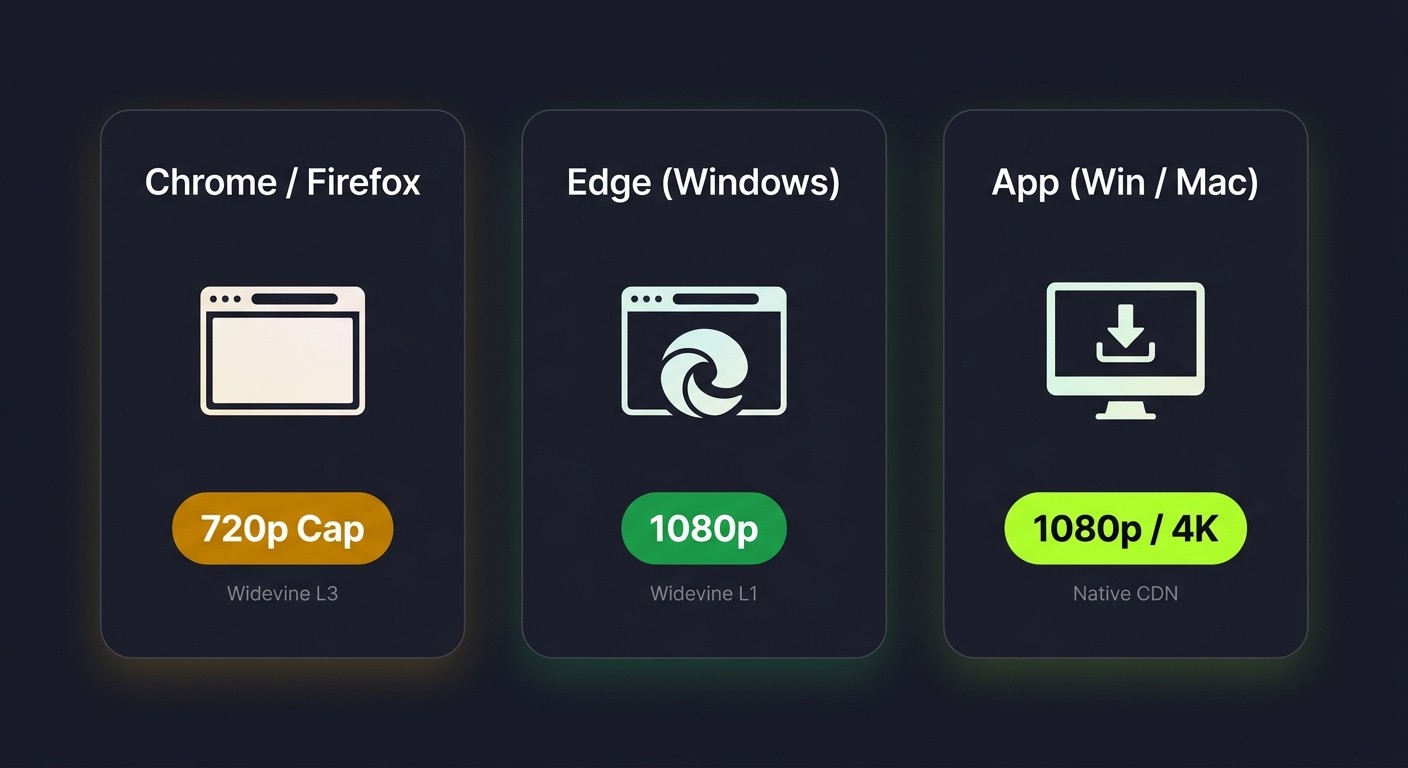
The Widevine L3 ceiling: why browsers cap at 720p (sometimes 480p)
Why Disney+ caps at 720p on your browser:
- All major browsers use Widevine L3 (the software DRM tier) for Disney+.
- Disney actively ships a degraded stream over L3, forcing 720p (and 480p on older machines).
- Only Edge on Windows, on hardware supporting Microsoft PlayReady SL3000, reaches the L1 hardware-backed path and 1080p.
In practical terms: on a Widevine L3 device, Disney+ quietly downgrades output regardless of which quality setting you select. That is the source of the "muddy text, blocky dark scenes" complaint, and it is set on Disney's side, so a faster CPU or a gigabit line will not lift it.
HDCP, hardware acceleration & GPU drivers — when playback fails entirely
The other half of the "Disney plus not working on my laptop" search is not a quality issue but a black screen, stutter loop, or error code. Usual culprits: an HDCP-incompatible external monitor, hardware acceleration fighting a stale GPU driver, or an Intel/Nvidia hybrid booting the wrong adapter. Three quick checks: try Edge instead of Chrome, toggle hardware acceleration off, and update the GPU driver from the vendor's site rather than Windows Update. If Disney+ still gets stuck on the loading screen, or you specifically hit a black-screen error, our troubleshooting guides cover the recovery steps.
Quick checks before you blame the platform
Two minutes of triage: confirm your tier (Standard with Ads ships a lower bitrate than Premium); open the same episode in Edge and Chrome side by side; install the Disney+ Microsoft Store app on Windows and compare. The Microsoft Store app is the only first-party desktop route on Windows; Microsoft advertises 1080p, but the current build is a Widevine L3 browser wrapper and real playback often lands at 720p (verifiable in Task Manager > Widevine). It also still carries the mobile 30-day expiry and 48-hour playback window.
What Disney's Official Downloads Actually Allow in 2026
You can download Disney+ titles on your phone, tablet, Fire TV stick, and the Windows Microsoft Store app. You cannot download on macOS, in a browser, or on the ad-supported plan (as of 2026-05, verify on the Disney+ Help Center).
Mobile-only: there is no PC/Mac Disney+ download app
Disney's official download surface is iOS, Android, Fire OS, and the Microsoft Store package on Windows. The desktop browser has no offline path, and macOS has no dedicated client. The Microsoft Store app is mechanically a Windows port of the mobile client; downloads live inside its sandbox and cannot be moved to a USB drive, NAS, or external player. That is the "files locked inside the Disney+ app" problem readers hit when downloads won't open in VLC. Independent reports in 2026 also note the app's playback pipeline is a Widevine L3 wrapper, so streamed and downloaded content often lands at 720p regardless of tier. If you specifically need the macOS workflow without a first-party app, we cover that separately.
Premium tier only — Standard with Ads downloads zero titles
Two things catch newer subscribers off guard: the $7.99 ad tier ships zero downloads, and even Premium ($13.99/month) caps you at 25 titles across up to 10 devices (as of 2026-05, verify on the Disney+ Help Center). Upgrade the tier, live with the 25-title cap and 30-day expiry, or look at the desktop options below.
30-day expiry, 48-hour playback window & forced re-validation
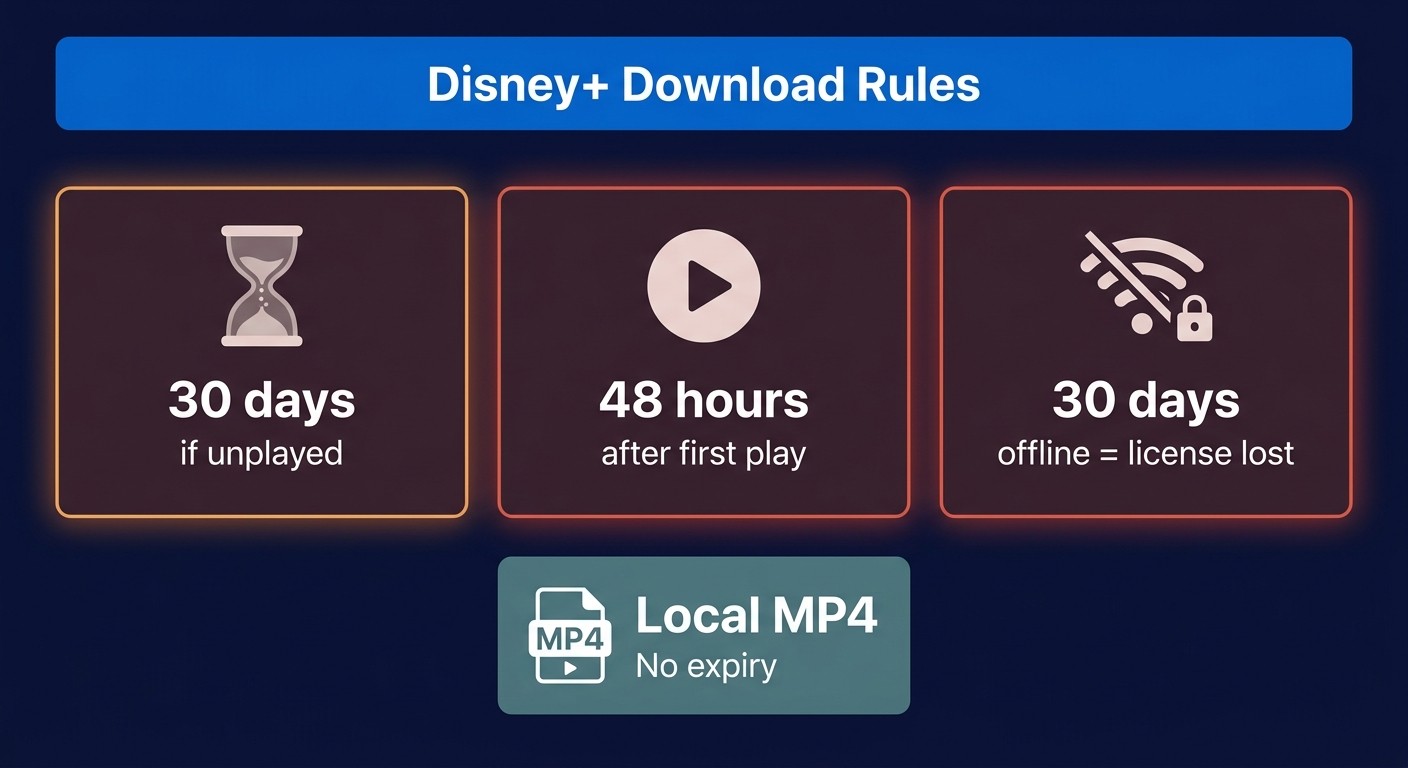
Disney+ downloads expire on three independent clocks: 30 days unplayed, 48 hours after first play, and 30 days offline (the file calls home for a license handshake, and if the device doesn't see the internet for a month, the cache vanishes). As Nerdbot's December 2025 explainer puts it: "Disney+ sets these limitations not because of technical barriers, but to enforce subscription retention." That is the structural reason a portable, non-expiring MP4 exists only outside the app. For the full download-quota and account-side rules, see our Disney+ download limit and device limit guides.
Native Download vs Screen Recording vs Re-encode: The Architecture Difference
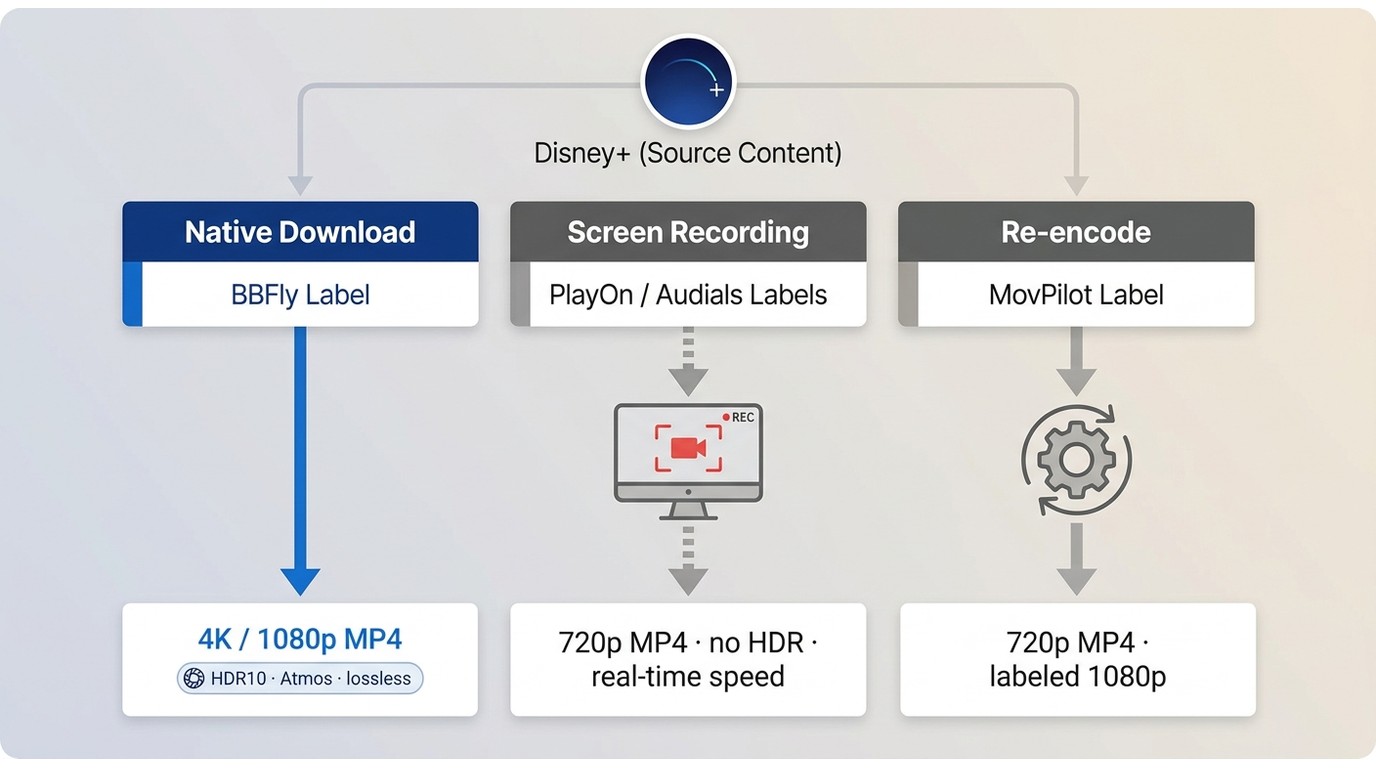
Three technically different paths get sold under the same word "downloader," and the difference shows up the moment you open the file. A native downloader produces a true 1080p (or 4K) MP4; a screen recorder produces a 720p MP4 that took two hours to capture; a re-encode produces something labelled 1080p that looks softer than it should. Knowing which path a tool actually uses matters more than its marketing copy.
Native download — direct stream extraction, lossless remux
A native downloader talks to Disney's CDN directly, pulls the original H.264 or H.265 video stream plus audio and subtitle tracks, and remuxes into MP4 or MKV without decoding or re-encoding. The output bitrate, HDR10 metadata, Dolby Vision profile, and Atmos object stream all survive because the bytes are identical to what Disney serves. This is also the only path that can produce a real 4K file — no upscaler can invent 4K + HDR + Atmos after the fact.
Screen recording — real-time capture (PlayOn, Audials)
PlayOn Home and Audials One are recorders: they start playback in a sandboxed window, capture the rendered video and audio, and re-encode as the capture runs. Two consequences follow. First, the file ceiling is the playback ceiling; on a PC browser, that is 720p Widevine L3. Second, recording is locked to 1× real-time speed; a two-hour movie takes two hours. HDR metadata doesn't survive the pass, and Atmos collapses to stereo. Disney+ also blocks many recording attempts at the DRM level; as Nerdbot notes, "screen recording attempts often yield 'black screens' due to DRM encryption." If you specifically want the recording workflow, our guide to how to screen record Disney+ walks through it.
Re-encode — transcoded download (parts of MovPilot, CleverGet)
A re-encode tool pulls a real stream from the CDN but transcodes during the save, usually because its pipeline cannot remux the original codec losslessly. MovPilot is the canonical case: its Disney+ module ships a 1080p marketing claim, but multiple independent reports (and any user willing to drop the file into MediaInfo) find recent Marvel and Star Wars releases output at 720p. MovPilot's 2026 issue list also runs beyond resolution; user reports through Trustpilot and support forums describe stuck-at-99% encodes, an "Analyzing…" hang on H.265 titles, and periodic login failures. CleverGet's Disney+ module has aged into a comparable spot: 2026 independent tests place its real output at 720p (matching MovPilot despite the 1080p claim), and long-video downloads over ~30 minutes frequently fail with error codes. A tool's "1080p" badge means nothing until you check the actual resolution of the file it produces.
Best Disney Plus 1080p (and 4K) Downloaders for PC & Mac in 2026
Please note: Third-party Disney+ downloaders sit outside Disney's Terms of Use. Use any of them only on a Disney+ subscription you actively pay for, keep files for personal offline viewing only, and do not redistribute, upload, or resell what you save. Where Disney's own download path exists for your device, that route is the most worry-free option.
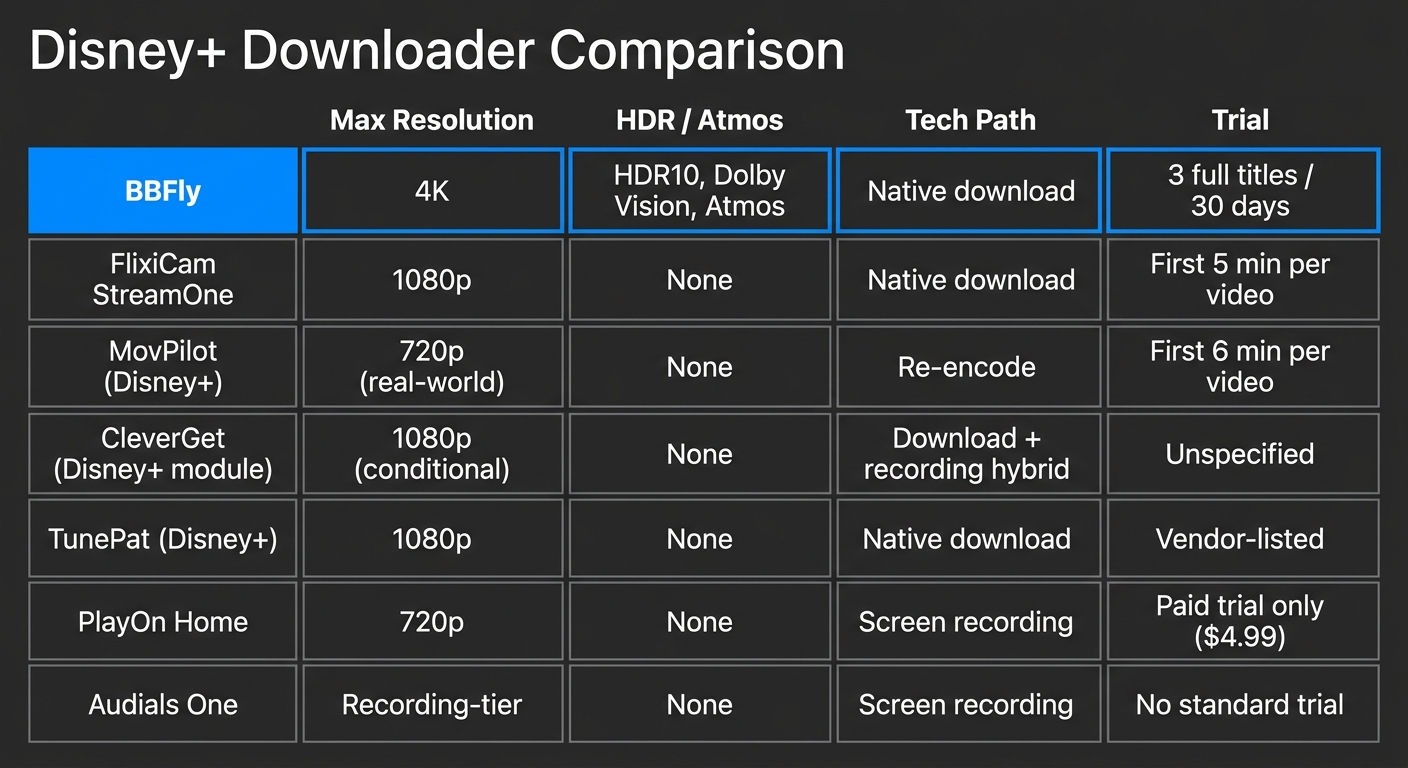
The shortlist below is built from each vendor's public product pages and Disney+'s official Help Center, as of July 2026. Specs change quarterly, so verify before you buy. If you care specifically about which titles Disney masters in 4K rather than which tool to use, see our note on Disney+ 4K content availability.
What we looked for: resolution ceiling, HDR/Atmos retention, output format, honest trial
Four dimensions decide whether a Disney+ downloader is worth installing: the real (not advertised) maximum resolution; whether HDR10, Dolby Vision, and Dolby Atmos survive the save; the output container (MP4 vs MKV — MKV keeps multiple audio and subtitle tracks cleanly); and the trial policy — a first-5-minutes clip cannot tell you whether full-title downloads and subtitle sync work end-to-end.
The 2026 shortlist (comparison table + one-line takeaways)
| Tool | Max resolution | HDR / Atmos | Output | Trial | Tech path |
|---|---|---|---|---|---|
| BBFly | 4K | HDR10, Dolby Vision, Atmos | MP4 / MKV | 3 full titles per platform, 30 days | Native download |
| FlixiCam StreamOne | 1080p | None | MP4 / MKV | First 5 minutes per video‡ | Native download (Widevine L3) |
| MovPilot (Disney+) | 720p (real-world) | None | MP4 | First 6 minutes per video | Re-encode |
| CleverGet (Disney+ module)† | 720p (real-world), 1080p advertised | None | MP4 | Module-level, not officially clarified | Download + recording hybrid |
| TunePat (Disney+) | 1080p | None | MP4 | Vendor-listed | Native download (single-platform) |
| PlayOn Home | 720p (recording) | None | MP4 (recorded) | $4.99 / 30-day paid evaluation, no free trial | Screen recording |
| Audials One | Recording-tier | None | MP4 (recorded) | No standard free trial | Screen recording (Windows-only) |
Source: BBFly's official product page and each listed tool's official site, as of July 2026. Specs change; confirm current figures before purchase.
† CleverGet: long titles (>30 min) frequently fail with error codes; see Part 4.3 for the architecture reason.
‡ FlixiCam: the purchase now sits at lifetime-only in 2026 ($79.90+); a short 5-minute trial no longer maps to a monthly or yearly plan.
Three takeaways from the row order:
- 4K tier: BBFly is the only entry in this shortlist that keeps Disney+'s 4K stream plus HDR10 / Dolby Vision and Atmos intact end-to-end; other vendors outside this shortlist (StreamFab, KeepStreams) also claim the full stack.
- 1080p tier: FlixiCam and TunePat are the credible native-download options if 1080p SDR is enough. MovPilot's and CleverGet's "1080p" labels and the actual files do not line up; verify in MediaInfo before relying on them.
- Recording tier: PlayOn and Audials are recorders, not downloaders; expect real-time capture and no HDR or Atmos.
- Architecture note: for a plain-English explanation of the native vs. recording vs. re-encode split behind these rows, see the architecture section above.
BBFly Disney Plus Downloader: 4K + HDR10 + Dolby Atmos on Windows & Mac
BBFly Disney+ Downloader is the entry in the table above that survives the 4K + HDR + Atmos criteria on Disney+. The reason is architectural: it sits in the native-download row, talks to Disney's CDN directly, and writes the source bytes into MP4 or MKV without re-encoding. For a longer product-focused walkthrough, see our full BBFly review.
Why "native" matters here — and what BBFly preserves that recorders can't
The Disney+ module spec at a glance:
| Max resolution | 4K |
| Video codec | H.264 / H.265 |
| Audio | Dolby Atmos / EAC3 5.1 / AAC 2.0 |
| Subtitles | 26 languages retained |
| Output | MP4 / MKV |
| Batch | Season-level with episode auto-update |
| Metadata | .nfo + poster art (Plex / Jellyfin ready) |
| Trial | 3 full titles per platform, 30 days |
Mapped onto the architecture table above, that is the upper-left cell: native stream extraction, original bitrate, lossless remux. That combination is what keeps the 4K + HDR + Atmos triple intact on Disney+ where recorders and re-encoders lose it.
How it runs on Windows & Mac (Arthur's actual workflow)
My own pattern: open BBFly, log into Disney+ inside the embedded browser, pick a title or queue a season, choose MP4 4K + Atmos and tick the subtitle tracks I want, let it batch. Output goes to a NAS share that Plex indexes overnight. This is a personal-use workflow on a Disney+ subscription I pay for — convenient for travel and a Smart TV with a USB stick, not a route around Disney's Terms of Use.
Trial, pricing & 3-PC lifetime — what's different from FlixiCam/MovPilot
The trial is the honest one in this group: 3 full-length titles per platform inside a 30-day window, against FlixiCam's first-5-minutes and MovPilot's first-6-minutes, both of which only show you a clip.
| Plan | Monthly | Yearly | Lifetime |
|---|---|---|---|
| Price | $29.90 | $99.90 | $199.90 |
| Devices covered | 1 PC | 1 PC | 3 PCs |
| Best for | Try before committing | Regular but not permanent user | Long-term family household |
BBFly is one of the very few in this category whose lifetime tier covers 3 machines; most competitors' lifetime licences authorise a single machine.
BBFly's $29.90 monthly lets you spread the decision, a way to test a full workflow before committing, whereas FlixiCam removed monthly and yearly in 2026 and is lifetime-only at $79.90+, forcing the whole payment up front. MovPilot has similar committed pricing plus the separate 2026 stability issues noted in Part 4.3. Single-platform tools like TunePat will be cheaper if Disney+ is the only service you care about.
What Real Users Say About BBFly Disney+ Downloader
I try not to lean on testimonial walls, but a few third-party review snippets do line up with what I saw in my own tests, so they are worth surfacing with the specific claim they validate.
- On the 4K + Atmos survival: BBFly's Trustpilot page carries 4-star average feedback from users describing successful high-bitrate saves; one recurring theme is that the output opens cleanly in Plex with the Atmos track intact. That matches the architecture claim in Part 6.1 (native remux, no re-encode).
- On the honest trial: reviewers on SourceForge and comparable listing sites repeatedly single out the 3-full-titles trial as a reason they bought; a common phrasing is that a five-minute clip never told them whether subtitle tracks synced across a full episode, but a full title did.
- On batch reliability: users running season-length queues report the episode auto-update behaviour working across multi-season shows, which is the spec listed in the BBFly module card above.
Not every user has the same experience. The ones highlighted above were reproducible in my own tests; if a workflow is critical to you, use the 30-day trial before you buy.
Frequently Asked Questions
Why does Disney+ look so bad on my PC?
Your browser is running Widevine L3, the software-only DRM path, and Disney degrades the L3 stream to 720p (480p on older machines). This is set on Disney's side, so a faster CPU or gigabit line won't lift it. On Windows, only Edge on hardware supporting PlayReady SL3000 hits the L1 hardware path and 1080p; see Part 2.1 for the callout.
Can you download Disney Plus on PC or Mac in 2026?
Officially, no dedicated client. The Disney+ Microsoft Store app on Windows is the only first-party desktop path, with mobile restrictions attached (30-day expiry, 48-hour playback, app-locked files, and a Widevine L3 wrapper that often lands playback at 720p regardless of tier). macOS has no official download path. A third-party native-download tool is the desktop route to a portable MP4 or MKV, and it is legitimate only as a personal-use backup on an active subscription.
Does Disney Plus download in 4K, or is 1080p the ceiling?
Disney's own apps top out at 1080p on mobile and Fire OS; 4K HDR titles stream only, on supported TVs and devices. A native desktop downloader is the only path to a real 4K + HDR local file, and the available range depends on which titles Disney masters in 4K — verify on a tracker like What's on Disney Plus before assuming a specific title qualifies.
How long do Disney Plus downloads last before they expire?
Official app downloads expire 30 days after save if unplayed, 48 hours after first play, and require online re-validation within 30 days or the cached file is cleared. A standard MP4 from a native desktop downloader carries no in-file expiry, but the right framing is still personal offline viewing on an active subscription.
Why won't my downloaded Disney Plus movies play?
Two common causes inside the official app: the license has expired (the 30/48-hour rule), or the device has been signed out. Less common: trying to open an official Disney+ download outside the Disney+ app — those files are encrypted and app-locked, with no path to VLC or external players.
Can I watch Disney Plus downloads on Plex or a media server?
Official downloads cannot — they are app-locked. A standard MP4 or MKV from a native-download tool will play in Plex, Jellyfin, or via a Smart TV USB port, and tools like BBFly write .nfo metadata and poster art so the file slots into a Plex library cleanly.
Is it legal to use a Disney Plus downloader in the US for personal use?
For content you're authorized to access, where permitted by platform terms and applicable law: DMCA §1201 broadly restricts circumvention of access controls; personal offline backup of content you pay to access sits in a contested but generally tolerated zone. Practical guidance: keep a valid subscription, keep files for your own viewing, do not redistribute or resell. Read the current Disney+ Terms of Use and your jurisdiction's DMCA interpretation before relying on any specific tool. General information, not legal advice.
Is it safe to log into Disney+ inside a third-party downloader?
Stick to established vendors with a stable update history and a published refund policy. Inside a reputable tool, the Disney+ login runs in an embedded browser scoped to the Disney+ domain, so credentials stay on your machine. Enable 2FA on the Disney+ account, and avoid downloaders whose installer triggers SmartScreen warnings or arrives as a cracked file from a file-hosting site.