
Video Downloader for OnlyFans: No Save Button, What Works
If you paid for or can lawfully view an OnlyFans video but cannot find a save button, a video downloader for OnlyFans can create a local file for personal offline viewing. Desktop software suits repeat or batch jobs; extensions, online tools, command-line utilities, and recording are more situational.
The real worry is often not convenience but control: paid PPV media can disappear from a message thread, while a saved browser session is not a library. After 15 years of managing local video collections, I judge a method by the file it leaves behind and the time it consumes. My rule is blunt: a real-time recording is a fallback, not an archive. I will compare each OnlyFans media downloader workflow by device, explain the technical tradeoff, and finish with a concrete desktop process.
How to Choose an OnlyFans Downloader for Your Device
Choose by frequency, device, and tolerance for setup. Before choosing an OnlyFans media downloader, confirm lawful access, OS support, available storage, and whether you need a portable file or only a real-time fallback.
Legal reminder: Downloader tools may conflict with OnlyFans' Terms of Service. Use them only for personal offline viewing of media you are signed in and authorized to access, and do not redistribute, resell, or publicly share the files.
Prerequisites: Authorized Access, Device Support, and Storage
Start with a valid account, lawful access to the feed or message video, and enough local storage for the selected quality. Check whether the tool supports your operating system before paying or signing in. A username alone is not access, and no downloader should turn an unavailable post into authorized media.
The setup problem is real. As one Reddit poster in r/DataHoarder wrote, "I've been meaning to purchase a subscription to a specific creator on OnlyFans and download their videos and photos, but I haven't seen anything other than yt-dlp (which looks complicated) and paid programs like SERP ($22 a month) to download videos from OF."
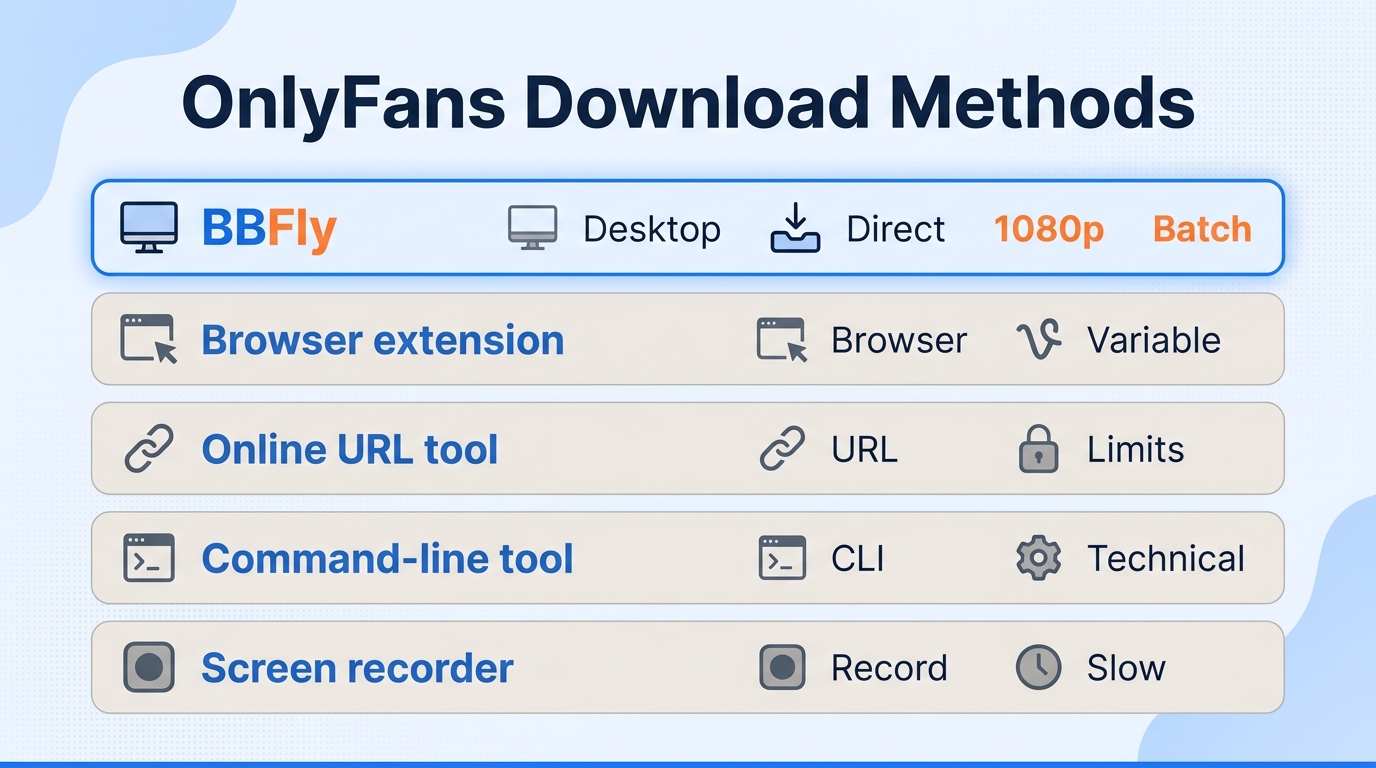
| Method | Devices | Processing path | Output or speed | Best fit and main limit |
|---|---|---|---|---|
| BBFly desktop app | Windows, macOS | Native download and remux | Up to 1080p; H.264/AAC; MP4/MKV; batch | Repeat authorized jobs; install required |
| Browser extension | Desktop browser | Browser-integrated retrieval | Quality and reliability vary | Occasional saves; permissions matter |
| Online URL tool | Browser; sometimes mobile | Pasted-link retrieval | Requires a usable direct link | Lowest setup; signed-in media often fails |
| Command-line tool | Desktop terminal | Configurable retrieval | Depends on support and configuration | Technical control; substantial upkeep |
| Screen recorder | Desktop or mobile | Real-time capture and re-encoding | 1x playback; setting-dependent quality | Broad fallback; black output may occur |
Table note: BBFly specifications reflect its official product page in October 2026. Device support and availability may change; the current coverage list is maintained there.
The practical split is clear: if the job repeats every week, build around a desktop queue and portable files; if you are mobile-only and saving one item, accept a lighter tool's limits. Paying desktop-app effort for one clip is wasteful; building an archive on a fragile add-on is worse.
Desktop Downloader Apps
Desktop apps make sense when you need a queue, stable output choices, and files you can move to an external drive or personal media server. They also require installation, local storage, and account sign-in inside the app's browsing workflow.
Best for: Windows or Mac users with repeat, message-based, or batch downloads. Not ideal for: mobile-only users or anyone unwilling to install software.
Browser Extensions
Extensions are convenient because they sit beside the page you already use. The cost is permission scope and maintenance: a site change can break an extension until its publisher updates it.
That maintenance burden is not theoretical. Another r/DataHoarder poster wrote, "Every since OF-DL has gone down, I've just been using the old version of it and I think it's finally time to let it go, been getting worse and worse. Anything opensource out there?" I would use an extension for occasional single items, not as the foundation of a long-term collection.
Best for: infrequent desktop saves with a well-maintained extension. Not ideal for: batch work, unattended queues, or people who cannot assess browser permissions.
Online URL Downloaders
An online tool has the lowest setup cost: paste a link, request the file, and download if the service can reach it. That model works poorly when the video depends on a signed-in session or does not expose a usable direct link.
Do not paste account credentials, session data, or private message links into an unknown website. Best for: a simple, already accessible media URL. Not ideal for: paid feeds, PPV messages, or any workflow that asks for more access than the task requires.
Command-Line Tools
Command-line utilities offer fine control, scripting, and repeatability, but support can change and configuration can become a second job. I like terminals; I do not mistake that preference for a universal recommendation.
Use this category only if you can maintain the software, understand its authentication model, and stop when the source is unsupported. Best for: experienced users who value automation. Not ideal for: readers seeking a quick app or instructions for extracting protected links.
Screen Recording and Mobile Workflows
Recording is available on many desktop and mobile devices, but it runs at playback speed and creates a newly encoded capture. Notifications, orientation changes, storage pressure, and pictureless output can spoil a long recording.
On Android or iPhone, an extension or web tool may be more convenient when it works, but mobile browsers and file handling impose tighter limits than a desktop. Best for: a compatibility fallback when authorized playback works but no retrieval method does. Not ideal for: repeat downloads, predictable quality, or efficient batch work.
Decision Framework: Match the Method to the Scenario
Use this order rather than choosing by the loudest promise:
- For repeat or batch work on Windows or Mac, choose a reputable desktop downloader with clear output specifications.
- For an occasional single item in a desktop browser, consider a maintained extension with limited permissions.
- For a direct, non-sensitive link, an online tool may be enough, but never hand an unknown site your account session.
- For scripting and maintenance control, use a command-line utility only within content you can already lawfully access.
- For mobile-only use or failure recovery, treat screen recording as the last resort and expect real-time speed.
This framework also answers the “bulk downloader,” “by username,” GitHub, and message-video searches. Batch work favors a desktop queue; GitHub tools favor technical users; a username never grants access; and message videos remain limited to what the signed-in account can already view.
Native Downloading vs. Screen Recording: What Changes
Native downloading usually gives you more file control because it retrieves the playable media and packages it without filming the screen in real time. Recording is broader but slower, more fragile, and more likely to alter picture or audio quality.
Retrieval Path and Re-encoding
Here, “native download” describes the processing path, not an official OnlyFans save feature. A native workflow retrieves the available video and audio streams and remuxes them into a container; a recorder captures playback and encodes a new file.
That distinction matters more than a large “HD” badge. In my media-server work, the container and track details tell me what I can manage later; a marketing adjective tells me almost nothing.
Speed and Failure Modes
A downloader can queue items and process them without waiting through every minute of playback. A recorder is normally tied to 1x real time, so a 40-minute video requires roughly 40 minutes of uninterrupted capture, plus time to check the result.
Recording can also produce audio with no usable picture. One Reddit poster in r/Piracy described the symptom plainly: "But some are \"offline\" and when I download them, I got a Video without picture. Any way to get those videos anyway?" The right response is to change methods, not to pile more compression onto a failed capture.
Resolution, Audio, and File Portability
Judge an OnlyFans video downloader app by concrete fields: maximum resolution, video codec, audio format, container, and whether it can queue multiple authorized items. MP4 usually offers wider device compatibility; MKV is useful when a workflow needs a more flexible container. Neither label proves quality by itself.
A normal local file is also easier to organize on an external drive, NAS, Plex library, or personal backup. That portability is my deciding factor for repeat use, provided the file was created within the account and usage boundaries discussed here.
Personal-Use and Account Boundaries
A saved local file and the right to use the underlying content are separate questions. An unauthorized client may violate platform terms, while redistribution, resale, or public posting raises copyright issues; personal offline viewing sits in a legal gray area that can vary by jurisdiction.
Keep an active, valid basis for access and follow the creator's terms, OnlyFans' rules, and local law. A downloader is an offline-management tool, not a substitute for a subscription, purchase, or permission.
How to Download OnlyFans Videos with BBFly
For readers searching “video downloader OnlyFans,” BBFly OnlyFans Downloader is a Windows and macOS desktop app that batches authorized videos at up to 1080p into H.264/AAC 2.0 MP4 or MKV files. The process is straightforward: confirm access, select the video and output, add it to the queue, then verify the finished file.
Before You Start
BBFly OnlyFans Downloader is a third-party desktop tool, not an official OnlyFans feature. Use it only with a valid account and media you are authorized to view, for personal offline use under the platform's terms and local law. You also need adequate disk space and a Windows or Mac computer.
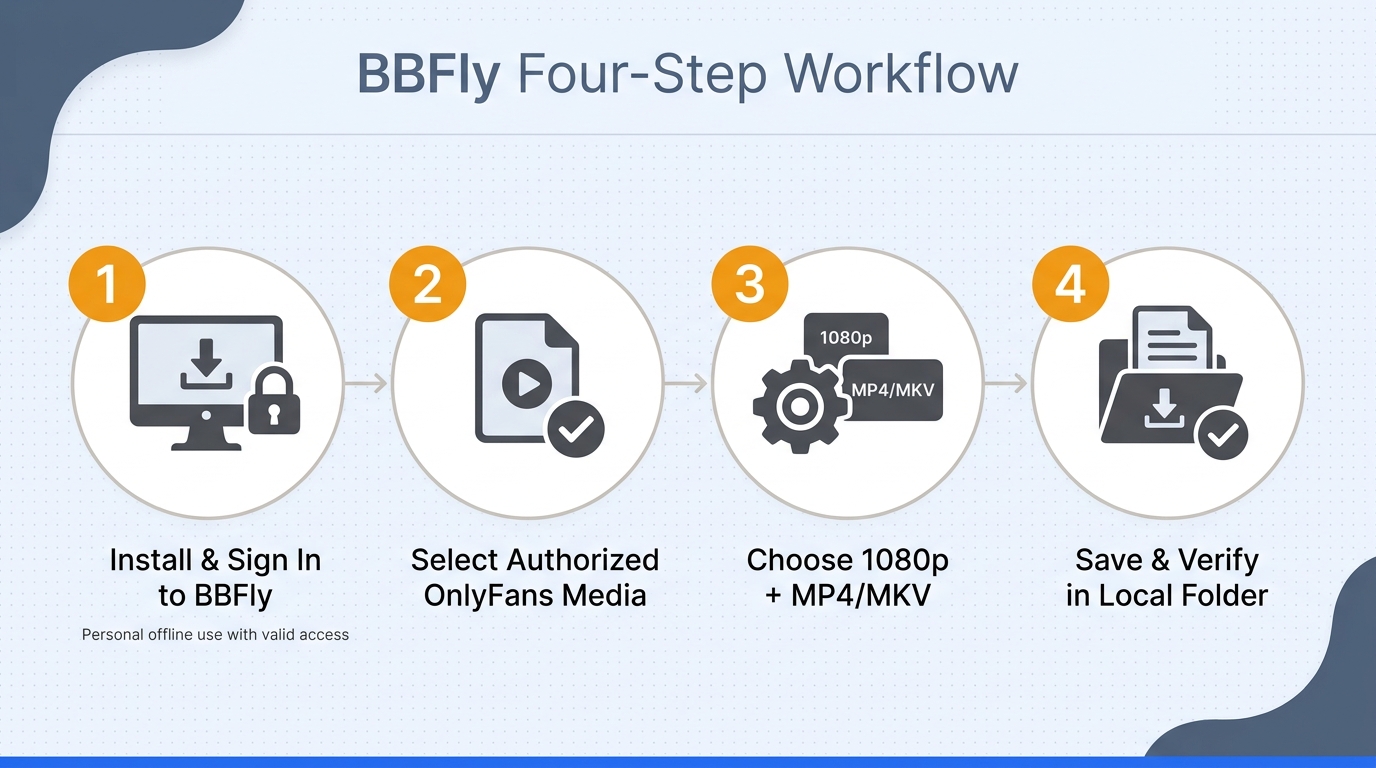
The Four-Step BBFly Workflow
A desktop install pays off for repeat authorized downloads; it is excessive for one isolated file.
- Install BBFly and open OnlyFans. Launch the supported desktop app, open the OnlyFans service, and sign in through the provided browsing workflow.
- Select an authorized feed or message video. Navigate only to a post or PPV message the signed-in account can already play.
- Choose the output. Select 1080p or 720p, then MP4 or MKV. BBFly's verified stack uses H.264 video with AAC 2.0 audio.
- Queue and verify the files. Add one or more authorized videos; batch download and subscription-channel tracking are supported. When processing finishes, open the local file, confirm playback, and note its storage folder before clearing the queue.
This is where I prefer a specified workflow over a vague “HD downloader.” It tells me whether the output belongs in a managed library before I commit to the queue. BBFly is desktop-only and does not support subtitles, audio-language choice, metadata, or ad removal on OnlyFans.
Price and Trial Fit
Installation is easier to justify for recurring work than for one isolated file. As of October 2026, BBFly lists $29.90 monthly for one PC, $99.90 yearly for one PC, and $199.90 once for three PCs; its 30-day trial covers three complete videos per supported service.
OnlyFans Downloader FAQ
Which devices can run an OnlyFans downloader: Windows, Mac, Android, or iPhone?
Answer: Desktop downloaders commonly target Windows and macOS; the BBFly workflow above supports both. Android and iPhone users are more dependent on browser tools, extensions where supported, or real-time recording, with tighter file-handling and reliability limits.
Is OnlyFans Video Downloader Global an app or a browser extension?
Answer: “OnlyFans Video Downloader Global” is a product-style search phrase, not an official OnlyFans feature. The name alone does not establish whether a result is an app or extension. Check its publisher, platform listing, permissions, update history, and support documentation before installing it.
Is it legal to save OnlyFans videos for personal offline viewing?
Answer: There is no blanket yes or no. Saving media through an unauthorized client may breach OnlyFans' terms, while sharing or selling creator content can infringe copyright. Limit any copy to content you bought or can lawfully view, personal use, and the rules in your jurisdiction. “Free without a subscription” is outside that boundary.
Is it safe to sign in to OnlyFans inside a downloader app, and can activity be detected?
Answer: No tool can promise zero account risk or invisible activity. Prefer an established publisher with clear permissions and support, avoid no-name websites that request session data, use a unique password and two-factor authentication, and assume the service can log account activity.
Do locally saved OnlyFans files expire?
Answer: A standard MP4 or MKV does not carry the same platform-managed expiration timer as an in-app offline item. That file fact does not expand your rights: keep it for lawful personal viewing, retain valid access where required, and do not redistribute it.
Can you use saved videos while traveling without internet access?
Answer: Yes, a completed local file can play offline on a compatible device during travel. Download it before leaving, verify playback, and store it securely. Do not copy it to other accounts, share it with a group, or treat offline access as a replacement for valid authorization. My verdict is simple: for repeat authorized downloads and portable files, use a desktop workflow. For a rare one-off save or mobile-only use, choose a lighter method and accept its limits. In every case, keep the boundary clear: valid access, personal use, no redistribution.

Mei Shirakawa
Mei takes download and recording tools apart and tells you where each one stops working.