
Disney Plus 4K in 2026: How to Stream It and How to Save It
Table of Contents
After fifteen years building media libraries, I have a rule: a streaming spec only matters if your setup can actually deliver it. Disney+ streams in 4K UHD with HDR10, Dolby Vision, and IMAX Enhanced on supported titles, and in 2026 every US plan includes it. You need a 4K-capable TV or streaming device on an HDCP 2.2 display chain, at least 25 Mbps, and the right app. PC and Mac browsers stay at 1080p. Official downloads are mobile-only and also capped at 1080p.
A Quora user with a Razer Blade 15 OLED 4K laptop and an active Premium subscription recently asked why Disney+ still served him 1080p. I have answered some version of that question since the early days of streaming. The resolution on the box is rarely the resolution your eyes get. The gap usually lives in three places — the player, the cable chain, and the format catalog.
TL;DR: What Disney+ 4K Really Delivers in 2026
Three takeaways before the wiring details.
First, the 4K setup pays off in the TV room and barely anywhere else. On a current smart TV, Apple TV 4K, Roku Ultra, Fire TV Stick 4K Max, or PS5, the path is short and invisible. On a desktop browser — Chrome, Firefox, Safari, on any laptop including a 4K OLED one — you are not getting 4K, and no setting changes that.
Second, the catalog that justifies Premium is the modern flagship one. Marvel, Star Wars, Pixar, and headline Originals (The Mandalorian, Andor, Loki) deliver 4K HDR consistently. Older animated classics, much of the older live-action library, and most National Geographic titles still play at 1080p or SDR regardless of device.
Third, the "offline" version of Disney+ 4K is not the same product as the streaming version. The official mobile download tops out at 1080p, expires fast, and disappears the moment you cancel.
Does Disney+ Stream in 4K? Yes — Here's What That Includes
Disney+ streams in 4K UHD (3840×2160) with HDR10 across a broad slice of the catalog, Dolby Vision on supported titles and devices, IMAX Enhanced expanded-aspect frames on eligible Marvel and Originals, and Dolby Atmos audio on flagship titles.
4K Ultra HD with HDR10 and Dolby Vision: the core Disney+ formats
The baseline is 3840×2160 UHD with HDR10 and Dolby Vision on supported titles and devices. These layers sit on top of UHD and are negotiated at the moment you press play — they are not universal. Per Disney+'s Help Center, the per-title Details tab shows exactly which layers a specific title carries. I treat it as the source of truth and ignore the marketing rails when they disagree.
IMAX Enhanced: Disney's expanded aspect ratio on select Marvel and Disney+ Originals
IMAX Enhanced delivers a 1.90:1 expanded frame on eligible titles — most of the modern MCU plus selected Originals — that Netflix and Prime Video cannot match for the same content. Most viewers do not notice until they see a Marvel film on the IMAX Enhanced rail and realize they were missing roughly a quarter of the image. The IMAX Enhanced rail lives on the Disney+ Home page; the per-title Details tab confirms the format for any single film.
What's Actually in 4K on Disney+, and How to Find It Fast
Disney+'s 4K UHD HDR library spans Marvel, Star Wars, Pixar, and flagship Originals like The Mandalorian, Andor, and Loki. Older animated classics and much of the National Geographic library stay at 1080p or SDR. Confirm any title's format via the "4K Ultra HD HDR" Home rail, the IMAX Enhanced rail, or the per-title Details tab.
The 4K Ultra HD HDR catalog: Marvel, Star Wars, Pixar, and Disney+ Originals
The post-Iron Man MCU, mainline Star Wars, modern Pixar, and prestige Originals ship in 4K HDR with Dolby Vision on most titles. The honest catch: older animated classics, most older Disney live-action, the majority of the National Geographic catalog, and many legacy Fox titles still play at 1080p, often SDR. Verify any specific title on its Details tab before assuming.
Filtering 4K titles: the Ultra HD & HDR row, the IMAX Enhanced row, and the title Details tab
Three confirmation points, in order of trust. The "4K Ultra HD HDR" Home rail is a curated row of UHD titles. The "IMAX Enhanced" rail surfaces the expanded-ratio subset. The per-title Details tab is the most reliable — it lists every flag a specific film carries (UHD, HDR10, Dolby Vision, Dolby Atmos). When a rail label and a Details tab disagree, the Details tab is right.
What You Need to Watch Disney+ in 4K: Devices, Plans, and Internet Speed
You need three things lined up: a 4K-capable device with an HDCP 2.2-compliant display chain, at least 25 Mbps of stable internet, and the right app. PC and Mac browsers hold you at 1080p regardless of the panel; only the Microsoft Edge PWA and the Disney+ Windows Store app open a 4K path on desktop, and even those require the cable chain to cooperate.
Devices that actually stream Disney+ in 4K (smart TVs, streaming sticks, consoles)
The table below maps reliable 4K paths — compiled from Disney+'s Help Center and current device documentation, June 2026. Verify the per-device matrix on the Disney+ Help Center before any big purchase.
Disney+ 4K compatibility by device path (June 2026)
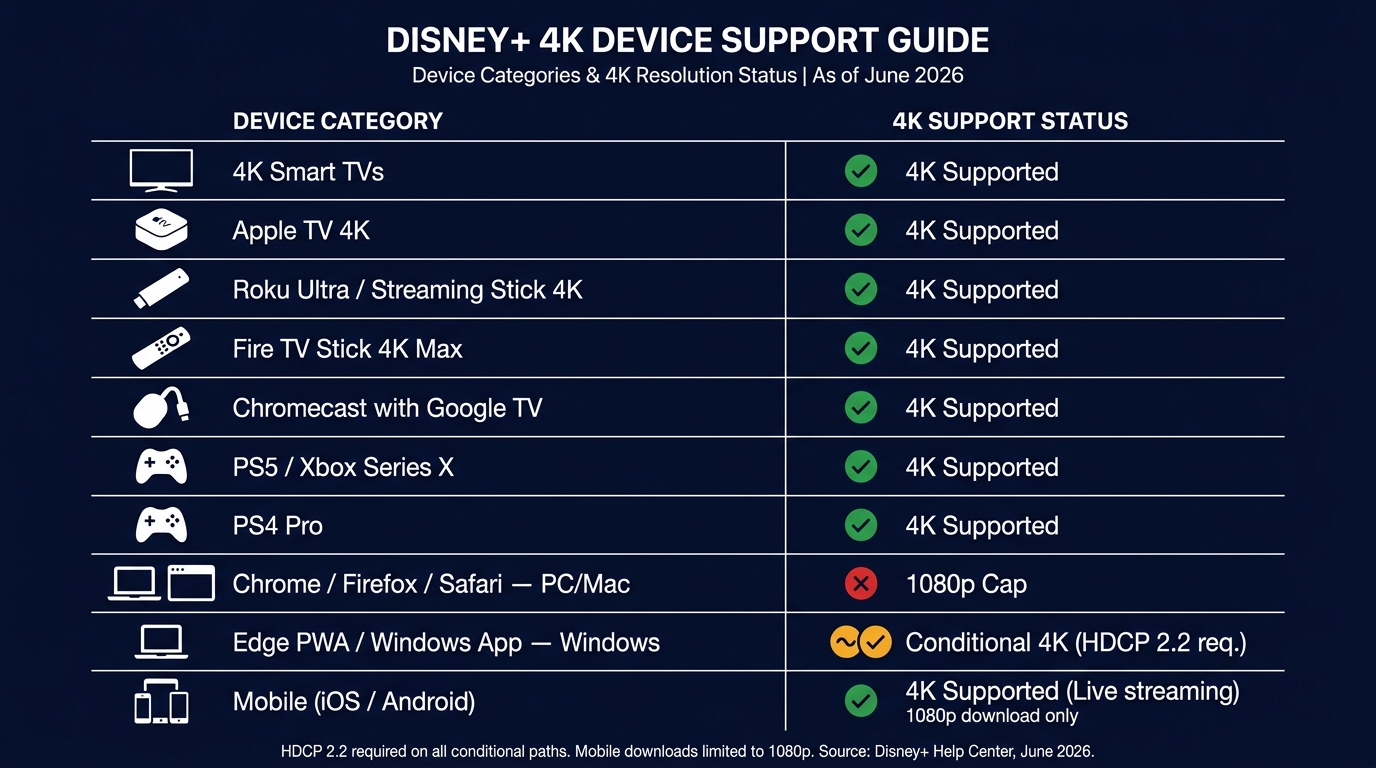
Here is the specific table info:
| Device | Streams 4K? | Notes |
|---|---|---|
| 4K smart TVs (HDCP 2.2 compliant) | Yes | Most 2018+ models; verify HDCP 2.2 in spec sheet |
| Apple TV 4K | Yes | Dolby Vision + Atmos supported |
| Roku Ultra / Streaming Stick 4K | Yes | HDR10 + Dolby Vision on supported titles |
| Fire TV Stick 4K / 4K Max | Yes | Dolby Vision + Atmos on the Max |
| Chromecast with Google TV (4K) | Yes | Dolby Vision supported |
| PS5 / Xbox Series X|S | Yes | Confirm display chain HDCP 2.2 |
| PS4 Pro | Yes | HDR10 only; no Dolby Vision |
| Chrome (PC / Mac) | No | 1080p cap on the browser DRM path |
| Firefox (PC / Mac) | No | 720p typical; lowest of the desktop browsers |
| Safari (Mac) | No | 1080p cap |
| Microsoft Edge PWA (Windows) | Yes (conditional) | HDCP 2.2 GPU + monitor required |
| Disney+ Windows Store app | Yes (conditional) | HDCP 2.2 required |
| iPhone / iPad (Disney+ app) | Yes | On 4K-HDR-capable models (iPhone 12+, iPad Pro) |
| Android phones / tablets | Yes | On HDR-certified devices with Widevine L1 |
Source: Disney+'s official Help Center and current device documentation, June 2026. Confirm current support on the Disney+ Help Center before relying on any specific entry.
The practical upshot: every "Yes" entry assumes the cable chain holds. An HDCP 2.2 break anywhere between device and panel — a non-compliant HDMI splitter, an older receiver, a cheap cable on a long run — drops you to 1080p without warning.
Why your PC or Mac browser is stuck at 1080p (and the Windows app exception)
On Mac, Safari, Chrome, and Firefox all cap Disney+ at 1080p or below. On Windows, Chrome and Firefox do the same. The only desktop paths to 4K are the Microsoft Edge PWA and the Disney+ Windows Store app — and even those need an HDCP 2.2-compliant GPU, monitor, and cable. As HDTVtest noted during a Disney+ playback bug last year, "whatever the user is watching can only be viewed in 1080p SDR" once any link in that chain misbehaves. Buying a 4K laptop for Disney+ streaming is the upgrade with the lowest hit rate I see; the panel can do 4K, but the browser DRM path will not hand it to you.
Plans and the 25 Mbps speed line
In the US as of June 2026, all Disney+ plans — Basic with Ads, Standard, and Premium — include 4K UHD where the title and device support it. Outside the US (UK, EU, Canada), 4K is still Premium-only. Check Disney+'s Help Center for the current regional matrix. Disney+ recommends a stable 25 Mbps for 4K UHD, and "stable" is doing the heavy lifting — a 200 Mbps line that drops to 12 Mbps during peak hours will downscale you silently.
Saving Disney+ 4K Titles as Permanent Local Files for Personal Offline Viewing
Please note: Third-party downloaders sit outside Disney+'s Terms of Service. Keep any saved files for your own personal, offline viewing of content you actually subscribe to — not for redistribution, resale, or public screening. Where an official download covers your need, that's the most worry-free route.
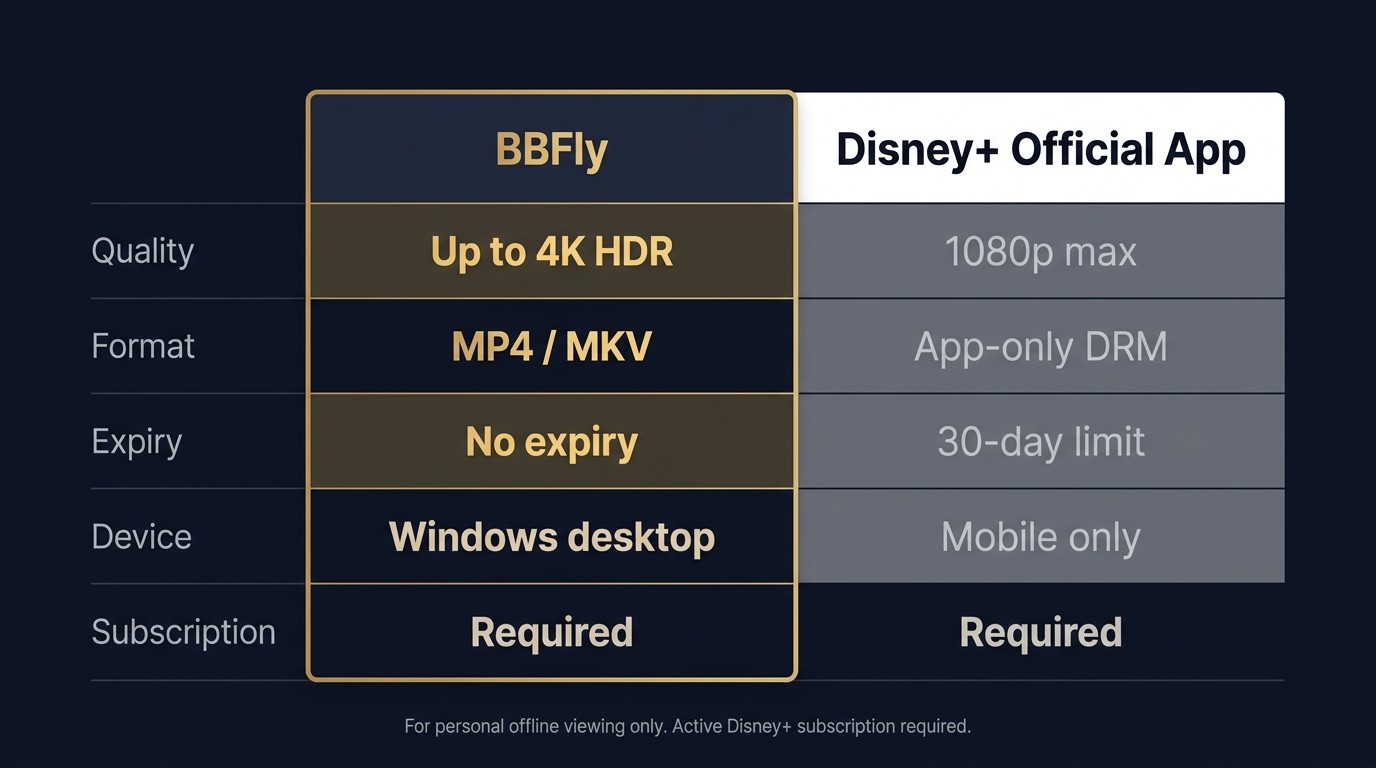
Disney+ 4K titles can be saved as permanent local MP4 or MKV files for personal offline viewing using a subscriber-only third-party tool. The official download path is mobile-only and capped at 1080p. A valid Disney+ subscription is required either way.
Why the official Disney+ download caps at 1080p (and expires on you)
The official app on iOS, Android, and Fire OS supports downloads at "High" quality — 1080p at a bitrate well below Blu-ray. Premium subscribers can keep up to 25 titles across up to 10 mobile devices. Unplayed files expire after 30 days; play one and you have 48 hours. Every 30 days the file re-validates, and cancelling the subscription makes the whole library immediately unplayable. That is platform policy, not a bug — and a poor fit for anyone who wants a clean MP4 in a media server.
How BBFly Disney Plus Downloader saves 4K, HDR10, Dolby Vision, and Atmos titles as local MP4/MKV
For cases the official app does not cover, I use BBFly Disney Plus Downloader. Three things matter, in order:
- Format fidelity: BBFly's Native Download preserves up to 4K with HDR10, Dolby Vision, and Dolby Atmos (or EAC3 5.1) intact — no re-encode, no codec downgrade; the MP4 or MKV on disk is the source stream, remuxed.
- Subtitle flexibility: Disney+'s 26-language subtitle ladder is preserved end to end.
- Batch efficiency: queue a whole season, and the tracker picks up new episodes as they release. The 30-day trial covers three complete films per platform — not five-minute clips — which is the part I would judge any downloader on.
The personal-use guardrail: a valid Disney+ subscription is still required
BBFly is a backup tool for subscribers. It does not replace a Disney+ account; you sign in to your own, and the saved files are for your own offline viewing only — no redistribution, no resale, no public screening.
Disney+ 4K FAQ
Can you download Disney+ content in 4K?
Not from the official Disney+ app — its "High" download tier is capped at 1080p and is mobile-only. To save a 4K local file with HDR or Dolby Vision intact, you need a subscriber-only third-party tool such as BBFly Disney Plus Downloader, with the personal-use guardrail in force.
How does Disney+ 4K compare to Netflix and Prime Video 4K?
All three deliver 4K UHD with HDR10 and Dolby Vision on supported titles. Disney+ is the only one with IMAX Enhanced expanded-ratio frames on eligible Marvel and Originals. Netflix carries the widest 4K catalog overall and leans on AV1/HEVC encoding with Dolby Atmos on flagships. Prime Video tier-gates some HDR formats. For any specific film, the platform's Details tab is the only honest comparison — marketing rails on every platform overstate their reach.
Can you stream Disney+ in 4K on a PC or Mac?
On Mac, no — Safari, Chrome, and Firefox all hold you at 1080p or below. On Windows, only the Microsoft Edge PWA or the Disney+ Windows Store app deliver 4K, and only with an HDCP 2.2-compliant GPU, monitor, and cable. Most 4K laptops still hit the cap.
Why is my Disney+ playing in 1080p instead of 4K?
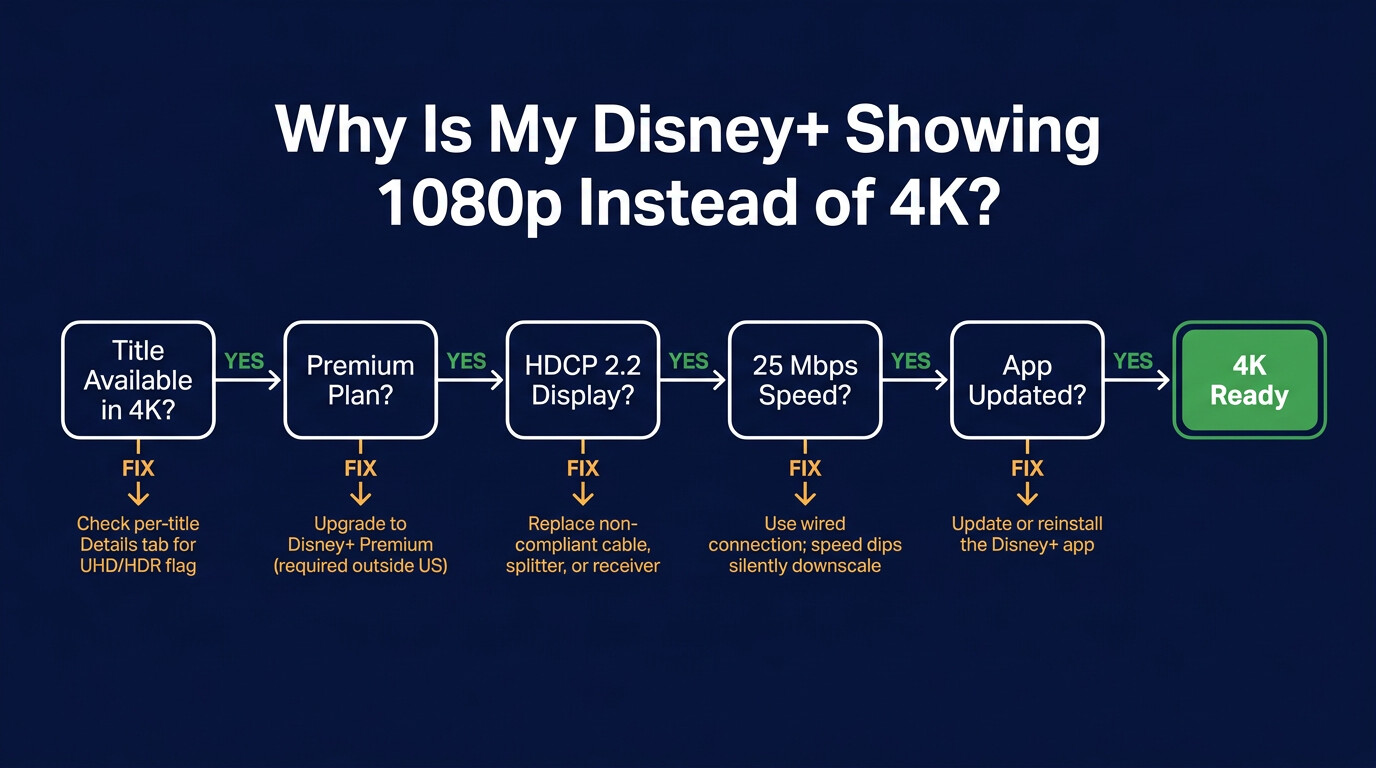
Run the checks in order:
- (1) The title — confirm UHD/HDR is listed on the Details tab.
- (2) The plan — US plans all include 4K in 2026; outside the US, you need Premium.
- (3) The display chain — every link needs HDCP 2.2; one non-compliant HDMI splitter drops you to 1080p.
- (4) The connection — Disney+ recommends 25 Mbps; throughput dips downscale silently.
- (5) The app version — Disney+ has shipped buggy updates.
As reported in September 2025, "both frame rate matching and SDR/HDR/Dolby Vision matching are broken" until a patch landed. Update or roll back.
Do all Disney+ plans include 4K in the US?
Yes, as of June 2026 — Basic with Ads, Standard, and Premium all include UHD and HDR access. Outside the US (UK, EU, Canada), 4K is still Premium-only. Plan structure changes; check the Disney+ Help Center for the current regional matrix.
How long do Disney+ downloads stay playable?
Thirty days if unplayed; 48 hours from first play; a re-validation check every 30 days; immediately unplayable if you cancel. Those are documented platform policy — and the single biggest reason a "downloaded" Disney+ movie stops working at 35,000 feet.
Is it safe to use a third-party Disney+ downloader?
Saving content you subscribe to for personal offline viewing is a Terms-of-Service question for Disney+, not a malware question. The malware question lives in the installer. Stick to tools from companies with a real website, a real support email, and openly listed pricing; avoid cracked builds, anonymous forum links, and anything that asks for crypto payment.