
BBFly Max Downloader Review (2026): 4K Downloads, Pricing, and an Honest Verdict
Table of Contents
I've been managing a personal media library since the DVD-ripping days, and the one question I keep coming back to with streaming is simple: can I actually hold on to a file I paid to watch? Max is the platform where that question gets uncomfortable fastest. So I spent a couple of weeks with BBFly Max Downloader on Windows and Mac to see whether it solves the part of the problem Max itself doesn't.
Why Official Max Downloads Fall Short on PC
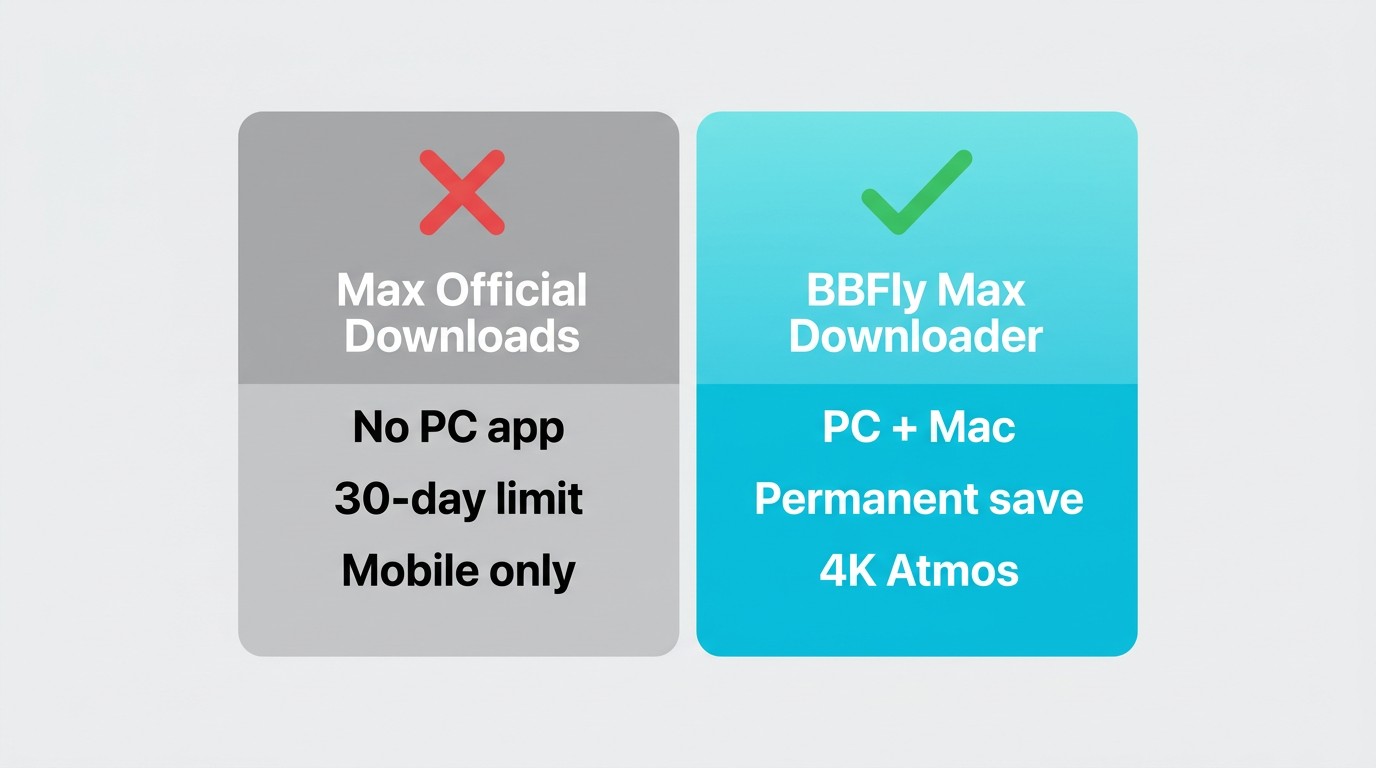
Max gives PC and Mac users nothing on the download front. There is no desktop app with offline support — downloads exist only inside the iOS, Android, and Fire tablet apps, expire 30 days after saving (or 48 hours after you press play), and the Basic with Ads tier can't download at all.
I ran into the second half of that problem the obvious way: I queued a few episodes on my phone before a flight, switched to airplane mode at the gate, and the app refused to play one of them because the subscription-validation handshake had timed out. That is the gap I wanted BBFly to close — not to dodge a subscription, but to keep a local file of something I'm already paying for and authorized to watch.
A few things worth knowing before we get into the tool itself, as of June 2026 (Max changes these periodically — check the official Max Help Center for the current rules):
- Standard ($18.49/month) caps account-wide downloads at 30 titles; Ultimate ($22.99/month) at 100.
- Downloads sit inside the mobile app and can't be moved to a PC, external drive, NAS, or Smart TV.
- When Max pulls a title from its library (and it has done this at scale with originals like Westworld), any downloads of that title get wiped from your device too.
If you've ever lost a download to that last point, you already understand why some of us want a standard MP4 sitting on a hard drive.
BBFly Max Downloader: What It Actually Does
BBFly Max Downloader saves Max titles as local MP4 or MKV files on Windows and Mac, for personal offline viewing of content you're authorized to access, where permitted by platform terms and applicable law. You sign in with your own Max subscription inside the app, browse to a title, and BBFly pulls the licensed stream straight through and remuxes it — no screen recording, no re-encoding.
Native Download Mode vs. Screen-Capture Approaches
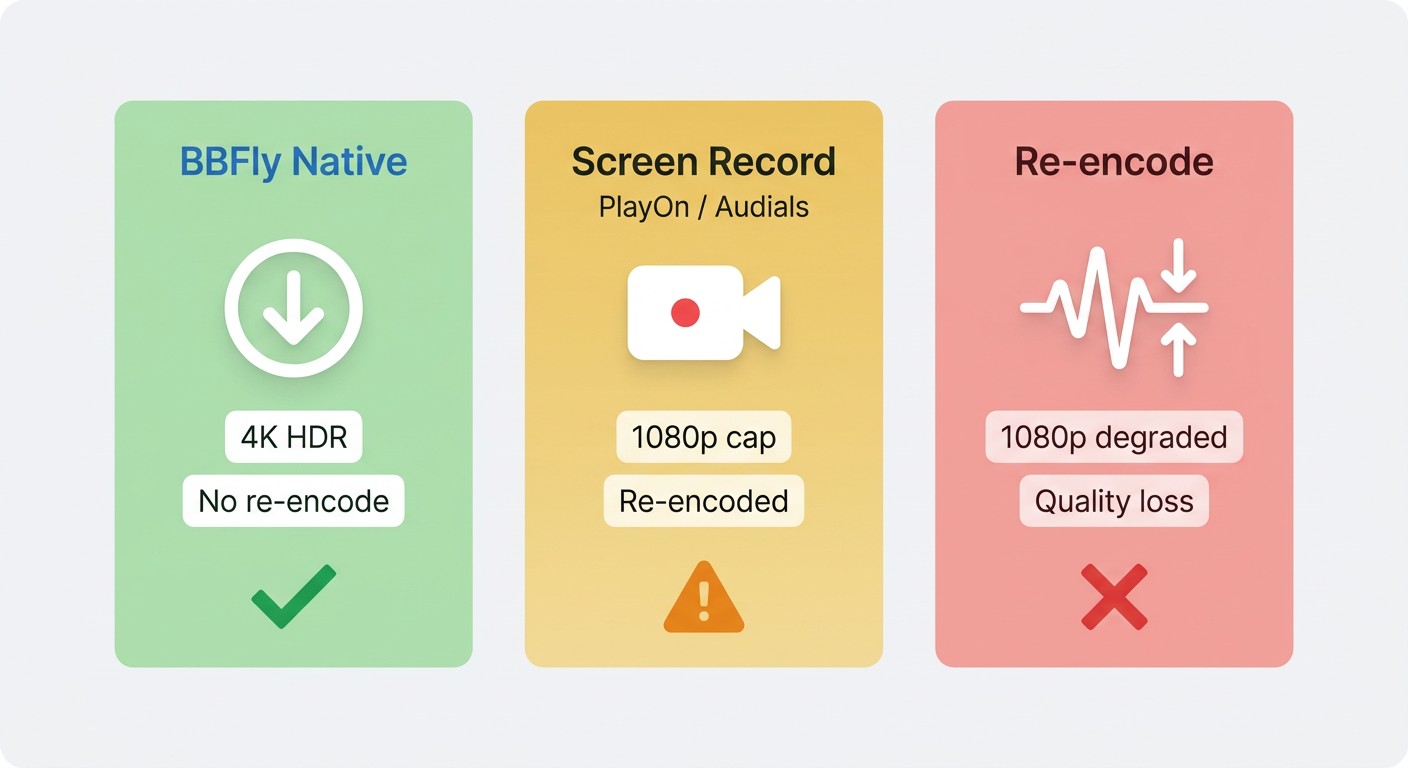
This is the part that matters more than the marketing suggests. There are three rough approaches used by tools in this category:
- Native download (BBFly's approach): the tool talks to the platform's servers using your authorized session, fetches the original audio and video streams, and wraps them into MP4 or MKV without re-encoding. The output keeps the source bitrate, HDR metadata, and multichannel audio intact.
- Screen recording: the tool plays the title in real time and captures the screen. You're locked to 1x playback, HDR and Dolby Vision collapse into SDR, and Atmos becomes a stereo or 5.1 downmix. PlayOn and Audials sit here.
- Re-encode: the tool grabs the stream but transcodes it to a new file. Even at 1080p, the result is a generation removed from the source.
I care about this distinction because re-encoding is what burned me on earlier-generation tools — I'd end up with a "1080p" file that visibly wasn't, and Atmos tracks that quietly turned into 2.0. BBFly's native path is the reason a 4K HDR Max title actually lands as a 4K HDR file on disk.
Full Technical Specifications
Here's what BBFly Max Downloader supports on the spec sheet, as of June 2026 (confirm the current figures on the official BBFly product page before buying):
| Spec | Value |
|---|---|
| Maximum resolution | 4K (1080p also selectable) |
| Video codecs | H.264, H.265 |
| Audio formats | Dolby Atmos, EAC3 5.1, AAC 2.0 |
| Display formats | HDR10, Dolby Vision |
| Output containers | MP4, MKV |
| Subtitles | Multi-language, remux or separate SRT |
| OS support | Windows, Mac |
| Platforms covered (single subscription) | 60+ streaming services |
For the HBO flagships I tested with — House of the Dragon and The Last of Us season one — the 4K HDR10 stream came through intact, and the Dolby Atmos track stayed labeled as Atmos in the MKV (I checked in MediaInfo on a Windows 11 desktop with a Ryzen 7 5800X and an RTX 4070). Source: BBFly's official product page (birdbirdfly.com) and Max's official Help Center, as of June 2026. Specs change — confirm current figures first.
Key Features Worth Knowing Before You Buy
You probably don't need a feature list — you need to know which behaviors hold up when you actually use the tool. These are the ones I leaned on most across two weeks of normal use:
- Batch download for full seasons. When I queued an entire season of The Last of Us, BBFly grabbed each episode in sequence without me babysitting it. For series watchers, this is the difference between "useful" and "I'll forget I own this."
- Multi-language subtitles, your choice of format. Max carries 20+ subtitle languages on its bigger releases. BBFly let me remux English and Spanish into the MKV and also export a separate SRT — handy if you watch on a player that doesn't pick up embedded tracks cleanly.
- Audio track selection. You pick which audio track to keep before the download starts, including the Dolby Atmos track where the source carries one. No mystery-mux defaulting to stereo.
- Ad-free local file. The saved MP4 or MKV contains the program content without the mid-stream ad interruptions you'd see streaming live. This applies to the downloaded file only.
- New-episode auto-fetch for series. Subscribe a show inside BBFly and new episodes pull down as they drop. Useful for week-by-week releases like HBO's Sunday-night slot.
- Metadata and extras. Titles come tagged with metadata (helpful if you drop them into Plex or Infuse), and bonus features download alongside the main title when available.
If you also use Netflix, Disney+, or Amazon Prime Video, one BBFly subscription covers 60+ platforms, relevant if you're weighing it against tools sold per platform. You may also be interested in the BBFly Amazon Downloader review and the BBFly Disney Plus Downloader review.
Plans, Pricing, and the Free Trial
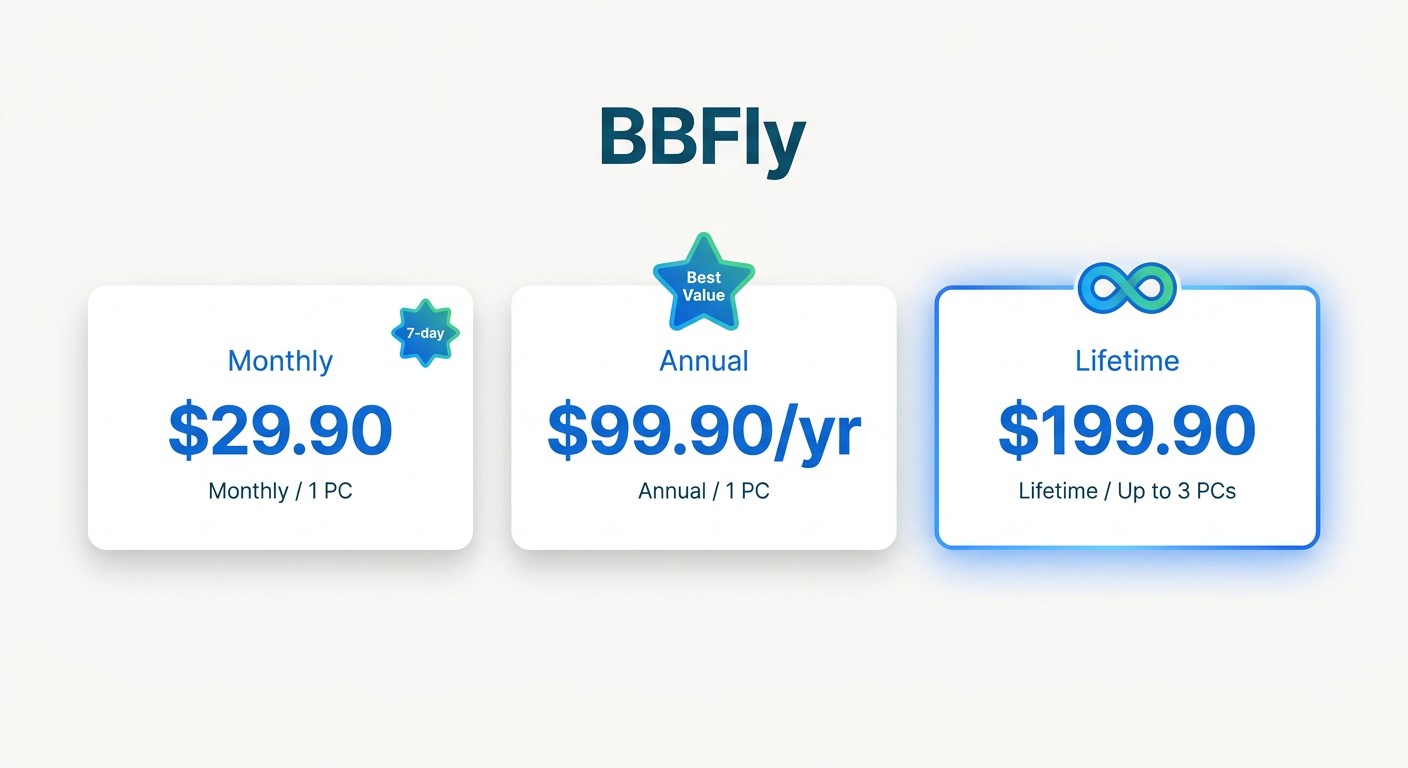
BBFly has three tiers. The same price covers any platform you point it at — there's no Max-specific upcharge.
| Plan | Price | What's included |
|---|---|---|
| Monthly | $29.90/month | 1 PC; cancel anytime; 7-day money-back guarantee; free updates; support within 48 working hours |
| Annual | $99.90/year (about $8.33/month) | 1 PC; cancel anytime; 7-day money-back guarantee; free updates; support within 48 working hours |
| Lifetime | $199.90 one-time (about $66.63 per PC) | Up to 3 PCs; 14-day money-back guarantee; free updates; support within 48 working hours |
Note: Pricing as of June 2026, subject to change.
The lifetime plan is the one I'd flag for anyone with more than one machine in the household. At $199.90 for 3 PCs, it's the only household multi-PC lifetime option I found in this category as of June 2026 — StreamFab, CleverGet, and TunePat lifetime plans, per their product pages and the keepstreams.com comparison table dated June 2026, are single-PC. If your partner has their own laptop, that math gets one-sided quickly.
How BBFly's 3-Video Trial Stacks Up Against Competitors
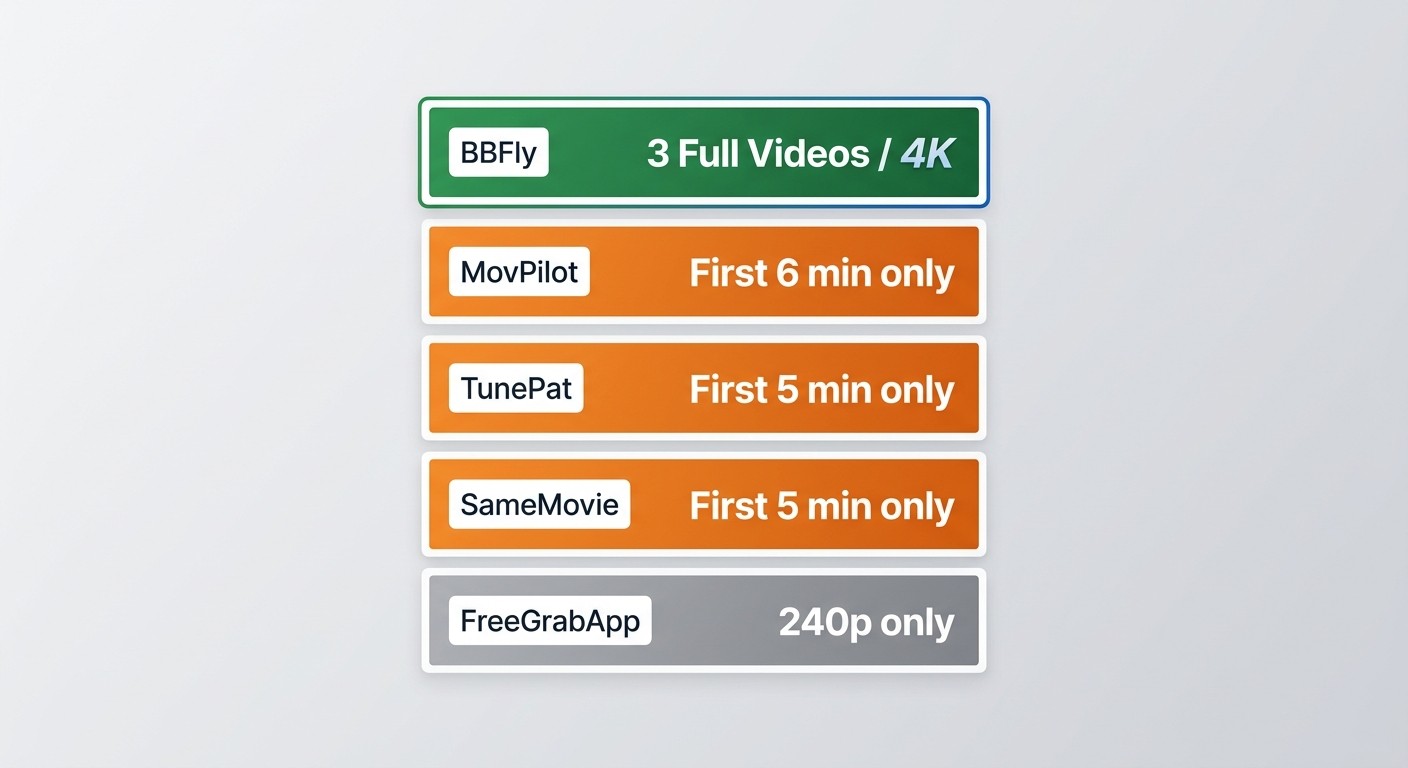
You'll probably want to know whether the trial is enough to judge the tool. The honest answer is yes — and that's not a given in this category. BBFly's free trial lets you download 3 full-length titles within 30 days, at full 4K quality, no minute-cap.
Per keepstreams.com's comparison table (June 2026), the typical competitor trial looks like this:
- MovPilot: first 6 minutes of each title only.
- TunePat: first 5 minutes only.
- SameMovie: first 5 minutes only.
- FreeGrabApp: capped at 240p.
Six minutes of an episode tells you the UI works. It does not tell you whether the 4K stream came through cleanly, whether Atmos held up, or whether the subtitle sync drifts on a 90-minute film. A full-video trial is the only one where you can actually answer those questions before paying. Source: keepstreams.com comparison data and each tool's official product page, as of June 2026 — trial terms change, so verify before testing.
How to Download Max Videos with BBFly (Step-by-Step)
The setup is genuinely beginner-friendly — in my testing on a 2024 MacBook Air (M3, macOS Sonoma 14.5), the entire process from install to first completed download took under five minutes, most of which was the installer and signing into Max.
Step 1: Install BBFly and Open the Max Portal
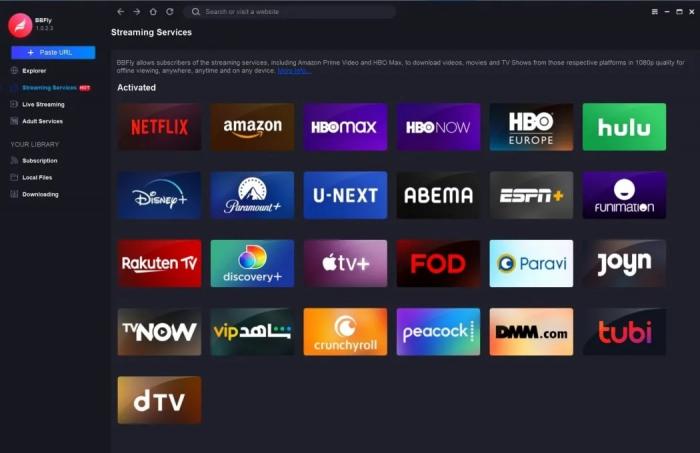
Download the installer from the official BBFly site (Windows or Mac build), run it, and launch the app. From the home screen, open VIP Services and pick Max from the list. Sign in with your own Max credentials when prompted.
Step 2: Search for and Configure Your Download
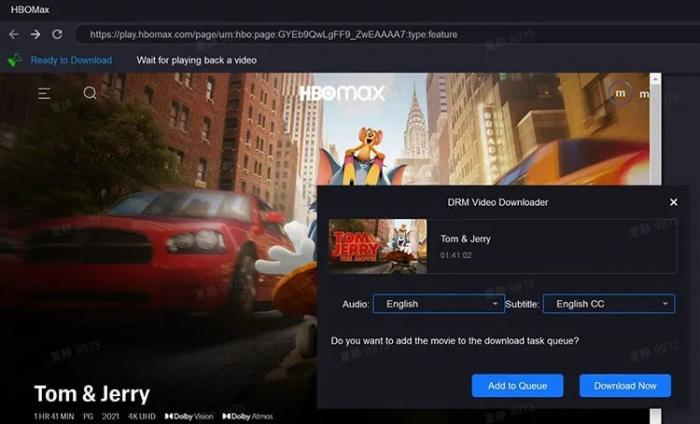
Use the built-in search to find the title you want. When you open it, BBFly surfaces a configuration panel: resolution (up to 4K where the source supports it), audio track (including Atmos where available), and which subtitle languages to keep — embedded or as separate SRT files. If it's a series, you'll get an episode picker so you can grab a whole season in one pass.
Step 3: Start the Download and Access Your Files
Click Download Now. Progress appears in the Downloading tab; finished titles land in Downloaded, where you can right-click to open the containing folder. From there it's a standard MP4 or MKV — drop it into Plex, Infuse, VLC, or copy it to an external drive.
Personal-Use Scope and Legal Considerations
BBFly is built for personal offline viewing of content you're authorized to access, where permitted by platform terms and applicable law. A few ground rules I'd treat as non-negotiable:
- You need an active, valid Max subscription. BBFly does not work around the paywall and isn't designed to.
- Files are for your own viewing. Don't redistribute, share, upload, or use them commercially or in any public setting. DMCA and the applicable copyright laws in your jurisdiction still apply.
- Max's Terms of Service generally restrict third-party download tools. Review the current ToS and your local law before using any tool in this category, and make your own call.
The framing I use personally is straightforward: I'm paying for the content, and I want a local copy I can watch on a flight or keep when Max decides a title isn't worth licensing anymore. That's the scope the tool fits.
Is BBFly Max Downloader Worth It? Honest Verdict
Short version: if you want a 4K HDR local file of Max content on a PC or Mac and you're working within personal-use scope, BBFly is the most direct path I've tested in 2026. The native download mode delivers what a re-encoded or screen-recorded file can't — original-bitrate 4K, intact HDR10 and Dolby Vision metadata, and Dolby Atmos that arrives as Atmos rather than a downmix.
Where I'd temper expectations: when Max ships a backend change, every tool in this category needs a few days to catch up. BBFly's update cadence has been solid in my experience, but it's not magic — if you try to download on patch day, occasionally you'll wait. The UI is functional rather than slick. And the lifetime price tag ($199.90) is a real commitment if you're only here for one platform.
Best for:
- PC and Mac users who want 4K-quality Max content as standard MP4 or MKV files.
- Households with multiple computers — the 3-PC lifetime license earns its keep.
- People who already subscribe to Netflix, Disney+, or Amazon Prime Video alongside Max; the 60+ platform coverage is where the per-platform math turns favorable.
- Anyone who's lost a Max download to a content removal or a 30-day expiry and doesn't want it to happen again.
Not ideal for:
- Mobile-only viewers who are happy with the Max app's built-in downloads and never watch on a laptop.
- Users who only need a single title and don't mind a recording-grade copy.
Worth comparing alongside the BBFly Netflix Downloader review if you also subscribe to Netflix.
Frequently Asked Questions
Will my HBO Max account get banned for using BBFly?
BBFly's Native Download Mode pulls the licensed stream directly through your authorized session rather than simulating browser behavior or screen-recording playback, so it doesn't generate the kind of interaction signals platforms typically flag. I haven't seen documented account-ban incidents tied to personal-use, non-redistributed downloads in the community sources I follow. That said, no third-party tool can offer absolute guarantees — keep usage within Max's Terms of Service and personal-viewing scope.
Does BBFly support 4K and Dolby Atmos for Max downloads?
Yes. BBFly Max Downloader supports up to 4K resolution, with Dolby Atmos, EAC3 5.1, and AAC 2.0 audio, and HDR10 and Dolby Vision where the source title carries those formats. Output is MP4 or MKV. Specs as of June 2026 — check the official BBFly product page for current capabilities.
Can I still watch my BBFly downloads if I cancel my Max subscription?
You need an active Max subscription to download a title in the first place — BBFly is not a workaround for paying, and isn't designed to replace a subscription. Once a title is saved, it's a standard MP4 or MKV on your drive, so playback is a property of the file format itself and doesn't depend on a DRM check-in with Max's servers. Keep this strictly within personal-use scope on content you were authorized to access.
Can I download Max videos without ads using BBFly?
Yes — the downloaded MP4 or MKV contains the program content without the mid-stream ads you'd see on the Max ad-supported tier. This applies to the saved local file; it does not affect live streaming inside the Max app.
Is it legal to download from Max for personal use?
It depends on your jurisdiction and what you do with the file. The intended use case is personal offline viewing of content you're authorized to access, where permitted by platform terms and applicable law. Max's Terms of Service generally restrict third-party download tools, and downloaded content must not be redistributed, shared, or used commercially. Review the current Max ToS and your local copyright law before deciding.
What is BBFly's free trial limit for Max?
The free trial lets you download 3 full-length titles within 30 days, at full quality including 4K — no minute-cap and no resolution restriction. That contrasts with MovPilot (first 6 minutes per title), TunePat and SameMovie (first 5 minutes), and FreeGrabApp (240p only), per keepstreams.com's comparison data as of June 2026. A full-title trial is the only way to verify 4K and Atmos behavior before paying.
Does BBFly work for streaming platforms besides Max?
Yes. One BBFly subscription covers 60+ streaming platforms, including Netflix, Disney+, Amazon Prime Video, and others, with the same pricing tiers regardless of which platforms you use. That makes the per-platform cost meaningfully lower than tools that charge separately for each service.