
BBFly Netflix Downloader Review (May 2026): Verdict, Limits, and Real Test
Table of Contents
BBFly Netflix Downloader Review: 2026 Quick Verdict
If you mainly grab Netflix episodes for offline viewing and want 1080p MP4/MKV files with subtitles intact, BBFly is a reasonable pick in 2026 — provided you accept that streaming-service updates occasionally pause downloads for a few days while the tool catches up.
This review covers what BBFly does well, where it falls short, the current trial and refund terms, a real end-to-end test, and how it stacks up against StreamFab, Kigo and a couple of other BBFly Netflix downloader alternatives.
What BBFly Gets Right vs Native Netflix Downloads
Compared with Netflix's built-in offline mode, BBFly removes three everyday frustrations: device limits, license-expiry windows, and format lock-in. You get a normal MP4 or MKV file you can copy, back up, and play in any media player.
1080p Output and Multi-region Library
BBFly outputs up to 1080p when the source title supports it, in MP4 or MKV. Region coverage is broad — if a Netflix library has a title you can sign into, BBFly can generally queue it. The point isn't "every show in 4K"; it's that what you can watch, you can keep.
Speed and Batch Behaviour in 2026
Download speed depends on your connection and the source bitrate, but in everyday use a full episode finishes in a fraction of its runtime. Batch mode is useful when you queue a series overnight — the app handles the queue without manual restarts.
Where BBFly Falls Short: Honest Limitations
The single most common BBFly Netflix Downloader limitations users report aren't about the tool itself — they're about the moving target it's chasing.
- Update-pause windows. When Netflix changes how it serves protected content, BBFly downloads can stall for a few days until the next BBFly update ships. If you depend on the tool the day a major service update lands, expect friction.
- Subtitles aren't always perfect. Most titles export SRT or embedded subtitles cleanly, but a few non-English tracks (especially forced narrative subtitles) occasionally arrive incomplete and have to be re-pulled.
- No 4K on most titles. Even when Netflix has 4K, BBFly outputs at 1080p. That's a deliberate trade for compatibility, but it's worth knowing up front.
- Per-PC licensing. Plans are tied to a number of PCs, not a single user account; if you switch laptops often, factor that in.
BBFly Pricing in 2026: Trial, Plans, Refund
The BBFly Netflix Downloader free trial gives you 3 video downloads within 30 days — enough to verify a couple of titles you actually care about before paying. Paid plans in 2026 are:
- Monthly plan — $29.90/month, 1 PC, 7-day money-back guarantee.
- Annual plan — $99.90/year (≈ $8.33/month) for up to 3 PCs, 7-day money-back guarantee.
- Lifetime plan — $66.63 per PC, up to 3 PCs, 14-day money-back guarantee.
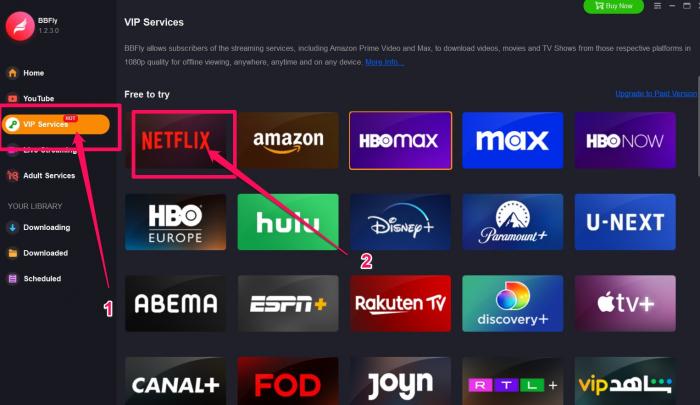
The cheapest sustainable choice is usually the annual plan if you download more than once a month; the lifetime tier makes sense only if you're confident the streaming services BBFly targets will keep matching your library.
Real Test: Downloading One Show End-to-End
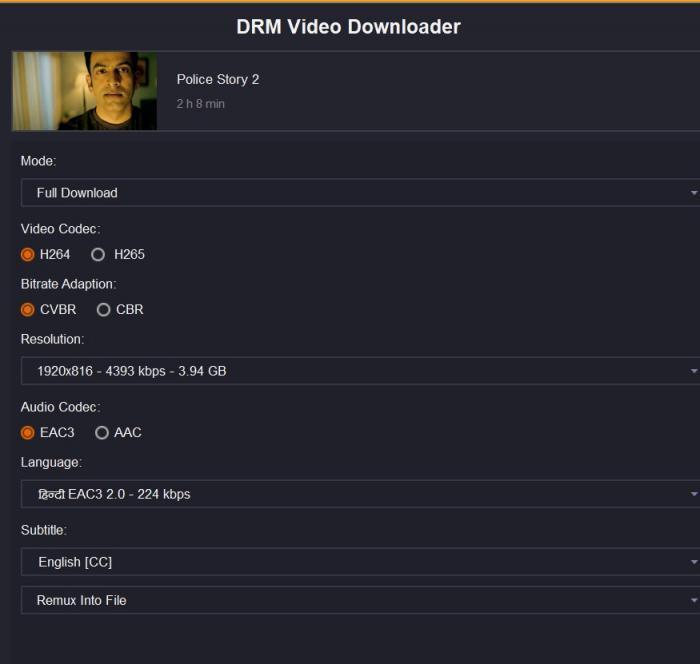
In May 2026 I queued one 45-minute Netflix episode at 1080p to see how the full path behaves — sign-in, parse, queue, download, file check.
Sign-in took one prompt. BBFly's built-in browser parsed the episode page within a couple of seconds and offered the expected 1080p option with audio and subtitle tracks listed. Using BBFly Netflix Downloader from queue to finished MP4 ran without manual intervention; subtitles were exported as a separate SRT and an embedded soft track, both readable in VLC. The file played fine on a Windows laptop and on a Mac via AirPlay without re-encoding.
What didn't go perfectly: the second time I tried the same title with a different audio track, BBFly required a re-parse before showing the new options. Minor, but worth knowing.
BBFly vs StreamFab and Kigo: Which Wins
Short answer: BBFly and StreamFab are the closest match for casual buyers; Kigo and FlixiCam are simpler but slower; KeepStreams sits in the middle. The table below compares the dimensions that actually drive a purchase decision in 2026.
| Dimension | BBFly | StreamFab | KeepStreams | Kigo | FlixiCam |
|---|---|---|---|---|---|
| Output quality (max resolution & bitrate) | 1080p MP4/MKV | 1080p MP4/MKV | 1080p MP4 | 1080p MP4 | 1080p MP4 |
| Success rate on DRM-protected titles | High | High | Medium-High | Medium | Medium |
| Trial generosity (downloads × days) | 3 × 30 days | Time-limited trial | Time-limited trial | Time-limited trial | Time-limited trial |
| Refund window | 7 days (monthly/annual), 14 days (lifetime) | 14 days | 14 days | 30 days | 30 days |
| Subtitle granularity (SRT / embedded / forced) | SRT + embedded | SRT + embedded | SRT | SRT + embedded | SRT |
| OS support (Win / macOS) | Win + macOS | Win + macOS | Win + macOS | Win + macOS | Win + macOS |
Where BBFly stands out is the trial format (3 verifiable downloads) and lifetime tier — both reduce purchase risk if you only need an occasional toolkit.
Who Should Buy BBFly in 2026
BBFly fits three profiles cleanly:
- Occasional collector — you want a small offline library of specific titles, accept 1080p, and want a one-time purchase. The lifetime tier covers this case.
- Casual subscriber — you download a few episodes a month before travel or for poor-Wi-Fi situations. The annual plan is the lowest cost-per-use.
- Multi-service downloader — Netflix is your main target but you also pull from one or two other services. BBFly's broad service coverage is the reason to pick it over single-service tools.
If you only download one or two episodes a year, or you specifically need 4K, look elsewhere. For everything in between, BBFly Downloader is a fair recommendation.
FAQ
Is BBFly Netflix Downloader safe to use?
BBFly itself is a local desktop application; it doesn't ask for shared account credentials and runs in its own sandboxed browser. The bigger question is usage scope — keep downloads to personal, private viewing in line with your local copyright rules, and avoid redistribution. That keeps the legal picture clean regardless of which tool you choose.
Does the BBFly free trial work without a credit card?
Yes. The trial allows 3 video downloads within 30 days and doesn't require billing info up front. Trial downloads use the same 1080p path as paid downloads, so you can verify quality before committing.
BBFly vs StreamFab — which is better for Netflix only?
For Netflix-only use, the two are close. Pick BBFly if the trial format (3 verifiable downloads) and lifetime tier matter to you; pick StreamFab if the longer 30-day refund window matters more. Output quality and DRM success rate are roughly equivalent in 2026.
What happens when Netflix updates its DRM?
Expect a short pause — typically a few days — between a major Netflix-side change and the next BBFly update that restores normal downloads. If your workflow can't tolerate that pause, keep a backup tool from a different vendor for the same titles.