
How to Download FANZA (DMM) Videos Locally in 2026 — Windows & Mac Guide
Table of Contents
I still remember the specific evening this workflow broke for me: I was traveling, had a Japanese IP via a standard data-center VPN, and fired up OBS to capture a title I'd already paid for on FANZA. Black screen. Audio playing fine, video completely absent. That was early 2026, and it turned out the platform had just tightened its content protection in a way that quietly killed every screen-recorder and browser extension I'd relied on. What followed was about two weeks of testing alternatives — which is essentially what this guide documents. If you've hit the same wall, here's what I found.
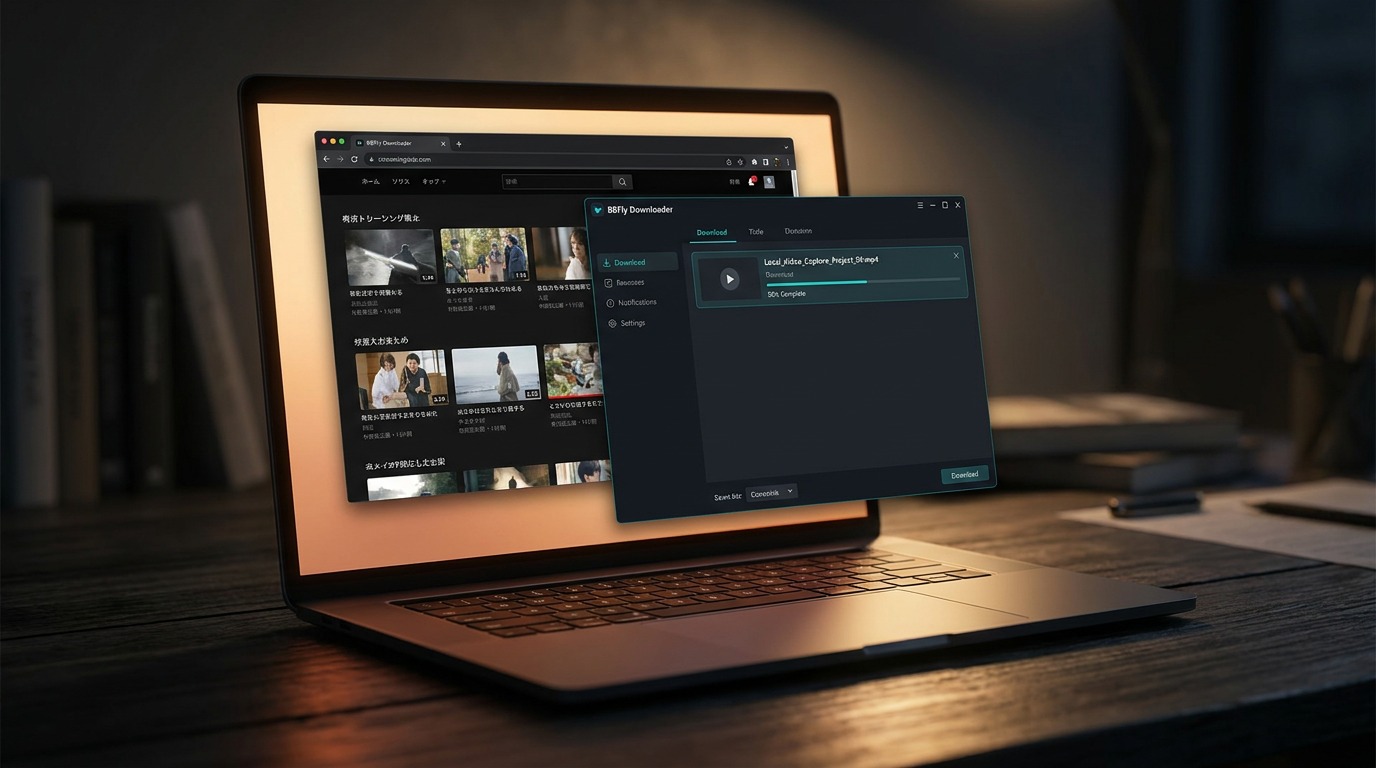
What FANZA Is and Why It Differs from DMM
FANZA is Japan's largest adult content platform, operated by DMM and previously branded as DMM.R18. Outside Japan, the names are often used interchangeably, but "FANZA" is the dedicated label for adult video content, while "DMM" covers the broader marketplace — games, e-books, live services, and general video. The catalog spans tens of thousands of titles across multiple genres, and the platform supports both streaming and a proprietary DRM-locked download system via the official DMM Player.
For US-based users, the practical distinction matters: FANZA content requires a Japan-region account, and the payment and access infrastructure is built around Japanese consumers. That creates the specific access friction this guide addresses.
FANZA Access for US Users: VPN and Payment Setup
Accessing FANZA from outside Japan requires two things: a Japan-region IP address that FANZA's detection systems accept, and a payment method the checkout will process. Getting either one wrong means a dead end before you even reach the download question.
Getting a Japan IP: Residential VPN vs. Data-Center VPN
FANZA aggressively blocks known data-center IP ranges — the kind issued by AWS, DigitalOcean, or most consumer VPN providers running shared server infrastructure. If you connect through one of those and visit FANZA, you'll hit a geo-block or a blank content wall almost immediately.
What actually works is a residential Japan IP: an address that routes through a real Japanese ISP subscriber's connection rather than a server farm. Several VPN providers offer dedicated residential IP add-ons or residential-only plans for Japan. When evaluating options, look specifically for "residential IP" or "ISP IP" labeling — not just "Japan server."
Even with a residential IP, FANZA can flag sessions based on browser cookie history. If you're still blocked after switching to a residential node, clear all browser cookies and cached data before reconnecting, then navigate to FANZA fresh. In my own testing on a Windows 11 machine with a residential Japan node, clearing cookies resolved the block within one retry — the session authenticated normally and content loaded without restriction.
Paying for FANZA from the US: Amazon Pay and DMM Points
US Visa and Mastercard cards are frequently declined at FANZA checkout, even when the billing address is set to Japan. This is a persistent, well-documented issue in the community — the payment processor validates card-issuing country, and non-Japanese-issued cards fail the check regardless of what address you enter.
Two workarounds have consistent community confirmation:
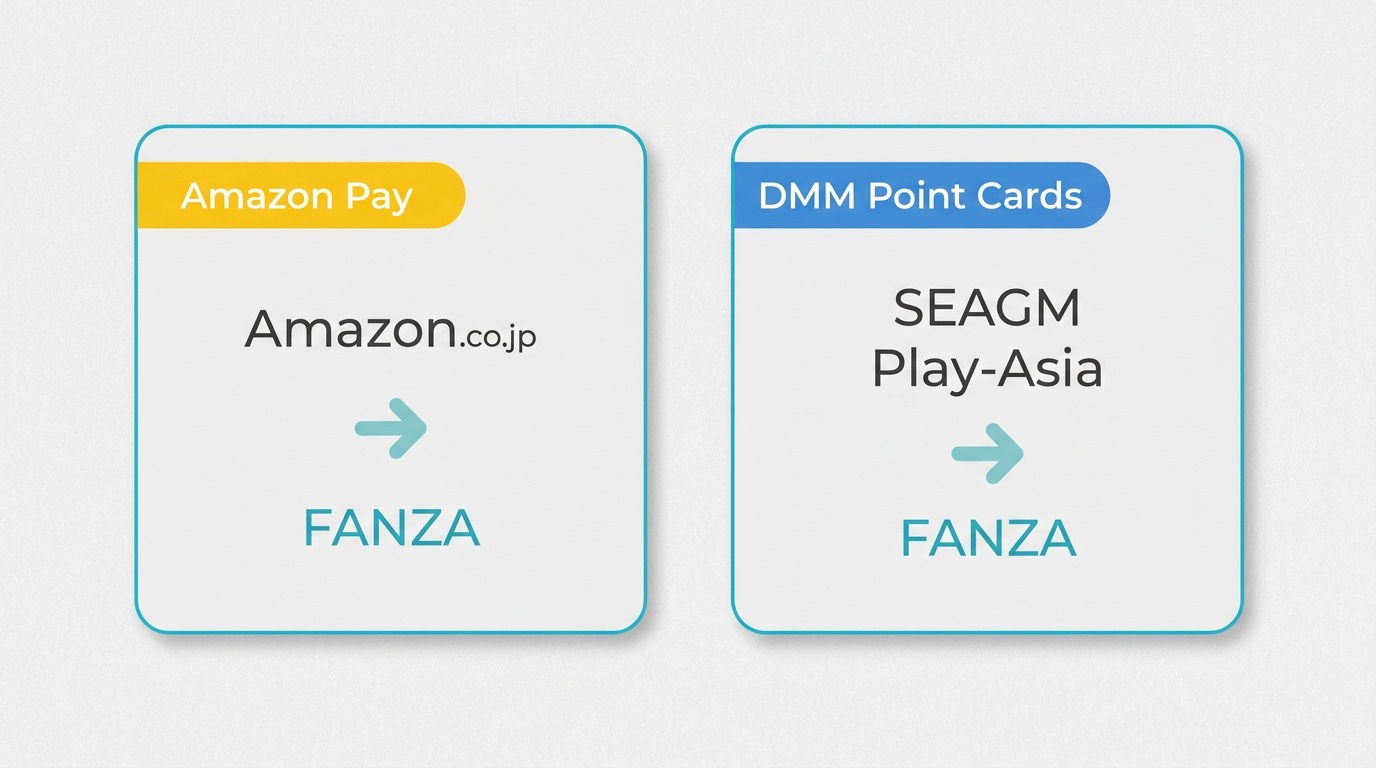
- Amazon Pay via a Japanese Amazon account: If you have or can register a Japanese Amazon account (amazon.co.jp), you can link it to FANZA's checkout via Amazon Pay. This routes billing through Amazon Japan's payment infrastructure, which FANZA accepts without issue.
- DMM Point Cards: Physical or digital DMM Point cards can be purchased through third-party resellers — SEAGM and Play-Asia are the most commonly cited options. You load the points to your DMM account and spend them directly, bypassing the card payment step entirely.
Of the two, DMM Points via a reseller tends to be the faster path if you don't already have a Japanese Amazon account set up.
Is FANZA Free, Safe, and Legal to Use?
These three questions come up together often enough that it's worth addressing them in sequence before getting into download workflows.
Is FANZA Free to Use?
Some titles and short preview clips on FANZA are available without payment. However, full HD titles and any content with download rights require either individual purchase or an active subscription. FANZA runs periodic "free viewing" campaigns, but full-resolution downloads — even through official channels — are not free. Treat any tool or service claiming "free unlimited FANZA downloads" as a red flag; the platform's content is licensed and paid access is the only legitimate path.
Is FANZA Safe?
FANZA itself is a legitimate, widely-used platform with an established commercial history in Japan. The safety concern is almost entirely about what you add to the equation: browser extensions of unknown provenance, free downloader tools from unverified sites, torrent trackers. These carry genuine risks — malware bundled in installers, phishing overlays, credential harvesting from FANZA login forms. If you use any third-party tool, download only from the developer's official domain and verify the installer against any published checksums.
Personal Offline Viewing: Legal Boundaries by Region
The legal picture varies significantly by jurisdiction, and it's worth being precise rather than vague here.
- Japan: Japan's Copyright Act explicitly prohibits circumventing technical protection measures — including the DRM on FANZA content — even for personal use. This is not a gray area under Japanese law.
- United States: DMCA Section 1201 generally prohibits circumventing technological protection measures. "Fair use" as a defense in this specific context is narrow and rarely upheld in practice.
- EU: Similar prohibitions exist across member states under the EU Copyright Directive, though implementation varies by country.
The practical framing for any desktop downloader approach: saving a local copy for personal offline viewing of content you are authorized to access, where permitted by platform terms and applicable law. Redistribution or sharing of downloaded content is never legally defensible under any jurisdiction's framework.
Why Official FANZA Downloads Are Device-Locked
FANZA's official download system produces DRM-protected files that are locked to the DMM Player and to your account authentication. Understanding what that actually means at the file level explains why the workarounds that seem obvious — renaming files, running them through a converter — fail completely.
What .dcv and .wsdcf Files Are (and Why Renaming Fails)
When you download a purchased video through the official DMM Player, the file you receive has a .dcv or .wsdcf extension. These are not video containers in the conventional sense — they're DRM-encrypted wrappers. The video stream inside is encrypted with keys tied to your account and device license.
Renaming a .dcv file to .mp4 does nothing: the file's internal structure is unchanged, and no standard media player will open it. Running it through HandBrake fails at the same point — HandBrake reads the outer container, encounters the encryption layer, and cannot proceed. This trips up a lot of users who assume the file format is the obstacle rather than the encryption. The encryption is the obstacle, and it requires a tool that can interact with FANZA's license server as an authenticated session to produce a usable local file.
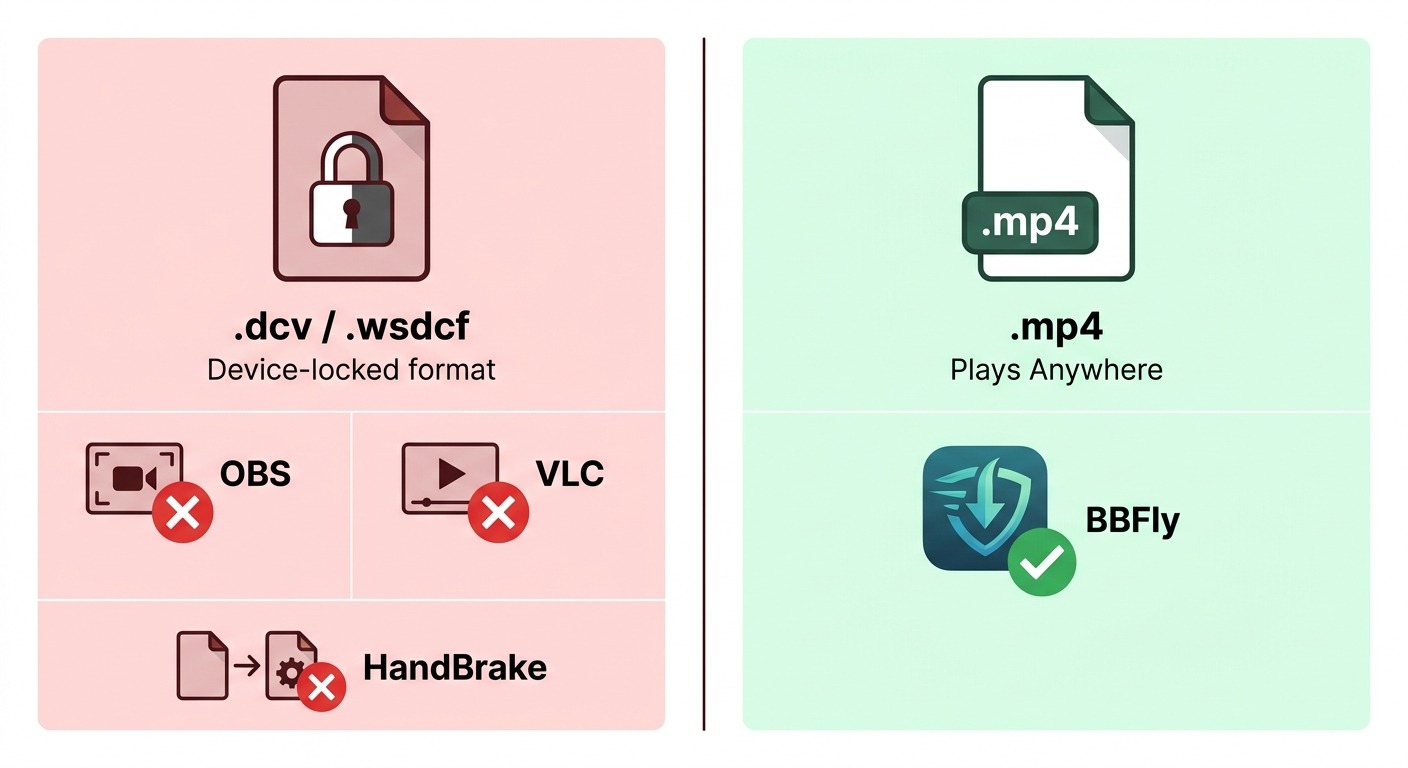
The official DMM Player handles this correctly because it has the license authentication built in. Outside that player, the only desktop path that consistently works for personal offline viewing is a stream-parsing downloader that authenticates as your account and handles the session-level access.
FANZA's 2026 DRM Update and What It Broke
In early 2026, FANZA implemented a tightened DRM configuration. The practical effect on existing workflows was significant: OBS Studio's capture of FANZA browser windows now produces black-screen video with audio only. Xbox Game Bar capture has the same result. Video DownloadHelper and similar browser extensions that previously extracted stream URLs now return errors or partial captures that won't play.
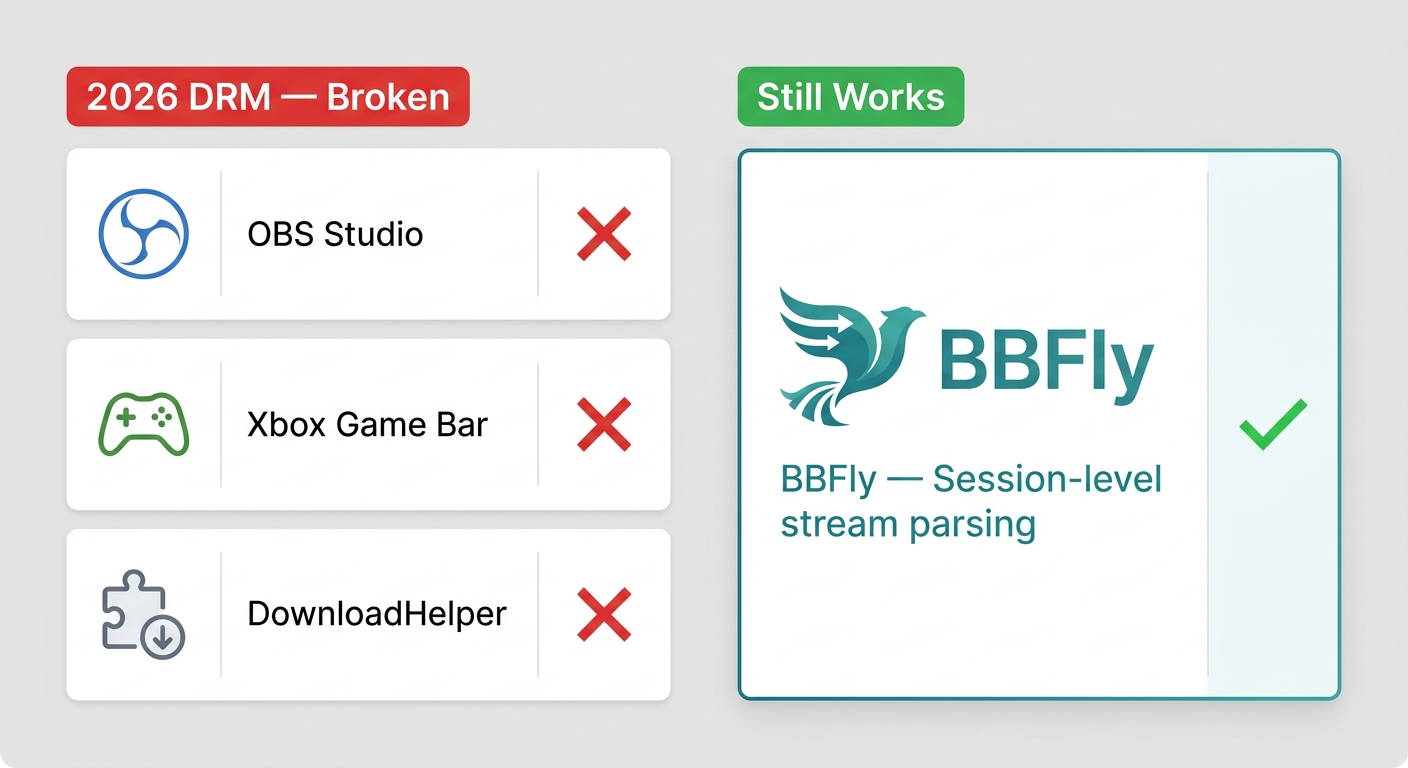
This isn't an OBS configuration problem or a codec issue — it's the result of how FANZA's updated content protection interacts with browser GPU hardware acceleration (more on this in the screen recording section below). The 2026 update effectively ended the era of browser-extension and screen-recorder workflows for FANZA. Stream-parsing desktop downloaders that authenticate at the session level are now the practical local-file workflow for Windows and Mac users seeking to save authorized content offline.
Save FANZA Videos Locally on Windows and Mac
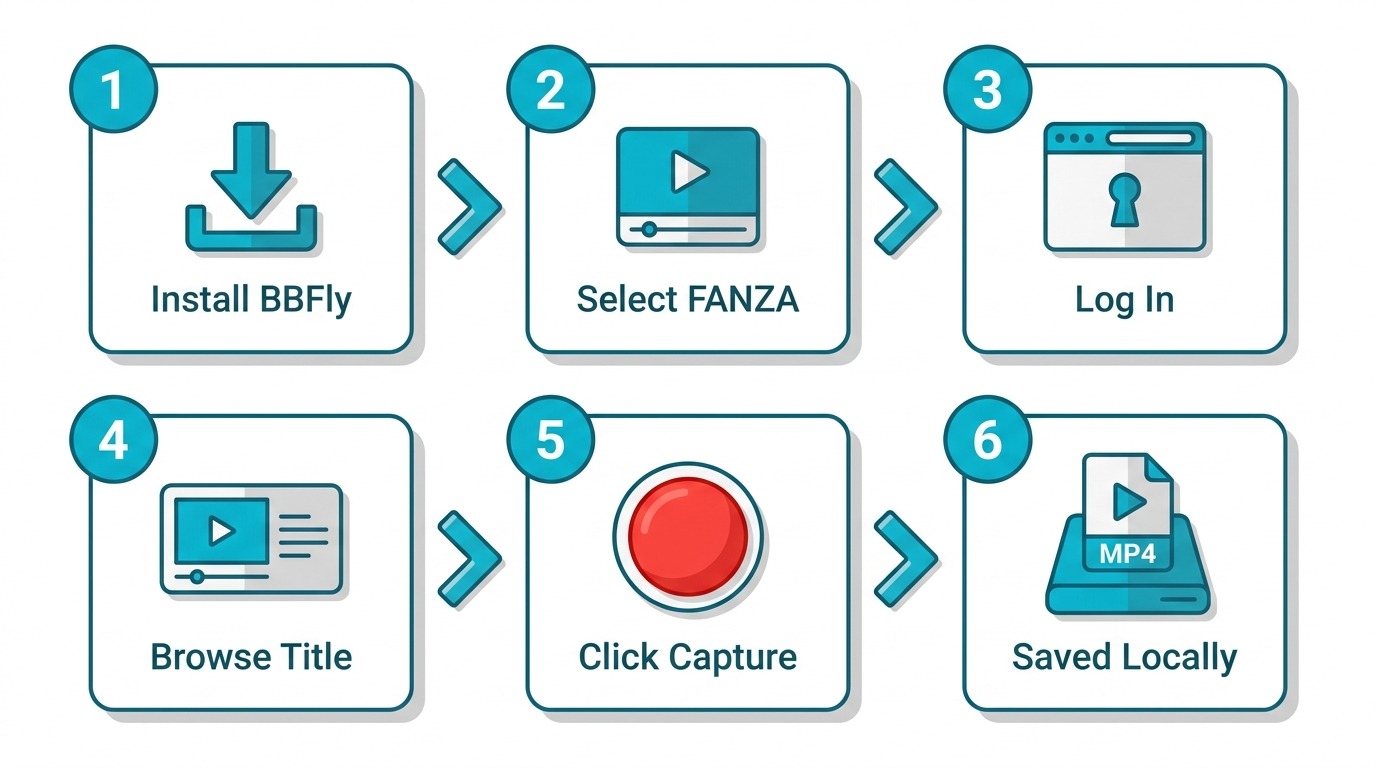
For personal offline viewing of FANZA content you're authorized to access — where permitted by platform terms and applicable law — a stream-parsing desktop downloader is the current practical path on Windows and Mac. The step-by-step below uses BBFly FANZA Downloader as the reference tool; the workflow is similar for other stream-parsing options.
2026 DRM note: Browser-based screen recorders (OBS, Xbox Game Bar), Video DownloadHelper, and generic Chrome/Firefox capture extensions no longer reliably capture FANZA streams as of the 2026 DRM update. The steps below use a stream-parsing approach that authenticates at the session level and is not affected by this change.
Step-by-Step with BBFly FANZA Downloader
1. Download and install BBFly FANZA Downloader. Get the installer from the BBFly Fanza Downloader — not from mirror or software-aggregator sites, which may bundle outdated or modified versions.
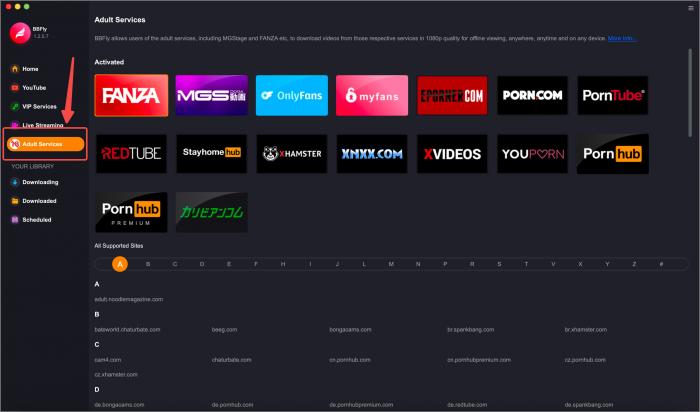
2. Launch the app and select FANZA under supported services. The app lists supported platforms by name; FANZA/DMM is in the catalog.
3. Log in to your FANZA account within the app's built-in browser. Enter your credentials directly in the app's browser window — this is how the tool authenticates your session. Do not enter credentials in any external pop-up or unrecognized window.
4. Browse to the title you want and select it. Navigate to the video within the app browser the same way you would on the FANZA website.
5. Choose output quality and format. BBFly outputs MP4 or MKV; select your preferred resolution (up to 4K where the source title supports it) and format before starting.
6. Start the download and monitor progress. Download duration depends on connection speed and title length. A roughly 90-minute title on a stable 50 Mbps connection typically completes without interruption; connection drops mid-download can require a restart.
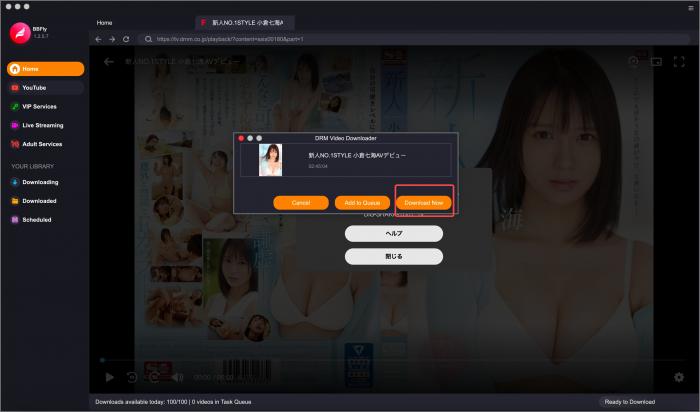
Note: Recent BBFly versions have improved compatibility, but sometimes require a manual update after FANZA site changes. Always use the latest release — the app will flag when an update is available.
BBFly Free Trial, Output Quality, and Practical Limits
BBFly's free trial covers 3 complete videos at full quality — not time-limited previews or partial files. That's enough to verify that the output quality, subtitle handling, and batch behavior match your expectations before committing to a purchase. The trial outputs standard MP4 or MKV files playable in any media player.
One design detail worth knowing: BBFly sets a 700-download session cap. This is a deliberate usage-safety measure to keep activity within patterns that don't trigger FANZA's account security checks. For personal offline viewing of a back-catalog, 700 downloads per session is a practical ceiling rather than a meaningful constraint for most users.
Paid plans include a lifetime license option covering up to 3 devices — one practical desktop option for Windows and Mac users looking to save authorized FANZA content locally, without re-purchasing for each machine.
FANZA Downloader Comparison (2026)
The table below compares stream-parsing desktop downloaders with FANZA support against browser-based capture tools, based on publicly available product pages as of June 2026. Specs are subject to change; verify current details on each developer's official site.
| Tool | FANZA Support | Output Format | Max Resolution | Free Trial (Full Videos) | Batch Download | Windows + Mac | Update Cadence | Malware Risk |
|---|---|---|---|---|---|---|---|---|
| BBFly FANZA Downloader | ✔️ Dedicated | MP4, MKV | up to 4K | 3 full videos | ✔️ | Both | Frequent | Low (official site) |
| StreamFab | ✔️ Dedicated | MP4, MKV | up to 4K | Free trial | ✔️ | Both | Frequent | Low (official site) |
| KeepStreams | ✔️ Listed | MP4, MKV | up to 4K | Free trial | ✔️ | Both | Regular | Low (official site) |
| CleverGet | Partial (module) | MP4, MKV | 1080p | Not clearly stated | ✔️ | Both | Regular | Low (official site) |
| Browser extensions / screen recorders (e.g., OBS, Video DownloadHelper) | ❌ Affected by 2026 DRM update | Varies / unreliable | 720p or less (when working) | Free | ❌ | Varies | Sporadic | Varies widely |
Note: Browser extensions and screen recorders are listed as affected by the 2026 DRM update per multiple competitor technical sources — verify current status before use.
For additional context on adult platform downloaders, see also: adult platform downloader reviews and the Pornhub Premium downloader review.
FANZA on Android and iOS: What Is and Isn't Possible
A common assumption: if there's a desktop downloader, there must be a mobile equivalent. There isn't, and the reason is structural rather than a gap waiting to be filled.
FANZA has official apps for Android and iOS, but these are primarily for Japan-registered accounts and support streaming only — no DRM-free local saving through any official mobile path. The reason third-party downloaders don't exist for mobile is the same reason you can't sideload a Netflix DRM tool on iOS: both the App Store and Google Play have review policies that prohibit apps that interact with platform DRM in unauthorized ways. Any "FANZA downloader for Android" you find in an app store is almost certainly either non-functional or a credential-harvesting fake.
The desktop-only reality of this workflow is worth setting as an expectation early. If your primary device is a phone or tablet, the practical options are the official streaming apps (Japan account required) or transferring locally downloaded files from a Windows or Mac machine to the device after the fact via a media player app that accepts local files.
Screen Recording FANZA: Why Black Screen Happens and What to Do
If you've tried to screen-record FANZA and gotten a black video rectangle with audio playing underneath it, you've hit a specific technical interaction — not a misconfigured recorder. Here's what's actually happening and what the options are.
Root Cause: HDCP 2.3 and Browser GPU Hardware Acceleration
FANZA streams with HDCP 2.3 content protection. When GPU hardware acceleration is enabled in the browser — which it is by default in Chrome, Edge, and Firefox — the video frame is rendered through a protected memory path on the GPU. Screen capture tools like OBS intercept video at the display compositor level, which is outside that protected path. The result is a captured frame that contains everything except the video: overlays, browser chrome, audio — but the video area is black.
This isn't an OBS setting or a driver issue. It's by design: HDCP 2.3 is specifically intended to prevent capture at the display layer. FANZA's 2026 DRM update tightened this protection further, closing workarounds that had previously allowed some capture tools to get around it via software-rendered paths.
Fix Options: Disable HW Accel vs. Use a Stream-Parsing Downloader
There's a partial workaround: disabling GPU hardware acceleration in your browser forces video rendering through a software path that some screen capture tools can intercept.
- Chrome: Settings → System → turn off "Use graphics acceleration when available"
- Edge: Settings → System and performance → turn off "Use graphics acceleration when available"
- Firefox: Settings → General → Performance → uncheck "Use recommended performance settings" → uncheck "Use hardware acceleration when available"
Limitations as of the 2026 DRM update: disabling hardware acceleration introduces frame drops and audio desync on higher-bitrate titles; it imposes a hard ceiling around 720p for most capture scenarios; and it doesn't work reliably at all when FANZA's CDM layer has been updated, which happens without user notice. I tried this on a Windows 11 machine with OBS 31 and Chrome 124 in early 2026 — the captures were consistently degraded compared to the source stream and occasionally dropped to an unwatchable state mid-recording.
The more consistent approach for authorized content offline viewing is a stream-parsing desktop downloader, which authenticates at the session level and retrieves the stream directly rather than capturing the rendered output. This avoids the GPU rendering path entirely and isn't affected by HDCP at the display layer.
Troubleshooting: Errors, Stuck Downloads, and Format Issues
Three categories cover most of the failure modes users encounter: downloads that never start or get stuck, playback problems after a successful download, and account or geo-block errors.
Download Stuck on 'Analyzing' or Never Starts
The "analyzing" state that never resolves — where the downloader appears to be working but no progress occurs — has two primary causes, and they're both fixable:
- Flagged or data-center VPN IP: If your current VPN IP has been identified by FANZA as a known data-center address or has been flagged for suspicious activity, the session authentication hangs. Fix: switch to a residential Japan IP node in your VPN client, then restart the downloader and re-log in to FANZA within the app's browser. This resolves the stuck-analyzing state in the majority of cases.
- Stale Widevine CDM token: The downloader's Widevine content delivery token can expire or become stale if the app has been running for an extended period without a fresh login. Fix: close the downloader completely, relaunch it, and log in to FANZA fresh within the app's browser before starting a new download queue. On a Windows 10 machine with BBFly, this restart-and-relogin cycle consistently resolved analyzing-hang states that had persisted through multiple download retries.
If neither fix works, check whether FANZA has recently updated its site structure — the downloader may need an app update to match. BBFly flags available updates at launch.
Video Not Playing or Wrong Format After Download
If the downloaded file won't open in your default media player, the most common cause is a player that doesn't handle H.264 MP4 or MKV containers well. VLC Player and PotPlayer both handle these formats without additional codec installation and are the recommended first test.
For Mac users: ensure your downloader version supports macOS 11 or later, and test with a short sample title before committing to a longer download queue. Some codec configurations on older macOS versions require a player update rather than a downloader fix.
One thing to avoid: running a FANZA download output through HandBrake for format conversion assumes the file is already a standard video container. If the download completed correctly, it should already be a standard MP4 or MKV — HandBrake is unnecessary. If the file is still a .dcv or .wsdcf, HandBrake will fail because the DRM encryption hasn't been handled; that's a downloader authentication problem, not a format conversion problem.
Account and Geo-Block Errors
FANZA's account security checks trigger on patterns that look like automated or bulk access — not on any single download. The official DMM Player enforces per-title download counts (typically a small number of device activations per purchased title). Third-party stream-parsing tools have separate session-level limits: BBFly, for example, sets a 700-download session cap as a deliberate usage-safety design to stay within patterns that don't resemble bulk scraping.
If you see a geo-block error mid-session — content that was accessible earlier in the same session becomes unavailable — it usually indicates your VPN IP has been flagged during the session. The fix is the same as for the stuck-analyzing state: switch to a fresh residential Japan IP and re-authenticate.
Account suspension risk is real but rare for users who keep usage within personal-viewing patterns. Never share downloaded files externally, avoid automated download scripts, and use the tool at a pace consistent with someone watching content rather than archiving a catalog in bulk.
FAQs
Can I download FANZA videos to watch offline?
Yes — through two paths. Officially, FANZA offers DRM-locked downloads via the DMM Player, producing .dcv files playable only within that app on your registered device. For a standard MP4 or MKV file for personal offline viewing on any device, a stream-parsing desktop downloader is the practical alternative — for content you are authorized to access, where permitted by platform terms and applicable law.
Is it legal to download FANZA videos for personal use?
Legality varies by jurisdiction. In Japan, circumventing technical protection measures is prohibited under the Copyright Act even for personal use. In the United States, DMCA Section 1201 generally prohibits circumventing technological protection measures; narrow fair-use arguments exist but rarely apply in practice. EU law varies by member state but imposes similar restrictions. Always check local law before proceeding; redistribution of content is never legally defensible under any jurisdiction.
How do I access FANZA from outside Japan?
Use a VPN with a residential Japan IP — data-center IPs (from major cloud providers and most consumer VPN shared server pools) are aggressively blocked by FANZA. If access is still blocked after connecting through a residential Japan node, clear all browser cookies and cached data, then reconnect and navigate to FANZA fresh. A dedicated IP protocol can help if shared residential IPs are also being flagged.
Why is my US credit card declined on FANZA?
FANZA's payment processor validates card-issuing country and frequently rejects non-Japanese-issued cards regardless of billing address. Two reliable workarounds: (1) Amazon Pay linked to a Japanese Amazon account (amazon.co.jp), which routes billing through Amazon Japan's infrastructure; (2) DMM Point Cards purchased through third-party resellers such as SEAGM or Play-Asia, which lets you load credit to your DMM account and spend it without a card payment step.
What is a .dcv file and can I open it in VLC?
A .dcv (or .wsdcf) file is FANZA's DRM-encrypted download container — not a standard video format. Renaming it to .mp4 does nothing; the internal structure is unchanged. VLC cannot open it because the encryption layer isn't a codec issue VLC can handle. HandBrake will also fail. Only the official DMM Player (which has the license authentication built in) or a compatible stream-parsing tool can produce a playable file from FANZA content.
Why is my screen recording of FANZA showing a black screen?
This is caused by HDCP 2.3 content protection interacting with browser GPU hardware acceleration. When GPU acceleration is active, the video frame renders in a protected memory path that screen capture tools cannot access — the result is black video with audio. Disabling hardware acceleration in your browser (Chrome/Edge/Firefox settings) can partially work around this, but FANZA's 2026 DRM update has made screen recorders largely unreliable: expect frame drops, audio desync, and a ceiling around 720p even when it appears to work. A stream-parsing desktop downloader is the more consistent personal offline-viewing workflow.
Why is BBFly FANZA Downloader stuck on 'Analyzing'?
The two most common causes: (1) your VPN IP has been flagged or is a data-center IP — switch to a residential Japan IP node, restart the app, and re-log in to FANZA within the app browser; (2) a stale Widevine CDM token — close the app completely, relaunch, and log in fresh before starting the download. If the issue persists, check whether a BBFly update is available, as FANZA site changes occasionally require a compatibility update.
Will I get banned for using a downloader on FANZA?
Excessive or automated download patterns can trigger FANZA's account security checks. Keep usage within personal offline viewing of content you are authorized to access — avoid bulk automated downloads, never share downloaded files externally, and use only trusted software from official sources. Tools like BBFly include session-level download caps (700 downloads) specifically to stay within usage patterns that don't resemble bulk scraping.
Does FANZA work on Android and iOS?
FANZA has official apps for Android and iOS, primarily for Japan-registered accounts, supporting streaming. No official mobile path supports DRM-free local saving. Third-party downloaders are generally desktop-only (Windows and Mac) — the App Store and Google Play review policies prohibit apps that interact with platform DRM in this way, which is why no legitimate mobile downloader exists for FANZA.
Is BBFly FANZA Downloader safe to use?
BBFly is a paid, regularly updated desktop tool. Always download from the official BBFly website rather than third-party mirror or aggregator sites, which may distribute outdated or modified builds. It is designed for personal offline viewing of content you are authorized to access. The free trial (3 complete videos at full quality) lets you verify output quality and compatibility before purchasing.