
How to Download Hulu Videos Offline on PC & Mac (2026 Guide)
Table of Contents
If you've ever tried to download a Hulu show on your laptop and hit a wall, you're not alone. The official Hulu app's download feature comes with a long list of restrictions that catch most desktop users off guard. This guide covers what those limits are, how the 2026 Disney+ migration changes things, and how BBFly Hulu Downloader works as a desktop alternative for Windows and Mac users who want a local copy for personal offline viewing.
Why Downloading Hulu Offline Is Harder Than It Looks
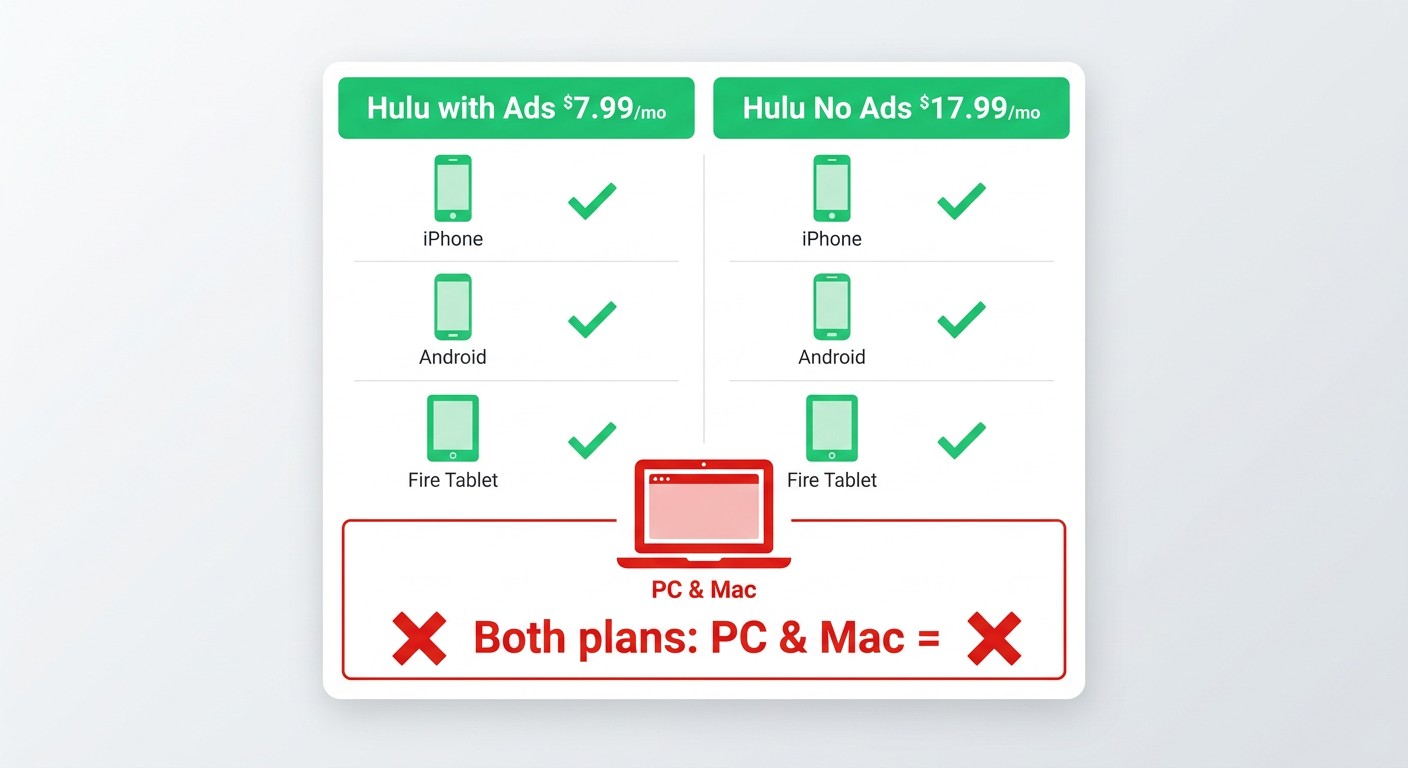
Hulu does offer an official download feature — but it excludes PC and Mac users entirely, requires a specific subscription tier, and puts strict time limits on every file. Here's what you need to know before assuming you can just hit a download button on your laptop.
Official Downloads: Mobile-Only, No Ads Plan Required
The official Hulu download feature works only on iOS, Android, and Amazon Fire tablets. If you're on a PC, Mac, Chromebook, or smart TV, the official app provides no download option at all — that gap is the core reason desktop users go looking for alternatives.
Even on supported mobile devices, downloading is gated behind the No Ads plan. As of 2026, Hulu's relevant pricing breaks down like this:
- Hulu (with Ads) — $7.99/month: Streaming only. No download feature included.
- Hulu (No Ads) — $17.99/month: Official mobile downloads included, but PC and Mac remain blocked regardless of plan.
I've seen a lot of readers assume the No Ads upgrade fixes the PC problem — it doesn't. The desktop lockout is a platform-level restriction, not a tier difference. If your workflow is laptop-based, the official path simply doesn't exist for you.
Expiry Rules, Device Caps, and the 2026 Disney+ Migration
Even when official downloads work on mobile, the files come with hard expiry constraints. Downloaded titles expire 30 days after download, or 48 hours after you begin watching — whichever comes first. Once a title expires, you need to re-download it while your subscription remains active. Hulu also caps offline storage at 25 downloaded titles across up to 5 registered devices.
In 2026, there's an additional wrinkle: Hulu's standalone app entered a phased shutdown as Hulu content migrated into the Disney+ ecosystem. Users who switched to the integrated Disney+ interface reported that their existing offline download libraries were wiped in the process. If your downloaded library matters to you, that migration carries real risk.
For Windows and Mac users looking for a practical workaround, BBFly Hulu Downloader saves content as standard local MP4 or MKV files — for personal offline viewing of content you're authorized to access, where permitted by platform terms and applicable law. A local file on your hard drive isn't subject to app-level expiry timers or interface migrations.
BBFly Hulu Downloader: A Desktop Alternative for Local Copies
BBFly Hulu Downloader is a Windows and Mac application that lets authorized Hulu subscribers save a local copy of content for personal offline viewing. It uses a native download approach — pulling the original stream directly from Hulu's servers and remuxing it into a standard container — rather than screen recording or re-encoding. That distinction matters for output quality.
Beyond Hulu, BBFly covers 60+ streaming platforms in a single tool — including Netflix, Disney+, Amazon Prime Video, Crunchyroll, Twitch, ABEMA, and more — so you're not buying a separate app for each service. Each platform comes with a 3-full-title free trial, which is enough to verify download quality, subtitle sync, and batch behavior before committing to a purchase.
Download Quality Specs at a Glance
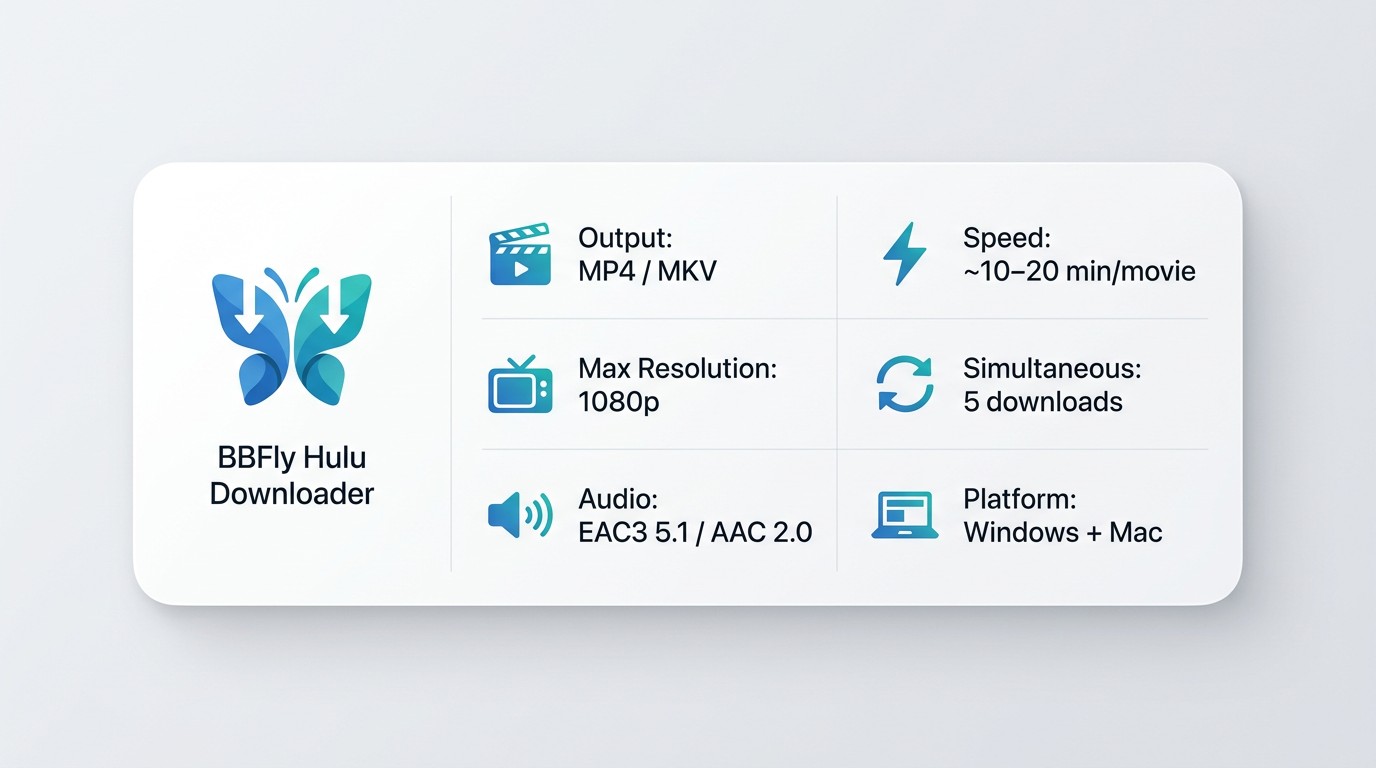
Here's what BBFly Hulu Downloader delivers on the technical side:
| Spec | BBFly Hulu Downloader |
|---|---|
| Output Format | MP4, MKV |
| Max Resolution | Up to 1080p |
| Audio Codec | EAC3 5.1 / AAC 2.0 |
| Simultaneous Downloads | Up to 5 files (additional titles queue automatically) |
| Approx. Speed | ~10–20 minutes per movie (varies by title length and connection) |
| Supported OS | Windows, Mac |
During our hands-on testing with BBFly Hulu Downloader on a Windows 11 machine, a standard 45-minute TV episode completed without interruption in under 10 minutes — the native download approach means no real-time playback lock, unlike screen-recording tools that require you to sit through the full runtime.
Hulu US and Hulu JP: Both Supported
BBFly supports both Hulu US and Hulu JP libraries. For authorized Hulu JP subscribers — expats in Japan, anime fans accessing Japan-exclusive titles, or bilingual viewers — BBFly can save a local copy for personal offline viewing, where permitted by platform terms and applicable law.
Hulu JP carries a substantial catalog of anime and Japanese drama titles that don't appear on the US service. Having the option to save a local copy without being tethered to the app or a stable connection is genuinely useful in that context. To be clear: this requires an active Hulu JP subscription — BBFly does not circumvent regional access controls or subscription requirements.
Batch Download, Audio Tracks, Subtitles, and Metadata
For anyone managing a personal media library, the feature set beyond resolution matters. BBFly handles several things that make post-download organization practical:
- Batch download: Queue an entire TV season at once; BBFly handles up to 5 simultaneous downloads with the remainder in queue.
- Audio track selection: Choose from available audio languages before downloading — useful for dual-language content or accessibility tracks.
- Subtitle download: Download subtitle tracks alongside the video; BBFly auto-detects available subtitle languages based on the content's available tracks.
- Metadata write: Title, cast, season number, episode name, and cover art are embedded in the output file — your media server (Plex, Infuse, Jellyfin) picks it up without manual tagging.
- Series follow: Enable auto-download for ongoing series so new episodes are saved locally as they release on Hulu.
I've been burned by tools that download video but strip the metadata, leaving you with a folder full of files named by episode ID. Getting title, season, and cover art written directly into the MP4 is the kind of detail that makes the difference between a usable local library and a mess.
How to Download Hulu Videos with BBFly: Step-by-Step
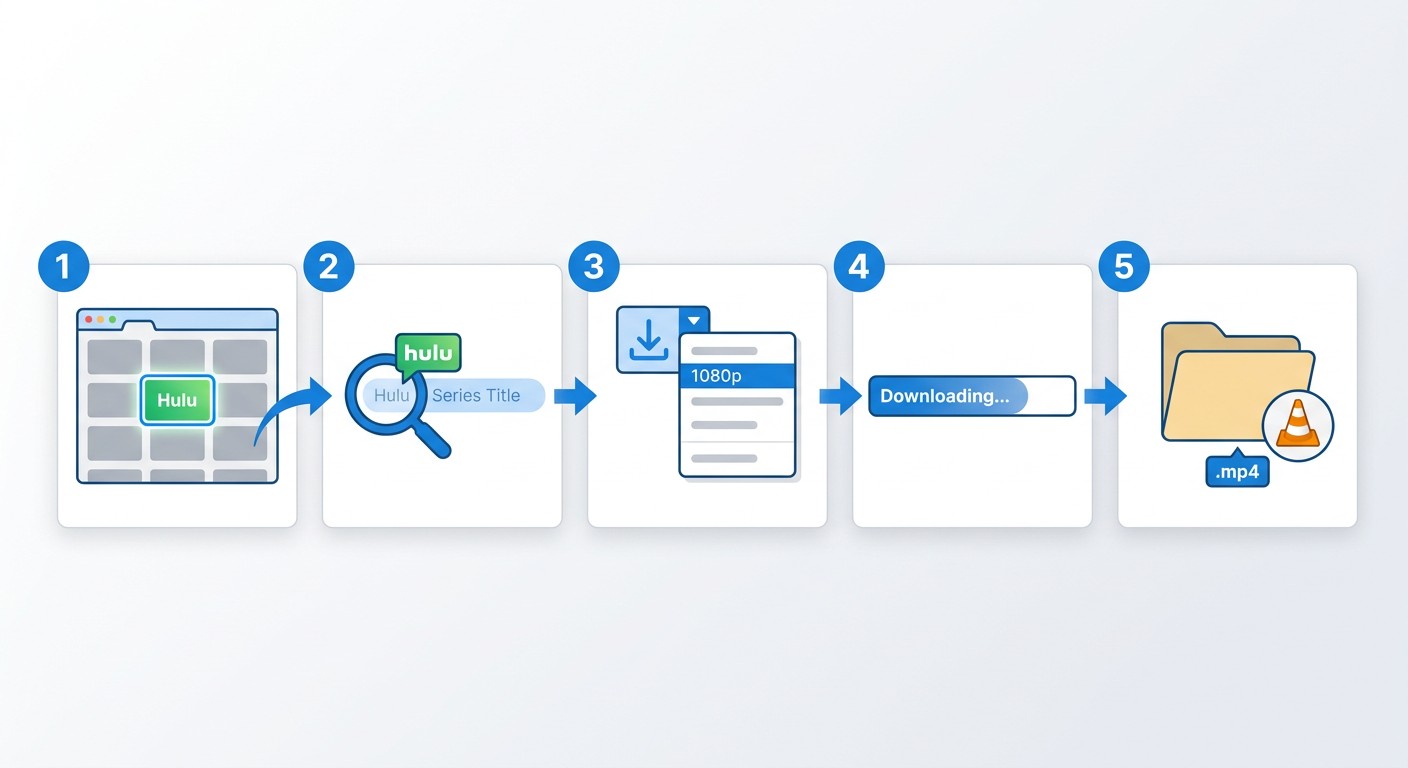
The process is straightforward once BBFly is installed. Here's the full sequence from setup to local file.
Prerequisites: What You Need Before You Start
Before you download anything, confirm you have both of these:
- An active Hulu subscription: Any Hulu plan works with BBFly — you are not required to have the No Ads plan (that restriction applies only to the official Hulu mobile app). You do need valid credentials to sign in via BBFly's built-in browser.
- BBFly Hulu Downloader installed on Windows or Mac: Download and install the application from the official BBFly site. The installer is straightforward on both platforms.
Steps 1–5: From Launch to Local File
Once prerequisites are in place, follow these steps:
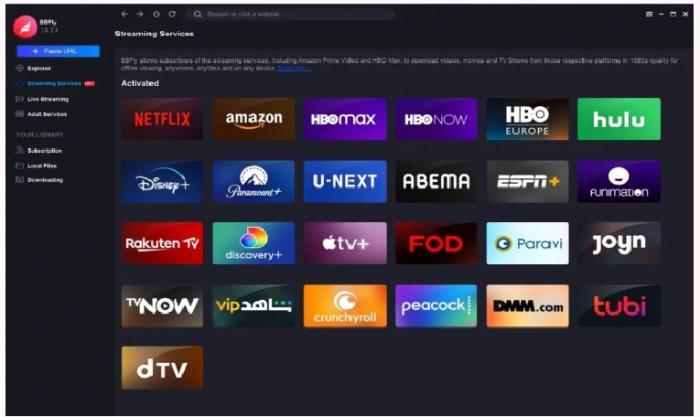
- Launch BBFly and open the Hulu tile. Start the BBFly application. In the left panel, click Streaming Services. From the platform grid, select the Hulu tile. BBFly's built-in browser loads Hulu's sign-in page. Completion state: You're signed in and can browse Hulu's catalog normally within the BBFly window.
- Find your title. Use the built-in browser's search bar or navigate to a show or movie directly. Browse as you normally would on Hulu — search, browse by genre, or go straight to a series page. Completion state: Your target title's page is open inside BBFly.
- Trigger the download panel. Once you're on a title's page, a download icon appears in the top-left corner of the BBFly window. Click it. A settings panel opens where you select resolution (up to 1080p), audio track language, and subtitle track. Completion state: Download options panel is open with your preferred settings selected.
- Start or queue the download. Click Download Now to begin immediately, or Add to Queue to stack it with other titles. BBFly processes up to 5 downloads simultaneously; anything beyond that waits in the queue automatically. Completion state: A progress bar appears for your download, or the title appears in the queue list.
- Retrieve your local file. When the download completes, BBFly saves the MP4 (or MKV) to your designated local storage folder. Open that folder directly from the BBFly interface or navigate to it in Finder / File Explorer. The file includes embedded metadata — title, season, episode name, cover art — ready for any local media player or server. Completion state: A standard MP4 or MKV file is in your local storage folder, playable in VLC, Infuse, Plex, or any compatible player.
After testing this workflow on a 2023 MacBook Pro running macOS Sequoia with a Hulu US account, the built-in browser loaded the catalog reliably and the download panel appeared consistently across both movie and series pages. Queue management for a 10-episode season worked without manual restarts.
Personal Use, Legal Boundaries, and Platform Terms
This is worth being direct about, because the legal landscape around third-party downloading tools is genuinely unsettled.
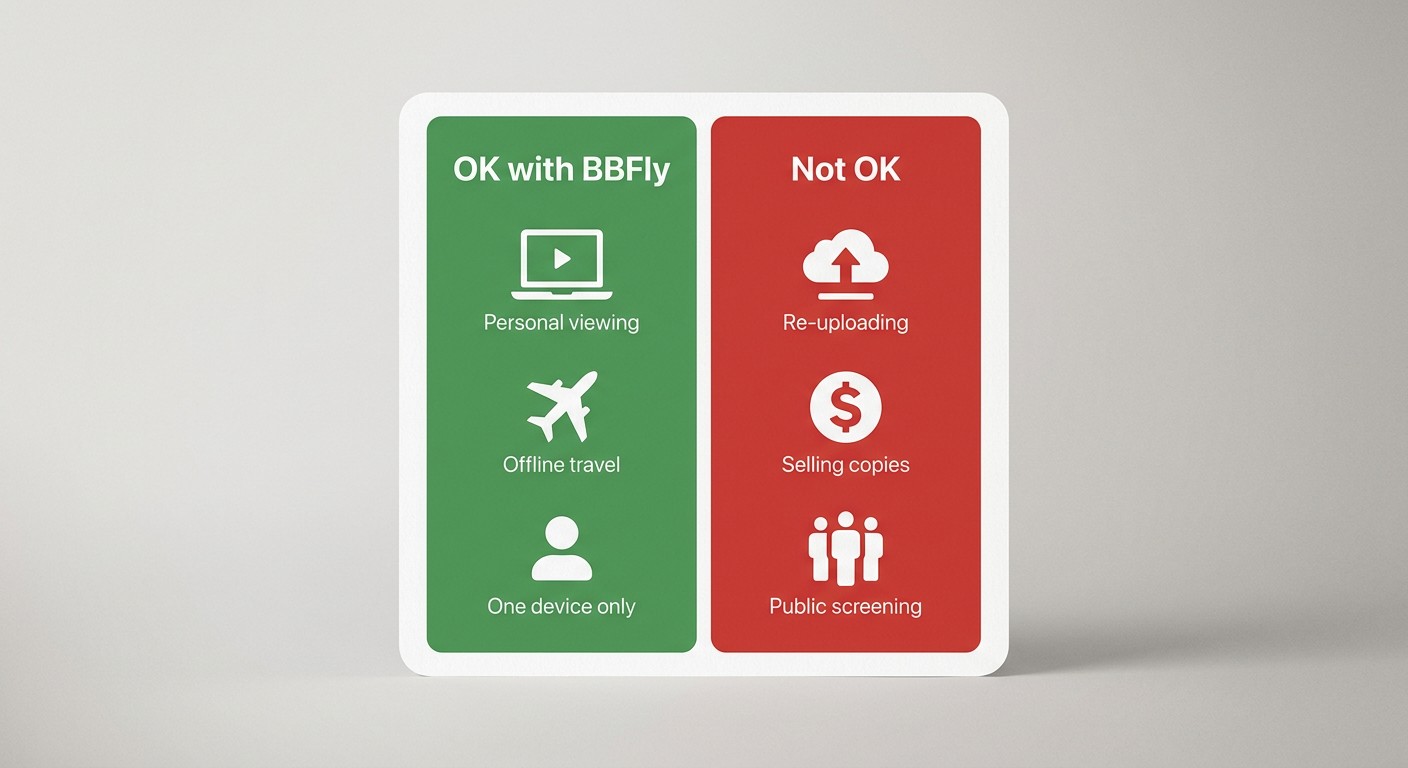
BBFly Hulu Downloader is intended as a desktop alternative for saving a local copy of Hulu content for personal offline viewing of content you're authorized to access, where permitted by platform terms and applicable law. It requires an active Hulu subscription — it does not provide any means to access content without paying for it.
That said, a few boundaries apply:
- Hulu's Terms of Service prohibit redistribution of downloaded content. Do not share, upload, or redistribute files saved with BBFly. Personal viewing is a different matter from distribution.
- DMCA gray area: Personal-use copying of streaming content by paid subscribers occupies a contested legal space in the United States. It is not a clearly established right under current law, and it is not a clearly established violation either — but it has not been litigated to a settled conclusion. Proceed with that context in mind.
- No redistribution, no commercial use: Any use beyond personal offline viewing — sharing with others, posting clips, commercial screening — falls clearly outside the intended use case and outside what any reasonable reading of fair use would cover.
If you're a paid Hulu subscriber saving a show to watch on a plane next week, that's the use case BBFly is built for. If you're looking to build a shareable library or sidestep a subscription entirely, that's a different thing — and not what this tool is designed to do.
More Readings:
Frequently Asked Questions
Can you download Hulu shows on a PC or Mac?
Not through the official Hulu app. Official Hulu downloads are restricted to iOS, Android, and Amazon Fire tablets — PC, Mac, Chromebook, and smart TVs are not supported regardless of subscription plan. BBFly Hulu Downloader is a desktop alternative for Windows and Mac users, for content you're authorized to access, where permitted by applicable law.
Do you need a No Ads plan to download Hulu officially?
Yes. The official Hulu download feature requires the No Ads plan, priced at $17.99/month as of 2026. The ad-supported plan at $7.99/month does not include the download feature. Even with the No Ads plan, PC and Mac users are still blocked — the restriction is device-level, not just plan-level.
How long do official Hulu downloads last before they expire?
Official Hulu downloads expire 30 days after download, or 48 hours after you start watching — whichever comes first. Once expired, you need to re-download the title while your subscription is still active. Hulu also caps offline storage at 25 titles across up to 5 registered devices.
Is it legal to use a third-party Hulu downloader?
Third-party downloading tools occupy a legal gray area under U.S. copyright law. BBFly is intended for personal offline viewing of content you're authorized to access, where permitted by platform terms and applicable law. Do not redistribute downloaded files. Personal-use copying by paid subscribers is a contested legal space — not a cleared right, but not a settled violation either.
What devices officially support Hulu offline downloads?
Official Hulu downloads work on iOS, Android, and Amazon Fire tablets. PC, Mac, Chromebook, and smart TVs are not supported by the official Hulu app's download feature.
What happened to Hulu in 2026 — can I still access my downloaded shows?
The standalone Hulu app entered a phased shutdown in 2026 as it migrated into the Disney+ ecosystem. Users who switched to the integrated interface reported their existing offline download libraries were wiped. Local MP4 or MKV files saved via BBFly reside on your hard drive and are not affected by app-level migrations or account interface changes.
What is the best Hulu downloader for Windows and Mac?
BBFly Hulu Downloader supports both Windows and Mac, downloads up to 1080p MP4 or MKV with EAC3 5.1 audio, and covers 60+ streaming platforms in one tool. It offers 3 full-title free trials per platform — enough to test actual download quality, subtitle sync, and batch behavior before purchasing.