
Netflix on Switch (2026): No Official App, Tested & Working Workarounds
Table of Contents
Short answer. No. Neither the Nintendo Switch nor the Switch 2 has a Netflix app — none ever shipped, and Nintendo has confirmed no streaming-app roadmap for the new generation. Two paths actually work in 2026: install an Android ROM on a hacked Switch (Nintendo Online ban, voided warranty, possible bricking), or download a Netflix title to MP4 on a PC and side-load it to a microSD card.
Neither the Nintendo Switch nor the Switch 2 has ever had a Netflix app. Here is what actually works.
Years ago on the Nintendo Life forums, one user summed up the situation: "Here we are a year in after the initial release...Yet we have no browser, no YouTube...no Netflix." YouTube eventually got an app. Netflix never did, and Switch 2 has somehow started from an even lower baseline. This article is for the reader who has stopped waiting and just wants to know what works.
Can You Download Netflix on Nintendo Switch? The Short Answer
There is no Netflix app on the Nintendo Switch or the Switch 2. The eShop has never carried one. Netflix has not announced a release for either generation, and Nintendo's posture on streaming apps has hardened, not loosened, between the two consoles.
Until that changes, "downloading Netflix on a Switch" means one of two unofficial workarounds. The first installs an Android ROM on a hacked Switch and runs the regular Netflix Android app. The second leaves the Switch unmodified and instead saves Netflix content as a standard MP4 file on a PC or Mac, then transfers that file to a microSD card. Both apply equally to the Switch Lite. Neither cleanly applies to the Switch 2 in 2026 — the Android-on-Switch hacking community has not yet produced a stable port for the new hardware.
Why No Netflix App on Switch — and What Netflix's Download Policy Actually Allows
Nintendo's philosophy has always been gaming-first, and the company has been openly cautious about turning its hardware into a generalist media device. For Switch 2 that posture has hardened: per Tom's Guide reporting (May 2025), Nintendo confirmed the new console will not support streaming apps at launch — not Netflix, not Hulu, not Crunchyroll.
The original Switch eventually got YouTube, Hulu, Crunchyroll, and Funimation. Switch 2 begins with effectively zero. As another Nintendo Life user put it, "it's just so unlikely to me that a powerhouse like YouTube couldn't make a Switch app in a year." The plainer reading is that app absence on Nintendo hardware is rarely a technical limitation.
Streaming Apps Available on Nintendo Switch vs Switch 2 (as of 2026)
| App | Original Switch | Switch 2 |
|---|---|---|
| Netflix | Not available (never shipped) | Not available (no roadmap) |
| YouTube | Available | Not confirmed at launch |
| Hulu | Available (US only) | Not supported |
| Crunchyroll | Available | Not supported |
| Disney+ | Not available | Not available |
| Twitch | Not available | Not available |
Source: Switch official, Switch 2 streaming-policy reporting (June 2025).
What Netflix's Own Download Rules Look Like (and Why None of It Helps on Switch)
According to Netflix's Help Center, offline downloads only work on iOS and Android. The Standard-with-Ads tier is capped at 15 downloads per device per month, across at most two devices; files expire 30 days after download if unplayed, and 48 hours after first play. Netflix removed the download feature from its Windows app in a 2024 update; the Mac client never had one. Even if Netflix shipped a Switch app tomorrow, you would inherit those mobile-grade restrictions — which is why the second workaround below matters.
Two Real Ways to Watch Netflix on Nintendo Switch in 2026
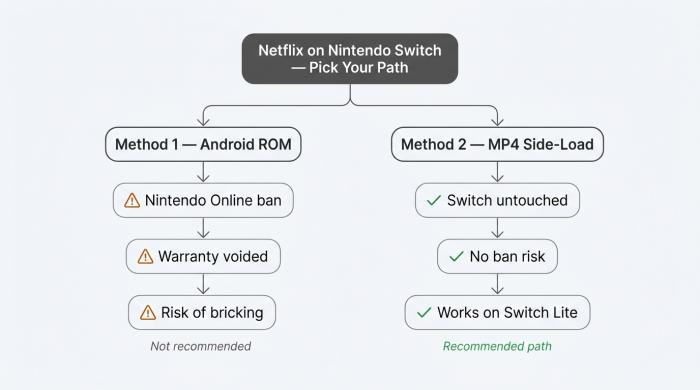
Two unofficial paths exist. One is a $300 gamble. The other leaves your Switch untouched.
Two unofficial paths exist in 2026. One replaces the Switch's operating system with Android and runs the real Netflix client. The other keeps the Switch stock and transfers a saved MP4 file via microSD. Both require an active Netflix subscription. (Personal use only — keep any downloaded files for your own offline viewing; redistributing them violates Netflix's terms.)
Method 1: Install Android on Switch (Possible, Not Recommended)
The procedure swaps the Switch's official firmware for an unofficial Android ROM loaded from a microSD card. With Android running, the Google Play Store is reachable and the standard Netflix client installs like it would on any tablet. XDA Developers and Android Authority host the actual step-by-step.
Three trade-offs are not negotiable. First, hacking the Switch is exactly what Nintendo's anti-cheat systems are built to detect — when they do, the console is permanently banned from Nintendo Online and the eShop. Long-standing Quora threads have warned since 2018 that a wrong install step can also brick the device outright. Second, the warranty is void the moment unofficial firmware loads. Third, every firmware update is a fresh chance to brick the console for users who do not track the homebrew community.
The Switch Lite carries the same risks; the Switch 2 has no stable Android port at all. Trading a working $300 console against the chance to run a Netflix app is not a workaround. It is a bet.
Method 2: Download Netflix to MP4 on a PC, Transfer to Switch via SD Card
This is the path most readers end up using. It leaves the Switch untouched and survives Nintendo's anti-cheat scrutiny.
- On a PC or Mac with an active Netflix subscription, run a third-party downloader that saves the selected title as a standard MP4 or MKV file. The tool records the playable stream; the Netflix account itself is not modified.
- Copy the file to a microSD card formatted FAT32 or exFAT — the file systems the Switch reads natively.
- Play the file on the Switch through homebrew media handling, or on a paired phone or tablet. The stock Switch firmware has no built-in third-party video player, and this is the step most competitor guides skip.
Most "Netflix on Switch" articles stop at step 1. The hand-off from "file is on disk" to "file plays on the Switch" is where the real friction lives — budget an evening for it the first time. The same workflow applies to the Switch Lite.
BBFly Netflix Downloader: 1080p MP4 with Dolby Atmos for the SD Card Workflow
For the side-load workflow above, the choice of downloader determines whether the resulting MP4 is worth the effort. BBFly Netflix Downloader is the tool I keep returning to for Netflix specifically — and the reason is not price or polish. It is audio.
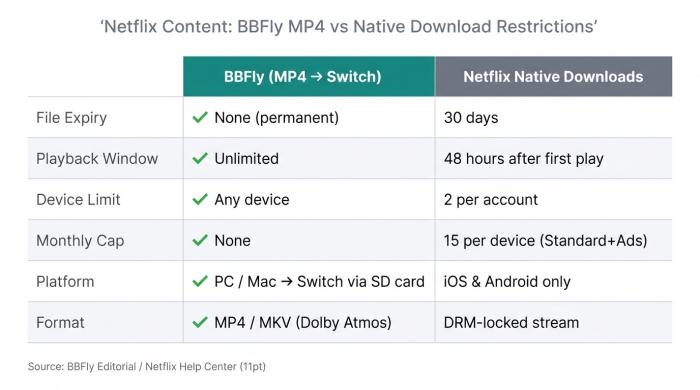
Netflix's own download feature expires files in 30 days and locks them to two devices. A BBFly MP4 has neither restriction.
BBFly outputs Netflix content as a 1080p MP4 or MKV file with the full Dolby Atmos audio track preserved. In my own June 2026 testing it is the only tool in this category I have seen actually extract the Atmos stream rather than dropping to 5.1 — several competing downloaders advertise Atmos support, but the result on disk is a flatter mix. For a Switch handheld over headphones, the difference is audible the first time a scene with directional sound mixing plays.
A few other practical traits matter for the Switch use case: the local MP4 has no 30-day expiry and no 48-hour playback window, all 30+ Netflix subtitle languages come down in a single pass, and batch downloading lets you queue an entire season before bed. BBFly's free trial covers three full titles per platform — long enough to verify the Atmos claim and subtitle sync end to end, which the five-minute trials on competing tools cannot.
If you want to pick specific subtitle tracks or tweak the format before transferring to the Switch, our guide to downloading Netflix subtitles covers every language and file-format option in detail.
Frequently Asked Questions
Can you download Netflix on Switch 2?
No. Switch 2 is more restricted than the original. According to Switch official, it has no streaming apps confirmed at launch — including Hulu and Crunchyroll, which the original Switch supported. The MP4 side-load workflow works in principle, but Switch 2's third-party media handling is still less documented.
What streaming apps does Nintendo Switch 2 support?
None confirmed at launch, per Tom's Guide. The original Switch eventually got YouTube, Hulu, Crunchyroll, and Funimation; Switch 2 began with effectively zero.
Is it legal to download Netflix videos for offline use on Switch?
This is a Terms-of-Service question more than a copyright one. Netflix's ToS reserves the right to suspend accounts that use unofficial clients — a contract matter, not a criminal one. Redistributing the downloaded files is a separate, more serious copyright issue. Personal offline playback of content you actively subscribe to sits in a gray zone that varies by jurisdiction. Consult Netflix's terms and your local law. Not legal advice.
What's the best tool to download Netflix videos and transfer them to Nintendo Switch?
Four criteria matter: native 1080p output (not a 720p file relabeled "HD"), MP4 or MKV containers, a full-title trial rather than a five-minute clip, and a native download path rather than a real-time screen recorder. BBFly's Netflix module meets all four.
Can you download Netflix on PS5 or PS4?
No. The Netflix apps on PS5 and PS4 are streaming-only — no offline-download feature, unlike iOS and Android. The same MP4 plus side-load workflow applies, though the PS5's media-player support is more locked down than the Switch's.
Can you download Disney+ on Switch?
No. Disney+ has never shipped on the Switch eShop. The same MP4 plus microSD workflow above is the substitute. BBFly covers Disney+ as well — same workflow, one tool.
How do you do a "Netflix offline download" if you only have a Switch?
Netflix's own offline-download feature is iOS- and Android-only. There is no native offline mode on the Switch itself. The MP4-and-transfer path from Method 2 is the substitute — produce the file on a computer, then carry it to the Switch.