
How Long Do Netflix Downloads Last? Timers, Expiry, and Renewal (2026)
Table of Contents
Netflix download expiration varies by title. Many downloads allow roughly 7–30 days before playback and about 48 hours after playback begins, but the deadline shown in the Netflix app controls the specific title. Windows and Mac have no official Netflix download option.
Two readers wrote me in the same week with the same question. One had been told the answer was 30 days. The other watched a saved show vanish overnight. Both were right. Netflix downloads are governed by three different timing conditions, and the answer depends on which condition applies. As one Quora user put it: "Each Netflix download has a different expiration time. Titles that are no longer available on Netflix will expire when they leave the service, regardless of when they were downloaded."
Netflix downloads run on three separate timers — knowing which one caught you is the first step.
How Long Do Netflix Downloads Last?
Netflix download expiration varies by title. Many downloads allow roughly 7–30 days before playback and about 48 hours after playback begins, but the deadline shown in the Netflix app controls your specific title. Check that timer before relying on a download offline.
For a trip, I would trust the title-specific timer over any generic 30-day rule. Licensing terms, playback status, and account conditions can change the result, so the app's displayed deadline is the useful answer to how long Netflix downloads last.
Common Timers, Not a Universal Rule
Most downloads fall into a few familiar patterns, but Netflix does not apply one expiration window to every movie or episode. An unopened title may remain available for 7–30 days, while a title that has started playing may give you about 48 hours to finish. A title can also become unavailable sooner if it leaves the Netflix catalog.
Plan limits are a separate issue from the Netflix download timer. They affect how many downloads or devices your account can use, while the title page and Downloads list show whether a particular file is still available.
Netflix Download Expiration at a Glance
| Expiry trigger | Typical timing | Reader action |
|---|---|---|
| Unplayed title | About 7–30 days | Check the displayed deadline |
| Playback started | About 48 hours | Finish before the timer ends |
| In-app deadline displayed | Title-specific | Use this date as the guide |
| Title leaves Netflix | May become unavailable sooner | Renew only if still eligible |
| Account canceled | Downloaded titles are deleted | Download again after restarting |
Source: Netflix Help Center (help.Netflix.com/en/node/54865 and /node/133763).
Check a Title's Expiration Timer
To check how long a specific Netflix download will last, open Downloads, select the title, and read the displayed expiration date or remaining-time indicator. While you are still online, start playback briefly to confirm that the file works before a flight or another long period without a signal.
The exact timer is more reliable than memorizing a standard window because Netflix applies download eligibility and expiration rules at the title level.
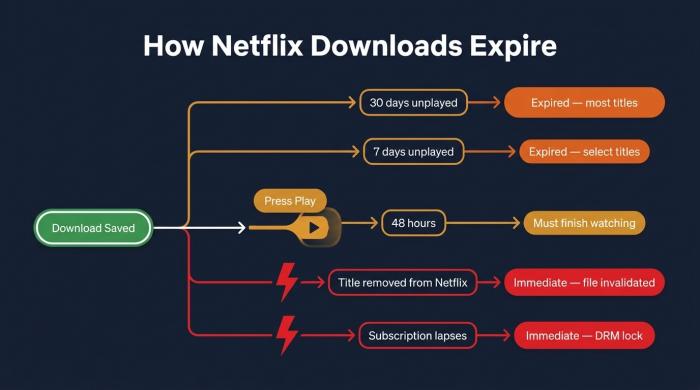
A Netflix download can follow different clocks, so the deadline shown for the title is the one that matters.
Why Some Titles Have No Download Button
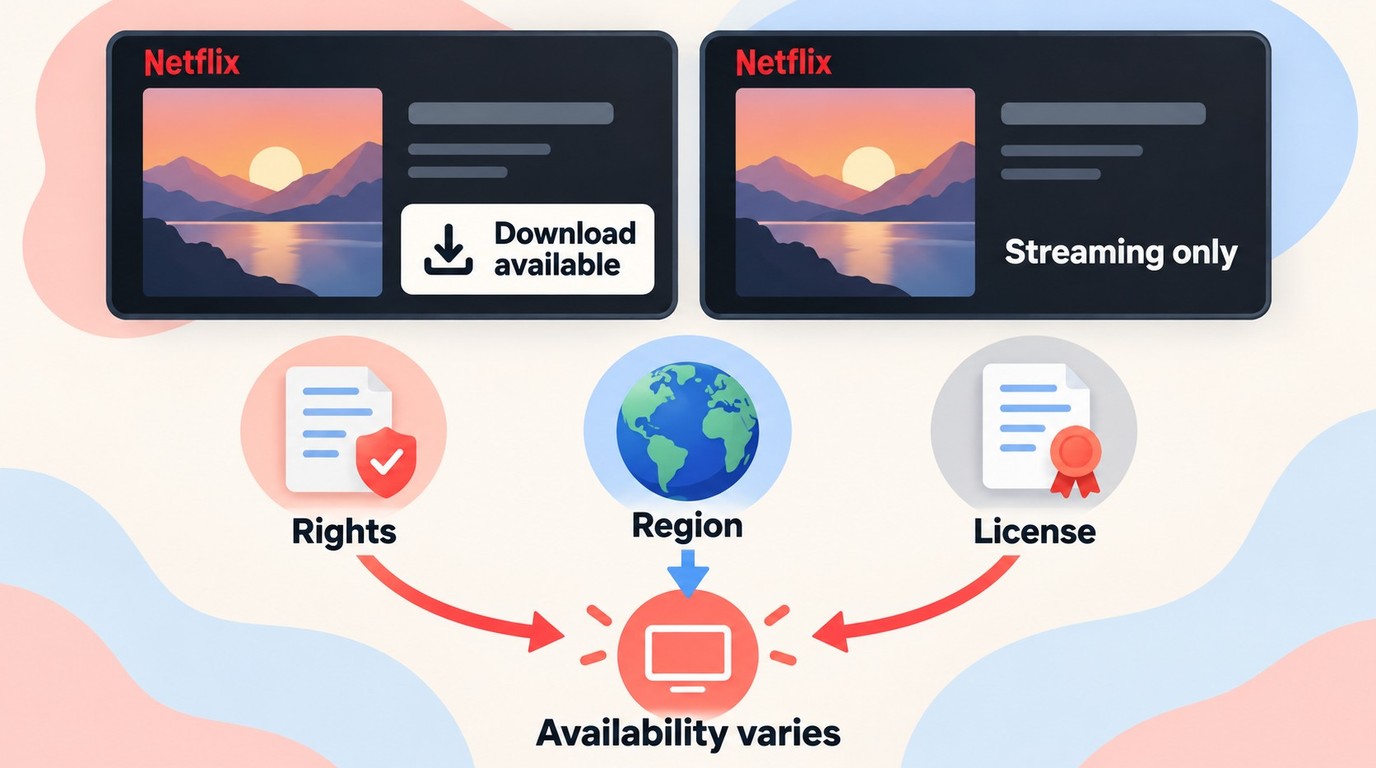
A movie or show can be available to stream without being eligible for offline download. Netflix determines download availability title by title, based on rights, the content provider, licensing cost, seasonal agreements, and region.
That means the absence of a Download button is not necessarily a device problem or a plan error. If the title page offers streaming but no download control, Netflix is not offering that title for offline viewing through the official app in your current region.
Travelers should check the title page before building a flight playlist. A show that streams at home may have different download eligibility elsewhere, so confirm the button and test the download while you still have a reliable connection.
Why Netflix Downloads Expire
Netflix licenses much of its catalog from studios and other rights holders. Those agreements can limit how long a title may remain available for offline viewing, which is why expiry timing differs from one movie or episode to another.
Several conditions affect a Netflix download. A content license sets the offline window, the app enforces that window on the device, and some titles also have limits on how often they can be downloaded within a year.
There is another expiry path when a title leaves the catalog. If Netflix no longer has the rights to a movie or show, the downloaded copy can become unavailable even when its original timer has not finished.
Account status matters as well. When a Netflix account is canceled, Netflix deletes its downloaded titles. Restarting membership does not restore those files; the titles must be downloaded again. In practical terms, cancellation is not a recovery method for an existing app download.
If you're curious about where Netflix downloads are stored on your device, the path varies by platform, but the location does not change the title's expiration or account rules.
Streaming downloads feel temporary because they are tied to licensing, playback, and account conditions rather than treated as ordinary media files.
Renew an Expired Netflix Download
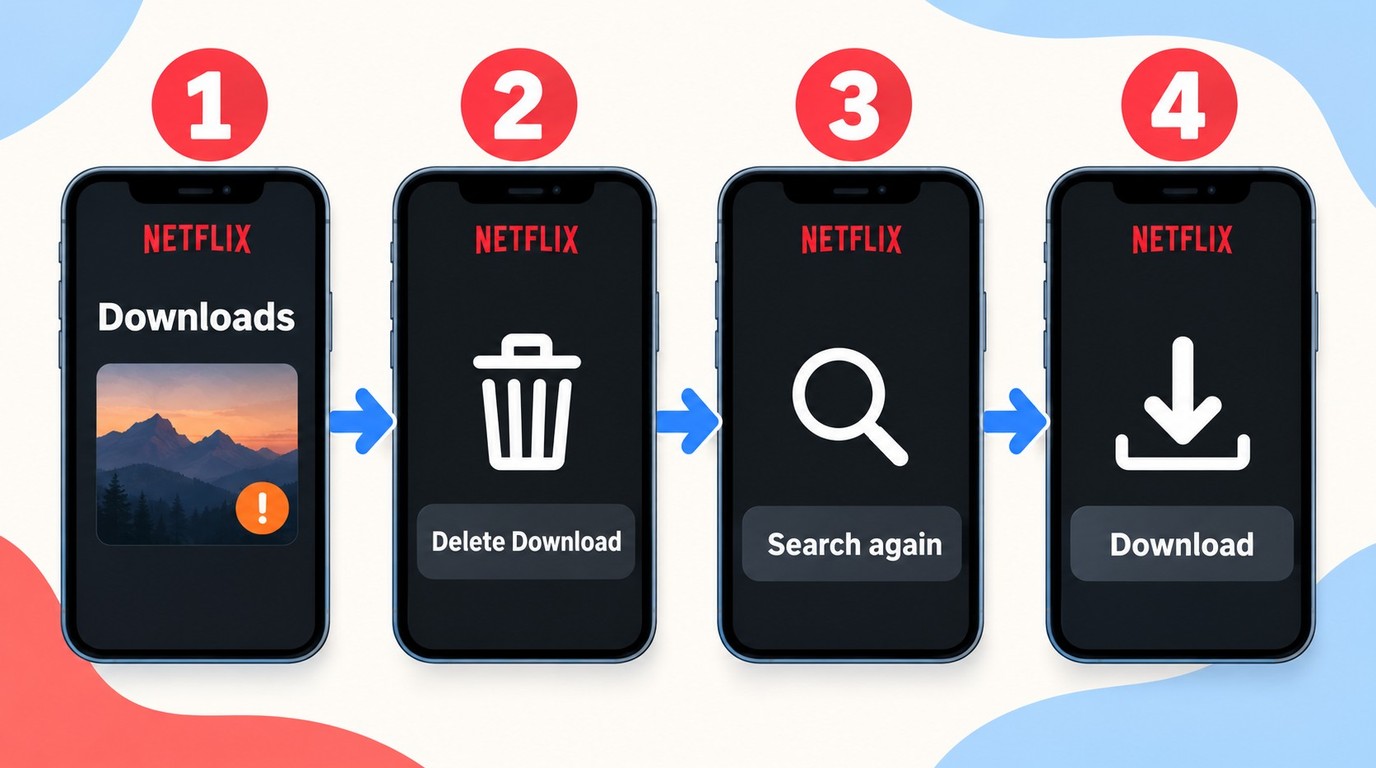
To renew an expired Netflix download, open the Netflix mobile app, remove the expired title from Downloads, search for it again, and start a fresh download if the title is still eligible. There is no in-place refresh button. If the issue extends beyond one expired title, the Netflix download not working troubleshooting steps cover the broader causes.
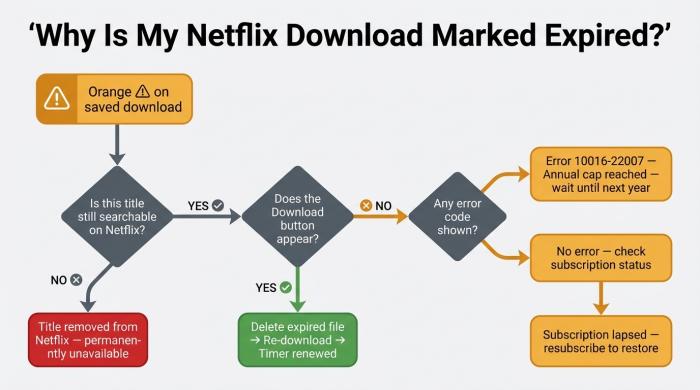
The download-status icon narrows the problem, but the title page confirms whether a fresh download is still possible.
The sequence:
- Open Netflix on iOS, Android, iPad, or ChromeOS and make sure the device is online.
- Open Downloads and select the expired title or its download-status icon.
- Choose Delete Download when Netflix displays the expired-download options.
- Search for the title again. If it is still eligible, the Download button appears on the title page.
- Tap Download to create a fresh offline copy.
- On iPhone or iPad, check that Set Automatically is enabled for the device's date and time.
Source: Netflix Help Center, "Downloaded title says 'Expired'" (help.Netflix.com/en/node/54865).
Best for: a title that is still searchable and still offers a Download button. Not ideal for: a title removed from the catalog, an account that has been canceled, or a device that cannot connect to Netflix.
What the Exclamation Icon Means
An orange exclamation icon means Netflix needs attention on that download, but it does not identify one universal cause. Check the title's displayed deadline first, then consider whether playback has started, the title is still available in your region, or the account status has changed.
If the title remains searchable and the Download button is available, delete the old copy and download it again. If the title page has no Download button, the title may not be eligible in that region.
When Renewal Fails
Work through these checks in order when a Netflix download keeps stopping or will not renew:
- Title eligibility. Search for the title again. A streamable title may have no Download button because availability varies by rights, provider, region, or licensing terms.
- Displayed deadline. Check the timer in Downloads to see the remaining time for that title.
- Account status. Confirm that the current membership is active before downloading again.
- Download limits. Standard with Ads has a 15-downloads-per-device-per-month limit, and some titles have an annual per-title limit. Error code 10016-22007 can appear when that title limit is reached.
- Connection and device time. Renewal needs an internet connection. On iPhone or iPad, also confirm that the date and time are set automatically.
If the title is unavailable or the account limit applies, deleting the file will not create a new renewal option. For a trip, resolve these checks while online rather than waiting until the download is needed.
A Desktop Local-File Option
Netflix's official app downloads use title-specific expiration rules, so they are not designed for long-term offline access. For a short trip, I would use the official app when the displayed title timer fits; for a long trip or Windows and Mac viewing, I would consider a desktop local-file workflow only when authorized by platform terms and applicable law.
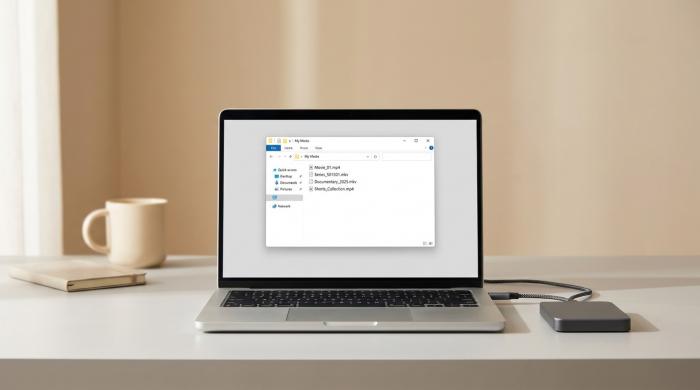
A local file follows a different workflow from an in-app download, but its use still depends on authorization and applicable terms.
BBFly Netflix Downloader is a Windows and Mac desktop option for saving authorized Netflix content as local files for personal offline viewing. It supports output up to 1080p in MP4 or MKV, preserves available subtitles, and uses native download with remuxing rather than screen recording and re-encoding. Its Netflix workflow also supports Dolby Atmos audio. For this particular problem, I would choose a local-file workflow only when the official mobile download timer does not fit the trip or viewing setup; otherwise, the Netflix app is simpler.
Personal-Use and Platform Boundaries
Official Netflix downloads are encrypted and app-bound; any local-file workflow should be limited to content you are authorized to access and used consistently with platform terms and applicable law.
BBFly requires an active Netflix subscription. Local files are intended for your own offline viewing, not resale, public sharing, commercial use, or redistribution.
Pre-Trip Reliability Checklist
Before leaving, open each planned title in Netflix Downloads and read its displayed deadline or remaining-time indicator. Play the title briefly while online, confirm that the required subtitles are available, and check that the destination device has enough storage. If you are traveling between regions, verify the titles before departure because catalog availability can differ after a location change.
For a long flight or a period without reliable internet, make these checks before the last minute. A timer that looks acceptable at home is a poor travel plan if the title is not eligible in the destination catalog or the device cannot access the saved file.
Netflix Download FAQ
Does Netflix Have a Two-Minute Rule?
Netflix does not provide a separate two-minute extension; use the title's playback window and displayed deadline. A short preview does not reset or lengthen the expiration period.
Why Did My Netflix Download Disappear While Traveling?
Check the title in the Netflix catalog and the Downloads list separately. If the title is still streamable but no longer appears as a download, review its current eligibility and displayed deadline before assuming the remaining device storage means the download is usable.
How long does it take to download a Netflix movie?
For a two-hour movie at 1080p, expect roughly 5–25 minutes depending on your connection. On home Wi-Fi at 100 Mbps or better, a feature film usually lands in well under 10 minutes. On hotel Wi-Fi, plan for the high end. The app downloads over Wi-Fi only by default; cellular downloads are a toggle in settings. Smart Downloads (ad-free plans only) pre-fetches the next episode of a series overnight while the device is on Wi-Fi and charging. You never watch that timer. If your goal is to watch downloaded Netflix on a plane, this Smart Downloads behaviour is especially useful — preloading episodes the night before a flight means you board with a full queue already saved.
How many downloads can I have on Netflix at once?
Per Netflix's Help Center: Standard with Ads — 2 devices, Standard — 2 devices, Premium — 6 devices. Standard with Ads also carries a 15-downloads-per-device-per-month cap. Ad-free plans have no monthly cap, but the per-title annual limit still applies.
Does Netflix have a download limit per month?
The monthly cap applies only to Standard with Ads: 15 downloads per device per month , with a two-device cap. That limit is separate from a title's expiration timer and any annual per-title limit.
Can I Download Netflix on Windows?
No. Netflix removed downloads from its Windows app in 2024 when it migrated to a progressive web app. Mac has no Netflix download client either. The official routes for Netflix offline viewing on iOS, Android, iPad, and ChromeOS remain mobile and ChromeOS-based. Windows and Mac users can stream in a browser or consider a qualified desktop local-file option for authorized personal offline viewing, where permitted by platform terms and applicable law. For a broader look at how watch Netflix offline on any device actually works, including which plans support it and what the app's limits are, our full offline-viewing guide covers the end-to-end picture.

Clara Hensley
Clara explains what each streaming plan lets you download — and what to do when it doesn't.