
Disney Plus Download Limit: Rules and Tested Workarounds
Table of Contents
I've covered streaming download policies for the better part of a decade, and Disney+'s offline rules still feel less like a feature and more like a fence. Two 12-episode seasons of one Marvel or Star Wars series already exceed the 25-title download cap most write-ups report — so before you even finish the second season, the app is telling you to delete something. What follows is a sober walk through what the rules actually say, where they get contested, and what to do when the official limits stop being usable.
Here is the direct answer: Disney+ caps offline downloads at 25 titles total across up to 10 mobile devices, on the Premium (ad-free) plan only. Downloads expire 30 days after being stored if your device never reconnects, and 48 hours after you first press play. The official app has no download button on PC, Mac, or smart TVs — only iOS, Android, and Fire OS.
Note: all figures as of June 2026; verify on the Disney+ Help Center.
TL;DR — Disney+ Download Limits at a Glance
Only Premium subscribers can download anything — Basic and Standard with Ads download zero titles. The account holds up to 25 saved titles at a time, across as many as 10 mobile devices. A download needs your device online at least once every 30 days, and once you press play you have 48 hours to finish. Offline files top out at 1080p even when the title streams in 4K. And there is no official download path on Windows, macOS, or smart TVs. All figures as of 2026-06 — verify on the Disney+ Help Center.
The Official Disney+ Download Limits, Rule by Rule
Disney+'s download policy looks short on the surface and is full of edge cases in practice. Here's each rule, with the source where I could find one and an honest note where I couldn't.
Plan tier: Premium-only — Basic and Standard with Ads have zero downloads
Downloads are a Premium-tier feature. The ad-supported Standard with Ads plan (US $7.99/month) has no download button at all. Premium (US $13.99/month) is the only tier that unlocks the offline library. As of 2026-06 — see the Disney+ Help Center for current pricing.
10-device account cap (mobile devices only)
One Disney+ account can carry downloads on up to 10 mobile devices at once. The cap is account-wide, not per profile. If you've filled it, open account settings, find the device list, and remove a device you're no longer using — that frees a slot the next time you sign in on a new phone or tablet.
25 titles total — and the myth that won't die
Almost every secondary write-up on this topic states a 25-title total cap. There are dissenting voices — one Quora answer puts it bluntly: "as long as titles remain available to stream, there is no limit to the number of titles you can store" — but they're the minority. I tried to settle this against Disney+'s own help page during research and the page returned a CAPTCHA block; I couldn't fetch a primary answer. My read: treat 25 as a working ceiling, plan around it, and verify on the Disney+ Help Center directly. A figure seven secondary sources repeat isn't proof, but it isn't nothing.
30-day offline + 48-hour playback window
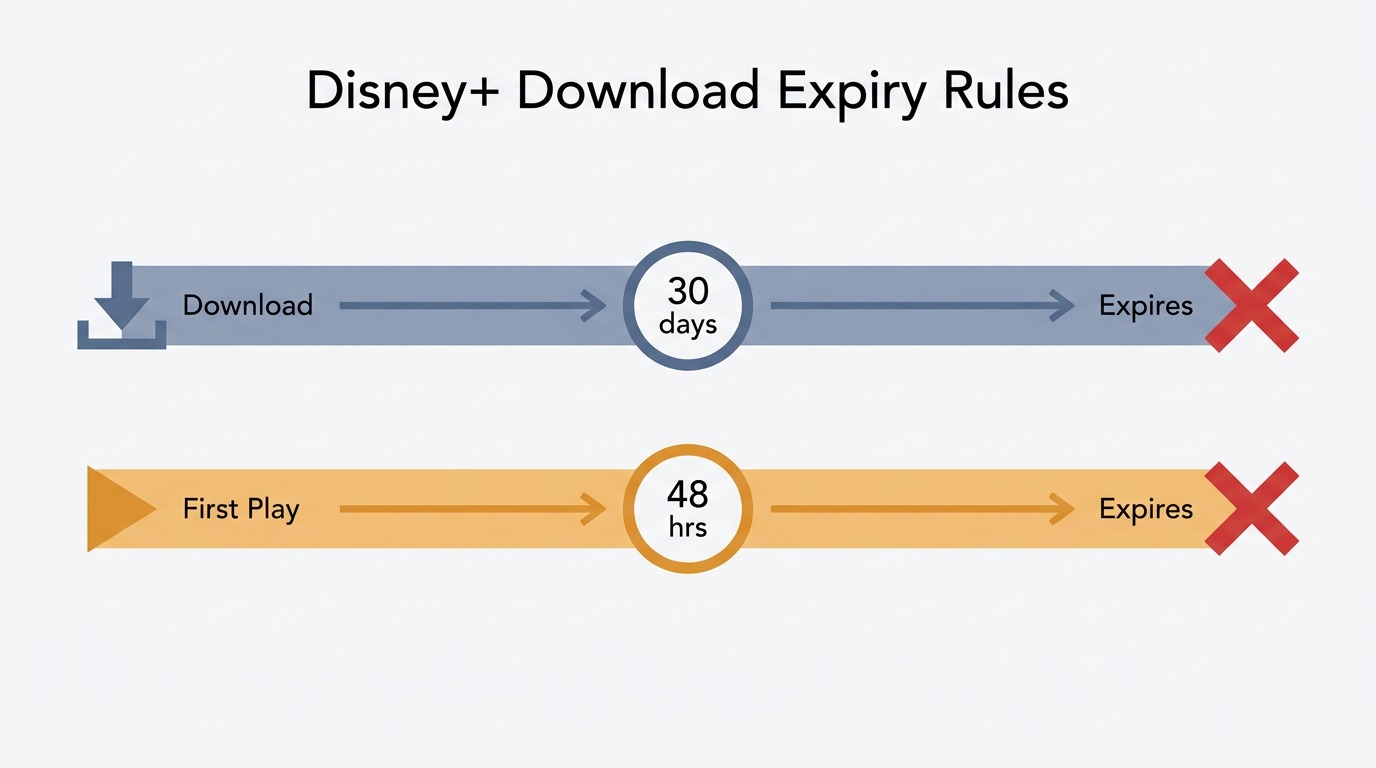
Two clocks run on every Disney+ download. According to the Disney+ Help Center, if your device doesn't connect to the internet at least once in any 30-day window, the platform removes your downloaded content. The second clock starts the moment you press play: 48 hours to finish the title before it expires. The practical lesson: don't "test-play" a movie at home if you mean to finish it on a plane two days later — you've just started the 48-hour timer.
The 1080p ceiling — downloads never hit 4K, even when streaming does
This is the rule almost nobody flags. Disney+ streams plenty of titles in 4K with HDR and Dolby Atmos — but the offline file the app produces tops out at 1080p, on every device I've checked. If a third-party tool claims a "true 4K Disney+ download," pull the resulting file into MediaInfo and check the actual resolution and HDR metadata before trusting the label. Upscaled 1080p and a real 4K master are not the same thing.
Mobile-only — no PC, no Mac, no smart TV downloads
The download button only exists in the iOS, Android, and Fire OS apps. Open the Disney+ web player on a Windows laptop or a Mac and there is nothing to tap. Smart TVs and streaming sticks are likewise stream-only. For desktop viewers, the official app has no answer.
How Disney+ Stacks Up: Download Limits vs Netflix, Max, and Hulu
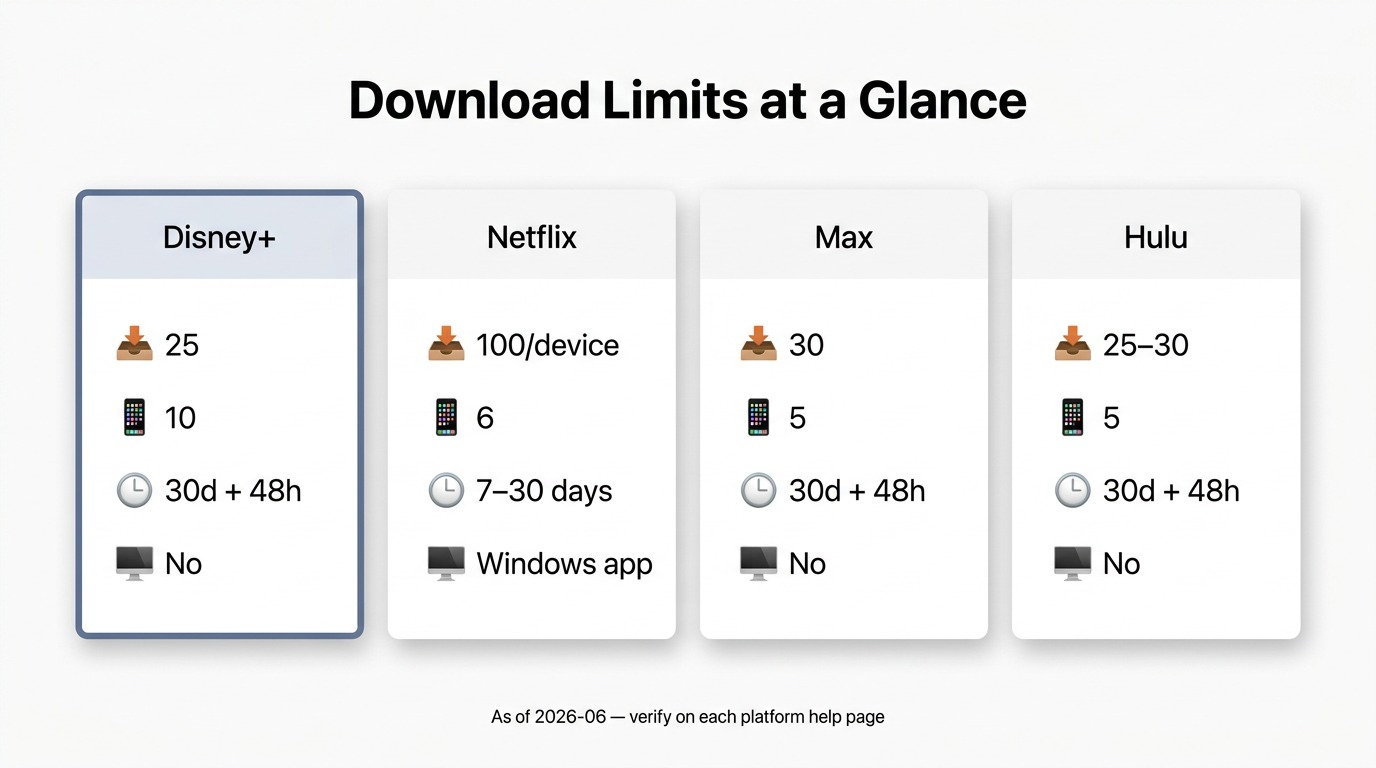
Disney+'s 25-title number looks more restrictive once you put it next to the others. Below is the side-by-side as widely reported in third-party coverage (as of 2026-06). Treat the non-Disney rows as a snapshot to verify on each platform's own help page — these policies change without notice.
Download policy at a glance: Disney+ vs Netflix vs Max vs Hulu (2026)
| Platform | Title limit | Device cap | Expiry rules | Desktop downloads |
|---|---|---|---|---|
| Disney+ Premium | 25 total across all devices | 10 mobile devices | 30-day reconnect + 48-hour playback | None (mobile only) |
| Netflix Premium | ~100 titles per device | 6 devices | Varies by title (~7–30 days) | Windows app only (per third-party reporting; no macOS app) |
| Max (Ad-Free) | 30 titles total | 5 devices | 30-day reconnect + 48-hour playback | None |
| Hulu (Ad-Free) | 25–30 titles total | 5 devices | 30-day reconnect + 48-hour playback | None |
Source: From Disney+ & Netflix's own help page.
There's a real story in that table. Disney+ ties Hulu for the lowest title cap among the major US services, and it's the only one bundling a strict 10-device limit with a 25-cap. A single-device Netflix Premium subscriber has roughly four times the title headroom that Disney+ allows them — and Netflix has a real Windows desktop client where Disney+ has none.
When the Built-In Limits Aren't Enough: BBFly's Permanent Local MP4 Files for Personal Offline Use
Please note: Third-party downloaders may conflict with Disney+'s Terms of Use. Keep any saved files for your own personal, offline viewing of content you actively subscribe to — don't redistribute, resell, or treat a saved file as a substitute for an active subscription. Where the official Disney+ app already covers your need, that's the most worry-free route.
If the official rules leave you stuck — desktop viewer, frequent traveler, or simply tired of constantly pruning your 25 slots to make room for new titles — BBFly Disney Plus Downlaoder is one tool I'd consider. To be clear about what it is: not a workaround in the bypass sense, but a separate local-file utility that produces a standard MP4 or MKV for personal offline viewing.
Two frictions matter most for Disney+.
- The desktop gap: BBFly runs on Windows and Mac, filling the PC/Mac entry point the official app doesn't offer.
- And the file itself: per BBFly's verified specs, output is a standard MP4 or MKV up to 4K with HDR10, Dolby Vision, and Dolby Atmos preserved, meaningful where the Disney+ app caps offline files at 1080p. This is the file I'd actually keep on a Plex box, alongside my own ripped library. Pricing is $99.90/year or $199.90 Lifetime (3 PCs), with a 30-day trial covering 3 full titles per platform, subject to Disney+'s terms and personal-offline-use only.
FAQ: Disney+ Download Limit
How do I fix "Disney+ download limit reached"?
Clear out titles you've finished, ones that expired, or anything you stored "just in case" months ago — that frees title slots. If it's the device side, account settings list every device holding downloads; remove the one you're no longer using. My usual move: prune watched episodes by the season before adding anything new, rather than letting the app force a delete at boarding time.
How long do Disney+ downloads last before they expire?
Two clocks. Your device must connect to the internet at least once every 30 days, or Disney+ removes the content. Once you start playback, you have 48 hours to finish. As of 2026-06 — Disney+ may revise these on its Help Center.
Does Disney+ allow downloads on a PC or Mac?
No. The official iOS, Android, and Fire OS apps are the only paths with a download button. The Windows and macOS experience is browser-only and stream-only — there is no Microsoft Store or Mac App Store Disney+ client that downloads. Desktop viewers either stream live or evaluate third-party options subject to Disney+'s terms.
What resolution and audio quality are Disney+ downloads?
Offline files in the Disney+ app top out at 1080p even on titles that stream in 4K — and on some lower-tier devices they're SD. Dolby Atmos retention in the offline file is platform- and device-dependent. If keeping the original audio master matters to you, that gap is real, and the Disney+ UI doesn't flag it anywhere I've looked.
How does the Disney+ download limit compare to Netflix?
By the widely-reported numbers, Netflix Premium allows roughly 100 titles per device on up to 6 devices; Disney+ permits 25 total across 10 mobile devices. Netflix's ceiling for a single-device user is roughly 4× Disney+'s account-wide ceiling. As of 2026-06 — verify on each platform's help page.
Is it safe to log into Disney+ from a third-party downloader?
Use judgment. Favor tools that use a proper sign-in flow over ones asking for your raw username and password in a generic form. Check the vendor's privacy policy and how long they've been around — an established, reputable tool with proper credential handling is a different proposition from a no-name installer. The login itself isn't the risk; whose hands you're putting it into is.
Where can I check the terms of use for saved Disney+ content?
The Disney+ Subscriber Agreement and Terms of Use govern what you may do with Disney+ content; personal offline use also sits inside local copyright law, which varies by jurisdiction. Check the current Disney+ legal pages and your country's rules — saved files presuppose an active subscription, and what's permitted offline is not the same everywhere.
Bottom Line: Plan Before You Hit the Wall
Disney+'s offline model is the most restrictive among the majors: small title cap, hard expiry windows, no desktop, and a 1080p ceiling even on 4K content. None of it is hidden — but none of it is friendly either. Plan downloads before you fly, prune the library before the cap forces you to, and if you need a desktop-first or permanent-local-file workflow, evaluate a tool like BBFly with the personal-use framing in mind. Verify every figure here against the Disney+ Help Center before you depend on it.