
Disney+ Device Limit 2026: Streams, Devices & Household Rules
Table of Contents
After fifteen years tracking how streamers count "devices," I still see paying subscribers blindsided by what the Disney+ plan page actually buys them. The math looks simple — pay for Premium, get four streams — but it stops mid-sentence. A second layer the marketing page barely mentions decides where those four streams can be. If I pay for four streams, why does Disney+ care whether they're on the same couch? This article tries to close that gap.
Direct answer: Disney+ Premium allows 4 simultaneous streams; Standard with Ads is capped at 2. Up to 10 devices can be registered to one account, with up to 7 user profiles on top. Figures here are as of May 2026 — Disney has reshuffled these caps before, so confirm on the Disney+ Help Center before relying on a specific number.
Quick Answer: How Many Devices Can Stream Disney+ at Once?
Per the Disney+ Help Center, four simultaneous streams on Premium and two on Standard with Ads — that is the headline number. Up to 10 devices can be registered to a single account, and a profile cap of 7 sits on top. None of those caps tell you the whole story; the household rule further down decides whether you can actually use them where you want.
The three numbers that matter (streams/devices/profiles)
- Streams: 4 (Premium) or 2 (Standard with Ads), as of May 2026 — verify on help.disneyplus.com, since Disney has reshuffled tier names and caps more than once.
- Devices registered to the account: up to 10. Each phone, tablet, Apple TV, Roku, Smart TV app, or web install counts as one slot. You manage the list under Account → Devices.
- Profiles: up to 7 per account, each with its own watchlist, recommendations, and Kids toggle.
The thing readers consistently miss: "registered" and "streaming right now" are different numbers. You can have 10 devices signed in and still be capped at 4 (or 2) playing at the same moment.
Disney+ Streaming and Device Limits Explained (Premium vs Standard with Ads)
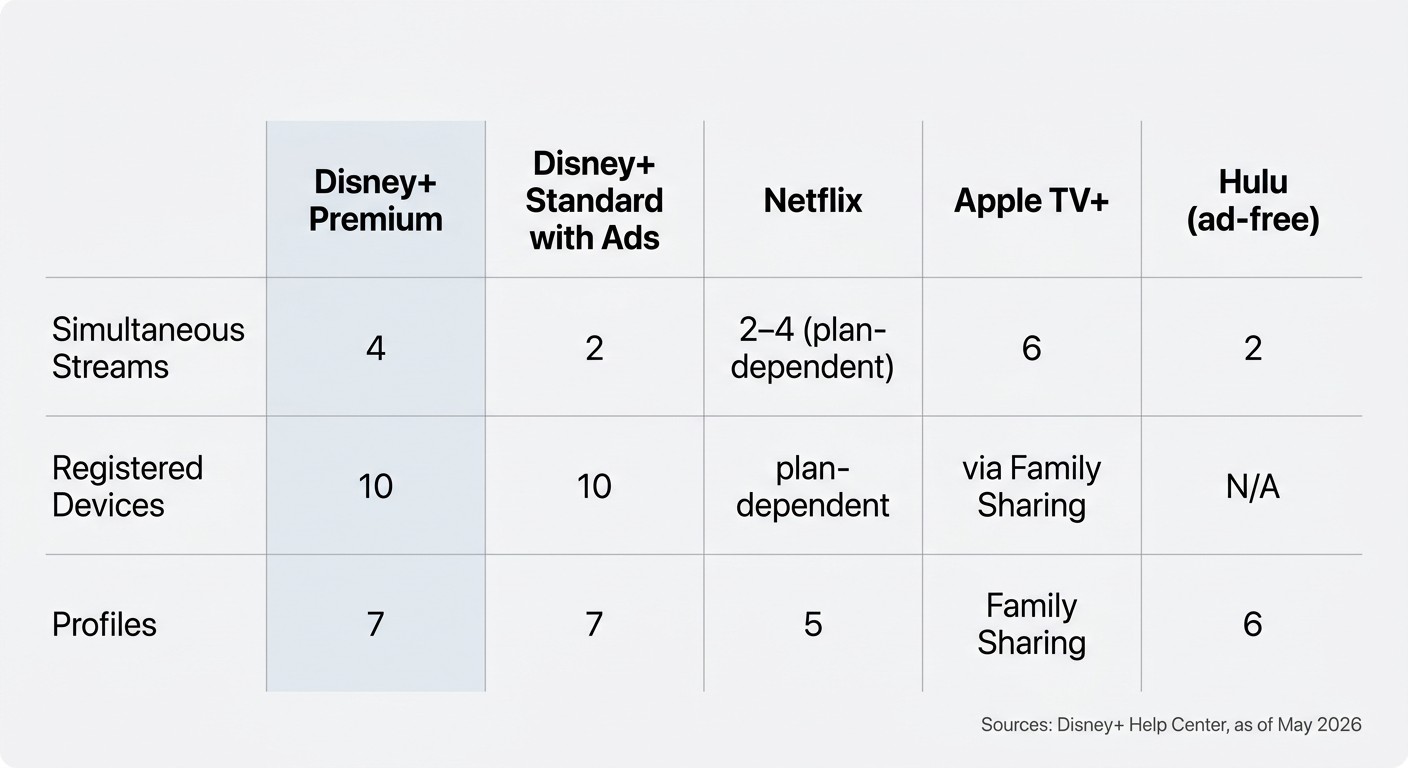
The headline number depends on which plan is on the account. Premium gets you 4 simultaneous streams; Standard with Ads cuts that in half to 2. Both plans share the same 10-device registration ceiling and the same 7-profile cap — only the concurrent stream count changes by tier. Pricing and tier names move; Disney has restructured plans repeatedly, so confirm current values on the official plan page.
Simultaneous streams: 4 on Premium, 2 on Standard with Ads
Premium accounts can play four titles at once on four different devices; Standard with Ads accounts get two. The cap is enforced server-side, so it does not matter whether the second stream is on the same Wi-Fi or in another time zone — push one too many and the lowest-priority session gets bumped with Error Code 75. More on that error in a moment.
Registered devices and profiles: 10 + 7
The 10-device list is where I see the most confusion. It is not a "slot per stream" — it is a roster of every install that has signed into your account. Old phones and dead Smart TVs you forgot to sign out of still occupy slots; clean them out from Account → Devices once a year, or the day you add a new TV you'll be told you are already at the limit. The 7-profile ceiling on top is the easiest piece to reason about: each family member gets a watchlist and a Continue Watching row of their own.
GroupWatch: up to 6 people on the same stream
GroupWatch syncs up to 6 accounts on the same title at the same time — Disney+ treats it as one stream from a billing perspective, not six. Treat it as a shared-experience feature for movie nights with friends, not extra capacity.
Hit Error Code 75? What it means and how to clear it
Error 75 means "you are at the concurrent-stream cap." The fix is mechanical: stop another stream from inside the app, or open Account → Devices on the web and sign out an inactive session. If the count looks wrong, sign out and back in — orphaned sessions hang sometimes. Per the Disney+ Help Center on Error 75, that is the canonical path; follow help.disneyplus.com if the wording has changed since this writing.
Disney+ Device Limits at a Glance vs Major Competitors (2026)
| Service | Simultaneous streams | Registered devices | Profiles | Shared / family |
|---|---|---|---|---|
| Disney+ Premium | 4 | 10 | 7 | GroupWatch up to 6 |
| Disney+ Standard with Ads | 2 | 10 | 7 | GroupWatch up to 6 |
| Netflix | 2–4 (plan-dependent) | plan-dependent | 5 | — |
| Apple TV+ | 6 | via Family Sharing | Family Sharing | SharePlay |
| Hulu (ad-free) | 2 | — | 6 | — |
Source: from the Disney+ Help Center and Digital Trends, figures as of June 2026.
The Disney+ Household Rule: What 'Update Household' and 'I'm Away From Home' Actually Mean
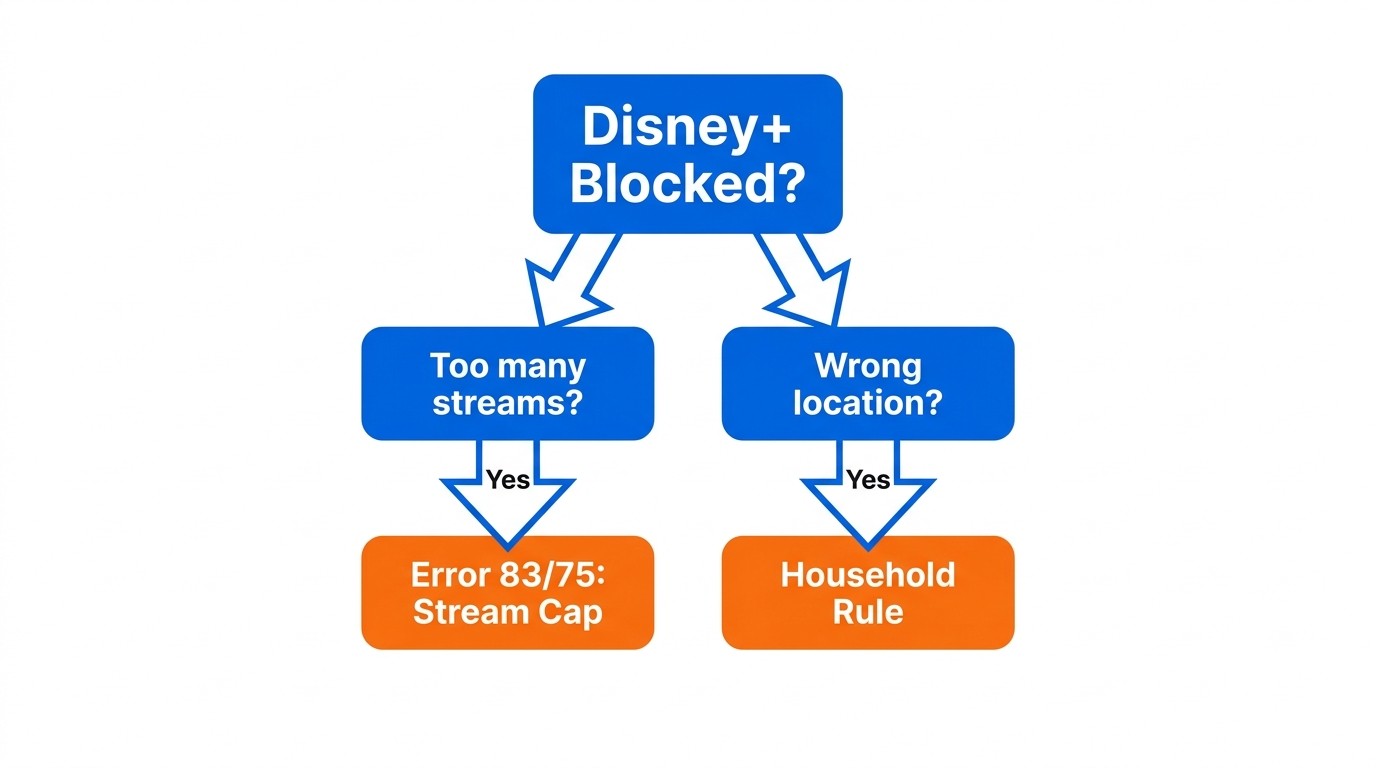
So you are inside the 4-stream cap and you still hit a roadblock — that is the household rule. Disney+ defines a household as people sharing a single primary residence, and since June 2024 it enforces that layer separately from the concurrent-stream count. Cap or no cap, an out-of-household device can be blocked or prompted to "Update Household."
What Disney+ counts as your 'household' (post-June 2024 change)
Per the Disney+ Subscriber Agreement, your household is the people living at your primary residence. Disney+ infers location from device IP and account-usage patterns; out-of-household devices may be challenged at sign-in. This sits on top of the 4-stream cap — even with three streams idle, an out-of-home device can be cut off. (As of May 2026; see disneyplus.com/legal/subscriber-agreement.)
'Update Household' and 'I'm Away From Home' prompts
Two prompts show up when Disney+ thinks a device is not in your household.
- Update Household moves your registered home location to the device you are using now. There are frequency limits on how often you are allowed to switch.
- I'm Away From Home is a temporary travel mode for short trips — it grants access for a limited window without permanently flipping the household.
In my own testing, the "I'm Away From Home" prompt is less forgiving than Netflix's travel mode — Disney+ asks again sooner and more often. If your real life involves two regular addresses — split-custody parenting, a college-aged kid, an elderly parent's house every other weekend — expect to be prompted.
The Extra Member add-on: the only official off-household option
The sanctioned out-of-household path is the Extra Member add-on: roughly $6.99–$9.99/month as of May 2026 (verify on disneyplus.com — Disney has nudged these prices), one extra person, same country, one device at a time. Honest enough as a college-kid or roommate solution; it does not solve a frequent-traveler use case or a split family where two people want to stream at once.
How BBFly Saves Disney+ Titles as Permanent Personal Offline Files
If you are a Premium subscriber bumping into the household wall on desktop, there is one path worth knowing: keep a personal offline copy of titles you have legitimate access to, so playback no longer depends on which Wi-Fi you happen to be on.
Please note: A third-party downloader is one option among several and may sit outside Disney+'s Terms of Use. Use it only with an active Disney+ Premium subscription, for your own personal offline viewing, and don't redistribute the files. Where an official Disney+ download path exists for your device, that is the most worry-free route.
MP4/MKV files for personal offline viewing — not a way around the subscription
I have lost enough Disney+ downloads to the 30-day re-verification timer to know the official mobile app is not built for long trips. BBFly Disney+ Downloader runs on Windows or Mac — where Disney+ has no official desktop download at all — and saves titles as standard MP4 or MKV files that do not expire, for personal offline viewing on a laptop or NAS. The 30-day free trial covers three full titles per platform, so you can verify the output before paying. The underlying Premium subscription stays in force: BBFly does not skip the subscription, sidestep household rules, or grant access to content you have not paid for. (Specs as of May 2026; verify on bbfly.com.)
Disney+ Device Limit FAQ
Can I watch Disney+ on Nintendo Switch?
No official Disney+ app on the Switch eShop, as of May 2026. The DNS-based "hidden browser" workaround that surfaces in Switch discussion threads needs you to re-login every 20 minutes or so — I tested it once and would not bother again. If Switch playback matters, side-loading a saved MP4 or MKV onto microSD is the more reliable path.
How much does the Disney+ Extra Member add-on cost?
Roughly $6.99–$9.99/month as of May 2026 — Disney has changed pricing more than once, so check the current number on disneyplus.com. It covers one extra person, same country, streaming on one device at a time.
Can a VPN get around the Disney+ household check?
I would not. Per Disney+'s Terms of Use, circumvention technology is explicitly prohibited, and accounts have been flagged and suspended for VPN-based household evasion. The risk-to-reward ratio is bad: you save a few dollars on the Extra Member fee and put years of account history at risk of being flagged.
How long do Disney+ downloads last on my device?
Per the Disney+ Help Center, as of May 2026: Premium tier only (Basic and Standard with Ads cannot download), 25-title cap per account, 10-device cap, 30 days unwatched, 48 hours after pressing play, plus a 30-day re-verification online check. Mobile only — iOS, Android, Fire OS. No PC or Mac.
Does Disney+ work on Samsung TV or Xfinity?
Yes. Disney+ has a native Samsung TV (Tizen) app on supported models, downloaded through the TV's app store — the standard search term is "Disney plus samsung tv app download." Xfinity boxes ship with Disney+ available via the on-screen install prompt. App availability does not change the device-limit math: the same 4-stream / 2-stream cap and 10-device registration list apply on every supported device.