
How to Download STARZ Movies on PC, Mac, and Mobile: A 2026 Guide
Table of Contents
STARZ offers offline downloads only through its iOS and Android apps, and those files come with a roughly two-week expiry plus a 48-hour playback window once you press Play. There is no native download on Windows or Mac. After fifteen years of running a Plex library and testing nearly every streaming downloader on the market, my read is simple: the official app is fine for a short trip, but if you want a portable local file on your computer, you need a desktop tool — and BBFly is the option I keep coming back to for authorized personal offline viewing.
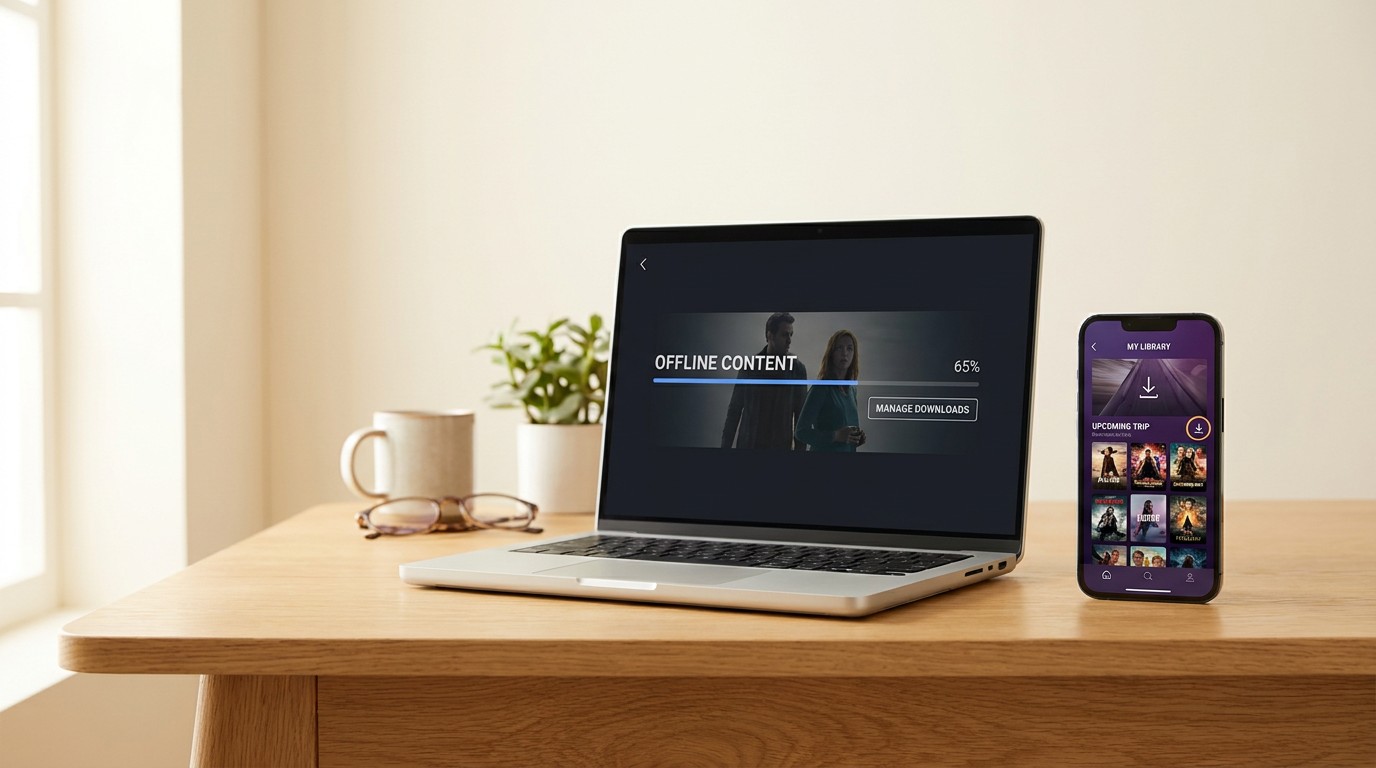
What STARZ Offers and How to Start Watching
STARZ is a Lionsgate-owned premium streamer with a library of thousands of films and series episodes, built around originals like Power Book II: Ghost, Outlander, and Run the World, plus a rotating catalog of recent theatrical movies. It runs as a standalone over-the-top service on its own site and apps, and is also available as an add-on through cable providers, Amazon Prime Video Channels, Apple, and Roku.
STARZ Subscription Cost and Current Promotions (as of June 2026)
Standard STARZ pricing is $10.99 per month or $74.99 per year and that figure can shift, and it runs introductory promos from time to time, often in the $3–$5/month range for the first three to six months, and the exact terms move around between billing cycles and partner channels. Treat any specific promo number you see in older news (including the $3/month-for-3-months offer) as expired unless starz.com shows it live at the moment you check.
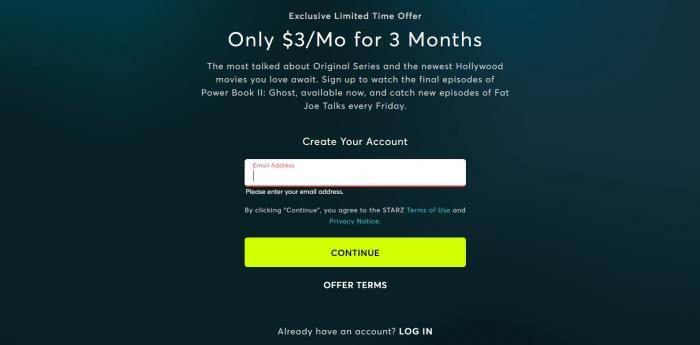
Is There Still a STARZ Free Trial?
STARZ retired its standalone 7-day free trial on its own site some time ago, but trial access still surfaces through partner channels in 2026: Amazon Prime Video Channels and Apple's STARZ subscription have offered short free trial windows at various points, and some cable or satellite operators bundle a complimentary intro period. None of these are guaranteed to be live on any given day — check the STARZ page on each platform before assuming a trial is on the table.
How to Sign In and Start Streaming
Sign-in is identical on the web and in the app: tap or click Log In, enter the email and password tied to your STARZ account, or use Apple, Google, or a participating TV provider credential. Once signed in, content plays in the browser on PC and Mac and in the native app on phones, tablets, smart TVs, and streaming sticks. Now to the part most readers actually came for — where the picture changes is the moment you want a copy you can watch without Wi-Fi.
Which Devices Support STARZ?
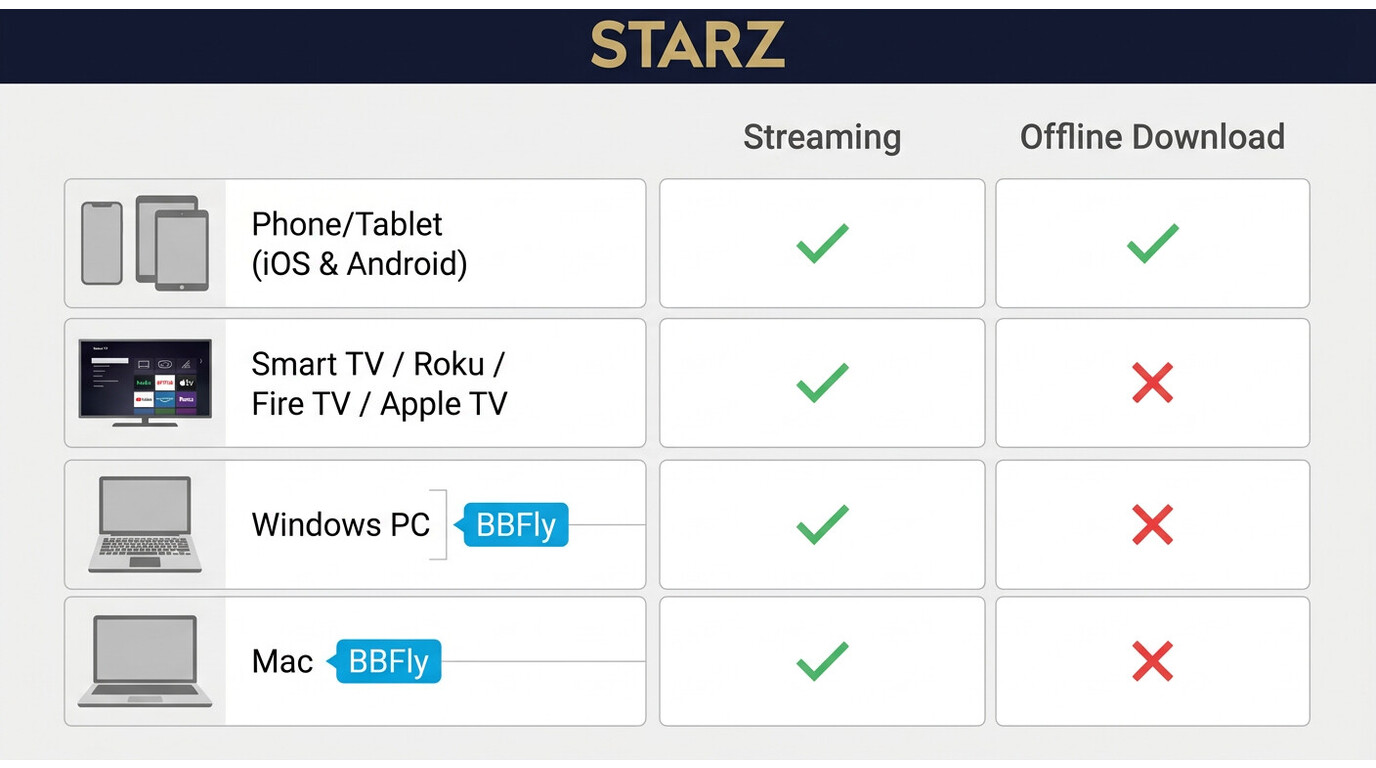
STARZ runs on basically every major screen in 2026, but the download feature is a different story — it lives only on phones and tablets. Here is the split by device class, with the offline-download status called out explicitly.
Smartphones and Tablets
The STARZ app for iOS (iPhone, iPad) and Android (phones, tablets, Kindle Fire) is the only place official offline downloads exist. On a 2024 iPad Air running iPadOS 18, a typical hour-long episode finishes downloading in two to three minutes on home Wi-Fi and lands in the in-app Downloads tab, ready to play airplane-mode. Android users on devices with expandable storage hit one extra wall: STARZ writes downloads to internal storage only, with no option to move files to an SD card.
Smart TVs and Streaming Players
STARZ streams natively on Roku, Amazon Fire TV and Fire Sticks, Apple TV (4th gen and later), Android TV/Google TV, Samsung Smart TVs (Tizen 2017+), LG Smart TVs (webOS 3.0+), Vizio SmartCast, and Xbox One/Series consoles. None of these platforms support offline downloads — they are stream-only. Casting from a phone download to a TV via AirPlay or Chromecast also does not work, because the in-app download file is locked to the device that fetched it.
Windows PC and Mac
This is the gap most readers run into. STARZ is fully watchable on Windows 10/11 PCs and on Mac through any modern browser (Chrome, Edge, Safari, Firefox), and there is a Windows STARZ app in the Microsoft Store. None of these paths support an offline download. If you want a STARZ file you can play on a laptop on a plane, the official ecosystem simply does not offer it — which is the entire reason desktop workarounds exist.
The Real Limits of STARZ's Official Download Feature
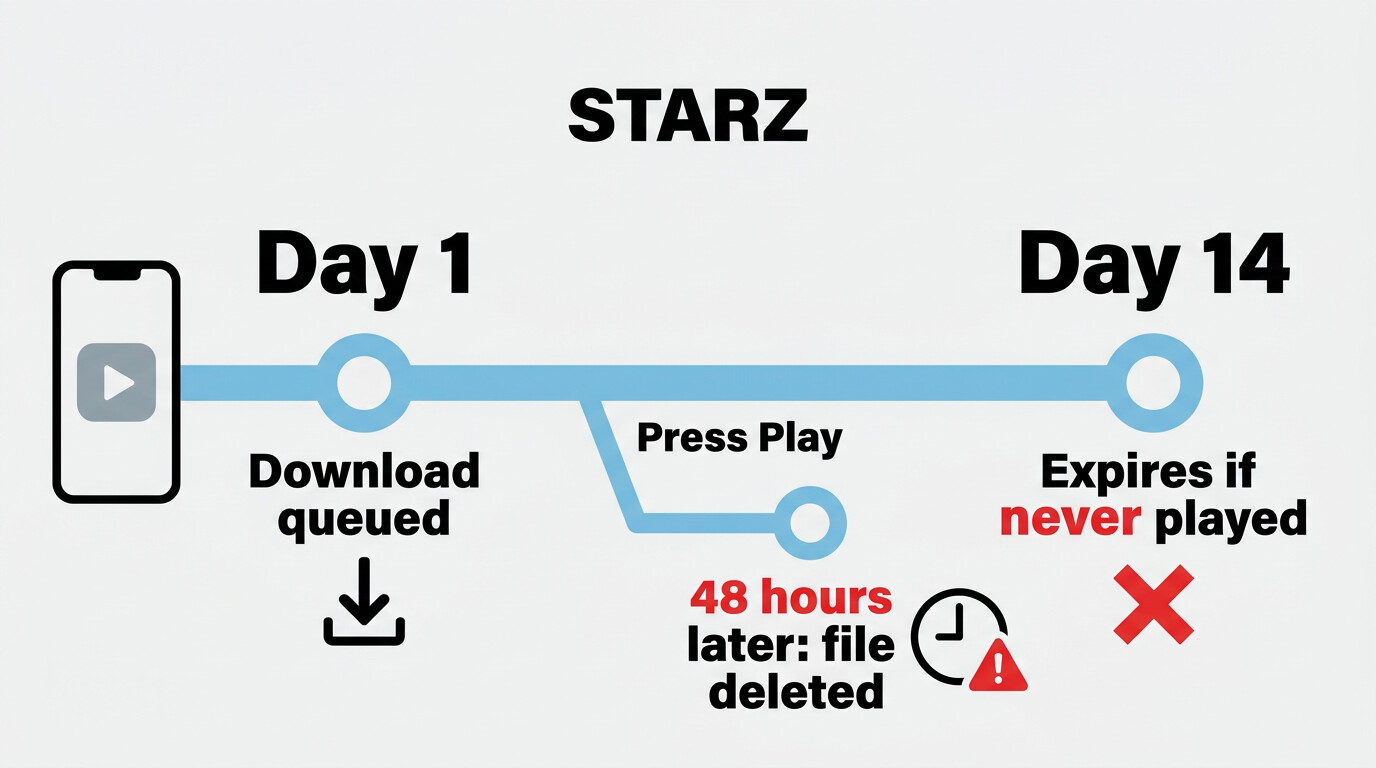
I learned the hard way how strict the official download is. Last year I queued up two episodes of Outlander on my iPhone 15 the night before a transatlantic flight, opened the app at 30,000 feet, and the first episode was gone — the download had expired because I'd queued it about two weeks earlier and never pressed Play. That single experience is the most honest summary of where the in-app download falls short. Here is what to plan around.
- Mobile and tablet only. No PC, Mac, smart TV, console, or streaming-stick download. The Windows STARZ app does not have a download button either.
- ~2-week expiry if unwatched. A queued title that never gets played is removed automatically after roughly 14 days. Verify the exact window in the STARZ Help Center, as policies may change.
- 48-hour viewing window after you press Play. The moment you start the file, a 48-hour timer kicks in. Miss it and the file is wiped, even if you only watched the first five minutes.
- Device-locked, app-locked. Downloads cannot be moved to a USB drive, NAS, external hard disk, or another phone. They play only inside the STARZ app, on the device that downloaded them.
- No SD card transfer. Even on Android phones with microSD slots, downloads stay on internal storage.
- Not every title has a Download button. Licensing varies per title, especially for newer theatrical movies in the rotating catalog. If the button isn't there, that title isn't offline-eligible at that moment.
- An active subscription is required. Downloads are part of the in-app library and stop being playable once the subscription lapses — the file is not a standalone asset.
For a quick trip with one or two flagged-the-night-before episodes, the official app is fine. For anything past that — a long-haul flight, an extended road trip, or a home media setup where you want one file you can play on a laptop or a TV without Wi-Fi — the official app is the wrong tool. That trade-off is exactly what the next two sections address.
How to Download STARZ Movies on Mobile (Official App)
The official app remains the right starting point if you're heading out the door in an hour and just want something on your phone. The steps are identical on iPhone, iPad, and Android — only the storage caveat differs.
- Open the STARZ app and sign in (or sign in through your Apple, Google, or TV-provider account).
- Search for the movie or series episode you want to save and open its detail page.
- Tap the Download icon (a downward arrow). For a series, you can download episodes one at a time. If the icon isn't shown, that title isn't licensed for download right now.
- Wait for the download to finish; progress shows on the title card and in the Downloads tab.
- Play offline: open the menu, tap Downloads, and start the file. Remember the 48-hour clock starts the moment you press Play.
Android users with low internal storage: downloads cannot be redirected to an SD card, so clear space on internal storage before queuing a season. Everything else — quality selection, multiple-title queueing, pause/resume behavior — works the same on both platforms.
How to Download STARZ Movies on PC or Mac (Windows & Mac)
Because STARZ doesn't offer any native download on desktop, the realistic path on Windows or Mac is a third-party desktop downloader. I've tested most of the popular ones over the years — screen recorders, browser-extension grabbers, and stream-savers — and BBFly is the one I keep recommending to readers, mainly because it saves the actual stream as a clean MP4 or MKV rather than re-encoding from a screen capture.
Why a Desktop Downloader Is Needed for PC Users
If you've ever cleared a few hours on a weekend to start a STARZ series, only to remember at the gate that your laptop has no offline option, you already know the pain. STARZ is not on the list of services that let you save anything to a Windows or Mac machine — the browser plays the stream and that's it. Screen-recording the playback works in a pinch, but it re-encodes the picture (visible softness on dark scenes), captures at 1x real-time (a 50-minute episode takes 50 minutes to record), and usually loses the subtitle track. A purpose-built desktop downloader gets you a portable file without those compromises, which is why this category exists at all.
A Note on Personal Use and Platform Terms
One thing I want to be straight about, because it gets glossed over in this category: BBFly is for saving a local copy of content you're authorized to access — meaning you hold a valid STARZ subscription and you're using the downloaded file for personal offline viewing, on devices in your own household, where permitted by the platform's terms of service and your local copyright law. It's a desktop alternative for the case STARZ doesn't cover (PC and Mac), not a route to access content without paying.
If you're planning to re-distribute, host publicly, or use downloads commercially, that's outside what this workflow is for, and you should review STARZ's terms and applicable law before going any further.
BBFly STARZ Downloader at a Glance
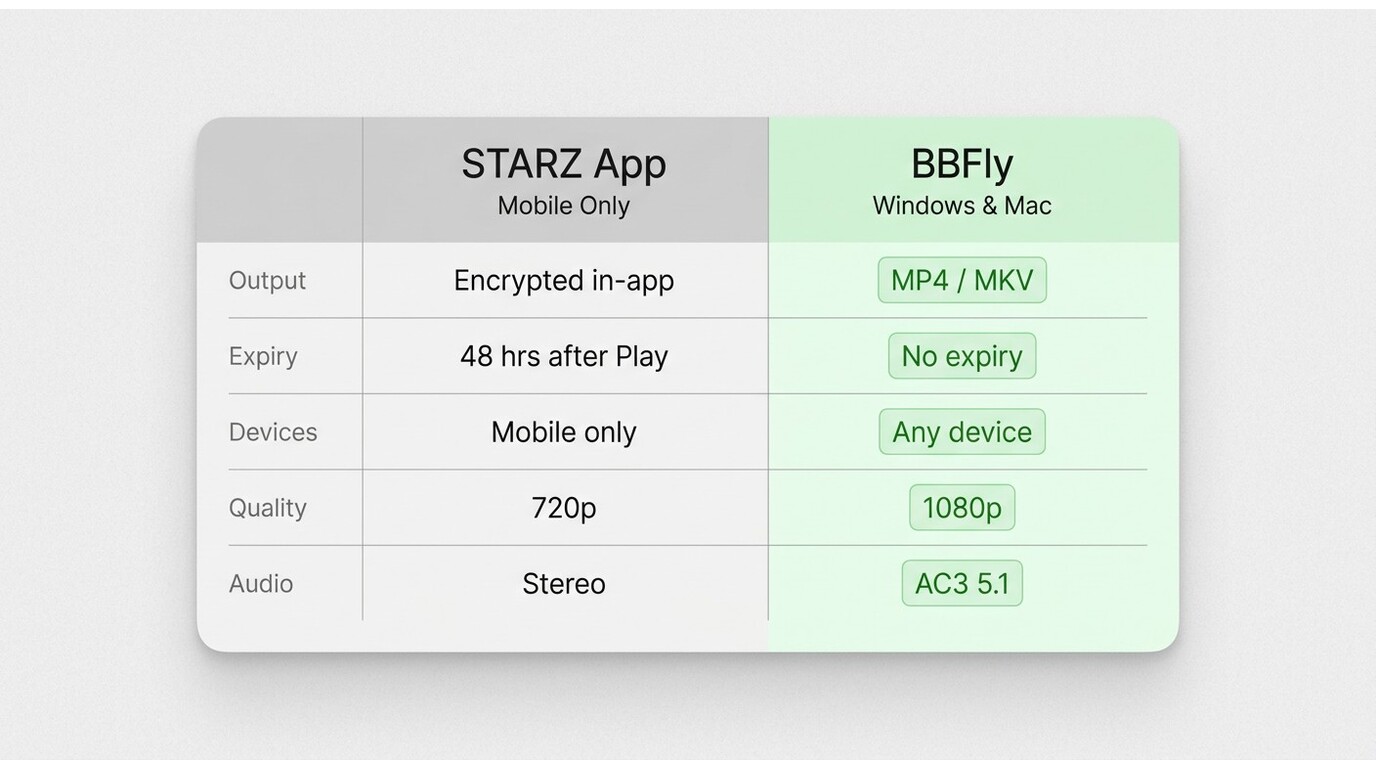
BBFly downloads the actual video stream from STARZ rather than recording playback, which preserves the original H.264 video and AC3 5.1/AAC 2.0 audio without re-encoding. It outputs standard MP4 or MKV files up to 1080p, exports subtitle tracks to external SRT, supports batch downloading, removes ads from ad-supported tiers where applicable, and works on Windows 10/11 and macOS.
| STARZ Official App (mobile) | BBFly STARZ Downloader (PC/Mac) | |
|---|---|---|
| Download method | In-app DRM-protected download | Native stream download to local file |
| Supported devices | iOS, iPadOS, Android, Fire tablets | Windows 10/11, macOS |
| Max resolution | Varies by title (verify on starz.com) | Up to 1080p |
| Audio | Stereo (in-app) | AC3 5.1, AAC 2.0 |
| Output format | Encrypted in-app file | MP4 or MKV |
| Expiry | ~2 weeks unwatched / 48 hours after Play | Local file, not tied to in-app expiry timers |
| Device transfer | None — device- and app-locked | Plays on any device that supports MP4/MKV |
| Free trial | Via partner channels (Amazon, Apple); varies | 30 days, 3 full titles |
| Pricing | $10.99/mo standard | See birdbirdfly.com for current pricing |
Source: Starz official, table values reflect general availability as of June 2026.
Step-by-Step: Saving STARZ Videos with BBFly
Here's the workflow I use on a 14-inch MacBook Pro (M2, macOS 14) — the Windows steps are identical.
- Install BBFly on your PC or Mac from the Windows installer or the Mac installer.
-
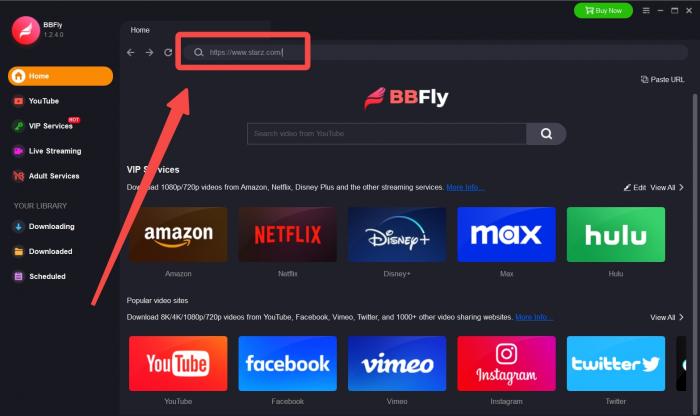
Enter starz.com in BBFly's built-in browser search bar.
-
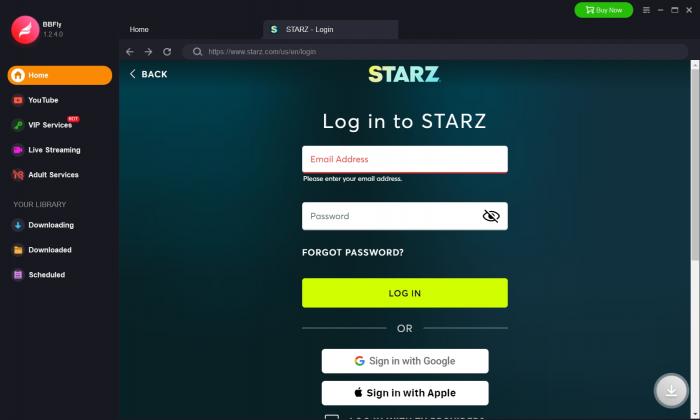
Sign in to your STARZ account inside BBFly and open the title you want to save.
-
Pick resolution, audio track, and subtitle language, then click Download Now. For a series, queue every episode in one batch.
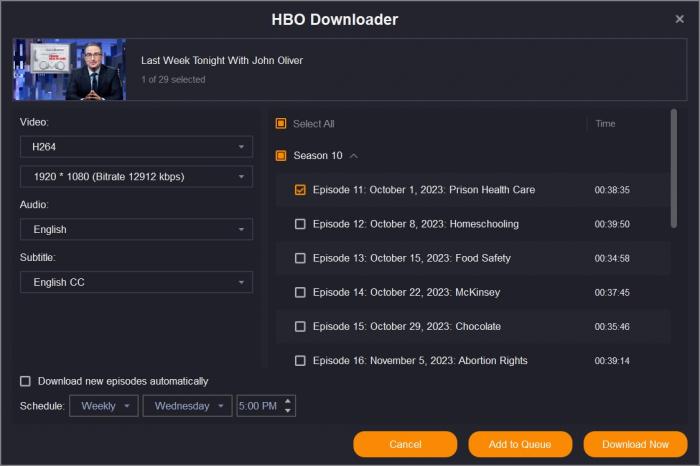
- Open the Downloaded tab when the queue finishes and click the folder icon to reveal the MP4 or MKV files. From there they play in VLC, Infuse, Plex, on a Smart TV via USB, or anywhere else you'd play a standard video file.
In a typical session — about a 45-minute episode on a 200 Mbps fiber connection — the file lands in under five minutes with subtitles synced and 5.1 audio intact. If you also subscribe to other services, BBFly's same workflow handles them: it's the engine I use to save Netflix titles for offline viewing and to capture Streaming+ shows from a URL.
FAQs: STARZ Downloads and Offline Viewing
Do STARZ downloads expire, and how long do they last?
Yes. Official STARZ app downloads expire roughly 14 days after you queue them if you never press Play, and once you do press Play a 48-hour viewing window starts before the file is removed automatically. These timers are enforced by the app, not by your device's clock — there's no way to extend them from the user side. As of June 2026, verify the exact windows in the STARZ Help Center, as policies may change.
Are all STARZ titles available to download?
No. Download availability is per-title and depends on STARZ's licensing deals with studios and rights holders. Originals (Outlander, Power Book II, Run the World, etc.) are generally downloadable; recent theatrical movies in the rotating catalog are often stream-only because their offline-license windows are narrower. If the Download arrow isn't on a title's detail page, that title isn't eligible at that moment — check back later, as the flag can change when a license renews.
Can I watch STARZ downloads on a TV or other device without the app?
Not with the official app — its downloads are locked to the device and the STARZ app that fetched them, so you cannot move them to a TV, USB stick, NAS, or laptop. AirPlay and Chromecast won't pick up the offline file either. The MP4 or MKV file BBFly saves to a PC or Mac is a standard video file with no such device lock and plays in VLC, Infuse, Plex, or directly via USB on a Smart TV, for personal offline viewing of titles you're authorized to access.
How do I fix STARZ downloads not working?
On mobile, the usual fixes resolve most cases: confirm you're on a stable Wi-Fi connection, force-quit and reopen the STARZ app, update it from the App Store or Play Store, clear app cache (Android: Settings → Apps → STARZ → Storage → Clear Cache), and restart your device. If a download stalls at the same percentage on multiple titles, sign out and back in — that resets the entitlement token. On a PC or Mac browser, blank-screen playback is most often a graphics-driver or browser-cache issue: update Chrome or Edge, disable hardware acceleration, and try an incognito window before assuming a STARZ-side outage. A VPN with a U.S. exit node can also trip login on the web.
How many devices can stream STARZ at once?
STARZ allows up to 4 simultaneous streams per account as of June 2026 — verify on starz.com because plan terms can change. Locally saved files (whether the in-app download on a phone or an MP4 saved to a PC for personal use) do not consume one of those four concurrent stream slots, since they aren't pulling from the live stream server.
The Bottom Line
STARZ gives you a workable offline option on phones and tablets, and a real gap on computers. If your trip is short, your screen is a phone, and you remember to press Play within two weeks, the official app does the job. If you're a Windows or Mac user, or you want a portable file that survives past the 48-hour timer for personal offline viewing, a desktop tool is the only path the platform leaves open — and after testing the field, BBFly is what I'd point a friend toward. Grab the Windows free trial or the Mac free trial and run three full titles through it before deciding.

Clara Hensley
Clara explains what each streaming plan lets you download — and what to do when it doesn't.