Hulu Offline Downloads: Mobile Limits and Laptop Options
Table of Contents
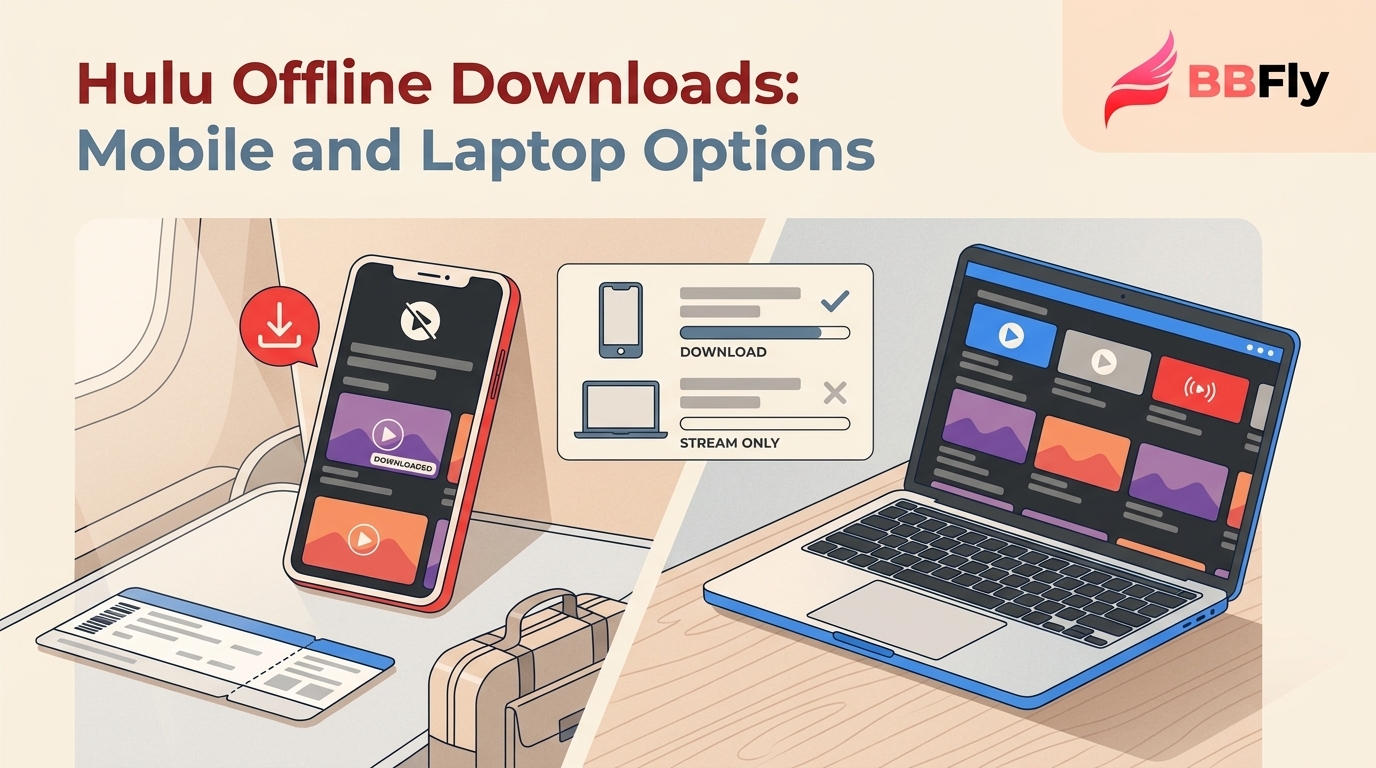
Hulu offline downloads are only available inside the Hulu mobile app on iPhone, iPad, Android, and Amazon Fire Tablet, and you need the Hulu (No Ads) plan or higher. Mac, Windows, smart TV, and Apple TV apps do not expose a download button — Hulu.com on a desktop browser is stream-only. If you want a portable local file on a laptop, that's outside Hulu's official support, and a third-party desktop downloader is the realistic workaround.
Most people who download a Hulu episode for a flight don't realize they've started a 48-hour countdown. The clock isn't tied to finishing the episode — it starts the second you press play. I learned that on a Vegas red-eye: I opened the pilot at the gate to make sure the file played, watched ten minutes, fell asleep. Two nights later, the whole season had locked itself. That's the part Hulu's Help Center buries three clicks deep, and it shapes every choice below — the official mobile path, the limits no listicle quite spells out, and what's actually left if you want a copy on a Mac or PC.
Official Hulu Downloads: Eligibility and Steps
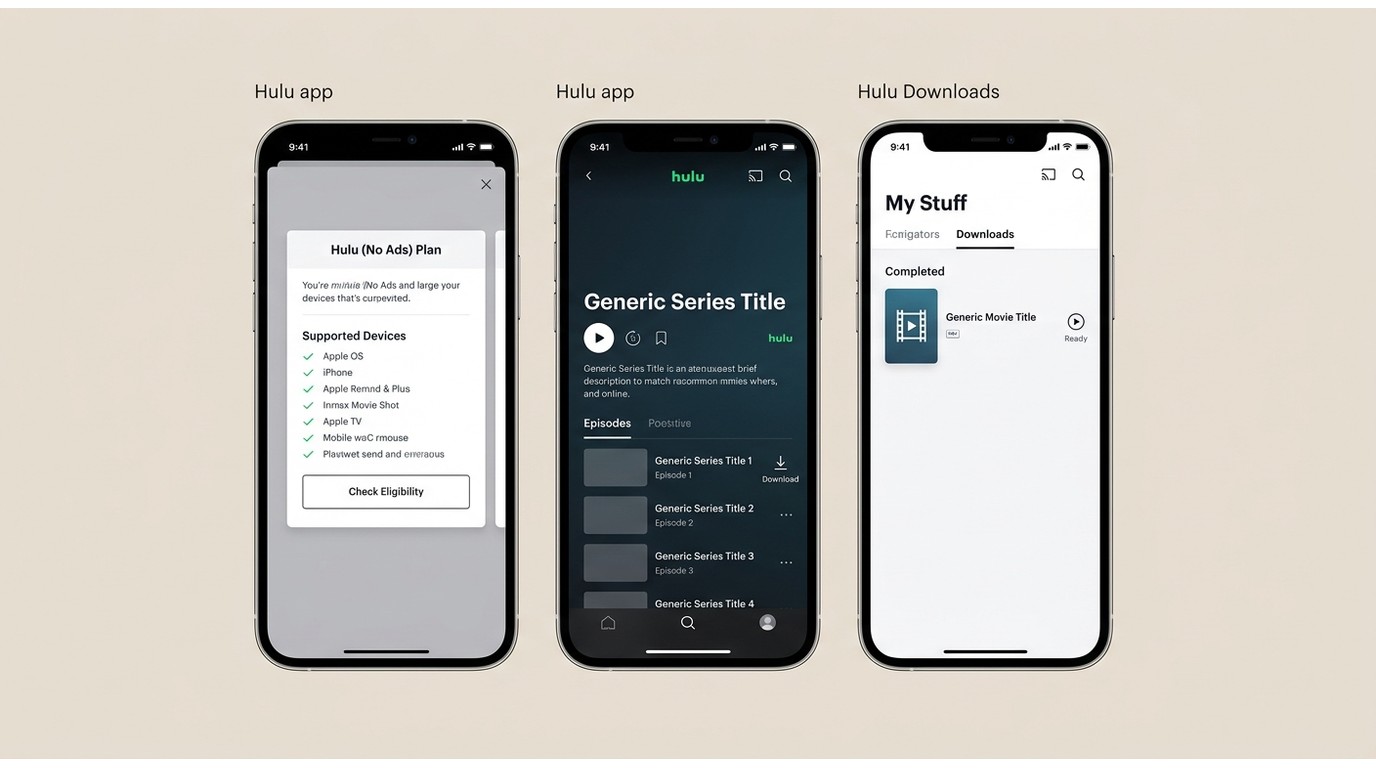
For Hulu download offline in the United States, official downloads are limited to supported mobile devices and remain inside the Hulu app. An eligible Hulu plan lets you download supported shows or movies for travel, but Mac, Windows, and most TV apps do not provide the same download path.
Plans, Regions, and Supported Devices
Three checks determine whether the steps below will work:
- Plan: Hulu (No Ads), Hulu + Live TV (No Ads), or the Disney Bundle Premium. The ad-supported "Hulu (With Ads)" tier excludes downloads entirely.
- Region and device: Official downloads are available in the United States on iOS, iPadOS, Android, or Amazon Fire Tablet. For device-specific guidance, see how to download on Hulu iPhone and Hulu Android.
- App boundary: Downloads remain tied to the supported device and play inside the Hulu mobile app. Mac, Windows, Apple TV, Roku, and smart TVs are not on the supported list.
If you're missing any of these conditions, the download arrow won't appear, even on titles you can stream. Check the specific title before upgrading your plan; paying more does not make every show downloadable.
Step-by-Step: Find a Title, Tap the Download Arrow, Watch from My Stuff
- Open the Hulu app on a supported mobile device and sign in.
- Search or browse to the title.
- Tap the downward-arrow icon next to an episode or movie poster. On a series page, you can also tap Download Season to queue the full run.
- Wait for the progress ring to fill — Hulu keeps downloading in the background when the app is minimized.
- Go to My Stuff > Downloads to play files offline.
That's the entire flow. Hulu doesn't surface it through the website or any desktop client.
Find Downloadable Titles and Exclusions
Most of Hulu's on-demand catalog is downloadable — Originals, catalog series, and library movies. In the Hulu app, open a title and look for the downward-arrow icon before adding it to your travel queue.
The main exclusions are easier to scan here:
| Title type | Download status in the Hulu app |
|---|---|
| Hulu Originals and on-demand titles | Often available; check the title |
| Live TV, sports, and news | Not downloadable |
| Premium Add-On networks | Use the provider's own app |
| Publisher-restricted titles | May be stream-only |
If a title is missing the arrow but plays fine in streaming, check its category and the title page first. I would verify the exact show or movie before paying for a plan upgrade; the plan alone does not guarantee download eligibility.
Adjusting Download Quality: Standard vs. High
Hulu hides the toggle under Settings > Downloads > Download Quality, with two options: Standard (default) and High.
High roughly doubles the file size and runs noticeably slower over weak Wi-Fi. For a long trip where I've queued five hours of content, Standard is the honest choice — the picture is fine on a phone screen and you halve the storage hit. I keep High in reserve for the hotel-tablet scenarios where I'd actually notice the difference, and never run it on terminal Wi-Fi.
Prepare Hulu Downloads Before Travel
Before a trip, set up Hulu downloads on the same supported device you will carry. Choose Wi-Fi or cellular downloading in the app, leave enough storage for the queue, and confirm that every title has finished downloading.
Manage Storage, Data, and the Queue
- Use Wi-Fi when possible: It is usually the safer choice for larger queues.
- Choose quality deliberately: Standard uses less storage; High suits larger screens and stronger connections.
- Clear space first: Remove finished downloads before adding a trip queue.
- Review the queue: Confirm each title shows as complete in My Stuff > Downloads.
Run an Offline Preflight Check
While you still have reliable internet, confirm that you are signed in, open the Downloads screen, and use airplane mode to check one expendable title. Do not start every episode just to test it: beginning playback can start the 48-hour window. Supported devices and availability may change; Hulu's Help Center lists the current status.
Fix Missing or Failed Hulu Downloads
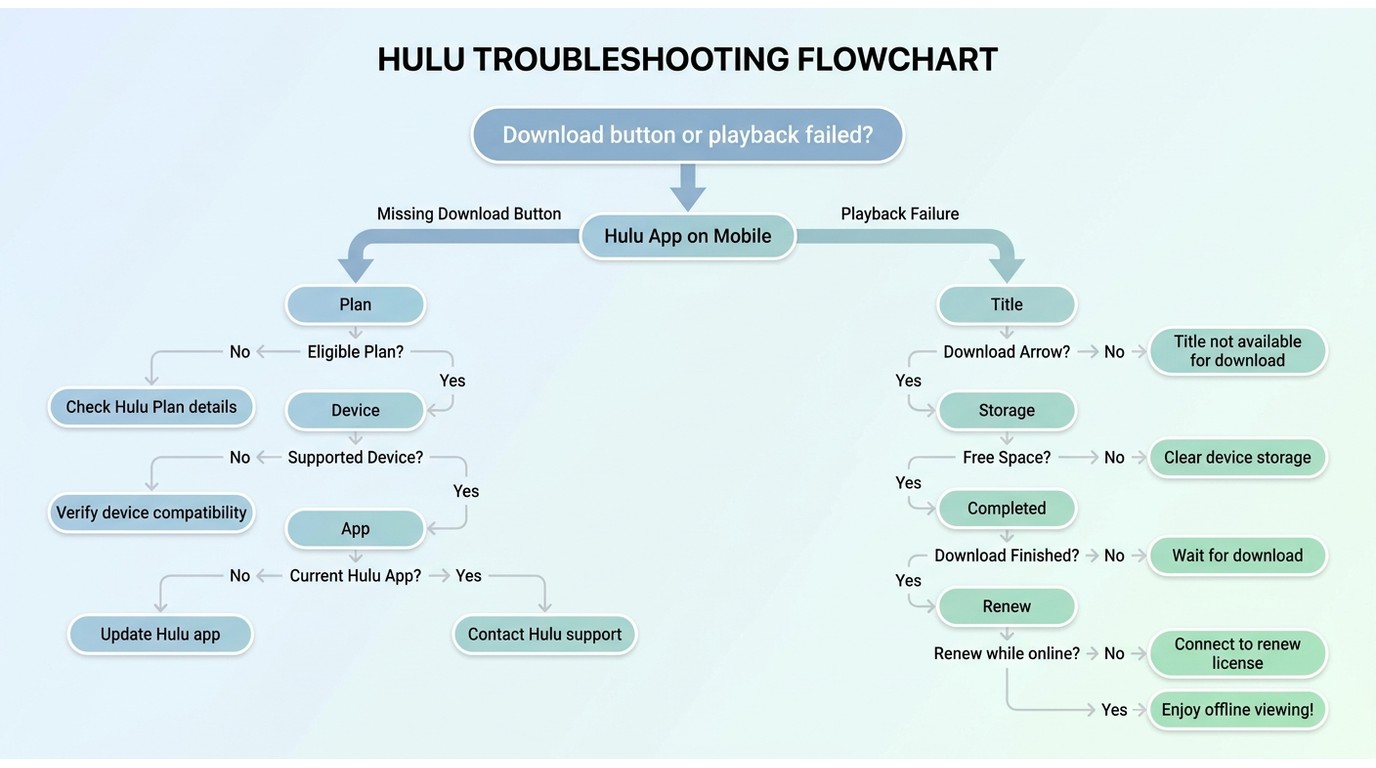
A missing download button or a failed offline title usually comes down to eligibility, the device, the app, storage, or the title itself. Work through those checks in order before assuming the download feature is broken.
When the Download Button Is Missing
- Confirm that your Hulu plan includes downloads.
- Use the current Hulu app on a supported mobile device in the United States.
- Sign out and back in, then update the app if an update is available.
- Open the title page and check for the download arrow; not every streamable title is downloadable.
- Free enough device storage and try the download again.
When Offline Playback Fails
First make sure the download completed and has not reached its playback window. Then reconnect while online if Hulu offers a renewal, reopen the app, and check the video, selected audio track, and subtitles separately. If the issue is a Hulu black screen rather than a downloaded-title failure, use the device-specific troubleshooting steps for that symptom.
My rule before travel is blunt: check the plan, title, storage, and sign-in while you still have Wi-Fi. Those four checks prevent most last-minute surprises.
Hulu Download Limits and Expiry Windows
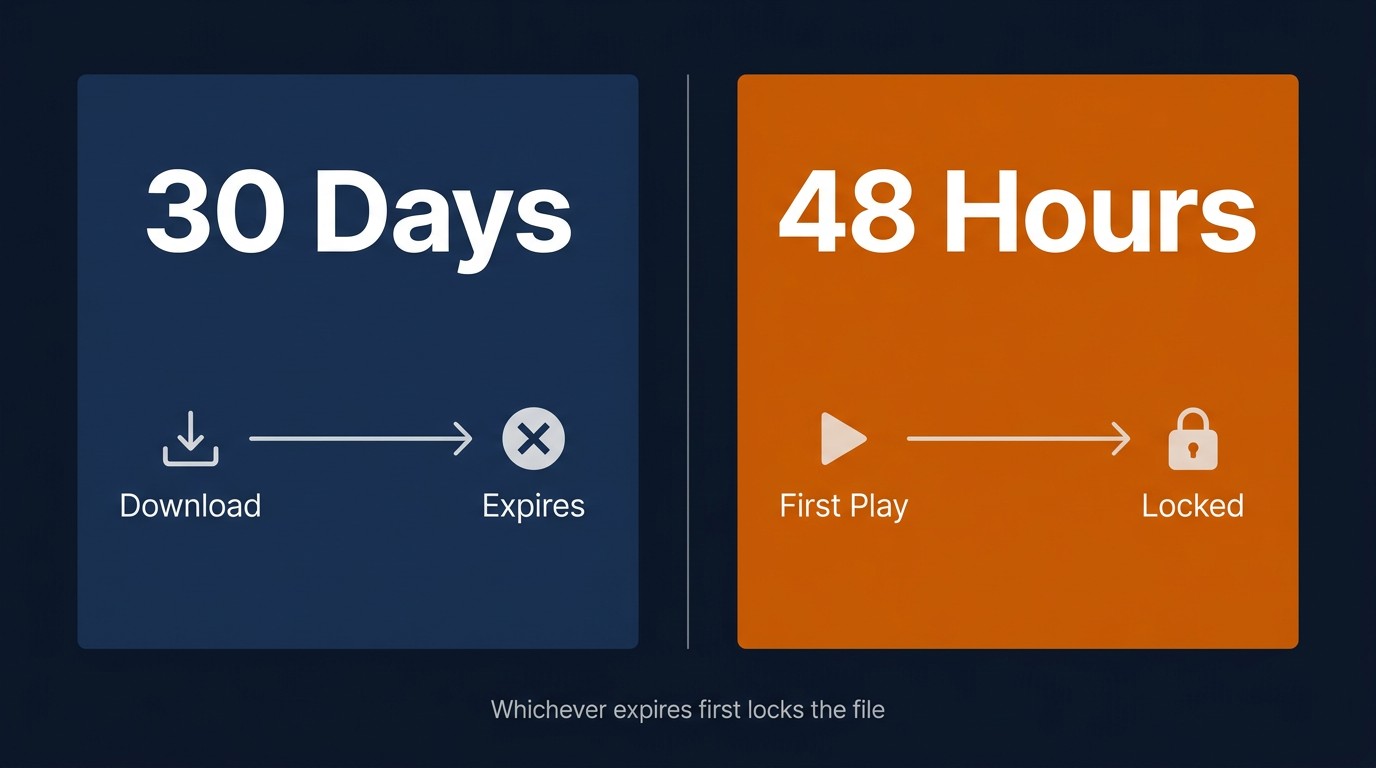
Hulu downloads can remain available for up to 30 days before playback and generally expire 48 hours after playback begins; eligible titles may be renewed while online. The cap is 25 titles per account, shared across up to 5 supported mobile devices — not 25 per device.
I would not open every title simply to test it before a trip. Starting playback can shorten the useful travel window, so test the Downloads screen and one title you can afford to start.
The 25-Title Account Limit
Hulu's 25-title download limit is shared across the account, up to five supported mobile devices, and all attached profiles. Your queue, a partner's shows, and your kids' downloads all use the same pool. That shared ceiling is separate from larger-queue planning, such as a guide on How to download more than 50 Hulu videos at the same time.
Twenty-five titles is usually enough for one traveler, but a household preparing several profiles for the same weekend can reach the limit quickly.
Two Expiry Clocks Run in Parallel: 30 Days Unwatched, 48 Hours After Play
Two clocks run side by side on every download:
- Clock A — 30 days from download. The file expires whether or not you've opened it.
- Clock B — 48 hours from first play. Once you've started watching, that's your full window for the file.
Whichever clock hits zero first wins, and the file goes dark until you renew.
What Starts the 48-Hour Window
Pressing play starts the 48-hour window, not finishing the episode. Open the pilot on the runway to confirm the file actually plays, and the countdown starts there, not when you sit down for the return flight. For travel, test the Downloads screen before leaving Wi-Fi and avoid opening the rest of your queue unless you plan to watch it soon.
Renew or Replace an Expired Download
When a download has expired but the title is still available in your library, connect to Wi-Fi and open the Hulu app. If the title remains eligible, Hulu can refresh the download while you are online.
When you can't get to Wi-Fi — a delayed flight, a cruise without working internet, or a stretch in the field — you cannot renew the download until you are back online. Plan that check before leaving reliable internet access.
Can Laptops Download Hulu Officially?
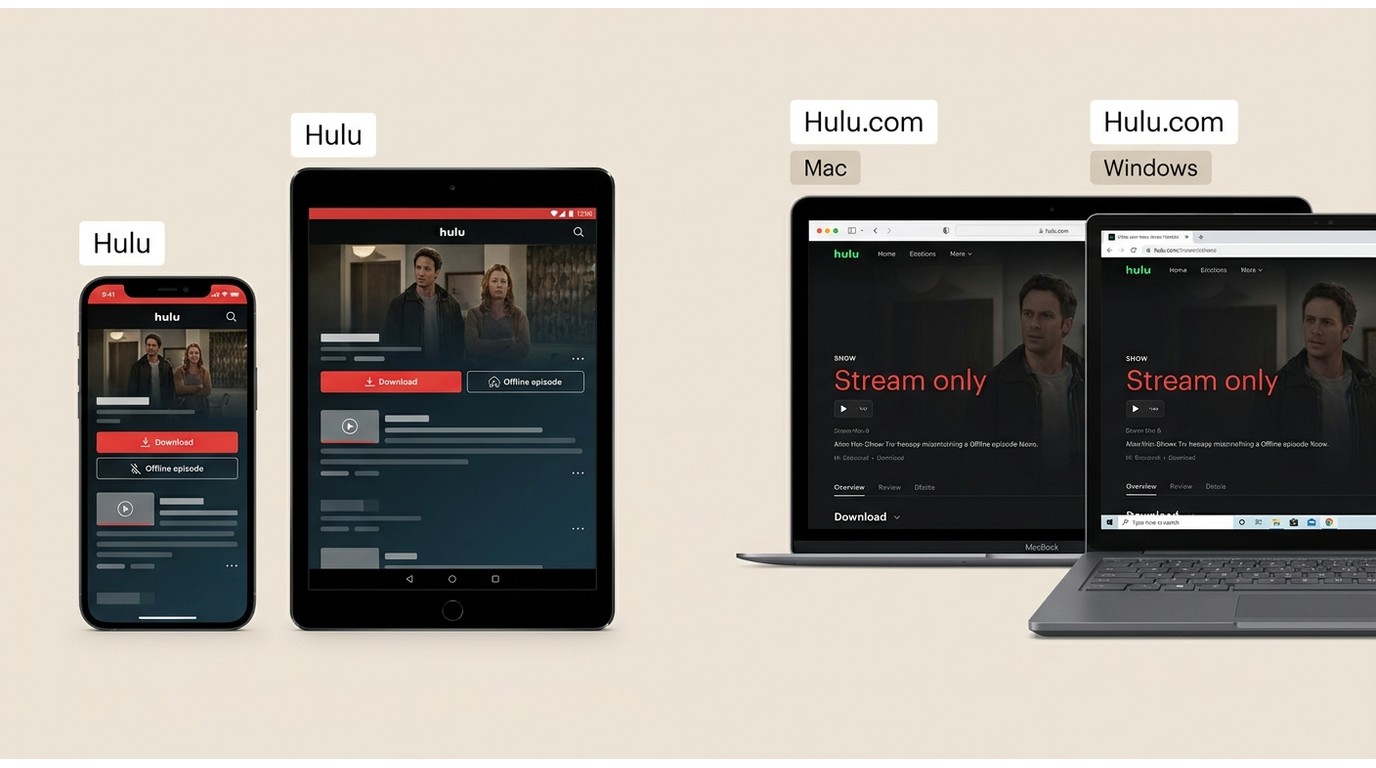
Hulu does not offer offline downloads through Hulu.com on Mac or Windows. The desktop experience is browser-based, so laptop users can stream but do not get the mobile app's download control. If you need Hulu laptop downloads, the practical choice is between preparing an eligible mobile device and considering a separate desktop local-file workflow for authorized personal viewing where permitted.
Mac and Windows Lack Official Downloads
Hulu does not provide an official offline-download option through Hulu.com on Mac or Windows. A Windows Store app may support streaming, but laptop users should not expect the download control available in the Hulu mobile app. That leaves mobile downloads as the official route and a separate desktop workflow for readers who specifically need a local file.
What Hulu.com Supports on a Computer
The browser at Hulu.com supports streaming, with available quality varying by title and account tier. There is no download button in the desktop web experience. For offline viewing, Hulu directs users toward its supported mobile-app environment rather than a Mac or Windows browser.
Why Common Desktop Workarounds Disappoint
Three workarounds come up repeatedly, but none is a dependable answer for Hulu laptop downloads:
- How to Screen Record on Hulu? (OBS, QuickTime): it creates a re-encoded copy of what the display renders and runs in real time, so a two-hour movie takes two hours to capture.
- Browser workarounds: browser playback does not provide an official offline-download option or a portable file workflow.
- Android emulators: Hulu may not work consistently in an emulator, and downloaded content remains tied to that app environment.
My take is simple: these routes either trade away quality and time or leave you with a file you cannot use where you need it. They are a poor fit when a flight is close and the laptop is the device you plan to bring.
BBFly's Desktop Local-File Workflow
Please note: BBFly is a desktop alternative to Hulu’s official in-app downloads. Use it only for personal offline viewing of content you are authorized to access, where permitted by Hulu’s terms and applicable law. Do not redistribute, resell, or publicly share downloaded content.
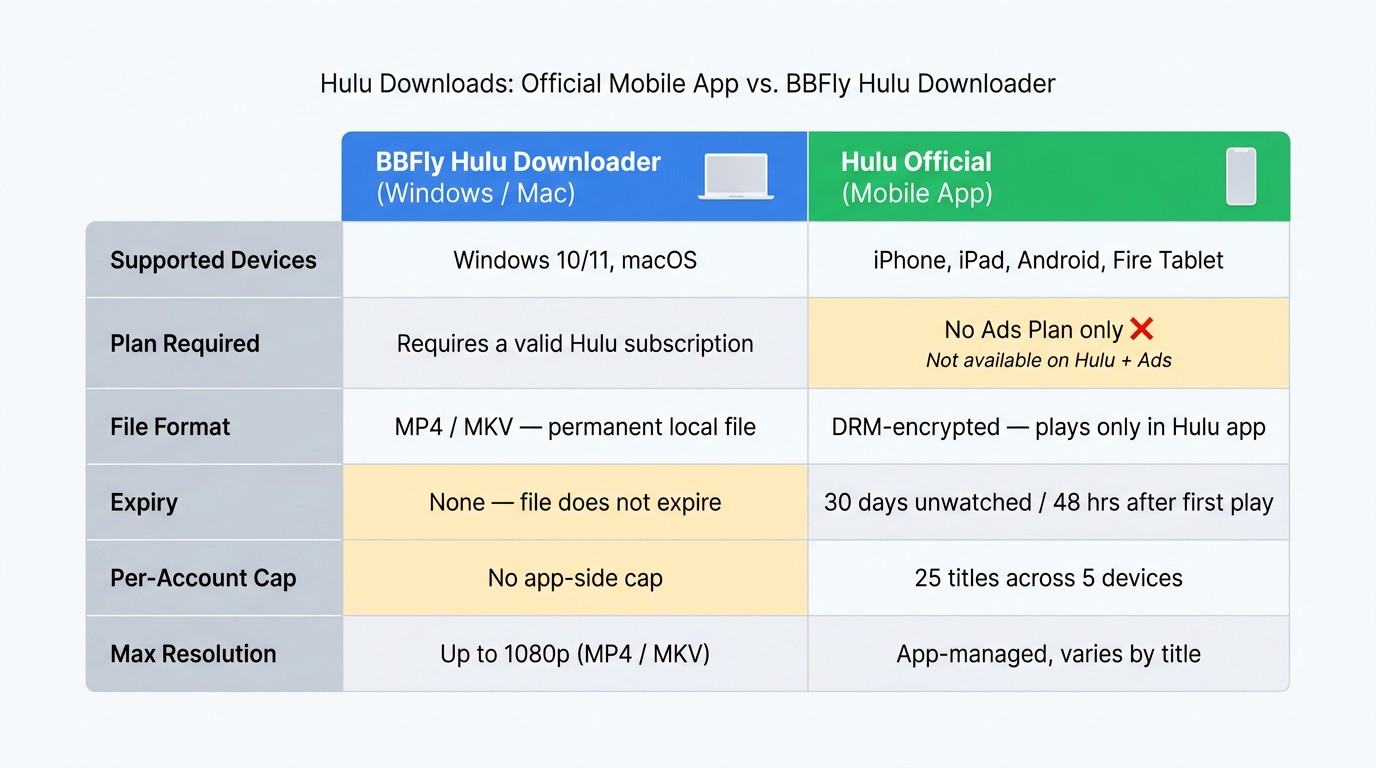
If you need a local-file workflow for authorized Hulu viewing on Windows or Mac, BBFly Hulu Downloader provides a desktop option that saves supported content as MP4 or MKV. It is most useful when the official mobile app does not meet your device needs; if you watch only on a supported phone or tablet, Hulu’s own download feature is the simpler choice.
Native Downloads and Full-Title Trial
This is BBFly’s desktop workflow, not Hulu’s official in-app download feature. For authorized content, BBFly uses native download processing to save supported streams as MP4 or MKV without screen recording or a second-pass re-encode, for personal offline viewing where permitted.
The 30-day trial includes three full titles for each streaming service, so you can check a complete episode or movie on the Windows or Mac device you actually plan to use before choosing a paid plan.
Quality, Audio, and Subtitle Options
For a Hulu use case, these are the settings that matter most:
- Resolution options: up to 1080p, with 4K available where the source supports it.
- Audio and subtitles: EAC3 5.1 or AAC 2.0 audio, plus selectable audio languages and downloadable subtitle tracks.
- Season management: batch downloads and episode subscriptions can reduce the manual work of keeping a queue ready.
How the Free Trial Works
BBFly's free trial gives you three full titles per platform, not a clip. As of my last test in June 2026, that meant finishing an episode end-to-end and verifying subtitle sync, audio-track selection, and the batch queue behavior — the parts of a downloader that only show themselves at full length. Some competing tools cap their free trial at a short snippet from each title, which proves the installer runs but doesn't tell you whether quality holds for a full episode.
Official Hulu Downloads vs. BBFly Hulu Downloader — At-a-Glance
| Dimension | Hulu Official (Mobile App) | BBFly Hulu Downloader (PC / Mac) |
|---|---|---|
| Supported devices | iPhone, iPad, Android, Amazon Fire Tablet | Windows 10/11, macOS |
| Plan tier required | Hulu (No Ads) or higher — ad tier excluded | Active Hulu subscription |
| Max output resolution | App-managed; varies by title and device | Up to 1080p (4K where the source supports it) |
| File format | Plays inside the Hulu app | MP4 / MKV — portable local file for personal offline viewing |
| Expiry | 30 days unwatched / 48 hours after first play | Outside Hulu’s official download window |
| Per-account download cap | 25 titles, shared across 5 devices | Separate product limits apply |
Hulu Offline Download FAQ
Will a Hulu download work if I travel outside the United States?
Hulu’s official download feature is a U.S. service and stays tied to the supported device and Hulu app used to download the title. Before international travel, download and test titles on the same device you plan to carry, but do not assume playback will be available in every region.
Why is the download button missing after I upgraded to No Ads?
First confirm that your account has an eligible Hulu plan, then check that you are using a supported mobile device in the United States with the current Hulu app. Next, confirm the title is downloadable and that the device has enough storage. A title can stream normally without offering a download button.
Can I test Hulu downloads before boarding a flight?
Yes. While still on Wi-Fi, confirm that each download is complete, open the Downloads screen, and check that you are signed in on the device you will travel with. Use airplane mode to test the screen and one expendable title rather than opening your whole queue, because starting playback can begin the 48-hour window.
Is BBFly a good fit if I only watch Hulu on my phone?
Usually not. If your phone or tablet supports Hulu downloads and the official app’s limits work for your trip, that is the more straightforward route. BBFly is aimed at authorized Windows or Mac local-file needs when a laptop-based workflow is the specific requirement.
Choose the Right Offline Setup
For supported phones and tablets in the United States, Hulu's official app is the simplest choice when its download limits fit the trip. On a Mac or Windows laptop, Hulu does not offer official offline downloads, so BBFly may suit readers who specifically need an authorized local-file workflow for personal offline viewing, where permitted by Hulu's terms and applicable law. If I were packing for a short trip with a supported phone, I would use Hulu's app; for a longer trip that specifically requires a Windows or Mac local file, I would consider the compliant desktop workflow. Choose the official mobile path when it meets your device and travel needs; consider a compliant desktop local-file workflow only when that specific need remains.