
OnlyFans Downloader Firefox: Limits and a Better Way
Table of Contents
An OnlyFans downloader Firefox add-on can save media only when the page exposes a usable file. If it detects nothing, the extension may not be broken: when the browser exposes no savable media resource, consider an authorized desktop workflow that complies with the platform's terms.
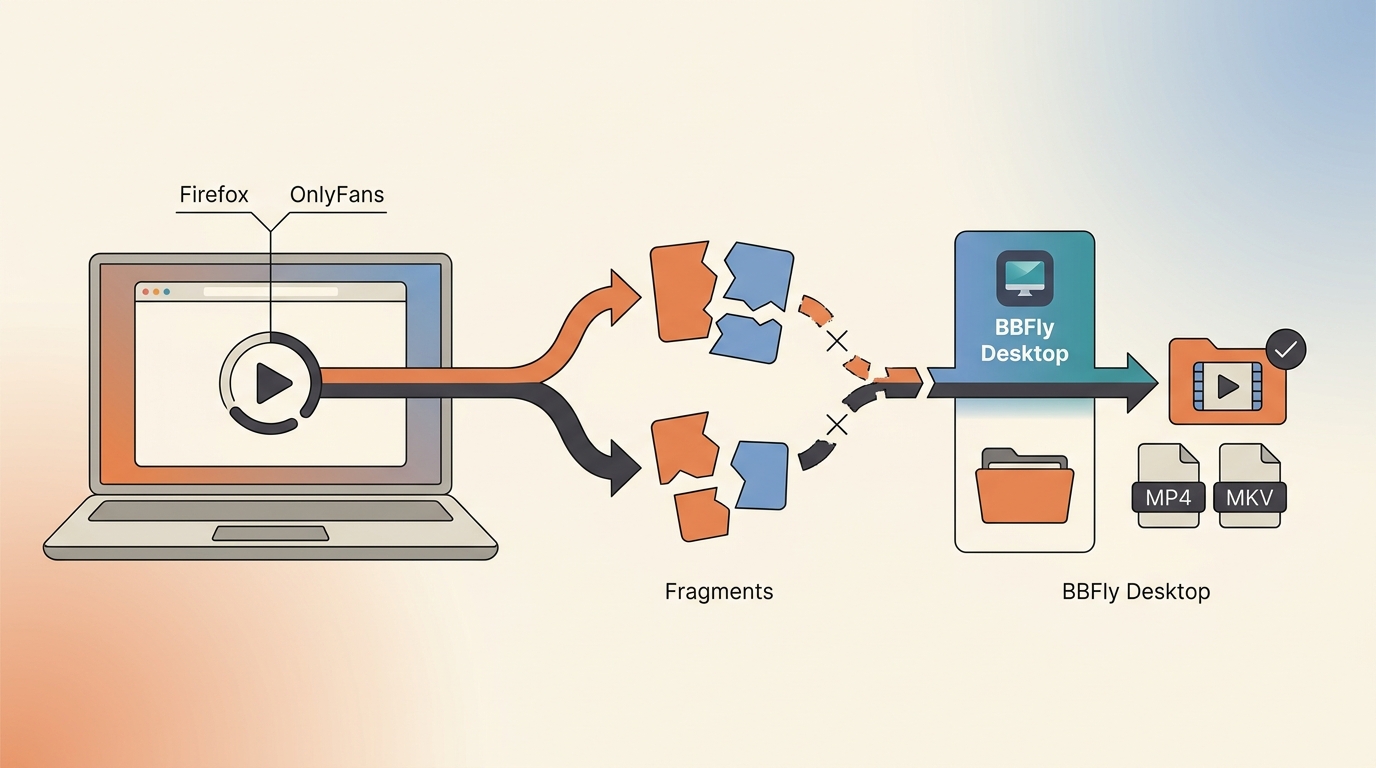
I understand why the browser route is attractive: you already have authorized access, the post is open, and you want a local file you can manage. But reinstalling the same extension five times is not troubleshooting; it is ritual. I will show you how to verify a Firefox OnlyFans downloader on one accessible video, identify the point where detection has structurally failed, and decide when a desktop option makes more sense. The route changes with the media, not with how determinedly you click the toolbar button.
What a Firefox OnlyFans Downloader Can Actually Save
A Firefox OnlyFans downloader can save media only when Firefox exposes a usable resource to the add-on. You also need an active authorized account, a current browser, and enough local storage; seeing a post does not guarantee that an extension can produce a portable file.
Prerequisites: Authorized Access, Current Firefox, and Local Storage
Start with content your account is authorized to view. Keep Firefox and the extension current, confirm the destination drive has space, and choose a folder you can find later. Permission to view or purchase media is not permission to redistribute, resell, or publicly share it.
My practical rule is to settle those basics before diagnosing the downloader. A surprising amount of “extension failure” is an expired session, a blocked permission, or a download folder that has quietly moved. If the account cannot play the item normally, the downloader is not the first problem to solve.
Exposed Media Files Versus Protected Streams
An exposed media file appears to Firefox as a coherent video or image resource. An extension can identify it, display a filename or quality option, and pass it to the browser's download manager. A protected or tokenized stream may arrive in temporary pieces tied to the current session, so the extension never sees one complete file it can offer.
That distinction explains why the same add-on may work on one post and fail on another. The word “downloader” describes the tool's intention, not a guarantee that every media path will be visible to it.
Video, Images, and Message Media Do Not Share One Workflow
Feed videos, still images, and media delivered through messages may expose different browser controls. An extension built around video detection may ignore images, while a normal image save may preserve only the version displayed on the page. A Reddit user in r/firefox stated the need plainly: “Looking for a way to download images from OnlyFans in their original resolution. Thanks!”
Treat each media type as a separate check. A browser extension is best suited to a single, clearly exposed resource. It is not an ideal assumption for a mixed archive of videos, pictures, and message attachments.
How to Download Accessible OnlyFans Videos in Firefox
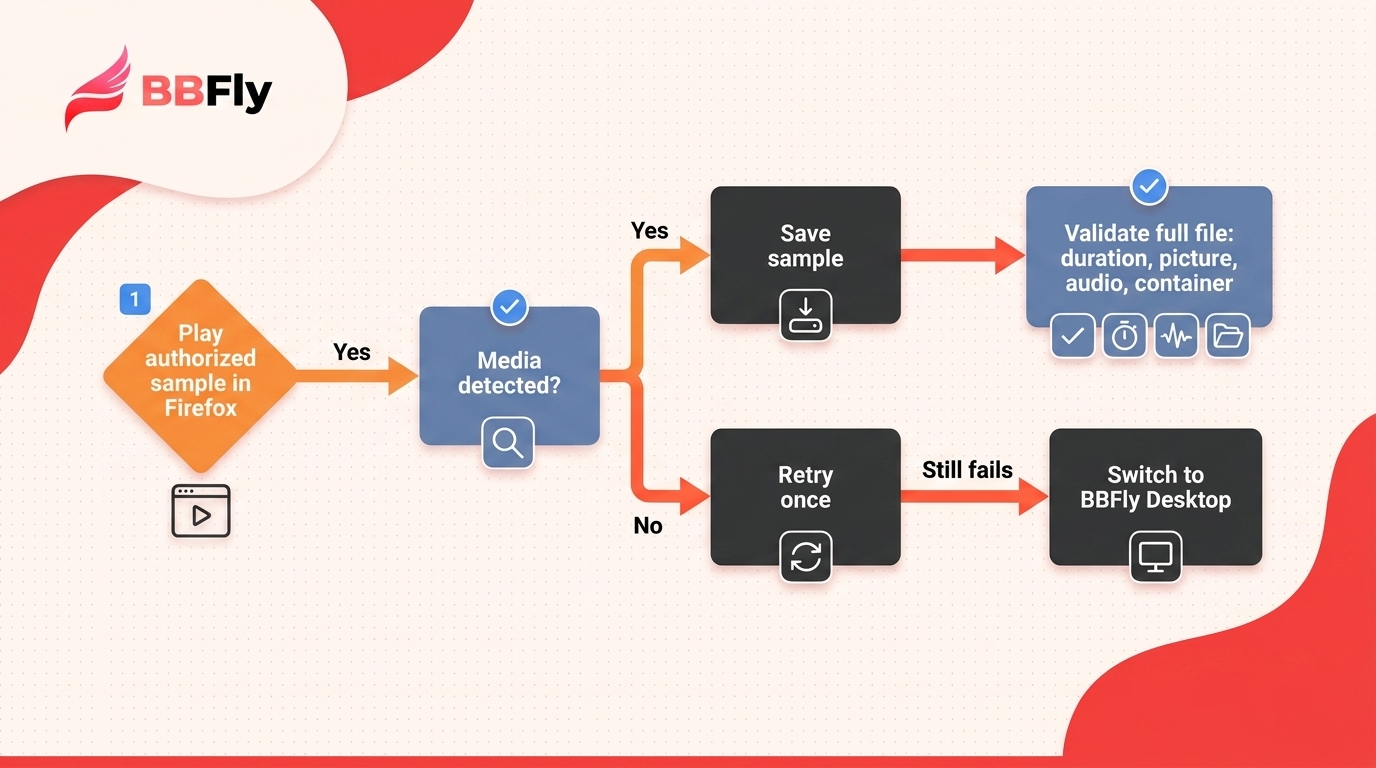
Please note: To download OnlyFans videos Firefox exposes as a usable resource, use the five-step verification sequence below and stop after one troubleshooting pass if detection still fails. Work only with content you are authorized to access, keep files for lawful personal offline viewing, follow OnlyFans' terms, and do not redistribute or sell them.
- Review the extension's permissions, maintenance history, and support details.
- Sign in to OnlyFans and open media your account is authorized to view.
- Start playback and let the extension inspect the active page.
- Save one sample and verify its duration, picture, audio, and file container (the wrapper format, such as MP4 or MKV).
- Try basic troubleshooting once, then switch approaches if detection still fails.
1. Choose an Extension With Clear Permissions and Recent Maintenance
Read the Firefox listing before installation. The requested access should make sense for media detection, the developer should provide recognizable support information, and the update history should not look abandoned. A polished icon is not a maintenance policy.
Avoid installing several similar add-ons at once. Overlapping page scripts and download handlers make failures harder to diagnose, and broad permissions deserve more scrutiny when the developer gives little explanation.
2. Sign In and Open Media You Are Authorized to View
Sign in through the normal OnlyFans page and open the specific post or message containing the video. Confirm that it plays in Firefox before involving the extension. If the item is unavailable to the account, no legitimate downloader workflow should be expected to make it available.
Keep the test narrow. Use one item you can access, rather than opening many tabs and creating several possible failure points.
3. Start Playback and Let the Extension Detect the Stream
Begin playback, then open the extension panel. A successful detection usually presents a media entry, file type, or quality choice associated with the active tab. If several entries appear, favor the one whose duration and resolution match the video you opened.
Do not assume the largest filename is the correct file. Temporary fragments, previews, and page assets can all look plausible until you inspect the result.
4. Verify the File Before Saving a Larger Set
Open the saved sample in a local player. Check the full duration, image dimensions, audio presence, and whether the container is one your devices can use. MediaInfo can identify the video codec (the compression format) and audio format when a player's label is vague.
When I organize a local library, this is the checkpoint I refuse to skip. One verified file tells me more than a queue full of downloads with missing audio or a shortened runtime.
5. Stop After Basic Troubleshooting if Detection Still Fails
Use one restrained troubleshooting pass:
- Refresh the page, replay the authorized video, and reopen the extension panel.
- Restart Firefox and temporarily disable another add-on that may be handling media or page scripts.
- Test a different authorized item to learn whether the failure is item-specific or general.
If no coherent media entry appears after that, stop. Repeating the same cycle will not make a stream more visible to the browser, and the next section explains why.
Why Firefox Downloader Extensions Stop Working
An OnlyFans downloader Firefox extension can detect one video and miss another because the page structure, session tokens, and delivery method are not identical for every item. Extension maintenance matters, but some failures reflect what the browser can see rather than a defect you can repair locally.
Page Changes, Tokenized Streams, and Extension Maintenance
Browser add-ons depend on recognizable page elements and network behavior. A site update can rename those elements, alter requests, or change how a session authorizes media. The extension then needs a matching update from its developer.
Tokenized delivery adds another limit. A temporary request may work only inside the current signed-in session, and an add-on may see segments rather than a complete downloadable asset. Reinstall-first advice is weak here: it replaces software without answering whether the media was exposed in the first place.
Why Screen Recording Is Not the Same as Downloading
A screen recorder captures decoded pictures and sound during playback, then encodes a new file. That generally ties the process to playback time and can change quality, audio behavior, or subtitle handling. A native-download workflow instead saves the available media stream without using the screen as the source.
Calling both processes “download” hides the tradeoff that matters. For a quick personal reference, a recording may be sufficient. For a managed media library, I prefer a verifiable file whose duration, container, video codec, and actual audio can be inspected before it joins the archive.
The Practical Switch Point: One Clip, Many Posts, or a Managed Library
Stay with Firefox when one exposed video produces a valid file and you have no need for automation. Stop browser troubleshooting when detection repeatedly fails, when you need to process many authorized posts, or when you want an organized library rather than a folder of manually named files.
That is the conditional “better way” in the title. It is not better for every reader; it is better when the job has outgrown a page-level extension.
How BBFly Handles OnlyFans Downloads Beyond Firefox
BBFly fits repeated authorized saves, batch jobs, and subscription-channel tracking on Windows or macOS. For one exposed clip, a working Firefox extension remains simpler.
Positioning note: BBFly is a third-party desktop tool, not an official OnlyFans feature. Use it with an active account only for content you are authorized to access, subject to OnlyFans' terms and applicable law.
One Positioning Disclosure, Then the Fit Verdict
It is not for phone-only use, subtitle or alternate-audio downloads, or files Firefox already saves correctly. That decision comes before the specification sheet: if you do not need repeated authorized saves or a managed local library, the desktop route adds needless machinery.
Verified Output: 1080p H.264, AAC 2.0, MP4 or MKV
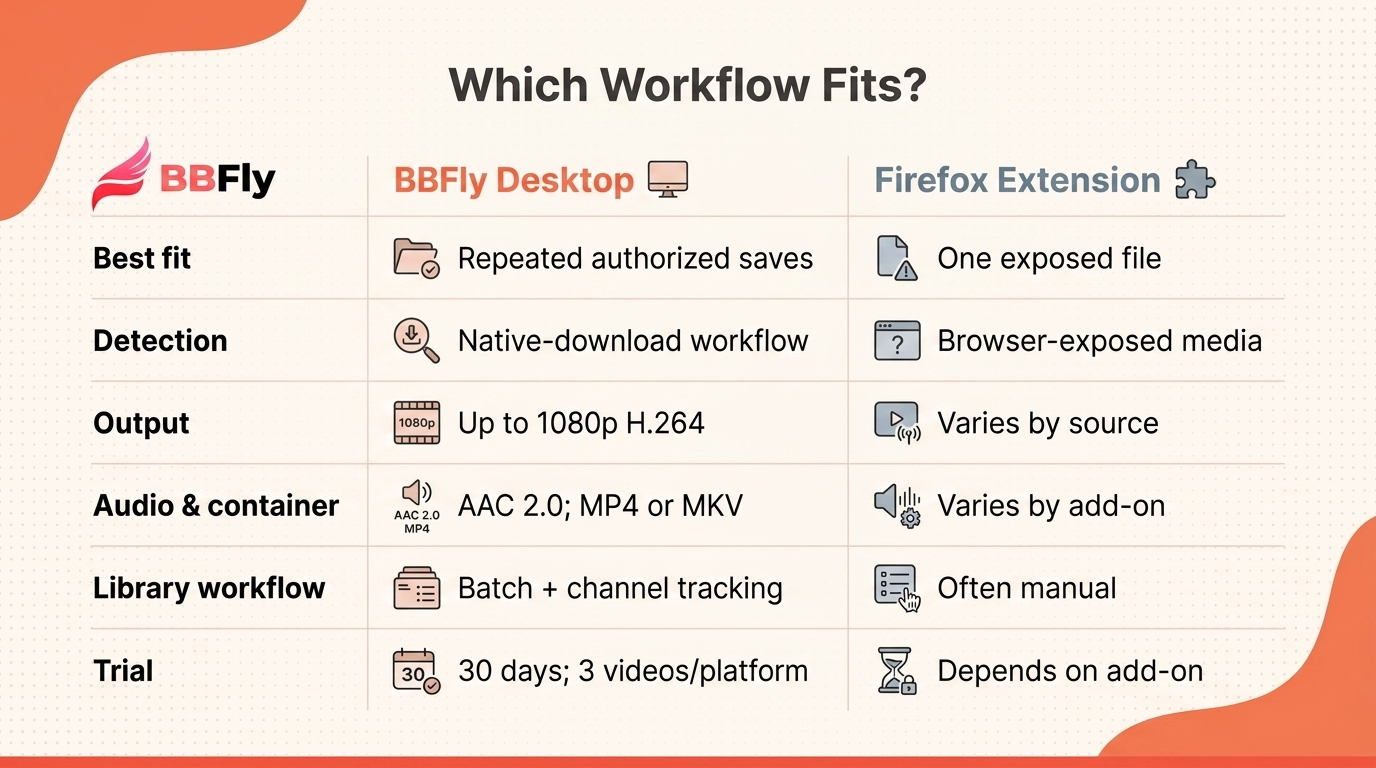
BBFly OnlyFans Downloader uses a native-download workflow and outputs available video at up to 1080p using H.264 video with AAC 2.0 stereo audio, saved as MP4 or MKV files. It supports 720p but not subtitle downloads, audio-language selection, ad removal, or metadata writing.
Firefox Extension vs. BBFly Desktop Workflow
| Decision factor | Firefox extension | BBFly desktop workflow |
|---|---|---|
| Detection method | Browser-exposed media; varies by stream | Native-download workflow |
| Verified video output | Varies by add-on and source | Up to 1080p H.264 |
| Audio and container | Varies by add-on | AAC 2.0; MP4 or MKV |
| Library workflow | Often manual; varies by add-on | Batch downloads and channel tracking |
| Trial | Depends on the add-on | 30 days; three complete videos per platform |
Batch Downloads, Subscription-Channel Tracking, and Trial Terms
Batch downloading and channel tracking support a maintained local collection. If that is the job you actually have, the 30-day trial lets you inspect up to three complete videos per platform before considering paid plans that start at $29.90 monthly as of August 2026.
OnlyFans Downloader for Firefox FAQ
Before choosing an OnlyFans downloader extension Firefox users can trust, settle the legal, account, device, media-type, travel, and retention questions below. My cutoff comes earlier: I verify one file before travel, and if it still fails after one clean troubleshooting pass, I stop and change the workflow. File control is useful, but it does not expand the rights attached to the content.
Is it legal to save OnlyFans videos I can access for personal offline viewing?
There is no universal answer. An unauthorized client may conflict with OnlyFans' terms, while redistribution, resale, or public sharing raises separate copyright issues. Personal offline viewing may sit in a gray area shaped by local law and the platform agreement.
My advice is conservative: keep an active authorized account, save only what you can legitimately view, use it privately, and do not treat payment as a transfer of copyright.
Is it safe to sign in to OnlyFans inside a desktop downloader?
No third-party sign-in should be described as risk-free. Use software obtained from the developer's official site, read its privacy and credential-handling terms, keep the application current, and protect the account with a unique password and multi-factor authentication.
Favor an established vendor with clear support and privacy practices over an anonymous utility that gives no account-handling explanation.
Can I use an OnlyFans downloader on Android or iPhone?
The Firefox extension and BBFly workflows described here are desktop-oriented; BBFly's verified support is Windows and macOS. Mobile browsers do not necessarily provide the same add-on behavior, download controls, or file-management access.
A practical route is to create an authorized personal-use file on a supported computer, then copy a compatible MP4 or MKV to the phone. Storage and player support still matter.
Can I save OnlyFans images and media from messages as well as videos?
Possibly, but do not assume one detector covers every media type and page context. Feed videos, images, and message attachments may be delivered through different controls, and access to one item does not guarantee that an extension will expose another as a file.
Test one authorized sample from the exact context you care about. For images, verify pixel dimensions rather than trusting the filename or the size shown in the page layout.
Can saved OnlyFans videos be viewed offline while traveling?
A verified local MP4 or MKV can be played without a network connection when the device has enough storage and a compatible player. Check the file before departure, including its full duration and audio, because discovering a broken save in airplane mode is poor timing.
Offline playback does not change the personal-use boundary. Keep the file private and do not use travel as a pretext for sharing it with others.
What should I do if a creator removes media I previously purchased?
This concern is real. One r/DataHoarder poster wrote, “I dont plan to share merely want to save what I bought because I’ve heard horror stories of OF models deleting the videos you paid for in the DMs and don’t want to fall victim.”
If local saving is permitted, make the personal backup while access remains authorized and verify it immediately. The file does not create ownership, extend platform entitlement, or grant redistribution rights.
After 15 years of managing local libraries, I have learned that an unverified file is not a backup; it is merely a future surprise.

Clara Hensley
Clara explains what each streaming plan lets you download — and what to do when it doesn't.