
How Long Do Netflix Downloads Last? Full Answer (2026)
Table of Contents
Netflix downloads last up to 30 days unplayed on a device, or 48 hours once you press Play. A handful of titles use a shorter 7-day window, and any download disappears the moment Netflix loses the licence — even if the timer hasn't run out. Windows and Mac have had no official download option since 2024.
Two readers wrote me in the same week with the same question. One had been told the answer was 30 days. The other watched a saved show vanish overnight. Both were right. "Netflix downloads" is three timers in a trench coat, and the answer you get depends on which timer caught you. As one Quora user put it: "Each Netflix download has a different expiration time. Titles that are no longer available on Netflix will expire when they leave the service, regardless of when they were downloaded."
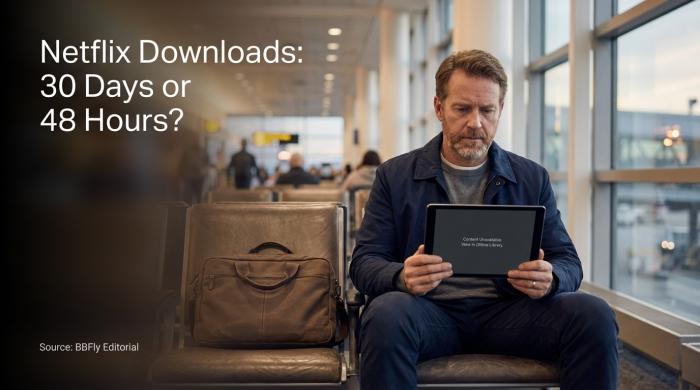
Netflix downloads run on three separate timers — knowing which one caught you is the first step.
How Long Do Netflix Downloads Last? The Quick Answer
In practice, the answer to how long a Netflix download stays on your phone or tablet is the shorter of two timers — whichever runs out first. Unopened, the file is good for 30 days (or 7 on some titles). Opened, you have 48 hours to finish, regardless of whether you watched a minute or an hour.
The full surface has more moving parts than the marketing pages suggest. Plan tier sets your monthly cap. Studio licences set the per-title window. DRM enforces both. Subscription status sits underneath all of it.
Netflix Download Expiry Rules at a Glance (2026)
| Scenario | Timer |
|---|---|
| Unplayed download (most titles) | 30 days |
| Unplayed download (select titles) | 7 days (varies by licence) |
| After you press Play | 48 hours to finish |
| Title leaves Netflix catalog | Immediate — file invalidated |
| Subscription cancelled or lapses | Immediate — DRM lock |
| Standard with Ads — monthly cap | 15 downloads / device / month, max 2 devices |
| Standard (no-ads) — device cap | 2 devices, no monthly cap |
| Premium — device cap | 6 devices, 4K + HDR supported |
| Windows / Mac desktop | No official download option (removed 2024) |
Source: Netflix Help Center (help.netflix.com/en/node/54865 and /node/133763).
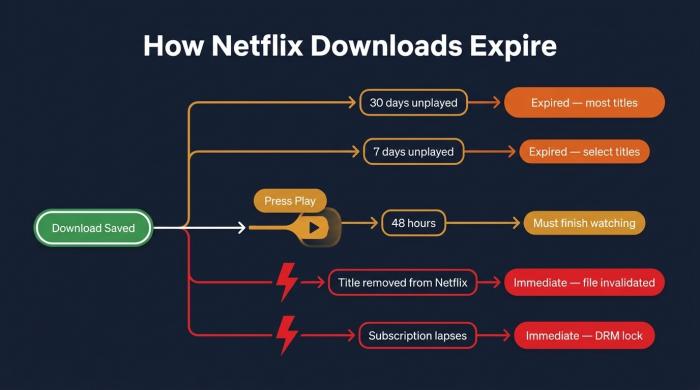
Five ways a Netflix download expires — whichever clock runs out first wins.
Why Do Netflix Downloads Expire?
Netflix doesn't own most of what's on Netflix. It licenses each title from a studio under terms that limit how long an offline copy may sit on a customer's device. The studios — not Netflix — set most of the expiry math.
Three forces converge on every downloaded file. A content licence sets a fixed offline window. A DRM layer enforces that window on the device. A per-title renewal counter limits how many times you can re-download the same film in a year.
The 30-day timer is contractual. The 48-hour playback timer is a DRM enforcement choice — once a file decrypts, the clock starts. The two don't match because the studios negotiating with Netflix care more about preventing redistribution than about your weekend plans.
There is a fourth expiry path: the title leaves the catalogue. Per Netflix's Help Center, when a movie or show is removed from the service, every downloaded copy of it becomes unplayable at the same moment, regardless of how long you've had the file.
A fifth path catches people off guard: the account itself. Cancel your subscription, or let a card fail, and every download on your phone goes dark. The DRM check phones home, fails, and the app refuses to play. The bits are still on disk; they just won't decrypt. As one Hacker News commenter summed up the broader frustration: "All these streaming downloads are still worse experience than torrent. Can't download 4K… Downloads expire in 30 days."
If you're curious about where Netflix downloads are stored on your device, the path varies by platform — but knowing the folder doesn't let you move or back up the DRM-locked files.
If you have ever wondered why streaming downloads feel like rented chairs — they are.
How to Renew an Expired Netflix Download
To renew an expired Netflix download: open the Netflix mobile app, delete the expired title from your Downloads list, and download it again — assuming Netflix still has the rights and you haven't hit the per-title annual cap. There is no in-place "refresh" button. Renewal is always a fresh download against Netflix's licensing servers.
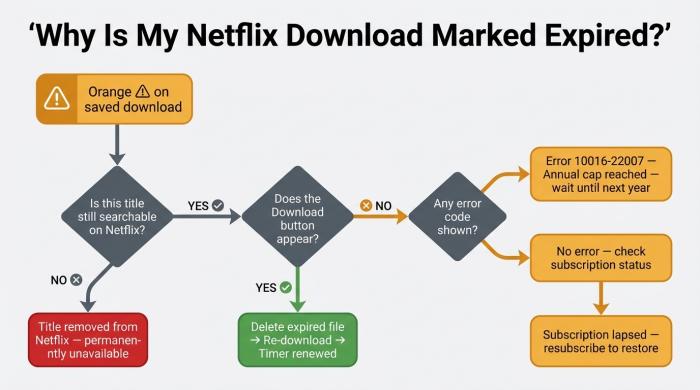
The orange exclamation mark can mean three different things — trace your branch to find the fix.
The sequence:
- Open the Netflix app on iOS, Android, an iPad, or ChromeOS. (Windows and Mac no longer have a download option — see the FAQ.)
- Tap Downloads at the bottom of the screen.
- Find the title flagged with the orange exclamation mark.
- Tap the three-dot menu → Delete Download.
- Search for the title again. If Netflix still carries it, the Download button reappears on the title page.
- Tap Download. An internet connection is required — Netflix issues a fresh licence on the server side.
Source: Netflix Help Center, "Downloaded title says 'Expired'" (help.netflix.com/en/node/54865).
What the Exclamation Mark Icon Means
The orange exclamation mark on a downloaded title means one of three things: the 30-day timer has run out, your subscription has lapsed, or Netflix no longer holds the licence. The Downloads list itself doesn't distinguish which — you find out by trying to play it.
If the file shows an error and bounces back, the cause is usually subscription or licence. If the Download button reappears in the catalogue, the title is still available and renews normally. If the title isn't searchable on Netflix at all, it is gone, and no amount of deleting will bring it back.
When the Renew Button Won't Work
A few situations bury the renew option:
- Title removed from Netflix. No catalogue listing means no renew option. The most common reason a download "won't come back."
- Annual per-title cap. Studios set a per-title yearly download limit on some titles. You see error code 10016-22007 when you hit it.
- Standard with Ads, 15-per-month cap. The ad-supported plan caps each device at 15 downloads per calendar month. Renewals fail until next month.
- No internet. Renewal calls Netflix's licensing server. An offline device cannot refresh a download.
When the official path is closed, two options remain: wait for the next renewal window, or step outside Netflix's expiry machinery entirely. That is the next section.
Keep Them Permanently with BBFly Netflix Downloader
You can't keep Netflix downloads permanently inside the Netflix app — every file you save there runs on Netflix's clock. The practical way to step around that clock, without stepping around your subscription, is a desktop tool that saves the content as a standard MP4 or MKV file under your own control.
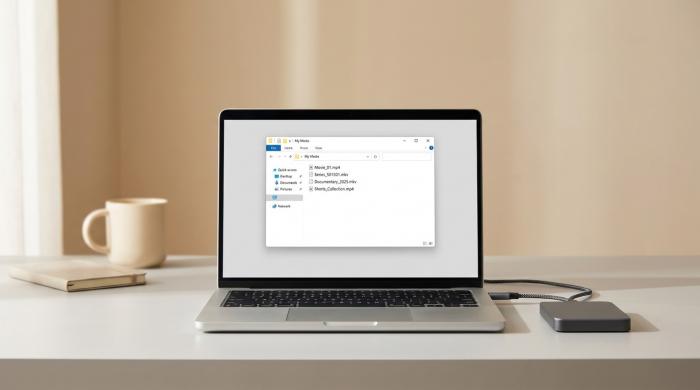
Saved as a local MP4 — plays in any media player, on any device, with no expiry timer.
BBFly Netflix Downloader is the tool I have been tracking for this purpose. It runs on Windows and Mac — the two platforms Netflix has quietly abandoned for offline viewing — and outputs 1080p MP4 or MKV files with subtitles in every language Netflix carries for that title. Once saved locally, the file has no 30-day timer, no 48-hour playback window, and no subscription check on launch. It plays in VLC, on a Smart TV via USB, or on a NAS.
Two technical notes worth flagging. BBFly uses native download — pulling the original stream and remuxing it, rather than recording the screen — so there is no transcoding pass. And its Netflix module, per the brand's technical team in May 2026, currently preserves the full Dolby Atmos audio track, which most competing tools claim and few deliver.
Personal use only. BBFly requires an active Netflix subscription, and saved files are for your own offline viewing — not for resale, public sharing, or redistribution.
FAQ: Plans, Devices, and Download Time
Short answers to the questions that pile up underneath the main expiry rules.
How long does it take to download a Netflix movie?
For a two-hour movie at 1080p, expect roughly 5–25 minutes depending on your connection. On home Wi-Fi at 100 Mbps or better, a feature film usually lands in well under 10 minutes. On hotel Wi-Fi, plan for the high end. The app downloads over Wi-Fi only by default; cellular downloads are a toggle in settings.
Smart Downloads (ad-free plans only) pre-fetches the next episode of a series overnight while the device is on Wi-Fi and charging. You never watch that timer.
If your goal is to watch downloaded Netflix on a plane, this Smart Downloads behaviour is especially useful — preloading episodes the night before a flight means you board with a full queue already saved.
How many downloads can I have on Netflix at once?
Per Netflix's Help Center: Standard with Ads — 2 devices, Standard — 2 devices, Premium — 6 devices. Standard with Ads also carries a 15-downloads-per-device-per-month cap. Ad-free plans have no monthly cap, but the per-title annual limit still applies.
What happens to my Netflix downloads when my subscription ends?
They stop playing. The files remain on the device, but Netflix's DRM check fails the moment the subscription lapses. Resubscribing restores access. Files saved outside the Netflix app — for instance, MP4s exported by a desktop tool like BBFly — don't go through that check.
Does Netflix have a download limit per month?
Only on Standard with Ads: 15 downloads per device per month, with a two-device cap. Standard and Premium have no monthly cap. Every plan still hits the per-title annual limit (error 10016-22007).
Can I still download Netflix on a Windows PC in 2026?
No. Netflix removed downloads from its Windows app in 2024 when it migrated to a progressive web app. Mac never had a download client. As one Hacker News commenter summed up the inconvenience: "When travelling I carry a company laptop and don't intend to carry a tablet as well for entertainment." The official offline routes today are iOS, Android, iPad, and ChromeOS. Desktop users either travel with a second device, accept browser-only streaming, or save files locally with a desktop downloader.
For a broader look at how watch Netflix offline on any device actually works — including which plans support it and what the app's limits are — our full offline-viewing guide covers the end-to-end picture.

Clara Hensley
Clara explains what each streaming plan lets you download — and what to do when it doesn't.