
HBO Max Download Not Working? 8 Fixes in 2026 (and Max's Built-In Limits)
Table of Contents
The classic Max moment: you saved three episodes for the flight, opened the app at 35,000 feet, and it asked to retry the connection before a single frame played. Most "HBO Max download not working" fixes take five minutes — check the plan tier first, then clear the app cache and sign out, then look at VPN and storage. Reinstall is a last resort, not step one. And if you are on a Windows or Mac laptop, Max does not ship a download client at all.
I have watched this play out enough times to spot the pattern, and the frustrating part is that the fix list everyone copies around is in the wrong order — and it skips one cause that quietly takes down more downloads than the popular suspects.
Why HBO Max Downloads Fail: 8 Causes and the Fix for Each
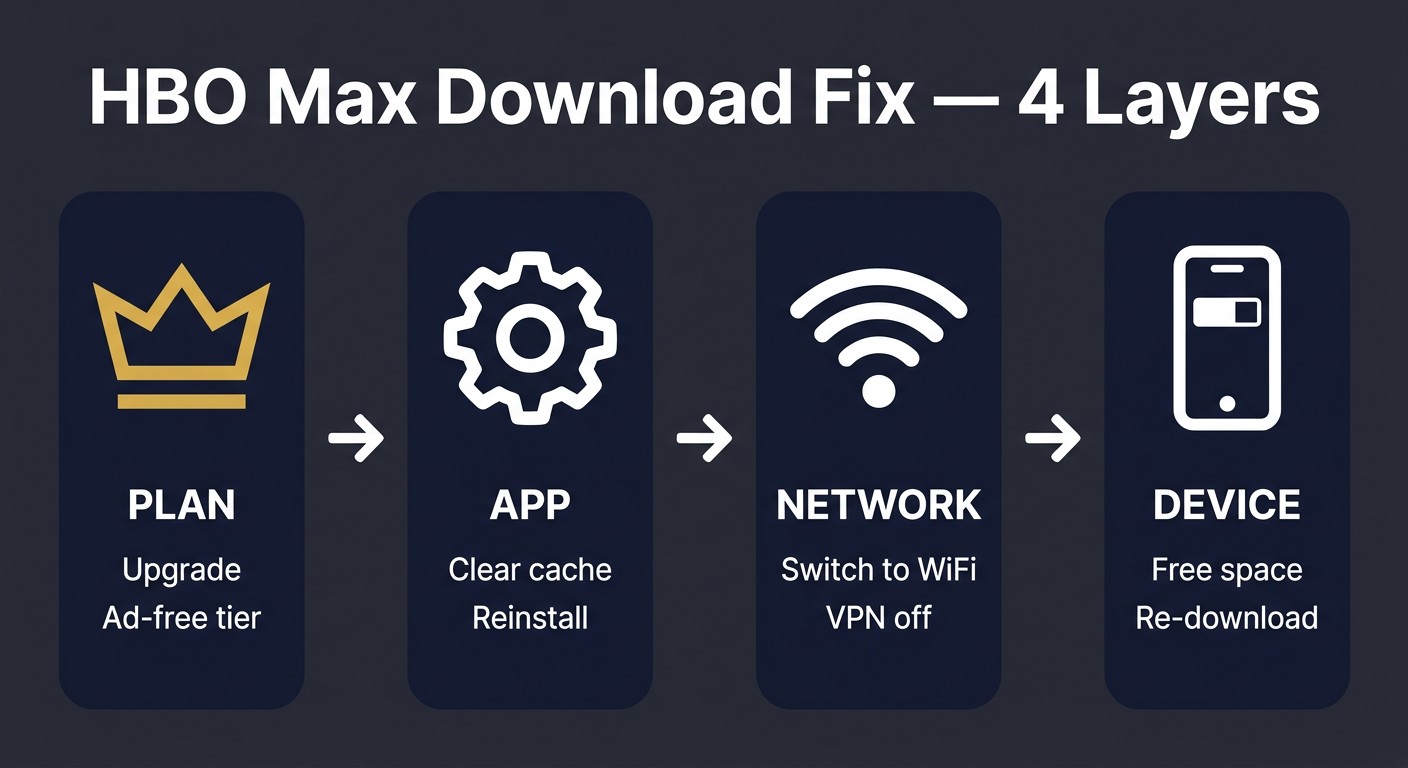
Work through these in order, cheapest fix to most destructive. Stop the moment the download starts behaving:
- Confirm you're on Standard or Ultimate. Basic with Ads has no download button at all.
- Update the Max app to the current version.
- Sign out, then sign back in to refresh entitlements server-side.
- Clear the app cache (Settings → Storage → Max → Clear Cache on Android; offload-and-reinstall on iOS).
- Disable any VPN or iCloud Private Relay — Max flags both as proxies.
- Toggle off "Download over Wi-Fi only", or join a Wi-Fi network.
- Free up storage and drop the download quality from Highest to Standard.
- Turn off OS battery optimization for Max so the system doesn't suspend the download when the screen locks.
Plan check first: Basic with Ads has no download button at all
This is the single biggest reason guides waste readers' time. Per HBO Max's Help Center, Basic with Ads does not expose downloads — no button to grey out, no menu to find. If a household member switched everyone to Basic with Ads to save a few dollars, the fix is on the plan page, not in the app. Standard and Ultimate are the only tiers that unlock offline.
App layer: update, sign out, clear cache — reinstall last
Reinstall is the first move most guides suggest, and the last move I would try. It wipes your queue and every half-finished download with it, and on most accounts it doesn't fix anything a sign-out and cache clear wouldn't. My order: update, sign out and back in for a fresh entitlement check, clear cache to throw out the corrupt manifest, and only then — if a specific title still refuses — uninstall and reinstall. The queue survives every step except the last.
Network layer: VPN, iCloud Private Relay, and the Wi-Fi-only toggle
Max treats VPNs and iCloud Private Relay as proxies. Per Max's Help Center, an active proxy can block playback and downloads outright. Turn either off before you queue a title; turning it back on afterward is usually fine. The separate "Download over Wi-Fi only" toggle is on by default — useful if your cellular plan is small, but it is also why a download on the train suddenly stops the second your Wi-Fi drops.
Device layer: storage, download quality, and OS Wake Lock
If storage is low, Max stalls silently rather than warning you — check the device's storage view before anything else. A 1080p hour-long episode runs a couple of gigabytes; drop to Standard quality if you're tight. The cause almost nobody writes about: modern Android and iOS suspend background work aggressively after the screen locks. I have reproduced this on a Pixel — start a queue, lock the phone, come back twenty minutes later to no progress. Open OS battery settings, exempt Max from optimization, and the background download holds.
Why You Can't Download on HBO Max: Plans, Caps, Expiry, and the Desktop Wall
Max draws three lines around offline viewing — which plan, how many titles per account, and how long each saved file lasts. Most "I can't download on HBO Max" frustration is not a bug; it is policy you bumped into.
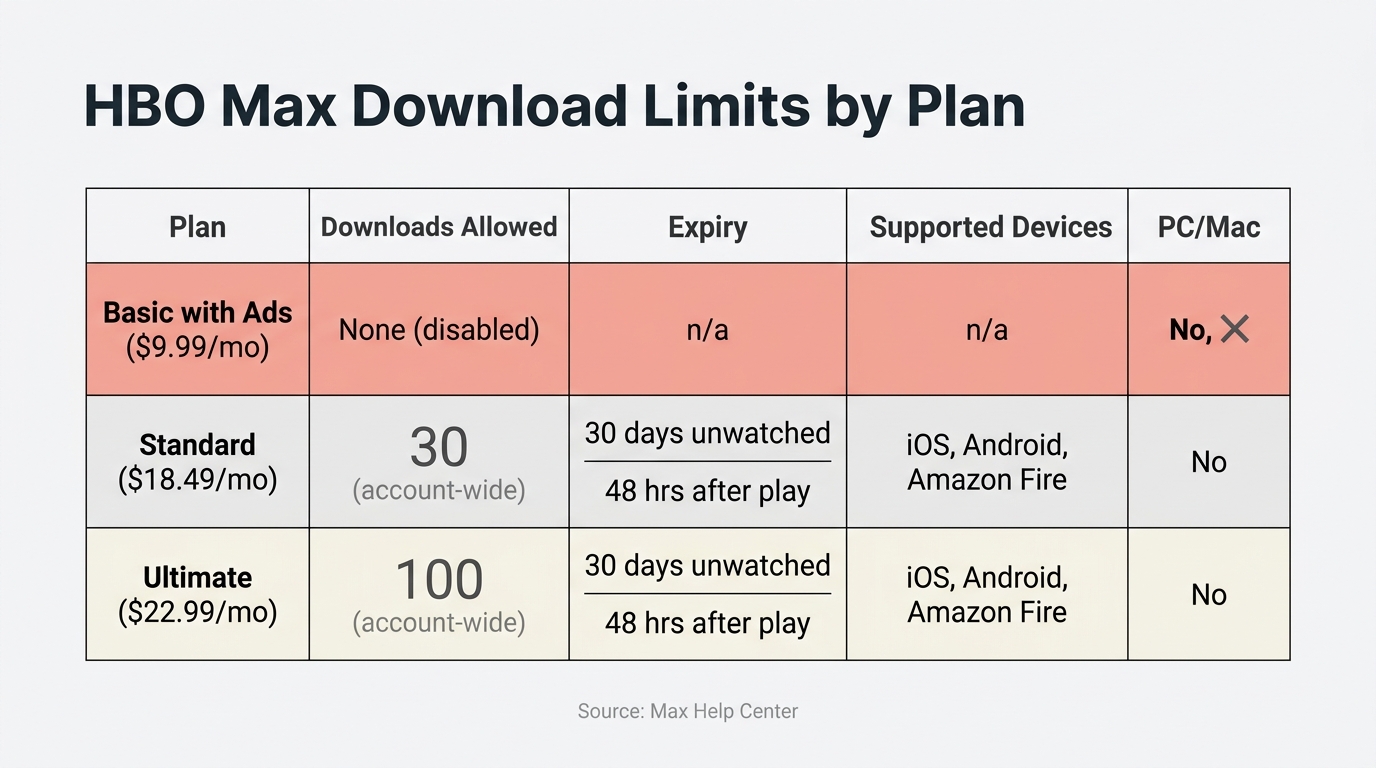
Plan tiers: Basic with Ads, Standard, and Ultimate
| Plan | Monthly price | Downloads allowed | Expiry | Supported devices |
|---|---|---|---|---|
| Basic with Ads | $9.99/mo | 0 — feature disabled | n/a | n/a |
| Standard | $18.49/mo | 30 (account-wide, all devices) | 30 days unwatched / 48 hours after first play | iOS, Android, Amazon Fire (no Windows or Mac) |
| Ultimate | $22.99/mo | 100 (account-wide, all devices) | 30 days unwatched / 48 hours after first play | iOS, Android, Amazon Fire (no Windows or Mac) |
Source: HBO Max's official Help Center, as of June 2026.
Account-wide download caps and the 30-day / 48-hour expiry
The cap is the part most households miss. Per Max's Help Center, the 30 (Standard) and 100 (Ultimate) ceiling is shared across every device on the account — not per phone. Your queue can look empty on your own device while a teenager three states away has filled it from their tablet. The expiry timer is the second surprise: 30 days unwatched, 48 hours after you press play. Same rule on Ultimate as on Standard — the premium tier buys more slots, not a longer shelf life.
No PC or Mac desktop app — the device wall
This is the gap no fix in section one can address. Max has never shipped a Windows or Mac client with downloads. Browser streaming requires a live connection; there is no "save for offline" path in the browser and no Microsoft Store package either. Official offline support is iOS, Android, and Amazon Fire — full stop. Worth checking Max's device support page before assuming your laptop is misbehaving.
BBFly's Personal Offline Option for HBO Max Movies That Won't Download in the App
Please note: Third-party downloaders may conflict with Max's Terms of Use. Keep any saved files for your own personal, offline viewing of content you actively subscribe to — no redistribution. A valid Max subscription remains required; this is an offline-viewing aid for paying subscribers, not a way around the paywall.
After confirming there is no official Windows or Mac client, the path I settled on for my own library is BBFly HBO Downloader, which is not "one more fix" in the listicle, but a different shape of answer for two specific cohorts (laptop users and anyone tired of the 30-day timer). It runs a native download — no re-encode — so the 4K, HDR10, Dolby Vision, and Dolby Atmos that Max ships on flagship HBO titles stay intact from the source stream. The output is a plain MP4 or MKV with no in-app expiry, playable in VLC, Plex, or any media server. Windows and Mac are both supported. A 30-day trial covers three full titles per platform, which is enough to verify subtitle sync and batch behavior before paying.
Frequently Asked Questions
A few questions I keep seeing in forums after readers work through guides like this one — the first three are about usage, the last three sit on the edges where most articles stop short.
Can I download HBO Max on a Windows or Mac laptop?
No. Max has no Windows or Mac client — not as a browser download, not as a Microsoft Store package. Official offline viewing is iOS, Android, and Amazon Fire only. For laptop offline use you are looking at a third-party tool, with the personal-use scope from the previous section.
How many HBO Max downloads can I save, and what plan do I need?
Basic with Ads, zero. Standard, 30. Ultimate, 100. That cap is account-wide across every device on the profile, so an empty queue on your phone tells you nothing if anyone else on the account has been downloading (as of June 2026 — check Max's Help Center for current numbers).
Do HBO Max downloads expire?
Yes. 30 days unwatched, or 48 hours after you press play. Same timer on every plan, Ultimate included. You can hit "Renew Download" when online to reset it, but if you are already on the plane without signal, there is no manual override.
My HBO Max download failed — what's the fastest fix?
Plan → cache → VPN, in that order. Confirm Standard or Ultimate, sign out and clear the app cache, then disable any VPN or iCloud Private Relay. Those three are fast because they are all reversible in under a minute and none of them touches your existing queue. Reinstall is the loud, queue-destroying fix everyone leads with — save it for last.
My download finished but won't play offline — what's wrong?
Max performs a periodic online check even on saved files. If your device went offline before that handshake refreshed (typically valid for a few days after your last sign-in), the app refuses playback until it can phone home. Bring the device online once, open the title until the spinner clears, then go offline — the file plays.
Is it safe to use a third-party downloader with my HBO Max account?
A reputable tool with a named developer and a transparent installer is a manageable risk; an unsigned binary from an anonymous forum link is not. Either way the rule is the same: a valid Max subscription is required, the saved files are for personal offline viewing, and you do not redistribute. For the definitive answer, read Max's Terms of Use and your local copyright law.