
How to Download Hulu on Nintendo Switch: 2026 Status & Workarounds
Table of Contents
Half the existing tutorials still tell you to open the eShop, search for Hulu, and tap "Free Download." That advice was correct in late 2024. In mid-2026 it sends you into a wall — the listing isn't there, and sideloaded older builds can't reach a live server. The official path is gone. What's left are workarounds, and there are real differences in which ones survive contact with a Switch in someone's hands.
The Quick answer is: You can't, in any meaningful sense. The Hulu app was removed from the Nintendo eShop on November 6, 2025, and the service stopped working on the Switch entirely on February 5, 2026. To get Hulu titles onto a Switch in 2026, the realistic path is to download them to a PC or Mac as MP4 / MKV files, host them on a Plex media server, and stream from Plex to the Switch — which still has the Plex app.
Can You Still Download Hulu on Nintendo Switch in 2026? Short Answer First
No — neither the Hulu app nor the Hulu service is available on Nintendo Switch anymore. Nintendo pulled the listing from the eShop in November 2025, and Hulu's own back-end stopped serving the Switch client in February 2026. There is no in-app download path because there is no app.
That matters for two adjacent searches. "Can you download Hulu on Switch" — no, not the official way, since the Switch app itself is gone. "Can I download Hulu on Nintendo Switch" — same answer, including on Switch Lite and Switch OLED. The hardware still runs Plex, YouTube, and Crunchyroll, so a workaround built around Plex is genuinely viable, but the Hulu app you remember is not coming back. Anyone telling you otherwise in 2026 is working off an outdated tutorial. The next section covers what changed and why it matters for what you do next.
Why Hulu Disappeared from the Switch eShop — Timeline and Disney's Restructure
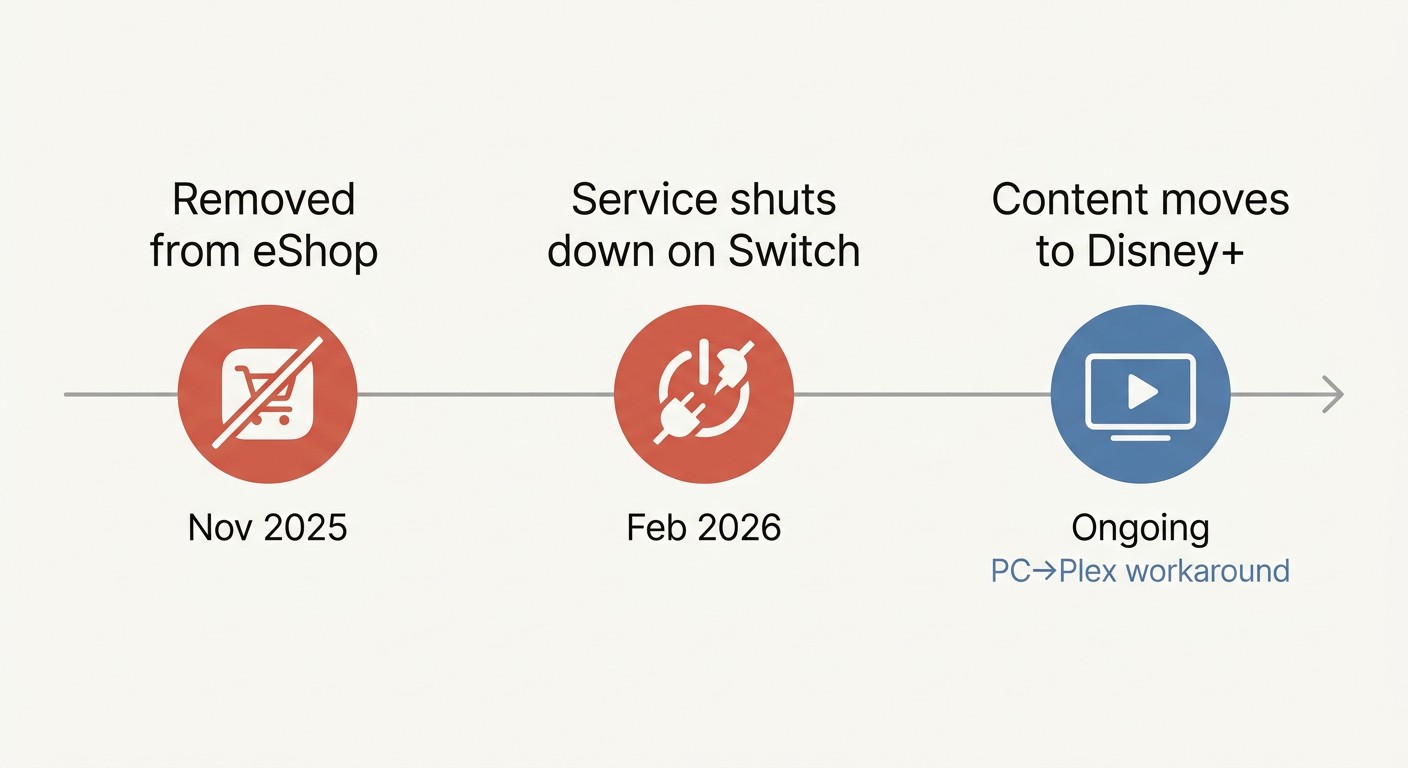
Hulu's exit from Switch wasn't a sudden decision — it was the tail end of Disney consolidating the service into Disney+. Two dates matter: November 6, 2025 (app delisted from the eShop) and February 5, 2026 (service fully shut down on the Switch client). Both are documented on Nintendo's own help pages.
November 6, 2025: Hulu Drops Off the Nintendo eShop
This was the first signal. Per Nintendo's support pages, the Hulu listing was removed from the US eShop on November 6, 2025. People who already had the app installed could keep using it for a few more months, but new installs were impossible. (As of mid-2026 Nintendo's original "Using Hulu on Nintendo Switch & FAQ" page returns a 404 — the help article itself has been deleted, which is its own kind of confirmation.)
February 5, 2026: The Service Itself Shuts Down on Switch
Three months later, the back-end stopped responding. Existing installs broke. After February 5, 2026, the Hulu app on a Switch is a dead icon — sign-in fails, the content list won't populate. Even if you sideload an older package or pull one from a backup, there is no working server on the other end to talk to. Nintendo Life covered the wind-down in January 2026, and the user reaction in the comments was mostly nostalgia rather than surprise; the closure was telegraphed two months in advance.
Where Hulu Content Is Going Now — The Disney+ Picture
Disney took a controlling share of Hulu in June 2025, and the long-term plan has been to fold Hulu content into Disney+ as a tile inside that single app. That's already happened on smart TVs and mobile. The catch for Switch owners is that Disney+ has never shipped on any Nintendo console — not on the original Switch, not on Switch 2. My read on it: I wouldn't hold my breath for that to change. Nintendo has been quietly trimming streaming surface, not expanding it; the odds of Disney+ launching on Switch 2 specifically, in a year where Switch 2 has fewer streaming apps than the original Switch, look low to me. That assumption shapes the rest of this guide.
How to Download Hulu on Nintendo Switch in 2026: The PC-to-Plex Workaround
The only Switch-side path that still works is indirect: you don't run Hulu on the Switch at all. You download Hulu titles to a PC or Mac, store them in a Plex library, and use the Plex app on the Switch to stream from your own server. Plex is still on the eShop alongside YouTube and Crunchyroll, which is what makes any of this possible.
Please note: Third-party desktop downloaders may conflict with Hulu's Terms of Use. Keep any downloads for your own personal, offline viewing under an active Hulu subscription, and don't redistribute or resell them. Where an official download path exists on a device you own, that's the most worry-free route — for Hulu on Switch in 2026 no such path exists, which is why this workflow is here at all.
Step 1 — Download Hulu Titles to PC or Mac as MP4 / MKV
Grab a desktop downloader that signs into your own Hulu subscription and writes the playable stream out as a standard MP4 or MKV file. The non-negotiable spec list: 1080p video at minimum (4K where the Hulu source supports it), AAC or EAC3 audio, embedded or sidecar subtitles, and an option to skip the in-stream ads if you're on an ad-supported plan. Batch downloading is a quiet quality-of-life feature — a single season of an hour-long show is twenty-plus episodes; clicking each one is its own job. I'm holding off on naming a specific tool in this step on purpose; the brand-section H2 below covers the one I default to and why.
Step 2 — Add Files to a Plex Library on a PC or NAS
Install Plex Media Server on whatever you'll leave running — a desktop PC for in-home use, a NAS if you want it reachable away from home. Make a library, point it at the folder where your downloads live, and let Plex scrape metadata. Two lessons from running Plex for a decade: use Plex's official naming convention (Show Name - s01e02 - Episode Title.mp4) so the scraper doesn't mis-match, and keep files in H.264 MP4 for clean direct-play to the Switch. The Plex client on Switch streams natively in most cases, but the moment the server has to transcode — re-encoding a 4K HEVC file into something the Switch can handle — you're at the mercy of the server CPU and a visible quality drop. I've watched a fine 1080p episode turn into a pixel storm because Plex was transcoding live on a low-power NAS. The fix is upstream: download in a Switch-friendly format (1080p H.264 MP4, AAC audio) and skip the transcode entirely.
Step 3 — Stream to Your Switch via the Plex App
On the Switch: open the eShop, search Plex, install it, sign in to the same Plex account. Pick the library, pick the title, hit play. In handheld mode the Switch screen tops out at 720p (the OLED is still 720p — the OLED part is the panel, not the resolution), so my honest take is that a 1080p MP4 is the sweet spot for the Switch-Plex path. A 4K source file just wastes server storage and bandwidth on a display that can't show it, and adds transcoding risk for nothing. Docked output goes up to 1080p, which the Switch hardware can pass through cleanly. Five-channel audio is fine over HDMI; over the OLED's speakers it'll downmix on its own.
Plan B — Cast from Phone to a TV Where Your Switch Is Docked
If you don't want to run a PC or NAS, there's a free shortcut: install the Hulu mobile app on a phone or tablet and cast to the same TV your Switch is docked to. Chromecast, AirPlay, an HDMI dongle — whatever the TV accepts. The Switch isn't actually the player here; the TV is. But if your real goal is "watch Hulu in the room where my Switch lives," this fixes it in under a minute, and it's free if you already have a Hulu subscription and a phone. A lot of people I've watched go through this gauntlet end up here anyway — picking up the tablet instead of fighting the Switch.
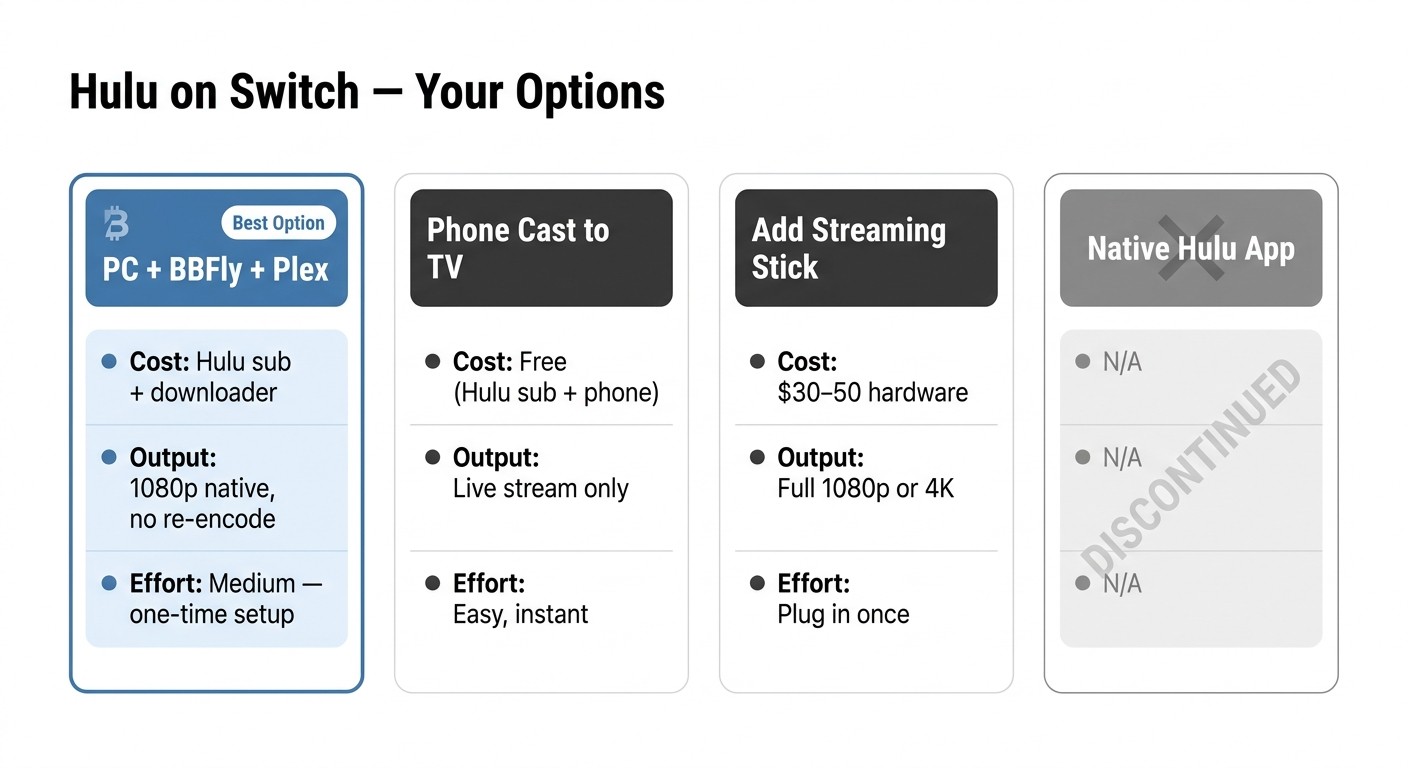
Hulu on Nintendo Switch in 2026 — workaround options compared
| Method | Cost | Output | Effort | Caveats |
|---|---|---|---|---|
| PC / Mac download → Plex library → Plex app on Switch | Hulu subscription + a desktop downloader (subscription or lifetime plan — see BBFly pricing page) | 1080p / 4K MP4 or MKV, ads removed, multi-subtitle, EAC3 5.1 — files are permanent local copies | ~30-min Plex setup, then one-click per title | Needs a PC or NAS running when you want to stream from outside the house; Hulu subscription must stay active to add new downloads |
| Hulu mobile app → cast / mirror to TV where Switch is docked | Free if you already have Hulu + a phone or tablet | Live streaming, no saved file — quality matches the phone | None beyond casting setup | Needs Wi-Fi and a TV that accepts casting; you're not really using the Switch — it just shares the TV |
| Add a streaming stick (Fire TV / Chromecast / Roku) to the dock TV | $30 – $50 one-time hardware | Native Hulu app on the stick — full 1080p / 4K streaming with all Hulu features | Plug in, set up once | Defeats the "use my Switch" point — but if the goal is watching Hulu in the room where the Switch lives, this is the simplest fix |
| Hulu app native on Switch — DISCONTINUED | n/a | n/a — app removed Nov 6 2025, service ended Feb 5 2026 | n/a | Listed for historical context only — this is what every outdated tutorial still tells you to do |
Sources: Hulu-on-Switch status from Nintendo's support pages and Nintendo Life coverage (Jan 2026); BBFly output specs from official product documentation.
Hulu on Nintendo Switch 2 — Why It's Even Less Available
Switch 2 launched with fewer streaming options than the original Switch, and Hulu's discontinuation makes the answer trivial in both directions.
Short Answer: No Hulu, No Disney+, No Major Streaming Apps
No Hulu on Switch 2 — the service is discontinued everywhere on Nintendo hardware. No Disney+ either, since that has never been on a Nintendo console. At the time of writing in 2026 the Switch 2 eShop doesn't carry the major streaming brands that even the original Switch had. One famiboards user summed up the mood plainly: "I just want to watch anime and true crime videos on my Switch 2 dammit!" That frustration is the typical Switch 2 streaming experience, condensed.
Why Switch 2 Currently Has Fewer Streaming Options Than Switch 1
The original Switch still runs YouTube, Crunchyroll, and Plex for people who never deleted them. The Switch 2, at launch, has essentially none of those — not YouTube, not Crunchyroll. Whatever you were using to watch video on Switch 1 is not on Switch 2 unless and until Nintendo or the third party ships a Switch 2 build. As another famiboards user put it, "NS2 should have been a chance to build that function out further, maybe add a streaming apps tab like you have on PS5." Whether that ever happens is on Nintendo. The pattern so far suggests Switch 2 is being positioned as a pure gaming device — closer to a high-end handheld than to a streaming hub.
If You Bought a Switch 2 for Streaming — The Realistic Path Forward
Two options. Either wait for Plex to ship a Switch 2 build — at which point the PC-to-Plex workflow above starts working on the new hardware too — or set up the phone-cast Plan B and use the Switch 2 strictly for games. There is no third path that involves a Hulu app opening on the device itself, because the Hulu app no longer exists on any Nintendo console.
How BBFly Saves Hulu Titles as Permanent Local MP4 Files for Personal Offline Viewing
Which desktop downloader is worth pointing at the Plex workflow above? My short answer is the one that produces files Plex can direct-play on the Switch without re-encoding. That's where most tools in this category fall down.
Native Download vs Screen Recording — Why It Matters for the Switch-Plex Path
Two different things share the label "Hulu downloader." Native-download tools sign into your account and pull the original video stream from Hulu's servers, then remux it into a plain MP4 or MKV — the file is bit-for-bit close to what was already going to your screen. Recording-mode tools (PlayOn, Audials) play the title in real time and capture the picture frame by frame, then re-encode the capture. For a Switch-Plex setup, that distinction matters two ways: native-downloaded MP4s direct-play through Plex with no server-side transcoding, and they keep the original audio (EAC3 5.1 where present, AAC 2.0 otherwise) and subtitles intact. Recording-mode output is locked to real-time capture and re-encoded picture, by definition, isn't the same file Hulu was about to play you.
BBFly's Hulu downloader is the one I default to here. It outputs MP4 or MKV up to 4K with H.264 video, EAC3 5.1 / AAC 2.0 audio, soft-subbed tracks, ad removal on supported titles, and subscription-aware episode follow for ongoing series. Windows and macOS, batch queues, three full-title free downloads per platform — long enough to verify subtitle sync and audio track on your own content before paying. Subscription and lifetime plan available; see bbfly.com for current pricing. Honest limitations: Windows / macOS only — no Linux, no browser version — and you need a PC or Mac running when you download. Earlier rules still apply: BBFly requires your own active Hulu subscription, files are for personal offline viewing.
Hulu on Nintendo Switch — Frequently Asked Questions
The single biggest miss in this topic area is treating Hulu on Switch as if it's still installable somewhere. It isn't — the app and the service are both gone. Most other questions trace back to that gap.
Is Hulu still on the Nintendo Switch?
No. The app was removed from the eShop on November 6, 2025, and the service stopped working on Switch on February 5, 2026. There is no current path to install or run it on Switch, Switch Lite, or Switch OLED.
Can you watch Hulu on Nintendo Switch 2?
No, for two independent reasons. Hulu the service is discontinued on Nintendo hardware, and Switch 2 at launch has no major streaming apps at all.
Why was Hulu removed from Nintendo Switch?
Disney took a controlling share of Hulu in June 2025 and has been consolidating Hulu content into Disney+. Standalone Hulu apps are being phased out across smaller platforms; the Switch app was one of the casualties.
Does Disney+ work on Nintendo Switch?
No. Disney+ has never been on any Nintendo console — Switch or Switch 2 — and no announced plan changes that. If you assumed Hulu's migration into Disney+ would mean Disney+ picks up the slack on Switch, it won't.
Can I just cast Hulu from my phone to the TV my Switch is docked to?
Yes — that's Plan B in the workaround section above. It's free if you already have a Hulu subscription and a phone or tablet, and it works in under a minute on any TV that accepts casting or AirPlay.
Is it safe to sign into Hulu inside a third-party downloader?
It depends on the tool. Check how it handles the login before you type your password — a reputable downloader uses the platform's normal web login flow inside an embedded browser and doesn't store your raw credentials. That's the first item on my list when reviewing one of these tools. Reputable, established tools are fine; no-name binaries off a forum I wouldn't sign into.
How long do downloaded Hulu files keep playing?
Hulu's own mobile downloads expire when your subscription lapses or after the platform's offline window closes. A locally-saved MP4 or MKV from a desktop downloader has no expiry on the file itself — it's a permanent local file for your personal offline viewing, the same way a home-recorded TV episode used to be. New downloads still need an active Hulu subscription, since the tool signs in as you to fetch them.