
Paramount Plus to MP4 in 2026: Limits & What Actually Works
Table of Contents
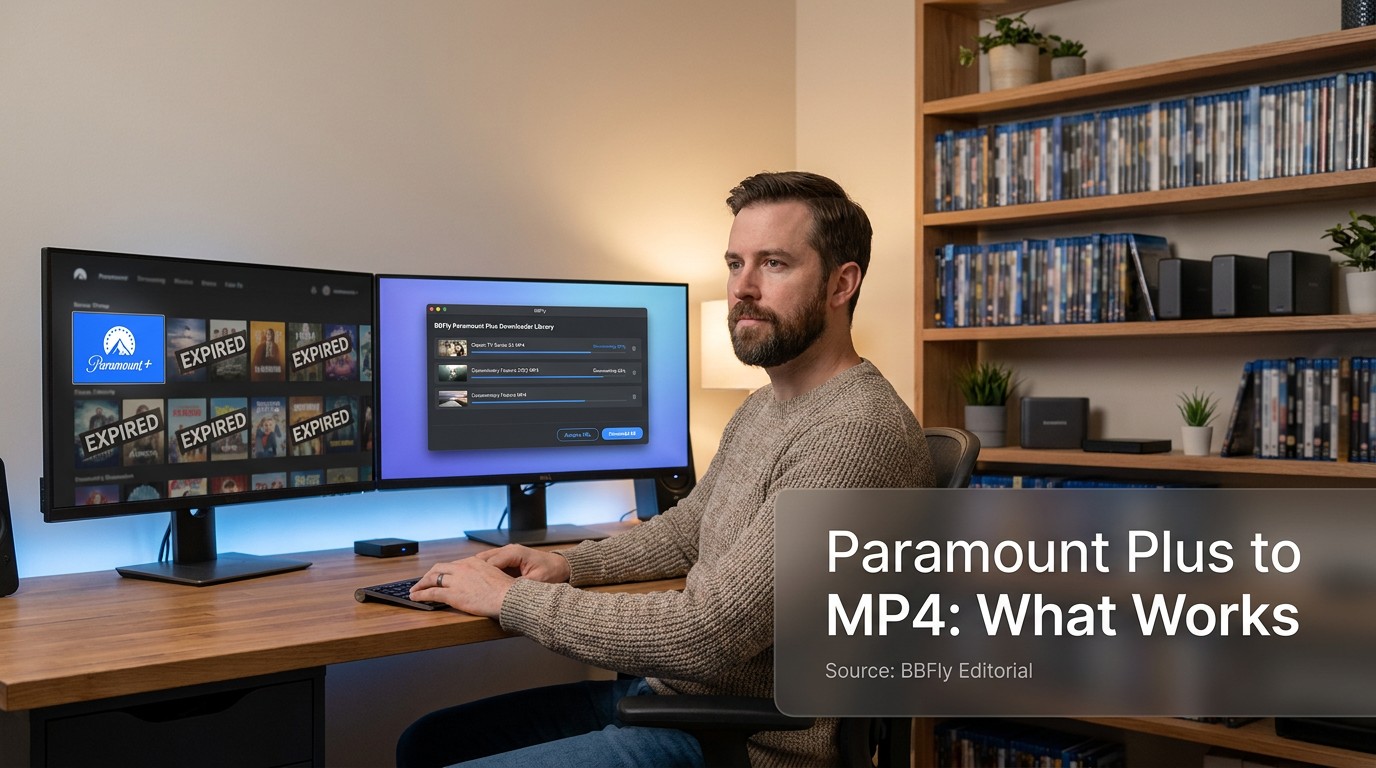
Paramount+ has no official MP4 export, and on Windows or Mac it has no official download at all. To get a real MP4 you can keep, you need a desktop native-download tool with an active Paramount+ subscription, used for personal offline viewing. The trigger to search "paramount plus to mp4" is usually finding that saved titles have quietly vanished from the app overnight.
Official downloads are licensed assets that expire on the platform's timetable, not files you own. I've sat through enough re-encoded "1080p" output to call it — that file doesn't look like a 1080p stream straight from the platform, and on Paramount+ titles with Dolby Atmos and HDR the gap gets more obvious. The rest of this piece walks the limits of the built-in download, the three technical paths a desktop tool can take, the exact steps I use to save a title to MP4, and an honest verdict on which tool fits which reader.
Why Paramount Plus Won't Just Hand You an MP4
Paramount+'s download feature was never built to produce a portable file. What the app calls a "download" is a license-bound asset stored inside the app, keyed to your account, scoped to one device, and time-limited. "MP4" is a container, not a setting; flipping an MP4 switch isn't an option Paramount+ exposes, because the saved asset isn't a movie file in any conventional sense.
The disappearing-downloads moment most subscribers know
The complaint that lands most consistently in editorial coverage: people who carefully saved episodes for a flight open the app and find the library half-empty, with no warning. The triggers are predictable once you know them — a license server marking the title expired, Paramount+ pulling the show after a contract change, an app cache reset, or the 48-hour after-play timer running out. None involve the user pressing delete.
Why "MP4" became the question
After enough vanishings, "save it as MP4" becomes shorthand for "give me a real file." An MP4 is a portable container that plays in VLC, on a smart TV's USB input, on Plex, on a NAS. What Paramount+ saves is an encrypted package only the Paramount+ app can open. Closing that gap is what the rest of this article is about.
Paramount Plus's Built-In Download: What It Saves, What It Locks Away
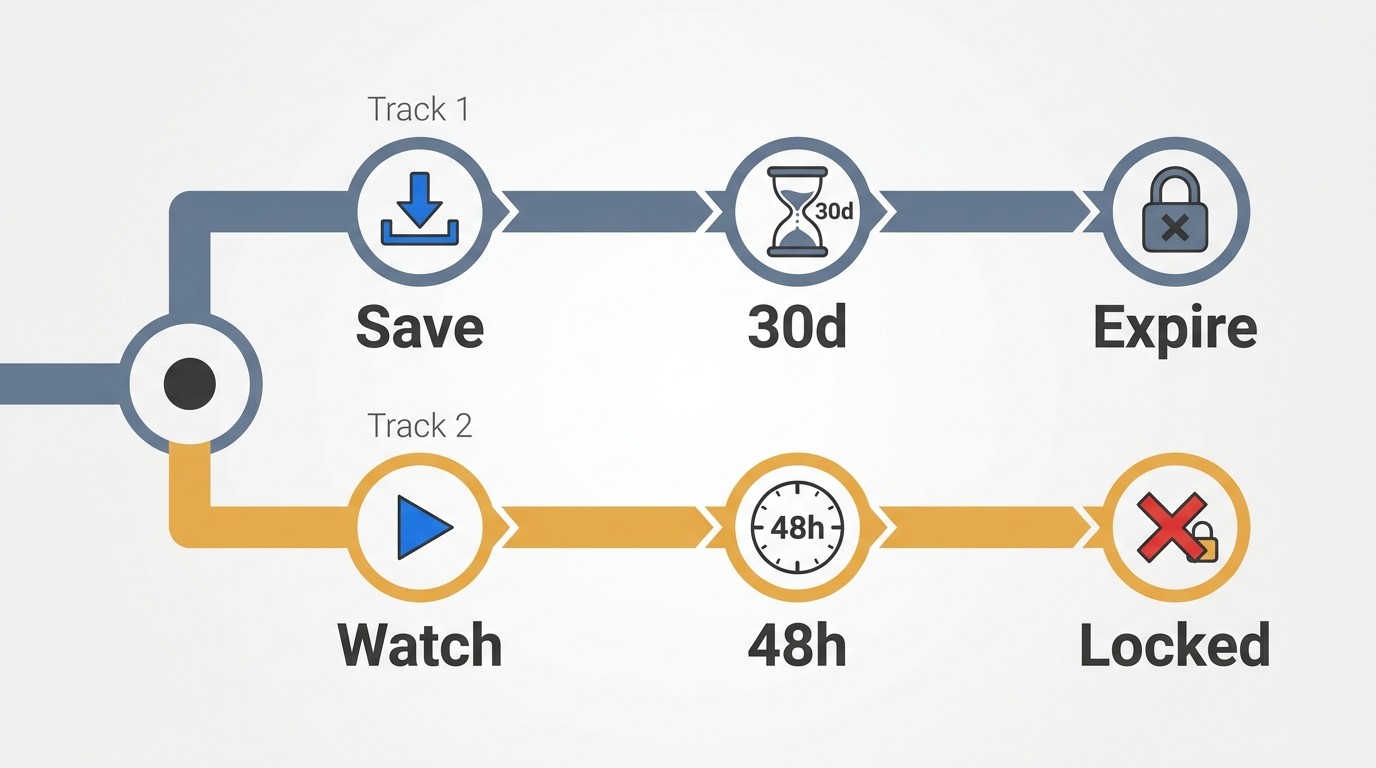
On Windows or Mac, Paramount+ has no built-in download at all; the feature exists only in iOS and Android apps and requires the Paramount+ Premium tier. Even there, the saved file isn't an MP4 — it's an encrypted .pip container, capped at 25 titles per device, valid 30 days from save and 48 hours from first play.
Mobile-only, Premium-only, with a 25-title cap
Three constraints stack: mobile devices only (no Windows app, no Mac app, no smart TV), Premium plan only, and 25 titles maximum on one device at a time. The mobile-only piece is what most desktop subscribers learn the hard way. The 25-title cap is easy to hit when prepping for a trip.
The 30-day library and the 48-hour after-play timer
Two timers run in parallel. The 30-day timer starts when you save the file; if you never press play, it expires after thirty days. The 48-hour timer starts when you press play — and it's the one that bites: most people learn about it when a half-watched episode silently becomes unplayable mid-trip. Whichever ends first wins.
The .pip file behind the icon
The saved asset is a .pip container, encrypted and tied to the Paramount+ app. VLC can't open it; there's no path to an external SD card on Android, no AirDrop, no casting outside the app. The app is the only player that holds the key.
Screen recording isn't the answer either
On modern phones, tablets, and laptops it doesn't work: Paramount+, like every major paid streamer, uses HDCP and DRM signaling that blanks the recorded output. Older edge cases occasionally get through, but those produce 1× real-time output with degraded audio and no HDR.
Native Download vs Recording vs Re-Encode: Why the Method Decides the File
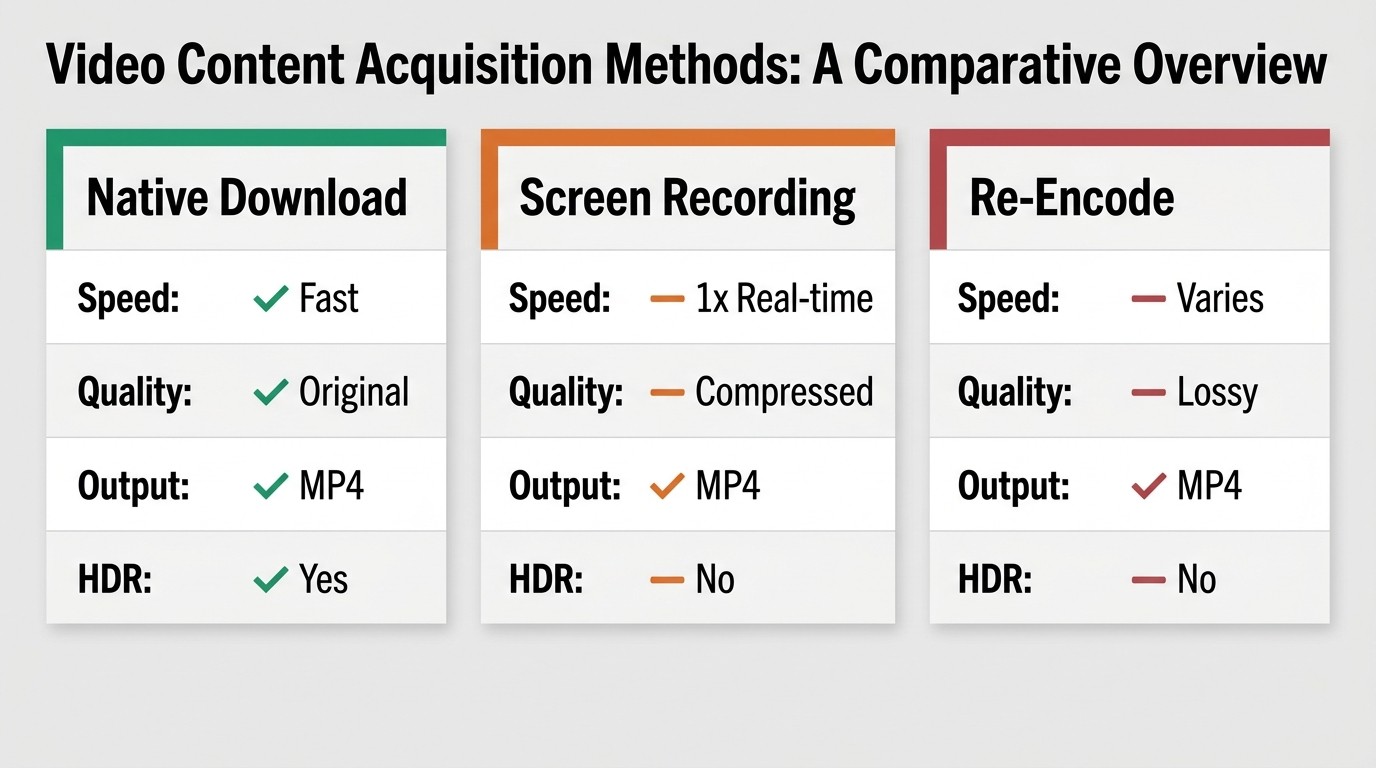
The label "downloader" hides three different technical paths. A native download fetches the platform's original stream and remuxes it into MP4 or MKV without decoding; bitrate, codec, HDR metadata, and Atmos audio all survive. Screen recording captures pixels in real time at 1× speed and loses anything HDR or object-audio. Re-encode decodes and re-compresses into a second-generation copy that may look close on a phone and fall apart on a TV.
Native download: original stream, remuxed not re-encoded
This path talks to the platform server, asks for the original audio and video streams, and writes them into MP4 or MKV. Nothing is decoded or re-encoded. The bitrate is whatever the platform served, the codec is whatever the platform chose (typically H.264 or H.265), HDR metadata passes through, and Dolby Atmos or EAC3 5.1 tracks survive intact.
Recording: real-time capture, blocked by DRM on most paid streams
Recording-based tools play the stream and capture the decoded output. Two consequences follow: capture runs at 1× (a 90-minute movie takes 90 minutes), and on most modern devices the platform's DRM signaling blanks the captured frame. Even when it works the output is stereo at best, no HDR, no Atmos.
Re-encode: visually close, technically a second-generation copy
Re-encoding decodes and re-compresses the stream. The "1080p" label is honest about pixel count and dishonest about quality: generation loss adds smearing on motion, banding on gradients, and crushed shadows. HDR metadata almost never survives. On a laptop screen this is invisible; on a 65-inch OLED with the lights down it is not.
How to Save Paramount Plus to MP4 on Windows or Mac, Step by Step
The desktop workflow is short:
- Install a native-download tool that supports Paramount+ on Windows or macOS.
- Sign in to Paramount+ inside the tool using your active subscription.
- Paste a Paramount+ URL, or search the catalog from inside the tool.
- Pick resolution, audio track, subtitles, and output format (MP4 or MKV).
- Click download and verify the file plays in VLC.
Please note: Third-party downloaders may conflict with Paramount+'s Terms of Use. Keep downloads for your own personal, offline viewing of content you currently subscribe to, and don't redistribute or resell them.
Before you start: subscription, OS, and the personal-use rule
You need an active Paramount+ subscription (Premium where the title requires it), Windows 10/11 or macOS, and a clear understanding that anything you save is for your own viewing. Check Paramount+'s current Terms of Use and your local copyright rules.
Step 1: Install and sign in
Download the installer from the tool's own product page, not a third-party mirror. A downloader that asks for your Paramount+ login and your card details on the same screen is a red flag; established vendors don't bundle the two.
Step 2: Find the title — search inside the tool or paste a Paramount Plus link
Two paths. The built-in search browses the Paramount+ catalog from inside the tool. The faster path: open the title in a browser tab on paramountplus.com, copy the URL, paste it into the tool's address bar. The tool resolves the link and queues the episode or movie directly. That's the "paramount plus link to mp4" workflow.
Step 3: Pick quality, audio track, subtitles, and output format (MP4 or MKV)
Resolution: pick the highest the title actually offers. Audio: pick Atmos or 5.1 if the title carries it. Subtitles: select every language you might want; disk cost is negligible. Format: MP4 for universal playback on phones and smart TVs; MKV when you want multiple audio tracks and every subtitle in one file (Plex and Infuse handle MKV cleanly). For Paramount Plus titles with multiple dubs, that's where "download paramount plus video to mkv" earns its keep.
Step 4: Download, then verify the file plays in VLC
Hit download. When it finishes, open the file in VLC; if it plays without a license prompt, you have a clean MP4 (or MKV). For a season, queue every episode at once and let the tool run the list without per-file re-authentication.
BBFly Paramount Plus Downloader: Specs, Trial, and License at a Glance
BBFly Paramount Plus Downloader is one of the tools that runs the desktop native-download workflow above. It's the one I reach for when a Paramount+ title carries Dolby Atmos or HDR, because the spec sheet supports those formats end-to-end. What follows is the verified spec, trial, and price as of June 2026; verify current figures on the official page before buying.
Verified specs
Windows and macOS. Maximum output resolution 4K, with 1080p as the typical fallback for titles that don't expose a 4K stream. Display formats HDR10+ and Dolby Vision; audio Dolby Atmos, EAC3 5.1, AAC 2.0; video codecs H.264 and H.265; output containers MP4 or MKV. Subtitle download, audio-track selection, batch download (whole seasons in a single queue), episode tracking for ongoing series, and metadata write are all on the sheet. For readers pulling Paramount+ originals with Atmos mixes, the relevant line is that the Atmos track is preserved in the output, not collapsed to stereo.
Trial: three full movies per platform, not a five-minute clip
The trial gives three full movies per platform inside a 30-day window. That matters because the things that decide whether a downloader is actually usable — subtitle sync over 90 minutes, audio behavior on Atmos titles, batch behavior across a season — don't show up in a five-minute sample. For reference, FlixiCam caps each free-trial video to the first 5 minutes, and MovPilot's trial limits each video to the first 6 minutes (per each tool's official product page, as of June 2026).
Pricing: monthly, yearly, and a 3-device Lifetime
Three tiers: $29.90/month (1 PC), $99.90/year (1 PC, about $8.33/month), and $199.90 one-time Lifetime (3 PCs). Monthly for a one-time project, yearly as the sane default for a single streaming service, Lifetime only when a household has multiple machines in play.
How the Major Paramount Plus Downloaders Compare
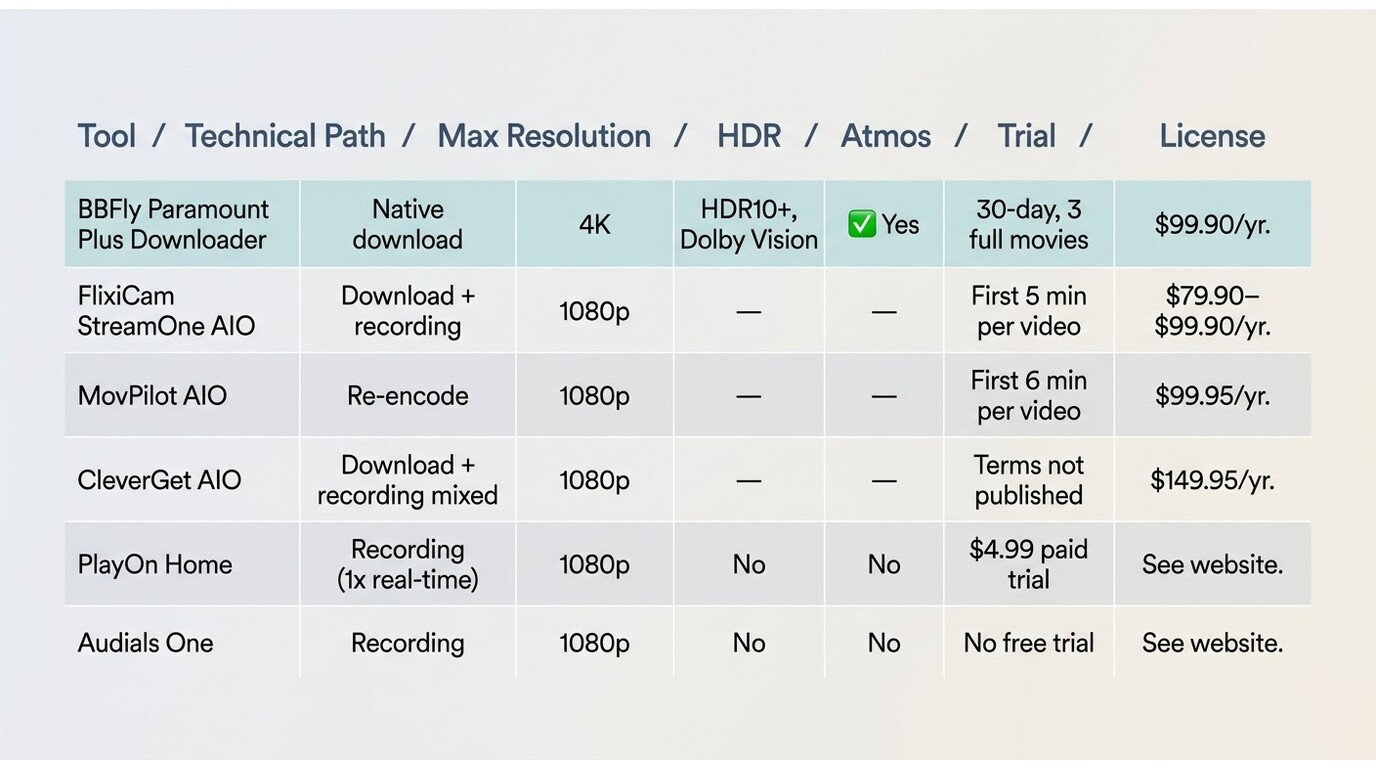
Read the table by technical path first. Native download, recording, or re-encode decides whether the output keeps the original bitrate, HDR metadata, and Atmos. Resolution, audio, output, and license are downstream of that one choice.
| Tool | Technical path | Max resolution | HDR | Audio top | Output | Trial | License |
|---|---|---|---|---|---|---|---|
| BBFly Paramount Plus Downloader | Native download (remux, no re-encode) | 4K | HDR10+, Dolby Vision | Dolby Atmos / EAC3 5.1 | MP4, MKV | 30-day, 3 full movies per platform | $99.90/year or $199.90 Lifetime (3 PCs) |
| FlixiCam StreamOne (AIO) | Download with a recording product on the side | 1080p | Not advertised | 5.1 | MP4 / MKV | First 5 minutes per video | $79.90–$99.90/year |
| MovPilot AIO | Re-encode pipeline | 1080p | Not advertised | 5.1 | MP4 | First 6 minutes per video | $99.95/year, 5–6 platforms |
| CleverGet AIO | Download + recording mixed | 1080p | Not advertised | 5.1 | MP4 | Terms not formally published | $149.95/year AIO or $229.95 full bundle |
| PlayOn Home | Recording (1× real-time) | 1080p | Not supported (recording path) | 2.0 | MP4 | $4.99 paid 30-day trial | Subscription after Lifetime sunset |
| Audials One | Recording | 1080p | Not supported (recording path) | 2.0 | MP4 | No standard free trial | Annual license |
Source: BBFly's official Paramount Plus Downloader page, Paramount+'s official Help Center.
Fit-verdicts:
- BBFly: best for readers who want 4K, HDR, and Atmos preservation across multiple streaming services. Not ideal if you only download from one platform and a single-platform license on a focused tool is cheaper.
- FlixiCam StreamOne: workable for Netflix-leaning buyers comfortable with a 5-minute trial. Not ideal for HDR or Atmos preservation.
- MovPilot AIO: lowest entry price in the AIO tier. Not ideal if you care about preserving the original stream; re-encode drops HDR and adds generation loss.
- CleverGet AIO: broad module catalog, modular pricing. Not ideal if you want a predictable total cost up front.
- PlayOn Home: acceptable once you've accepted recording-class output (no HDR, real-time speed). Not ideal for anything you want to look like the platform stream.
- Audials One: same lane as PlayOn. Not ideal for archival quality.
Frequently Asked Questions
Q: Can I download Paramount Plus videos on a PC or Mac at all? A: Not through Paramount+'s own apps; its built-in download is iOS and Android only, on the Premium tier. Saving a Paramount Plus title to MP4 on Windows or Mac requires a third-party native-download tool with an active subscription.
Q: Is it legal to convert Paramount Plus videos to MP4 for personal offline viewing? A: There isn't one clean answer. Using a third-party tool is typically a Paramount+ Terms of Use issue; distributing or selling files is a copyright issue. Personal offline viewing of content you currently subscribe to sits in a gray zone that varies by jurisdiction. Read Paramount+'s current Terms of Use and your local copyright rules.
Q: How long does an official Paramount Plus download last, and how is that different from a local MP4? A: An official download is good for 30 days from save and 48 hours from first play, whichever ends first. A locally saved MP4 or MKV is a normal file with no built-in expiry; its lawful use still presupposes an active subscription and personal viewing.
Q: Does Paramount Plus support 4K, HDR, or Dolby Atmos in downloads? A: Paramount+'s official downloads are mobile-only and don't expose 4K, HDR, or Atmos selection. With a native-download tool, the ceiling depends on what stream the title actually exposes; some Paramount+ originals carry HDR and Atmos, many don't (as of June 2026).
Q: Can I move a Paramount Plus download to an external drive, smart TV, or NAS? A: An official .pip file: no, it's bound to the Paramount+ app on the device that saved it. A locally saved MP4 or MKV: yes, like any other file — VLC, USB on a smart TV, Plex, Jellyfin, Infuse on an Apple TV. Within personal-use limits.
Q: Is it safe to sign in to Paramount Plus inside a third-party downloader? A: Depends on the vendor. Established vendors with a verifiable company page, a documented privacy policy, and a paid product treat the sign-in the way the platform's own app does. Unknown freeware that asks for your Paramount+ login and your card details on the same screen is what to avoid.
Q: Can I screen-record Paramount Plus instead? A: On most modern devices the recording comes out black; Paramount+, like every major paid streamer, uses HDCP and DRM signaling that blanks captured output. Even where capture sneaks through, it's 1× real-time with no HDR or Atmos. See the native-vs-recording section above.