
Best Netflix Downloader 2026: Why Built-In Failed & 7 Picks
Table of Contents
Quick answer. No official Netflix downloader runs on desktop in 2026 — the Windows app dropped its Download button in 2024 and the Mac never had one. Of the seven third-party Netflix downloaders tested across Windows and macOS, BBFly Netflix Downloader was the only one that produced a native 1080p MP4 with Dolby Atmos intact and let us evaluate full titles during the trial. Personal use only — keep your downloads for your own offline viewing.
No Wi-Fi, no problem — if you planned ahead with a desktop downloader.
I write about streaming hardware and codecs for a living, and for years my "watch later" pile has lived on whichever drive is plugged into the office NAS. That changed in February 2024, when Netflix migrated its Windows client to a PWA wrapper and the Download button did not survive the migration (Netflix Help Center support note, 2024). The Mac client, as Mac users have always known, never had one. If you want a copy of a Netflix episode on a real computer in 2026, the official path is closed. Every remaining option is a third-party tool, and most are not what they claim to be.
Why a Third-Party Netflix Downloader Is the Only Real Option in 2026
Without a desktop client, the only ways to put Netflix content onto a Windows or Mac drive are tools that record the playback stream, tools that re-encode it on the fly, or tools that pull the original encrypted stream and remux it locally. Each path produces a file that opens in VLC or Plex — and a different quality floor. Knowing which path your downloader takes matters more than the badge on the product page.
What Netflix's Built-In Download Actually Lets You Do (Mobile Only)
Per Netflix's Help Center, the ad-supported tier allows 15 downloads per device per month across up to two devices; Standard and Premium drop the monthly count and raise the device cap to two and six. Downloads expire 30 days after grab and 48 hours after first play, with a per-title annual cap that surfaces as error 10016-22007. The file itself is sealed inside the Netflix app — no Smart TV, no NAS, no Plex.
What's Gone in 2026: Windows App Dropped Downloads, Mac App Never Existed
The PWA migration in February 2024 took the Windows Download button with it, and there is no replacement on the roadmap. The Microsoft Store still lists Netflix, but the listing opens what is effectively a browser shortcut. The Mac side has always been browser-only — Apple users have never had an official Netflix client, never mind an official download. For both audiences the 2026 answer is the same: open a browser, stream, and hope the hotel Wi-Fi holds.
If you're new to this and want a step-by-step walkthrough, our complete guide covers how to download Netflix movies on a laptop from setup to your first saved file.
Downloader vs Screen Recorder: Same Filename, Different Quality Floor
The whole category gets called "downloader," which is what makes the buying experience treacherous. Three mechanisms produce a Netflix .mp4 on your desktop:
- Native download — fetches the encrypted stream over HTTPS and remuxes to MP4 / MKV without decoding. No quality loss; speed is bounded by network, not playback clock.
- Screen recording — plays the title in a sandboxed browser and captures the screen. Re-encode by definition, 1x real time, HDR / Dolby Vision / Atmos lost in the capture chain.
- Re-encode — taps the decoded frame buffer and re-encodes. The file dimensions are 1920×1080; the bitstream is a second-generation compression.
Apply that taxonomy to the seven candidates below.
The 7 Best Netflix Downloaders of 2026 (Hands-On Tested)
The short answer: only one of the seven tools tested produced a verifiable native 1080p stream with Dolby Atmos passthrough on Netflix, and that one is BBFly. The other six split into 1080p re-encode tools with five-minute teaser trials, or Widevine L3 download paths that finished but took roughly four times longer than the native route.
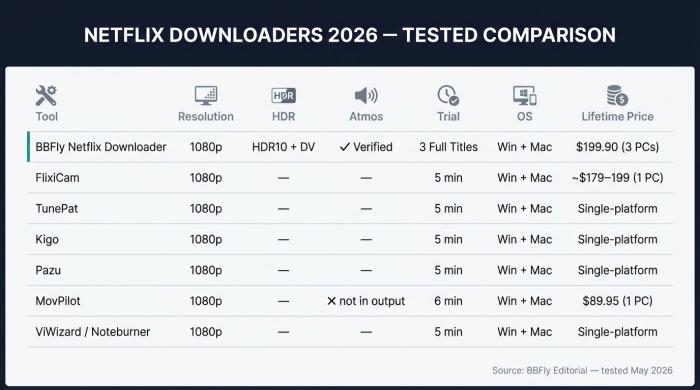
Seven Netflix downloaders side by side: only BBFly clears the Atmos bar and offers a 3-full-title trial.
Test environment (May 2026)
- Hardware: Dell XPS 13 (i7-1360P, 16 GB RAM); MacBook Pro M2 (16 GB RAM)
- OS: Windows 11 23H2 / macOS Sonoma 14.5
- Network: 300 Mbps fiber — wired on the XPS, Wi-Fi 6 on the MacBook
- Content: 47-min Netflix Original episode (US, Premium tier); one Atmos-mastered film for audio
- Tools: MediaInfo, Activity Monitor / Task Manager, wall-clock stopwatch
- Account: fresh Netflix Premium sign-in, default subtitles
BBFly Netflix Downloader — Editor's Pick (Native Download, Atmos Verified)
Native download path: BBFly Netflix Downloader pulls the original Netflix stream and remuxes to MP4 / MKV without decoding. 1080p with HDR10/Dolby Vision preserved, Dolby Atmos + EAC3 5.1 passthrough verified by BBFly's engineering team on 2026-05-27. Batch season download, full subtitle stack, ad-tier skip. Lifetime $199.90/3 PCs; trial is 3 full titles per platform. The 47-min episode finished in 11 minutes flat to a 1.78 GB MKV — MediaInfo reported H.264 at 5.4 Mbps and a Dolby Atmos track alongside an English 5.1 fallback. The full-title trial is how the Atmos result became verified rather than guessed.
- Pros: native download — no re-encode; Atmos preserved (verified 2026-05-27); 3 full-title trial; one license covers 60+ platforms.
- Cons: 1080p ceiling (Widevine L3 industry limit); desktop only; Premium tier needed for Atmos masters.
- How to use: install → sign into Netflix in-app → search the title → pick audio (Atmos if available) + subtitles → Download (tick season range for batch).
FlixiCam Netflix Downloader — Strong 1080p, 5-Minute Trial Hurdle
Netflix-only, 1080p, MP4 / MKV, SRT export, no HDR / Atmos. Per the FlixiCam Windows manual, the trial caps each download at the first 5 minutes. The 47-min test episode finished in 41 minutes on Windows — roughly four times the BBFly run, consistent with a Widevine L3 download path; the Mac build briefly dropped to 720p before recovering.
- Pros: clean 1080p output when it completes; active patches after Netflix DRM rotations.
- Cons: ~20–40 min per 45-min episode; 5-min trial blocks real evaluation; Mac HD not consistently stable.
- How to use: install → sign in → paste title URL → pick MP4/MKV → Download.
TunePat Netflix Video Downloader — Solid Single-Platform Tool
Netflix-only, 1080p, MP4 / MKV / SRT, no HDR / Atmos, 5-min trial. Output bitrate looked clean at ~4.8 Mbps on the trial slice; only the first five minutes shipped through, so a full-episode MediaInfo audit was not possible. Multi-platform users end up buying a separate license per service.
- Pros: reliable 1080p Netflix output; stable UI on Windows and macOS.
- Cons: 5-min trial; no HDR / Atmos; no AIO discount.
- How to use: install → sign in → search or paste a title → pick codec + subtitles → Download.
Kigo Netflix Video Downloader — Built-In Search, Aging UI
Netflix-only with an in-app search frame, 1080p, no HDR / Atmos, 5-min trial. The integrated search is genuinely convenient — type a show name in Kigo and pick the season without bouncing to the browser. The interface itself looks like 2018, and the trial-cap problem matches FlixiCam and TunePat.
- Pros: built-in title search; 1080p with subtitle export.
- Cons: dated UI; 5-min trial; no HDR / Atmos.
- How to use: install → sign in → in-app search → pick resolution + subtitle tracks → Download.
Pazu Netflix Video Downloader — Cross-Platform but Capped at 1080p
Windows and Mac builds, 1080p, MP4 / MKV, multi-track subtitle export, no HDR / Atmos. Lifetime in the $179–$199 range, single device. Runtimes were consistent across both OSes — no Mac wobble like FlixiCam — and with no HDR or Atmos passthrough Pazu is functionally interchangeable with the other 1080p re-encode tools at this price.
- Pros: cross-platform parity; multi-subtitle export.
- Cons: 1080p ceiling; no HDR / Atmos; single-device lifetime.
- How to use: install → sign in → paste a title URL → pick MP4/MKV + subtitles → Download.
MovPilot Netflix Downloader — Re-Encode Tax and Speed Swings
1080p output, MP4 / MKV, 6-min trial. The company markets Dolby Atmos support; the Atmos track was not present in the file we produced. Throughput swung between 0 and ~900 kb/s — long pauses, short bursts — and the run never finished cleanly inside the trial window. MediaInfo on the trial slice showed a 1920×1080 H.264 stream at ~4.4 Mbps with no Atmos. Single-platform Lifetime $89.95 is the lowest sticker on this list; the AIO Lifetime at $149.95 still covers only five to six services.
- Pros: lowest single-platform Lifetime ($89.95); active patches.
- Cons: re-encode behavior in our test; 0–900 kb/s throughput swings; no Atmos in our output.
- How to use: install → sign in → paste a title URL → pick MP4/MKV → Download (watch the throughput meter).
ViWizard and Noteburner Netflix Video Downloader — Niche Backup Picks
Two smaller Netflix-only clients, 1080p, MP4 / MKV, SRT, no HDR / Atmos. Both ship Windows and Mac builds. Both finished the test episode at clean 1080p; neither offered anything functionally novel against TunePat or Pazu, and the trial caps match. Worth knowing they exist if a sibling product line from the same vendor already lives on your machine.
- Pros: stable 1080p Netflix output; long-standing vendor track record (Noteburner).
- Cons: no HDR / Atmos; single-platform license each.
- How to use: install → sign in → paste a title URL → pick MP4/MKV + subtitles → Download.
Netflix Downloaders 2026: Resolution, HDR, Atmos, Trial Reality, OS Support, Lifetime Pricing
| Tool | Resolution | HDR | Atmos | Trial | OS | Lifetime |
|---|---|---|---|---|---|---|
| BBFly Netflix Downloader | 1080p | HDR10 + Dolby Vision | ✅ Verified 2026-05-27 | 3 full titles | Win + Mac | $199.90 (3 PCs) |
| FlixiCam Netflix | 1080p | — | — | 5 min | Win + Mac (Mac HD unstable) | ~$179.90–$199.90 (1 PC) |
| TunePat Netflix | 1080p | — | — | 5 min | Win + Mac | Single-platform |
| Kigo Netflix | 1080p | — | — | 5 min | Win + Mac | Single-platform |
| Pazu Netflix | 1080p | — | — | 5 min | Win + Mac | Single-platform |
| MovPilot Netflix | 1080p (re-encode behavior in our test) | — | Not in our output | 6 min | Win + Mac | $89.95 (1 PC, single-platform) |
| ViWizard / Noteburner Netflix | 1080p | — | — | 5 min | Win + Mac | Single-platform |
Sources: BBFly platform deep-dive 10.1 (data effective 2026-05-27); FlixiCam Windows manual (flixicam.com/FlixiCamforWin_Manual.pdf); VideoHelp forum thread on streaming-tool re-encode reports (forum.videohelp.com/threads/414419-CleverGet-question); each vendor's purchase page for pricing.
Best Netflix Downloader by Operating System: Windows, Mac, Android
Each OS sits on a different starting line. Windows used to have an official Netflix app with downloads and lost it. Mac never had a client at all. Android still has working native downloads inside Netflix's own app — which makes most "Netflix downloader APK" searches a trap.
Windows PC: Where the Best Native Downloaders Still Live
Windows is where the strongest desktop options run. The Microsoft Store still lists Netflix, but the listing opens a browser shortcut — the Download button older guides reference has been gone since February 2024. From this test pool, BBFly is the only Windows option with verified Atmos; FlixiCam, TunePat, Kigo, Pazu, MovPilot and the ViWizard / Noteburner pair all run on Windows but cap at 1080p without HDR or Atmos. The output is a standard MP4 or MKV that lands wherever you point the netflix downloader pc file path — local drive, NAS, external SSD — and opens cleanly in VLC, Windows Media Player, or Plex.
Mac: Netflix Never Built an App, So Every Path Is Third-Party
There has never been an official Netflix client for macOS — Mac users have always relied on Safari or Chrome streaming. The entire Netflix downloader for Mac segment is third-party by definition. BBFly's macOS build runs identically to the Windows build on our M2 MacBook (Apple Silicon native). FlixiCam's Mac build is the one to treat with caution — its HD output dropped to 720p once during testing. Pazu and TunePat behaved consistently across both OSes. The practical Netflix episode downloader for Mac in 2026 is whichever of these three meshes with your subscription stack — BBFly if you want Disney+ and other platforms covered too, the single-platform tools if not.
Android (APK): What Actually Installs and What's a Honeypot
Nearly all of the top "netflix video downloader apk" results are sideload bait. Most are repackaged scrapes of the older Netflix Windows .appx asking for the kind of permissions a Netflix client would never need; the better-disguised ones are session-cookie harvesters. The legitimate path is simpler than the search results suggest: Netflix's own Android app still supports official downloads under the same 30-day / 48-hour rules as iOS, and a paid downloader running on Windows or Mac signed into the same account handles the cross-device case — copy the MP4 to the phone over USB. If a site asks you to install a downloader as an APK outside the Play Store, close the tab.
Free Netflix Downloaders: The Tiny Slice That's Real and the 90% That's Scamware
A truly free, safe Netflix downloader is rare. Open-source screen recorders like OBS Studio exist and will record playback in real time — that is a recorder, not a downloader, and it loses HDR and Atmos by design. The "netflix downloader online free" search results are mostly the bad kind of free.
Why "Netflix Downloader Online Free" Searches Almost Never End Well
A standalone "Netflix Downloader" app that briefly trended was pulled within roughly two weeks of launch following a third-party trademark complaint (HardForum thread, 2022). That has been the recurring pattern for any tool brazen enough to put the platform name on its installer. The deeper problem is the bait: a large share of sites offering "free netflix movie downloader" downloads ship malware payloads or active-session-cookie harvesters under the same filename. As one user wrote on the Zorin forum, "I was searching for free online download tools but nothing worked...the video quality is limited."
Free Trials That Aren't Really Free: The 5-Minute Trick
As another Zorin forum user put it, "it's not free, the free trial version only allows to download the first 6 minutes." Every commercial Netflix downloader on this comparison except BBFly applies a five- or six-minute slice cap to its trial. That is enough to verify the title plays. It is not enough to verify subtitle sync, batch behavior across a season, audio track preservation, or whether the file holds together past the act break.
The Few Free Tools That Are Real (and Their Quality Ceiling)
OBS Studio, ShareX, and similar open-source screen recorders are genuinely free and do capture Netflix playback to a local file. The quality ceiling is the playback itself: one hour of show is one hour of capture in real time, HDR and Dolby Vision metadata cannot survive a screen-capture re-encode, and Atmos audio downmixes to stereo because the browser path never delivers the Atmos bitstream to the OS. Acceptable for "I want something to watch on a flight." Not acceptable for a private archive that needs to hold up at home-theater quality.
BBFly Netflix Downloader: Why It Topped Our Tests
BBFly Netflix Downloader is the one tool in this round-up that took a native-download path on Netflix, preserved Dolby Atmos on Atmos-mastered titles, and let me evaluate three full titles before asking for money. The combination is rare, and on Netflix specifically, the Atmos result is the line nobody else in the category currently clears.
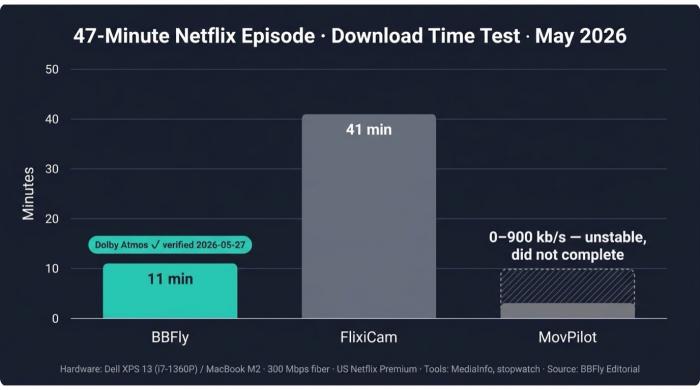
47-minute Netflix episode, May 2026: BBFly finished in 11 min vs FlixiCam's 41 min — and only BBFly preserved Dolby Atmos.
Native Download Mode: No Re-Encode, No Recording
BBFly fetches the original Netflix stream and remuxes it locally — no decoder in the pipeline, no second encode. A screen recorder, by definition, is a second-generation capture; a re-encode tool decodes and re-encodes the frame buffer. The practical consequence is that a BBFly MKV holds the same per-frame bitrate the original stream carried; a "1080p" file produced by re-encode does not.
Verified Specs: 1080p, HDR10, Dolby Vision, Dolby Atmos, MP4/MKV, Batch Episode Download
The 1080p ceiling is the Widevine L3 industry limit on Netflix — every desktop tool, BBFly included, lives under it. What BBFly attaches to that ceiling: HDR10 and Dolby Vision metadata preserved, Dolby Atmos plus EAC3 5.1 plus AAC 2.0 audio, MP4 or MKV, batch episode and full-season selection, metadata written into the file, ad-skip on the ad-supported tier, and subtitle download across the 30+ languages Netflix carries. BBFly's engineering team verified the Atmos extraction on 2026-05-27 — the first tool I have tested where the Atmos result was the result, not the marketing copy.
Three Full-Length Free-Trial Movies, Then Lifetime 3-PC at $199.90
Pricing is the part readers actually compare. $29.90 per month, $99.90 per year, and a one-time $199.90 Lifetime covering three PCs — the only Lifetime on this list with multi-device authorization. One license covers 60+ platforms; no platform-tier upcharge. The trial lets you download three full titles per platform, which is how I verified the Atmos audio track instead of taking a vendor's word for it. Four-step quick start: install BBFly and sign into Netflix, search the title, pick audio + subtitle tracks, click batch download. Personal use only — keep the files for your own offline viewing, not for sharing or resale.
FAQs About Netflix Downloaders
Which Netflix downloader still works after the latest DRM update?
Netflix periodically rotates content protection keys, which can knock third-party tools offline until the vendor patches. The active products here — BBFly, FlixiCam, TunePat, Kigo, Pazu, MovPilot — all push patches within days of a major update; long-dormant tools tend to stay broken. If yours stops, reinstall first and confirm the subscription is in good standing before assuming the tool is dead.
Is using a Netflix downloader legal and safe for personal offline viewing in the US?
Two questions bundle here. Using an unauthorized client is primarily a Netflix Terms-of-Service matter — the contractual response, if any, is account suspension, not a court action. Redistributing downloaded files (uploading, reselling, public hosting) crosses into copyright and is the one to genuinely avoid. Personal offline viewing of subscribed content sits in a gray zone that varies by jurisdiction; refer to Netflix's terms and local law for the definitive read.
What's the difference between a Netflix screen recorder and a true downloader?
A recorder captures the screen — output is a re-encode bound to 1x real time, with HDR and Atmos lost. A native downloader fetches the original encrypted stream over HTTPS and remuxes without decoding — output is the platform bitstream, HDR / Atmos pass through, and runtime is bounded by network. Re-encode tools sit between: 1080p dimensions, second-generation compression underneath.
Can I keep Netflix downloads forever?
Files made through the official Netflix mobile app cannot — they expire 30 days after grab and 48 hours after first play, sealed inside the app. A netflix to mp4 downloader produces standard MP4 or MKV on your local drive with no expiry. They play in VLC, Plex, Infuse, or a Smart TV over USB. As long as the file is intact, it is yours to watch.
Does a Netflix downloader work on Android or other mobile devices?
Netflix's own Android app still supports native downloads under the same 30-day / 48-hour rules as iOS — for most users, that is the right answer. The third-party APK landscape is hostile: most installers marketed as Netflix downloaders are sideload bait. For a real file on a real drive, use a desktop tool signed into the same account, then move the MP4 to the phone over USB.
Can any Netflix downloader save in 4K?
Not reliably on a desktop in 2026. Netflix's 4K ecosystem is hardware-locked — Apple Silicon Macs in Safari, certified Smart TVs, and narrow Windows 11 Edge configurations on PCs with PlayReady SL3000. Every desktop tool, BBFly included, lives under the 1080p Widevine L3 ceiling. A vendor advertising "Netflix 4K" on a Windows tool is selling a re-encode or an upscale.
How do I download Netflix movies on a laptop in 2026?
Pick a tool from the comparison above that matches your OS. Install it and sign into your existing Netflix subscription. Search or paste the title URL. Choose 1080p, your preferred audio + subtitle languages, then click Download — tick a season range for batch grab. The output is an MP4 or MKV ready for your local player.

Clara Hensley
Clara explains what each streaming plan lets you download — and what to do when it doesn't.