
Where Are Netflix Downloads Stored? Paths, Limits, and Legal Methods for File Save
Table of Contents
Every Netflix download lives in a folder. None of them open outside the Netflix app.
Two decades of building a private film library — DVDs, then MKVs, then a NAS — and I still remember the first time Netflix's 2016 offline downloads landed on my Android phone. Tap a button, get a file: that was the assumption. Instead I found a folder of twelve‑character numeric blobs that VLC refused to open. As one Hardforum user put it, "Netflix will not recognize contents if you rename or try to edit files — the download folder contains random numeric filenames with no way to identify which movie is which." The folder is there. The files are not really yours.
Quick Answer: Where Netflix Files Live (or Don't)
Netflix downloads sit inside the Netflix app's private container on the device that wrote them — not in any folder a normal user would browse. The locations split three ways: an Android subsystem path on Android, Fire tablets, and Chromebooks; an opaque iOS sandbox on iPhone, iPad, and Apple‑silicon Macs; and a deprecated AppData path on Windows. None expose anything you can drop into a standard player.
Netflix downloads live in the Netflix app's private storage on the device that wrote them: /Android/data/com.netflix.mediaclient/files/Download/ on Android, an opaque app sandbox on iPhone, iPad, and Apple‑silicon Macs, and Netflix removed Windows download support on July 20, 2024. Every file is Widevine‑encrypted and only plays inside the Netflix app on the install that wrote it.
Two facts shape the rest of this article. First, every file is an encrypted blob with a random numeric filename — renaming, copying, and extension‑swapping all fail. Second, Netflix removed Windows download support in July 2024, so "where did it go on my laptop" often has a different answer than older guides suggest: nowhere, because nothing was written.
Netflix Download File Paths by Platform: Android, iPhone, Mac, Windows
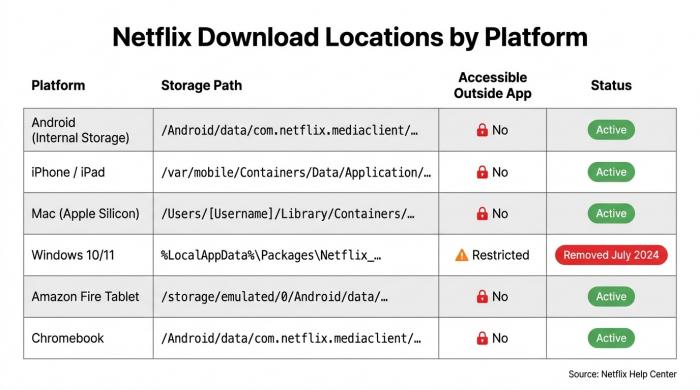
Netflix download paths exist on every platform — but none give you a file you can open.
Paths exist on every platform, but accessibility ranges from "browsable, mostly useless" to "you can't even see it." None give you a playable file outside the Netflix app.
Netflix Download Locations by Platform
| Platform | Path | Outside the app? |
| Android (internal) | /Android/data/com.netflix.mediaclient/files/Download/ |
Read‑only on Android 13+ |
| Android (SD card) | [SD]/Android/data/com.netflix.mediaclient/files/Download/ |
Same restriction |
| iPhone / iPad | Netflix app sandbox — not in Files.app | No |
| Mac (Apple Silicon) |
~/Library/Containers/com.netflix.Netflix/Data/ via iPad app |
No |
| Windows 10/11 (legacy) | %LocalAppData%\Packages\4DF9E0F8.Netflix_mcm4njqhnhss8\LocalState\offlineInfo\downloads |
No — native download removed July 2024 |
| Fire tablet / Chromebook | Same /Android/data/... Android path |
Restricted |
Source: Netflix Help Center (help.netflix.com/en/node/116069, 133763); Hardforum Windows storage thread.
Android Netflix File Storage
Here is the location (/Android/data/com.netflix.mediaclient/files/Download/). Android 13 sandboxed /Android/data from third‑party file managers — what used to be a simple browse is now a USB‑to‑PC chore, and pays nothing back regardless: twelve‑character numeric filenames, no titles, no playable container.
iPhone & iPad: Locked Inside the Netflix App Sandbox
iOS never exposes a third‑party app's private container. Downloads sit under /var/mobile/Containers/Data/Application/, invisible without a jailbreak. As one Quora answer put it: "The movies can be downloaded and saved only in the Netflix app — there is no way to save them anywhere else on your device."
Mac (Apple Silicon): ~/Library/Containers via the iPad App
Netflix has never shipped a native Mac download app — true since downloads launched in 2016, and the quietest dead end in the offline catalog. Apple‑silicon Macs can sideload the iOS app, which writes to ~/Library/Containers/com.netflix.Netflix/Data/, a hidden user‑Library path. Intel Macs get nothing.
Windows 10/11: The Legacy AppData Path
The historic location is %LocalAppData%\Packages\4DF9E0F8.Netflix_mcm4njqhnhss8\LocalState\offlineInfo\downloads\. Older installs may still have files on disk; the current Windows app does not write to it. The next section explains why.
How to Open the Downloads Tab on Netflix on Laptop or Mobile
On mobile, tap the profile menu, then Downloads. On a laptop browser, smart‑TV client, or the current Windows PWA, the Downloads tab is not there — those clients have never supported offline storage, and where to find Netflix downloads on laptop is, bluntly, nowhere.
Why You Can't Just Open Netflix Downloads
DRM, the 2024 Windows Removal, and the 30-Day Clock
You can find the folder. You cannot open the files. Three constraints stack: each blob is Widevine‑encrypted and bound to the Netflix client that wrote it; Netflix stripped download support from the Windows app on July 20, 2024; and where downloads still exist, they expire after 30 days unplayed or 48 hours after first play.
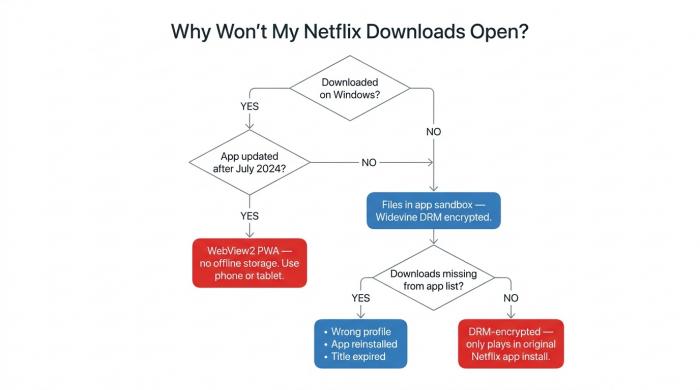
Three root causes, one flowchart — find out which one is blocking your Netflix download.
DRM Encryption: Why the Files Won't Play in VLC
Netflix encrypts every download with Widevine — L1 on most mobile and tablet hardware, L3 on lower‑tier devices. The blob is wrapped in a container the Netflix app understands and nothing else does. Rename it, change its extension, or copy it to another device, and the app stops recognizing it while no third‑party player will read it. A folder full of files behaves like an empty folder.
The 2024 Windows App Switch: Download Button Gone for Good
In July 2024 Netflix replaced its native Windows app with a thin Edge WebView2 wrapper around the website. TechIssuesToday documented it: "As of July 20, 2024, Netflix updated its support page removing Windows 10 and 11 computers from the list of devices that support offline downloads. The new app is primarily an Edge WebView2 PWA, and because it merely loads a web interface, native offline storage capabilities have been entirely stripped out." My read: this was not a bug or a side‑effect of a UI refresh — Netflix closed the door on desktop offline by choice. The Mac never had a download app, so the desktop is now without any official Netflix offline path.
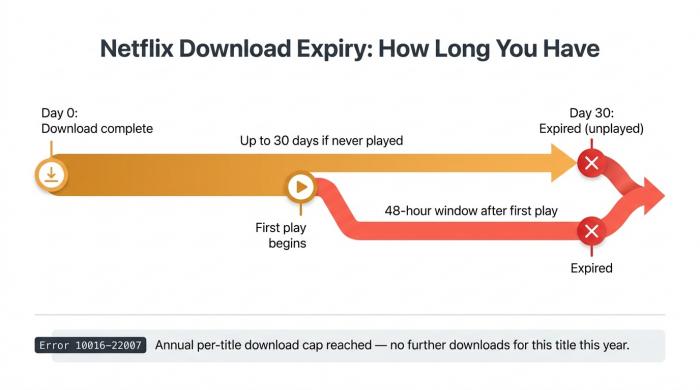
Netflix downloads run two timers simultaneously — whichever fires first ends your access.
Expiry: 30 Days Before First Play, 48 Hours After
Netflix's Help Center documents the two timers plainly. A title expires 30 days after the download completes if you never press play, and 48 hours after the moment you do. There is also an annual per‑title cap surfaced as error 10016‑22007 — once a title has been downloaded too many times in twelve months, the next attempt is refused regardless of plan tier.
BBFly Netflix Downloader That Produces Actual MP4 Files in a Folder You Control
The question this article keeps coming back to has a workable answer — just not from Netflix. A third‑party downloader that uses your own active Netflix subscription can save the playable stream as a standard MP4 in a folder you choose, and the file lives there without the 30‑day expiry.
Where the File Actually Lives
For Windows and Mac users who have lost — or never had — an official Netflix download client, this has been the only path I've found that delivers the literal thing the question keeps asking for: a file in a folder you named. BBFly Netflix Downloader produces a 1080p MP4 or MKV in a user‑selected folder, with the title written into the filename instead of a random number, and every subtitle language Netflix offers saved alongside.
The legal frame: personal, non‑commercial offline viewing of titles you have an active Netflix subscription for at the time of download. Keep the files for your own offline viewing only; do not redistribute them, host them publicly, or use them in ways your Netflix agreement forbids.
FAQs About Netflix Download Locations and Storage
The same follow‑ups come up repeatedly. Short answers below; the sections above carry the longer reasoning.
Why can't I find my Netflix downloads in File Explorer on Windows?
In a current install, there are none — the 2024 Windows app is a WebView2 wrapper that stores nothing offline. Older installs may still have encrypted blobs under %LocalAppData%\Packages\4DF9E0F8.Netflix...\offlineInfo\downloads\, but they are useless outside that original install.
How long do Netflix downloads last before they expire?
Thirty days if you never press play, 48 hours from the moment you do. Error 10016‑22007 means you hit the annual per‑title cap, that's how long Netflix downloads last before they expire.
Does Netflix still support downloads on Windows PC?
No. Netflix removed Windows 10 and 11 from its supported‑downloads list on July 20, 2024. The official suggestion is to download on a phone or tablet.
For a full breakdown of which devices support offline playback and how to set it up, see our guide to watching Netflix offline on supported devices.
Can I transfer Netflix downloads to another device?
No. Each file is keyed to the Netflix install on the device that wrote it.
Why are my Netflix downloads not showing up?
Wrong profile, expired title, signed out since the download, or a recent app reinstall — any of these clears the local list.
Why are Netflix downloaded files encrypted and unplayable outside the app?
Widevine DRM keyed to the original app install. See the DRM section above.
What happened to Netflix's download feature on Windows PC, and is there an official workaround?
Removed July 20, 2024 with the PWA migration. No official workaround — Netflix points users to mobile and tablet. Details in the Windows section above.
How can I keep a Netflix title in a folder I control without the 30-day expiry?
Netflix's own downloads are designed to expire; no setting turns the timers off. The only working route is the third‑party MP4 workaround in the previous section. You still need an active Netflix subscription at the time of download, and the files are for your own personal offline viewing only.