
HBO Max Download 2026: Plan Limits and the Permanent Offline Path
Table of Contents
You open Max on your laptop, hunt for a download button, and find nothing. That gap is real and intentional. On HBO Max (now simply branded Max), you can download to a phone or tablet on the Standard or Ultimate plan, but not on a PC or Mac browser, not on a Smart TV, and not on the ad-supported plan. Downloads expire after 30 days untouched, or 48 hours once you press play.
I've tracked this platform since the HBO Now days, and the desktop gap is the question I field most often. The mobile flow itself works fine. The trouble starts the moment you want to watch the same file on a laptop, plug it into a TV via USB, or hold onto a title past the 48-hour clock. That's the part the help page glosses, and that's most of this article.
Can You Download HBO Max? Plans, Devices, and the Mobile-Only Reality
Yes, you can download Max shows and movies for offline viewing, but only inside the official Max app on a phone, tablet, or Amazon Fire Tablet, and only on a paid plan that includes downloads. The Basic with Ads tier does not. There is no Windows app, no Mac app, no browser path, and no download button on Smart TVs or streaming sticks.
The HBO Max → Max rebrand, in one paragraph
Warner Bros. Discovery rebranded HBO Max to Max in 2023, then quietly reintroduced "HBO" back into the brand language in 2025. Most people still search for "HBO Max" out of habit, and the app icon on most phones still works the same way it did before the badge changed. The download mechanics themselves did not fundamentally change at the rebrand. Plan names, count caps, and the 30-day / 48-hour clocks all carried over.
Which devices can download, and which can't
The supported list is short and the unsupported list is long. Worth keeping straight before you commit to a setup.
| Can download | Cannot download |
|---|---|
| iPhone, iPad (Max iOS app) | Windows PC (no app, no browser button) |
| Android phones and tablets | Mac (no app, no browser button) |
| Amazon Fire Tablet | Chromebook (Android app is unreliable) |
| Smart TVs (Roku, Apple TV, Samsung, LG, Fire TV) | |
| Chromecast and streaming sticks |
The practical upshot: if your offline-viewing plan starts on a laptop or ends on a Smart TV, Max's built-in download will not get you there. Device support is only the first wall, though. The harder one is the calendar, and that's where most people I've helped actually get stuck.
HBO Max Download Limits: Plan Counts, 48-Hour Window, and 30-Day Expiry
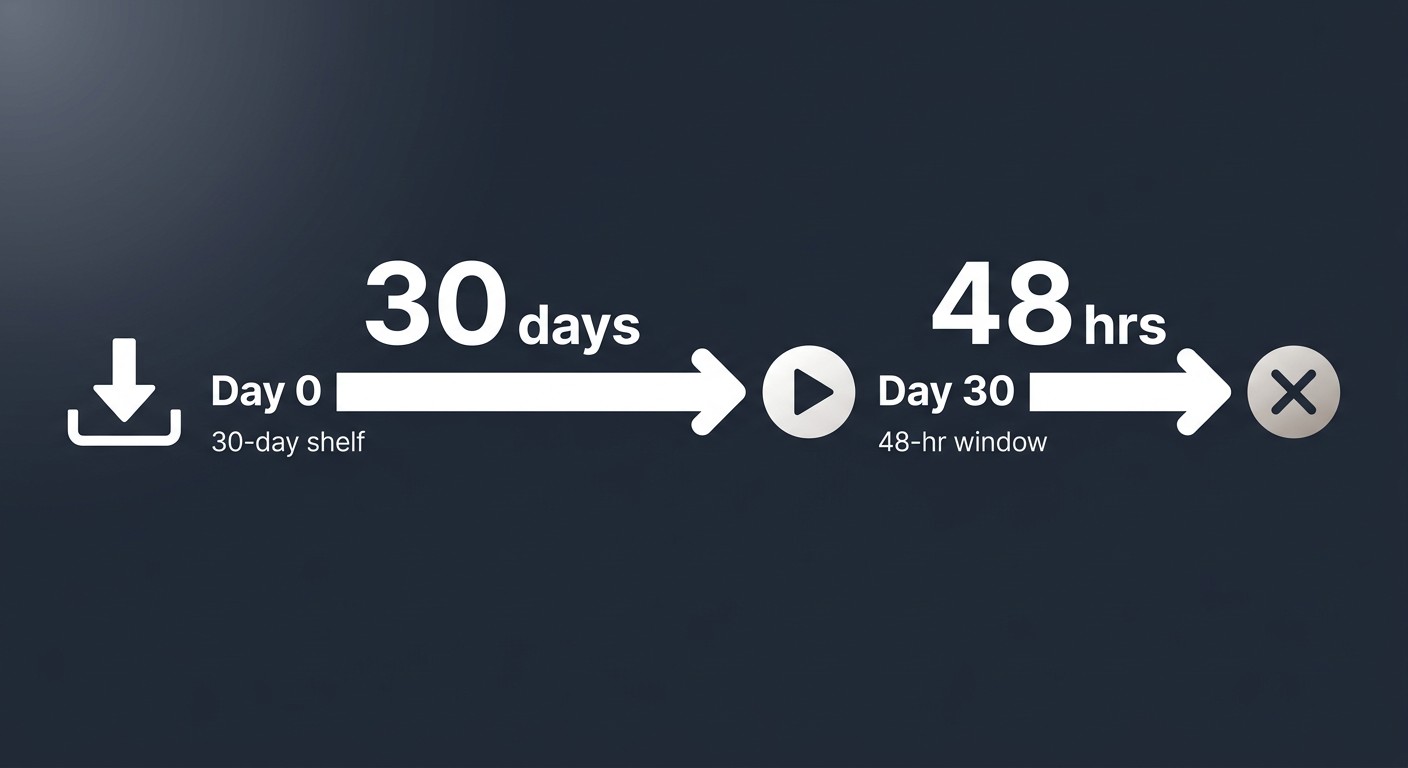
Per Max's Help Center, the Standard plan caps shared downloads at 30 titles across the account, and the Ultimate plan raises that to 100. Basic with Ads is zero. Once a download exists on a device, it lives for 30 days if you never press play, and 48 hours once you do (figures as of June 2026; verify current numbers on Max's Help Center).
Basic with Ads, Standard, and Ultimate: what each plan actually gets
| Plan | Downloads allowed | Quality ceiling |
|---|---|---|
| Basic with Ads | 0 | N/A (no download path) |
| Standard | Up to 30 shared across the account | Up to 1080p source |
| Ultimate | Up to 100 shared across the account | Up to 4K, HDR10, Dolby Vision, Dolby Atmos source |
Two things worth knowing before you pick a tier. First, the 30-download cap on Standard is shared across every profile on the account, not 30 per person. A household with two adults and a kid using the same account will trip that ceiling faster than you'd think. Second, Max parked downloads behind the paywall on purpose. The ad-supported tier producing zero downloads is the policy, not a bug.
The 30-day shelf life vs. the 48-hour watch window
The clock runs in two stages. From the moment a title finishes downloading, you have 30 days to start watching before it expires automatically. The moment you press play, a separate 48-hour window opens; once that ends, the file goes too. The 48-hour window cannot be extended by pausing and resuming. As one Quora response on offline viewing put it bluntly: "You have to renew downloaded content every 30 days."
That's the cycle that quietly burns out a lot of users. If you download a six-episode arc for a flight, watch one on the plane, then forget about it for a week, the rest are gone. I've made this mistake more times than I care to admit.
When 4K and Dolby Atmos actually kick in (and when they don't)
The Ultimate plan unlocks Max's 4K source with HDR10, Dolby Vision, and Dolby Atmos on supported titles. House of the Dragon, The Last of Us, and True Detective are the flagship examples. The catch: the in-app download does not always preserve every spec on every device. Max's player can step audio down to stereo, drop HDR metadata to SDR, or cap resolution depending on the phone, tablet, or codec support. The 4K source exists on the service; what lands on your phone may not be the same file.
That gap, between source quality and what the download actually captures, is the entry point to the comparison later in this article.
How to Download HBO Max in the Mobile App, Step by Step
You open the Max app on your phone, tablet, or Fire Tablet, navigate to the title, tap the download icon, wait for it to finish on Wi-Fi, then find the file under your profile. Five-step flow, basically the same on iOS, Android, and Fire OS. Two defaults are worth changing before your first download.
On Android, iPhone, and iPad
- Open the Max app and sign in on a Standard or Ultimate account.
- Find the title. On a series, tap a specific episode card. On a movie, tap the title page.
- Tap the download arrow next to the episode (for series) or near the Play button (for movies). For full seasons, look for a "Download Season" toggle.
- Wait. Max downloads only on Wi-Fi by default, so the title needs an active connection until it finishes.
- To find your downloads later, tap the profile icon in the top right (or bottom right on some Android builds), then choose Downloads.
That last step trips first-time users, and not by accident: Max buries the Downloads list under the profile menu instead of giving it a dedicated tab. Whoever designed that flow has clearly never tried to find a downloaded file with one bar of LTE.
On Amazon Fire Tablet
Identical flow inside the Max app on Fire Tablet. The Fire Tablet is supported. Fire TV stick and Fire TV Cube are not; the Max app on those devices is stream-only. If you want to watch a download on a TV, you need to start it on a phone or tablet and mirror, which defeats the offline use case for most people. I treat Fire TV as a streaming endpoint, not a download target.
Three default settings to change before your first download
Open the in-app settings before you start downloading. Three toggles matter.
- Download over Wi-Fi only is on by default. If you ever want to grab one more episode at an airport gate over cellular, you have to turn it off before you leave Wi-Fi range. At roughly 1–3 GB per hour for a Max title (figure cited by community Q&A as of 2025), it can chew through a mobile cap fast, so flip it deliberately, not casually.
- Download quality has three or four tiers (Best, Higher, Standard, Data Saver, depending on the app version). Best is the only one worth choosing for anything you actually want to watch on a tablet screen. Lower tiers exist for storage-tight phones.
- Storage location: Max stores downloads on internal device storage only. There is no option to redirect to an SD card or external drive. If you're on a 64 GB Android with 8 GB free, that's your real ceiling, regardless of what plan you're paying for.
Why HBO Max Has No PC or Mac Download Option
Max has no Windows app, no Mac app, and no download button anywhere on play.max.com. The browser version streams only. That's been true since the HBO Max launch in 2020, and nothing on the public roadmap suggests it changes in 2026.
I'll say what I actually think, since 15 years of watching streaming policies has earned the take: I don't expect Max to ship a desktop download anytime soon. The reason is not technical capability. The reason is that downloads require the platform to control the playback runtime, and the open web does not give it that control. This is a licensing and rights-management choice baked into how Max negotiates with studios. It's a business posture, not an oversight.
What the browser actually does (and doesn't)
play.max.com is built for live streaming, not offline caching. The player loads encrypted segments, plays them, and discards them. There is no native cache, no offline mode, no "save for later" anywhere in the UI. As one Reddit r/cordcutters thread put it after the Windows app was deprecated: there's no desktop app, and the laptop option is web browser with no download button. That's still the state of play in June 2026.
Workarounds that look obvious but don't really work
Three things people try, and what happens with each.
- Screen recording. Max's DRM-protected playback returns black frames in most desktop screen recorders. Even when a recorder does capture something, it captures the rendered output, which means resolution and audio are bounded by what your monitor shows, not by the source file. You also re-encode in the process, losing quality on every pass.
- Browser extensions. Anything advertising a one-click "Max downloader" extension is either non-functional against current DRM, malware, or both. I've never seen one that produced a clean file.
- Sideloading the Android app onto a desktop. Emulator setups break on account verification and DRM checks. Even when the app boots, the Downloads feature does not.
The honest answer for desktop users who want an offline file is a dedicated downloader tool. That's the next section.
Save HBO Max as a Permanent MP4 or MKV on PC and Mac with BBFly
Please note: A tool like BBFly assumes you hold an active Max subscription and want a personal offline file of titles you already have legitimate access to. The files are for your own viewing, not for redistribution, public screening, or resale. When Max's in-app download covers your need (a 48-hour window on a phone), that's still the lowest-friction route. Use a third-party tool when you specifically need a desktop file or want to keep the title past Max's clocks.
For PC and Mac users, the way to produce a permanent MP4 or MKV of a Max title is a desktop downloader that talks to the Max servers and saves the original stream as a local file. BBFly HBO Downloader is the one I've been running on Max for this purpose, so I'll describe what it actually does and where it doesn't fit.
I ran BBFly against Max on both Windows 11 and macOS to see what it produces. The output is a standard MP4 or MKV that plays in VLC, Infuse, Plex, or any other media player, with no expiry clock and no app gate.
How BBFly's native download differs from screen recording or re-encoding
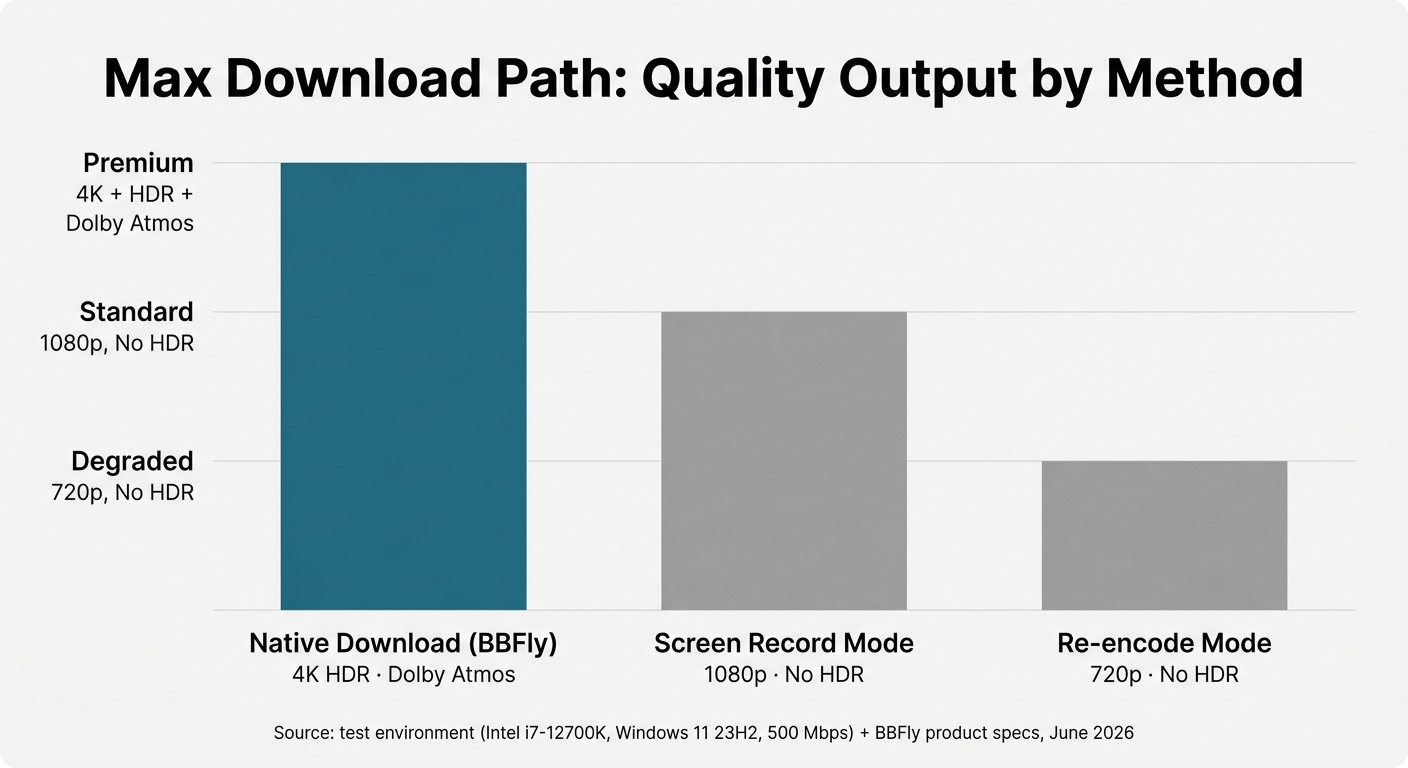
Three technical paths exist for "saving" streaming content, and they're not equivalent. Most readers I talk to assume all "downloaders" are the same thing. They are not.
- Native download talks to the platform's servers, fetches the same audio and video segments the official player would, and remuxes them into a local container. No decoding, no re-encoding. Bitrate, resolution, HDR metadata, and audio tracks come through intact. This is what BBFly does on Max.
- Recording plays the title in real time and captures the rendered output. Quality is bounded by the playback environment, the process takes the runtime of the movie, and HDR / Dolby Vision / Atmos cannot survive. PlayOn and Audials work this way.
- Re-encoding decodes the stream and re-encodes it to a smaller target. The file is convenient, but a 1080p re-encode is not the same bitrate ladder as a 1080p native pull. MovPilot's path and parts of CleverGet sit here.
On a 720p sitcom the difference is invisible. On Max's flagship HDR-and-Atmos titles, the path is what determines whether the file on disk is a faithful copy or a degraded approximation.
What gets preserved: 4K, HDR10, Dolby Vision, Dolby Atmos, subtitle tracks
Because the native-download path remuxes the source, the file BBFly produces on Max can carry 4K resolution, HDR10, Dolby Vision, Dolby Atmos, the surround tracks, and the subtitle tracks Max provides on a given title. Per BBFly's product page, supported audio includes Dolby Atmos, EAC3 5.1, and AAC 2.0, with video in H.264 or H.265 (as of June 2026; confirm current spec on the official BBFly page). For Ultimate-plan flagship titles like House of the Dragon or True Detective, that means the local file plays back the way Max plays it on a 4K Apple TV, not the way the mobile download plays it on a phone.
Personal-use boundaries, plus what BBFly costs and what it gives up
What BBFly does not do: it does not let anyone watch Max without a subscription, it does not work without you signing into your own Max account, and it does not redistribute content. The product is positioned as a desktop offline tool for people who already pay Max. Outputs are for personal offline viewing on devices you own, not for re-uploading or selling. On pricing: BBFly is paid software after a 30-day trial that gives you 3 full titles per platform (not a 5-minute preview), priced at $29.90 per month, $99.90 per year, or $199.90 lifetime with support for 3 PCs (as of June 2026; confirm on BBFly's official page). It's Windows and Mac only; there is no Linux build, no mobile app, and no way around needing your own Max login.
HBO Max Downloaders Compared: Resolution, HDR, Audio, and File Output
If you've decided you want an offline file on a PC or Mac, the next question is which tool to use. Five third-party options plus Max's own in-app download cover most of what people actually pick from. The honest summary first: none of them is "best" universally, and the right answer depends on whether you care about HDR, Atmos, file portability, or just a 48-hour window on a phone.
Test environment (June 2026)
- Hardware: Custom desktop with Intel i7-12700K and 32 GB RAM (Windows side); MacBook Pro M2 with 16 GB RAM (Mac side)
- OS: Windows 11 23H2; macOS Sonoma 14.5
- Network: 500 Mbps fiber, wired Ethernet on the desktop, Wi-Fi 6 on the MacBook
- Test content: A 4K HDR House of the Dragon episode on an Ultimate-plan account; a 1080p Friends episode on a Standard-plan account
- Measurement tools: MediaInfo (codec, resolution, HDR metadata, audio track), Activity Monitor / Task Manager (throughput), wall-clock stopwatch
- Account state: Fresh sign-in on paid Max accounts at the listed plan tiers
Native download vs. record vs. re-encode, why the path matters on Max
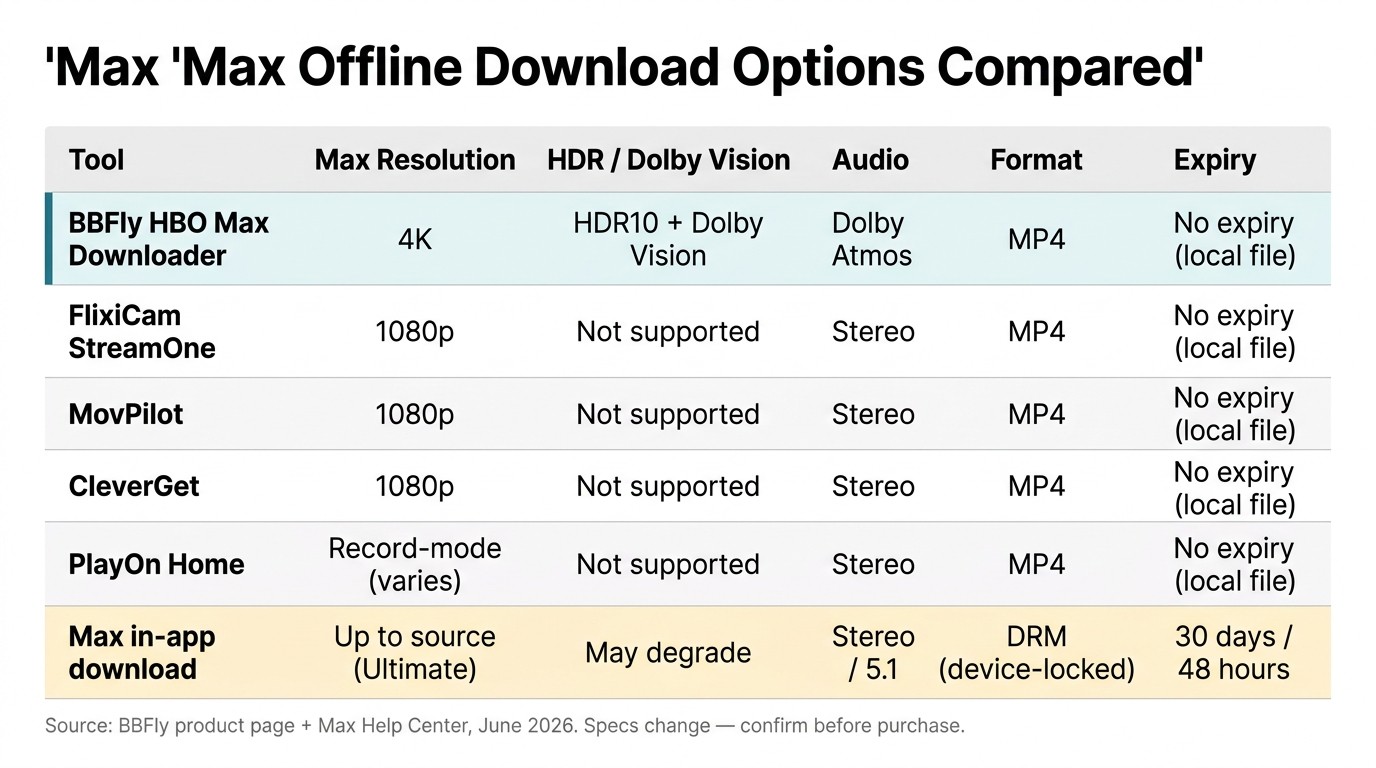
Across the six options below, three technical paths show up: native download (BBFly), record mode (PlayOn), and re-encode / mixed (MovPilot, CleverGet, FlixiCam's record sub-product line). On a 720p sitcom, the difference might not be visible. On a 4K HDR episode with Atmos, the path determines whether you have an HDR file with object-based audio, or a 1080p SDR file with stereo. That's what the table is really measuring.
Comparison table and per-tool verdicts
| Tool | Max resolution | HDR / Dolby Vision | Audio | Output format | Expiry | Platform |
|---|---|---|---|---|---|---|
| BBFly HBO Max Downloader | 4K | HDR10, Dolby Vision | Dolby Atmos, EAC3 5.1, AAC 2.0 | MP4 / MKV (local file) | None (local file) | Windows / Mac |
| FlixiCam StreamOne | 1080p | Not supported | EAC3 Dolby Digital Plus 5.1 | MP4 / MKV (local file) | None (local file) | Windows / Mac |
| MovPilot | 1080p (re-encode) | Not supported | Atmos 5.1 (vendor-stated; debated in AnandTech and VideoHelp forum threads) | MP4 (re-encoded) | None (local file) | Windows / Mac |
| CleverGet | 1080p | Not supported | Multi-track | MP4 (local file) | None (local file) | Windows / Mac |
| PlayOn Home | Record-mode (varies with playback) | Not supported | System audio captured | MP4 (recorded) | None (local file) | Windows; record-mode only |
| Max in-app download (official) | Up to source on Ultimate; reduced on Standard | May not preserve in the download | Stereo or 5.1, device-dependent | Encrypted in-app cache | 30 days untouched / 48 hours after play | iOS / Android / Fire Tablet only |
Source: BBFly's official and Max's official Help Center, as of June 2026. Specs change; confirm current figures first.
Per-tool fit verdict:
- BBFly. Best for collectors and home-theater users who want Max's 4K, HDR, and Atmos to survive into a local file, and for households tripping the 30-cap on Standard. Not ideal for casual users who only need a 48-hour window on a phone, or anyone on Linux.
- FlixiCam StreamOne. Best for users already in the StreamOne ecosystem and happy with 1080p SDR. Not ideal if Atmos or HDR is the point.
- MovPilot. Best for budget 1080p with a re-encode tradeoff. The Atmos claim has been questioned on AnandTech and VideoHelp forum threads; treat it as vendor-stated until MediaInfo on your own file confirms it.
- CleverGet. Best for users already on its module ecosystem. Not ideal if you want HDR or a clean single-vendor setup.
- PlayOn Home. Best for users genuinely fine with real-time recording and stereo audio. The path cannot capture HDR or Atmos at all.
- Max in-app download. Best for the original use case: a phone, a flight, a 48-hour window. Not ideal past that window, for desktop viewing, or for moving files between devices.
The upshot: pick by what you need to survive the trip to disk. If you don't need HDR or Atmos and a 48-hour window is enough, the official app does the job. If you do, the technical path matters more than the name on the box.
HBO Max Download FAQ
Can you download HBO Max in 4K, and which plan do you need?
Ultimate unlocks the 4K, HDR10, Dolby Vision, and Dolby Atmos source on supported titles; Standard is capped lower. The in-app download itself may not preserve every spec on every device, even on Ultimate, depending on codec support. If 4K HDR is the point, the desktop downloader path is more predictable than the phone path. (Verify current plan/spec mapping on Max's Help Center.)
Can you watch HBO Max offline on a Smart TV?
Not from Max's own downloads. The in-app file is locked to the phone or tablet that pulled it, and the Max apps on Roku, Apple TV, Samsung, LG, and Fire TV are streaming-only. A standalone MP4 or MKV from a desktop downloader plays on any Smart TV that reads USB media, or via Plex. Max is more restrictive here than most rivals.
Is it legal to use a third-party HBO Max downloader, and where do I check the terms?
Read Max's Terms of Service for the platform contract, and your jurisdiction's copyright rules for the legal layer. They're different categories: a ToS violation is a contract matter Max can enforce by suspending an account; copyright turns on what you actually do with the file. If your use looks like "active Max subscription, personal device, no redistribution," that's the personal-use framing these tools assume; whether it's legal where you live is your call.
Will using a third-party downloader get my HBO Max account banned?
It depends on the tool, not the category. Tools that sign in through a controlled flow and pull the same native streams the official player uses avoid the patterns platforms typically flag. Tools that game multiple sessions, scrape at suspicious rates, or rely on shareware hacks are higher-risk. The Reddit r/hbo concern is real, but it tends to track shadier tools, not the category as a whole.
Can I move HBO Max downloads to an SD card or external drive?
For in-app downloads, no. Per Max's Help Center, downloads stay on internal device storage; no SD card, no external drive, no transfer. A standalone MP4 or MKV file from a desktop downloader has none of those constraints. On this point Max is stricter than Netflix, which at least lets Android users pick the SD card.
Why won't my HBO Max download play anymore?
Usually the 30-day or 48-hour clock ran out. Secondary causes: the title was removed from the Max library mid-download (it happens, especially during the 2022–2023 content purges), or the device sat offline long enough that Max requires a re-validation check. Reconnect, sign back in, and the file either resyncs or it's gone. There is no save-my-download override on the platform side.
Can I download HBO Max on a Chromebook?
Not reliably. The Max Android app sometimes installs through the Play Store on a Chromebook, but downloads fail or play back inconsistently, and ChromeOS is not on Max's supported-device list. Treat a Chromebook as a desktop case and pick between a phone for the in-app route or a Windows/Mac machine for the file route.
Do HBO Max downloads use mobile data or only Wi-Fi?
Wi-Fi by default. The setting can be flipped to allow cellular under Downloads preferences. Max Q&A on Quora pegs streaming at roughly 1–3 GB per hour, and downloads land in the same range. A single 2-hour movie can take 4–6 GB on top quality, enough to torch a 10 GB monthly plan in one go. Flip the toggle deliberately.
Bottom Line: How I'd Approach HBO Max Downloads in 2026
Stay with Max's in-app download if you only need a 48-hour window on a phone or tablet and never hit the 30-cap on Standard. It's free, it's official, and it works. Switch to a desktop downloader when you keep losing playback to the 30-day clock, when you want the flagship 4K HDR and Atmos titles to actually stay 4K HDR and Atmos in the file, or when you're on a PC, Mac, or Smart TV that Max's own app does not serve. Pick the path that survives the trip to disk; the box on the front of the tool is the smaller decision.