
HBO Max 4K in 2026: Plans, Library, and Hidden Limits
Table of Contents
Max in 4K is real, but how much of HBO's catalog you can watch in 4K, and whether your living-room chain will deliver it, are two different questions. Yes, Max streams in 4K UHD with HDR10 and Dolby Vision, but only on the Ultimate plan at $22.99 a month (as of June 2026 — verify on Max's plan page). The 4K library runs to about 1,000 titles, strong on Warner films and Max's newest originals, thin on the older HBO prestige back catalog. You also need a 4K HDR display, HDCP 2.2 across the signal chain, 25+ Mbps to the device, and a browser that isn't Chrome.
In December 2025 I started Max's new Mad Men 4K remaster and the second scene I watched contained a crew member off-camera "manning the puke machine after Roger has too many oysters." Per The Hollywood Reporter, that wasn't a one-off: the first episodes went out with unedited post-production footage and were even listed out of order. That asterisk is what this piece is about — Max 4K is a serious offering with real catches around it. Below: what Ultimate actually buys you, where the library leaves you short, the troubleshooting failures I keep seeing in friends' setups, and what to do when you want a 4K title that outlives the 48-hour download timer.
Is HBO Max in 4K? The plan, the devices, and the catches
Does HBO stream in 4K? Yes — Max is in 4K, but only on the Ultimate tier. Standard and Basic with Ads cap at 1080p, full stop. You also need 4K HDR hardware, HDCP 2.2 from source to screen, and a steady 25 Mbps connection per the HBO Max Help Center (as of June 2026).
Plans and pricing for 4K access: Ultimate vs Standard vs Basic with Ads
Ultimate (~$22.99/month) is the only path to 4K, Dolby Vision, Dolby Atmos, and the 100-title download cap. Standard ($18.49/month) tops at 1080p with 30 downloads. Basic with Ads runs around $9.99 with no downloads at all. My take: if you have a 4K HDR TV and a watchlist of HBO Originals or Warner films, Ultimate is honest value. If your TV is 1080p, you're paying for output you can't see.
Hardware requirements: HDR10, Dolby Vision, HDCP 2.2, 25+ Mbps internet
A 4K HDR display is the entry ticket. Beyond that: HDMI 2.0 or better, HDCP 2.2 negotiated across every link, and ≥25 Mbps to the device. Per Max's Help Center, Chrome does not stream Max in 4K — use Edge on Windows or Safari on macOS for browser 4K, or default to a native TV or console app, which sidesteps the browser question entirely.
What changed when HBO Max became Max in 2023
At the rebrand, 4K was lifted out of the standard ad-free plan and parked behind Ultimate. Long-time HBO Max subscribers who had been getting 4K on their existing plan were told to upgrade or accept a quality downgrade — a move that still bothers me on principle. Max's plan page is the canonical reference for any further changes.
What's actually streaming in 4K on Max (and what HBO still keeps in 1080p)
For hbo max 4k content, the headline number is ~1,000 titles in 4K UHD on Ultimate, leaning heavily on the Warner film vault and Max's newer originals. The practical upshot: the 4K library is strong on new prestige TV and big-ticket movies, mediocre on the older HBO catalog that built the brand.
Flagship HBO originals in 4K: House of the Dragon, The Last of Us, Game of Thrones, True Detective
These are why you'd pay for Ultimate. House of the Dragon and The Last of Us are mastered with Dolby Vision and Atmos and look the part on a calibrated set. Game of Thrones finally streams in 4K HDR on Max (a long wait — the original Blu-rays were 1080p only). Newer seasons of True Detective are also up in 4K. Fit-verdict: best for viewers whose watchlist is built around current HBO originals; not ideal for anyone planning a deep dive into the back catalog and assuming everything will look the same.
4K movie catalog highlights: Dune, The Matrix, The Dark Knight, Lord of the Rings, Harry Potter
The Warner side is where Max's 4K library quietly outperforms competitors. Dune Parts One and Two, the Lord of the Rings and Hobbit trilogies (extended editions), the Harry Potter run, the Matrix quadrilogy, and The Dark Knight trilogy all stream in 4K HDR — most with Dolby Vision and Atmos. This is the part of Max's 4K offering that genuinely competes with disc collecting. If your priority is event-cinema rewatches on a big screen, this is the strongest argument for Ultimate I can make.
The 1080p stragglers: Succession, The Sopranos, The Wire
Here is where Ultimate disappoints. Succession remains 1080p on Max. The Sopranos and The Wire are likewise 1080p — The Wire in particular has a long, well-documented remastering history. Older HBO shows weren't always finished with 4K masters in mind, and HBO's remastering schedule has been selective. So does HBO stream in 4K for those particular titles? No. My read: don't subscribe to Ultimate for the prestige back catalog. Subscribe for what's already been remastered, and treat the 1080p shows as a bonus on the same service.
Mad Men in 4K on Max: the December 2025 launch and what the QC mess revealed
Is Mad Men on Max in 4K? Yes — Mad Men hit Max in 4K UHD in December 2025, and on its best episodes the new transfer is genuinely beautiful. The catch is the launch shipped half-cooked.
Where to find Mad Men's 4K episodes on Max
Open Mad Men's series page on Max while signed into an Ultimate account. 4K episodes carry a UHD badge in the episode listing on supported devices; the audio track on most carries Dolby Atmos. If you don't see the UHD badge, confirm Ultimate is active (not a downgraded Standard) and that you're on a Max app that supports 4K — the browser route, especially Chrome, will hide the badge entirely.
What the botched launch revealed — and how the masters look once they're right
Per The Hollywood Reporter, the first batch of episodes uploaded for the 4K relaunch "lacked post-production edits, exposing a crew member 'manning the puke machine after Roger has too many oysters.'" Episodes were also listed out of order. That's not a transfer problem — that's Max pushing files that were never meant to leave the editing bay. Where corrected episodes are in place, the underlying remaster is the real thing: filmic grain preserved, color decisions clearly supervised, no obvious DNR scrub. My recommendation for mad men hbo max 4k specifically: if you're already rewatching, you're probably fine. If you're new to the show, give it a few weeks past launch so corrected episodes propagate before you commit.
Max 4K vs Netflix 4K and Disney+ 4K: HDR formats, Dolby Atmos, and where each platform actually wins
On paper the three platforms are closer than the spec sheets suggest. The choice should come down to catalog, not codec.
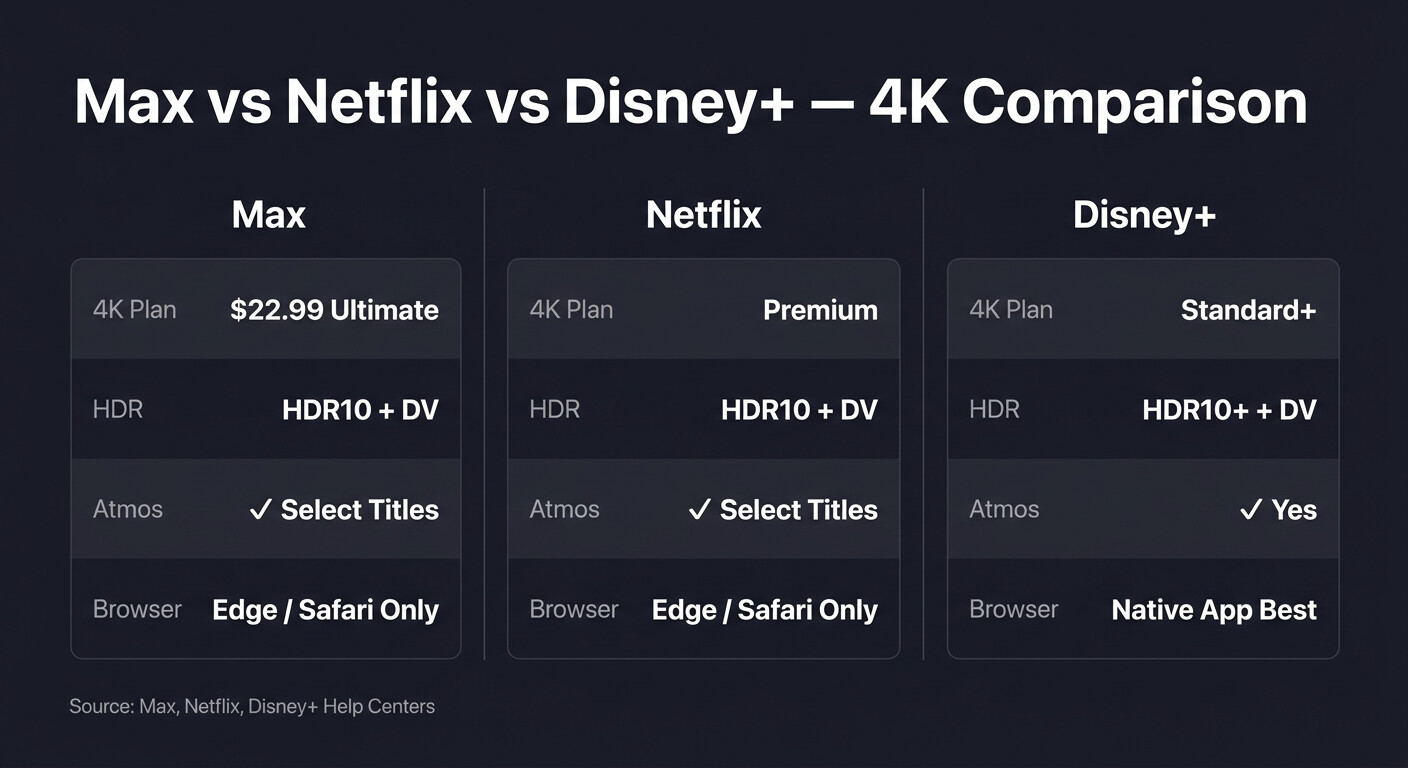
Max 4K vs Netflix 4K vs Disney+ 4K — quick comparison (as of June 2026)
| Platform | Plan required for 4K | HDR formats | Dolby Atmos | Browser caveats |
|---|---|---|---|---|
| Max (HBO Max) | Ultimate (~$22.99/mo) | HDR10, Dolby Vision | Yes, on select titles | No dedicated desktop app; Chrome capped below 4K (use Edge or Safari) |
| Netflix | Premium tier | HDR10, Dolby Vision | Yes, on select titles | 4K limited to Edge / Safari on supported devices |
| Disney+ | Standard tier or above (4K included) | HDR10, Dolby Vision, HDR10+ | Yes | Browser support varies; native apps recommended for 4K |
Source: Max's official Help Center, Netflix's Help Center, and Disney+'s Help Center, as of June 2026.
Which platform's 4K is right for your catalog priority
After years running these side by side, here's how I actually decide. If your watchlist is HBO originals plus the Warner vault, Max is the right call — nothing else has House of the Dragon, The Last of Us, and the LOTR extended editions in 4K HDR on a single subscription. If your watchlist is Marvel, Star Wars, and Pixar, Disney+ wins on both catalog and HDR10+ support. Netflix is the tightest encoder of the three and the deepest in non-English originals, but its movie 4K library is thinner. Picking by codec spec is a mistake; the formats overlap. Pick by what you'll actually press play on.
When Max isn't streaming in 4K: Chrome, HDCP 2.2, and the silent quality drops
Last winter I spent an evening at a friend's place trying to figure out why his new QLED was streaming Max at what was clearly 1080p when every box on the receipt said 4K. The fix wasn't on Max's troubleshooting page. The pattern repeats: when your Max stream silently drops below 4K, work through these in order:
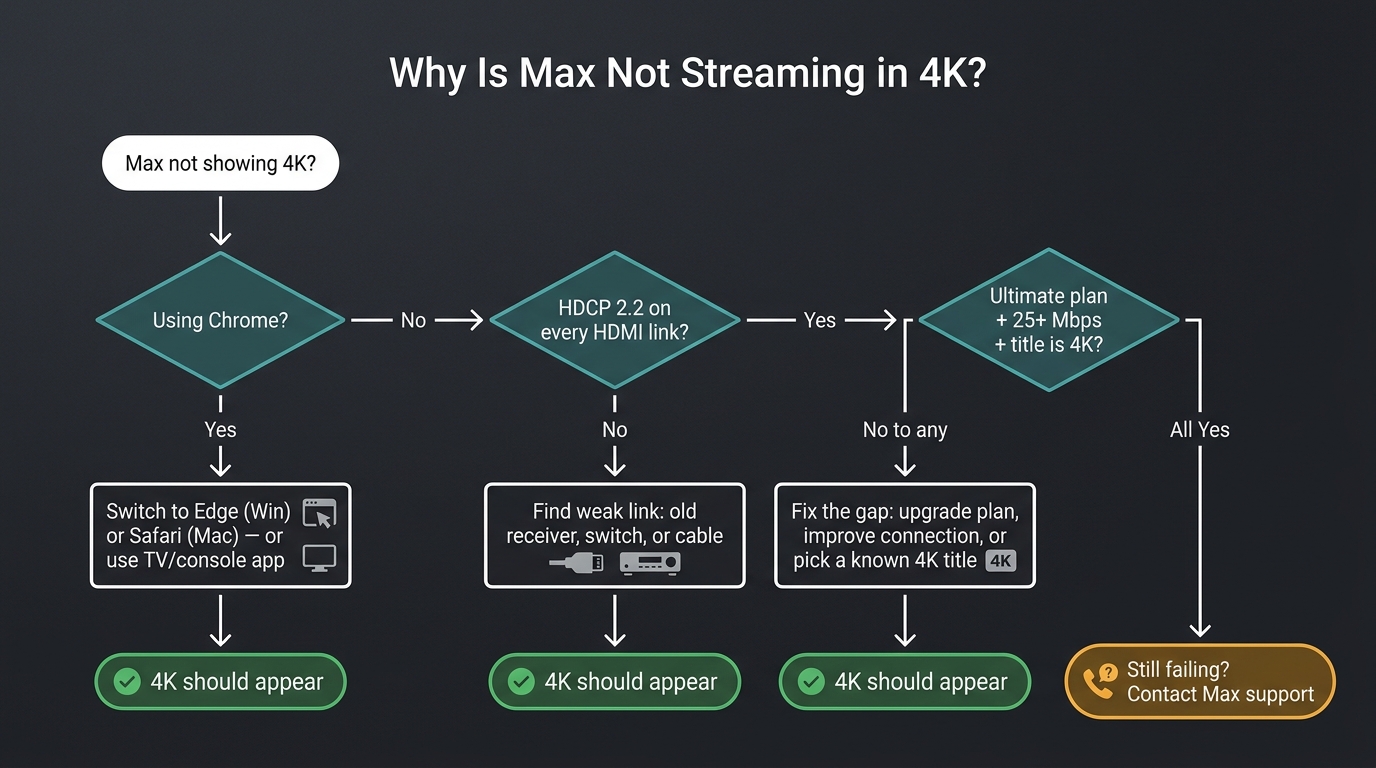
- Confirm you're not on Chrome — switch to Edge on Windows or Safari on macOS, or move to the TV/console app.
- Audit every link in your HDMI chain for HDCP 2.2 — TV input, receiver, switch, cable. One weak link silently drops the signal.
- Verify Ultimate is active, you have 25+ Mbps to the device, and the specific title is actually mastered in 4K.
Browser limitation: why Chrome can't do 4K on Max (use Edge or Safari instead)
Chrome on Windows and macOS does not stream Max in 4K — it caps at 1080p or below. The HBO Max Help Center spells out which browsers do support 4K (Edge on Windows, Safari on macOS). This is the single most common reason a "4K subscription" looks soft on a desktop. If you're on a Mac and reach for Chrome by habit, switch to Safari just for Max — the difference is immediate.
HDCP 2.2: when your TV is 4K-ready but the chain isn't
My friend's setup turned out to be a five-year-old AV receiver in an otherwise 4K-capable chain — the receiver wasn't passing HDCP 2.2, so Max silently dropped the stream rather than refuse to play. I see this constantly with Samsung TV plus older Fire Stick combinations: every device is technically 4K, but one HDMI link doesn't negotiate HDCP 2.2 and the whole signal collapses to 1080p. Diagnostic move: temporarily plug the streaming device directly into the TV, bypassing the receiver and any switches. If 4K returns, you've found the culprit.
Bandwidth, account tier, and quick sanity checks
If the chain is clean and you're on a supported app, the last layer is account and bandwidth. Max needs ≥25 Mbps to the device — run a speed test on the streaming hardware itself, not your phone, since Wi-Fi dead spots are real. Confirm your plan is Ultimate, not a downgraded Standard. And remember: not every title is in 4K. Pick a known 4K reference like Dune: Part Two rather than diagnosing on something that may have only ever been 1080p.
Keeping Max 4K offline past the 48-hour expiry: travel, archival, and family setups
Please note: Third-party downloaders may conflict with Max's Terms of Use. Keep any local files you create for your own personal, offline viewing of content you actively subscribe to — don't redistribute or resell. Where Max's mobile download already covers your situation, that remains the most worry-free route.
Max's official downloads are mobile-only (there is no Max desktop app for Windows or Mac), capped at 100 titles on Ultimate, and expire 48 hours after first play or 30 days unwatched. If a title leaves the library, the local download disappears with it. Fine for a single flight; useless for archival and frustrating for anyone in the household who watches across a full week.
What Max's official downloads can (and can't) do — tier caps, 48-hour expiry, mobile-only, auto-delete on content removal
Basic with Ads: 0 downloads. Standard: 30 titles, 1080p. Ultimate: 100 titles, eligible for 4K HDR on supported phones and tablets. All downloads sit inside the Max mobile app, expire on the platform's clock, and vanish if Max removes the title — a hazard Max users have hit before during the company's well-publicized content cullings. The practical upshot: official downloads are a viewing convenience, not a preservation tool.
How BBFly's native-download path preserves Max 4K + HDR10 + Dolby Vision + Atmos as local MP4/MKV files for personal offline viewing
My own workflow for the Max titles I actually want to keep is BBFly's HBO Max Downloader on a desktop PC. The reason I use it instead of the mobile app: BBFly pulls the original stream and remuxes to MP4 or MKV — no screen recording, no transcode — so the 4K master, HDR10 or Dolby Vision metadata, and the Dolby Atmos track all survive intact into a file my Plex server can play on any TV in the house. That output is what makes it useful for archival, not just travel.
Lifetime is $199.90 for three PCs (as of June 2026), which lines up with a typical household, and the free trial covers three full titles per platform — enough to confirm the output before paying. Boundary: this still requires an active Max Ultimate subscription, and is for your own personal offline viewing — not for redistribution. Best for: collectors building a Plex or NAS library, and family setups with multiple PCs. Not ideal for: anyone who only needs a single download for a single trip (the Max mobile app already does that), or anyone unwilling to keep Max Ultimate active.
HBO Max 4K FAQ
Is the Max Ultimate tier worth $22.99/month just for 4K? Worth it on a 4K HDR TV if your watchlist is built around HBO originals or Warner films in HDR. Skip if your TV is 1080p, or if your viewing is mostly the pre-2015 HBO back catalog (still 1080p on Max). One forum user on WhatHiFi put it bluntly: "I don't think it's been worth it… you definitely need to have at least a 60-inch screen to appreciate it." That tracks with my experience.
Can I get 4K on Max with the ad-supported plan? No. Basic with Ads streams at 1080p and below, with no downloads at all. 4K, Dolby Vision, and Dolby Atmos are Ultimate-only.
Why are HBO classics like Succession, The Sopranos, and The Wire still 1080p on Max? HBO remasters selectively, and older shows were not always finished with 4K masters available. The Wire in particular has a documented history of remastering false starts. There's no guarantee any specific older title will get a 4K release on Max; treat it as a 1080p library until announced otherwise.
What happens to my Max 4K downloads if I cancel or downgrade from Ultimate? Official mobile downloads become inaccessible as soon as the Ultimate entitlement ends. Downgrading to Standard caps you at 30 downloads and removes 4K from new downloads; existing 4K files inside the Max app generally won't survive the tier change either. If permanence matters, solve it before you cancel.
Can I watch Max in 4K from a desktop computer? There is no dedicated Max desktop app for Windows or Mac. Browser is the only desktop path, and Chrome is capped below 4K. Use Edge on Windows or Safari on macOS, or move to a TV / console / streaming-stick app for the cleanest 4K playback.
Bottom line: who Max 4K is for (and who should pass)
Pay for Max Ultimate if you have a 4K HDR TV and your watchlist is built around House of the Dragon, The Last of Us, Dune, and the Mad Men remaster — that's the stack Ultimate actually pays off on. Skip Ultimate if your hardware can't show HDR, or if you mostly watch the older HBO catalog still stuck at 1080p. For titles you genuinely want to keep past a 48-hour timer, supplement with a local download workflow rather than betting on Max's mobile app surviving every cancellation, removal, or trip without Wi-Fi.