
How to Download Max Shows to Watch Offline: Limits & a Better Way
Table of Contents
Most people land here after typing "how to download Max on a laptop" and finding only mobile-focused guides. Here is the short answer: Max only supports offline downloads inside the iPhone, iPad, Android, and Fire tablet apps, on the Ad-Free or Ultimate Ad-Free plan, and each saved title expires after 30 days unwatched or 48 hours once you press play. There is no official Max app for Windows, Intel Mac, or Chromebook.
I have been tracking platform download policies since the HBO Now days, and Max is one of the most quietly hostile streamers to anyone on a Windows laptop. The mobile-only app is not an oversight; it is a design choice that has held for years, and the rebrand from HBO Max to Max in mid-2023 did nothing to soften it. Below, the official rules in plain language, then what to actually do when those limits bite, including a desktop workaround that exists only inside the lane of personal, subscription-backed use. No miracle path. Just the trade-offs as they stand in June 2026.
Max Downloads in 2026: What Actually Works
Yes, you can download Max shows to watch offline, but only inside the official Max app on a phone or tablet (iPhone, iPad, Android, or Amazon Fire), and only on the Ad-Free or Ultimate Ad-Free plan. Max With Ads has no download feature. There is no official Max app for Windows, Intel Mac, or Chromebook, which means "download Max on a laptop" has no native solution as of June 2026.
A naming note: the service is called Max now, but plenty of search traffic still uses "HBO Max" and the old help-center URLs redirect. The current Max app is the only path Warner Bros. Discovery officially supports for offline viewing. Everything below stays inside that reality.
Who Can Download Max, and How Long Those Downloads Last
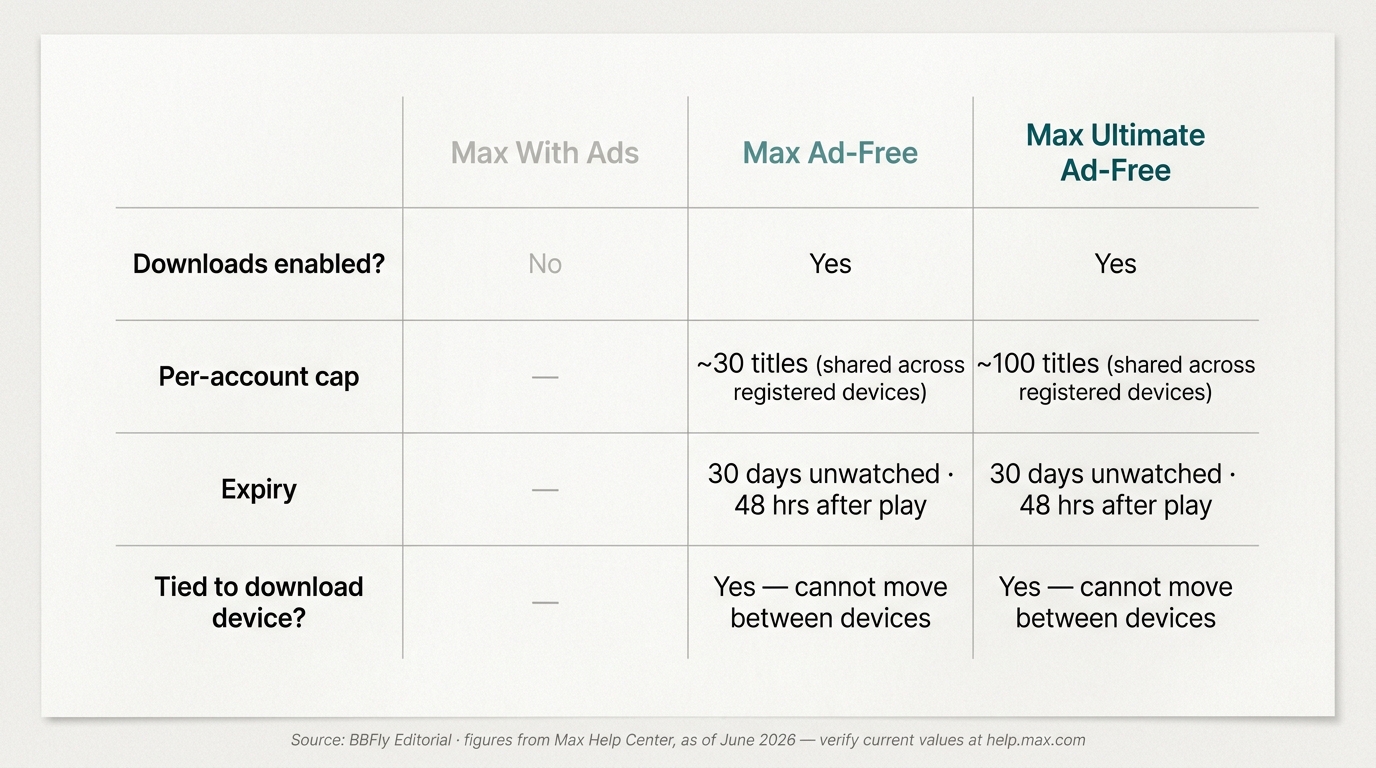
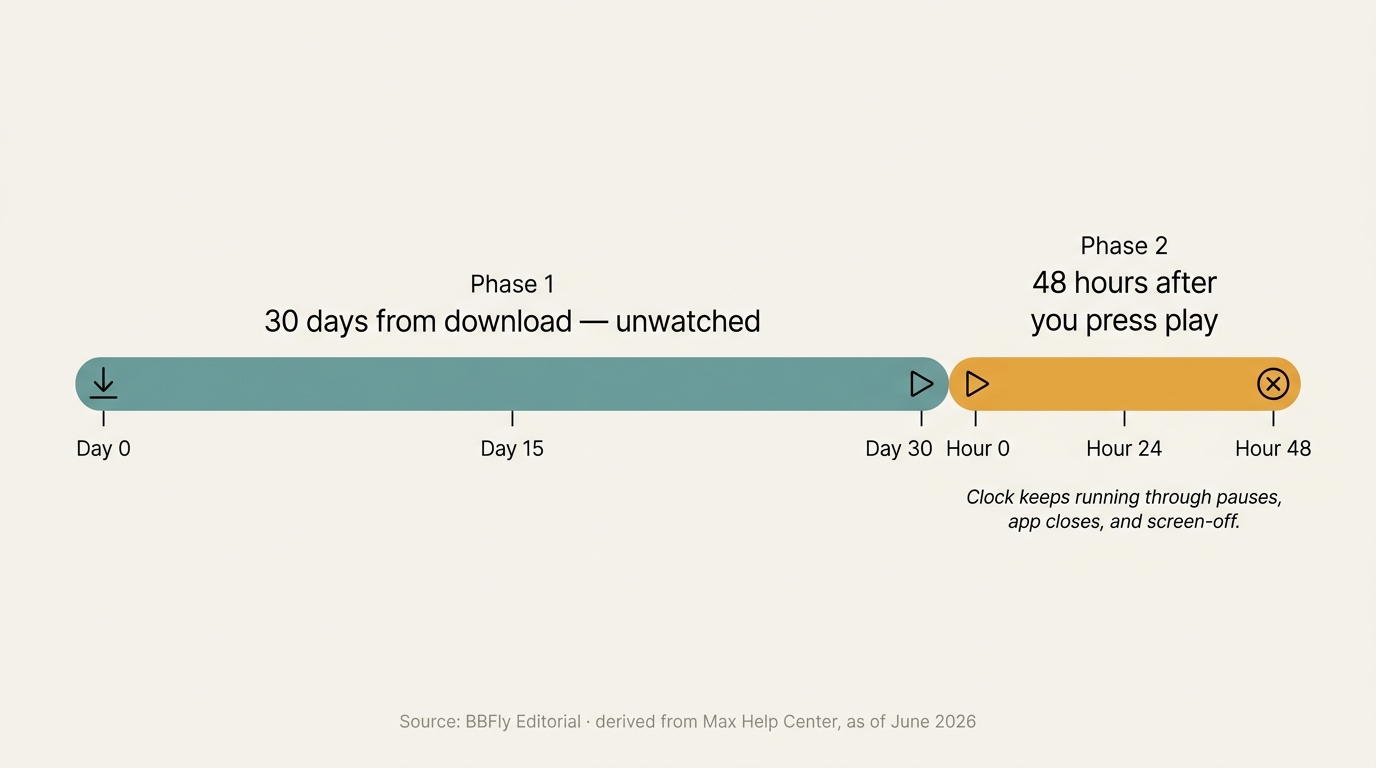
Max downloads are available only on Ad-Free and Ultimate Ad-Free. Ad-Free subscribers can keep roughly 30 titles at a time across the registered devices on the account; Ultimate Ad-Free roughly triples that ceiling to about 100, as of June 2026. Every saved title runs two clocks: 30 days from the day you downloaded it if you never press play, then 48 hours from the moment you do, with the timer running through pauses and app closes.
| Plan | Downloads enabled? | Per-account cap | Expiry | Cross-device behavior |
|---|---|---|---|---|
| Max With Ads | No | n/a | n/a | n/a |
| Max Ad-Free | Yes | ~30 titles (shared across registered devices) | 30 days unwatched; 48 hrs after play | Tied to the device that downloaded; cannot move between devices |
| Max Ultimate Ad-Free | Yes | ~100 titles (shared across registered devices) | 30 days unwatched; 48 hrs after play | Tied to the device that downloaded; cannot move between devices |
Source: Max's official Help Center on downloads, as of July 2026.
The practical upshot: these read like rental terms, not ownership. As one Quora user put it on a long-running "how do you watch HBO Max without Wi-Fi" thread, "You have to renew downloaded content every 30 days. Downloading is only allowed if you have an ad-free subscription." That captures the policy in one breath.
Which Max plan lets you download (and which doesn't)
The two ad-free plans are the only ones where the download icon appears next to a title. Max With Ads has the download capability disabled at the account level. This is the most common confusion I see in community threads: ad-supported subscribers assume they get downloads, and the platform draws the line precisely there. If you signed up on the ad-supported tier and need offline copies, the only official move is to upgrade the plan.
How many downloads, per device and per account
On Ad-Free the approximate ceiling is 30 saved titles across the whole account; on Ultimate Ad-Free, around 100. The cap is shared across every registered device, not per device, so downloads on your iPad and your partner's phone count against the same pool. Warner Bros. Discovery has nudged these numbers before, so treat the figures as good guidance and confirm the live ones on Max's Help Center.
How long downloads last: 30 days unwatched, 48 hours after you press play
This is the part that catches travelers off guard. From the moment Max finishes saving a title, you have 30 days to start watching before the file self-revokes. The instant you press play, the second clock starts: 48 hours, and it keeps running through pauses, screen-offs, and app closes. A long itinerary with two layovers can outrun the timer before a season finale ends. There is no official extension and no in-app refresh.
How to Download Max in the Mobile App (iPhone, iPad, Android, Fire Tablet)
Open the Max app on a phone or tablet over Wi-Fi, find the title, tap the download icon, and play it from the Downloads tab when you go offline. The flow is identical across iPhone, iPad, Android, and Amazon Fire tablet, with one install-time wrinkle on Fire.
iPhone, iPad, Android, and Fire tablet: the same in-app flow
- Sign in to the Max app on iPhone, iPad, Android phone or tablet, or Amazon Fire tablet. Fire users install through the Amazon Appstore rather than Google Play; everything after the install is identical.
- Connect to Wi-Fi. The app will not start a download over cellular by default.
- Open a show or movie page and tap the download icon next to the title or, for series, next to each episode.
- Wait for the progress bar to finish. Partial saves are not playable.
- Open the Downloads tab from the Profile screen and tap a title to watch offline.
Change the download quality (Standard vs High) and find your saved titles
The Standard / High toggle lives under Profile → Settings → Video Quality → Download Quality. Standard is roughly half the size of High; based on Max's stated quality tiers and standard H.264 bitrates, expect a one-hour Standard episode to land around 350 to 500 MB and a High one closer to 700 to 900 MB. Saved files live in the Max app's private internal storage, so you cannot pull them into the camera roll, the Files app, or onto an SD card. By design, unchanged across the rebrand.
Why You Can't Officially Download Max on a PC or Mac (and What Actually Works)
Max never built a desktop download client. On Windows, Intel-based Macs, and Chromebooks, the Max website plays in the browser but never caches files for offline use, and there is no app in the Microsoft Store, Mac App Store, or Chromebook store that adds the feature. The realistic official workaround is the mobile app on a phone, tablet, or an M-series Mac running iPad apps. For users who specifically need a desktop offline path, a third-party downloader is one option to consider, with the caveats below.
What Windows, Intel Mac, and Chromebook users get from the Max app
On Windows 11, Windows 10, Intel-based MacBook and iMac systems, and ChromeOS, Max is a browser-only service. Open play.max.com in Chrome, Edge, or Safari and you can stream, but no download button appears in the web UI; the browser player discards what it buffered the moment you close the tab. Chromebooks with Google Play support can sometimes sideload the Android Max app and behave like an Android tablet, but Warner Bros. Discovery does not officially support that path and behavior varies by hardware.
The third-party desktop downloader route: what it does and what it doesn't
Please note: Third-party downloaders run outside Max's official client and may conflict with the platform's Terms of Use. Use them only for personal, offline viewing of content you actively subscribe to, do not redistribute or resell what you save, and check Max's terms and your local copyright law for your situation. Nothing below is a legal guarantee.
A desktop downloader is a separate program that runs on Windows or Mac, prompts you to sign in with your own Max account, plays the title you choose, and saves a local MP4 or MKV from the playable stream. It depends on a valid Max subscription; if your account lapses, no tool can pull anything. None of the reputable ones claim to strip protection or unlock anything; they capture what the player is permitted to show. Output quality, supported titles, and ad handling vary by tool, so verify each vendor's current Max coverage and free-trial scope before paying.
What "keep forever" actually means (and what it doesn't)
This is where readers get oversold. A locally saved MP4 is a file on your hard drive: it does not vanish when Max removes the title from its catalog, and it does not run a 48-hour timer. Persistence on disk is not a license to use the file anywhere, though. Max's terms and your country's copyright law govern what you may do with it; personal, offline playback for the person who recorded it sits in a different bucket from sharing, public screening, or resale. For anything beyond solo viewing, check Max's terms and your local regulations first.
What to Look for in a Desktop Max Downloader (and Where BBFly Fits)
If you are shopping for a desktop Max downloader, compare on the axes a serious reviewer would: codec and maximum resolution, batch-queue support, output portability, ad-tier behavior, subtitle and audio-track preservation, and free-trial scope. Skip anything that headlines a feature it cannot actually deliver.
Criteria that separate a usable Max downloader from a wasted install
- Codec and maximum resolution. Max sources cap below 4K on the desktop side as of June 2026, so 1080p in H.264 or H.265 is the realistic ceiling. Any tool advertising "true 4K Max" is not matching what Max exposes to clients.
- Batch queue. The official mobile app forces episode-by-episode taps. A serious desktop tool should queue a full season in one pass.
- Output portability. MP4 or MKV that plays in VLC, Plex, or Infuse without the source app. Proprietary containers are a regression.
- Ad-tier behavior. With-Ads content carries baked-in pre-rolls; how a tool handles them is service- and tool-dependent. Do not believe any "guaranteed clean MP4" claim.
- Subtitles and multi-audio. Confirm SRT export and that foreign-language audio tracks survive the save.
- Free trial. A real free-trial run against your own Max account is the only honest way to verify the tool before paying.
Where BBFly fits the criteria (and what to verify before buying)
BBFly HBO Max Downloader targets 1080p MP4 and MKV outputs from supported streaming sources, supports batch queues so a full season can run unattended, and offers a free-trial window so you can confirm Max behavior on your account before committing.
- Best for: desktop users on Windows or Mac who want a one-application workflow and accept that no third-party tool can guarantee perfect ad handling.
- Not ideal for: 4K purists, since Max does not currently expose 4K to download clients on any tool.
- Suits: subscribers who already pay for Max and want a desktop companion to the mobile app, not a replacement.
Troubleshooting: When Max Downloads Won't Start, Stick, or Play
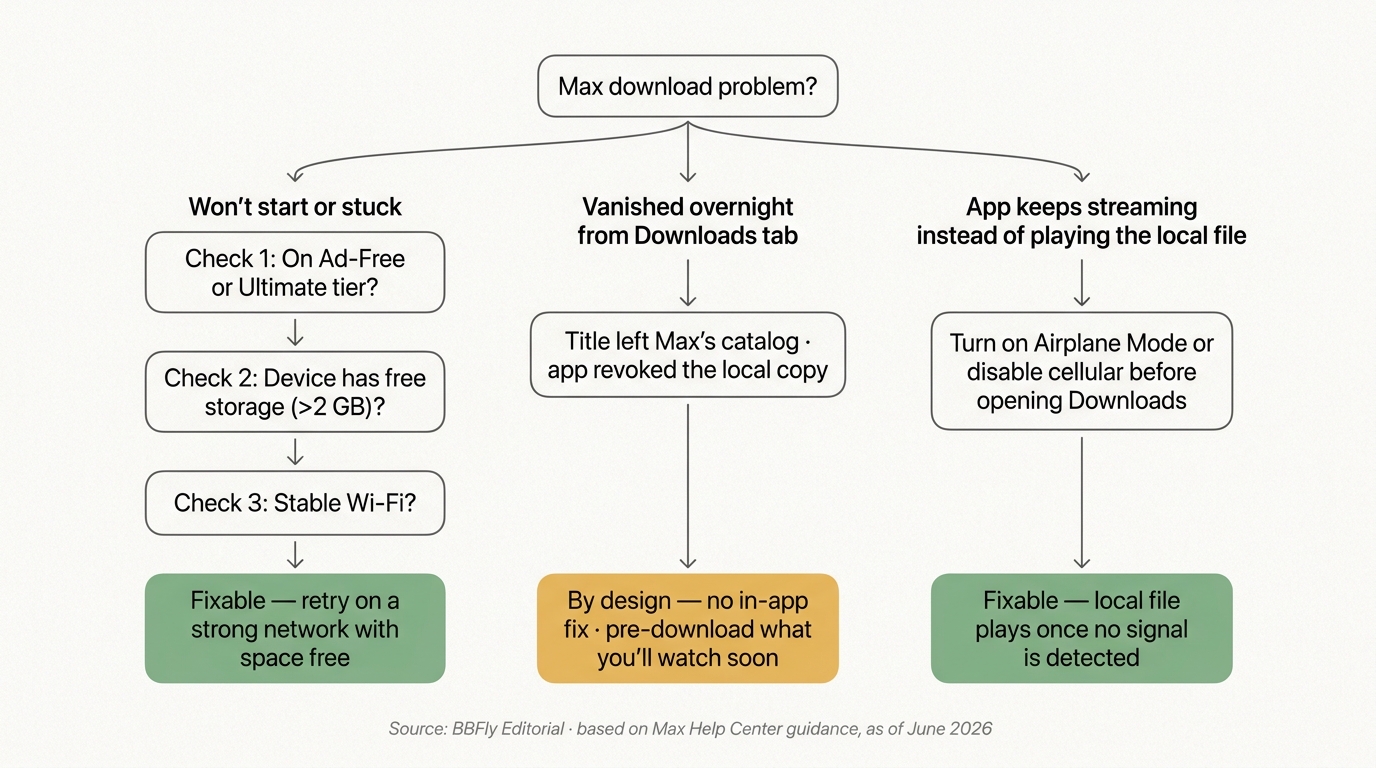
Three failure modes account for nearly every Max download problem: the account is on a tier that does not allow downloads, the device cannot complete or play the file because of storage or connection, or Max's licensing logic removed the local file. The first two are fixable; the third is by design.
Download won't start or gets stuck: tier, storage, connection
Check three things in order. The plan: only Ad-Free and Ultimate Ad-Free have downloads. Free storage: a one-hour High-quality episode runs roughly 700 to 900 MB, and Max refuses to start when the device is near full. The network: a flaky Wi-Fi connection makes the app abort segments and silently retry. Plug into a stable connection, free a couple of gigabytes, and try again.
The downloaded title disappeared overnight
When a show you saved last week is gone from the Downloads tab, the cause is usually licensing, not a bug. The moment a title leaves Max's catalog, the app revokes the local copy on its next online check-in. No setting overrides this. The honest mitigation: download only what you plan to watch in the next few weeks, and confirm a show's catalog status before a long trip.
The Max app keeps streaming instead of playing my downloaded file
The Max app prefers streaming whenever it detects any usable network connection, even a weak one. The fix is to remove the temptation: enable airplane mode or turn off cellular data before you open the Downloads tab, then play. The app falls back to the local file. The single most useful airline-and-hotel tip I can give a Max subscriber.
FAQ: Max Downloads
Can you download Max shows on a smart TV?
No. Smart-TV Max apps stream only and have no offline cache. The closest workaround inside Max's lane is to pre-download titles on a paired phone or tablet, then cast or HDMI-mirror to the TV during playback. As one Quora user described their setup, "Download the content. Get a Lightning to HDMI adapter. Plug your iPhone and adapter into the TV's hdmi port."
Does Max let you download on a Chromebook?
Not natively. Some Chromebooks can sideload the Android Max app and behave like an Android tablet, but the path is not officially supported and varies by hardware. Verify your specific model on Max's current Help Center.
Can I download Max shows in 4K?
No. The Max mobile app's download quality toggles are Standard and High, both below 4K, as of June 2026. For the latest, check Max's official quality and downloads page.
How long do Max downloads last before they expire?
30 days from the download date if you never press play. Once you press play, 48 hours, with the clock running through pauses, screen-offs, and app closes. Same on every download-eligible tier as of June 2026.
Is it legal to use a third-party Max downloader?
It depends on Max's terms of service, your country's copyright law, and your specific use case. Personal offline viewing of content you actively subscribe to is a different bucket from redistribution or resale. Read Max's terms and your local copyright regulations before deciding.
Is it safe to log into Max inside a third-party downloader?
Reputable tools that publish a clear privacy policy, a real refund window, and a track record are a different category from anonymous downloaders found in forum threads. If you choose to use one, confirm the vendor's data-handling page, enable two-factor authentication on your Max account, and treat fly-by-night tools as a hard no.
Why does Max try to stream instead of playing my downloaded file?
The Max app defaults to streaming whenever it detects any cellular or Wi-Fi signal, even a weak one. Force the local file by enabling airplane mode or turning off cellular data before opening the Downloads tab.
Can I save Max downloads to an SD card?
No. The Max app writes only to internal storage, even on Android devices with an SD slot. There is no in-app setting that moves downloads.