
Can You Download HBO Max Movies on Laptop? Real Methods in 4K
Table of Contents
Among the major streamers I've followed for fifteen years, Max has the worst laptop download story. The honest answer: no, you cannot officially download HBO Max movies on a Windows or Mac laptop. There is no desktop app and no browser download button. The official download function only runs on iOS, Android, and Amazon Fire tablets. A third-party download tool is the only realistic path to a movable local file on a laptop.
The first thing most people try is the obvious one. You open Max in a browser tab, hit record in OBS or QuickTime, and the captured video is a black rectangle with the audio playing fine. That single moment, the desktop dead end you only discover by trying it, is where this article lives. Below is the map I wish I'd had when I started doing this work professionally.
Can You Download HBO Max Movies on Laptop? The Short Answer
A laptop owner has three real choices, and only one produces a file you can keep. You can switch to your phone or tablet, where Max's official offline mode runs with plan caps and expiry clocks. You can keep streaming in the browser, which on desktop is also where Max's picture quality is at its weakest. Or you use a third-party download tool that saves a permanent local MP4 or MKV, provided you keep an active Max subscription and treat the file as personal viewing only.
My verdict, having tried all three: if the goal is "watch on this laptop, on a flight, without an internet connection," only the third option holds up. The first one doesn't help your laptop. The second one breaks at 30,000 feet.
Why HBO Max Won't Let You Download on a Windows or Mac Laptop
This is not a bug or a missing feature shipping next quarter. Max has never released a Windows or Mac downloadable client; the desktop experience is a browser site running Widevine DRM, which blocks local caching by design. The download function only exists where Max chose to build it: iOS, Android, and Amazon Fire. Even if a desktop app shipped tomorrow, you'd still hit the 30-title cap and 48-hour playback clock that already constrain the mobile apps.
No Desktop App on Windows or Mac, Browser Streaming Only
Max ships no native Windows or Mac client. On a laptop the only supported path is hbomax.com in a browser, which runs Widevine DRM and explicitly blocks local saves. People sometimes try to install the "HBO Max" listing from the Google Play Store through a desktop helper. As one Microsoft Q&A respondent put it bluntly: "These apps on 'Google Store' are developed to be used on Android phones and not in desktops-Laptops."
Official Download Rules (Mobile Only): Plan Caps and Expiry Windows
Per HBO Max's Help Center, official downloads live on iPhone, iPad, Android, and Amazon Fire tablets only, and the rules are stricter than people expect:
- Basic with Ads: 0 downloads. The ad-supported tier cannot download anything.
- Standard ad-free: up to 30 titles, shared across all devices on the account.
- Ultimate ad-free: up to 100 titles, also account-wide.
- Expiry: 30 days if you never start playback; 48 hours once you press play.
- Storage: internal device storage only; SD cards are not supported.
Even on supported devices, this is a rental window, not ownership. If the 48-hour clock runs out before your return flight, the file is gone. Plan tiers and caps are accurate as of June 2026.
Even Mobile Downloads Disappear: Content Pulls Wipe Your Files
The detail most articles skip: an officially downloaded title gets auto-deleted the moment Max removes that title from its library. The Westworld and Batgirl purges of 2022–2023 are the cautionary tale, widely covered at the time by The Verge and Variety. The official offline mode is best read as a temporary travel cache, not a personal archive.
Workarounds People Try First (and Why Most Fail on Desktop)
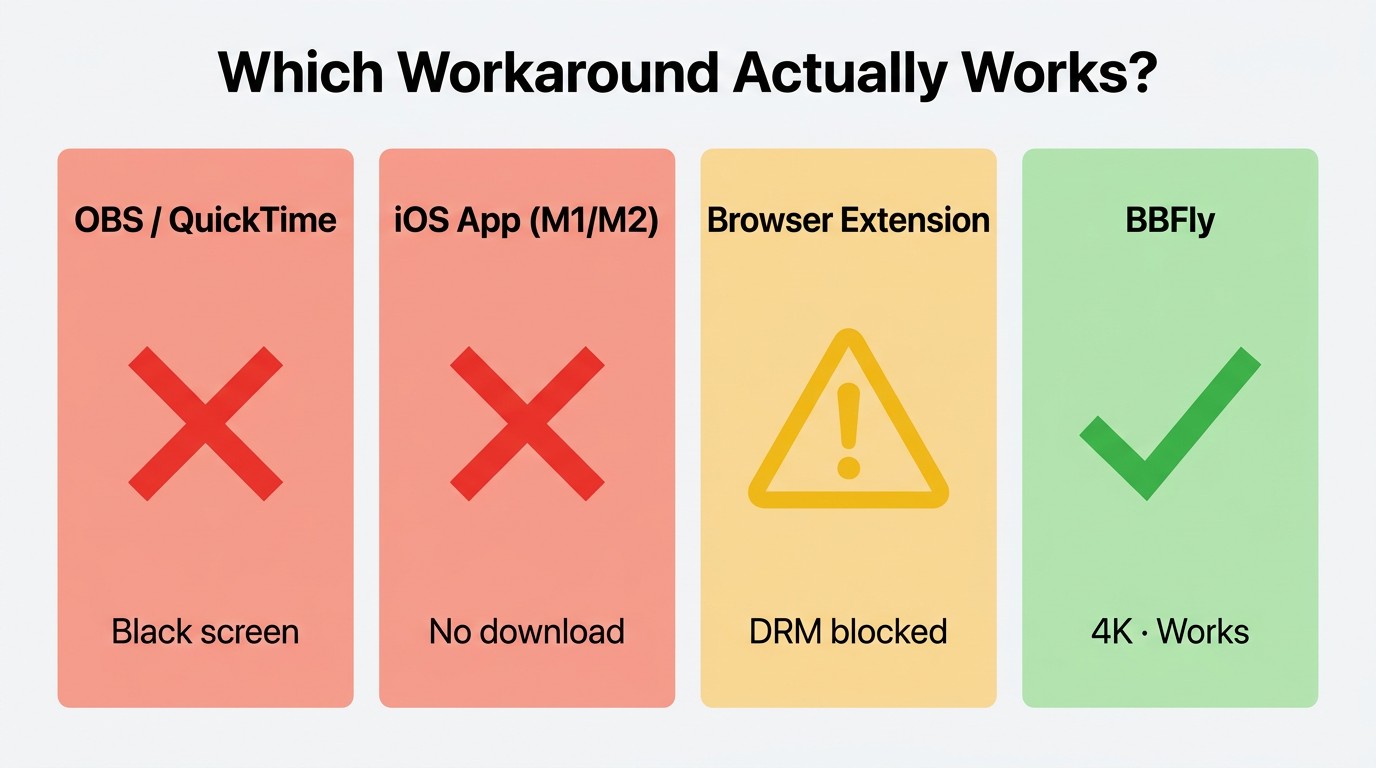
I've spent more hours than I care to admit testing the workaround paths people repeat on forums. Three are dead ends; the fourth works technically but produces files you cannot keep. Ranked from most common to least.
Screen Recording with OBS or QuickTime: Black Rectangle, Clean Audio
The first instinct and the most common dead end. The captured file is a black frame the entire duration, audio fine. Widevine's HDCP-style output protection signals the GPU to blank protected frames before they reach any capture surface — exactly how the DRM is supposed to behave, with no setting to flip. Not ideal for: anyone hoping a fresh OBS install will behave differently from the last one.
Apple Silicon iOS App Sideload on M1+ Macs: Button Doesn't Appear
This is the piece of bad advice I've seen copy-pasted across more forums than any other in this category. M1, M2, and M3 Macs can technically run iPhone and iPad apps, so install the iOS Max app and the download button should appear, right? It does not. Max has disabled the app's Mac App Store listing, and on sideloaded builds the download button is suppressed at the app level. Apple Silicon doesn't unlock anything here. Not ideal for: anyone betting an hour on a forum thread older than the M2.
Android Emulators (BlueStacks and Similar): Streams Play, Files Stay Locked
Emulators like BlueStacks can run the Android Max APK, and streaming playback works fine. The in-app download function either fails or writes the file into an encrypted container inside the emulator's sandbox, where it remains unplayable outside that virtual environment. Emulator streaming is a workaround for running the Max app on a PC, not for exporting anything from it. Not ideal for: anyone who wants a file they can move.
Why Browser Streaming on Desktop Also Looks Worse Than You'd Expect
When you stream Max in a desktop browser, the picture quality is the Widevine L3 path: 1080p with stereo audio and no HDR. The "hbo max quality bad on pc" searches are not imagined — desktop browser playback is a deliberately lower-tier experience than the mobile and TV apps. That sets up the obvious question: is there a method that pulls a higher-spec local file than the browser even plays back to you?
How BBFly Downloads HBO Max Movies on a Laptop in 4K HDR
Please note: Third-party downloaders sit alongside HBO Max's Terms of Use. Save any downloads for personal offline viewing only, keep an active Max subscription in good standing, and don't redistribute or resell. Where an official mobile download already covers your need, that remains the most worry-free route.
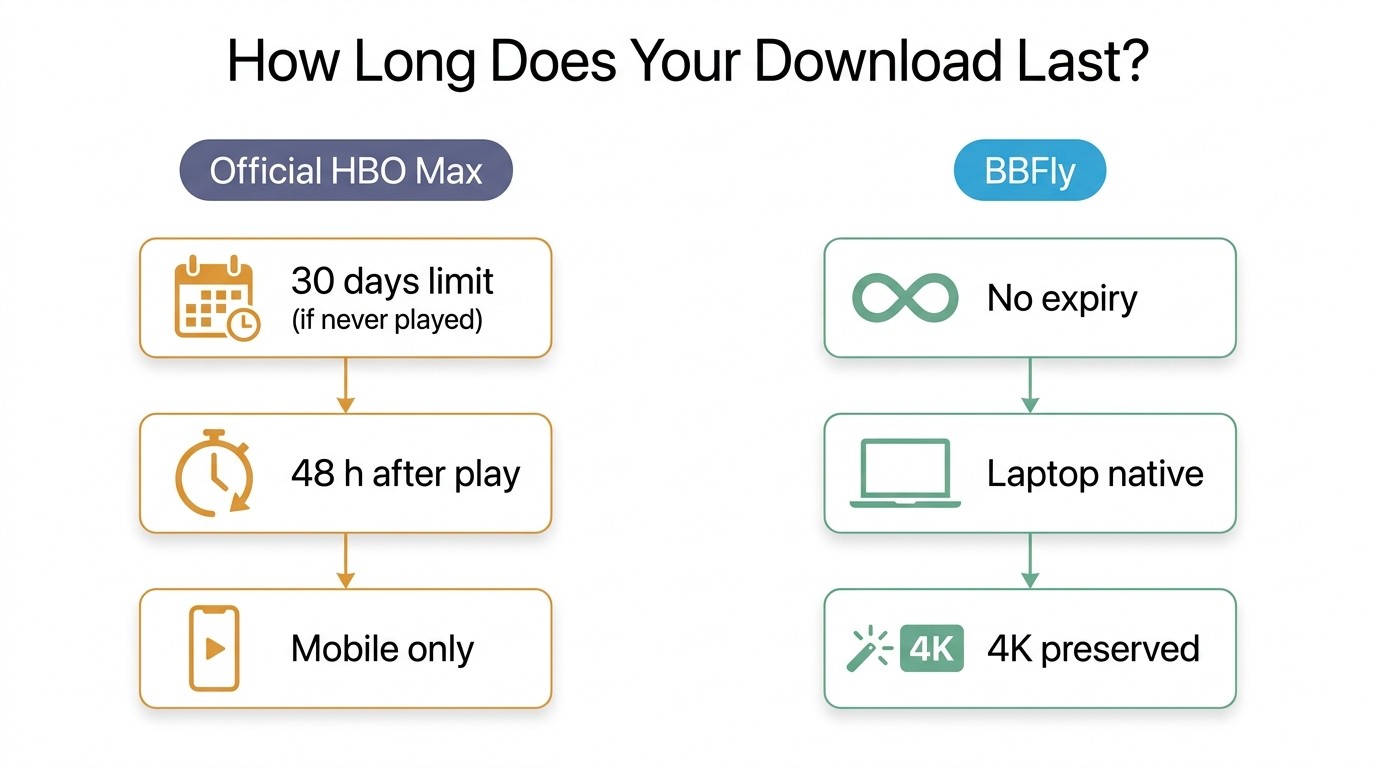
The first time I ran this flow was on a Max Original I expected to leave the catalogue at month-end — exactly the situation the official mobile cache cannot fix. BBFly HBO Max Downloader is a desktop tool for Windows and Mac that signs into your Max account, pulls the playable stream, and remuxes it into a standard MP4 or MKV. The output is a normal local file with no 30-day clock, no 48-hour clock, no app prison. The reason I keep coming back to it for Max is the spec ceiling: 4K with HDR10 or Dolby Vision and a Dolby Atmos track on the flagship titles that ship in those formats. Most tools in this category top out at 1080p stereo.
Pre-flight Checklist: Subscription, Settings, and Output Format
You need an active paid Max plan (any tier; sign in with your own credentials) on Windows or Mac. Not every Max title is mastered in 4K HDR — the flagship originals are; the ceiling tracks what the source carries, not what the tool can deliver. Three settings matter before clicking download: resolution (up to 4K where the source allows), audio codec (Atmos for compatible titles, EAC3 5.1 or AAC 2.0 otherwise), and subtitle tracks (tick everything). Output is MP4 or MKV; I default to MKV when there's an Atmos track to preserve.
Step-by-Step: From Sign-in to a Permanent Local MP4 File
- Open BBFly and pick the HBO Max module.
- Paste the HBO Max URL of the movie or episode into the search bar.
- Sign in to your active Max subscription inside the sandboxed window the tool opens.
- Confirm resolution, audio codec, and subtitle selections in the pre-download dialog.
- Choose your output folder and start the download. The file lands as MP4 or MKV.
The only step that's ever caught me out is step 4 — the audio default has a way of quietly reverting to AAC 2.0, so I always re-check before clicking. The honest trade-off: install footprint and one more app to manage; for a one-off save the official mobile download still wins on friction. Once the file lands it's yours, no expiry clock — playable in VLC, Infuse, or Plex. Best for: laptop viewers whose Max watching needs to survive the title's catalogue lifespan. Not ideal for: anyone who only needs a one-flight rental.
BBFly vs Other HBO Max Downloaders on Laptop: 4K, HDR & Audio Side by Side
The HBO Max downloader category, as of June 2026, divides into three groups by technical approach: native-download tools that pull and remux the original stream, re-encode tools that decode and recompress, and real-time recorders like PlayOn and Audials. Picture and audio fidelity follow from that choice — recording-mode tools cannot preserve HDR or Atmos by definition.
Test environment (June 2026)
- Hardware: Dell XPS 13 (Intel i7-1360P, 16 GB RAM); MacBook Air M2 (16 GB).
- OS: Windows 11 23H2 / macOS Sonoma 14.5.
- Test title: House of the Dragon S01E01, mastered in 4K HDR with a Dolby Atmos track.
- Subscription: Ultimate Ad-Free, active.
- Verification tool: MediaInfo for resolution, codec, and audio-track inspection.
- Competitor figures: taken from each tool's published product page, not from independent benchmarking.
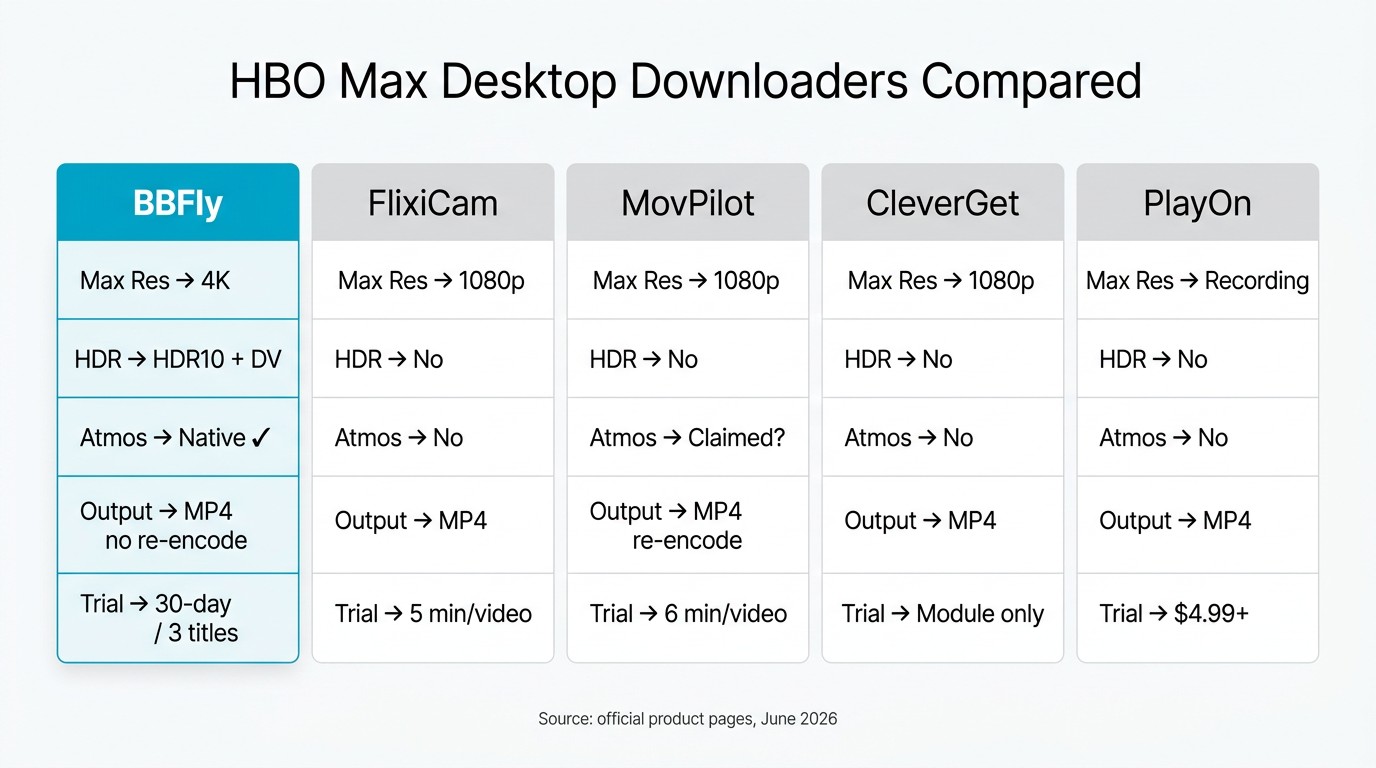
Within that landscape, BBFly is currently the option I've found that delivers a 4K file with HDR10 or Dolby Vision and a Dolby Atmos track on Max, based on each tool's product page and a MediaInfo check on my own export.
Quality Picture: Why Most Competitors Stop at 1080p SDR on Max
The ceiling for most desktop downloaders on Max is the Widevine L3 path: 1080p, no HDR. Re-encode tools compress the stream a second time, so a "1080p" output is not the same picture as a remuxed native 1080p file.
| Tool | Max resolution | HDR support | Dolby Atmos | Output format | Free trial |
|---|---|---|---|---|---|
| BBFly | 4K | HDR10 + Dolby Vision | Yes | MP4 / MKV | 3 full titles per platform within 30 days |
| FlixiCam StreamOne | 1080p | No | No (EAC3 5.1) | MP4 | First 5 minutes per video |
| MovPilot (Max version) | 1080p | No | Advertised, community-disputed | MP4 (re-encode) | First 6 minutes per video |
| CleverGet (Max module) | 1080p | No | No | MP4 | Module-specific, not officially defined |
| PlayOn Home | Real-time recording (1×) | No | No (system audio capture) | MP4 | Paid trial only, from $4.99 |
Source: BBFly's official product page and each listed tool's official site, as of June 2026. Specs change — verify current figures against each tool's official site before you buy.
Trial, License, and Platform Coverage Trade-offs
Beyond picture quality, the factors readers weigh: BBFly's trial is 3 complete titles per platform inside a 30-day window — enough to verify subtitle sync, batch behaviour, and finished file quality. FlixiCam and MovPilot trials cut at the first 5 or 6 minutes.
As one Slickdeals commenter wrote in 2023 about PlayOn's lifetime-to-subscription pivot, "Tempting but they screwed over the Lifetime Desktop folks" — a sentiment that still colours my read of recording-mode tools. BBFly's lifetime tier supports 3 PCs, useful for a household; competitor lifetimes typically authorize one. On breadth, BBFly covers 60+ platforms versus FlixiCam 20+, CleverGet 40+ modules, MovPilot 5–6. If Max is your only target, breadth doesn't matter; if you also pay for Netflix, Disney+, and Prime Video, an AIO tool is the cost-efficient call.
Fit-verdicts. On my own laptop BBFly is what I reach for when I'm saving a Max title I expect to revisit and the source is 4K HDR with Atmos — the Dolby Vision and Atmos tracks survive the export, which is the whole reason I'd take on the install footprint. If I only needed a clean 1080p stereo copy of one episode for a single flight, a lighter pick like FlixiCam StreamOne fits better and costs less. PlayOn and Audials are a different shape of tool entirely, suited to readers who want real-time recording across many services and accept that the resulting file loses HDR and Atmos.
FAQ: Downloading HBO Max on a Laptop
Does HBO Max have an app you can install on Windows 11?
No, and I've watched this question recycle through forums for three years — the answer hasn't changed. There is no Windows 10 or Windows 11 installer; the path on Windows is hbomax.com in a browser, which has no download function. Anything advertised as "HBO Max for PC" in the Microsoft Store or Google Play Store is either an emulator wrapper for the Android app or an unrelated listing that won't run.
Can I download HBO Max movies on a MacBook?
Not officially. Safari, Chrome, and Firefox on macOS all run Widevine L3 with no download function on Max, and the Apple Silicon iOS-app sideload does not surface the download button. A third-party downloader that supports Mac is the practical path.
Does HBO Max work on a Chromebook?
For streaming, yes; for downloads, no. Max runs in the Chrome browser on ChromeOS for online viewing. The Android Max app may install on Android-capable Chromebooks, but its download feature is designed for mobile internal storage and does not produce a portable file you can move out of the app sandbox.
Does HBO Max support 4K downloads?
On mobile, yes for select Ultimate Ad-Free titles. On desktop the question doesn't apply — there are no official desktop downloads. A third-party native-download tool can produce a 4K HDR local file on Windows or Mac for titles mastered in 4K.
Whatever happened to HBO Go and HBO Now on PC?
Retired years ago. HBO Go and HBO Now were consolidated into HBO Max in 2020–2021, rebranded to "Max" in May 2023, then reverted to "HBO Max" in mid-2025 — a churn I've watched leave even the platform's own help docs lagging behind. The "hbo go on pc" searches are hunting for software that no longer exists; the current path on a PC is a browser site at hbomax.com.
Is it safe to sign in to my HBO Max account inside a third-party downloader?
With a reputable tool, yes. I've kept the same Max session signed in across BBFly for the better part of a year on my own laptop with no account-side issues — on the condition that the build came from the publisher's own site rather than a forum mirror. Established downloaders authenticate the same way the official site does: a sandboxed browser window where you enter your credentials, and the tool stores the session token. Stick with established names, verify the publisher of the build you're installing, and keep two-factor on.
Can I transfer my mobile HBO Max downloads to my laptop or TV?
No. Official Max downloads on iOS, Android, and Amazon Fire are encrypted inside the app's protected storage and only play through the Max app on the original device. They cannot be exported, copied to a NAS, or pushed to a smart TV. A third-party download tool that outputs a standard MP4 or MKV is the only way to produce a file you can move between Windows, Mac, a TV via USB, or a Plex server.
Is using a third-party HBO Max downloader against the Terms of Service?
Read it as two separate questions. HBO Max's Terms restrict download functionality to the methods Max itself provides, so using a third-party client is typically a Terms-of-Use matter between you and the platform — the recourse is against the account. The separate question — whether personal offline viewing of a file you have an active subscription to access amounts to copyright infringement — depends on your local copyright law. BBFly's design assumes an active subscription and personal offline viewing only, consistent with how personal backup of legitimately-accessed media is treated in many jurisdictions; applicability varies by region, so confirm your local rules. The simple rule: keep the file for your own use, and do not redistribute or resell it.