
Download Netflix on Apple TV: App Install or Offline Playback?
Table of Contents
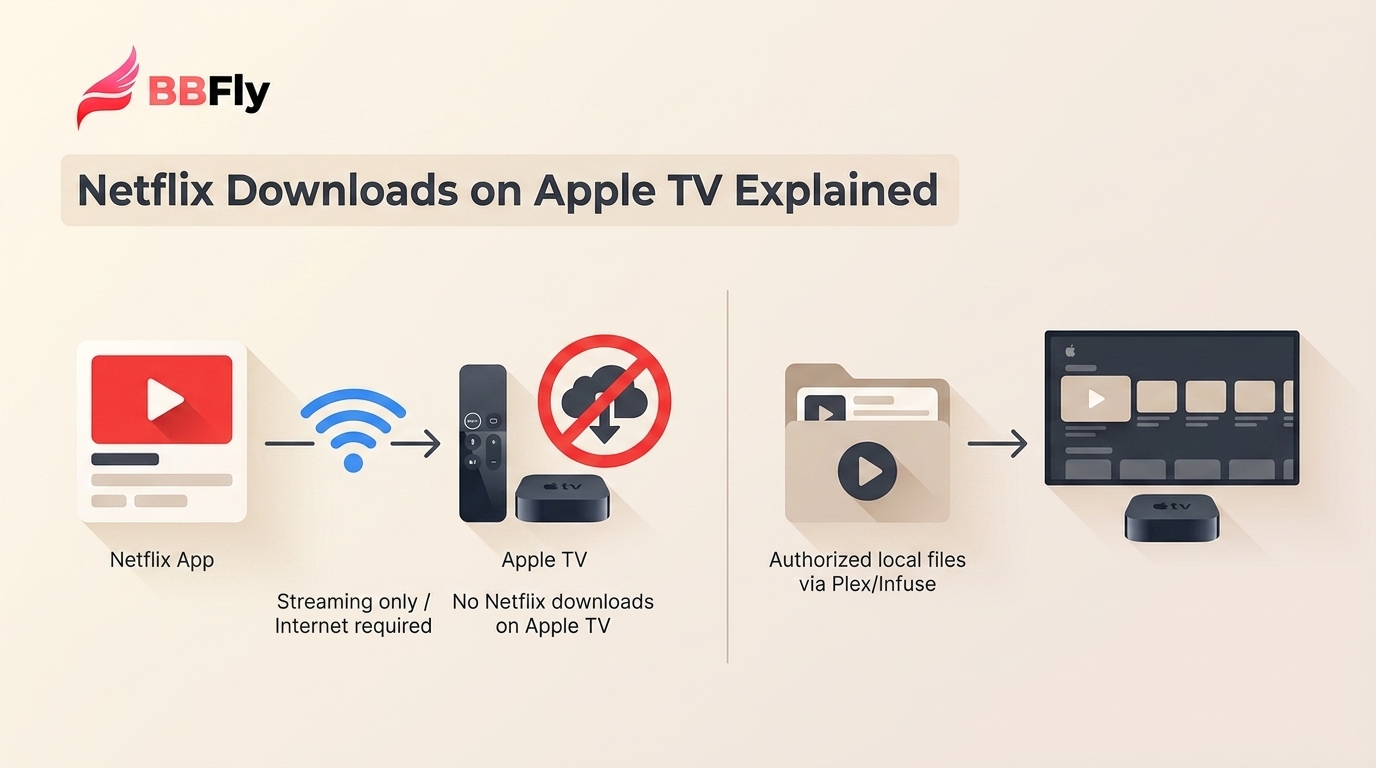
Direct answer. If you mean installing the Netflix app on Apple TV, supported models can get it from the App Store. If you mean saving Netflix titles on Apple TV for offline viewing, that is not available. For a TV during an outage or trip, use a compatible iPhone or iPad video adapter, or play authorized local files through a home library.

Apple TV can stream Netflix on supported hardware, but it cannot hold Netflix downloads for offline playback.
I have seen this become a problem most often when the internet disappears at the worst possible time: a trip, a cabin, or a home outage. The first question is what you are trying to download. Installing the Netflix app is possible on supported Apple TV models. Saving Netflix titles onto the Apple TV box is not. Older Apple TV models add a separate complication because Netflix support ended for some of them in 2024.
Choose the path that matches your setup:
- Install Netflix: Open the App Store on a supported Apple TV, search for Netflix, install it, and sign in.
- Watch official Netflix downloads on a TV: Use a compatible Lightning or USB-C video adapter with a supported iPhone or iPad setup.
- Build an offline TV library: Save authorized titles as local files on a PC or Mac, then play them through Plex, Infuse, or Home Sharing.
| Term | What it is | Netflix downloads? |
|---|---|---|
| Apple TV | TV streaming hardware | No local Netflix storage |
| Apple TV app | Apple media app and hub | Not Netflix downloads |
| Apple TV+ | Apple subscription service | Separate from Netflix |
| Device | Official Netflix downloads | Apple TV use |
|---|---|---|
| Android phones and tablets | Supported | Adapter compatibility varies |
| iPhone and iPad | Supported | Adapter compatibility varies |
| Amazon Fire tablets | Supported | Not an Apple TV route |
| Chromebooks with Google Play | Supported | Not an Apple TV route |
| Windows, Mac, and Apple TV | Unavailable | Use streaming or local files |
Netflix's ad-supported plan allows up to 15 downloads per device per calendar month on supported download devices. That allowance does not make Apple TV a download device. For the broader device picture, Netflix offline viewing works differently from Apple TV playback.
Why Apple TV Cannot Store Netflix Downloads
Apple TV is a streaming device. Its internal storage — 64 GB or 128 GB depending on the model — is allocated to tvOS and your installed apps. No streaming app is permitted to keep its video library there, by tvOS design. On top of that, two older Apple TV generations are no longer in the Netflix ecosystem at all as of mid-2024. Two reasons, one outcome: the device cannot give you offline Netflix.
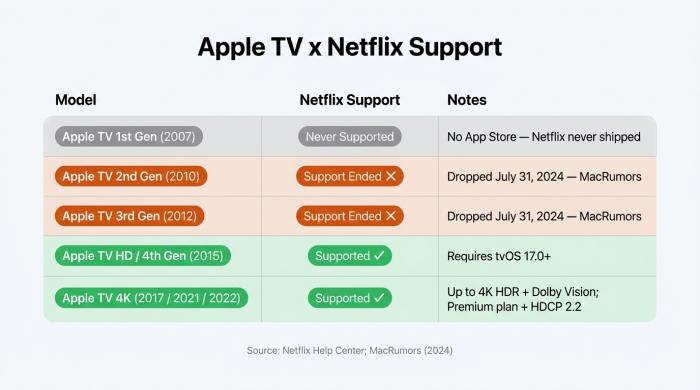
Netflix support by Apple TV generation: 2nd and 3rd gen lost access on July 31, 2024.
Apple TV Storage Holds Apps, Not Downloads
Apple TV storage is for tvOS, apps, and system data, not a Netflix downloads library. That is why buying the higher-capacity model does not create an offline Netflix option. An iPhone or iPad can keep official Netflix downloads inside the Netflix app; Apple TV has no equivalent library. It is a streaming device, not an iPad attached to your television.
Which Apple TV Models Still Support Netflix
Netflix ended support for 2nd and 3rd generation Apple TV models on July 31, 2024. If Netflix disappeared from one of those devices, reinstalling it will not restore support. Apple TV HD and supported Apple TV 4K models can still stream Netflix when they meet Netflix's current device requirements. Before troubleshooting Wi-Fi, check the model first. In my experience, that simple check saves a lot of pointless router restarts.
Apple TV Generation × Netflix Support (2026)
| Generation | Netflix Support | Notes |
|---|---|---|
| Apple TV (1st gen, 2007) | Never supported | No App Store; no Netflix app ever shipped |
| Apple TV (2nd gen, 2010) | Lost July 31, 2024 | Support dropped — per MacRumors 2024-06-04 |
| Apple TV (3rd gen, 2012) | Lost July 31, 2024 | Support dropped — per MacRumors 2024-06-04 |
| Apple TV HD (4th gen, 2015) | Supported | tvOS 17.0+ required (per Netflix Help Center) |
| Apple TV 4K (2017 / 2021 / 2022) | Supported | 4K needs Premium, HDCP 2.2, High playback settings, and 15 Mbps+ |
Netflix support and playback requirements shown here are current as of August 2026.
A Local-File Route for Offline Apple TV Playback
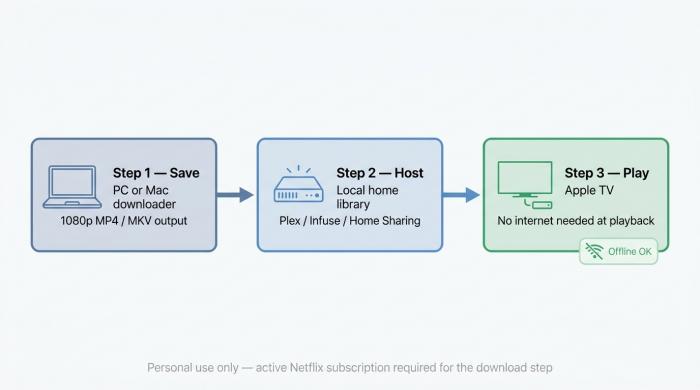
A local library can keep authorized files available to Apple TV when your internet connection is unavailable.
For content you are authorized to access, where permitted by platform terms and applicable law, a local-file workflow saves files on a separate computer and makes them available to Apple TV across your local network. It is practical for households that expect repeat playback during outages or travel. It is not a direct-download option for Apple TV, and it is not a phone-only setup.
Before you start: You need an active Netflix subscription, a Windows PC or Mac for the local-file step, an Apple TV that can run Plex, Infuse, or Home Sharing, and a local network for playback.
| Playback path | Works with Netflix downloads | Internet at playback | Best fit | Key limitation |
|---|---|---|---|---|
| Netflix app on Apple TV | No offline storage | Required | Normal streaming | No downloads on Apple TV |
| Netflix AirPlay | Unsupported | Not applicable | None | Netflix does not support AirPlay |
| Supported video adapter | May work | Not always required | Occasional TV viewing | Device and display dependent |
| Plex or Infuse local files | Local files only | Not required | Repeat offline playback | Needs a local library |
| Mac mirroring local files | Local files only | Not required | One-off viewing | Mac must remain available |
A compatible adapter is the simpler choice for occasional television playback. If you regularly want several files ready during an outage, a local library is the better tradeoff.
Step 1: Save Authorized Titles on PC or Mac
Use a desktop tool with your active Netflix subscription to create a local file for personal offline viewing. Netflix does not list Windows or Mac among its official download devices, so this is a separate local-file workflow rather than an in-app Netflix download. Choose an Apple TV-friendly MP4 or MKV output; the practical differences between Netflix to MP4 conversion and MKV matter most when you choose your player and subtitle setup. If you need to locate the saved files afterward, Netflix download storage locations on PC or Mac are useful for organizing the library.
Step 2: Set Up a Home Library Apple TV Can Reach
The file lives on the desktop machine until you give Apple TV a way to see it. Three reasonable destinations are a Plex server on an always-on Mac, PC, or NAS; Infuse on tvOS, which can use SMB, UPnP, and compatible cloud drives; or macOS Finder's Home Sharing, which makes a Mac media library appear in Apple TV's Computers app. Netflix does not support AirPlay from iPhone or iPad. A compatible Lightning or USB-C video adapter may play Netflix on a television, but results depend on the device model, adapter, cable, display, and title. For files already created in Step 1, a local library is the more practical route when you expect to play several titles repeatedly.
Step 3: Play Local Files on Apple TV
Use the Plex Apple TV app, Infuse, or Home Sharing to open the local file from your network. A Mac can also mirror a local file for one-off viewing, but that is different from trying to AirPlay Netflix itself. Codec support varies by player and Apple TV model, so open one complete episode before relying on the setup. Once the Apple TV can reach the local library, playback can continue without internet access.
Native Download Output for Apple TV Playback
For the desktop step above, output settings matter because Apple TV playback depends on the file, player, subtitle tracks, and audio track working together. This is where a native-download workflow can be more useful than a recording workflow: it avoids a second encode before the file reaches your local library.
If you need separate caption files for a player that does not use embedded tracks, download Netflix subtitles as SRT files before organizing the library.
If you also need to download Netflix subtitles as separate SRT files — useful for external players that don't read embedded tracks — our subtitle extraction guide walks through the exact steps.
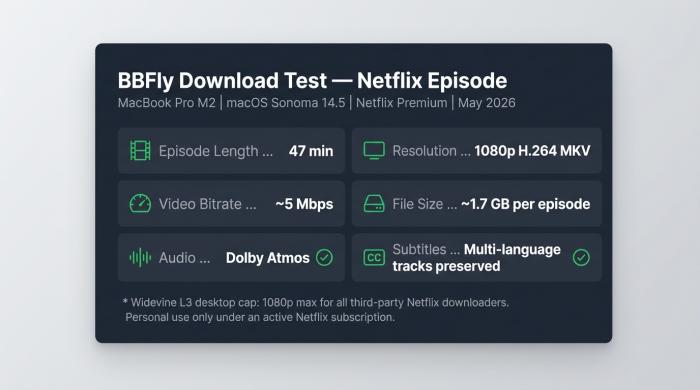
For this workflow, confirm the selected file, subtitle track, and audio track in your Apple TV player before relying on it offline.
Output Formats, Subtitles, and Audio
BBFly Netflix Downloader is a Windows and Mac desktop app that saves authorized Netflix titles as 1080p MP4 or MKV files for personal offline viewing. Its native-download mode remuxes the selected stream without re-encoding, with selectable subtitle tracks and supported Dolby Atmos, EAC3 5.1, or AAC 2.0 audio options. That matters here because Plex, Infuse, and other local players can work from a file you manage rather than an app-managed download. In my July 2026 download of a 45-minute episode, the file completed in about eight minutes; treat that as one observed result, since network conditions and hardware vary. BBFly includes a 30-day trial with three full titles per streaming service, which is enough to confirm that your Apple TV player handles the chosen format, subtitles, and audio before you commit.
FAQ: Netflix on Apple TV
Why Is Netflix Missing or Unavailable on My Apple TV?
First identify your Apple TV model. Netflix no longer supports 2nd and 3rd generation Apple TV hardware, and reinstalling the app will not restore it. On a supported model, check for a tvOS update and then install Netflix from the App Store.
Can a Video Adapter Play Netflix Downloads on a TV?
A supported Lightning or USB-C video adapter can work with a compatible iPhone or iPad, but do not assume that every cable, adapter, display, or title will behave the same way. Netflix does not support AirPlay. For occasional viewing, test the adapter first; for repeated offline TV playback, a local library is usually less fragile.
Does Netflix's Ad-Supported Plan Work on Apple TV?
Yes. Netflix's ad-supported plan works on supported Apple TV models for streaming. Its separate download allowance applies only to devices that Netflix supports for downloads, not to the Apple TV box.
What Internet Speed Does Netflix 4K Need on Apple TV?
Netflix recommends a steady 15 Mbps or faster connection for 4K. You also need a compatible Apple TV 4K, a Premium plan, a compatible 4K display with an HDCP 2.2 connection, and High playback settings.
What Should I Test Before Offline Apple TV Playback?
Open a complete local file in Plex, Infuse, or Home Sharing; confirm the subtitle and audio tracks; then disconnect internet access and make sure Apple TV can still reach the local library. If you plan to watch downloaded Netflix on a plane or during travel, do this check before leaving. I would not trust an offline setup until it has passed that deliberately inconvenient test.