
How to Download Netflix on iPhone (2026): Limits & Tested Methods
Table of Contents
Quick answer: To download Netflix on an iPhone or iPad in 2026, open the official Netflix iOS app, tap a title, then tap the download arrow. Saved files appear under My Netflix → Downloads. Two caveats: every download expires (30 days unwatched, then 48 hours after first play), and Standard with Ads caps you at 15 downloads per device per month, with no rollover.
Netflix lists downloads as a plan feature on every signup page. Read closer and the feature is smaller than it looks. On Standard with Ads — the plan a lot of new subscribers default to — "downloads" means up to fifteen titles per device per month, with Smart Downloads unavailable, so every episode is queued by hand (Source: Netflix Help Center, node 133763). Against a 22-episode season the math doesn't fit. This guide walks the official iOS path, marks where it ends, and covers what to do at the wall. For personal, offline viewing only.
The official Netflix app handles casual offline viewing — until you hit the plan walls.
How to Download Netflix on iPhone & iPad (Official App, Step-by-Step)
To download a Netflix show or movie on iPhone or iPad in 2026, open the Netflix iOS app, find the title, and tap the download arrow. Files appear under My Netflix → Downloads, viewable offline inside the same app. The flow is identical on iPhone and iPad — Netflix ships one iOS build for both.
Find a Title and Tap the Download Icon (iOS App Walkthrough)
- Sign in with an active subscription.
- Search the title, or browse the Available for Download row on the home tab.
- For movies, tap the title and tap the download arrow. For TV shows, open the episodes list and tap the arrow beside each one.
- Wait for the icon to fill; you can keep using the app while it works.
- To watch, tap My Netflix → Downloads.
The same five taps cover every variant — how to download Netflix shows on iPhone, how to download Netflix on a kids iPad, how to download a Netflix movie on iPad, watch-later queues, child profiles, offline-on-iPad. Source: Netflix Help Center, node 54816.
Smart Downloads, Download Next Episode & Downloads For You
Three auto-download switches under My Netflix → Settings (gear icon):
- Download Next Episode — finishes episode 5, queues 6, removes 5.
- Downloads For You — preloads recommendations on Wi-Fi based on viewing history.
- Smart Downloads (Wi-Fi-only) — umbrella switch for both above.
All three are unavailable on Standard with Ads. The ad-tier subscriber manages every episode by hand — which is the friction that makes 15-per-month feel punitive in practice.
Download Quality (Standard vs. Higher) & Cellular Downloads
Under Settings → Video Quality: Standard is smaller and faster; Higher goes up to 1080p where the title and the plan permit. Netflix does not promise HDR on downloads, and on Standard the ceiling is 1080p regardless of screen size. A separate Use Cellular Downloads toggle defaults to off — leave it off unless you have unlimited data, or a single season can eat the month's allotment.
Where Netflix Downloads Live & How Long They Last on iPhone
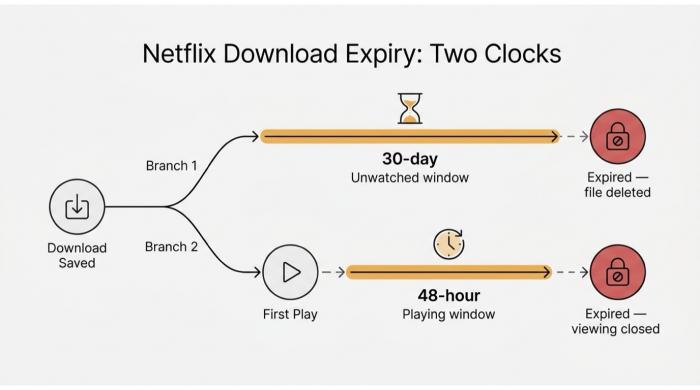
Two clocks run simultaneously — miss either and the file is gone.
Netflix downloads on iPhone live inside the Netflix app's private container — not in the Files app, not in the Camera Roll. They are DRM-protected and stay valid for 30 days unwatched, then 48 hours after first play, with per-title annual renewal caps on top.
Where Netflix Downloads Are Stored (and Why You Can't Move Them)
Every Netflix download lives inside the Netflix iOS app's sandbox — iOS's per-app private storage. You can't open the file in VLC, AirDrop it, or copy it through the Files app. Same on iPad: where do Netflix downloads go on iPad? The same place — inside the app, nowhere else. Netflix licenses the title for offline viewing inside its own player, and iOS enforces that boundary at the OS level.
For a closer look at the exact folder paths and why iOS prevents any external access, see our full breakdown of where Netflix downloads are stored on iPhone and iPad.
How Long Netflix Downloads Last: 30 Days, 48 Hours, and Renewal Caps
Two clocks run on every download. 30 days unwatched — open it within 30 days of saving, or it expires. 48 hours after first play — press Play and you have 48 hours to finish. So "how long do Netflix downloads last on iPhone" and "how long do Netflix downloads last on iPad" both depend on which clock is running. Each title also carries a per-account annual renewal cap (error 10016-22007). As the Netflix Help Center puts it: "When a download expires, you'll first need to delete it and then manually re-download it… especially frustrating if you're on Netflix's ad-supported plan, which limits downloads to 15 per device per calendar month." On Standard with Ads, every re-download burns a slot.
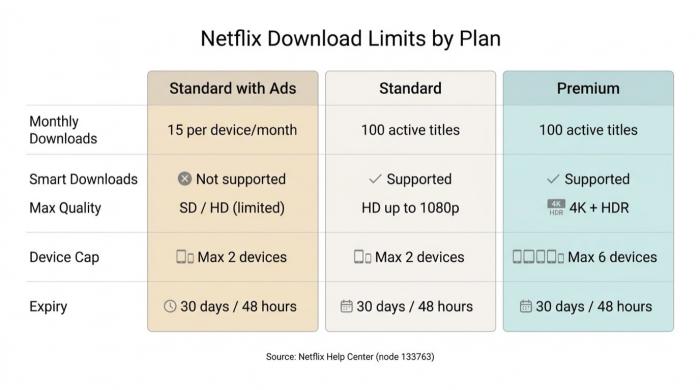
The 15-per-month cap on the ad plan isn't a bug — it's the plan.
Plan Caps: 15/Month (Ad), 100 Active (Standard), 6 Devices (Premium)
Netflix Download Rules by Plan: Caps, Devices, Quality, Expiry
| Plan | Active Downloads | Device Cap | Smart Downloads | Max Quality | Expiry |
|---|---|---|---|---|---|
| Standard with Ads | Up to 15 per device per month | Max 2 devices | Not supported | SD / HD (limited) | 30 days / 48 hours |
| Standard (no ads) | Up to 100 active titles | Max 2 devices | Supported | HD up to 1080p | 30 days / 48 hours |
| Premium | Up to 100 active titles | Max 6 devices | Supported | 4K + HDR (title-dependent) | 30 days / 48 hours |
Title-specific annual renewal caps apply across all plans (error 10016-22007). Re-downloads after expiry count against the monthly 15 on the ad plan.
Source: Netflix Help Center, node 133763 (plan rules) and node 54816 (mechanics).
Troubleshooting: Netflix Won't Download or Screen Record on iPhone
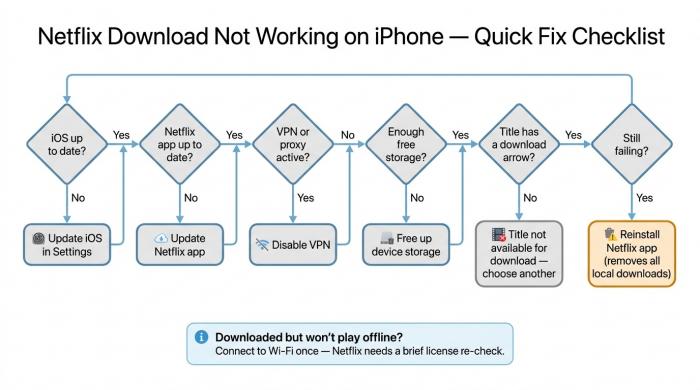
Work through these six checks before reinstalling — the fix is usually one of the first three.
If Netflix won't download on your iPhone, the fix is usually one of six things: outdated iOS, outdated Netflix app, a signed-out subscription, an active VPN, insufficient storage, or a plan that doesn't support downloads. A separate failure mode — file downloaded fine but won't play offline — is a license that needs a brief reconnect. Screen recording is a different problem: iOS DRM blanks the recorder's video frame by design.
When the Download Button Won't Work (Or the File Won't Play Offline)
Cheapest to most disruptive:
- Update iOS. Older builds periodically lose certificate trust for Netflix's DRM.
- Update the Netflix app. Outdated builds visibly hide the arrow.
- Sign out and back in. Forces a fresh subscription handshake.
- Disable any VPN. Netflix routinely blocks VPN-routed download requests.
- Free storage. Real free space, not "cleanable" cache.
- Confirm the title supports download. Not every Netflix title does — even some Originals. The arrow is simply absent on those, which is why "why won't Netflix download on my iPhone" sometimes resolves to a title that never had a download option.
- Reinstall the Netflix app. Last resort — deletes every existing download.
Separate case: file downloaded fine, won't play offline. Almost always a license needing renewal. Connect to Wi-Fi, open the title once to re-validate, then go back to airplane mode. The "Netflix downloads won't play offline iPhone" message is the OS asking for a license refresh, not a corrupted file.
Can You Screen Record Netflix on iPhone? (Why It Goes Black)
"How to screen record Netflix on iPhone", "can you screen record Netflix on iPhone", and "can I screen record Netflix on iPhone" all land in the same place: a black video frame and an audio-only file. The mechanism is iOS's FairPlay DRM. When Netflix marks its video buffer as protected, iOS — at the OS level, not the app level — blanks the screen recorder's view of it. Audio sometimes passes; the picture does not.
This is the design, not a misconfiguration. No Control Center setting patches it. The same restriction applies on Mac, PC (Netflix uses PlayReady), and Android (Widevine). Workarounds people post — Rave, Zoom screen share, Orion browser — fail outright or violate Netflix's terms of service. Any tutorial titled "how to screen record Netflix on PC, Mac, iOS, or Android" promising a clean recording is selling a third-party desktop tool — which is the next section.
Beyond the App: BBFly Netflix Downloader for a Permanent Library
The Netflix iOS app is the only official way to download Netflix on an iPhone. If you need a permanent, transferable file — same episode on a NAS, a Smart TV, or after a subscription pause — you need a desktop tool. BBFly Netflix Downloader runs on Windows and Mac, produces standard MP4 or MKV at up to 1080p, and outputs files you can move to iPhone like any other video. For personal, offline viewing only.
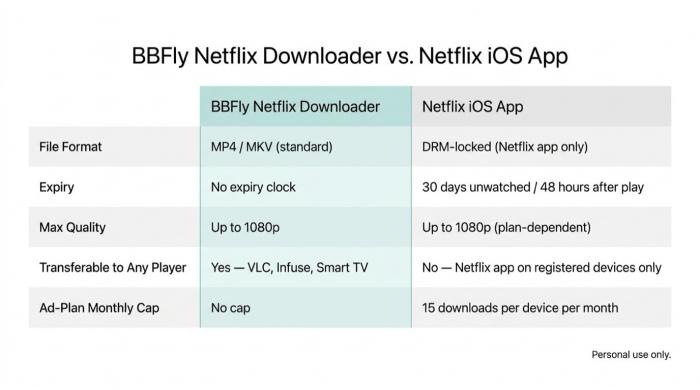
BBFly outputs standard MP4 or MKV — no 30-day clock, no app lock-in. Personal use only.
What BBFly Does Differently: Native Download, MP4/MKV, Atmos Preserved
- Native download, not record-and-transcode. BBFly remuxes the original Netflix stream into a local MP4 or MKV — bitrate matches what Netflix served.
- Standard container, no expiry clock. Output plays in VLC, Infuse, or any Smart TV. No 30-day window, no 48-hour timer.
- Dolby Atmos preserved on Netflix titles. Verified by BBFly's technical team on 2026-05-27 — uncommon, since most competing downloaders either don't claim Atmos on Netflix or have had the claim challenged by neutral testers.
Who It's For (and Who Should Stick With the Official App)
No Netflix downloader runs natively on iOS — App Store policy does not permit one, and any sideloaded build is two updates away from breaking. The workflow is desktop-first: download on PC or Mac, then transfer the MP4 to iPhone via AirDrop or Files. Good fit if you're on Standard with Ads and 15-per-month feels short, or on PC or Mac (Netflix removed Windows downloads in 2024 and never built a Mac downloader). Bad fit if the official 30-day window already covers your trips. BBFly offers three full titles per platform as a trial.
FAQ: Netflix Downloads on iPhone (and a Quick Android Note)
Can you download Netflix for free on iPhone?
No. The app is free to install; downloads require an active paid subscription. Netflix's free trial ended in the US in 2020.
How many movies can I download on Netflix at once?
Standard and Premium hold up to 100 active downloads across registered devices. Standard with Ads caps at 15 per device per month, max 2 devices.
Can I keep Netflix downloads on my iPhone permanently without my subscription?
Not through the official app — downloads re-validate against an active subscription. The only practical path to a permanent copy is a desktop tool; see the BBFly section above. Personal use only.
Why does Netflix screen recording show a black screen on iPhone?
FairPlay DRM. iOS blanks the recorder's video buffer when Netflix marks its frames as protected. Audio sometimes captures; the picture does not.
How do I download Netflix to my iPhone for travel?
Download over Wi-Fi the day before, set quality to Higher, and finish each title within 30 days of saving or 48 hours of starting. Pack more than you think you'll need — there's no offline renewal once a clock runs out.
What's the best Netflix downloader for iPhone?
None runs natively on iOS — App Store policy does not permit it, and sideloaded packages break when Netflix rotates client tokens. The practical answer is the official app plus a desktop tool (BBFly on Windows or Mac, for example) that outputs MP4 or MKV you can transfer afterward.
Can I save Netflix to my Camera Roll on iPhone?
No. The Camera Roll only accepts files from the Photos pipeline; Netflix files sit in the app's protected sandbox, and screen recording is blocked by FairPlay DRM.
How do Netflix downloads work on Android (and where are they stored)?
The Netflix download location on Android mirrors iPhone — inside the app's private storage, not the public Downloads folder. Same plan rules apply. You can download Netflix movies on Android or download Netflix videos on Android by tapping the arrow. Where are Netflix downloads stored on Android? Same answer — the app's sandbox; files can't be moved to internal storage or an SD card without root. "Android market Netflix download" is the standard Play Store install.