
[2026 Tested] Download Amazon Prime Videos to Mac: Caveats and Safe Methods
Table of Contents
Quick answer: Yes — Amazon Prime Video has an official Mac app from the Mac App Store with built-in downloads. The catch: a 720p cap, a 30-day / 48-hour expiry rule, and files locked to your active Prime subscription. For permanent 1080p MP4 files you keep offline, use a third-party tool such as BBFly.
The official Prime Video Mac app caps downloads at 720p and expires them after 30 days — limits most users find out too late.
The first time I opened Prime Video on a fresh MacBook Pro, the picture was softer than Safari's, labeled only "HD." A MacRumors thread had the diagnosis: "The Amazon Prime Video app will only stream at 720p at its highest quality." Same account, same Mac, two clients, a quiet 360-line gap — and the reason this guide walks the official path honestly before showing the workaround.
Downloading Amazon Prime Videos to Mac in 2026: The Honest Version
Yes, you can download Amazon Prime videos on a Mac using the official Prime Video app from the Mac App Store, with playback inside the app's library when you're offline. Most movies and TV episodes are eligible, though some titles never expose a Download button because the studio hasn't licensed them for offline viewing.
Two paths exist on a Mac: the official Prime Video app (free, convenient, limited) and third-party desktop downloaders (paid, more durable output, outside the Amazon client). Neither is wrong. The official path is built for convenience; the workaround path is built for ownership. Choose by whether you'll still want the file next year — that single question reframes the rest of this guide, and the sections below walk both paths so you can pick deliberately.
If you also use an iPhone, iPad, or Windows PC, our complete guide to downloading Amazon Prime Video on any device covers the same quality and expiry trade-offs platform by platform. download Amazon Prime Video on any device
Does Amazon Prime Video Have a Mac App? macOS, Apple Silicon, and What's Required
Yes — Prime Video for Mac is a free app on the Mac App Store. It runs as a universal binary on Apple Silicon (M1, M2, M3, M4) with no Rosetta translation required, and it installs on any modern macOS release.
App Store availability and the macOS version Amazon actually requires
Prime Video for Mac is distributed only through the Mac App Store — there is no .dmg on Amazon's website. Older guides cite Big Sur 11.4; newer ones cite Ventura 13.0. The current Mac App Store listing (verified May 2026) shows macOS 11.4 or later as the minimum, with 12.0+ recommended. macOS 14 Sonoma and 15 Sequoia are well clear.
M1 / M2 / M3 Apple Silicon: native or Rosetta?
The Mac app is a universal binary, so it runs natively on Apple Silicon — no Rosetta. Decoding goes through the chip's media engine, which keeps fanless models quiet. One mild quirk: if the Mac sleeps mid-download, the queue sometimes pauses and needs a manual nudge to resume. The same thing happens on Intel Macs, so it's a Prime Video client issue, not an M-series one.
Can You Download Amazon Prime Movies and TV Shows on Mac? Yes — With Three Caveats
You can download both Amazon Prime movies and TV shows on Mac through the official app, but three caveats apply: not every title shows a Download button, the active library is capped at 25 titles across all devices, and every downloaded file is tied to your active Prime subscription.
Movies vs. TV shows: what the app lets you download
Movies and individual episodes download the same way — click the download icon, pick a quality, and the file lands inside the app's library. Entire seasons queue when the show enables that option. The exception: licensed content the studio hasn't cleared for offline viewing streams fine but never exposes a Download button. It's a per-title licensing flag on Amazon's side; a different browser or a fresh sign-in will not unlock it.
The 25-title cross-device limit
Amazon limits the active download library to 25 titles, counted across every device on the account — Mac, iPhone, iPad, Fire tablet, Android phone. Download number 26 returns an error and asks you to delete an existing title first. (Personal use only — keep downloaded files for your own offline viewing; sharing or reselling them violates Amazon's terms.)
Subscription-tied: downloads vanish when Prime ends
Every downloaded file is bound to an active Prime subscription. The moment Prime lapses — cancellation, missed payment, household downgrade — the app revokes playback on files already on your disk. This is the durability problem the next section expands and the workaround section solves.
How to Download Amazon Prime Videos to Mac Using the Official App (Step-by-Step)
To download an Amazon Prime video to a Mac, install the Prime Video app from the Mac App Store, sign in with your Amazon account, open the title's page, click the download icon, and pick a quality. The file lives in the app's library, accessible from the Downloads tab for offline playback.
1. Install Prime Video from the Mac App Store
Open the Mac App Store, search "Amazon Prime Video," click Get. The package is roughly 80 MB. Launch it and sign in with the Amazon account holding your Prime subscription; if two-step verification is on, the app prompts for the OTP. The App Store is the only sanctioned macOS channel — there is no .dmg on Amazon's site.
2. Find the Download button (and the titles that hide it)
The download icon — a downward arrow into a tray — sits next to the Play button on movies and next to each episode on TV-show pages. If it's absent, the studio has not licensed that title for offline viewing. That single cause is far ahead of regional issues or account state. There is no master list inside the app; you discover availability one title at a time.
3. Pick quality, audio track, and start the download
The picker offers Good, Better, or Best with size estimates. "Best" on the Mac app means roughly 720p — not 1080p, despite the wording. Audio defaults to the original language in stereo; switch to a 5.1 mix here if the title offers one. Click Download. Multiple downloads queue serially, not in parallel — the second mild frustration after the resolution one.
4. Where downloads are stored and how to play them offline
Downloads do not appear in Finder. They live inside the Prime Video app, indexed in the Downloads tab. Open the app while disconnected, go to Downloads, and play. The file plays without network during the local playback window, but the app still pings Amazon for periodic license verification — usually transparent, occasionally not. There is no documented way to export these files as MP4.
The 720p Catch and Other Hidden Limits Mac Users Discover Too Late
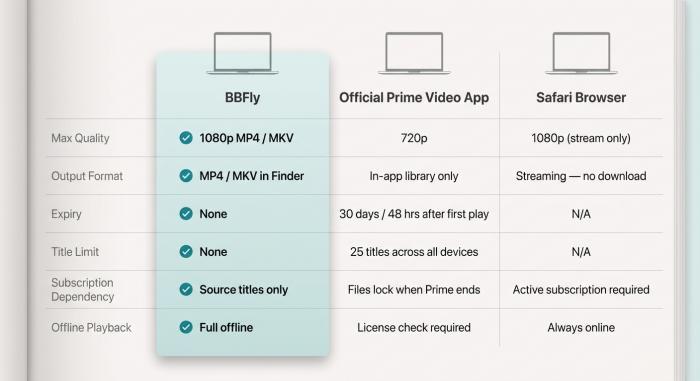
Same account, same Mac — three very different outcomes depending on which client you use.
The Mac app caps at 720p because Amazon's content-protection licensing grants it a lower video tier than Safari on the same machine. Downloads also expire after 30 days unwatched or 48 hours after first play, and the app re-verifies the license over the internet on titles you've already saved.
Amazon Prime Video on Mac: Official App vs Safari vs Third-Party Downloader
| Dimension | Official Mac app | Safari browser | BBFly |
| Max quality | 720p | 1080p stream | 1080p MP4 / MKV |
| Format | In-app library | Streaming only | MP4 / MKV in Finder |
| Expiry | 30 days / 48 hours | n/a | None |
| Title limit | 25 across all devices | n/a | None |
| Subscription | Files lock when Prime ends | Active Prime required | Needed to source only |
| Internet to play | Yes, periodic check | Always | No |
Source: MacRumors forum and BBFly's published feature list for the workaround column.
Why the app caps at 720p — and Safari quietly doesn't
The Mac app and Safari use different content-protection stacks, and Amazon's rules grant 1080p only to the browser tier on macOS. A MacRumors user put it plainly: "It just says HD, not HD 1080p as it will in the browser." The Mac UI gives no warning — the cap is invisible until you compare players side by side.
The 30-day / 48-hour expiry trap
Untouched downloads expire 30 days after they hit the disk. Press Play and a second timer starts: 48 hours to finish, then the file locks. Rentals are stricter — 48 hours from first play, no 30-day cushion.
License verification: why "offline" still needs internet
Even with the file on the SSD, the app pings Amazon before playback. On a flight, in a remote cabin, or during a Wi-Fi outage, that check can fail on titles that played fine the night before — exactly what the Apple Discussions reader who downloaded at a coffee shop hit when he plugged into the TV at home.
Permanent 1080p MP4 Downloads with BBFly (the Workaround That Removes Every Limit Above)
To keep Amazon Prime Video downloads after a subscription expires, you need a third-party desktop downloader that captures the playable stream and saves it as a plain MP4 or MKV outside the Prime Video client. BBFly is one such tool, and it removes the 720p, 25-title, and subscription-expiry restrictions of the official app.
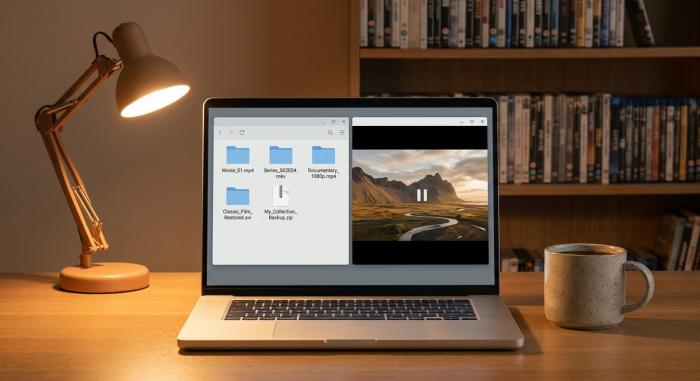
Plain MP4 files in your file manager: no subscription check, no 30-day clock, playable in any app.
What BBFly does that the official app can't
BBFly records the playable Prime Video stream while you're authenticated and writes a plain MP4 or MKV to your Finder at up to 1080p — matching what Safari serves rather than the app's 720p cap. Batch download queues an entire season at once. Auto-skip ads trims pre-roll and mid-roll inserts. Because the output is a standard video file, the 25-title cap and subscription-expiry lock no longer apply: the file is yours to keep, organize in Finder, AirPlay to an Apple TV, or play in QuickTime, IINA, or the Apple TV app. The free trial covers full-length videos — useful for the macbook amazon prime download use case when you want to confirm output quality before paying.
Honest pros, cons, and when it's worth it
Pros track to the four caveats: 1080p instead of 720p, no expiry, no 25-title cap, no subscription lock on saved files. Cons are real. You still need an active Prime subscription to source titles — BBFly unlocks nothing you haven't paid for. The first launch triggers a macOS Gatekeeper prompt requiring an Allow in System Settings → Privacy & Security. Personal, non-commercial use only — offline travel libraries, archiving a series you'll re-watch, holding a film whose Prime license expires next month.
Amazon Prime Video on Mac: FAQ
Short answers to the questions Mac users ask most.
Is it legal to use third-party software to download Amazon Prime videos on Mac?
Using an unauthorized client is typically a Terms of Service matter (account-level risk). Redistributing the files is a copyright matter (different category). Personal offline viewing sits in a jurisdiction-dependent gray zone — check Amazon's terms and local law.
Why does the Amazon Prime Video Mac app only show 720p?
Amazon's licensing grants the desktop app a lower video tier than Safari. Same Mac, two ceilings. Full explanation in the limits section above.
How can I keep Amazon Prime Video downloads after my subscription expires?
The official app can't — every file is tied to an active Prime subscription. A third-party downloader producing plain MP4 outside the Prime Video client is the only durable path. See the BBFly section above.
How long do Amazon Prime downloads last?
30 days from when the file finishes. Press Play and a separate 48-hour timer starts. Rentals are 48 hours from first play, no 30-day cushion.
Can you download Amazon Prime Video in 4K on Mac?
No. The Mac app caps at 720p; Safari streams at 1080p with no download option. 4K is gated to specific Fire TVs, smart TVs, and consoles.
What macOS version do I need for Amazon Prime Video?
macOS 11.4 Big Sur or later, per the Mac App Store listing (verified May 2026). 12+ recommended.
Can I watch Amazon Prime Video downloads without internet on Mac?
Mostly yes. The file plays offline, but the app re-verifies the license periodically; on long offline stretches that check can fail and lock the file until you reconnect.
Why did my Amazon Prime Video downloads disappear?
Three usual causes: the 30-day unwatched timer ran out, the title's license rotated off Prime, or your Prime subscription lapsed.
Amazon Prime download not working on Mac — what to check first?
Checklist: macOS 11.4+, sign out and back in, confirm the title has a Download button, verify free disk space, and check you're under the 25-title cap. If all five clear, restart the Mac.