
Can You Download on Paramount Plus? What Works in 2026
Table of Contents
If you opened this looking for the right way to save Paramount+ episodes for a flight or a commute, the short answer is yes, but on terms most readers don't expect. Paramount+ allows offline downloads only inside the iPhone, iPad, and Android apps, only on the Premium (with SHOWTIME) plan, and capped at 25 titles across the entire account. On a Windows laptop, MacBook, smart TV, or game console, the download button does not exist.
I've watched the cordcutter forums for a few years, and the same complaint keeps surfacing: on Paramount+, the laptop download path is closed in a way it isn't on Netflix or Disney+, where you can at least queue something in a browser. That asymmetry is real. Most articles still answer "yes, you can download" and then bury the conditions twelve paragraphs deep. I'd rather lead with them. Below: the mobile steps, the narrow Amazon Prime channel route that does work on PC, why screen recording produces a black frame, and where a desktop tool sits for Premium subscribers who want a personal offline file on their laptop.
Can You Download on Paramount Plus? The Short Answer with Conditions
Yes, with three conditions. The plan must be Premium (with SHOWTIME). The device must be an iPhone, iPad, or Android phone or tablet running the official Paramount+ app. The account is capped at 25 saved titles across every device combined, not per device. Trip any one of these and the download button simply does not appear, with no error message explaining why. That single missing button is what brings most readers to a search engine.
What's downloadable, and what isn't
The 25 titles you can save are the on-demand catalog, not the live feed. Live local CBS, live sports broadcasts, and many Showtime live events are stream-only. Some third-party-licensed films and shows are also excluded. The app doesn't publish a master "downloadable" list, so the practical test is the one I use: open a title's detail page on your phone and look for the download arrow next to each episode or under the play button. No arrow, no download. Most catalog originals work. The gaps are mostly licensing, not bugs you can argue your way around.
Mobile-only by design, and why
Paramount+ built its offline pipeline as a Widevine-protected package that the iOS and Android apps decrypt and play through their own player. The Windows app and the browser run as live-streaming players only; there is no equivalent desktop offline package. When you reach the no-PC section below, that is the reason. The feature was never built for desktop. It was not just disabled.
Plans, Pricing, and Download Eligibility (Essential vs Premium)
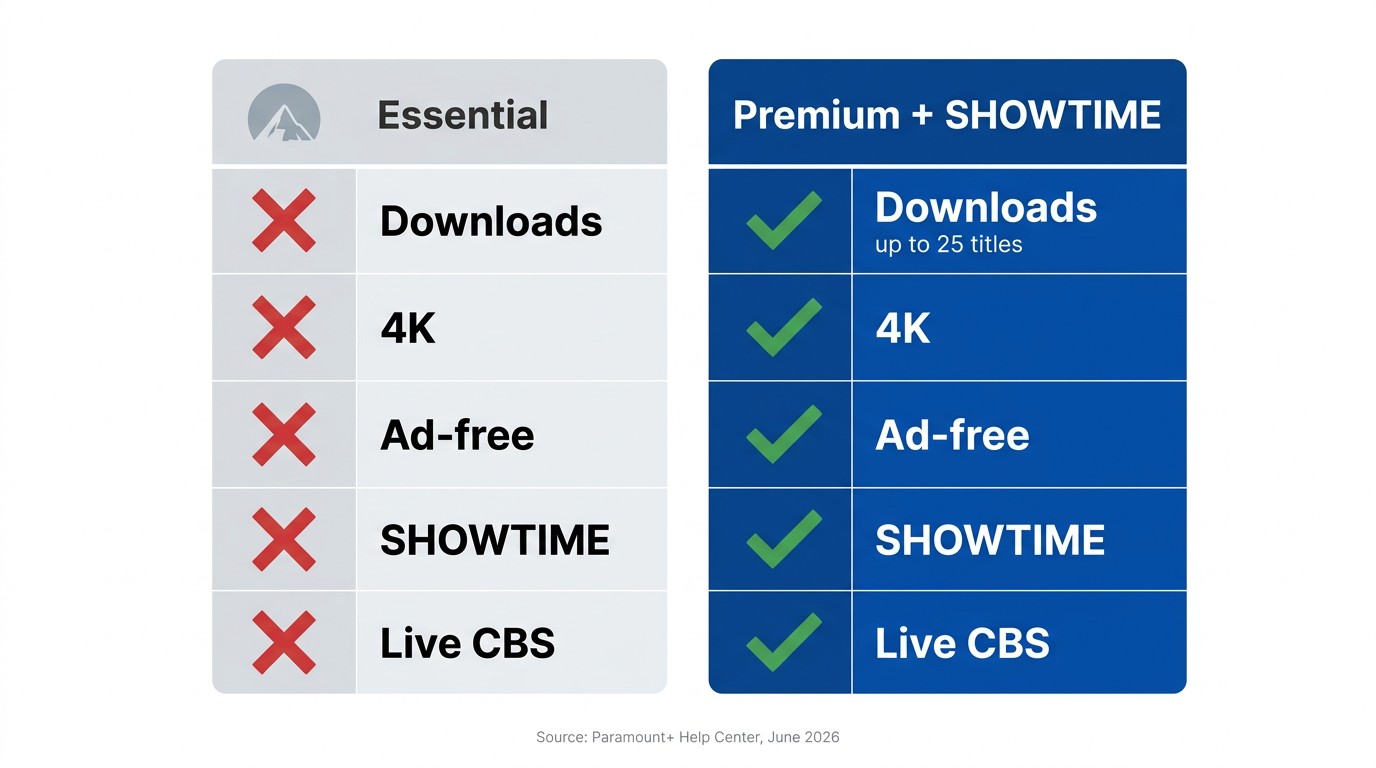
Only the Premium (with SHOWTIME) plan unlocks offline downloads on iOS and Android. Essential subscribers cannot download anything, ad-supported or not. The plan also gates 4K UHD, HDR (Dolby Vision and HDR10), and live local CBS, so on Paramount+ the eligibility question and the quality question collapse into the same answer: Premium, or stream-only.
Paramount Plus plans at a glance
| Feature | Essential | Premium (with SHOWTIME) |
|---|---|---|
| Offline downloads on iOS / Android | No | Yes (25-title account cap) |
| Downloads on PC, Mac, or TV | No | No (no native desktop offline) |
| 4K UHD streaming | No | Yes, limited catalog |
| HDR (Dolby Vision / HDR10) streaming | No | Yes, limited catalog on supported devices |
| Ad-free on demand | No (ads) | Yes (some live exceptions) |
| Live local CBS | No | Yes |
Source: Paramount+'s official plans page and Help Center.
Why Essential subscribers see no download button
The eligibility check happens at the account tier, not the app version. An Essential subscriber on the latest iOS Paramount+ app sees the same UI as a Premium subscriber, minus the download arrow on every detail page. Reinstalling, signing out, switching devices: none of these unlock it. The only path is upgrading the plan inside your account settings.
What 4K and HDR really look like on Paramount+, and whether downloads keep them
This is the question that trips up Premium subscribers. Yes, Premium streams a slice of the catalog in 4K and HDR, mostly Paramount+ Originals and select films, on supported TVs and a handful of streamer boxes. Downloads, however, ship at mobile-grade resolution. Your phone is not going to pull a 4K HDR file off Paramount's servers, regardless of plan. If you specifically need an offline 4K HDR copy of a Paramount+ Original, the official mobile download is not the path for it. The "4K when streaming" and "4K when downloaded" stories are different products, and conflating them is one of the easier mistakes to make at the upgrade screen.
How to Download Paramount Plus Shows on iPhone, iPad, and Android
The mobile flow is the same on every Paramount+ device: open the app, find a downloadable title, tap the download arrow next to an episode or under a movie, wait for the progress indicator to finish, and play it back from the Downloads tab. It works on iOS 14+ and Android 7+ as long as you're signed into a Premium account.
iOS: iPhone and iPad steps
Work through these in order:
- Sign into the Paramount+ app with a Premium account.
- Find the title you want. Use search if you know the name; otherwise browse the catalog.
- Open the title's detail page. For an episode, look for the download arrow next to each entry in the episode list. For a movie, look under the play button.
- Tap the arrow. If you don't see one, the title is either licensed-out or you're on Essential.
- Pick a quality (Standard or Higher) when prompted, then confirm.
- Watch the progress bar fill. When it's done, the title lives under the Downloads tab in the bottom navigation.
iPadOS uses the same flow. Downloads land inside the app's own sandbox, not in the Photos app, so AirDrop and Files-app sharing are not options.
Android: phones and tablets
The Android flow mirrors iOS, with three Android-specific notes:
- By default, downloads land in internal storage. SD-card support exists on some Android builds but is missing on many recent OEM customizations. Check Settings → Downloads → Storage location inside the Paramount+ app before assuming the SD slot will be used.
- Toggle Wi-Fi only downloads on if you're worried about cellular data. It is off by default on some Android skins.
- A downloaded file lives inside the Paramount+ app's private storage. It is not browsable in your file manager, and copying it out to another device is not supported.
Picking a download quality, and what it costs in storage
Two quality settings in the app: Standard and Higher. As a rough working baseline, Standard sits in the neighborhood of 500 MB per hour and Higher closer to 1 GB per hour (figures vary by title and codec; treat them as planning numbers, not guarantees, and check current values on Paramount+'s Help Center). On a 6.1-inch phone screen, the visible difference between the two is small. I default to Standard for flights and reserve Higher for titles I'll watch on a tablet. The choice matters most when you're filling all 25 cap slots and budgeting storage on a 64 GB device.
Can You Download Paramount Plus on a Laptop, PC, or Mac? The Honest Answer
No. The Paramount+ Windows app, the macOS browser experience, and the web player at paramountplus.com have no download function on any plan in 2026. I've tested every Microsoft Store reinstall, every browser flag, every "developer mode" trick that surfaces in cordcutter threads; none of them reveal a button that doesn't exist. The only legitimate offline path on desktop is a narrow workaround through the Amazon Prime Video channel.
Why the Windows app and browser have no download button
Paramount ships no desktop offline packaging. The web player runs an in-stream Widevine session with no offline manifest, and the Microsoft Store package is a thin shell over the same web player. A separate community pain point compounds the picture: a number of Windows users report that the Paramount+ Microsoft Store app fails to install at all, throwing error code 0x8D053CF3 on machines where Netflix and Prime Video install without trouble. Even when it does install, it adds no download path.
The Amazon Prime Video channel workaround, and who it actually works for
If, and only if, you subscribed to Paramount+ as an Amazon Prime Video channel add-on, your Paramount+ titles appear inside the Prime Video app. The Prime Video Windows app supports local downloads, so those titles can be saved to a PC through Amazon's own offline path. Three things to know before pinning hope on this:
- It applies only to that subscription path. If you bought Paramount+ directly from paramountplus.com, the Amazon app will not see your subscription.
- The downloads sit inside Amazon's DRM and Amazon's own 25-title cap, with Amazon's expiry rules. They are not portable Paramount+ files; they live inside the Prime Video app.
- You cannot move the file out of the Prime Video app. No USB export, no copying to a media server.
It is a clean fix for the subscribers it applies to. For most readers, that door is also closed.
Third-party desktop downloaders: what to look for, what to avoid
Please note: Third-party downloaders may conflict with Paramount+'s Terms of Use. Keep any saved files for your own personal, offline viewing of content you actively subscribe to, and do not redistribute or resell them. Where an official download path exists on your device, that is the most worry-free route.
A third-party desktop downloader is one option to consider, subject to Paramount+'s terms and your local copyright law. The technical criterion I weigh first is the download approach. A native-download tool talks to the platform's own servers and writes out the original codec to a plain file. A screen-recording tool plays the title in a window and re-captures the pixels; it is always lossy, and on Paramount+ it produces a black frame anyway (the next section explains why).
A re-encode tool decodes the original and re-encodes it to a new bitrate; even when it labels the output "1080p," that is not the same 1080p you paid for. Of the three, the native path is the only one that preserves what your subscription is actually delivering. Beyond that, look for verifiable company information, a real support footprint, and credential handling that doesn't ask you for more than the streaming login itself. The brand section near the end of this article walks through one specific example.
Paramount Plus on Smart TVs, Roku, Fire TV, and Game Consoles: Install vs Download
Installing the Paramount+ app on a Samsung TV, LG TV, Roku, Fire TV, Apple TV, Chromecast, PS4, PS5, or Xbox takes about a minute through each platform's app store. None of those installs gives you offline downloads. Paramount+ ships no offline feature outside the iOS and Android apps. The "download Paramount+ on Samsung TV" search has two completely different things tangled under the same phrase: installing the app (works) versus saving a show locally (does not, on any TV).
I will separate them so no one repeats my own mistake. I once spent the better part of twenty minutes hunting for a download arrow inside the Paramount+ app on a Samsung Frame, convinced I was missing a menu, before remembering there is no such arrow to find. TVs stream. They do not save.
Samsung Smart TV and LG: how to install, and why there is no offline option
On a 2018-or-newer Samsung Smart TV, open the Apps screen, search for Paramount+, hit Install, then sign in with your account. The LG flow runs through the LG Content Store on webOS sets. Same outcome on both: a working live-streaming app, no offline button. If you are trying to take a Premium download onto a hotel TV, the supported workflow is downloading it on your phone first and using HDMI or screen-mirror to play it from there, and even that depends on your phone supporting external HDMI for protected video, which most don't.
Roku, Fire TV, Chromecast, Apple TV
Same install pattern through each device's channel or app store, same no-offline rule. Apple TV runs the tvOS Paramount+ app; downloads are not part of it. Chromecast is a cast target and has no native Paramount+ app of its own. Fire TV and Roku both list Paramount+ in their channel stores: install, sign in, stream.
Game consoles: PS4, PS5, Xbox
The PS5 has a native Paramount+ app via the PlayStation Store. PS4 access runs through the Media app channel. Xbox One and Xbox Series X|S have a native app via the Microsoft Store on console. To answer "can I download Paramount Plus on PS4" literally: you can install the app, but you cannot save a show to the console's storage for offline playback.
Paramount Plus Download Limits, Expiry Rules, and Common Errors
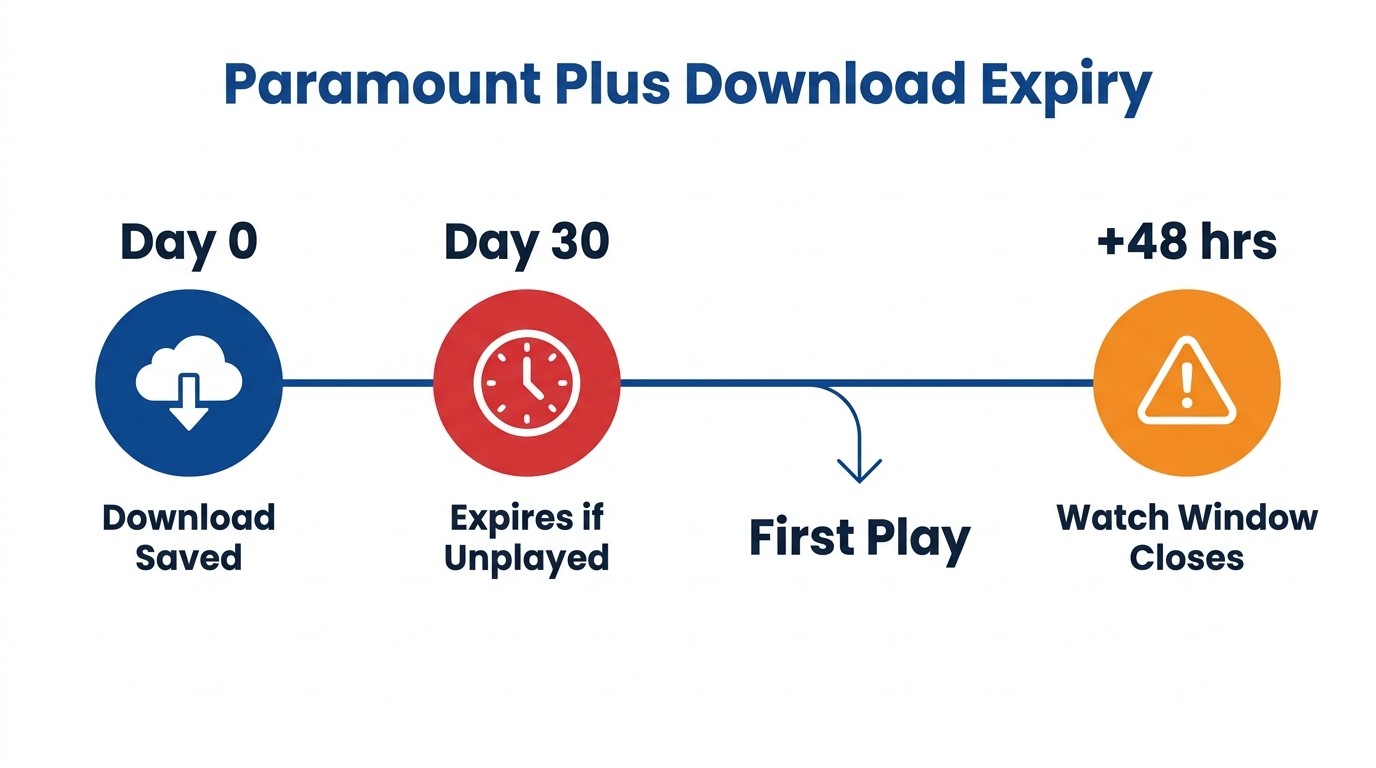
Paramount+ caps your account at 25 downloaded titles total across every linked device. Each download expires 30 days after you save it, or 48 hours after you start playing it, whichever comes first. The cap is the number every article quotes. The expiry timers and a sync bug around the cap are what actually waste people's evenings.
The 25-title cap and the ghost-limit sync bug
25 titles, account-wide. Not per device. Two phones, an iPad, and a tablet share the same pool, and a single episode counts as one title. The bug to know about is a sync mismatch that surfaces across Apple Discussions and Reddit threads. As one Apple Discussions user described it after wiping every download they had: "I get the error message 'Download Limit Reached, To continue downloading, delete an episode or movie from one of your devices and try again.'" The limit covers every linked device on the same account combined, and a delete that hasn't synced back to Paramount's servers leaves the count stuck at 25. If you hit the prompt with visibly fewer than 25 saved, the fix order I work through is: wait a few minutes after coming back online for the sync, sign out and back in, then reinstall the app as a last resort. Reinstalling wipes local files but does clear the count.
Expiry: 30 days unplayed, 48 hours after playback
Two clocks run on every file. The 30-day clock starts at download. The 48-hour clock starts the moment you tap play. Whichever expires first kills the file. Re-downloading the same title resets the clocks but still uses one of your 25 slots, and the previous copy has to be deleted first if you are at the cap. There is no in-app way to extend either timer. One framing note, because I see the question often: this is the in-app, DRM-tied download, governed by Paramount's licensing and tied to your active subscription. The premise of using it at all is that you are a Premium subscriber, using it for your own offline viewing while the subscription is live.
When downloads fail: blue screen, black screen, won't-download fixes
The Paramount+ blue screen and black screen errors are app-side, not DRM-side (the recording black-frame is a different problem, covered next). Quick checklist: confirm the account is on Premium, update the app, free up storage, check you have not exceeded the linked-device count, then reinstall as a last resort. Devices that lose their network mid-download sometimes stall on a loading screen; force-quitting and reopening the app usually clears it.
Can You Screen Record Paramount Plus? (Why You Get a Black Screen)
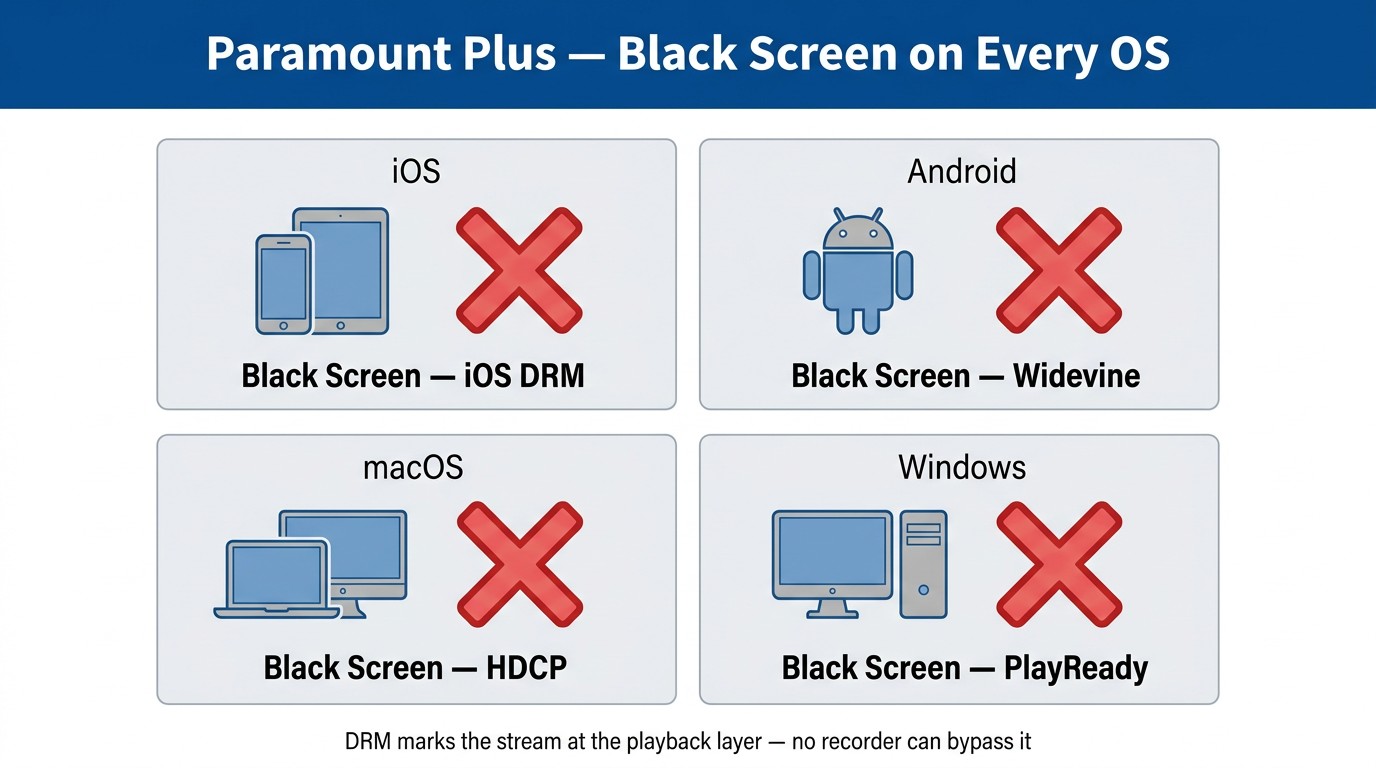
No. Paramount+ playback is protected by Widevine DRM on every supported platform. Screen recording on iOS, Android, macOS, or Windows produces a black video frame with sound, or refuses to record at all. The protection sits in the playback pipeline, not in your recording app, so swapping recorders does not change the outcome. This is the single most common evening that desktop users burn before they accept the mobile-only reality.
What actually happens when you try (iOS, Android, Mac, Windows)
- iOS: Apple's built-in screen recorder produces a file with audio and a black video track. The Paramount+ player flips to a protected surface the moment you start the capture.
- Android: Same outcome. Some OEM screen recorders crash outright; most save a file with no video.
- macOS: QuickTime "New Screen Recording" produces black video. Third-party recorders on macOS hit the same wall, because the protected output flag travels with the frame.
- Windows: Game Bar refuses to record at all, citing HDCP. Third-party Windows recorders either capture a black rectangle where the player sits or fail at the moment the title starts playing.
The pattern is identical because the cause is identical: at the playback layer, the protected stream is marked, and the OS hands the recorder a black frame instead of the real one. No combination of recorder, OS setting, or driver change moves that line.
What legitimately works for offline access on desktop
Screen recording is a dead end on every desktop OS. The next section walks through how a native-download desktop tool fits into the picture, and where it does not. The selection criteria are the ones from the laptop section above; I am not repeating that checklist here.
Where BBFly Fits: A Desktop Option for Personal Paramount+ Offline Backups
If, after the laptop and screen-recording sections, you have decided you specifically want a desktop offline file of titles you are already paying Paramount+ Premium to access, and you have accepted that this lives outside the official app's mobile path, BBFly Paramount+ Downloader is one Windows and macOS tool to evaluate. The frame I'd apply, stated upfront: it writes out a local MP4 or MKV from a Paramount+ title you have a valid subscription to, for your own personal offline viewing, on the same account you stream with. It does not skip paying Paramount+, and you will still need an active Premium subscription for it to do anything.
What it actually preserves versus a screen recording
This is the part that matters for the people asking the question. A screen recording, as the previous section showed, is a black frame on every desktop OS, so there is nothing to preserve. A native-download desktop tool talks to the platform server directly, so the output is a plain MP4 or MKV file sitting in a folder on your laptop, not a recording.
BBFly's lists up to 4K for this platform, which is higher than the mobile app's offline output and means you keep what your Premium subscription is delivering when the source allows it, and the file format it writes (MP4 and MKV play in VLC, Infuse, Plex, or any standards-compliant player; some competing outputs are app-locked containers and don't). Everything else, including Dolby Atmos audio preservation, multi-language subtitles, batch downloads across episodes, and series auto-tracking, lives on the official BBFly Paramount+ product page if you need a fuller spec sheet.
Trial and pricing: what to check before you buy
Trial first. BBFly's 30-day trial lets you download three full titles per platform, full-length videos rather than five-minute previews, which is what you need to verify, on your own connection and account, that the output plays cleanly, that subtitles arrive in the languages you want, and that batch download behaves on a multi-episode series. Pricing as of July 2026 is $29.90 per month for one PC, $99.90 per year for one PC, or $199.90 lifetime with three-PC activation.
Two notes on what this Paramount+ build does not do, by design: it does not skip ads inside Paramount+ content (the ad-skip flag is off for this platform), and it does not work without an active Paramount+ subscription. Both are intentional, and both align with the personal-use framing the rest of this article has used.
Paramount Plus Downloads: Frequently Asked Questions
How many titles can I download on Paramount Plus at once?
25 titles, across all linked devices on a single account. Episodes count individually. A 22-episode season fills 22 of your 25 slots.
How long do Paramount Plus downloads last before they expire?
30 days from the moment you saved the file, or 48 hours from the moment you started watching it, whichever comes first. Re-downloading requires deleting the original and counts as a fresh download against the cap.
Can I download Paramount Plus shows on a MacBook or Windows PC?
Not natively, as of July 2026. The Paramount+ Windows app, the macOS browser, and the web player all have no download function. Two practical alternatives: the Amazon Prime Video channel route (only if you subscribed to Paramount+ through Amazon), or a third-party desktop downloader for personal offline viewing of content you actively subscribe to, evaluated against the criteria in the laptop section.
Why can't I download Paramount Plus on my Smart TV?
Paramount+'s TV apps are stream-only on every model and every brand. Offline downloads exist only inside the iOS and Android apps; the feature is not present in any TV build.
Can I screen record a Paramount Plus show?
No. Widevine DRM produces a black video frame on iOS, Android, macOS, and Windows the moment you start a screen recording. The recorder is not the problem; the protection sits in the playback layer.
Do Paramount Plus downloads come in 4K or HDR?
No. Even on Premium, official offline downloads ship at mobile-grade resolution. 4K and HDR (Dolby Vision and HDR10) on Paramount+ are streaming-only, on supported devices.
Where can I find the terms covering my saved Paramount+ files?
The authoritative answer lives in Paramount+'s Terms of Use and download FAQ, plus your local copyright law. As a general principle: official downloads are tied to an active subscription, and any third-party desktop save is for personal offline viewing while you maintain a valid Premium account.
Is it safe to sign into Paramount Plus inside a third-party downloader?
Sign-in trust depends on the tool. A reputable downloader will have verifiable company information, a privacy and data-handling statement, real customer support, and either an OAuth-style flow or a browser handoff that minimizes how much it sees of your credentials. The names you should not give a streaming password to are anonymous, no-website tools from file-sharing sites. Established Windows and macOS downloaders with public product pages and active support are a different category.
Bottom Line: What to Do Based on Where You Watch
Mobile-first Premium subscriber: use the official iPhone, iPad, or Android Paramount+ app and the mobile steps above. The path is built for you, and the in-app limits are the ones you live with.
Amazon Prime Video channel subscriber to Paramount+: download inside Amazon's Prime Video app on Windows or Mac. It is the one clean desktop route, narrow eligibility aside, and the files stay inside Amazon's DRM.
Quality-conscious desktop user with an active Premium subscription: the screen-recording path is closed. A third-party desktop downloader is the practical option to evaluate against the criteria in the laptop section, used only for personal offline viewing of titles you actively subscribe to. The BBFly section above is one starting point.
Essential subscriber: no plan tier under Essential includes downloads. Upgrade to Premium for the mobile path, or accept streaming-only.