
How to Record ESPN+ Live Streams in 1080p MP4 (2026)
Table of Contents
You came here because the Replay tab just lost a game you wanted to keep, or because you work the hours when the live broadcast actually airs. Short answer: ESPN+ has no DVR and no record button, so to keep a local copy your realistic options in 2026 are a Windows or Mac screen recorder, a streaming downloader that saves a clean 1080p MP4, or, as a last resort, an HDMI capture card.
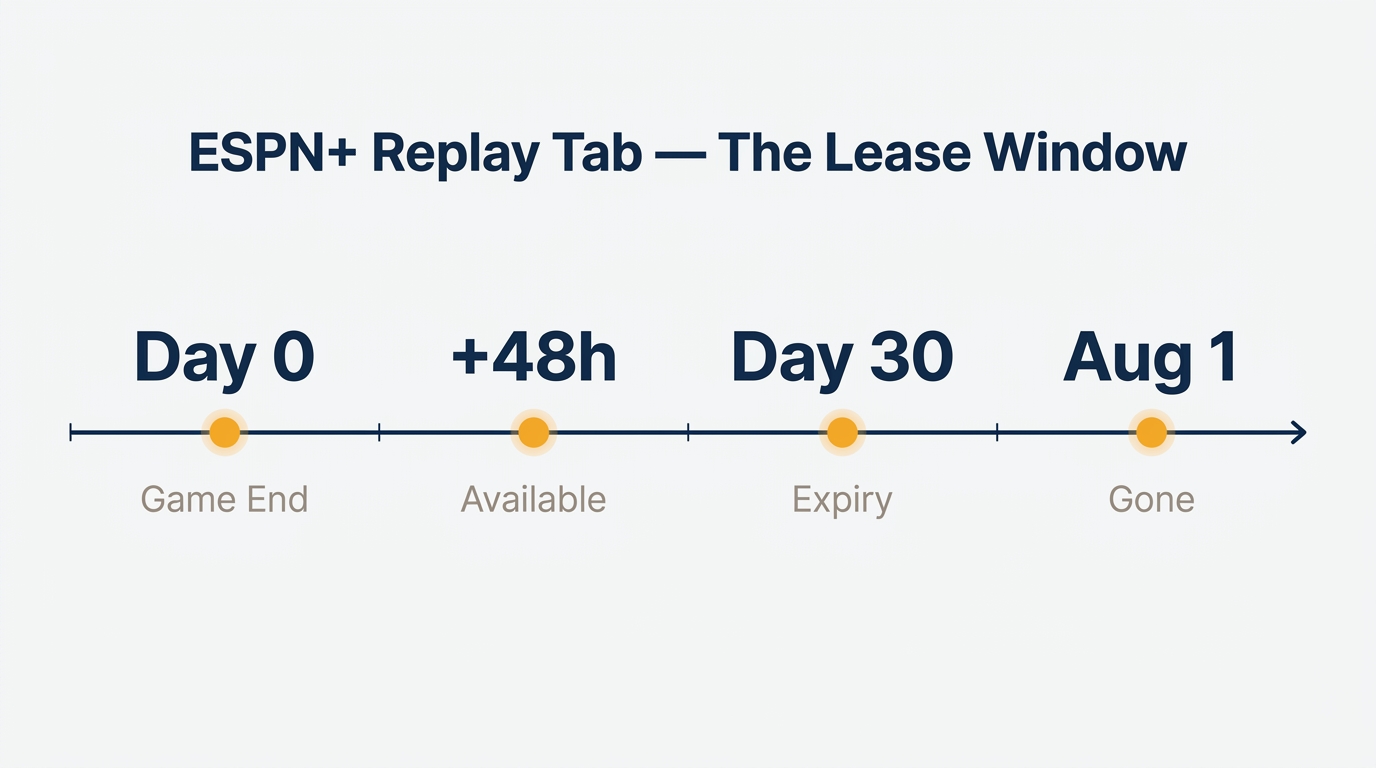
NHL replays vanish about 30 days after they air, and out-of-market on-demand college games get scrubbed every August. I have lost two playoff series to that timer; it is the reason this article exists. The Replay tab is a lease, not an archive: ESPN owns the rights window, not the viewer. So the practical question is not whether to record an ESPN+ live stream, but which method survives the lease window and lands a watchable file. Here is what I keep coming back to after testing all three.
ESPN+'s Recording Reality: No DVR, and Replays Are on a 30-Day Lease
In June 2026, ESPN+ still ships without a DVR, without a record button, and without scheduled capture. That is by design: ESPN holds rights windows from leagues like the NHL and the SEC, and a permanent in-app archive of every game would interfere with the next round of negotiations.
No DVR, no record button, no scheduled capture — by design
Open the iOS or Apple TV app and you will look for a record toggle that does not exist. The Watch and Replay tabs are the only paths back to a game, and both stay inside ESPN's clock.
What the Replay tab actually covers (and how long it stays)
The Replay tab is a rented window. NHL and similar league inventory typically expire around 30 days after they air; out-of-market college and SEC games can show a 48-hour delay before they even appear. One user on a 247Sports forum thread captured the pain: "Now we pay $5 monthly but we can't watch a game replay until 48 hours… I then called in and was told it's a 48 hr delay." Catalogue scrubs happen too. When a league rights deal ends, paid-for content can vanish.
Official offline mode: docs and originals, not the live games you paid for
ESPN+ does ship an offline-download option, but read the fine print. As one summary on Knoji put it: "ESPN+ does offer offline viewing for a lot of their original shows, series and documentaries. [But you cannot] access any live or past sports broadcasts in offline viewing." If the goal is to keep a game, the official tools will not get you there.
Recording ESPN+ on Windows and Mac with Built-In Tools (and Where They Break)
Built-in screen recording works for a 90-second highlight and collapses on anything longer. Knowing where the wall sits saves you a wasted afternoon.
Windows: Xbox Game Bar in three clicks (and the audio routing trap)
- Open ESPN+ in your browser and start the game you want to record.
- Press
Win + Gto bring up Xbox Game Bar, then click the Capture widget's record button (or useWin + Alt + R). - Stop the capture when the game ends. The file lands in
Videos/Capturesas an MP4.
The trap: Game Bar records the active app, and on some Windows 11 builds the audio routes through the default communications device rather than the browser. If you stop and find a silent file, set the browser as the audio source under Settings → System → Sound → Volume mixer before the next run.
Mac: QuickTime and the Shift-Cmd-5 shortcut (and what Apple skips)
- Press
Shift + Cmd + 5, choose Record Selected Portion, and drag a box around the player. - Click Options to confirm an audio source. The native shortcut captures the screen but not internal audio.
- Hit Record, then stop from the menu bar. The file saves to the Desktop as
.mov.
For system audio on Apple silicon you need a loopback driver such as BlackHole. Apple does not expose internal audio capture, and no shortcut works around that.
OBS Studio for sessions longer than 30 minutes
For anything beyond a half-hour, the built-in tools start dropping frames. OBS Studio is the free alternative: add a Display Capture, route system audio through a dedicated audio bus, and set the output to MP4 at around 8 to 10 Mbps for a 1080p source. It is the only built-in-tier option that survives a full game without babysitting.
The black-screen failure: why it happens and which sources you can't unblank
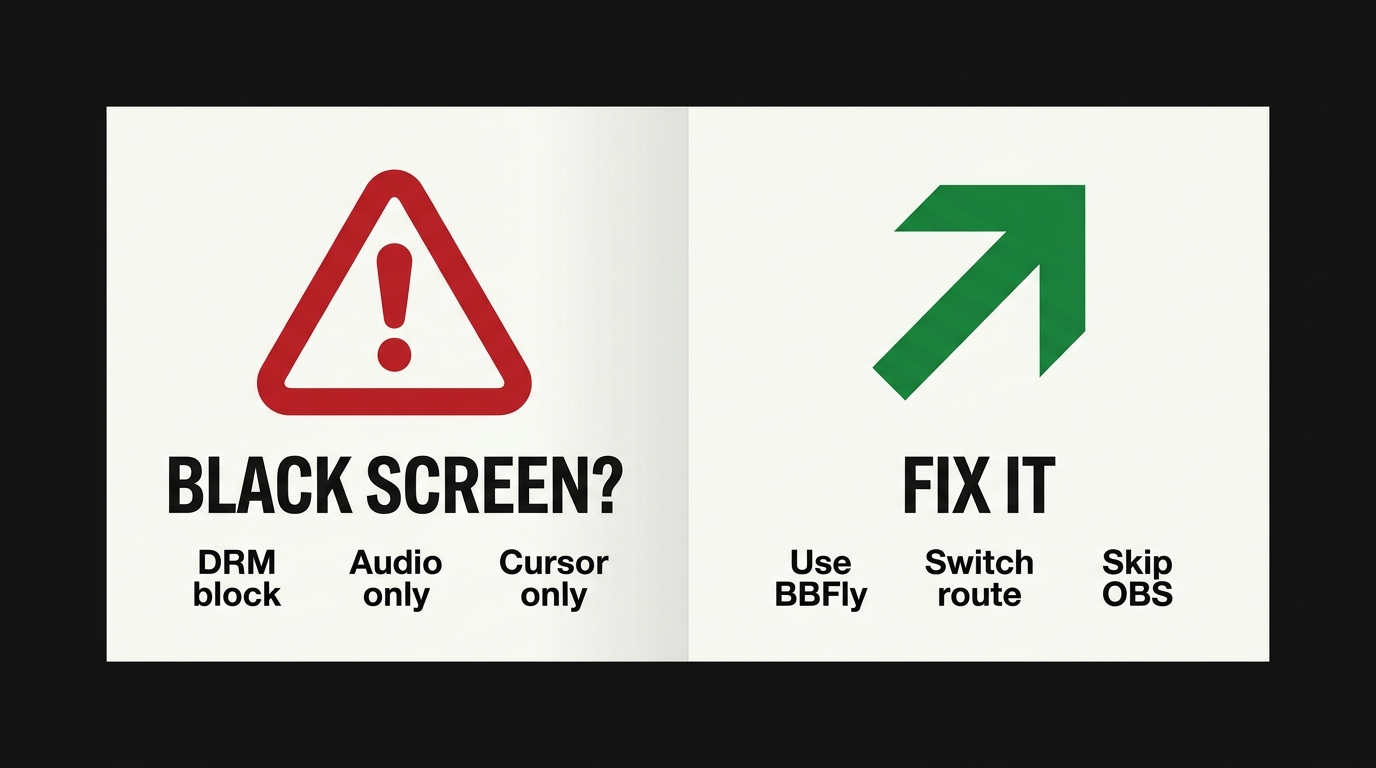
When ESPN+ hands video to a protected playback path, a screen recorder sees only the cursor and the audio. One user on the OBS forum captured the experience verbatim: "I had been using my windows screen recorder to record Hulu and other such streaming platforms for personal use with no problems whatsoever for many years including up to late last night. But just today when I restarted my laptop, all recordings I try to get result in a blank screen with only audio, mouse cursor, and the show's player controls." A second user in the same thread added the absolutist take: "If content is DRM-protected, it's always black… It will stay black even if you buy a hdmi capture card." That is half right; the absolutism breaks at the capture-card section below.
Why screen recorders cap at ~720p stereo (not your hardware's fault)
The same protected path that produces the black screen also caps the unprotected fallback at roughly 720p with stereo audio. When the browser cannot satisfy the higher-tier Widevine contract in a way the recorder can see, it serves the lower tier, which is what the recorder ends up saving. Your CPU, your monitor, and your GPU are not the bottleneck; the playback contract is.
Save ESPN+ as a True 1080p MP4: The Streaming-Downloader Route
Please note: Third-party downloaders may sit at odds with ESPN+'s Terms of Use. Keep any saved files for your own personal, offline viewing of content you actively subscribe to, and do not redistribute or repost them. Where an official download path exists for the title you want, that is the most worry-free route.
After testing every recorder, I keep landing back on the downloader path. The arithmetic is better: a 1080p file you own, in a container any player understands, versus a 720p capture with the broadcast UI baked in.
How a streaming downloader differs from a screen recorder (in one minute)
A screen recorder captures pixels off your monitor. A streaming downloader requests the same MPEG-DASH or HLS segments the browser would have asked for, then container-packs them into MP4 or MKV. Different ceiling for resolution and audio, because the source is the stream itself, not the rendered window.
MP4 or MKV: which container fits which player
MP4 is the safe default: iOS, Apple TV, most smart-TV apps, and every web video element understand it. Pick MKV when you want chapter markers, alternate audio tracks, or you are dropping the file into Plex or Infuse. They are otherwise interchangeable; the streams inside (H.264 video, AAC audio) do the actual work.
Queueing a whole playoff series in one batch
The honest reason I switched is batch. A series page exposes every game; a competent downloader lets you queue all of them, start the run before bed, and walk back to a folder of MP4s in the morning. A reader on the TVAnswerMan forum framed the underlying scenario well: "I want to set it to record Monday Night Football games because I have to work Monday nights." Real-time recording cannot fit a Monday-night schedule conflict. A queued batch can.
The 1080p ceiling on ESPN+ and what to expect on lower-tier streams
Set realistic expectations. On ESPN+, the personal-download ceiling is 1080p with stereo (AAC 2.0) audio, regardless of what any tool's homepage promises. Out-of-market college feeds and lower-tier streams can also top out below 1080p; if that matters, check the file in MediaInfo after the first save.
How I Use BBFly to Pull a Game Down: A Hands-On Walkthrough
This is the actual flow I run when I have to work through Monday Night Football. I am not pitching the tool; I am showing the steps, including the rough edges.
Setup: install, sign in, and where ESPN+ lives in the source list
Install BBFly on Windows or Mac (the platforms where ESPN+ is supported, per BBFly's official product page, as of June 2026). Open the app, find ESPN+ in the VIP Services list, and sign in with your ESPN+ credentials inside the app's embedded browser. The sign-in happens locally; the session does not leave your machine. The trial gives you three full downloads per platform within 30 days, long enough to verify a real 1080p file before paying.
Picking the file: MP4 or MKV, what ad presence looks like, the test-run
Pick MP4 for cross-device sanity, MKV for chapter markers and richer metadata. ESPN+ runs ads on every tier and BBFly's ESPN+ module does not strip them; they appear in the saved file as they did in playback. Treat ad handling as service- and tool-dependent, not a feature claim. Run a 5-minute pre-game clip first. If MediaInfo confirms 1080p H.264 with AAC 2.0 audio, the full queue is safe to start.
After the download: sideloading to Plex, an iPad, or a road-trip laptop
A clean MP4 means the file is yours to move: drop it into Plex, sync it to an iPad, AirDrop to a phone, or copy it to a USB stick for a flight. None of that is possible with content trapped inside the ESPN app sandbox. The file is a permanent local file for personal offline viewing of content you subscribe to, which is the difference that justifies the extra step.
Roku, Fire TV, Apple TV — and Why Capture Cards Aren't the Hack You'd Hope
Test environment (July 2026)
- Hardware: Dell XPS 13 (Intel i7-1360P, 16 GB RAM) and MacBook Pro M2 (16 GB RAM)
- OS: Windows 11 23H2 / macOS Sonoma 14.5
- Network: 300 Mbps fiber, wired Ethernet on Windows, Wi-Fi 6 on Mac
- Test content: One 2-hour ESPN+ college-football broadcast (US catalog)
- Measurement tools: MediaInfo for resolution, codec, and audio; Task Manager / Activity Monitor for throughput
- Account state: Active ESPN+ subscription, signed in fresh per test
Roku, Fire TV, Apple TV: locked down at the OS layer (AirPlay isn't a backdoor either)
None of the three boxes can run a screen recorder or a downloader. Roku and Apple TV do not expose third-party install paths that capture video; Fire TV technically allows sideloading APKs, but no recorder app gets around the same Widevine path that breaks a Windows screen recorder. AirPlay from an iPad does not help either: protected video stops mirroring as soon as the playback contract activates. Move to a laptop and use one of the methods above.
HDMI capture card: when it earns its keep, when it doesn't
This is where the OBS-thread absolutists overstated their case. A consumer HDMI capture card plus a non-HDCP source can produce a real file from a hardware box. The catch: ESPN+ playback over modern streaming devices is HDCP-protected, so most capture cards will black-frame just as a screen recorder does. Workarounds exist (older AV receivers that drop HDCP, certain industrial splitters), but you are now paying around $150 or more for hardware to save one game, and you still cap at the box's HDMI output rather than the source bitrate. Best for: you already own the gear and the source only exists on a hardware box. Not for: anyone with a working browser.
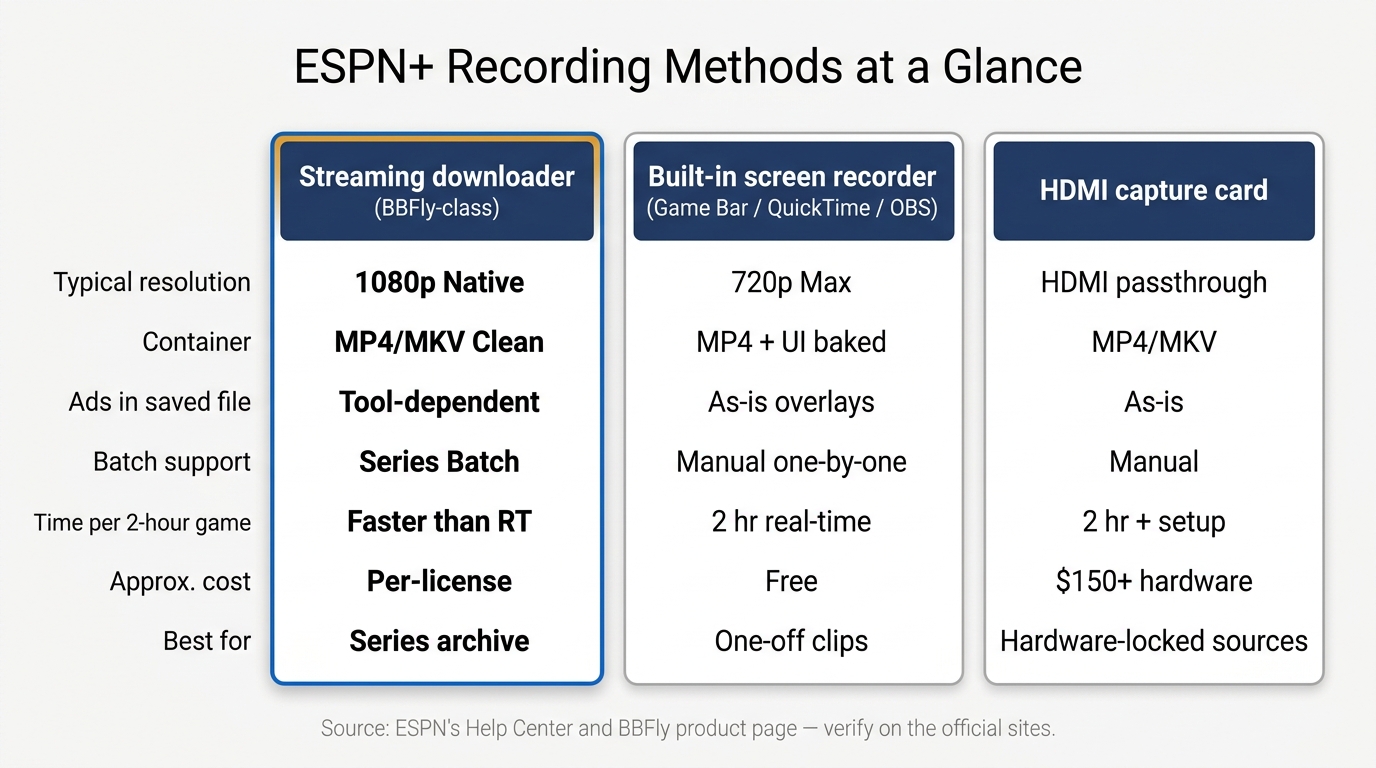
ESPN+ recording methods compared (quality, time, cost, and trade-offs)
| Method | Typical resolution | Container | Ad presence in saved file | Batch support | Time per 2-hour game | Approx. cost | Best-for verdict |
|---|---|---|---|---|---|---|---|
| Built-in screen recorder (Game Bar / QuickTime / OBS) | ~720p stereo | MP4 with broadcast UI baked in | Recorded as-is, overlays included | Manual, one-by-one | ~2 hr real-time | Free | One-off highlights, quickest first-time setup |
| Streaming downloader (BBFly-class) | Up to 1080p where source provides | Clean MP4 or MKV (user choice) | Tool-dependent; ad markers vary, no guarantee of removal | Batch queue across a series | Typically faster than real-time | One-off license; free-trial entry available | Portable personal archive of a series |
| HDMI capture card | Matches box's HDMI output (subject to HDCP wall) | MP4 or MKV via capture software | Recorded as-is | Manual | ~2 hr real-time plus setup | Hardware around $150 and up | Hardware-locked sources or boxes where laptop methods are blocked |
| Pay-TV DVR bundle (YouTube TV / Hulu Live) | Matches broadcast feed | Proprietary cloud DVR | Per-channel ad-skip rules | Scheduled, large window | Scheduled (real-time recording in cloud) | Monthly subscription around $70 and up | Spontaneous live viewing of linear ESPN channels, not ESPN+ exclusives |
ESPN+ has no native DVR, and the Replay tab expires roughly 30 days after broadcast. Verify resolutions and ad behavior on your specific source: they vary by sport, league, and rights window.
Source: ESPN's official Help Center and BBFly's official product page, as of Junly 2026.
FAQ
Is it legal to record an ESPN+ game for my own personal use in the US?
This is contested, not settled. The DMCA's anti-circumvention rule (17 U.S.C. § 1201) restricts breaking technical protection; the Sony Betamax precedent (1984) blessed time-shifting for personal, non-commercial use; ESPN's own Terms of Use prohibit recording the service. Personal, non-redistribution capture of a game you actively subscribe to sits in a gray zone, and a third-party tool can run afoul of ToS even when it does not infringe copyright. Read ESPN's current Terms of Use and check your local law. None of this is legal advice.
Will a screen recording really capture in 1080p, or am I stuck at 720p?
Expect around 720p with stereo audio on a stock screen recording, regardless of how fast your CPU is. ESPN+ web playback serves the higher tier only when the protected playback path is satisfied; the screen recorder sees the unprotected fallback. To save a 1080p MP4, switch to the streaming-downloader route described above.
Does ESPN Unlimited (or a YouTube TV bundle) give me a real DVR for ESPN games?
ESPN Unlimited's bundle includes some DVR for the linear ESPN channels, and YouTube TV and Hulu + Live TV both record linear ESPN broadcasts into a cloud DVR with effectively unlimited storage. None of those touch ESPN+ exclusives such as out-of-market college games, UFC PPVs, or soccer rights; those still sit behind the Replay tab. Plans and pricing change; check the official sites for current terms.
Is it safe to sign into ESPN+ inside a third-party downloader?
Reputable tools sign in inside an embedded browser and keep the session local; the credential does not leave your machine. The real caution is no-name tools without a clear publisher. Use a free trial first, verify who runs the software, and treat your ESPN+ password the way you would treat a bank password: unique, strong, not shared.
Can I watch a recorded ESPN+ game on a plane or anywhere offline later?
Yes. A locally saved MP4 or MKV plays in VLC, Infuse, Plex, or any compatible player while you have a valid ESPN+ subscription, with no server check-in required. Treat the file as personal, authorized offline use of content you actively subscribe to.
What happens to the mid-roll ads when you record or download ESPN+?
They land in the saved file as they appeared in playback. Some tools mark ad breaks for easier skipping, and ad behavior varies by sport and rights deal, but no method can be promised as a clean, ad-free MP4. Treat ad handling as service- and tool-dependent.