
OnlyFans Photo Downloader: Limits and Methods That Work
An OnlyFans photo downloader can save public profile images or media your account is already allowed to view, but it cannot lawfully grant access to locked posts. The right method depends on whether you need one picture, repeated browser saves, or an organized batch of authorized photos and videos.
I have spent years cleaning up media libraries where the file looked fine in a browser but turned out to be a small preview once archived. That is the real problem behind searches for how to save OnlyFans pictures: access is only the first gate; file fidelity is the second. My judgment is simple: screen recording is the wrong tool for a still image because it adds a lossy step to a job that should end with the best file the page actually serves. This guide follows that order, from access rights to quality checks to the workflow that fits the volume.
What an OnlyFans Photo Downloader Can and Cannot Access
An OnlyFans photo downloader should handle either public profile media or content already visible to your signed-in account. It should not be presented as a way to obtain posts, messages, or creator media that your account has not been granted permission to view.
Public Profile Images vs. Subscriber-Only Posts
An OnlyFans profile picture downloader usually works with a public avatar or header URL. Subscriber-only posts are different because access depends on the account session and the creator relationship. A public-image tool may be enough for the first job, but it does not become a feed downloader simply because both jobs involve JPEG or WebP files.
Prerequisites: An Active Account and Existing Access Rights
For paid or private media, start with an active account and existing access to the specific post. Keep saved files for personal offline use. Do not redistribute, resell, publicly share, or use a downloader to reach content outside those permissions.
Why Right-Click Saving May Fail or Return a Small Image
The browser may disable the context menu, place a visual layer over the image, or load a resized preview in the feed. A Reddit user in r/firefox stated the problem plainly: “Is there an easy to download photos from OnlyFans when the right click is disabled?” Even when Save Image works, the result may be the preview currently displayed rather than the largest asset available to the authorized session.
My rule for an archive is not “the file opened.” It is “the file survived inspection.” If the pixel dimensions and file size are far below what the enlarged view suggests, do not file it as the master copy.
Desktop Workflows vs. Mobile Shortcuts
Desktop browsers expose clearer file information and support extensions or dedicated apps. Mobile browsers are better suited to occasional saves through the system share sheet or press-and-hold menu, when available. For repeated work, the smaller screen and restricted file access make mobile shortcuts less auditable and harder to organize.
Which OnlyFans Photo Download Method Fits Your Workflow?
For an OnlyFans photo downloader, use the browser for one accessible image, a vetted extension for light repeat use, an online tool only for public URLs, and a desktop app for authorized recurring posts or mixed media. The best fit is determined by fidelity, account exposure, volume, and whether photos and videos must enter the same library.
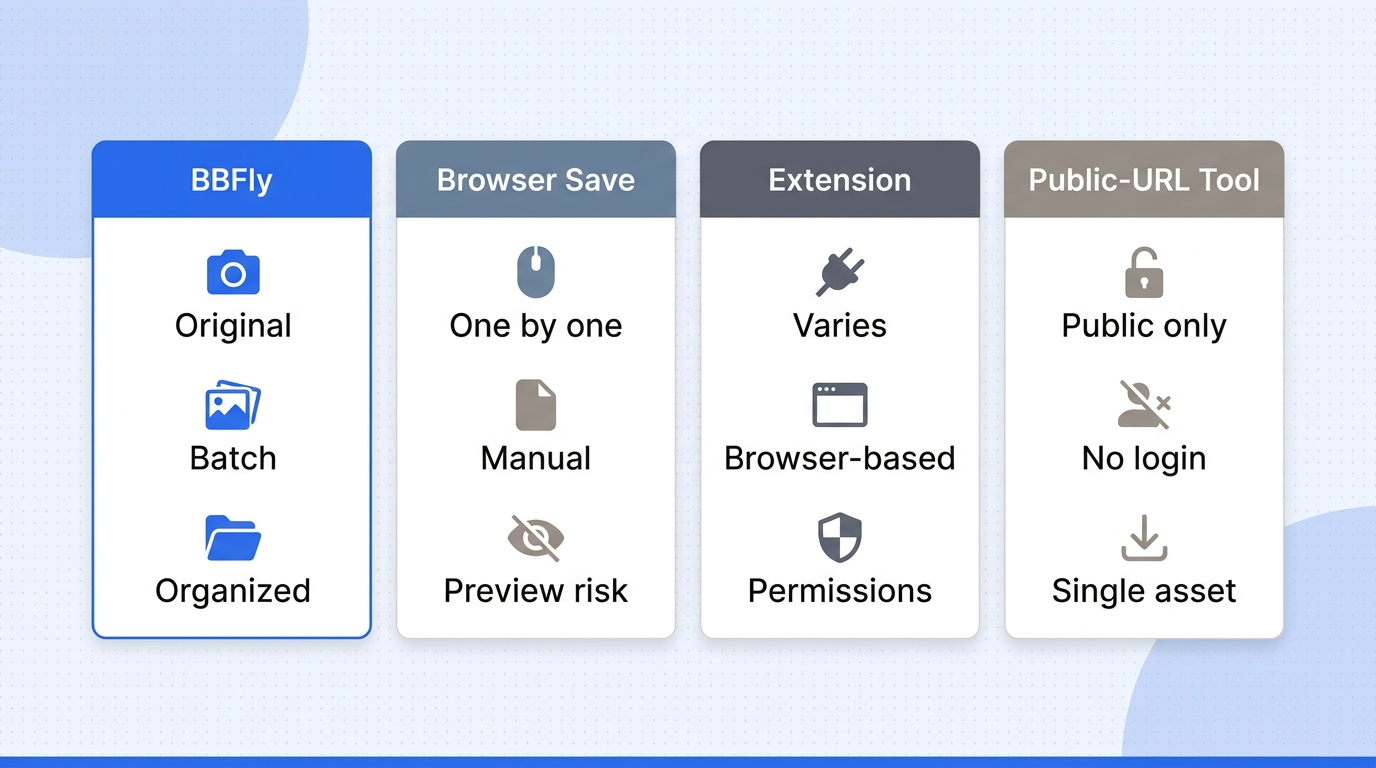
Please note: These methods may conflict with OnlyFans' Terms of Service. Save only media you are authorized to view for personal offline use, and do not redistribute or resell it.
| Method | Best fit | Account surface | Batch or mixed media | Cost or main limit |
|---|---|---|---|---|
| Browser or developer tools | One accessible image | Existing browser session | No practical batch flow | No added cost; previews may interfere |
| Browser extension | Repeated browser saves | Extension permissions | Tool-dependent | Maintenance and permissions vary |
| Online downloader | Public avatar or header URL | External website | Usually public URLs only | Avoid sites requesting credentials |
| Desktop downloader | Authorized recurring or mixed media | Windows or macOS app | Batch and follow-up supported | From $29.90 monthly; trial limits apply |
Pricing and trial details are from the official product information, as of October, 2026.
Manual Browser Save or Developer Tools
This is the least-permission route when you need to download OnlyFans pictures one at a time. If the enlarged image is already loaded, browser tools can help you inspect its displayed dimensions or file information. Do not use them to seek restricted resources. Best for: one authorized image. Not ideal for: batches or readers unfamiliar with browser inspection.
Browser Extensions
An extension can reduce repetitive clicking when you download OnlyFans pics in Chrome or Firefox, but its permissions and maintenance history matter more than a long feature list. Best for: a few repeat saves from the browser. Not ideal for: anyone unwilling to review what the extension can read or change.
Online Downloaders
Online tools make sense for public profile images that require no account session. I would not give an unknown website OnlyFans credentials; convenience is not worth surrendering the account boundary. Best for: a public URL. Not ideal for: paid feeds or messages.
Desktop Downloaders
A desktop app suits recurring authorized posts and mixed photo-and-video libraries. BBFly is the relevant example here because it supports batch work and subscription-channel follow-up, while its full limits belong in the dedicated section below. Best for: ongoing library management. Not ideal for: one public avatar.
Decision Criteria: Fidelity, Login Exposure, Volume, and Media Mix
Choose the smallest tool that completes the job. For one image, minimize permissions. For repeated browser saves, favor transparent extension access. For recurring mixed media, a desktop workflow is easier to audit and organize. Recording should be the last resort for video and is a poor choice for still photos because it substitutes a rendered frame for the served file.
How to Save OnlyFans Pictures at Full Resolution
For readers asking how to save OnlyFans pictures at full resolution, “full resolution” means the largest resource OnlyFans actually provides to the authorized session, not an unseen original upload. Confirm it by opening the largest permitted view, saving the served asset, and checking the local file before adding it to your library.
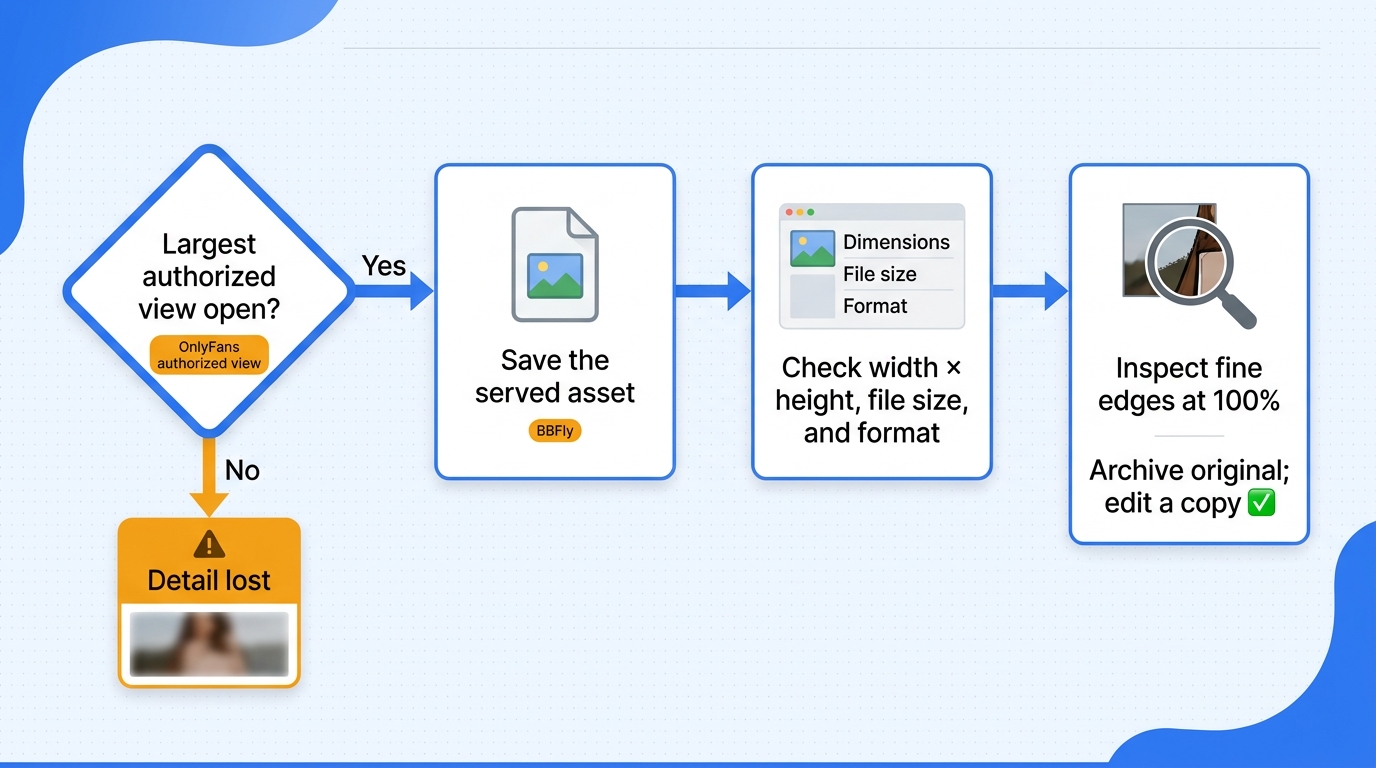
To understand how to save photos from OnlyFans without filing a thumbnail as the master, work through these checks in order:
- Open the largest view your account is authorized to see.
- Save or inspect only the image resource already loaded in that view.
- Compare pixel dimensions, file size, and format with any earlier preview.
- Preserve the resulting file without another export or compression pass.
Start With the Largest Authorized View Available
The first step in how to save pictures from OnlyFans is to open the post or message normally and expand the photo through the interface if that option is available. Do not begin from a feed thumbnail and assume a downloader can reconstruct data that the page never served. The largest visible view is your starting point, not proof of the creator's untouched source file.
A Reddit user looking for “images from OnlyFans in their original resolution” captured the central concern. The practical answer is verification, not a magic label: compare what the authorized page loads with what lands on disk.
Avoid Preview Thumbnails and Recompressed Copies
Feed previews, screenshots, and copied images from a resized browser view can all produce smaller files. One r/DataHoarder user described downloading about 40 images through inspection tools, then finding that “they're tiny.” That is exactly why I reject a workflow that treats a successful download dialog as a quality test.
If you use browser developer tools to save OnlyFans images, limit the task to checking resources already loaded for the current page and identifying basic file information. If the largest loaded asset is still small, stop there. A different filename or an upscale does not create missing detail.
Verify Pixel Dimensions, File Size, and Format
For anyone asking how to save images from OnlyFans, the local check is straightforward. On Windows, open file Properties and the Details tab. On macOS, use Finder's Get Info or Preview's Inspector. Record width by height, file size, and format. Then compare those values with the preview copy. A larger file is not automatically better, but a dramatic drop in dimensions is a clear warning that you saved a thumbnail.
For a visual check, inspect hair, text, and fine edges at 100% zoom. Artificial sharpening can make an enlarged image look crisp while preserving no extra detail. Pixels are evidence; the zoom slider is not.
Store and Organize Photos Without Another Compression Pass
Keep the downloaded file as the archival copy. Do not open and re-save it through a social app or editor unless you intend to create a derivative. I use a simple folder pattern such as creator, year, month, and post date, with a separate folder for edited copies.
So, can you save pictures from OnlyFans without adding another compression pass? Yes, if you keep the served file as the archival copy. That discipline matters more than clever software. A local collection becomes useful only when you can identify the source context, avoid duplicates, and tell the archived file from a thumbnail or later edit.
How to Download OnlyFans Photos with BBFly
For readers asking how to download OnlyFans photos in recurring authorized batches, BBFly provides a repeatable Windows and macOS workflow. Its verified video specifications do not guarantee an original photo resolution; inspect saved pictures using the checks above.
Prerequisites: Windows or macOS, an Active Account, and Lawful Access
BBFly is a third-party desktop tool relative to OnlyFans. Use it only for personal offline copies of media your active account is permitted to view, subject to OnlyFans' terms and applicable law.
Supported systems and availability may change; check the official product page for current status.
Four-Step BBFly Workflow
- If you need to know how to download images from OnlyFans on desktop, install BBFly on Windows or macOS and open OnlyFans inside the app.
- To understand how to download pictures from OnlyFans without crossing account boundaries, sign in and navigate only to posts already available to your account.
- When deciding how to download pics from OnlyFans, select the authorized posts and review the available media options.
- The practical route for how to download OnlyFans images in batches is to start the batch, choose an output folder, and verify photo files before organizing them. For recurring authorized posts, subscription-channel follow-up can reduce manual sorting.
Verified Specs, Trial Scope, Pricing, and Limits
For mixed-media jobs, BBFly can batch OnlyFans media and output supported video at up to 1080p or 720p in MP4 or MKV, using H.264 video and AAC 2.0 audio. It does not support ad removal, subtitle download, audio-language selection, or metadata writing for this service.
For photo archiving, my rule is simple: if you are deciding how to download OnlyFans pics at scale, judge the workflow by batch handling and file verification, not by the video spec sheet. The 30-day trial permits three complete titles per supported service. Paid plans are $29.90 monthly for one PC, $99.90 yearly for one PC, and $199.90 lifetime for three PCs. That makes the desktop workflow a sensible fit for a continuing library, but excessive for someone who needs a single public image.
Choose the Right Route for Your OnlyFans Media
To download OnlyFans photos responsibly, choose by permission first, served quality second, and volume third. Use the least-permission route for a single image, a transparent browser workflow for occasional authorized saves, and a batch-capable desktop app for recurring or mixed media.
One Public Image
Use the public image URL or normal browser save controls. There is no reason to share account credentials for a profile picture or header that is already public.
A Few Subscriber Photos
Use the signed-in browser and verify the largest loaded asset before filing it. An extension is reasonable only when its permissions and maintenance record are clear.
Recurring Posts or Mixed Media
This is where the trial is worth evaluating: lawful access, recurring batches, and mixed media in one filing routine. Otherwise, keep the workflow smaller. After 15 years of media-library housekeeping, I have learned that more buttons rarely mean fewer future problems.
OnlyFans Photo Download FAQ
Can I Use an OnlyFans Photo Downloader on iPhone or Android?
Yes, for occasional authorized images you may be able to use the mobile browser's press-and-hold or share controls. Mobile online tools should be limited to public URLs and should not receive your credentials. Chrome and Firefox extensions are mainly desktop workflows; iOS and Android impose tighter extension and file-access limits, so ongoing batch organization is usually easier on Windows or macOS.
Is It Legal to Save OnlyFans Photos for Personal Offline Use?
The answer depends on the platform terms, the creator's rights, and local law. Using an unauthorized client can raise a Terms-of-Service issue, while redistribution, resale, or public posting raises separate copyright concerns. Existing access does not grant a new right to publish someone else's work.
Is It Safe to Log Into OnlyFans Inside a Third-Party Downloader?
No tool deserves an absolute safety guarantee. Prefer an established app with a clear publisher, signed installer, current maintenance, transparent privacy terms, and an account workflow you understand. Avoid no-name websites that request credentials for a public-URL task, and enable the security options offered by your account.
Can I View Saved OnlyFans Photos Offline While Traveling?
A local image file can be opened without a network connection, which is useful on flights or unreliable hotel Wi-Fi. Keep that copy within the personal-use boundaries that applied when you saved it. Offline storage is not permission to redistribute the creator's work or ignore platform terms.
Can I Download Photos From OnlyFans Messages or My Creator Vault?
Only save message media that your account is authorized to open. A fan's access to a purchased message is not the same as a creator retrieving their own uploads from a vault. Creators should prefer the platform's available account or export tools for their own material, then use a local backup routine so the platform is not the sole copy.
Does OnlyFans Notify a Creator When a Photo Is Saved?
Do not base a privacy decision on an assumed notification rule. Unless OnlyFans states a current rule for the exact action, do not treat saving, downloading, and screenshots as identical events. Act as though your use must withstand scrutiny: save only authorized media, keep it private, and respect the creator's rights.

Mei Shirakawa
Mei takes download and recording tools apart and tells you where each one stops working.