
OnlyFans App Download: Official Shortcut or Local Files?
If you switched from Android to iPhone and the OnlyFans install prompt vanished, nothing is broken. An OnlyFans app download does not install a native app: the official route is a browser shortcut on your home screen or desktop. Saving creator videos for offline viewing is a separate local-file task.
I understand why people still call the shortcut an app; it gets an icon and opens with less browser clutter. After years of managing platform downloads, though, I do not call a browser shortcut a native app, because that wording creates the wrong expectations about updates, offline files, and portability. This guide shows how to download OnlyFans app access safely on iPhone, Android, Windows, and Mac, then explains when a separate local-file workflow is the real goal. The distinction sounds fussy until the first trip without a connection.
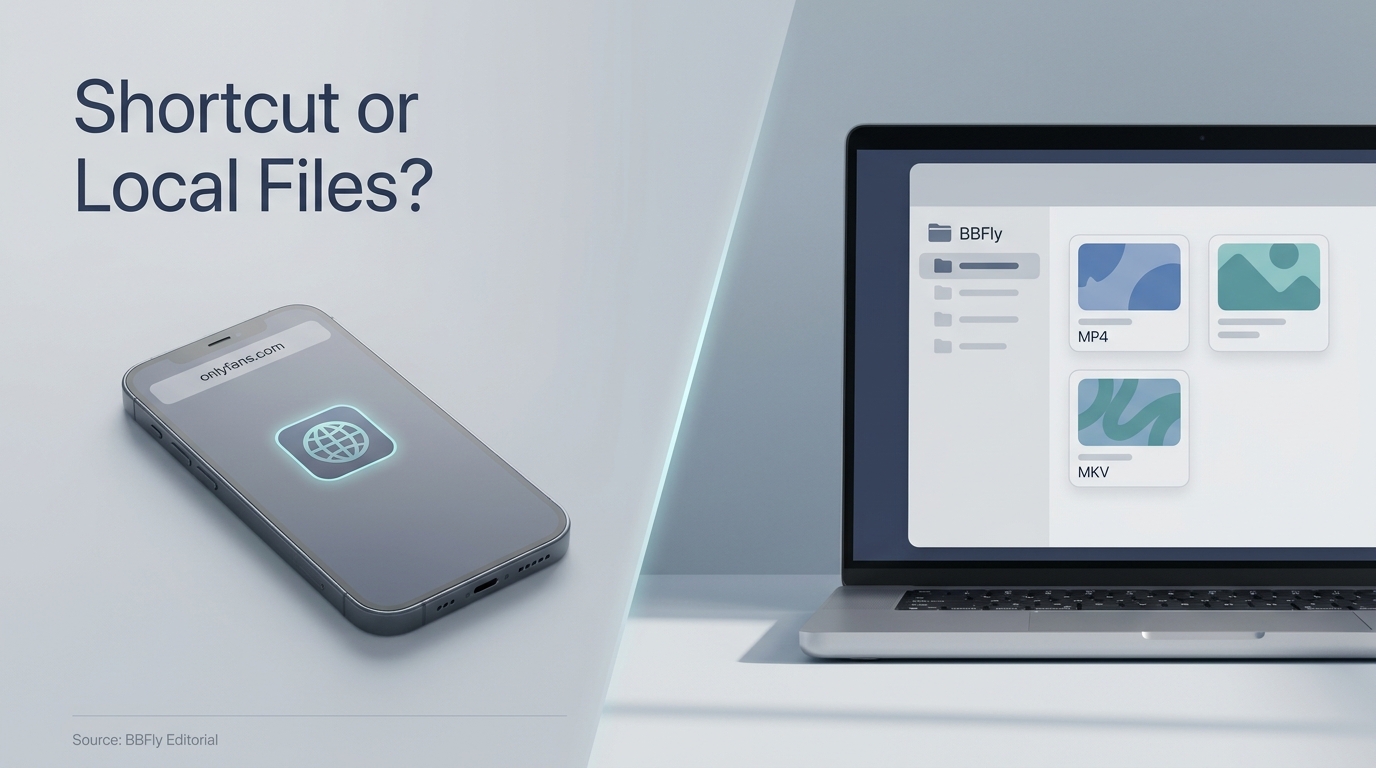
Does OnlyFans Have an Official App?
For anyone searching "onlyfans app download official," OnlyFans does not currently offer a dedicated native app for iPhone, Android, Windows, or Mac. Use OnlyFans.com in a supported browser and add the site to your home screen, Dock, Start menu, or desktop.
The Official Answer: Browser Access and a Home-Screen Shortcut
OnlyFans runs its main service through the web. After you add it to a device, the new icon launches the official website in a compact browser window or tab. Your login, subscriptions, messages, and content still come from the same OnlyFans account.
The confusion is understandable. One poster in r/onlyfansadvice wrote, "I recently switched from a Samsung phone to an IPhone and I cannot figure out how to get the app for OnlyFans. On my Samsung when I went to the site in a browser it would pop up asking if I wanted the app. That hasn't happened on the iPhone."
That is a menu-discovery problem, not evidence that iPhone users need a different unofficial installer. Android Chrome often surfaces an install prompt more visibly, while iPhone browsers put the command inside the Share menu.
Why the Shortcut Has No Separate Version Number
A native app normally arrives as a package with a version number and app-store updates. The OnlyFans shortcut points to the live website, so service-side changes appear when you open it. There is no separate "latest version" APK to chase for the official shortcut.
This is why pages promising an OnlyFans app download latest version can be misleading. A recent date on a download page says nothing about whether the package came from OnlyFans.
What the Shortcut Can and Cannot Do
The shortcut is best for faster sign-in and app-like access without typing the address each time. It does not create portable video files, add an official offline mode, or change what your account can access.
My practical verdict is simple: use the shortcut if you want convenience. Do not expect an icon to behave like a media library. That second job requires a different workflow and a much clearer discussion of permission.
How to Add OnlyFans to iPhone, Android, or Desktop
If you searched "how to download onlyfans app," open the official OnlyFans website in Safari, Chrome, or Edge, then use that browser's home-screen or install command. Readers who type "onlyfans download app" usually want this browser shortcut. The result is app-like access tied to the website, not a downloaded iOS, Android, Windows, or macOS program.
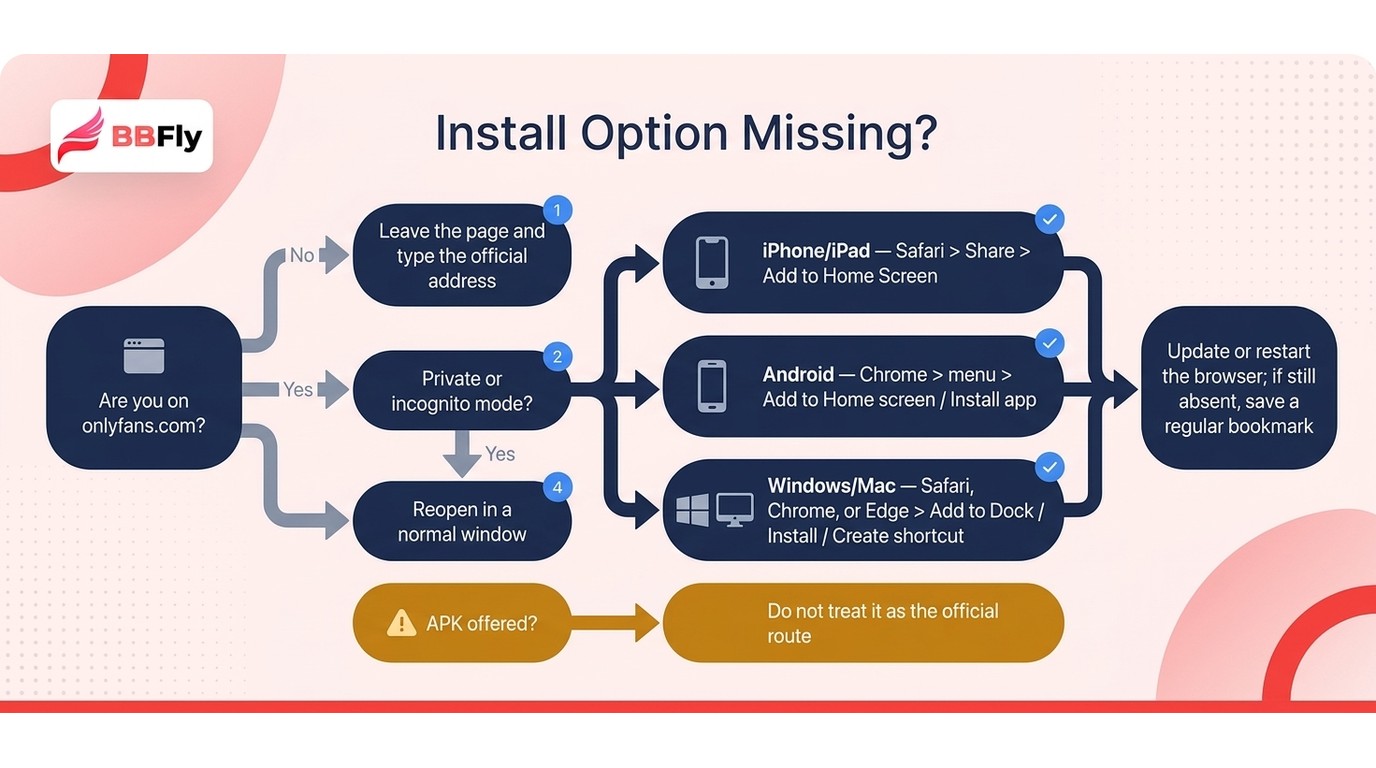
Before You Start: Use the Official Site
You need a current browser, normal access to your OnlyFans account, and the official onlyfans.com domain. Before adding anything, read the address carefully; a polished logo does not make a misspelled domain authentic.
Use these prerequisites:
- Open a standard, non-private browser window.
- Type
onlyfans.comyourself or use a trusted bookmark. - Confirm the address uses HTTPS before signing in.
- Update the browser if its install or Share menus look incomplete.
The practical upshot is that no APK, mobile configuration profile, or separate desktop installer is required for the official shortcut.
iPhone and iPad: Add to Home Screen in Safari
On current iPhone and iPad versions, the command is inside Safari's sharing controls. Menu placement can shift slightly with iOS updates, but the route remains the same:
- Open Safari and go to
onlyfans.com. - Tap Safari's page menu or three-dot control.
- Tap Share.
- Scroll down and choose Add to Home Screen.
- Review the name, then tap Add.
The icon now opens OnlyFans from the home screen. If you came from Samsung, this can feel needlessly hidden. Apple has never been shy about making a simple command feel like a small archaeological dig.
Android: Install the Shortcut from Chrome
Chrome on Android usually makes the web-app option easier to find:
- Open Chrome and visit
onlyfans.com. - Tap Chrome's three-dot menu.
- Choose Add to Home screen or Install app.
- Confirm Install or Add when prompted.
The wording depends on the Chrome version and whether the site meets the browser's install criteria. Both labels create access to the official website. Neither asks you to download an OnlyFans APK.
As one Reddit user in r/onlyfansadvice put it, "You can download the onlyfans app by looking it up in your Google chrome app and tapping on the three dots on the top right. There you will find the option to download it." The terminology is loose, but the menu path describes a browser-installed shortcut, not a separate Android package.
Windows and Mac: Create a Browser App Shortcut
Desktop browsers can place OnlyFans in a Dock, Start menu, taskbar, Applications folder, or desktop shortcut. Work through the option your browser exposes:
- Open
onlyfans.comin Safari, Chrome, or Edge. - In Safari on Mac, choose File > Add to Dock.
- In Chrome, click the install icon near the address bar.
- In Edge, click App available and confirm Install.
- Choose the Dock, Start menu, taskbar, or desktop location offered.
What you gain is a cleaner launch path and a separate window. What you do not gain is native desktop software from OnlyFans or local copies of creator videos.
If the Install Option Does Not Appear
Do not jump from a missing menu item to an APK site. Troubleshoot the browser first:
- Leave private or incognito mode and reopen the official site.
- Try Safari on iPhone, Chrome on Android, or Chrome/Edge on desktop.
- Refresh the page after signing in normally.
- Clear stale site data if the browser still shows an old layout.
- Look for Add to Home Screen, Install app, Create shortcut, or Add to Dock.
- Restart the browser after installing any pending update.
If the browser still offers no install command, save a regular bookmark. It is less elegant, but it reaches the same official website without introducing a questionable package.
Why an OnlyFans APK Is Not the Official App
An OnlyFans APK is not the official Android app, because OnlyFans says its main service has no dedicated Android application. A "download OnlyFans Android" result is not proof of an official publisher. Treat an "OnlyFans downloader APK" listing and other app-store lookalikes as third-party software until the developer identity, domain, permissions, and platform guidance prove otherwise.
How to Check Whether a Listing Is Official
An app-store page can rank highly and still have no formal connection to the company named in its title. Check the evidence, not the icon:
- Does the developer identity match the service's legal publisher?
- Does the listing link back to
onlyfans.com? - Does OnlyFans itself direct users to that exact store page?
- Are the requested permissions reasonable for opening a website?
- Does the update history identify a consistent publisher?
- Does the privacy policy name the same company and domain?
If those pieces do not line up, do not enter your OnlyFans credentials. Authenticity matters more than saving a minute on setup.
The Risks of Unofficial APK Files and App-Store Lookalikes
An unofficial package may be a simple wrapper around the website, but it may also display injected ads, request broad device permissions, capture credentials, or stop receiving security fixes. The risk is not that every APK is malicious. The risk is that the user has little reason to trust an unknown publisher with a paid account and private messages.
Search phrases such as "OnlyFans app download for Android latest version" encourage a version-number mindset that does not apply to the official browser shortcut. A file portal can keep changing a date label while distributing the same stale package. That is decoration, not provenance.
I would not hand account access to a lookalike merely because its store page looks finished. In media software, the glossy part is often the cheapest part to build.
The Safer Android Route
Use Chrome to open the official site and choose Add to Home screen or Install app. This route gives Android users the icon and app-like launch behavior they usually want, while the website itself stays current.
This method is best for people who want quick mobile access. It is not a tool for saving creator media offline, and it should not be confused with a downloader APK. Keeping those jobs separate makes both the security decision and the next section much clearer.
When You Mean Downloading OnlyFans Videos, Not the App
Please note: BBFly is third-party software relative to OnlyFans, and its use may be restricted by the platform's Terms of Service. Save only content you may lawfully access for personal offline viewing, and do not upload, share, sell, or publicly screen the files.
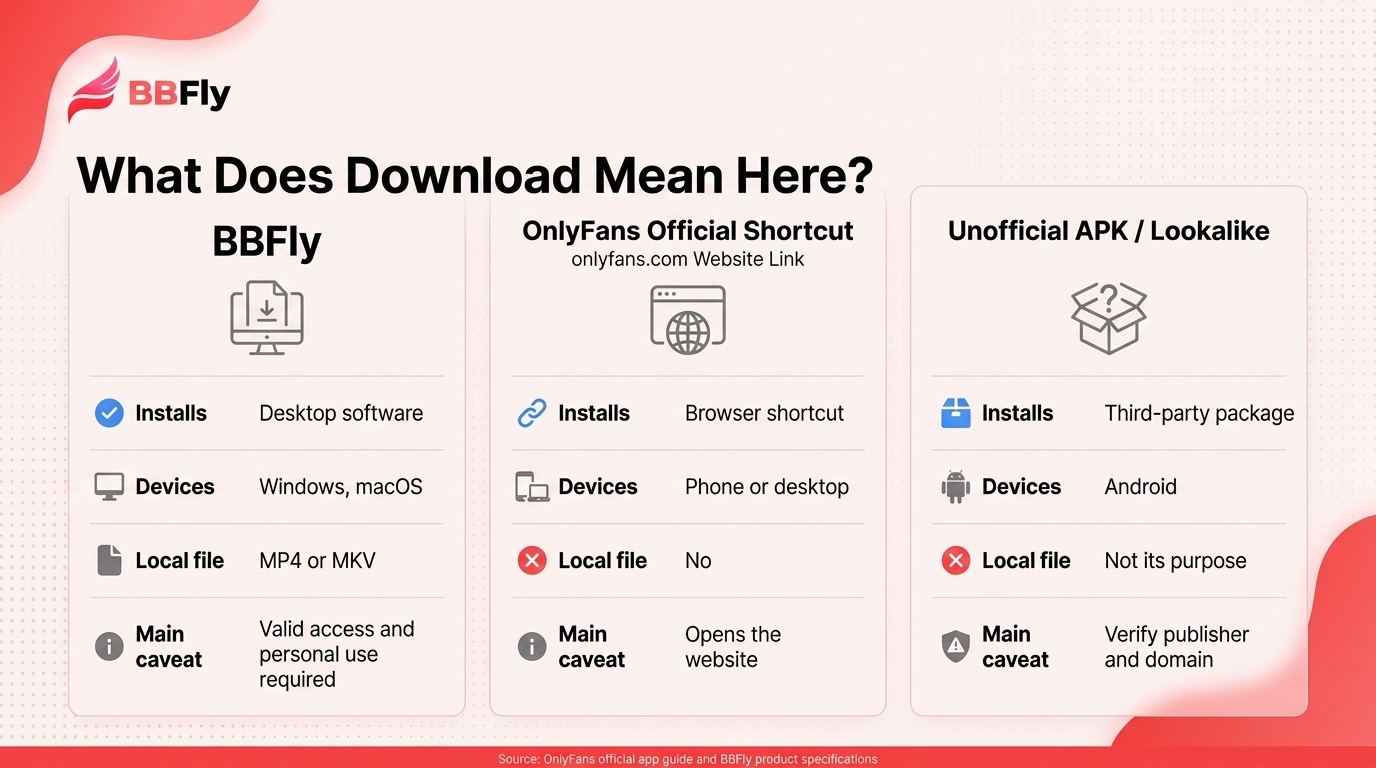
If your onlyfans app download search is really about offline video, BBFly saves lawfully accessed content as MP4 or MKV files on Windows or macOS. That is a local-file workflow, not another icon.
What "Download" Means in This Search
| Method | Installs | Devices | Local file | Main caveat |
|---|---|---|---|---|
| Official home-screen shortcut | Browser shortcut | Phone or desktop | No | Opens the website |
| Unofficial APK or lookalike | Third-party package | Android | Not its purpose | Authenticity risk |
| BBFly OnlyFans Downloader | Desktop software | Windows, macOS | MP4 or MKV | Valid access required |
Source: OnlyFans' official app guide and BBFly's official product page.
Use the shortcut for access; use a local file for offline playback and folder management.
What BBFly Is, and the Prerequisites
You need a valid account, lawful access, enough storage, and a permitted personal-use purpose.
How to Save a Video as a Local File
- Install BBFly on Windows or Mac.
- Open OnlyFans and sign in.
- Select a video available to your account.
- Choose an available resolution and MP4 or MKV.
- Start an individual or batch download.
OnlyFans Output Specs and Workflow Limits
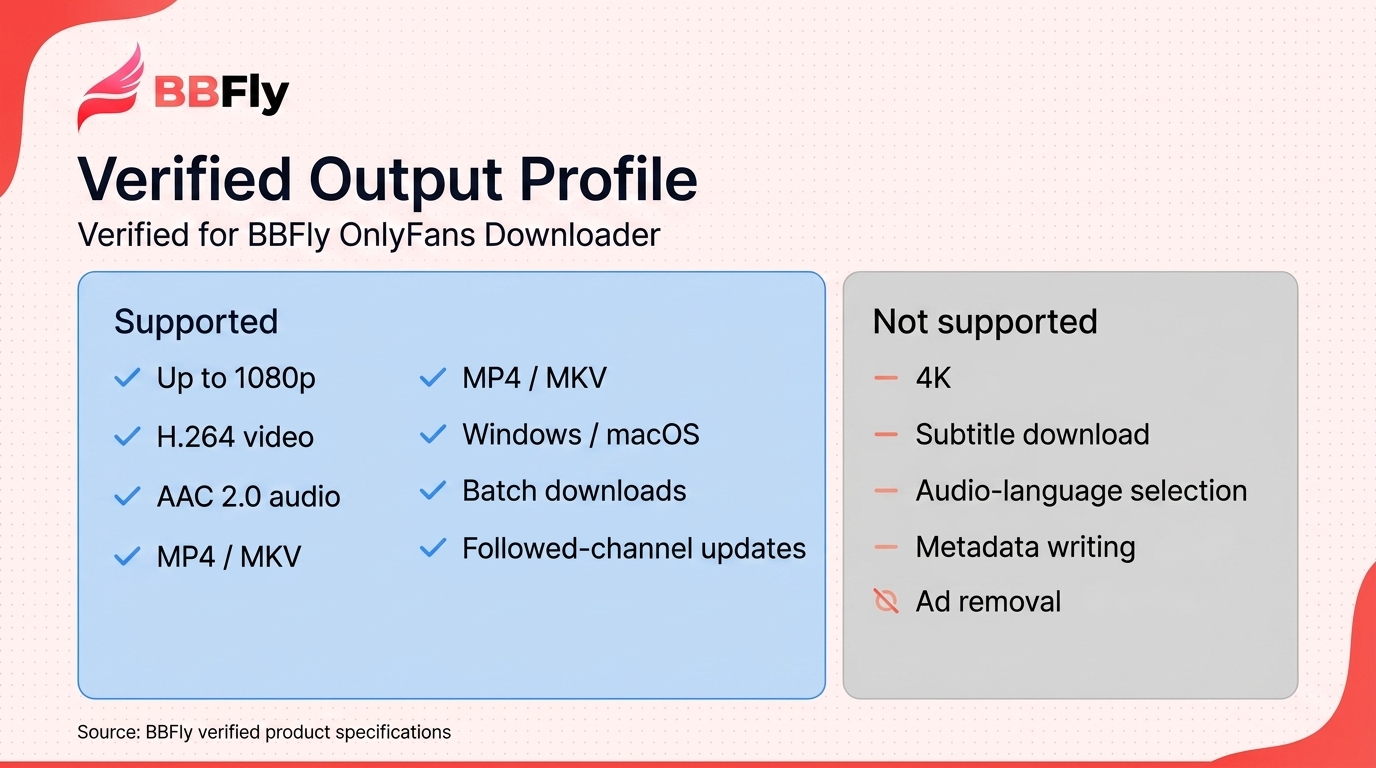
As of October 2026, BBFly supports up to 1080p H.264 video with AAC 2.0 audio in MP4 or MKV on Windows and macOS, with batch downloads and followed-channel update downloads.
For a managed library, I prefer this to real-time recording because it avoids playback waiting and another encoded copy. The tradeoff is desktop-only use.
Trial, Pricing, and Personal-Use Boundaries
As of August 2026, the 30-day trial permits three full videos per service. Paid options are $29.90 monthly for one PC, $99.90 yearly for one PC (about $8.33 per month), or $199.90 lifetime for three PCs.
A local file can remain until deleted, but that does not expand your rights or permit redistribution.
OnlyFans App Download FAQ
Do iPhone and Android Shortcuts Update Differently?
The menus differ, but the update model does not. iPhone hides Add to Home Screen inside Safari's Share controls, while Android Chrome often displays Install app more directly; both shortcuts load the current website, so neither needs a separate latest-version APK.
Can a Home-Screen Shortcut Save Videos for a Flight?
No. A shortcut still needs the website and an internet connection to stream content. A lawfully saved local file can be played offline if it is already stored on the device you are carrying or transferred to a compatible personal player before the trip.
Is It Safe to Sign In to OnlyFans Inside BBFly?
No sign-in tool deserves a blanket safety guarantee. Get the installer from BBFly's official product site, confirm that the embedded sign-in page uses the real OnlyFans domain, use a unique password, keep account security features enabled, and avoid unknown modified builds.
What If a Creator Removes a Post After I Saved the File?
A completed local file normally remains on the storage device until you delete it or the drive fails. That describes file behavior, not a new license: the platform's terms, the creator's rights, and local law still govern how you may use it. Do not repost or distribute removed material.
What Personal-Use Rules Apply to Saved OnlyFans Videos?
Use an active account to access content you are entitled to view, keep the files private, and do not upload, share, resell, or screen them publicly. An unauthorized client may raise a Terms of Service issue; redistribution or commercial exploitation raises separate copyright concerns. The legal details vary by jurisdiction. My rule is uncomplicated: use the browser shortcut when you want an icon, and consider a local file only when you have lawful access and a real offline-management need. Confusing those two jobs is what sends people toward the wrong download in the first place.

Mei Shirakawa
Mei takes download and recording tools apart and tells you where each one stops working.