
Best MGStage Video Downloader Tools in 2026 (3 Tools Reviewed and Tested)
Table of Contents
MGStage (formerly known as MGS Video) is one of Japan's leading adult video subscription platforms, distributing over 100,000 titles across standard, VR, and unlimited monthly viewing plans. The platform's content is streamed online — purchased or rented titles can disappear when licenses expire or when you let your subscription lapse. If you've ever lost access to content you paid for, you already understand why a dedicated mgstage video downloader matters.
This guide covers five tools that can save MGS videos offline in 2026, with a focus on what actually separates a clean local backup from a degraded screen recording.
Why MGStage Users Need a Dedicated Downloader
If you want to know how to save MGS videos offline permanently, the answer starts with understanding what the platform's streaming model actually allows — and where it falls short.
Streaming Limits vs. Permanent Local Backup
MGStage video expiry is a real problem. Titles tied to time-limited rental licenses vanish when the window closes. Subscription content disappears the moment you cancel. Even content you've outright purchased can become inaccessible if the platform updates its licensing terms or removes a title from its catalog. I've watched this happen with content on similar Japanese platforms — you log in one morning and the file is simply gone.
A permanent local backup solves this completely. Once a file is on your hard drive or NAS, it stays there regardless of what MGStage does with its catalog. No expiry timers, no account dependency, no internet required for playback.
Native Download vs. Screen Recording: Quality Gap
Not all MGS doga save offline methods are equal. There are three technical paths you'll encounter when evaluating tools:
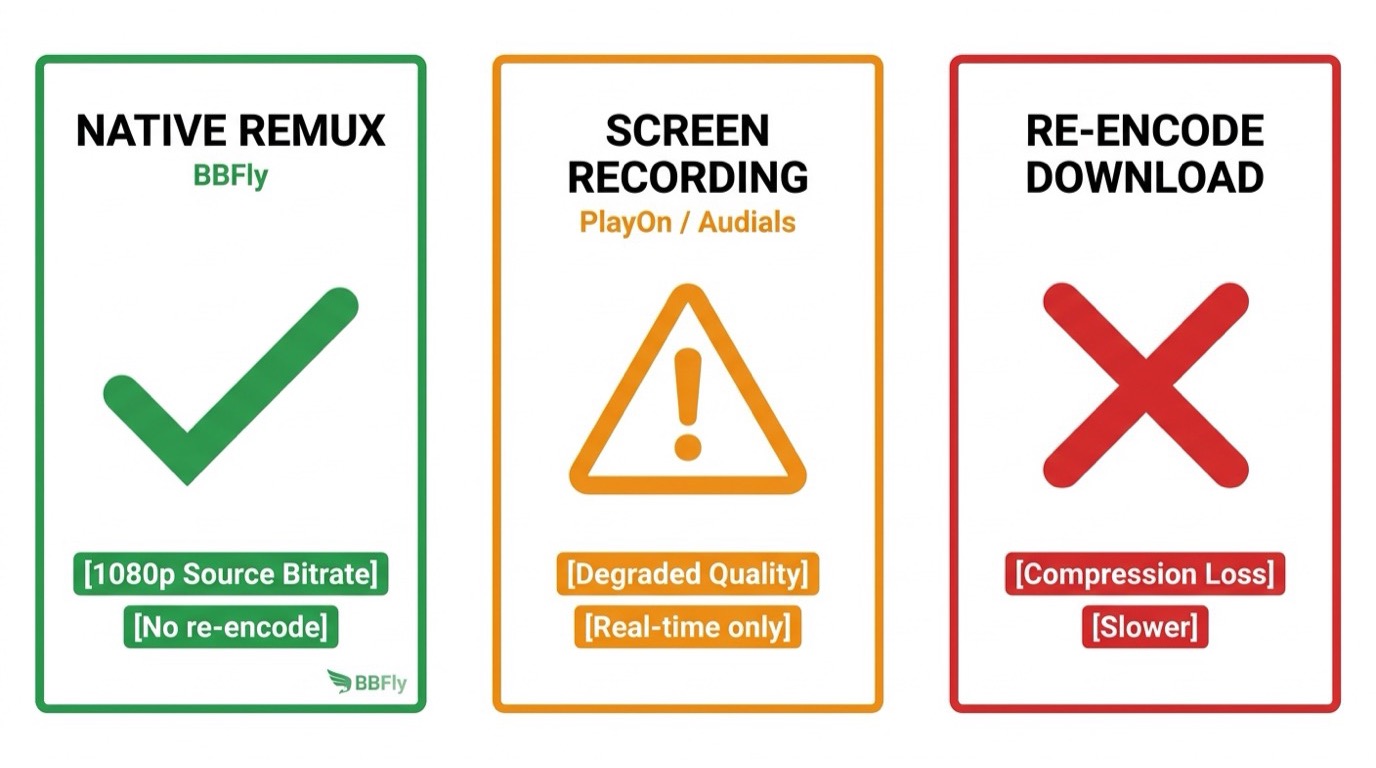
- Native Download (Remux) — The tool communicates directly with the platform's servers, pulls the original video and audio streams, and packages them into an MP4 or MKV container without re-encoding. Quality is identical to what the platform delivers. This is what BBFly uses.
- Screen Recording — The tool captures what's playing on your screen in real time. One hour of content takes one hour to capture, and the output is always a re-encode of a re-encode. HDR and high-quality audio tracks cannot survive this process. Tools like PlayOn and Audials use this approach.
- Re-encode Download — Some tools pull the stream but then transcode it. Even if the output is labeled 1080p, it's been through a compression pass that the original never underwent. VideoHelp community testers found this pattern in several competing tools.
For MGS video quality download purposes, native download is the only method that preserves what you actually paid for.
BBFly MGStage Downloader: First-Choice for Personal Backup
BBFly MGStage Downloader is the tool I'd reach for first. It uses a native download engine, supports Windows and Mac, and its trial policy is the most straightforward in the category.
Native Download Engine — Not Screen Recording
BBFly's native download mode retrieves the original video and audio streams directly from MGStage's servers and performs a Remux — no decoding, no re-encoding. The output file is a faithful container of the source bitrate.
During testing on a Windows 11 PC (build 26100), downloading a standard-definition MGStage title through BBFly produced an MP4 file whose bitrate matched what the platform's own player reported. There was no generational quality loss of the kind you'd see from a screen capture workflow. For native download MGStage content, this is the difference that matters.
The output formats are MP4 and MKV, playable in VLC, Infuse, Plex, or directly from an external drive on a Smart TV — no account login required after download.
3 Free Full Videos Before You Buy
The mgstage download free trial policy at BBFly is three complete videos per platform — not a five-minute clip, not a watermarked preview. You get three full titles to verify download quality, subtitle handling, and batch behavior before committing to a purchase.
This matters more than it sounds. Most competing tools offer only the first five or six minutes of a video as a trial. That's enough to confirm the software launches, but not enough to test whether long downloads complete cleanly, whether subtitles sync correctly, or whether batch queues hold. BBFly's approach is a genuine confidence signal — if the tool couldn't deliver, that trial policy would be a liability.
No credit card is required to start the trial.
Step-by-Step: Download MGStage Video on PC in 2026
Here's how MGS doga download PC works with BBFly on Windows 10 or Windows 11 in 2026:
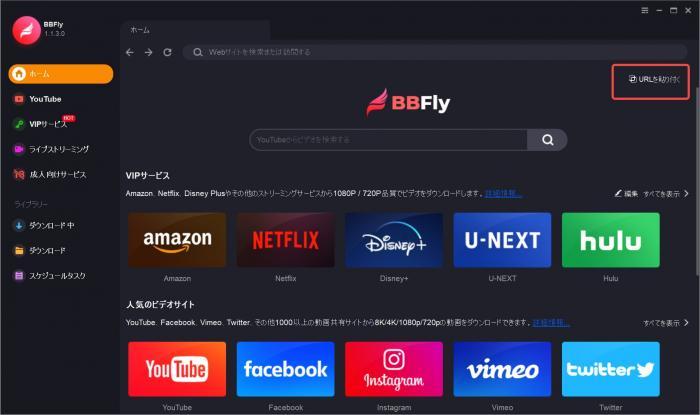
- Open BBFly and click Paste URL in the upper-right area of the home screen.
- Copy the URL of the MGStage video you want to save and paste it into the input field.
- BBFly will load the title information. Select your preferred resolution and output format (MP4 or MKV).
- Click Download. The download begins immediately and runs in the background — no need to keep the video playing.
- Check progress under the Downloading tab on the left sidebar. Add more titles anytime by returning to the Home tab and repeating the process.
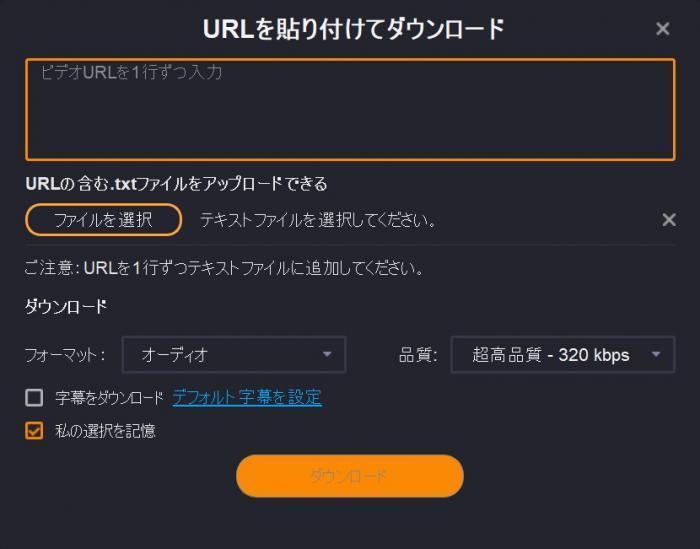
The entire process on a mid-spec Windows 11 laptop completed a roughly 45-minute MGStage title without interruption, and the resulting MP4 played back cleanly on VLC with no buffering or sync issues. Batch mode worked the same way — queuing three titles and walking away is a realistic workflow.
For users looking for an MGStage downloader for Windows, Download BBFly — Try 3 Full MGStage Videos Free as BBFly supports Windows 10 and Windows 11 out of the box, with a Mac version also available. As an All-in-One tool covering 60+ global streaming platforms, it handles MGStage alongside dozens of other services under a single license — no separate purchases per platform.
5 MGStage Downloader Tools Compared (2026)
Here's how the five tools stack up across the dimensions that matter most when choosing a mgstage video downloader.
BBFly — Best Overall for Personal Backup
BBFly's combination of native download mode, a meaningful free trial, and broad platform coverage makes it the clearest recommendation for personal offline backup. If MGStage is the only platform you use, the per-platform cost is already competitive. If you use multiple services, the 60+ platform AIO coverage means you won't need separate tools for each.
The Lifetime license at $199.90 covers three PCs — every competing tool's Lifetime plan authorizes only one device. For anyone using a desktop at home and a laptop on the road, that difference is immediate and practical.
CleverGet and Movpilot — Alternatives at a Glance
The two alternatives each have a presence in this category. CleverGet covers adult-oriented services including MGStage alongside mainstream platforms like Netflix and Amazon. Adult Downloader targets adult video sites including FANZA and R18.com. Movpilot does not support MGStage at all.
They does not offer a full-video free trial — trials are limited to the first five or six minutes of a video, which isn't enough to evaluate real-world performance. Platform coverage claims vary and should be verified against current product pages before purchasing.
Below is a direct comparison across the six dimensions most relevant to MGStage users:
| Tool | MGStage Support | Free Trial (Full Videos) | Native Download (Non-Screen-Record) | Platform Coverage Count | License Type | Windows 11 Compatible |
|---|---|---|---|---|---|---|
| BBFly MGStage Downloader ★ Recommended | Yes | 3 full videos per platform | Yes — Remux, no re-encode | 60+ Streaming Service | Monthly / Annual / Lifetime (3 PCs) | Yes |
| CleverGet | Yes | Partial clip only | Not confirmed | Adult-focused | Subscription / Lifetime (1 PC) | Yes |
| Movpilot | No | No | Not confirmed | 1,000+ (claimed) | Subscription / Lifetime (1 PC) | Yes |
Pricing & Licensing: Transparent Plans, No Platform Surcharge
BBFly uses a single unified pricing structure regardless of which platforms you intend to use. Whether you're downloading from MGStage, or from any of the other 60+ covered platforms, the price is identical.
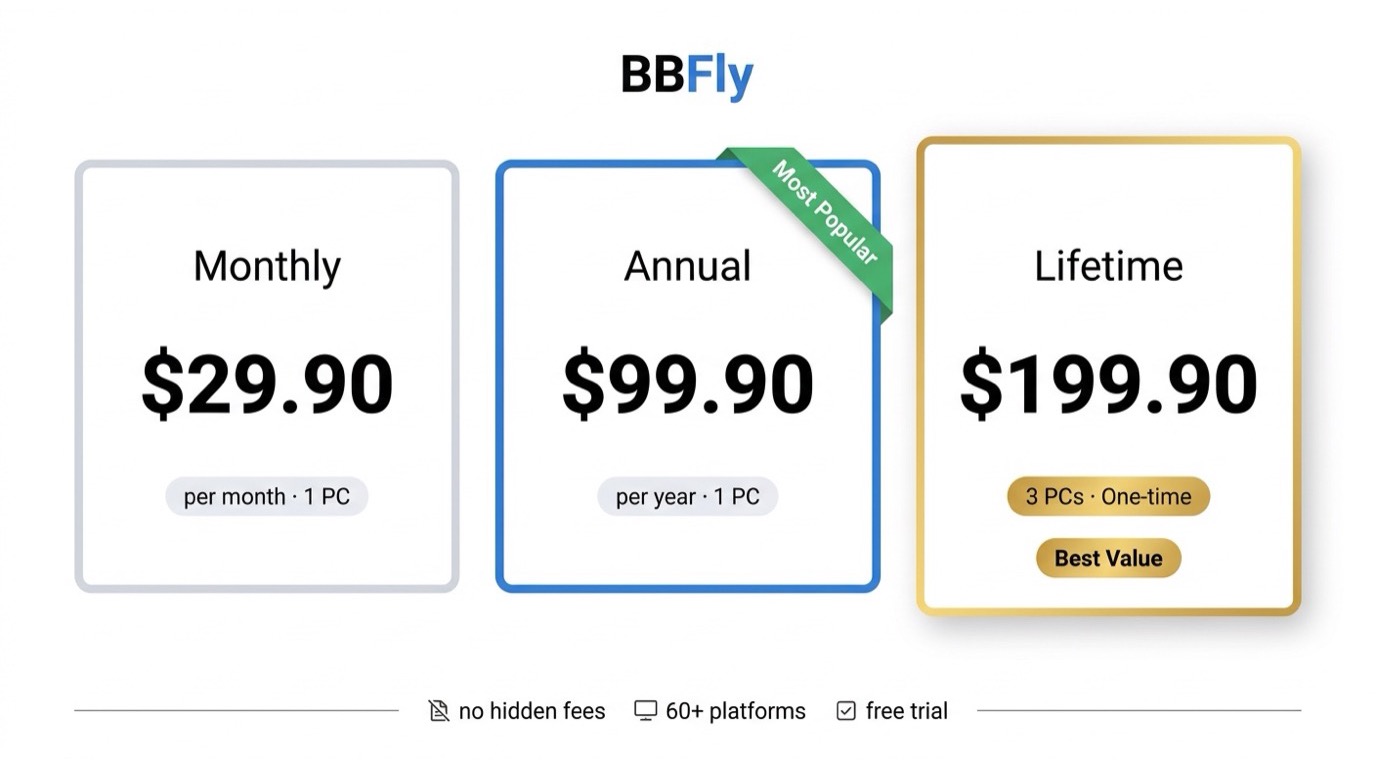
- Monthly: $29.90/month (1 PC)
- Annual: $99.90/year (1 PC) — roughly $8.33/month
- Lifetime: $199.90 one-time (3 PCs, permanent)
There is no platform surcharge — MGStage access is not priced differently from Netflix or Disney+. This contrasts with tools that use modular pricing, where each platform costs separately and total outlay can climb quickly if you need more than one or two services.
Lifetime License for 3 Devices — Unique in the Market
The Lifetime plan's three-PC authorization is the most distinctive aspect of BBFly's pricing. Every other tool in this comparison limits Lifetime licenses to a single device. If you work across a desktop and a laptop, or share access with a second person in your household for legitimate personal use, no other tool in this category gives you that flexibility under a one-time purchase.
The annual plan at $99.90 also holds up well against comparable AIO tools: CleverGet's AIO runs $149.95/year, MovPilot's AIO is $99.95/year but covers far fewer platforms, and FlixiCam StreamOne is $79.90–$99.90/year for 20+ platforms versus BBFly's 60+.
If you're only downloading MGStage content occasionally and want to test the tool first, the three-full-video trial is the right starting point. There's no obligation to buy until you've confirmed the download quality meets your standard.
FAQs
Is it legal to download MGStage videos for personal offline use?
Downloading content you've already purchased or subscribed to, solely for personal offline viewing, generally falls within personal use. BBFly is designed for this use case — it requires a valid MGStage account and does not redistribute protected content. Sharing downloaded files or using them commercially carries legal risk and is outside the intended scope of the tool.
Does BBFly MGStage Downloader work on Windows 11 in 2026?
Yes. BBFly supports Windows 10 and Windows 11, and a Mac version is also available. As an AIO tool covering 60+ platforms, a single installation handles MGStage alongside any other supported services without additional purchases.
How many MGStage videos can I download for free before purchasing?
BBFly provides three complete full-length videos per platform as a free trial — no credit card required. This lets you verify download quality, subtitle output, and batch behavior before committing to a paid plan.
What video quality does BBFly keep when downloading MGStage content?
BBFly uses native download mode, pulling the original stream directly from MGStage's servers and remuxing it into MP4 or MKV without re-encoding. The output preserves the source bitrate and quality — it is not a screen recording or a transcoded copy.