
HBO Max Download Limits in 2026: Caps, Expiry, and a Real Fix
Table of Contents
You open the app three days after downloading a movie for the flight, and it's already expired.
On HBO Max, Basic with Ads allows 0 downloads, Standard caps at 30 titles per account, and Ultimate at 100. Anything you press play on expires 48 hours later, with the countdown running even when the app is closed; unwatched downloads disappear after 30 days. Official downloads run only on iOS, Android, and Fire OS. There's no Windows or Mac client.
The plan caps are the spec everyone quotes; the expiry clock is the spec that bites. You queue something for a long-haul commute, three days later the file is gone, no warning, no in-app notice. I've watched households fall into that pattern more than once, and it's the reason I now treat HBO Max's offline mode as a temporary cache for the next 48 hours, never a personal library.
HBO Max Download Limits by Plan and the 48-Hour Expiry Clock
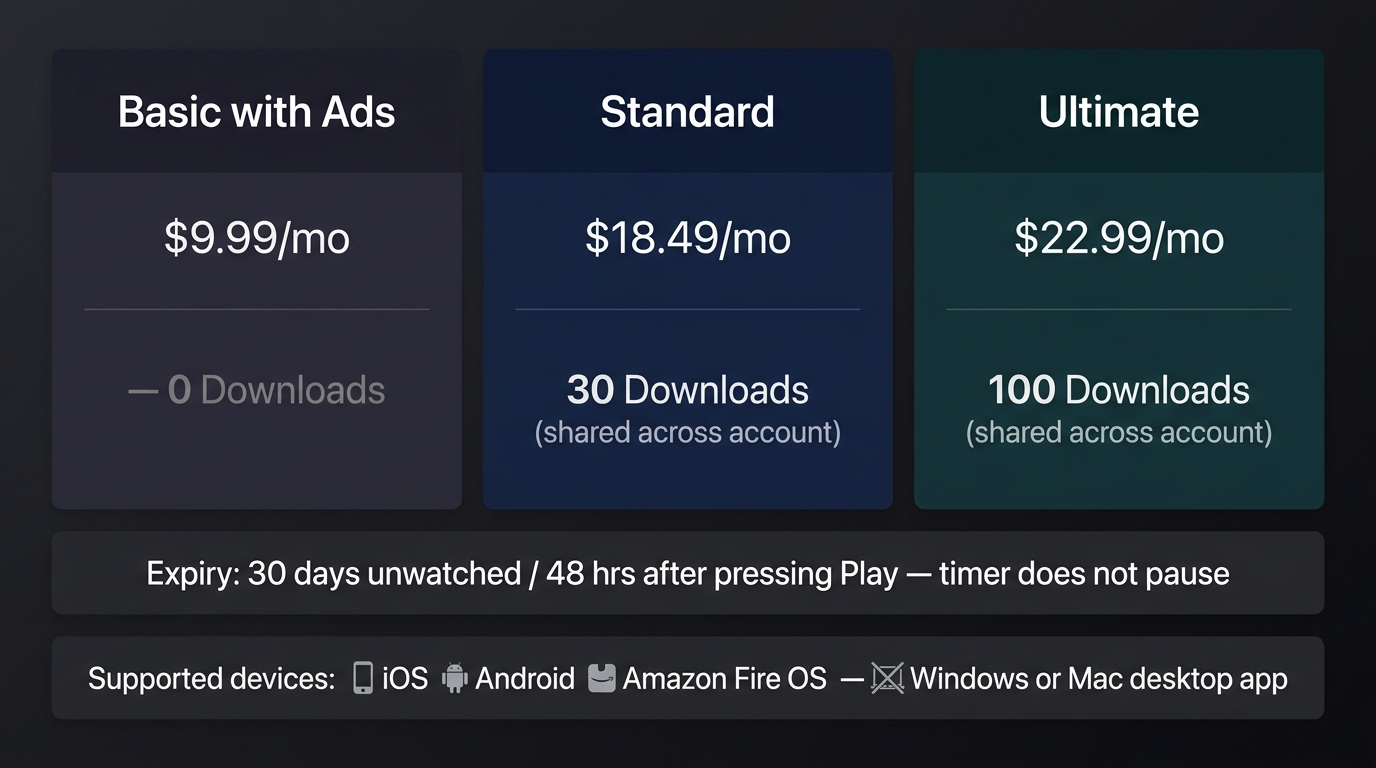
Each plan has its own download cap, and that cap is shared across every device on the account: Basic with Ads gets 0, Standard 30 titles, Ultimate 100. Once you press play on a downloaded title, you have 48 hours before it expires, and the countdown runs whether the app is open or closed. Any download you never play disappears 30 days after you saved it.
HBO Max Download Limits by Plan (as of June 2026)
| Plan | Downloads per account | Monthly price (USD) |
|---|---|---|
| Basic with Ads | 0 (downloads not supported) | $9.99 |
| Standard | 30, shared across the account | $18.49 |
| Ultimate | 100, shared across the account | $22.99 |
Expiry and supported devices
| Rule | Detail |
|---|---|
| Unwatched downloads | Expire 30 days after download |
| After pressing play | 48 hours; the timer keeps running with the app closed |
| Supported devices | iOS, Android, Amazon Fire OS only (no Windows or Mac desktop app) |
Source: Max's official Help Center, as of June 2026. Specs change; confirm current figures before relying on them.
The Plan Tiers: Basic with Ads (0), Standard (30), Ultimate (100)
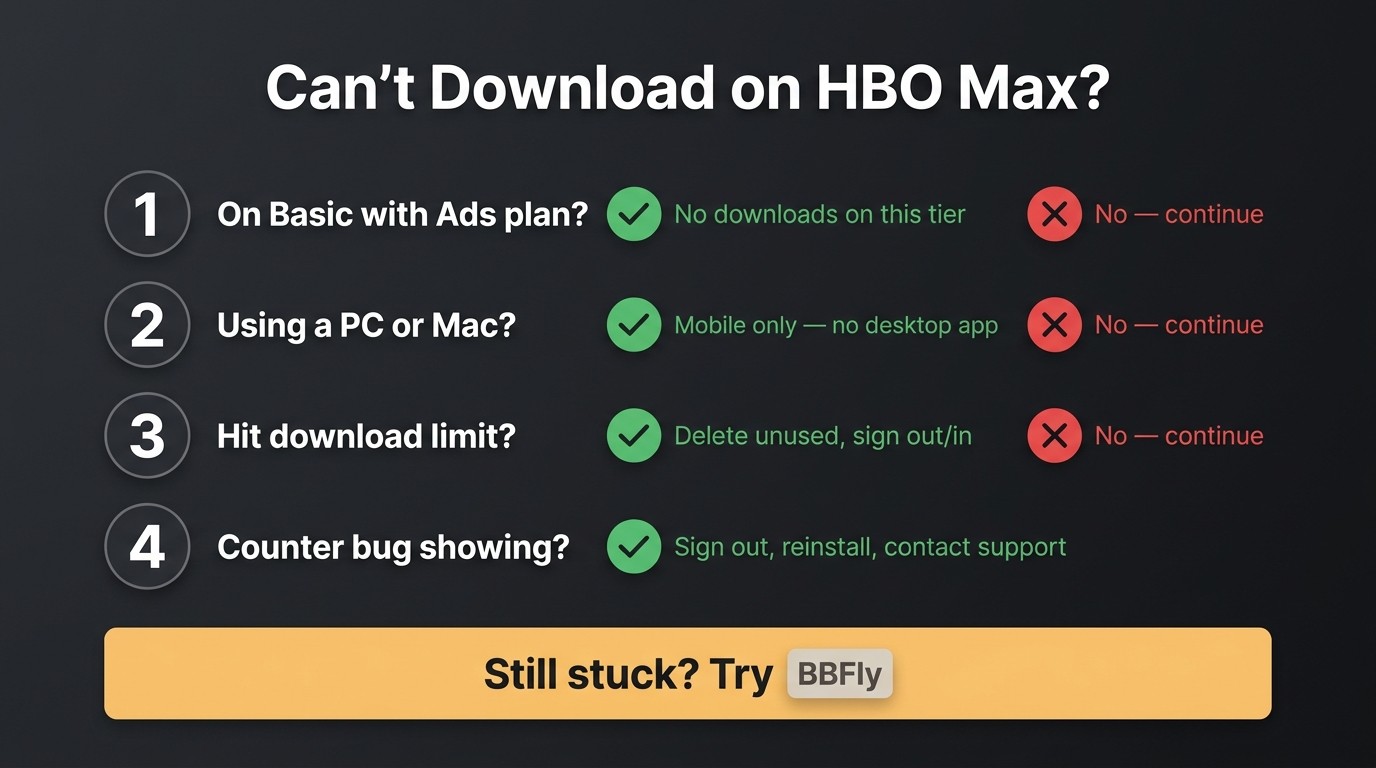
The first surprise is that Basic with Ads, the cheapest paid tier, has no offline mode at all. The download button isn't grayed out; it isn't there. That tier monetizes streams, not stored files.
Standard at $18.49 unlocks 30 titles. Ultimate at $22.99 raises the ceiling to 100. On both, the cap is account-wide, not per profile. Two phones, a tablet, and a Fire HD all draw from the same pool, which is the part that catches families off guard. A household of three queueing weekend movies can clear half of Standard's 30 titles before Friday night dinner, and the next download button greys out without any explanation of which device used up the slot.
The 30-Day and 48-Hour Expiry Rules (and Why the Clock Doesn't Pause)
30 titles sounds fine until a household of three starts loading them on a Friday night. The harder rule, though, is the expiry clock that activates the moment someone presses play.
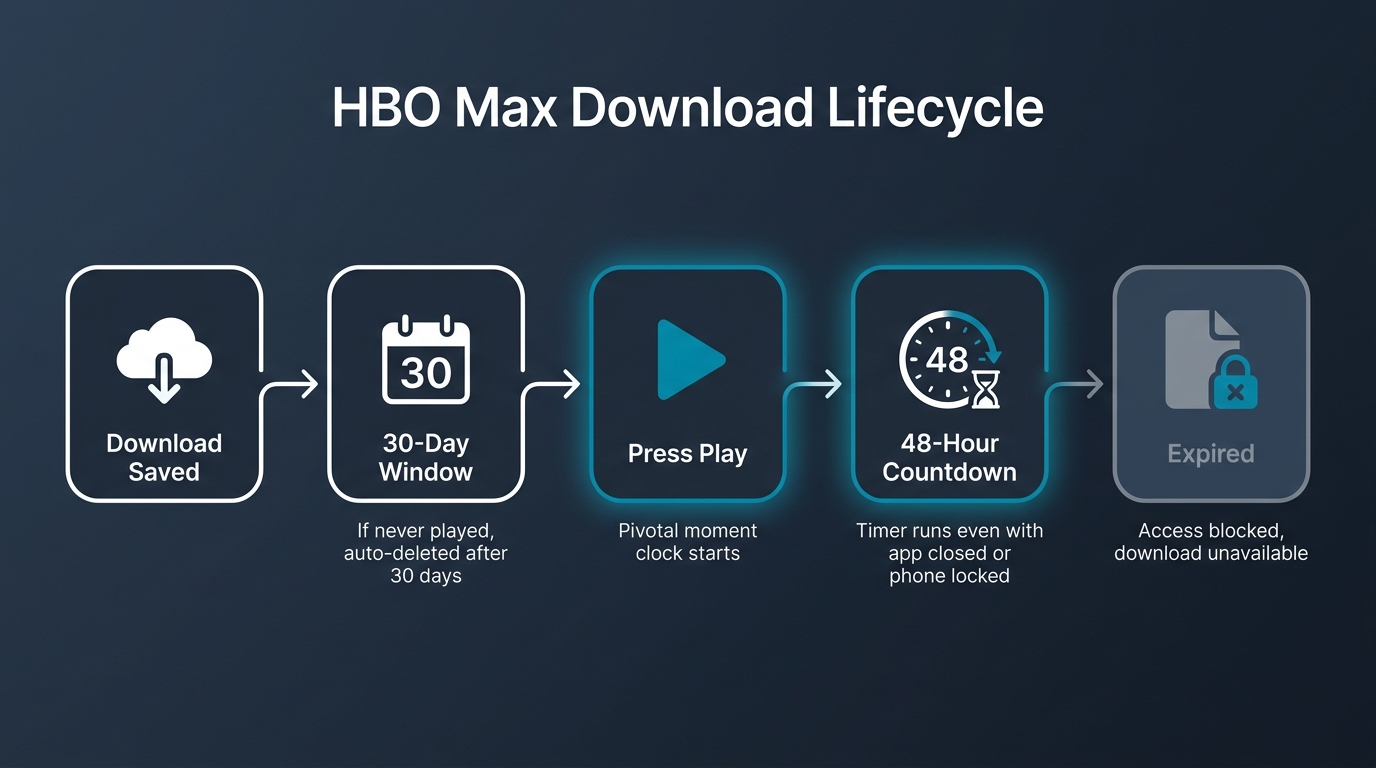
A download you never open sits there for 30 days, then deletes itself. The 48-hour rule is the one I see surprise people. Once that timer starts, it doesn't care about the app's state. Quitting back to the home screen, locking the phone, pausing the movie, none of it stops the countdown. A three-hour film you started Sunday evening is at risk by Tuesday evening even if you only watched ten minutes of it.
I've stopped recommending HBO Max downloads for week-long trips because of that one rule. The cap I can plan around. The clock I can't.
HBO Max Device Limit and Why There's No Desktop App for PC or Mac
No, you can't download HBO Max on a laptop. HBO Max has no desktop app, for Windows or Mac. The download feature lives only inside the iOS, Android, and Amazon Fire OS apps. Concurrent-stream limits sit around two to three at a time depending on plan (confirm the current number on Max's Help Center), and the account also tracks individual devices, so an old phone you replaced last year may still be quietly holding a slot.
How Many Devices and Concurrent Streams an HBO Max Account Allows
As of June 2026 most readers see two to three concurrent streams depending on the tier; the exact figure is worth confirming on Max's Help Center because the platform has adjusted it more than once. The more interesting number for offline-minded users is the device-slot counter, which ticks up every time you sign in on something new.
Phones drive most of the surprise. Replace a handset, sign in on the new one, and the old device still appears on your account list until you explicitly remove it. After several upgrades, new devices end up occupying slots and the limit hits earlier than expected. That isn't a bug; it's how the device list works. The fix is mundane: open the account settings, drop the devices you no longer use, and sign back in on the active one.
Why There's No HBO Max Desktop App for Windows or Mac
This is the part most write-ups bury. The lack of desktop downloads isn't a deliberate restriction inside an existing PC app. There is no PC app at all to put downloads into.
A user posted on Microsoft's Q&A site, "I want to download the HBO Max app on my older HP laptop, but the app is not available on the list." That's accurate. The Microsoft Store doesn't list one; macOS doesn't have one either. On a desktop you watch Max in a browser, full stop.
That choice, official download path on mobile only and no PC client at all, is why "how do I save Max on my laptop?" is a question with no in-platform answer. Which is what the next section is for.
Save HBO Max Titles as a Permanent Local MP4 with BBFly
Please note: Third-party downloaders may sit outside HBO Max's Terms of Use. Keep any downloads for personal, offline viewing of content you subscribe to, and don't redistribute. Where an official path exists on your device, that's still the safer route.
For a PC or Mac user with an active HBO Max subscription, the practical option is a native-download desktop tool that saves a title as a plain MP4 or MKV on your drive. BBFly HBO Max Downloader is the one I reach for.
After watching a re-encoded copy lose color depth and the 48-hour clock kill a half-finished film, my bar for a desktop tool is simple: keep the source codec, write a plain file, and stop calling recording "downloading." BBFly takes the native-download path, saving the original 1080p or 4K stream as MP4 or MKV, with HDR10 / Dolby Vision passed through where the source carries them and Dolby Atmos audio preserved. The output sits on your drive (Plex library, external SSD, whatever you use) without an expiry timer. Pricing is $99.90 yearly or a $199.90 lifetime license across three PCs. Not for an iPhone-only viewer, and not a route around paying Max.
HBO Max Download Limit FAQ
A handful of HBO Max download questions get asked again and again that the in-app UI never answers head-on. Direct answers first, one line of context after.
Can you download HBO Max content on a laptop or desktop computer?
Not through the official app. HBO Max's download feature runs only on iOS, Android, and Fire OS. On Windows or Mac you stream in a browser; there's no offline mode for desktop, which is why any desktop solution sits outside Max itself. The section above covers one such desktop option for paid subscribers.
Where can I check what HBO Max allows after my subscription ends?
Playback through the Max app requires an active subscription; when the subscription ends, the app stops streaming. For the binding rules on what you may do with content, the authority is Max's official Terms of Use plus your local copyright law. Don't treat any explainer (this one included) as a substitute for those documents.
Why does HBO Max say "Download Limit Reached" when I haven't reached it?
A known intermittent bug. The app's local download counter can desync from the server. Usual checks: delete titles you no longer need in the Downloads tab, sign out and back in to refresh the device list, then reinstall as a last resort. Max support can reset the counter server-side if those don't clear it.
Does Amazon Fire tablet support HBO Max downloads?
Yes. Fire OS is one of the three official download platforms, alongside iOS and Android. The same plan caps and 30-day / 48-hour expiry rules apply, and the title counter is shared with the other signed-in mobile devices on the account, not a separate Fire-only pool.
Is it safe to sign in to HBO Max inside a third-party downloader?
Depends on the tool. With an established native-download tool from a named vendor, you sign in with the same account you use for your active Max subscription, the same way you would on any new device. The caution is for no-name screen recorders with no clear vendor identity. Prefer reputable, identifiable software, the same standard you'd apply to any sign-in.
How does HBO Max's download cap compare to Netflix and Disney+?
HBO Max sits at the top for strictness: Basic with Ads gets 0 downloads, and there's no desktop app at all. Netflix and Disney+ both allow downloads on lower paid tiers with looser device counting, and both ship desktop clients. Verify current numbers on each platform's Help Center.
Can I keep HBO Max downloads from expiring?
Inside the official app, no. The 30-day and 48-hour timers are policy, not a setting you can change. Outside the app, some subscribers keep a personal-use offline MP4 of content they pay for using a native-download desktop tool (covered above), within personal-use limits only.