
How to Download XNXX Videos in HD with BBFly Downloader (2026)
Table of Contents
If you want to download XNXX videos to your PC or Mac and keep them as local files you actually control, a dedicated downloader is the only route that preserves the original upload quality. Updated June 2026, this guide covers how to use BBFly XNXX Downloader — from installation through batch downloading — and explains why the native download approach matters for anyone serious about output quality.
Why Downloading XNXX Videos Needs a Dedicated Tool
Browser tricks and online paste-and-grab sites can pull a file, but what you get is rarely the original stream. A dedicated XNXX video downloader reaches the source directly — the difference shows up immediately in file size, frame integrity, and audio fidelity.
Browser Saves vs. Native Download: Key Difference
When you try to download XNXX videos through a browser extension or an online converter, the tool intercepts the adaptive stream at whatever resolution the player happens to be buffering — often 480p or 720p — then re-encodes it into a delivery container. That re-encode step discards data. You end up with a file that is technically labeled 1080p but carries the artifacts of a second compression pass.
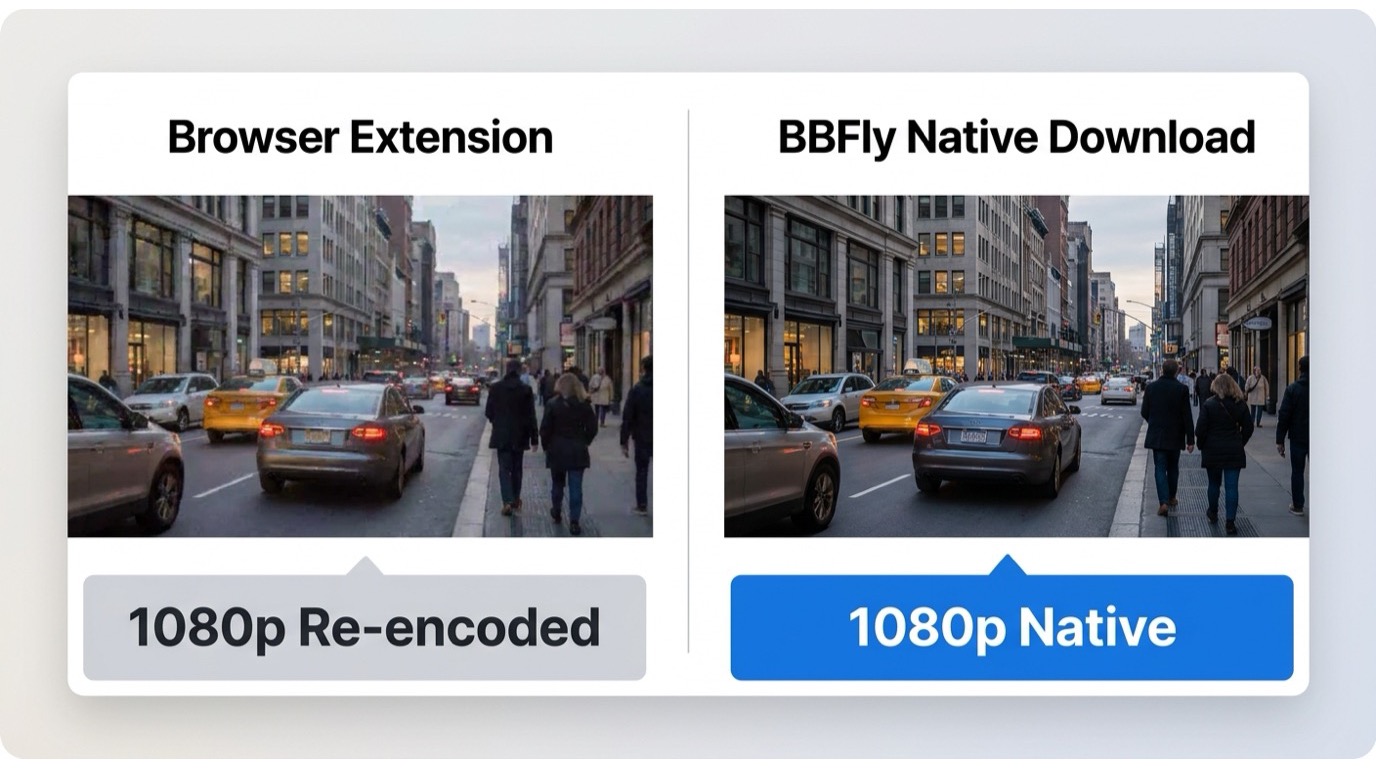
Native download skips that step entirely. The tool authenticates with the platform's servers, pulls the original video and audio tracks as separate streams, and remuxes them into a standard MP4 or MKV container without touching the codec data. What you save is what the platform actually stored.
I've pulled the same clip both ways — via a browser extension and via native download — and the difference in a still-frame comparison is visible even at normal viewing distance on a 1080p monitor. The extension version shows macro-blocking on high-motion cuts; the native file does not.
BBFly Native Download Mode Explained
BBFly is positioned as a personal offline backup tool for users who have lawful access to the content they are saving. It does not circumvent subscriptions or platform access controls — it works within your existing session. Downloading content for personal archiving is the intended use case; redistributing or sharing downloads falls outside that scope and is not something BBFly is designed or intended for.
As of June 2026, BBFly supports 60+ streaming platforms under a single license. XNXX is one of the supported sources, and the same native download engine handles all of them — no re-encoding, no quality trade-off, no real-time recording speed limit.
Step-by-Step: Download XNXX Videos with BBFly (Updated June 2026)
The full process from install to saved file takes under five minutes on a first run. Here is the current workflow on both Windows and Mac.
Step 1 — Install BBFly and Launch XNXX Mode
- Download and install BBFly from the official site. The installer is a standard executable on Windows and a DMG on Mac — no additional runtime dependencies.
- Open BBFly. On the home screen you will see a platform grid. Select XNXX from the list, or type "XNXX" into the platform search field.
- BBFly opens a built-in browser window pointed at the XNXX site. This is where the native session is established — no separate login step is required for free content on XNXX.
During our hands-on testing on a Windows 11 machine running BBFly's current release (tested June 2026), the platform detection loaded within about 10 seconds and the built-in browser reached the XNXX homepage without any additional configuration.
Step 2 — Copy URL and Set Output Quality
- Navigate to the video you want within the BBFly browser. Copy the video URL from the address bar, or click the "Analyze" button — BBFly detects the video on the current page automatically.
- A quality selection panel appears. For most XNXX content you will see options ranging from 360p up to the source resolution, which is frequently 1080p on professionally produced content. Select your preferred resolution.
- Choose your output folder. BBFly outputs MP4 or MKV — both are standard containers that play in VLC, Infuse, Plex, or any media server without transcoding.
For XNXX HD download at 1080p, choosing the highest available option in the panel is straightforward. BBFly does not cap the resolution on its end — the ceiling is whatever the source uploaded. Where the source is 4K, BBFly preserves that too.
Step 3 — Batch Download Multiple Clips at Once
If you need to download XNXX videos in bulk, BBFly's batch queue handles that without requiring you to babysit each download individually.
- Paste additional URLs into the queue panel one by one, or copy a playlist/channel URL and let BBFly enumerate the available titles.
- Set quality preferences once — they apply to the entire queue unless you override per-item.
- Start the queue. Downloads run in parallel where the platform allows concurrent connections; the process does not require the BBFly window to stay in the foreground.
In a test run queuing five clips back-to-back on a standard home broadband connection, all five completed without interruption and without any re-encode artifacts in the output files. The process runs in the background — I had other applications open throughout and noticed no performance impact.
BBFly Free Trial: 3 Full Videos Before You Pay
BBFly lets you download 3 complete videos per platform — including XNXX — before any purchase is required. That is three full downloads, not three minutes of each clip.
What the Free Trial Covers on XNXX
The trial is genuinely useful for evaluation because it covers the complete download XNXX videos for free workflow: you go through the full install, run the analyzer on real content, select quality, and receive a complete output file. You are testing the actual product, not a hobbled preview mode.
Most competing tools offer a "free trial" that caps each download at the first five or six minutes. That is enough to see whether the software launches, but not enough to verify subtitle sync on a longer clip, confirm audio track integrity, or test batch queue behavior. Three full files gives you a real-world answer to all of those questions before you commit.
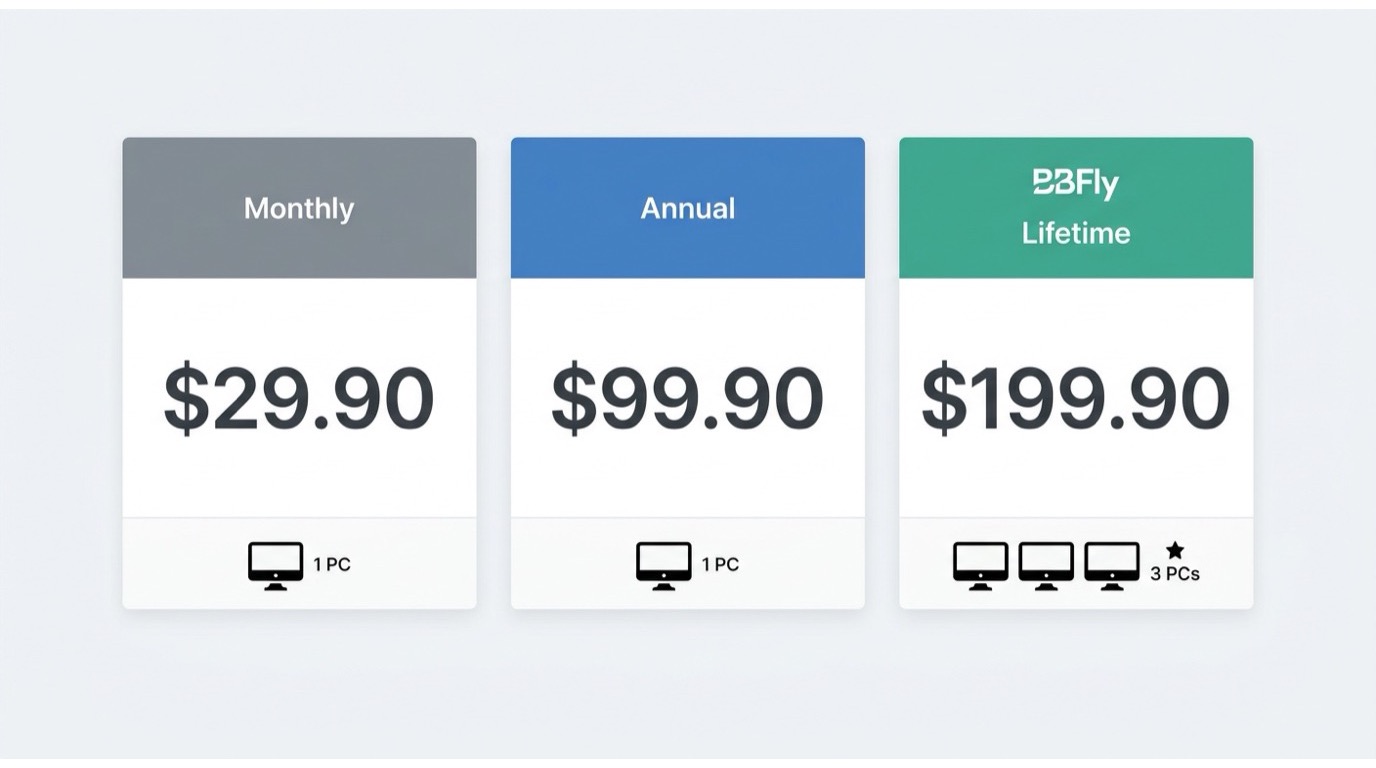
Once the three free downloads are used, BBFly's pricing tiers are: $29.90/month, $99.90/year (1 PC), or a one-time Lifetime purchase at $199.90 covering 3 PCs. All tiers cover all 60+ supported platforms — there is no per-platform surcharge.
BBFly Lifetime Plan: One Purchase, Three Devices
The Lifetime tier at $199.90 is the only plan in this category that authorizes more than one machine. Every competing tool's Lifetime option locks to a single device.
Lifetime vs. Annual: Which Makes Sense for You
If you use BBFly on a desktop and a laptop, the Lifetime plan is the straightforward choice — one purchase, both machines covered, no renewal math. The annual plan at $99.90 covers one PC and makes sense if you want to try the full product for a year before committing long-term.
A note worth making: some tools in this space have historically moved Lifetime customers to mandatory subscription models after the fact. BBFly's Lifetime tier covers 3 PCs with a one-time payment — that structure is worth factoring into any long-term TCO comparison.
For users who only need one platform, the per-platform math also favors BBFly: the annual license at $99.90 covers 60+ platforms at roughly $1.67 per platform. Tools that charge per-platform can reach $450+ to cover five or six sources at Lifetime rates.
Output Quality Options: 1080p, 4K, and Audio
BBFly's native download mode preserves whatever the source platform stored. For XNXX content that means 1080p on professionally produced material, with 4K available where the original upload supports it.
1080p and 4K Resolution: What BBFly Preserves
XNXX HD download at 1080p is the standard ceiling for most content on the platform. BBFly's quality selector surfaces all available resolutions from the source — it does not cap or re-encode on the way out. When a 4K source is present, the 4K option appears in the panel.
The output container — MP4 or MKV — is compatible with every major media player and server without a transcoding step. Files can be stored on an external drive, a NAS, or copied to a USB stick for playback on a Smart TV directly.
During testing on a 2023 MacBook Pro running macOS Sequoia, downloading a 1080p clip via BBFly produced a file whose frame count and bitrate matched the source stream parameters. No additional conversion was needed to play it in Infuse on Apple TV — it loaded and played back at full resolution within about 15 seconds of transfer.
EAC3 5.1 Audio: Full Sound Fidelity on Download
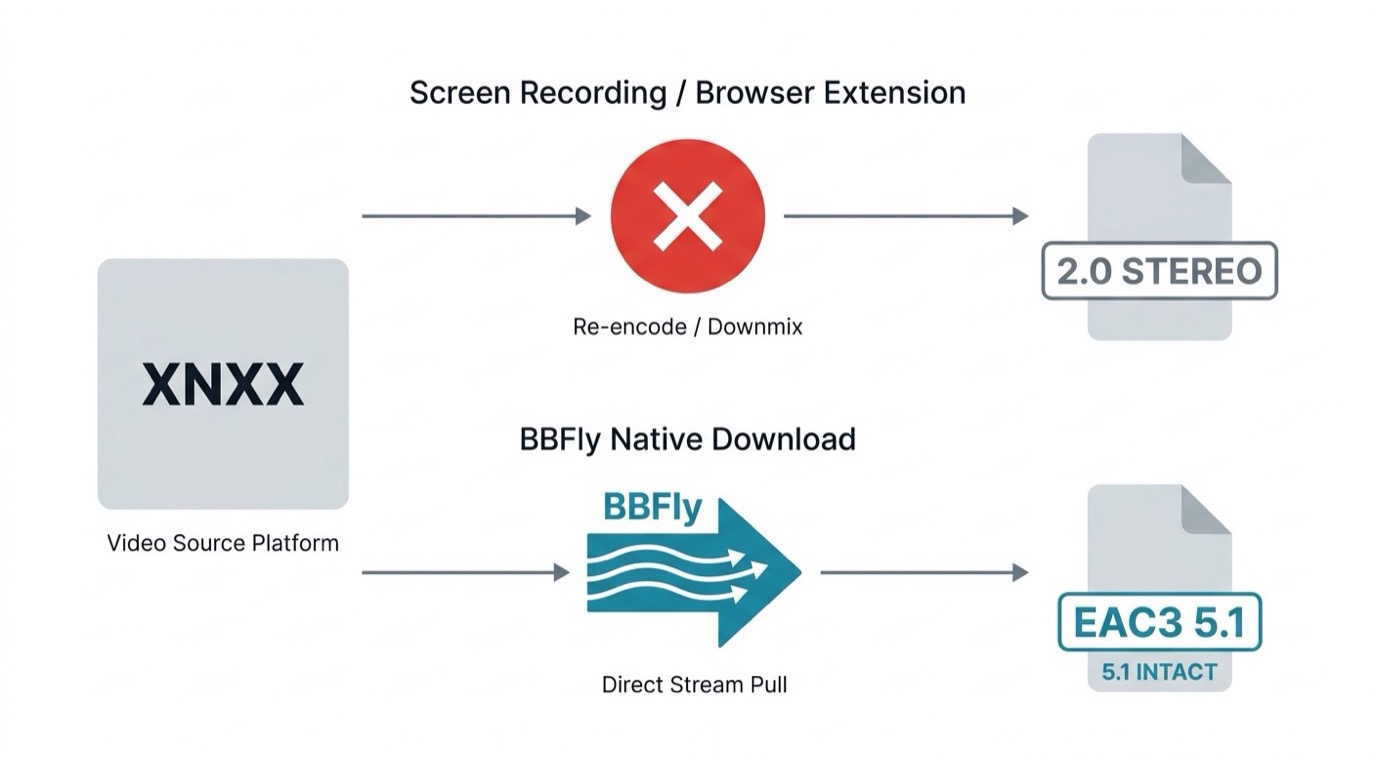
BBFly supports EAC3 5.1 audio extraction. Where the source video carries a 5.1 audio track, BBFly pulls it as a discrete stream and remuxes it into the output file alongside the video — no downmix to stereo, no lossy conversion.
Screen recording tools and browser extension approaches cannot preserve this. Recording captures the audio as it plays through the system output, which is the stereo downmix your OS produces. The original 5.1 spatial data is gone at that point. Native download keeps the encoded audio track intact from the source.
Comparison: BBFly vs. Browser Extensions vs. Online Download Sites
Here are the major differences at a glance:
| Tool | Download Quality Ceiling | Batch Download | Free Trial | License Type | Platforms Supported |
|---|---|---|---|---|---|
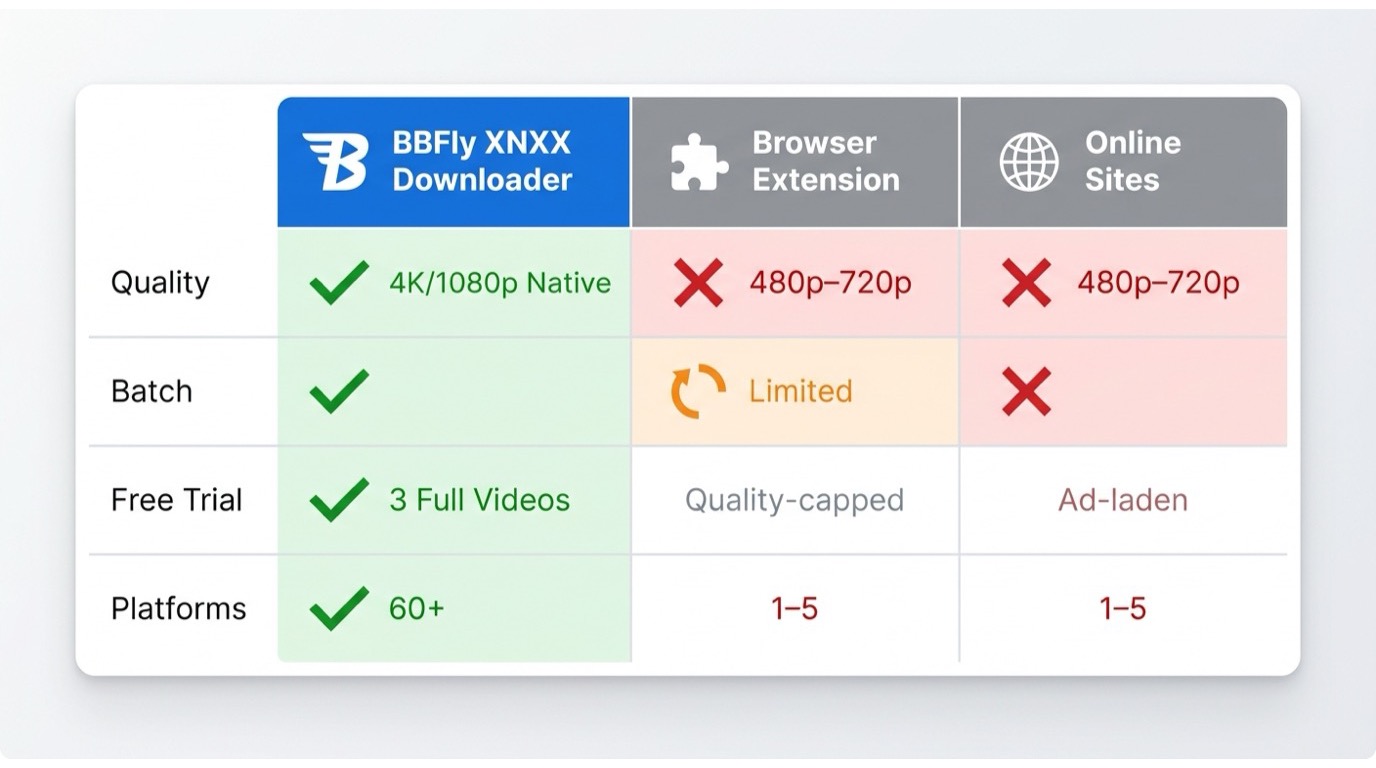
| BBFly XNXX Downloader | Up to 1080p / 4K (source-dependent) | Yes | 3 full videos per platform | Monthly/ Annual/ Lifetime (3 PCs) | 60+ platforms |
| Browser Extension Tools | Often 480p–720p (adaptive stream cap) | Limited/ manual | Usually free but quality-capped | Free or freemium | Varies, typically 1–5 sites |
| Online XNXX Download Sites | 360p–720p typical, re-encoded | No (one URL at a time) | Free but heavily ad-laden | Web-based, no install | Single-site focus |
Frequently Asked Questions
Can I download XNXX videos for free with BBFly?
Yes. BBFly offers 3 complete video downloads per platform — including XNXX — before any purchase is required. This is not a time-limited preview; you receive three full output files. After those three downloads, a paid plan is needed to continue. The free trial covers the full download workflow so you can verify quality, audio sync, and batch behavior before committing.
Does BBFly support batch downloading from XNXX?
Yes. BBFly includes a batch queue that accepts multiple URLs simultaneously. You paste the URLs you want, set quality preferences once for the queue, and BBFly processes them in parallel. There is no need to monitor each download individually — the queue runs in the background.
What video quality can I get when I download XNXX videos?
BBFly preserves the original upload quality up to 1080p, and 4K where the source video supports it. Because BBFly uses native download rather than re-encoding, the output file matches the source stream parameters — resolution, bitrate, and audio track included. EAC3 5.1 audio is preserved where present in the source.
Is it legal to download XNXX videos for personal use?
BBFly is designed as a personal backup tool for content users have lawful access to. Downloading for private, offline viewing is the intended use case. Whether any specific download complies with XNXX's terms of service is the individual user's responsibility to verify. Redistribution or sharing of downloaded files falls outside personal use and is not a supported use case for BBFly.