
How to Download HBO Max on Samsung TV: 2026 Install + Fixes
Table of Contents
You pay for HBO, the icon on your Samsung TV vanishes, and the store keeps showing the old HBO Max listing as "removed."
The short version is: HBO Max was renamed to Max in 2023, and the app runs on Samsung Tizen TVs from 2016 onward. Open Smart Hub → Apps, search Max (not HBO Max), tap Install, then sign in with the 6-character code at hbomax.com/tvsignin. Pre-2016 Samsung Tizen sets cannot install it at all.
I've watched this story repeat on the Samsung Community boards for two years. The pattern is the same every week: someone pays for HBO, opens their TV one evening, and as one user wrote on the AskAnExpert forum, "I pay for HBO and the option to watch it has disappeared from my TV." Sometimes the cause is a pre-2016 Tizen set the Max app was never going to support, sometimes a rebrand cleanup that left the store half-updated, sometimes something as mundane as 200 MB of free storage. The rest of this guide separates those causes in the order I'd actually check them, then covers the workarounds for readers whose Samsung TV simply isn't getting a Max app.
How to Download HBO Max (Max) on Samsung TV: Compatibility Check, Then the Smart Hub Walkthrough
On a Samsung Tizen TV from 2016 or later, open Smart Hub → Apps, search Max, tap Install, and sign in with the 6-character code at hbomax.com/tvsignin. The compatibility check has to come first, though. I've read enough install-failure threads on the Samsung Community to be confident: roughly nine out of ten aren't bugs to fix, they're TVs the Max app was never going to support, or rebrand cache that needs to clear before the new app appears in search.
Will the Max App Even Appear in Your Samsung Store? (Tizen 2016+ and the HBO Max → Max Rebrand)
Two gates decide whether you'll see Max in the store. The first is the TV's Tizen-OS year: per Max's official device support page, the Max app runs on Samsung Smart TVs from 2016 onward, with 2018+ models recommended for full feature parity (4K HDR, Dolby Vision). The second is the 2023 rebrand. The app's store listing changed from "HBO Max" to "Max," and many older searches still surface the defunct HBO Max entry, sometimes marked "removed," instead of the live Max listing. Searching only "HBO Max" can convince you the app is gone when it just moved.
The pre-2016 cutoff is hard. As one Quora contributor put it, "Not all Samsung TV models are supported. My Samsung smart TV from around 2014 doesn't support the HBO Max app." No firmware update has changed that, and Max has not announced a backport. If your TV is a 2014 or 2015 set, skip to the workarounds section.
Install Max from Smart Hub: The Six-Click Path
On a supported Samsung TV, the install path is short. Work through these in order:
- Press Home to open Smart Hub.
- Open Apps (the multi-tile icon, not Settings).
- Tap the search icon.
- Type Max. The first hit on a current store is the purple Max tile from Warner Bros. Discovery; ignore any "HBO Max" listing marked removed.
- Select Install. On a 2016–2017 TV expect 30–90 seconds; on a 2020+ set it's nearly instant.
- Select Open. The first launch on older Tizen sets can take another 20–40 seconds while the app fetches its catalog.
The icon lands at the end of your Apps row. If you use Max regularly, long-press the tile to move it onto the Home strip.
Sign In with the 6-Character Code at hbomax.com/tvsignin
Max uses device-pairing sign-in on TVs rather than typing a password with the remote, which would be miserable. On first launch you'll see a 6-character code on the TV. Open hbomax.com/tvsignin on a phone or laptop, sign in to your Max account, enter the code, and the TV finishes pairing in a few seconds. The code is valid for about 15 minutes; if it times out, exit and reopen the app for a fresh one. The pairing is tied to the physical TV, so a Smart Hub factory reset later will require re-pairing.
Why HBO Max Won't Download or Install on Your Samsung TV (Real Causes, Real Fixes)
Most Max install failures on Samsung TVs trace to one of four causes: the TV is older than 2016, leftover HBO Max cache after the 2023 rebrand, low storage or stale firmware, or a brief Samsung store outage. The fix order matters. Every forum's reflex is "uninstall and reinstall first," and from years of watching this play out, that's the last move, not the first. It wipes sign-ins and rarely addresses the actual cause. Work the list below in order: storage, firmware, cache, then (only if needed) reinstall.
The Max App Isn't in Your Store at All (Pre-2016 TV, Region, or Rebrand Cleanup)
Three different causes produce the same symptom — no Max app in search — and the right fix depends on which one is biting.
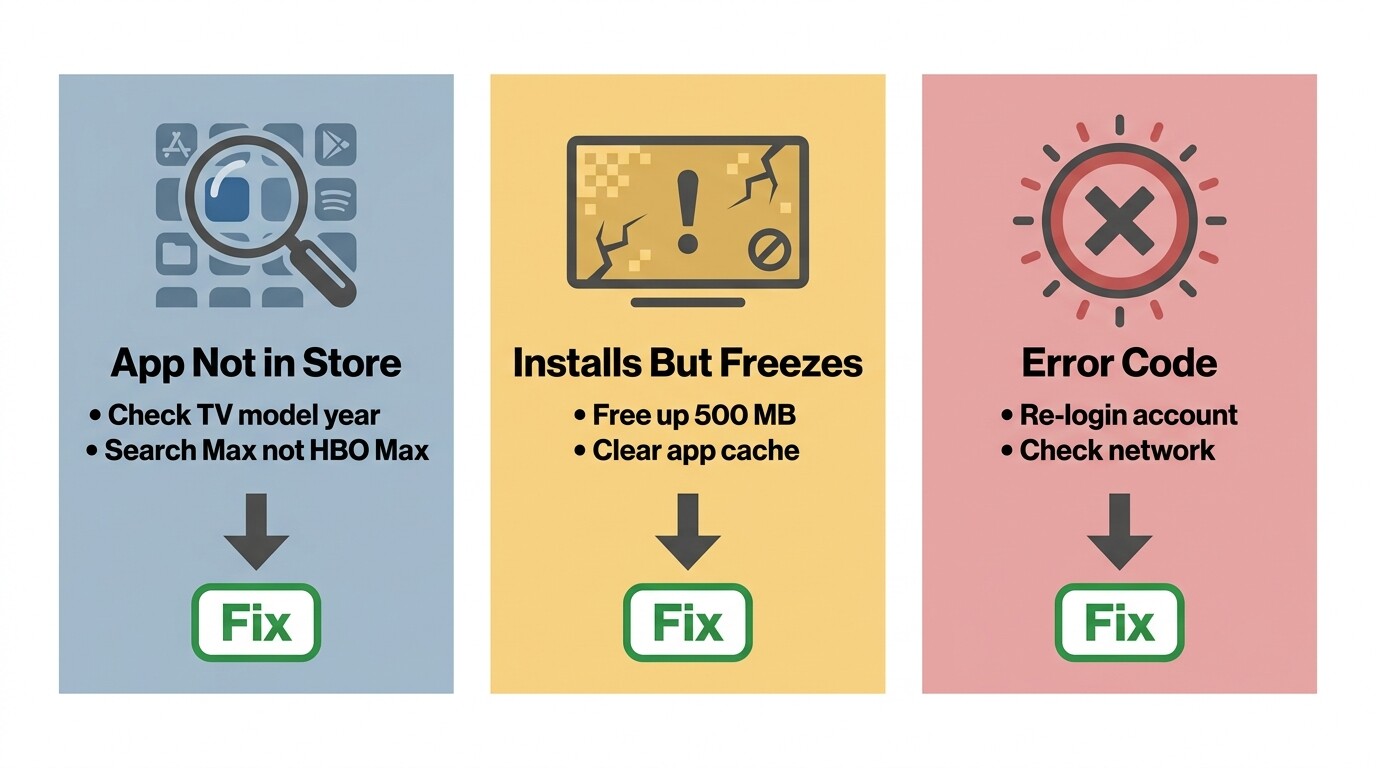
Pre-2016 Tizen TV. Samsung's app store filters by what the TV's OS can run; a 2014 or 2015 Tizen set will simply not list the Max app. As one user on the Samsung Community wrote, "I was using this app few months back. Now it is saying app got removed." On older sets that message usually means the listing was retired when Max raised its minimum OS bar during the rebrand. Sideload tricks for older Tizen builds tend to break the next time Max rotates its DRM client. Don't waste an evening on it; use a streaming stick (see the next section).
Regional store difference. Max rolls country by country, and some Samsung region locks restrict which apps appear. If you've moved or your TV's region setting is wrong, fix that in Settings → General → System Manager → Location/Reset Smart Hub before assuming the app is missing.
Rebrand cleanup still pending. This is the most common cause on 2017–2019 sets. Search "Max," not "HBO Max." If the search still surfaces only the old listing, clear the Smart Hub app store cache from Settings → Support → Self Diagnosis → Reset Smart Hub (this keeps TV settings; you only re-sign-in to apps).
App Downloads but Install or Open Fails: Storage → Firmware → Cache (In That Order)
When the Max app is in the store but won't install, or installs but won't open, work this ordered checklist. Each step targets a different failure mode.
- Free up at least 500 MB of internal storage. Settings → Support → Device Care → Manage Storage, then uninstall apps you don't use. This single step fixes more "install failed" reports than the next two combined.
- Update Tizen firmware. Settings → Support → Software Update → Update Now. If your TV hasn't checked in for a year, the Max app may refuse to install against a stale OS build. Let the TV reboot.
- Clear the Max app cache. Settings → Apps → Max → Clear Cache (then Clear Data if cache alone doesn't restore the app). This addresses the case where the app installed but crashes on open.
- Reinstall only after the above. Uninstall Max, restart the TV (unplug 30 seconds, plug back in), then reinstall. This wipes your sign-in, so plan to re-pair through hbomax.com/tvsignin.
"App Was Removed from This TV" After the HBO Max → Max Rebrand
This message appears on TVs that had the old HBO Max app before the rebrand. Samsung's store retired the HBO Max listing; on some models the Max replacement appeared automatically, on others it didn't. Search "Max" — the new app is a separate install, not an update. If the new Max app doesn't appear in search at all on a 2016+ TV, the Smart Hub local cache is holding the deprecated listing. Settings → Support → Self Diagnosis → Reset Smart Hub clears it; this signs you out of all apps and removes installed third-party apps, but keeps picture/sound/network settings.
When Reinstall Is the Right Call (and When It Just Wipes Your Sign-Ins)
Reinstalling is the right call when the app opens to a black screen after a cache clear, when you see persistent error codes referencing app state, or when Max support has explicitly asked you to. It is not the right first move when the app simply isn't in the store, when the TV hasn't been updated in a year, or when storage is full. Each of those has a cheaper fix. The pairing flow at hbomax.com/tvsignin makes recovery painless if you do reinstall, so once you've worked through storage / firmware / cache without luck, it's a low-cost final move.
Older Samsung TV or Max App Missing? Streaming Sticks, AirPlay, and the LG Note
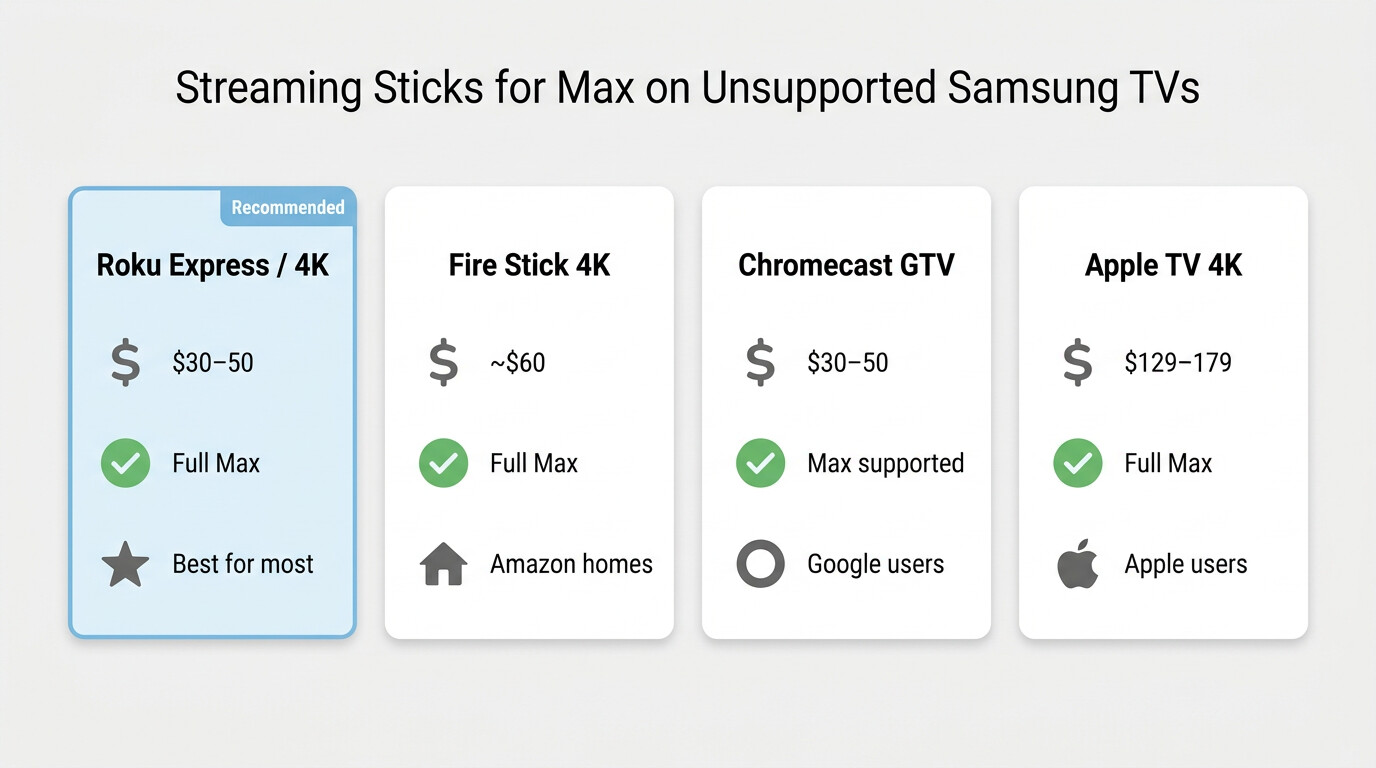
If your Samsung TV will never run Max natively (pre-2016 set, region gap, or stubborn rebrand case), the easiest fix is a $30 HDMI streaming stick. AirPlay 2 works on 2018+ Samsung TVs without extra hardware but Max can downgrade resolution under DRM, so it's a backup, not a primary path. Each option below carries a fit-verdict.
Plug in a Roku — The Cheapest Reliable Fix for Unsupported Sets
For any pre-2016 Samsung TV, a Roku Express or Streaming Stick 4K is my default recommendation, and I've stopped second-guessing it. Roku has shipped a stable Max channel through every rebrand, the sign-in uses the same hbomax.com/tvsignin code flow, and the cheapest current Roku is around the price of a month of Ultimate. The reason I push Roku over Fire TV or Chromecast specifically for this reader: Roku's interface doesn't push you toward another ecosystem (no Amazon Prime upsell, no Google Cast dependence), so a non-tech-savvy household member can find Max on the home screen without help.
Fit-verdict. Best for any household where the TV is the only piece of the streaming setup you can't replace. Not ideal if you're already deep in Apple's ecosystem (Apple TV 4K is a better fit) or Amazon's (Fire TV is smoother).
Fire TV Stick, Apple TV, Chromecast at a Glance
If you've already paid the ecosystem tax somewhere else, use that. Fire TV Stick 4K Max makes sense in an Amazon-heavy household. Apple TV 4K is overkill for Max alone but pays off if you also rent from iTunes or use Apple Fitness+. Chromecast with Google TV is the cheapest 4K option, though the Max app's casting behavior is less predictable than running the native channel.
AirPlay 2 from iPhone or Mac to 2018+ Samsung TVs (with a DRM-Quality Caveat)
AirPlay 2 is built into 2018-and-later Samsung Smart TVs, so an iPhone or Mac can send Max to the TV without an extra device. The catch is honest: as one Quora answer flagged, "DRM restrictions may downgrade resolution when mirroring. For full 4K/HDR and Dolby audio, use a supported streaming device." For an occasional session on someone else's TV it's fine; for your nightly viewing on the set you actually own, a $30 Roku is the more durable answer.
Already Have an LG TV in the House? Same Max App, Different Store
If you landed here but actually own an LG webOS TV, the process is structurally identical. Open the LG Content Store, search Max, install, and sign in with the same 6-character code. LG webOS sets from roughly 2018 onward support the Max app, and the rebrand cache gotcha applies the same way: search "Max," not "HBO Max." Everything in this guide on troubleshooting order, storage, and cache carries over.
How BBFly Saves Max Titles as Permanent Local MP4 Files on PC or Mac
Max has no desktop app and no PC or Mac download path. If you want a file you can keep, play offline, and copy onto a USB stick for a Samsung TV, the only practical route is a third-party desktop tool. The condition is straightforward: an active Max subscription, and the file is for your own offline viewing.
Please note: Third-party desktop downloaders may conflict with Max's Terms of Use. Keep any downloads for your own personal, offline viewing of content you currently subscribe to; don't redistribute, resell, or use them commercially. Where an official download path exists on your device (Max's iOS, Android, and Amazon Fire tablet apps), that's the most worry-free route.
What Max's Built-In Download Actually Gives You (and What It Doesn't)
Before reaching for any third-party tool, it's worth being clear about what Max's own downloads deliver. Per Max's Help Center (as of June 2026; confirm current figures): downloads run only on iOS, Android, and Amazon Fire tablets — there is no Windows or Mac client; files expire 30 days unopened, or 48 hours after first play; the Basic-with-Ads tier allows zero downloads, Standard caps at 30 titles, Ultimate at 100; and when a title leaves the Max library, the downloaded file is removed with it.
The catalog churn is real: high-profile titles like Westworld and Batgirl were among the WBD-era removals widely reported in 2022–2023. As one gisuser explainer summarized, "Downloads are not available on Mac or Windows laptops through the official app. Downloaded titles also expire in 30 days or become invalid 48 hours after playback." The practical reading: an official Max download is a tethered license, not a file you own.
BBFly's Native-Download Approach: Original 4K / HDR / Atmos Streams as MP4 or MKV
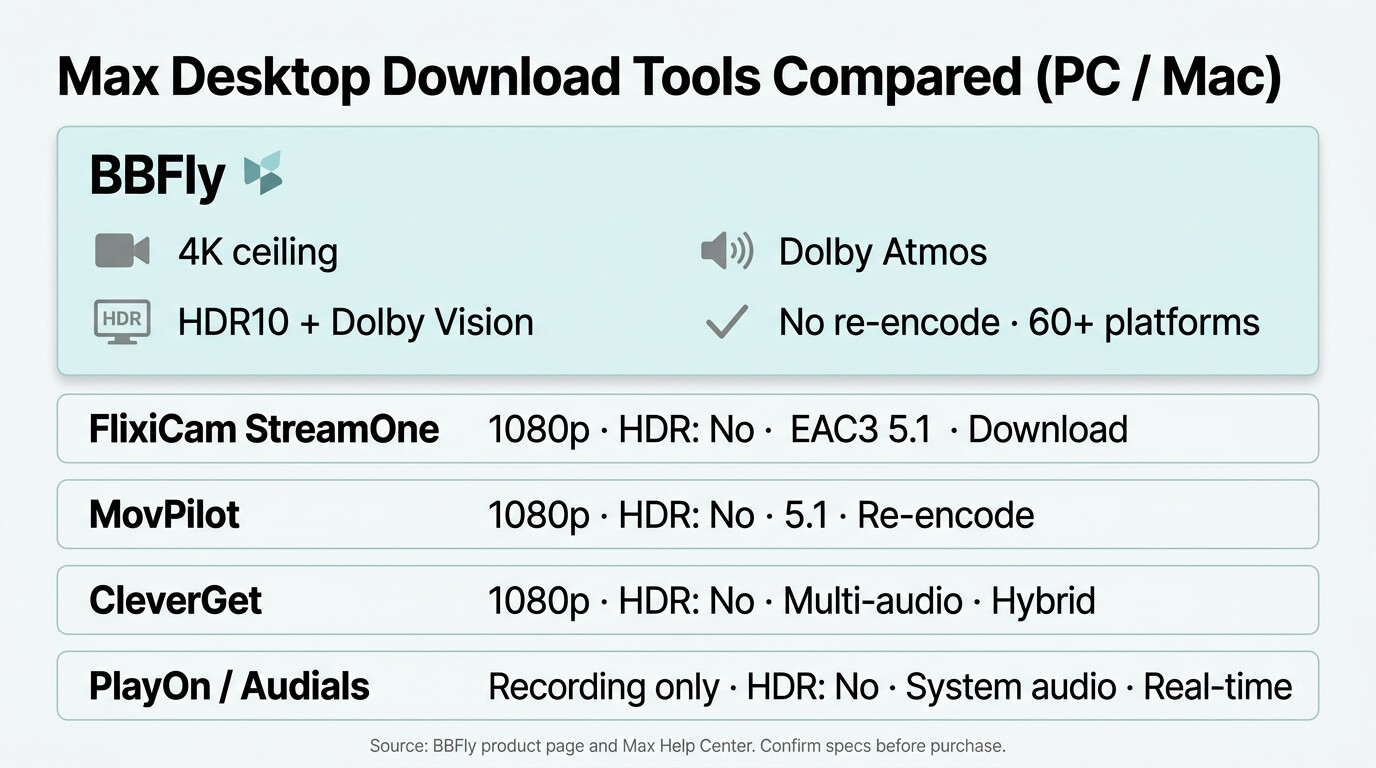
BBFly's HBO Max Downloader runs on Windows and Mac. It pulls the platform's original stream and Remux-packages it into an MP4 or MKV without re-encoding, which is how HDR10, Dolby Vision, and Dolby Atmos / EAC3 5.1 audio survive intact. Per BBFly's verified specs, it supports up to 4K, H.264 or H.265 video, subtitle download, multi-audio selection, batch download, and metadata write. Pricing is $99.90 a year or $199.90 one-time for three PCs; the trial covers three full titles per platform within 30 days, enough to see how it handles a real Max episode end-to-end.
BBFly vs other desktop tools on Max — feature comparison (June 2026):
| Tool | Max video ceiling | HDR10 / Dolby Vision | Audio | Output | Technical path |
|---|---|---|---|---|---|
| BBFly HBO Max Downloader (Win/Mac) | Up to 4K | Yes | Dolby Atmos, EAC3 5.1, AAC 2.0 | MP4/MKV | Native download (Remux, no re-encode) |
| Max official | Up to 4K HDR / Dolby Vision (Ultimate) | Yes | Dolby Atmos | In-app DRM container | Mobile only, 30-day/48-hour expiry |
| FlixiCam StreamOne | 1080p | No | EAC3 Dolby Digital Plus 5.1 | MP4 | Download (1080p ceiling) |
| MovPilot | 1080p | No | Stereo/5.1 | MP4 | Re-encode |
| CleverGet | 1080p | No | Multi-audio | MP4 | Download + record (hybrid) |
| PlayOn Home / Audials One | Recording (real-time) | No | System audio capture | MP4 | Recording mode |
Source: Max's official Help Center and BBFly's official product page, as of June 2026. Competitor figures reflect each tool's publicly stated capabilities on its official product page on the same date; specs change, so confirm current figures before purchase.
The practical upshot for a Max-focused reader: if you only want a 1080p personal copy, any of these tools is broadly equivalent. If you care about preserving the 4K HDR master and the Atmos track on titles like House of the Dragon or The Last of Us, the desktop comparison stops being a horse race.
Closing the Loop: Playing Saved MP4 Files on Your Samsung TV via USB
Once a Max title is saved as a standard MP4 or MKV, getting it onto a Samsung TV is easy. Copy to a USB stick (FAT32 for files under 4 GB, exFAT for larger), plug into the TV's USB port, open Source → USB Device, and pick the file. Samsung TVs from roughly 2015 onward play H.264 MP4 reliably; 2018+ sets handle H.265 / HEVC and HDR metadata. This is especially useful for the pre-2016 reader whose Samsung TV will never see the Max app. Personal offline viewing only; don't redistribute the file.
FAQ: HBO Max on Samsung TV — Compatibility, Casting, Downloads, and What's Legal
Eight residual questions that come up after the install (or after it fails), each adding an angle the body above didn't already settle.
Which Samsung TV models actually support the Max app in 2026?
Per Max's official device support page, Samsung Tizen TVs from 2016 onward support the Max app, with 2018+ models recommended for full 4K HDR and Dolby Vision feature parity. The exact model list shifts with each annual Tizen release; check Max's Help Center for the current cutoff on your specific model code (it's on the back of the TV). As of June 2026; confirm current figures.
Can I watch Max on a Samsung TV from before 2016?
Short answer, no — not natively. I've tested enough sideload tricks on older Tizen builds to say it isn't worth the evening; whatever you get working tends to break the next time Max rotates its DRM client. The three paths that actually hold up: a cheap streaming stick (Roku is my default), AirPlay 2 if your TV is somehow 2018+, or playing a downloaded MP4 file via USB. For most pre-2016 households, the streaming stick is fastest and least painful.
Can I cast or AirPlay Max to my Samsung TV without installing the app?
AirPlay 2 from an iPhone or Mac works on 2018+ Samsung Smart TVs, and Chromecast built-in is available on some 2019+ models. Both work for Max, but the picture may drop below the source resolution because of DRM behavior. For your daily setup, run the Max app natively or use a streaming stick.
How do I update the Max app on my Samsung TV when it's outdated?
Most TVs auto-update apps overnight when Settings → Apps → Auto Update is on. To force an update, toggle Auto Update off and on, then open the Max tile. If the update fails, fall back to the troubleshooting order above (storage → firmware → cache) before uninstalling.
Can I save Max shows to my PC or Mac to play later without the 30-day expiry?
Max has no official desktop app and no PC or Mac download path. Third-party desktop tools like BBFly can produce a permanent MP4 or MKV file from a valid Max subscription, for your own personal offline viewing. See the section above for the full breakdown.
Is it safe to sign into Max inside a third-party downloader like BBFly?
This is the question I get asked most, and the honest answer depends on the tool. Reputable, established desktop downloaders handle sign-in through an in-app browser that talks to Max's own login page; credentials don't leave your machine in any form the tool can read or replay. No-name tools downloaded from sketchy mirror sites are a different category of risk; those, I wouldn't hand any streaming password to. Two precautions regardless: use a Max password unique to that account, and enable two-factor authentication where Max supports it. Max may also flag a new desktop device on first sign-in; that's normal — confirm the new-device email and move on.
How long do Max's built-in downloads stay watchable on my device?
Per Max's Help Center (as of June 2026; confirm current figures): 30 days unopened, 48 hours after you press play, and the file is removed immediately when the title leaves the Max library. That third one is the easy-to-miss case — even if you've barely started watching, a title being pulled from Max removes your local copy.
Where can I find the official terms covering offline Max content?
For the definitive answer on what you can and cannot do with downloaded Max content, read Max's own Terms of Use at help.max.com and your local copyright and personal-use law. The framing in this guide reflects how I'd treat the question (active subscription, personal offline viewing only, no redistribution), but the platform's terms and your jurisdiction are the authority.