
How to Download HBO Max on MacBook (2026): No App, What Works
Table of Contents
Last month a friend asked me to set up Max downloads on her MacBook before a flight. I told her there were none to set up. She pointed at the screen: "There has to be a button somewhere." There isn't. A widely-shared Quora answer puts it plainly: "Unlike Netflix and Prime Video, HBO Max does not have an app for desktop or laptop computers." Netflix at least had a Mac story to abandon. Max never had one to give up. After fifteen years watching streamers add and remove download paths, I read this as a deliberate Warner Bros. Discovery choice, not an oversight they're about to fix. This guide treats that as settled and gets to what actually works.
I've watched HBO/Max launch on phones, tablets, smart TVs, and consoles: every screen except the one most subscribers actually open it on.
No, you cannot officially download HBO Max on a MacBook. Max has no macOS desktop app, the web player is stream-only, and on Apple Silicon the iOS Max app installs but the Download button stays greyed out. The only path that leaves you with a playable file is a third-party desktop downloader used with a valid Max subscription, for personal offline viewing.
Can You Download HBO Max on a MacBook? The Honest Answer
Can you download HBO Max on a MacBook? No, not officially. Max never shipped a macOS desktop app, the browser player has no save option, and the iOS app you can install on Apple Silicon ships with the Download button disabled. To get a playable file on your Mac, you need a third-party desktop downloader on a valid Max subscription.
That's the short answer. Here's why I'll commit to it: I have tried to make the official path work on a Mac across every macOS release for the last four years, and the result is the same each time. There is no hidden Help Center toggle, no Apple-specific entitlement, no upcoming feature any Warner Bros. Discovery announcement has flagged. If you searched for "how to download HBO Max on MacBook" hoping this guide would surface a switch the others missed, this isn't that guide. Spend the rest of your time on what actually leaves you with a file.
Is There an Official HBO Max App for Mac?
Is there an official HBO Max desktop app for Mac? No. As of June 2026, Max ships iOS, iPadOS, Android, tvOS, Fire TV, Roku, smart TV, and console apps. On macOS the entire story is a browser tab at play.max.com, with no Download button. The hbo max for mac surface, in 2026, is still just a web player.
Max on the web: works, but streaming only
Open Safari or Chrome, sign into play.max.com, and Max plays. There is no Download button in the player UI, no "save offline" in the right-click menu, no Safari extension that bolts one on. The browser is the only first-party way Max runs on a Mac, and it is built strictly for live playback.
Apple Silicon Macs: the iOS Max app installs, the Download button doesn't appear
If you own an M-series MacBook, the Mac App Store lets you install the iOS version of the Max app. Take that as a partial answer at best. The app launches, you can sign in, you can browse, you can watch. The Download button that appears on an iPhone next to each title is missing entirely in the macOS build. Warner Bros. Discovery is blocking it at the application layer, not at Apple's OS layer. Installing the iOS app on your Mac does not earn you downloads.
Intel Macs: web browser is the only path
If your MacBook still runs Intel, the iOS-on-Mac trick isn't available at all. The Mac App Store won't offer the iOS Max app. Your only sanctioned option is the browser. Everything below applies to your machine just as much as to Apple Silicon; the limits aren't OS-specific, they're platform-policy.
Why HBO Max Locks Mac Users Out of Downloads
Why doesn't HBO Max let me download on my MacBook? Because every layer of the official setup compounds against you: the only downloads that exist are mobile-only and plan-gated, those mobile downloads expire fast, the obvious "screen-record and watch later" workaround hits HDCP on the Mac, and even an in-pocket download can vanish when Max retires the title. There isn't one switch turned off. There are four, and they stack.
What each Max plan can download
As of June 2026, Max's Basic with Ads tier allows zero downloads. Standard caps at about 30 titles per account, Ultimate at roughly 100. Confirm the current numbers on Max's Help Center. None of these counts apply on a Mac; downloads are mobile and tablet only.
Every Max download expires: 30 days unplayed, 48 hours after first play
Now suppose you do have Standard or Ultimate and download on your phone. The file is a time-locked Max-app container, not a video file. Open Max within 30 days or it expires unplayed. Press play once and you have 48 hours to finish. You can't move it into Files, AirDrop it to your MacBook, or open it in QuickTime, because it isn't a file in any sense your Mac can read.
Why QuickTime and OBS produce a black frame (HDCP)
So the Mac end of the AirPlay-from-mobile workaround is where most readers I hear from get stuck. I have run the full set on an M2 MacBook on macOS Sonoma: QuickTime "New Movie Recording" against the Mac display, OBS Studio display capture, even an external HDMI capture box. Max playback on a Mac is HDCP-protected, and macOS honors it. The recording comes back black, with the audio track intact. This is enforced below the application layer; it is the protected video path doing its job, not a Max-specific block you can defeat by switching browsers or recorders.
When Max removes a title, the download disappears with it
Even an in-pocket download can vanish. In 2022 and 2023, Max retired Westworld, Batgirl, and several animated originals — The Verge and Variety covered the removals. When a title is pulled, any unfinished mobile downloads in subscribers' libraries are removed the next time the app phones home. A Max download is a lease against the library, not a copy you own. Mac users sit two layers removed from even that lease.
Four Ways to Get HBO Max Onto Your MacBook (and What Actually Works)
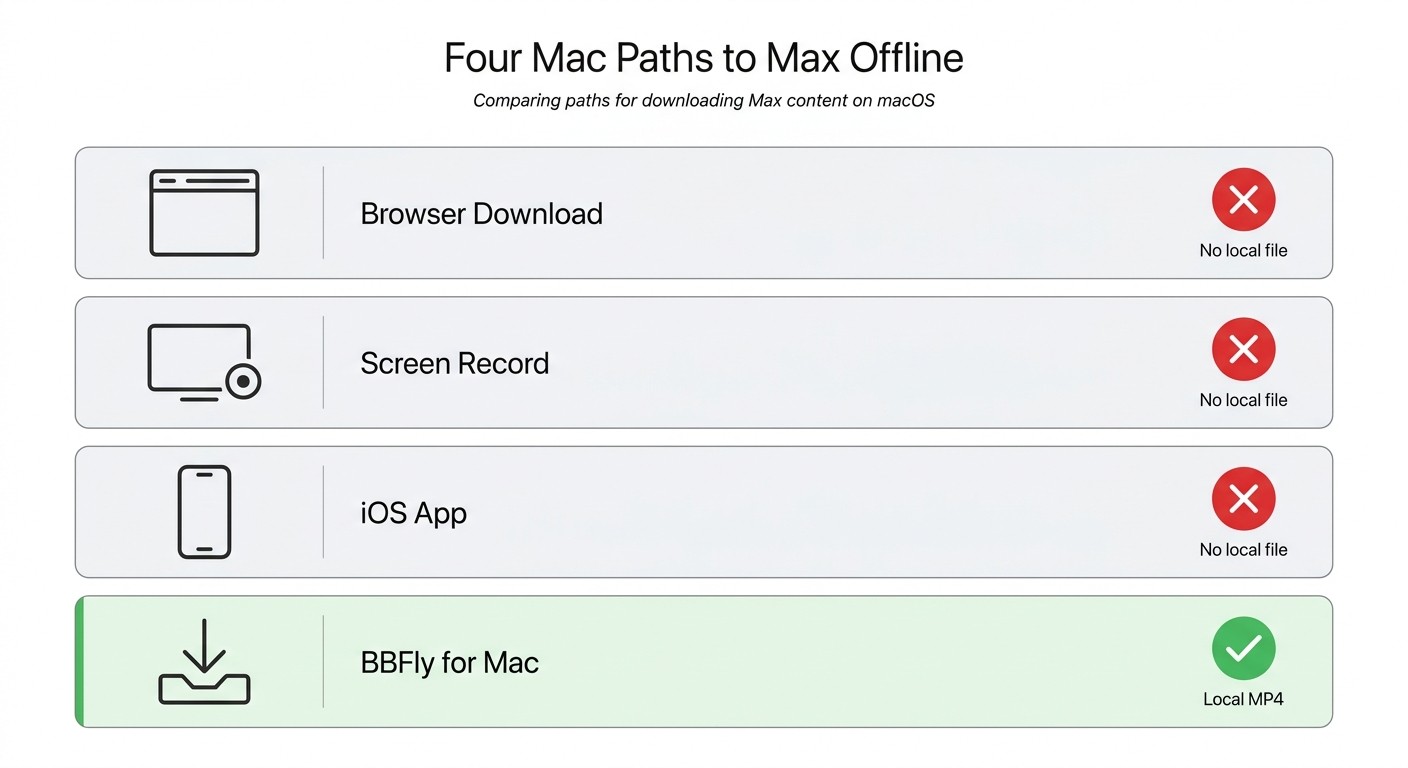
How do you download HBO Max on a MacBook in 2026? Four paths Mac users actually try: download on a phone and mirror, sideload the iOS Max app onto Apple Silicon, screen-record what plays, or run a desktop downloader on the Mac. Three are dead ends; the fourth produces a real file.
Method 1: Download on a phone, mirror to your Mac
Install Max on an iPhone or iPad, download a title there, watch on your MacBook by AirPlay or HDMI. I have done this exactly once: on a transatlantic flight I downloaded a film to an iPhone, propped the phone against a coffee cup, and HDMI'd into the MacBook lid I had open for notes. The 48-hour playback timer started the moment I pressed play; the phone battery and the timer were both racing the runway. Best for one-off trips. Not ideal for anyone who wants the title sitting on the Mac.
Method 2: Sideload the iOS Max app via PlayCover or Sideloadly
On Apple Silicon, PlayCover or Sideloadly can install the iOS Max app outside the Mac App Store. After a clean sideload the Download button stays missing the same way it does in the App Store version — Warner Bros. Discovery's block sits inside the app, not in the install path. I tried it on an M2 MacBook in late 2025; playback worked for one session, then two macOS minor updates broke both the Max app's signing chain and PlayCover's entitlements. Common breakage shows up as Error Code 100 or a black playback frame. Best for tinkerers who treat maintaining the sideload as a hobby. Not ideal as a long-term answer.
Method 3: Screen-record what you stream
I covered why this fails above. QuickTime, OBS, and an external HDMI capture box all came back the same way on Max, on M2 and Intel hardware both: black video, intact audio. Three recorders, same HDCP. Best for nothing on Max specifically.
Method 4: Use a desktop downloader app on the Mac
The fourth path is a small category of Mac-native applications that handle the Max stream and write it out as a local MP4 or MKV file. Some tools pull the actual stream and re-wrap it (native download), some re-encode it into a new file, and some replay at 1× speed while a recorder captures the screen. Output quality follows from the method, not the marketing copy. This is the only Mac path that produces a regular file you can move, back up, and play in VLC. The premise is non-negotiable: an active Max subscription, for personal offline viewing on your own devices.
How to Download HBO Max on MacBook with BBFly, Step by Step
Please note: Third-party Max downloaders sit outside Warner Bros. Discovery's published Terms of Use. Use them with your own active Max subscription, keep what you download for personal offline viewing on your own devices, and don't redistribute or resell. Where an official platform download path exists, that's the most worry-free route.
How does BBFly HBO Downloader download HBO Max on a MacBook, step by step? You install BBFly for Mac, sign into your existing Max account inside the app, pick a title, choose your quality and audio tracks, and let it write an MP4 or MKV file into a regular folder.
The full workflow:
- Install BBFly for macOS and grant the standard launch permission.
- Sign into your existing Max account inside the app.
- Browse or search for the title you want.
- Pick the quality, audio format, and subtitle tracks Max ships for that title.
- Choose your output container (MP4 or MKV).
- Run the download; the file lands in a regular macOS folder you pick.
Install BBFly on macOS and sign into your Max account
BBFly's spec sheet covers both Intel and Apple Silicon. Drag the app to /Applications, grant the macOS launch permission, and open it. Sign in with your existing Max credentials — the tool authenticates against your own subscription and does not create or share an account.
Pick a title and choose quality: 4K, HDR10, Dolby Vision, Dolby Atmos
The quality picker exposes resolution (up to 4K on Max's flagship slate — House of the Dragon, The Last of Us, True Detective), display format (HDR10 or Dolby Vision where the source ships them), and audio (Dolby Atmos, EAC3 5.1, or AAC stereo). Pick the highest set the source actually carries; the picker can only output what Max delivers.
One habit from running these tests for years: I check the finished file in MediaInfo before trusting any downloader's claims. The label inside the app is marketing; the codec, resolution, bitrate, and audio format inside the actual MP4 are the truth. On Max, the Atmos track is the one I check most often — it's the easiest to lose during re-encode.
Output as MP4 or MKV
MP4 plays anywhere; MKV is the better choice when you want to keep multiple audio tracks and the full subtitle set in one file (Max ships subtitles in 20+ languages on many titles). The output file lands in a regular folder, on an active Max subscription, for personal offline viewing on your own devices.
HBO Max Downloaders for Mac, Compared
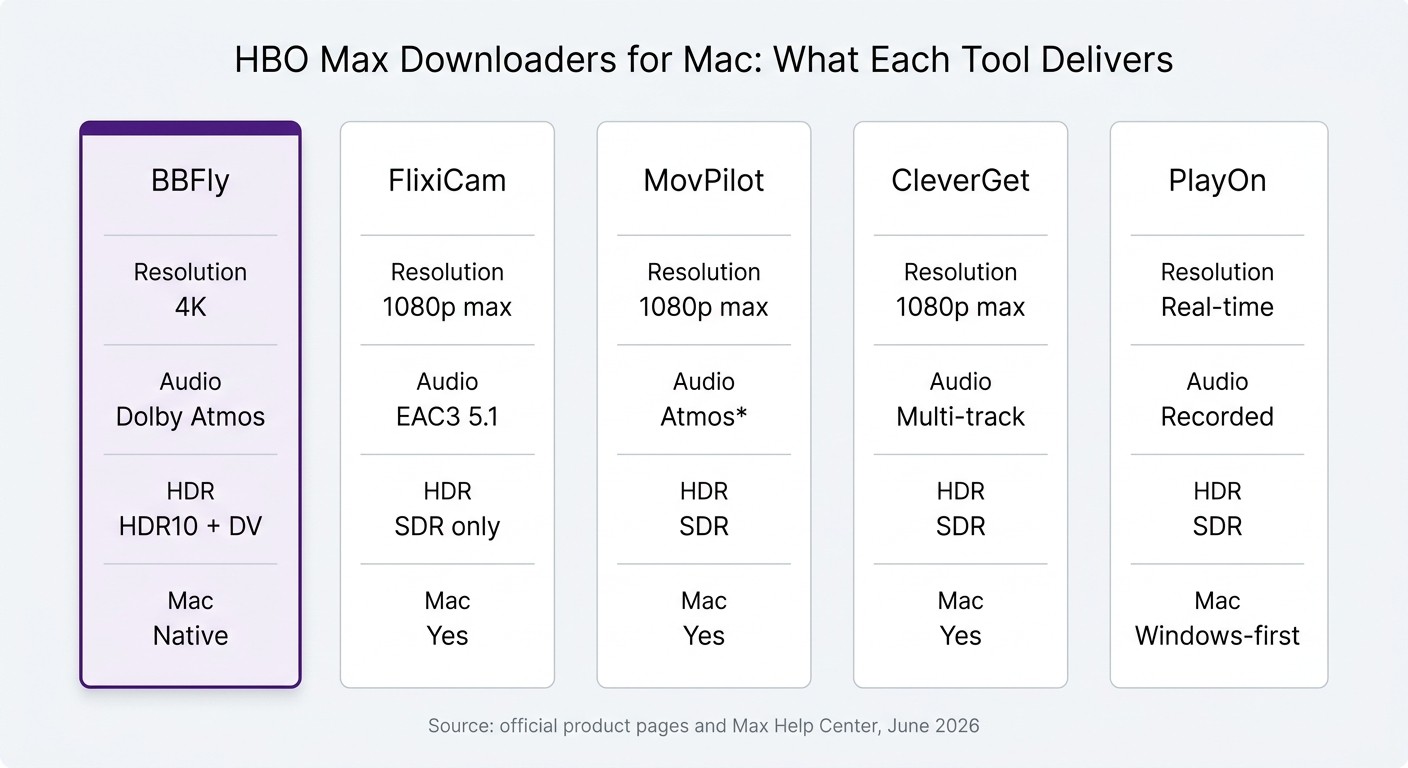
Which HBO Max downloader is best for Mac? Tool choice comes down to two questions: does the tool actually save a file (versus recording at 1× speed), and does it keep Max's higher-end formats (4K, HDR10, Dolby Vision, Dolby Atmos) versus capping at 1080p SDR. The table below is the rough state of the category as of June 2026; spec rows in this market change quickly.
| Tool | Max resolution | Audio | HDR support | Mac native | Main limitation |
|---|---|---|---|---|---|
| BBFly | Up to 4K | Dolby Atmos, EAC3 5.1, AAC 2.0 | HDR10, Dolby Vision | Yes (Intel + Apple Silicon) | Requires an active Max subscription; personal offline use only |
| FlixiCam StreamOne | Up to 1080p | EAC3 Dolby Digital Plus 5.1 | SDR only | Yes | No Atmos, HDR10, or Dolby Vision |
| MovPilot | Up to 1080p | Dolby Atmos 5.1 advertised (community-reported, not independently verified) | SDR | Yes | Re-encode pipeline; output consistency varies |
| CleverGet | Up to 1080p | Multi-track stereo / 5.1 | SDR | Yes | Stability issues noted in user forums as of mid-2024 |
| PlayOn Home / Audials | Real-time recording | System/recorded audio | SDR, no HDR | No (Windows-first) | Captures at 1× real-time; no Atmos, no HDR |
Source: each listed tool's official product page and Max's official Help Center, as of June 2026. Spec rows change quickly; confirm current figures and policies first.
My actual recommendation: if you subscribe to Max for the HDR slate — House of the Dragon, The Last of Us, True Detective — BBFly is what I'd reach for, because Dolby Vision and Atmos are the formats most readily lost in any re-encode pipeline. Friends who treat Max as a secondary library where 1080p SDR is fine, I send to FlixiCam StreamOne first. MovPilot and CleverGet sit in a middle band where output varies by title — defensible if you already own a license, not what I'd buy new without testing the current build. PlayOn and Audials are real-time recorders that lean Windows-first; on a Mac, both are out of scope.
One dimension every tool shares: each one wants you to sign into your own Max account inside the desktop app. The honest read is reputability. An established product with a paid support team and a public product page is the kind of place I'm willing to enter a Max password. A no-name binary downloaded from a search-ad landing page is not. Treat your Max credentials the way you treat your bank login.
HBO Max on MacBook: Quick-Lookup Questions
Why doesn't HBO Max have a desktop app for Mac at all?
Warner Bros. Discovery built Max for mobile-first downloads and never funded a macOS desktop client. The desktop DRM stack is browser-only, and downloads live inside the protected iOS/Android app environment. Maintaining a separate macOS app with its own DRM module would mean another codebase, another set of breakage windows, and another support load, all for what Max sees as a small share of viewing. Plan around the assumption it won't change.
Can I download HBO Max on an Apple Silicon (M1/M2/M3/M4) MacBook?
I get asked this every other week, and the answer is consistently disappointing. You can install the iOS Max app from the Mac App Store on Apple Silicon, but the Download button is hidden in that build. PlayCover and Sideloadly don't change this; the block is inside the Max app, not at the install path. The Apple Silicon "I can run iOS apps" capability is real; the Max download capability on it is not. Stop testing sideload combinations and move on.
Which HBO Max subscription plan do I need to download?
For Max's own mobile downloads you need Standard or Ultimate; Basic with Ads gives you zero. Standard caps the account at roughly 30 titles shared across profiles, Ultimate at around 100, both as of June 2026. Confirm the current numbers on Max's Help Center. My own rule: if I'm paying for Max anyway, Ultimate's headroom on downloads costs less than one wasted flight without one. For a third-party desktop tool on a Mac, the plan tier is less relevant — the gate is having an active subscription at all, since the tool authenticates through your account.
Is it safe to log into HBO Max from a third-party downloader?
Safe to the extent that the tool is reputable and credentials handling is sane. The reputable downloaders in the comparison above run as Mac applications you install, sign into once, and let manage the session inside the app the same way Safari does. The shady end of this category is a binary you downloaded from a search-ad landing page that asks for your Max password before showing you anything. Reputation does the work; treat your Max password like a bank password.
Where can I confirm what I'm allowed to do with a saved HBO Max file?
Two places: Max's Terms of Use, which set what the platform itself permits, and the copyright law of your country, which governs what you may do with the file once it exists. The honest summary is that an active subscriber making a personal copy for offline viewing on their own devices sits in a gray zone in most jurisdictions, while distributing or selling such a file is squarely a copyright issue everywhere. If a downloader's marketing tells you a saved file replaces the subscription, that vendor is selling you a story.
Will a VPN interfere with HBO Max downloads on Mac?
Often, yes. Max detects VPN connections and throws a region or network error, and the desktop downloaders I've tested often surface that as a generic download failure rather than a clear "VPN detected" message. Turn the VPN off before starting a Max download session, and turn it back on for general browsing afterward. Leaving a VPN running is the number-one cause of mysterious Max error codes on the desktop side.
Bottom Line: What I'd Actually Do
No official path to download HBO Max on a MacBook exists in 2026, and the platform has given no public indication it intends to ship one. The mobile-mirror, sideload, and screen-record routes are not solutions; they cost an afternoon and leave you without a file. If you want a Max title playable in QuickTime, VLC, or Infuse on your Mac, the only path that actually delivers is a desktop downloader run on your own active Max subscription, for personal offline viewing. Pick a tool whose output you can verify in MediaInfo, and budget your time on that, not on the dead ends. Reputable tools like BBFly offer a limited free trial — a few full titles inside a 30-day window — long enough to confirm a Max Atmos track and an HDR pass-through actually survive to the saved file before you pay.