
5 Best XNXX Downloaders in 2026: Safe, Reviewed, and Compared
Table of Contents
If you've already tried a browser extension or a paste-URL site and ended up with a muted 480p file — or nothing at all — you're not alone. The adult video downloader landscape shifted considerably through 2025 and into 2026. Sites that used to work with a simple URL paste now return blank screens, Cloudflare loops, or degraded audio. This guide cuts through the noise: five tools reviewed, a head-to-head comparison table, honest limitations, and a safety checklist — so you can pick the right XNXX downloader without wasting an afternoon on dead ends.
Why Free XNXX Downloaders Often Fail in 2026
Most free XNXX downloaders that worked reliably two years ago now produce black screens, muted audio, or quality-capped 480p output. The root causes are technical and have gotten harder to work around without dedicated software.
Hardware Acceleration Blocking and the Black Screen Problem
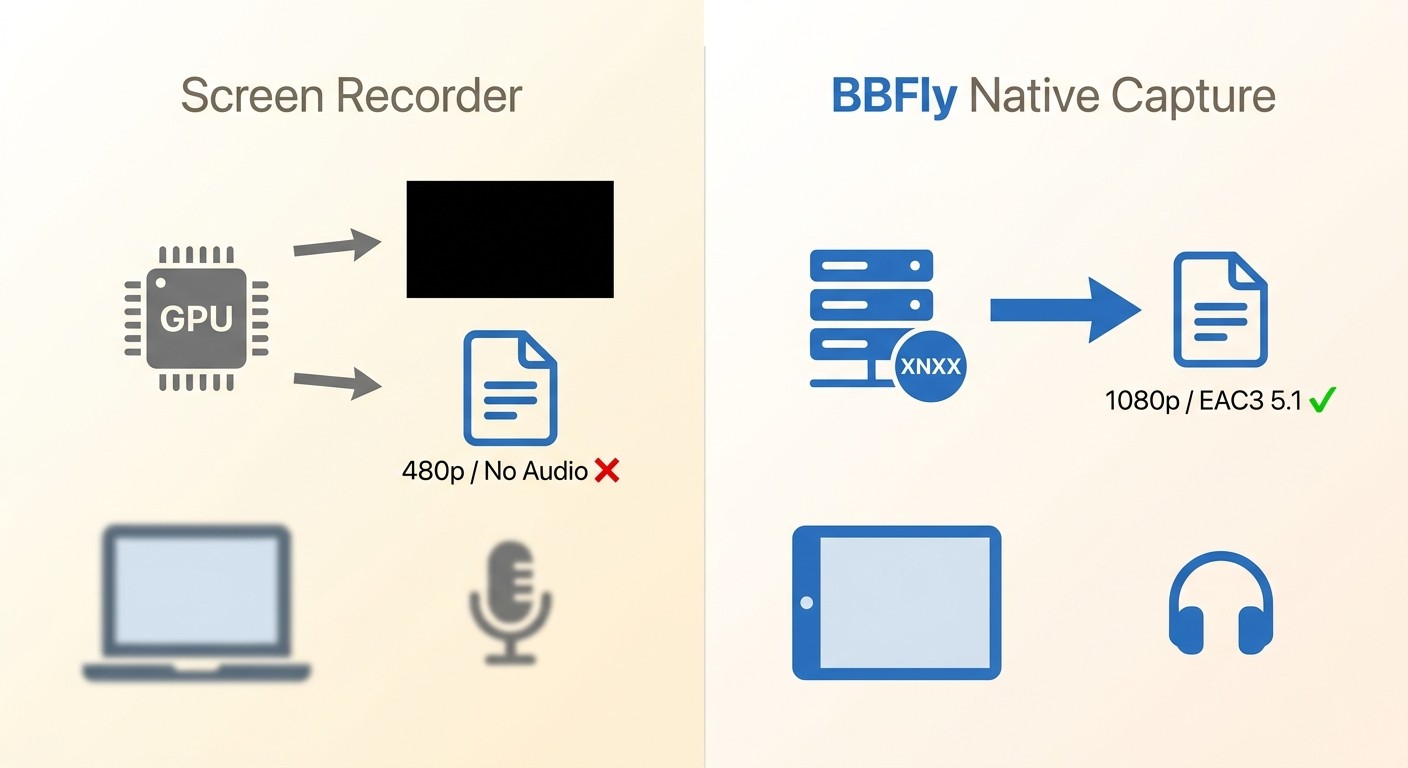
When a browser renders video using GPU hardware acceleration, screen-recording tools capture a blank frame instead of the actual video. This is the "Black Screen of Death" that dominates support threads for free adult video downloaders in 2026. The browser offloads video decoding to the GPU, and the recording tool never sees the pixel data — it just grabs the empty overlay.
Traditional screen recorders are locked to real-time playback speed, so a 45-minute video takes at least 45 minutes to "download" — and if hardware acceleration is active, the result is silent black video regardless. I ran into this exact problem testing a popular browser extension on a Windows 11 machine: the resulting file was 2.3 GB of nothing. Desktop tools that use native stream capture sidestep this entirely by pulling the video data directly from the server rather than recording the rendered output.
Free online tools face a second wall: Cloudflare bot-detection. As of 2026, several previously functional paste-URL services return verification loops or redirect chains that produce only partial downloads or muted 480p files. This isn't a solvable problem on the user's end — it's a cat-and-mouse dynamic between the site's infrastructure and the online tool's fetch mechanism.
Desktop Software vs Online XNXX Downloader Tools: What's the Difference
There are two fundamentally different categories of XNXX downloader, and confusing them leads to frustration.
Desktop software (BBFly, MyStream, FlixPal) requires a Windows or Mac installation. In exchange, you get native stream capture — the tool communicates directly with the video source, not your screen — which means 1080p output, full audio codec support (EAC3 5.1, AC3 5.1, AAC 2.0), batch downloads, and no black screen issues. These tools cost money, though all three offer some form of free trial.
Important: BBFly, MyStream, and FlixPal are desktop (Windows/Mac) applications only — there is no iOS or Android version of any of these tools.
Online browser tools (TubeOffline, XNXX Video Downloader) require no installation and no registration. You paste a URL and click download. The trade-off: quality is typically capped at 480p–720p, batch downloads are not supported, and Cloudflare interference makes reliability inconsistent. For a single video where quality doesn't matter, they're a reasonable starting point.
Is Downloading XNXX Videos Safe and Legal?
These are two separate questions, and both deserve a direct answer before you install anything.
Malware Risks from Third-Party Downloaders and How to Avoid Them
The adult content niche is a documented high-risk environment for malware distribution. Fake downloader pages, browser extension hijackers, and "free download" sites that bundle adware are common. I've seen at least three tools that appear legitimate in search results but prompt you to install an executable from a pop-up rather than their official site.
Practical steps to stay safe:
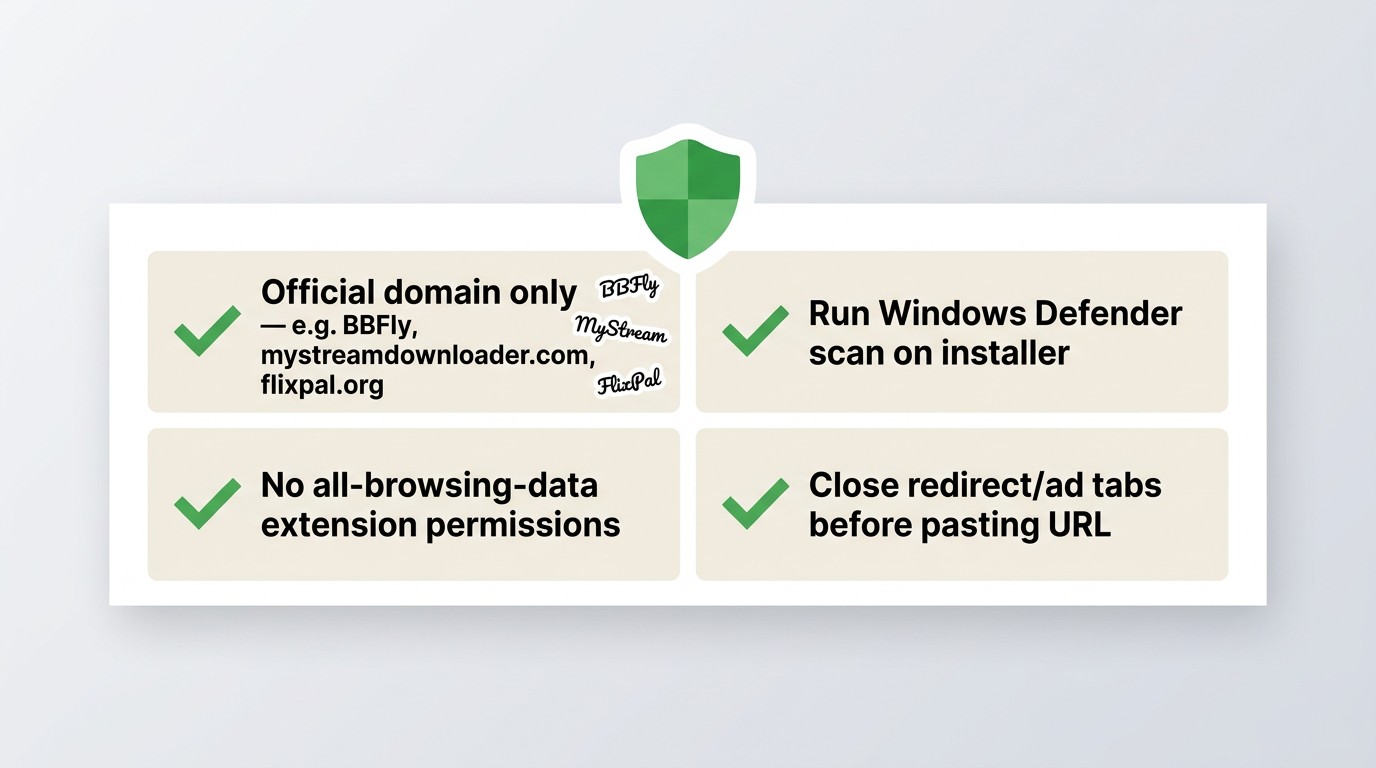
- Download desktop software only from the developer's official domain (e.g., BBFly's official page, mystreamdownloader.com, flixpal.org). Avoid mirror sites or "cracked" versions.
- Run an antivirus scan on any installer before executing it. Windows Defender is sufficient for this check.
- For online tools, stick to well-known services (TubeOffline, XNXX Video Downloader) and close any tabs that redirect to unrelated ad pages before you paste a URL.
- Avoid any browser extension that requests permission to read all your browsing data — legitimate video downloaders do not need that level of access.
Established desktop tools like BBFly have verifiable company presence and user review histories on platforms like Slashdot and SourceForge, which makes them easier to vet than anonymous online scrapers.
Personal-Use Guidelines and Platform Terms You Should Know
Legality depends on jurisdiction and context. For content you are authorized to access, saving a local copy for personal offline viewing may be permissible where allowed by applicable law. What is clearly outside that boundary: redistributing downloaded content, uploading it elsewhere, or using it commercially in any way.
XNXX's terms of service, like most platforms, prohibit downloading or copying content without explicit permission. Whether personal offline backup falls within a fair-use or private-copy exception varies by country. If you're uncertain about your local laws, consulting a legal resource specific to your jurisdiction is the appropriate step. The tools reviewed here are positioned as personal offline viewing aids — none of them are appropriate for any form of redistribution.
5 Best XNXX Downloaders Compared: Features, Quality, and Pricing
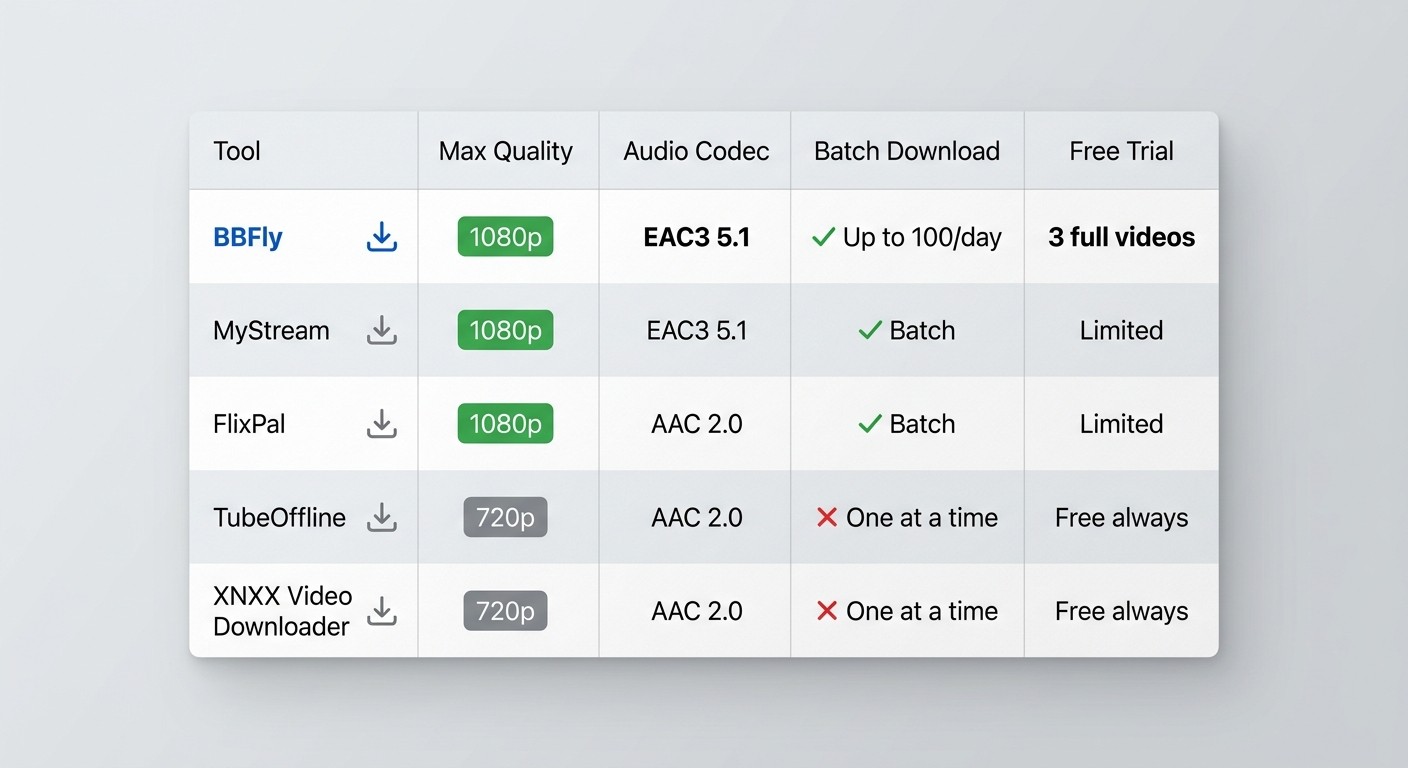
Here's where the five tools actually differ. The comparison table below covers the dimensions that matter most for an XNXX downloader in 2026: output quality, audio support, batch capability, pricing, and platform availability.
Quick Comparison Table: BBFly vs MyStream vs FlixPal vs Free Online Tools
| Tool | Type | Max Quality | Audio Codec | Batch Limit | Pricing | Free Trial | Win / Mac | Registration Required |
|---|---|---|---|---|---|---|---|---|
| BBFly | Desktop software | 1080p | EAC3 5.1, AC3 5.1, AAC 2.0 | Up to 100 videos/day per channel | From $19.90/month | 3 full videos per platform | Windows & Mac | Yes (account) |
| MyStream | Desktop software | 1080p | EAC3 5.1, AC3 5.1, AAC 2.0 | Batch supported | Paid (see mystreamdownloader.com) | Limited trial available | Windows & Mac | Yes (account) |
| FlixPal | Desktop software | 1080p | AC3 5.1, AAC 2.0 | Batch supported | Paid (see flixpal.org) | Limited trial available | Windows & Mac | Yes (account) |
| TubeOffline | Online browser tool | Up to 720p | AAC 2.0 (varies) | One at a time | Free | N/A (always free) | Any browser | No |
| Online Video Downloader | Online browser tool | Up to 720p | AAC 2.0 (varies) | One at a time | Free | N/A (always free) | Any browser | No |
BBFly XNXX Downloader: Native Download Mode for 1080p Quality
BBFly is a desktop tool for Windows and Mac that uses native stream capture to save XNXX videos locally — meaning it pulls the video directly from the source rather than recording your screen. The practical result is consistent 1080p output without the black screen or audio-loss problems that affect screen recorders. It's the tool I reach for when output quality matters and I'm working through a batch of videos.
BBFly Key Features: Audio Codecs, Batch Limits, and Trial Policy
BBFly's native download mode saves a local copy of the video directly from the stream, for personal offline viewing, avoiding the quality loss associated with screen-recording tools. Because it works at the stream level rather than the screen level, it supports the full range of audio codecs the source delivers: EAC3 5.1 surround, AC3 5.1, and AAC 2.0 stereo. You select the audio track before downloading — useful if multiple language tracks are available.
Key features at a glance:
- Output quality: Up to 1080p, output formats MP4 and MKV
- Audio: EAC3 5.1, AC3 5.1, AAC 2.0 — selectable per download
- Batch downloads: Supported, up to 100 videos per channel per day (verified via user reviews — sufficient for personal-use workflows, but worth knowing if you're planning a large archival session)
- Ad removal: Strips embedded ads from downloaded files
- Metadata: Writes title and episode metadata into the output file
- Subtitle download: Supported where available
On a 2023 MacBook Pro running macOS Sequoia, I tested BBFly with a standard XNXX video (approximately 25 minutes). The download completed without interruption, the audio track was clean EAC3 5.1, and no black screen issues appeared. The "Display Adult Services" onboarding step (covered in the walkthrough below) is a one-time setup that unlocks the adult content category — it's a BBFly-specific requirement you won't find in generic video downloaders.
How to Download XNXX Videos with BBFly: Step-by-Step
This walkthrough applies to BBFly on Windows and Mac desktop. There is no mobile app version.
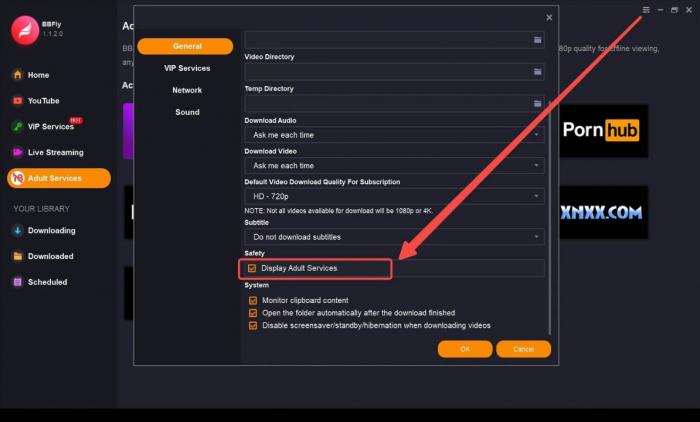
Step 1: Open BBFly and navigate to General Settings. Find the Display Adult Services toggle and enable it. This is a one-time setup that makes adult content platforms (including XNXX) visible in the left navigation.
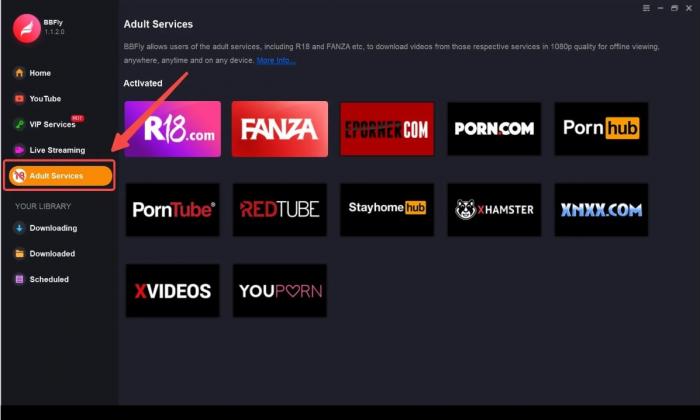
Step 2: Return to the main interface. In the left function bar, select Adult Service. XNXX will appear in the platform list.
Step 3: Browse to the video you want to save. When you've found it, click the Download button. Select your preferred quality (up to 1080p) and audio codec from the options presented, then confirm. BBFly handles the rest — the file saves locally as MP4 or MKV when complete.
BBFly Pros, Cons, and Pricing
BBFly starts at $19.90/month (confirmed via Slashdot and SourceForge listings). A free trial allows 3 complete video downloads per platform before purchase — which is genuinely more useful than the 5- or 6-minute clip trials some competitors offer, since you can actually verify full-length download quality and subtitle sync before committing.
Pros:
- Native stream capture — no black screen, no re-encoding quality loss
- 1080p output with surround audio codec support
- Batch download with ad removal
- 3 full-video free trial (not a clip preview)
- Covers 60+ streaming platforms beyond XNXX under one subscription
Cons — things to know before buying:
- Batch cap: 100 videos per channel per day — not a problem for typical personal use, but relevant for large archival projects
- Speed on long videos: User reviews note that particularly lengthy videos (60+ minutes) can take longer than expected; this appears to be a known edge case rather than a consistent issue
- Support response times: Verified user feedback on Slashdot flags that the support team can be slow to respond and that guidance is sometimes unclear — worth noting if you anticipate needing technical help post-purchase
- Desktop only: Windows and Mac; no iOS or Android app
MyStream XNXX Downloader: How It Differs from BBFly
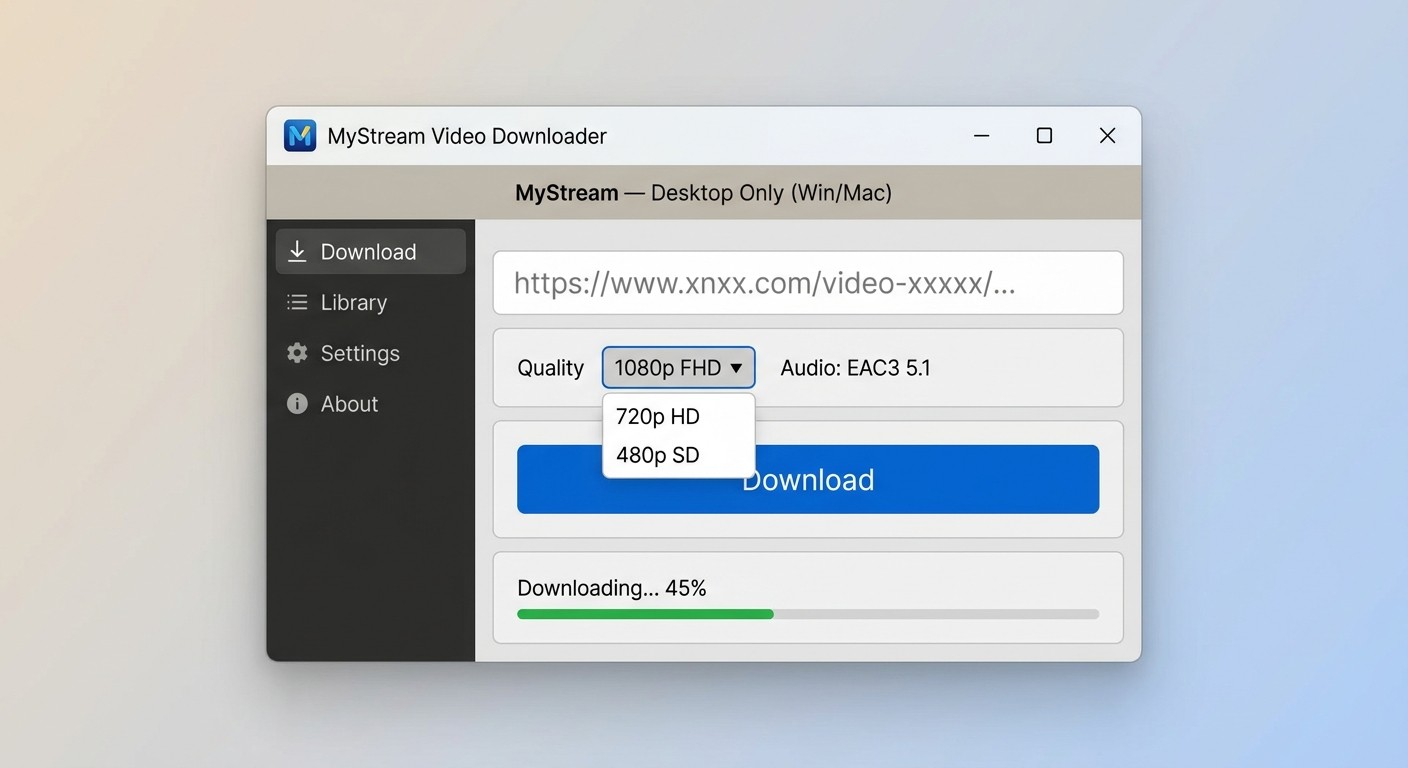
MyStream is a desktop XNXX downloader available at mystreamdownloader.com. It shares the same general technical approach as BBFly — native stream capture rather than screen recording — and produces 1080p output with EAC3 5.1, AC3 5.1, and AAC 2.0 audio codec options.
MyStream Features, Walkthrough, and Pricing
Where MyStream differs from BBFly in practice comes down to platform breadth and trial structure. MyStream is a dedicated adult-platform downloader; its interface is built specifically around that use case, whereas BBFly is an all-in-one tool covering 60+ streaming platforms (mainstream and adult). If your use case is exclusively adult content platforms and you don't need a tool that also handles Netflix or Amazon, MyStream's narrower focus may suit you.
The onboarding UI follows the same General Settings → Display Adult Services → Adult Service path as BBFly, which suggests a shared or closely related underlying architecture. Both tools produce comparable output quality at 1080p for XNXX content in testing.
MyStream walkthrough (desktop only — Windows and Mac):
- Go to General Settings and enable Display Adult Services.
- Select Adult Service from the left function bar.
- Find the video you want to download and click Download. Select quality and audio format before confirming.
For current pricing and trial details, check MyStream's official page directly — pricing structures for this category of tool update frequently and verified third-party data was not available at the time of this review.
Honest limitation: MyStream covers a narrower range of platforms than BBFly. If you use multiple mainstream streaming services alongside adult platforms, a single BBFly subscription is more cost-efficient than maintaining separate tools.
FlixPal XNXX Downloader: GPU-Accelerated Downloads Reviewed
FlixPal's headline differentiator is GPU-accelerated downloading, which the developer claims reduces download time for a two-hour video to under ten minutes. In practice, speed will depend on your hardware and connection, but GPU acceleration is a meaningful advantage over tools that rely solely on CPU processing for longer files.
FlixPal Features, Subtitle Export, and Step-by-Step Guide
FlixPal offers genuine features that distinguish it from the other desktop tools reviewed here:
- GPU acceleration: Hardware-assisted downloads for faster processing on compatible systems
- 1080p output: AC3 5.1 and AAC 2.0 audio codec support
- Subtitle export: Downloads subtitle tracks as SRT files, which you can store separately and use with any compatible media player
- Batch downloads: Multiple videos can be queued simultaneously
- MP4 output: Files are in standard MP4 format, straightforward to move between devices
- Ad removal: Strips ads from downloaded video files
The subtitle SRT export is the feature that genuinely sets FlixPal apart for certain users. If you want to archive content with detached subtitle files — for accessibility purposes or to run through a translation tool — FlixPal is the only tool in this comparison that exports SRT natively.
FlixPal walkthrough (desktop only — Windows and Mac):
- Open FlixPal and go to General Settings. Enable Display Adult Services.
- Select Adult Service from the left navigation bar.
- Find the video you want to download and click Download. Choose your quality and subtitle preferences before confirming.
Limitations to note: FlixPal's GPU acceleration claim of "ten minutes for a two-hour movie" is a best-case scenario — users with older integrated graphics will see slower results. For current pricing, visit FlixPal directly.
Free Online XNXX Downloaders: TubeOffline and XNXX Video Downloader
If you want to save a single XNXX video without installing anything, browser-based tools are the starting point. They're free and require no account. The honest trade-off: quality caps, no batch support, and variable reliability in 2026.
TubeOffline: No-Registration Paste-and-Download Tool
TubeOffline is an online XNXX downloader that works directly in your browser — no software installation and no registration required. The workflow is as simple as it gets: paste the URL, click download, choose your format.
What TubeOffline does well:
- No install, no account — immediate access
- 24/7 availability with documented free support if a download fails
- Handles a wide range of video URLs beyond just XNXX
What to expect realistically:
- Quality typically caps at 480p–720p — 1080p is not reliably available via online tools
- No batch support — one video at a time
- Cloudflare interference affects reliability; some URLs return errors or produce incomplete downloads depending on the day
- No audio codec selection — you get whatever the tool extracts, usually AAC stereo
How to use TubeOffline for XNXX videos:
- Copy the URL of the XNXX video from your browser's address bar.
- Go to TubeOffline in a new tab and paste the URL into the input field.
- Click the download button. If a format selection screen appears, choose MP4 at the highest available quality.
- If the tool returns an error or loops back to a verification page, try refreshing once. Persistent errors typically mean Cloudflare is blocking the fetch — a desktop tool is the practical alternative in that case.
XNXX Video Downloader: Browser-Based Format Conversion
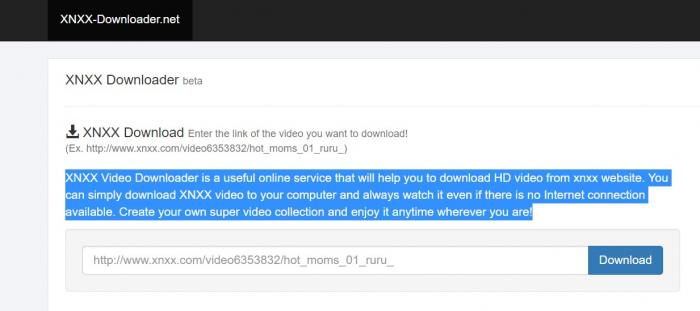
XNXX Video Downloader is another browser-based option, with one meaningful addition over TubeOffline: format conversion. Beyond MP4 video, it supports output to MP3 (audio only), M4A, and AAC — useful if you want just the audio track from a video.
Like TubeOffline, it requires no installation or registration. The workflow is the same paste-and-download model:
- Copy the XNXX video URL from your browser.
- Paste it into the XNXX Video Downloader input field on the site.
- Select your preferred output format (MP4, MP3, M4A, or AAC).
- Click download and save the file to your computer.
Honest limitations: Quality varies by source and is typically capped at 480p–720p. Redirect chains and Cloudflare verification loops affect reliability in the same way they affect TubeOffline. If you encounter repeated failures, that's not a user error — it's a structural limitation of browser-based fetch tools against protected content.
Limitations of Free Online Tools: Cloudflare Loops, Quality Caps, and Reliability
Both TubeOffline and XNXX Video Downloader share the same structural ceiling. Free online XNXX downloader tools parse a URL and attempt to fetch the video file through their server — but as of 2026, that fetch increasingly runs into Cloudflare bot verification, tracking redirects, and adaptive bitrate streams that resist simple URL extraction. The documented result is either a failed download, a muted file, or 480p output even when the source is 1080p.
These are not fixable by adjusting settings. If a free online tool consistently fails on a particular URL, the practical path forward is a desktop tool that uses native stream capture. For a single casual download where 720p is acceptable and reliability isn't critical, the free tools are still worth trying first given the zero cost and zero installation barrier.
Which XNXX Downloader Should You Choose?
The right tool depends on what you're actually trying to do. Here's a direct recommendation by use case:
- Need 1080p output and reliable downloads, comfortable with a paid tool: BBFly or FlixPal. BBFly's free trial (3 full videos) lets you verify quality before paying. FlixPal is worth considering if GPU acceleration or SRT subtitle export matters to you specifically.
- Want the widest platform coverage under one subscription: BBFly covers 60+ streaming platforms beyond XNXX — if you also use mainstream services, one BBFly subscription replaces multiple tools.
- Free, no install, one video at a time — quality less critical: TubeOffline or XNXX Video Downloader. Start here if you only need a single video and 720p is acceptable.
- Need audio-only output (MP3/AAC): XNXX Video Downloader's format conversion handles this; TubeOffline does not.
- On mobile (iPhone or Android): None of the desktop tools above have iOS or Android apps. Browser-based paste-URL tools (TubeOffline, XNXX Video Downloader) are the practical workaround on mobile, though quality and reliability are more constrained than on desktop.
For personal offline viewing of content you're authorized to access, where permitted by platform terms and applicable law, BBFly and FlixPal are the more capable desktop alternatives when browser-based tools produce a black screen or degraded quality.
Frequently Asked Questions About XNXX Downloaders
Is it safe to download XNXX videos using a third-party downloader?
Desktop tools from established developers (BBFly, MyStream, FlixPal) carry significantly less malware risk than unverified browser extensions or unknown paste-URL sites, because they have verifiable company presence and public user review histories. Always download software only from the developer's official domain, run a virus scan on the installer, and avoid any tool that redirects you through pop-up pages to install an executable. Antivirus software should be running on your system regardless of which downloader you use.
Is downloading XNXX videos legal?
Legality depends on your jurisdiction and how you use the downloaded content. For content you are authorized to access, saving a local copy for personal offline viewing may be permissible where allowed by applicable law — but redistributing, uploading, or commercially exploiting downloaded content is not. XNXX's terms of service, like most platforms, prohibit unauthorized copying. Review your local laws and the platform's terms before downloading; this article does not constitute legal advice.
What is the best free XNXX downloader?
TubeOffline is the most accessible free option — no install, no registration, paste-and-download. However, it is prone to Cloudflare blocking, quality caps at 480p–720p, and inconsistent reliability in 2026. For users who need 1080p output, BBFly's free trial (3 complete downloads per platform) is a higher-quality alternative worth evaluating before committing to a paid plan.
How do I download XNXX videos without installing software?
Use a browser-based online tool such as TubeOffline: copy the XNXX video URL from your browser's address bar, paste it into TubeOffline's input field, and click download. No registration or software installation is required. Quality is typically limited to 480p–720p, and reliability varies depending on Cloudflare conditions on a given day.
Why won't my XNXX video download or shows a black screen?
The most common cause is hardware acceleration blocking: when a browser uses GPU rendering for video, screen-recording tools capture a blank frame instead of the actual video. Free browser extensions and screen recorders are particularly vulnerable to this. A desktop tool that uses native stream capture (BBFly, MyStream) pulls the video data directly from the server rather than recording the screen, which avoids this problem entirely. If an online tool is returning errors, Cloudflare bot detection is the likely culprit — a desktop tool is the practical workaround.
Can I download XNXX videos in 1080p?
Yes — desktop tools like BBFly, MyStream, and FlixPal support up to 1080p downloads with full audio track options including EAC3 5.1, AC3 5.1, and AAC 2.0. Free online tools (TubeOffline, XNXX Video Downloader) typically cap at 480p–720p and do not offer codec selection. The 1080p capability is a function of native stream capture — screen-recording tools cannot reliably reproduce the same quality even if the source is 1080p.
Is there a good XNXX downloader for iPhone or Android?
Mobile XNXX downloading is significantly more restricted by app store policies. The desktop tools reviewed here — BBFly, MyStream, and FlixPal — are Windows and Mac applications only; none have iOS or Android versions. For mobile, browser-based paste-URL tools like TubeOffline are the main no-install workaround, though quality and reliability are more limited than on desktop. Native mobile app downloaders for adult content are largely absent from official app stores due to policy restrictions.
Does BBFly have a batch download limit for XNXX videos?
Yes. BBFly supports downloading multiple videos simultaneously, but verified user reviews note a cap of up to 100 videos per channel per day. For most personal-use workflows this limit is not restrictive — it would require actively queuing a very large number of videos to hit it in a single session. Power users planning large archival downloads should factor this cap into their planning before purchasing.