
How to Download Redtube Videos for Offline Viewing: BBFly and Other Options
Table of Contents
If you have a long flight coming up or your hotel connection is too unreliable to stream, downloading a local copy of content you already have access to is a practical solution. This guide walks through the tools that actually work in 2026 — from no-install online options to full-featured desktop apps — so you can pick the approach that fits your situation.
A Note on Personal Use and Content Access
Before downloading anything, it is worth being clear about what responsible, personal-use downloading looks like — and what it does not.
Downloading content for personal offline viewing, from content you are authorized to access, is the only scenario this guide addresses. Redtube's terms of service, like most video platforms, restrict downloading and redistribution of hosted content. Whether a specific download falls within applicable law in your jurisdiction is something you should verify independently — this guide does not constitute legal advice, and the word "legal" in some search results overstates what any third party can honestly claim.
On the malware side: adult sites are well-documented targets for malicious ads and fake download buttons. Independent security researchers have consistently flagged this risk. The practical rule is simple — download tools only from official developer websites, and avoid clicking any "Download" banner displayed on the Redtube page itself. Those banners are almost never from the tool you want.
With that framing in place, here is what the tools look like.
Online vs Desktop vs Browser Extension: Which Method Fits You?
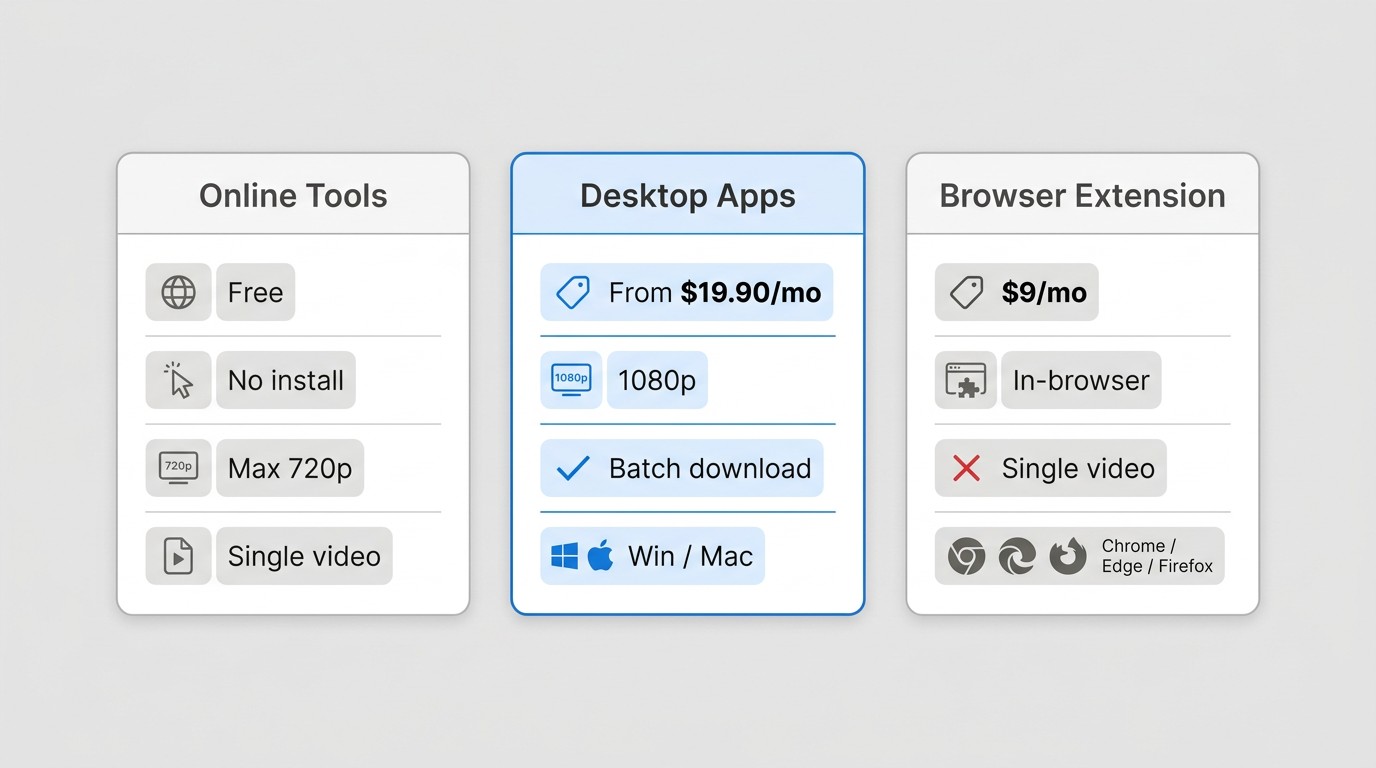
Three distinct approaches exist for saving Redtube videos locally. Each involves a real trade-off between convenience, quality, and features.
- Online tools (no install required): Paste a URL, get a file. Works on any device including mobile. Free. The trade-off: quality is typically capped below 1080p, batch downloading is not supported, and some tools show their own ads. Best for occasional, single-video use when you cannot or do not want to install software.
- Desktop apps (install required, Windows/Mac): The most capable option for users who download regularly. Support for higher resolution, batch downloads, audio track selection, and ad removal during the download process. Require an installation step and are generally subscription or one-time purchase products. BBFly, MyStream, and Flixpal fall into this category.
- Browser extensions: A middle ground — installed as a browser add-on rather than a desktop application. SERP Apps is a representative 2026 option at $9/month, compatible with Chrome, Edge, Firefox, Brave, and Opera. No separate desktop install is required, and it works directly in-browser. One practical workaround for users who prefer staying in their browser rather than switching to a separate app.
The right choice depends on how often you download, what device you are on, and whether quality ceiling matters to you. The comparison table below lays out the specifics.
Redtube Downloader Comparison: Quality, Price, and Features at a Glance
Here is a side-by-side look at the tools covered in this guide. Desktop apps lead on quality and features; online tools win on convenience and cost.
| Tool | Type | Max Resolution | Output Formats | Batch Download | OS / Device | Price | Adult Mode Required |
|---|---|---|---|---|---|---|---|
| BBFly | Desktop | 1080p | MP4, MKV | Yes | Windows, Mac | From $29.90/mo | Yes |
| MyStream | Desktop | 1080p | MP4 | Yes | Windows, Mac | From $29.90/mo | Yes |
| Flixpal | Desktop | 1080p | MP4 | Yes | Windows, Mac | From $35.90/mo | Yes |
| TubeOffline | Online | Normal/Best/Low tiers | MP4, FLV, AVI, WMV, MP3 | No | All browsers | Free | No |
| FetchFile | Online | Standard | MP4, MP3 | No | All browsers incl. mobile | Free | No |
| SERP Apps | Browser Extension | MP4/HLS | MP4 | No | Chrome, Edge, Firefox, Brave, Opera | $9/mo | No |
| yt-dlp | CLI | Source quality | MP4, MKV, and others | Yes | Windows, Mac, Linux | Free | No |
BBFly Redtube Downloader: Desktop Pick for Windows and Mac
BBFly is a desktop downloader for Windows and Mac that supports 100+ streaming and video sites, including Redtube, through its Adult Service mode. For users who download regularly and care about output quality, it is the most capable option in this guide.
I have used BBFly primarily for mainstream streaming platforms — it handles batch downloads and audio track selection cleanly, which is where it differentiates from online tools. One honest caveat from community feedback worth noting: download speeds on longer videos can be inconsistent depending on your connection and the source. It is not a tool that guarantees fast throughput on every session, and the social proof footprint is smaller than you would expect for a paid product. That said, for Windows and Mac users who want a GUI-based desktop downloader that covers Redtube alongside other platforms, it is a practical option.
Key Features of BBFly for Redtube Downloads
- Adult Service mode: Explicit content access requires a deliberate opt-in in General Settings — a purposeful UX safeguard rather than a default-on behavior.
- 100+ site coverage: Beyond BBFly Redtube Downloader, BBFly works across a wide range of streaming and video sites, one practical desktop alternative for multi-platform users who do not want separate tools for each site.
- Multi-channel audio: Supports EAC3 5.1, AC3 5.1, and AAC 2.0 audio tracks, so you can select the sound channel that fits your playback setup.
- Ad removal during download: Ads embedded in the video stream are automatically filtered during the download process.
- Batch download: Queue multiple videos and download them in one session rather than one at a time.
- Windows and Mac support: Both platforms are covered under a single license.
Pricing starts at $29.90/month. BBFly also offers a Lifetime plan at $199.90 covering 3 PCs — the only Lifetime multi-device option among desktop downloaders in this category.
About the Adult Service Mode in Desktop Apps
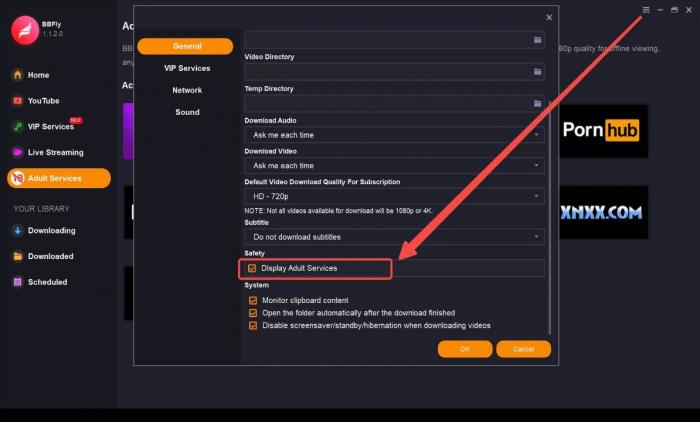
Before walking through the steps, a quick note on why this activation exists: desktop apps like BBFly and MyStream require explicit user opt-in before they will access adult site content. This is a deliberate design choice — the tool does not silently assume you want adult content enabled. Online tools handle this transparently by default; browser extensions like SERP Apps also do not require a separate activation step. If you hit Step 1 and wonder why it is there, that is the reason.
How to Download Redtube Videos with BBFly
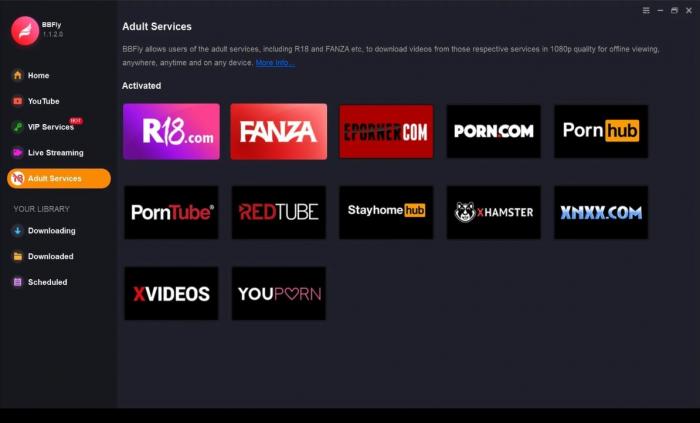
Step 1: Open General Settings and enable "Display Adult Services" from the dropdown list.
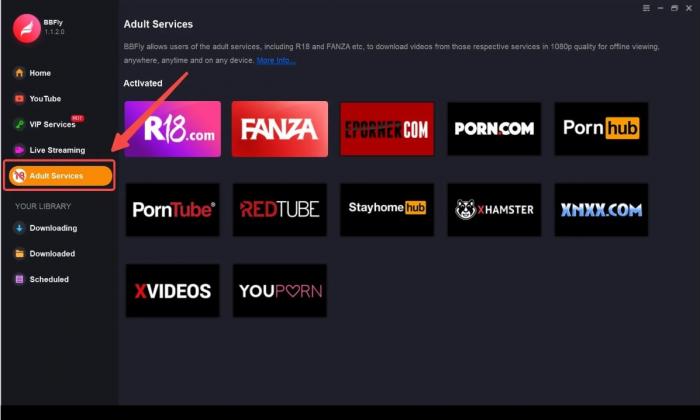
Step 2: On the left function bar, select "Adult Service."
Step 3: Browse to the Redtube video you want to save, then click the "Download" button.
MyStream Redtube Downloader: Alternative Desktop Option
MyStream Redtube Downloader is a Windows and Mac desktop downloader that follows the same Adult Service activation workflow as BBFly. It supports up to 1080p, outputs MP4, and handles batch downloads — making it a functional alternative if you are already familiar with MyStream from other platforms.
Feature-wise, MyStream and BBFly are close in this use case: both require Adult Service mode activation, both handle batch queues, and both support EAC3 5.1, AC3 5.1, and AAC 2.0 audio channels. The practical differentiator comes down to pricing model and how many other sites you need — BBFly covers 100+ platforms under one plan, while MyStream's pricing varies by package.
Flixpal Redtube Downloader: Desktop Option with Subtitle Support
Flixpal is another Windows and Mac desktop option. Its distinguishing feature relative to BBFly and MyStream is subtitle handling — it can download subtitles as separate SRT files alongside the video, which is useful if you want subtitle tracks stored independently of the video container.
On resolution, Flixpal supports up to 1080p. Output is MP4. Batch download is supported. The workflow follows the same Adult Service activation pattern as the other desktop tools.
Free Online Options: TubeOffline and FetchFile
If you do not want to install any software, two free online tools handle Redtube downloads directly in the browser: TubeOffline and FetchFile. Neither requires registration, and both work on any browser-capable device.
TubeOffline offers the most format flexibility of the two. Paste a Redtube URL, select your quality tier (Normal, Best, or Low), and choose an output format from MP4, FLV, AVI, WMV, or MP3. It is single-video only — no batch queue. Free support is available around the clock if a download fails.

Steps for TubeOffline: Paste the Redtube video URL into the input box, select your preferred format and quality, then click Download.
FetchFile is the simpler of the two — MP4 and MP3 output, no format menu to navigate. It is cross-device including mobile browsers, which makes it the more practical choice if you are on an iPhone or Android and want a quick download without desktop software.
The limitation both tools share: quality caps below what desktop apps deliver, and neither supports batch downloads. For occasional single-video use on any device, they are the lowest-friction option available.
Power Users: Download Redtube Videos with yt-dlp
For technically comfortable users, yt-dlp is a free, open-source command-line tool that is widely used for video downloading across adult and mainstream sites alike. It supports Redtube and can pull source-quality video in multiple formats.
The trade-off is the interface: yt-dlp is CLI only. There is no GUI. You run commands in a terminal, and you need to be comfortable with that workflow. It is not a tool for casual users — but for those who are already using the command line for other tasks, it is the most flexible and cost-free option in this list. Batch downloading via playlist or URL list files is supported.
If you want the same capability with a visual interface, BBFly covers 100+ sites including Redtube under a single desktop app — that is the practical GUI alternative for users who want yt-dlp-level site coverage without the command-line requirement.
Download Redtube Videos on iPhone or Android
The short answer: most desktop apps do not have native mobile counterparts.
BBFly and MyStream are Windows and Mac desktop applications — there are no iOS or Android versions. Flixpal follows the same pattern. If you are on a mobile device, the practical path is an online tool or browser-based method.
TubeOffline and FetchFile both work in any mobile browser without installation. Paste the URL, select your format, and download. FetchFile in particular is designed with cross-device use in mind, including mobile. SERP Apps, as a browser extension, works in mobile-compatible browsers where extensions are supported.
For a full-featured experience with batch downloads and higher quality, you will need to use a Windows or Mac desktop. Mobile options are functional but constrained to single-video, standard-quality downloads via online tools.
Frequently Asked Questions About Redtube Downloaders
Is it legal to download videos from Redtube?
Downloading content for personal offline viewing, from content you are authorized to access and where permitted by platform terms and applicable law, is the framing most personal-use discussions operate under. Redtube's terms of service restrict downloading, and copyright ownership of hosted content varies by video. This guide does not constitute legal advice — if legality in your jurisdiction matters to you, verify independently before downloading.
Are Redtube downloaders safe from malware?
Established desktop tools like BBFly and MyStream, downloaded from their official developer websites, carry significantly lower risk than unknown online converters or random "download" links. Adult sites are a well-documented target for fake download buttons and malicious ad redirects — independent security researchers have flagged this consistently. Always download tools from the official source, and never click download banners displayed on the Redtube page itself.
Can I download Redtube videos without installing software?
Yes. TubeOffline and FetchFile are free online tools that require no installation — paste a URL and download. SERP Apps ($9/month) is a browser extension that offers a middle ground: it installs as a browser add-on rather than a desktop application. Desktop apps like BBFly offer the most features but do require installation on Windows or Mac.
What video quality can I download from Redtube?
Quality varies by tool. Free online tools like TubeOffline and FetchFile are capped at standard or normal quality tiers — typically below 1080p. Desktop apps including BBFly, MyStream, and Flixpal support up to 1080p. See the comparison table above for a per-tool breakdown.
Can I batch download Redtube videos?
Yes, if you use a desktop app. BBFly, MyStream, and Flixpal all support batch download queues, letting you download multiple videos in one session. Online tools like TubeOffline and FetchFile are single-video only. yt-dlp supports batch downloading via URL list files for technical users.
Can I download Redtube videos on iPhone or Android?
Most desktop apps — BBFly, MyStream, Flixpal — are Windows and Mac only, with no native iOS or Android apps. For mobile, TubeOffline and FetchFile work in any mobile browser without installation. FetchFile is particularly suited for mobile use. SERP Apps works in mobile-compatible browsers where extensions are supported.
Why does BBFly ask me to enable "Display Adult Services" before downloading?
Desktop apps like BBFly and MyStream require explicit user opt-in to access adult site content — this is a deliberate safeguard rather than a default behavior. To enable it, go to General Settings and select "Display Adult Services" from the dropdown. Once activated, the Adult Service section appears in the left navigation bar. Online tools handle this silently by default; browser extensions do not require this step.
What is the difference between online and desktop Redtube downloaders?
Online tools require no installation, work on any device including mobile, and are free — but they cap quality below 1080p and support only single-video downloads. Desktop apps require installation on Windows or Mac but offer higher resolution, batch downloads, audio track selection, and ad removal. Browser extensions like SERP Apps blend the two: no desktop install required, in-browser operation, with a subscription cost.