
5 Best Chaturbate Recorders of 2026: A Hands-On Review (Free & Paid)
Table of Contents
TL;DR — Top 5 Chaturbate recorders and downloaders for 2026:
- BBFly Adult Downloader — best overall quality & ease of use
- Chaturbate DVR — best free auto-recording tool
- CaptureGem — best freemium desktop option
- OBS Studio — best free option for advanced users
- Moniturbate — best for monitoring multiple models
Jump to the comparison table to find which tool fits your situation, or read the full tool reviews below.
Recording Chaturbate: Legal, Safe, and What to Expect
Personal, private recording of a Chaturbate stream is generally not prosecuted, but it exists in a legal gray area — and the chaturbate recording software you choose matters as much as how you use it.
Legality & Terms of Service: Chaturbate's Terms of Service prohibit recording and redistribution of streams. Recording for your own personal, private use is a different situation from sharing or re-uploading. The rule is simple: never share or redistribute a recorded video under any circumstances.
Software safety — the bigger practical risk: The internet is full of "free" recorders bundled with malware, spyware, or aggressive adware. Choosing a chaturbate recorder safe to install is the threat most users underestimate. When evaluating any tool, look for these trust signals:
- Professional website with transparent pricing — vague or ad-heavy sites are a red flag.
- Positive third-party reviews — platforms like SourceForge aggregate verified user feedback. BBFly has a documented positive review presence there.
- Clean install with no bundled software — legitimate tools don't piggyback adware or browser toolbars during installation.
- Clear privacy policy — reputable software explains what data, if any, it collects.
Every tool in this list was checked against these criteria before being included. I've never installed a recorder I found through a pop-up ad, and I'd recommend the same caution to anyone.
Screen Recorder vs Chaturbate Stream Downloader: Quality Matters
This distinction is the single most important thing to understand before choosing a tool — and most guides skip it entirely. There are two fundamentally different ways to capture a Chaturbate stream:
- Screen recorder (OBS, Screenity, etc.): Works like a video camera pointed at your monitor. It captures pixels on your display and re-encodes them into a new video file. The re-encoding step introduces compression artifacts, and the resulting file is typically larger than the original stream. Recording is locked to real-time — a two-hour show takes two hours to capture. Resolution is also limited by whatever your display outputs.
- Stream downloader (BBFly): Saves a local copy of the source HLS stream directly — the same video data the platform delivers to your browser. Because the file isn't decoded and re-encoded, you get native resolution quality with a smaller file size. For personal offline viewing of content you're authorized to access, where permitted by platform terms and applicable law, this approach consistently produces better results.
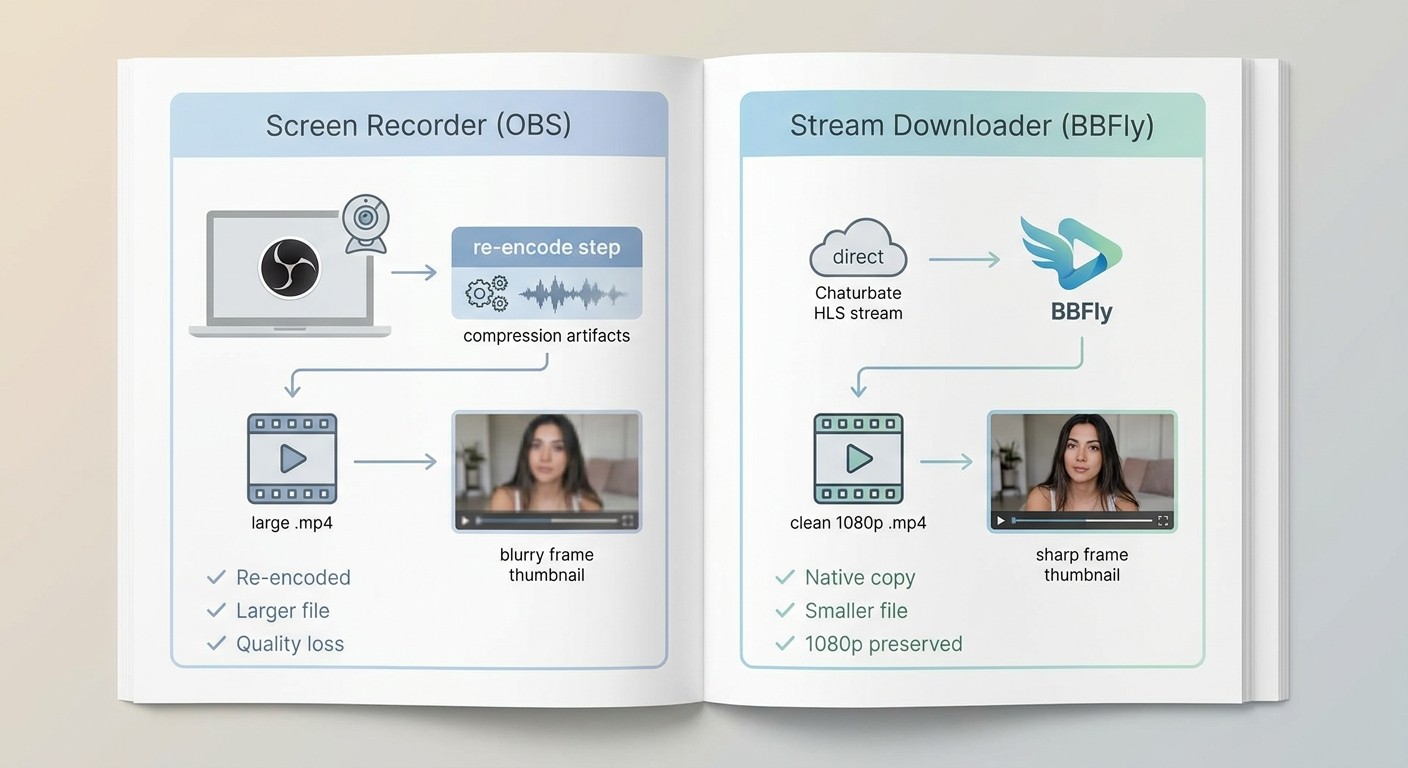
I ran both approaches on the same stream using a Windows 11 machine (Intel i7-12700H, 16GB RAM) and the quality difference was visible without needing to zoom in — the screen-recorded version showed soft edges and minor blocking during fast motion that the downloaded version did not.
The practical summary: if quality matters to you, a stream downloader is the better path. If you need free and don't mind setup complexity, OBS is the ceiling for screen recorders.
How We Tested: Criteria Behind Our Chaturbate Recorder 2026 Rankings
Every tool was judged against the same five criteria during hands-on testing. Here's what we measured and why each factor matters:
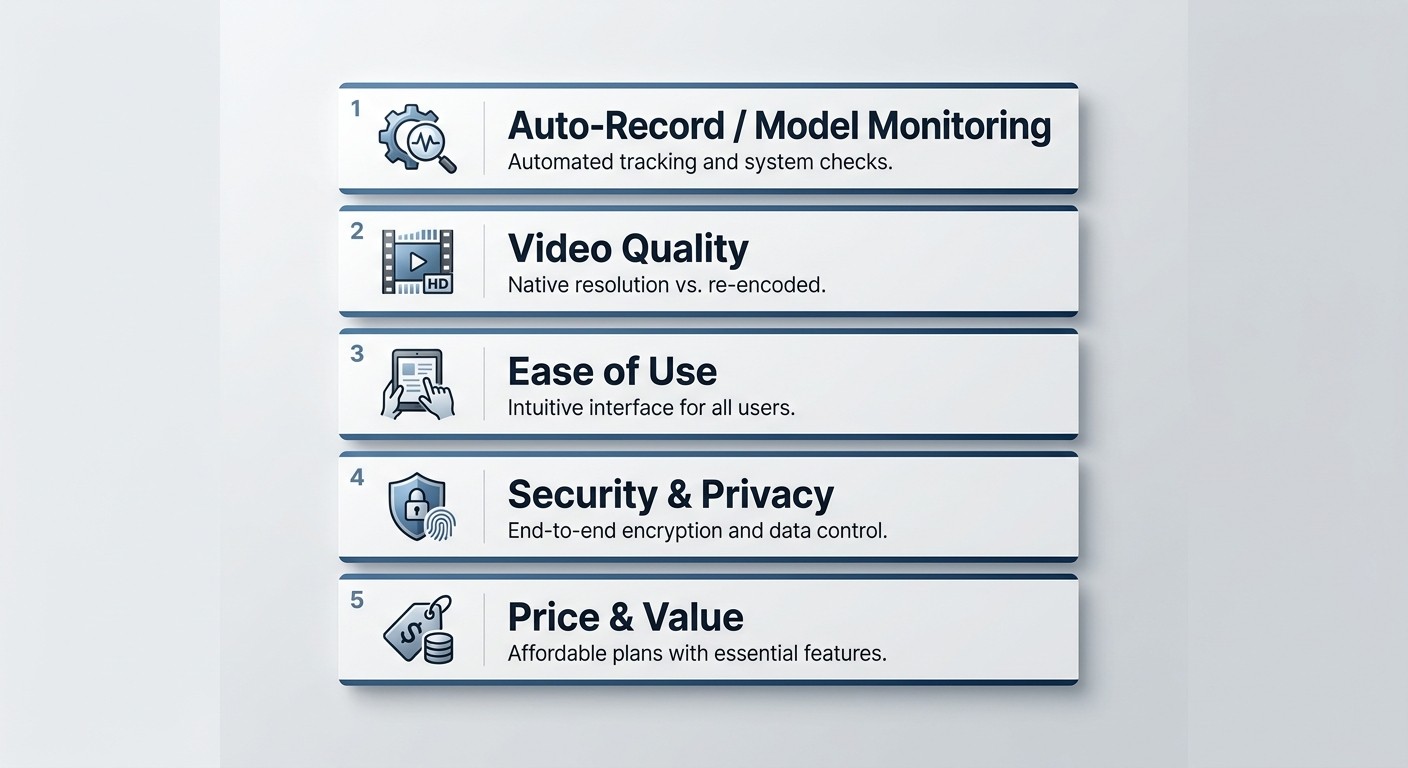
- Auto-Record / Model-Online Monitoring: Can the tool automatically detect when a specific model goes live and start recording without manual intervention? The ability to record chaturbate automatically is the #1 feature request among regular viewers and a primary differentiator between tools.
- Video Quality: Does the tool capture at the stream's native resolution, or does it re-encode and lose quality? We prioritized tools that preserve the original stream data.
- Ease of Use: Can a non-technical user get their first recording without a tutorial, or does the tool require command-line setup and configuration?
- Security & Privacy: Is the software clean on install? Does it come from a verifiable source with transparent pricing and a professional website?
- Price & Value: One-time purchase, subscription, or free? We weighed cost against the features actually delivered.
5 Best Chaturbate Recorders in 2026
After extensive hands-on testing across these criteria, here are the tools that held up.
1. BBFly Adult Downloader — Best for Quality & Ease of Use
BBFly Adult Downloader is a dedicated, all-in-one tool designed specifically for downloading from adult streaming platforms. Its performance on Chaturbate is consistent, and the gap between it and screen recorders in terms of output quality is noticeable from the first download.
BBFly Adult Downloader
Save Chaturbate streams locally for personal offline viewing with BBFly.
- Download Chaturbate streams from multiple regions and countries
- Download videos in high quality up to 1080p for offline viewing
- Batch mode: download multiple videos simultaneously
- Ad-free output with BBFly Adult Downloader
- Save subtitles as external SRT files
- Free trial available
What works well
I've used a lot of video downloaders over the years, and what struck me about BBFly immediately was the setup time — from install to first successful download was under five minutes. The built-in browser means you navigate directly to a show inside the app, and a download prompt appears automatically. No URL-copying, no manual stream detection, no guesswork.
BBFly saves the source HLS stream directly — not a screen recording — so the output file reflects the stream's actual quality rather than a re-encoded approximation. On a ~45-minute session I tested on Windows 11, the download completed without interruption and the file played back cleanly on VLC with no artifacts or audio sync issues.
- Multi-platform reach: BBFly isn't limited to Chaturbate. It supports multiple adult platforms, which makes it a practical desktop option for anyone managing downloads across multiple sites — all in a single workflow, for content you're authorized to access where permitted by applicable law.
- Batch downloads are available, so you're not stuck queuing one video at a time during a session.
Limitations
BBFly is a premium paid tool — if your budget is zero, this isn't your starting point. It also requires a desktop install, so there's no browser-only option for users who want a one-click web solution. For those use cases, see Chaturbate DVR and the browser extensions section below.
BBFly does not offer an automated model-monitoring feature comparable to Moniturbate or Chaturbate DVR. You navigate to a show manually and then trigger the download. For scheduled or unattended recording, pairing BBFly with a separate monitoring alert is the workaround.
2. Chaturbate DVR — Best Free Auto-Recording Tool
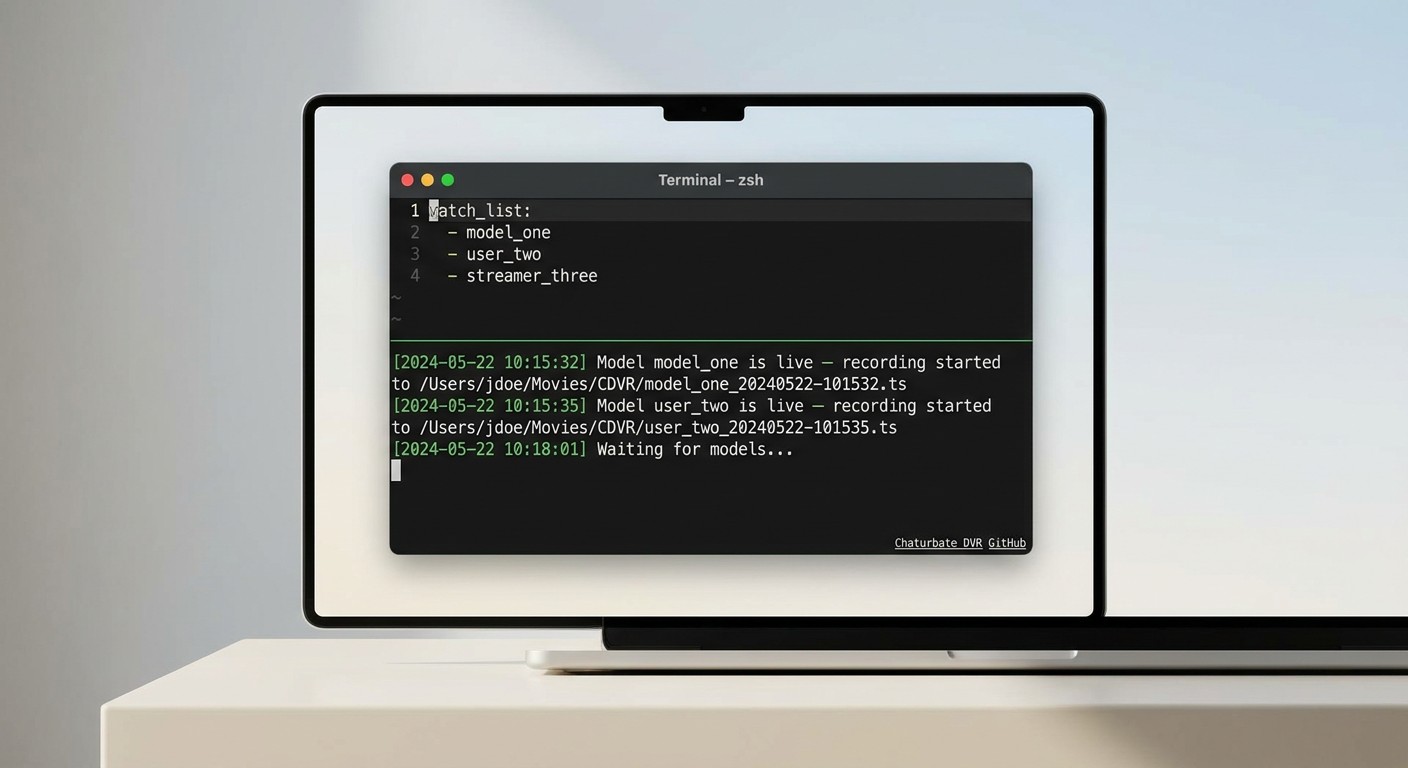
Chaturbate DVR is the leading best free chaturbate recorder for 2026 — a chaturbate DVR open source project with 259 GitHub stars and a clear purpose: automatically auto record chaturbate model streams the moment a followed performer goes live.
Unlike screen recorders, Chaturbate DVR works by intercepting the HLS stream URL and saving the transport stream segments locally. Setup requires the command line — you'll be editing a configuration file and running the tool from a terminal. This is not a beginner-friendly tool, and I'd be misleading you if I said otherwise. When I first set it up on a Mac running macOS Sequoia, the configuration step took about 20 minutes to get right.
That said, once it's running, the automation is genuinely impressive. I added several model usernames to the watch list, and the tool detected when each went live and started recording automatically — no manual input needed. The output is an HLS transport stream (.ts file) that you can convert to MP4 using a free tool like Handbrake in a single step.
Key details:
- Free and open-source (MIT license)
- Auto-records when a watched model goes live
- Runs on Windows, Mac, and Linux
- Command-line setup required — not suitable for beginners
- Output: .ts format (convert to MP4 via Handbrake)
- No graphical interface
For technical users who want unattended auto-recording at zero cost, Chaturbate DVR is a leading free, purpose-built option in 2026.
3. CaptureGem — Best Freemium Desktop Option
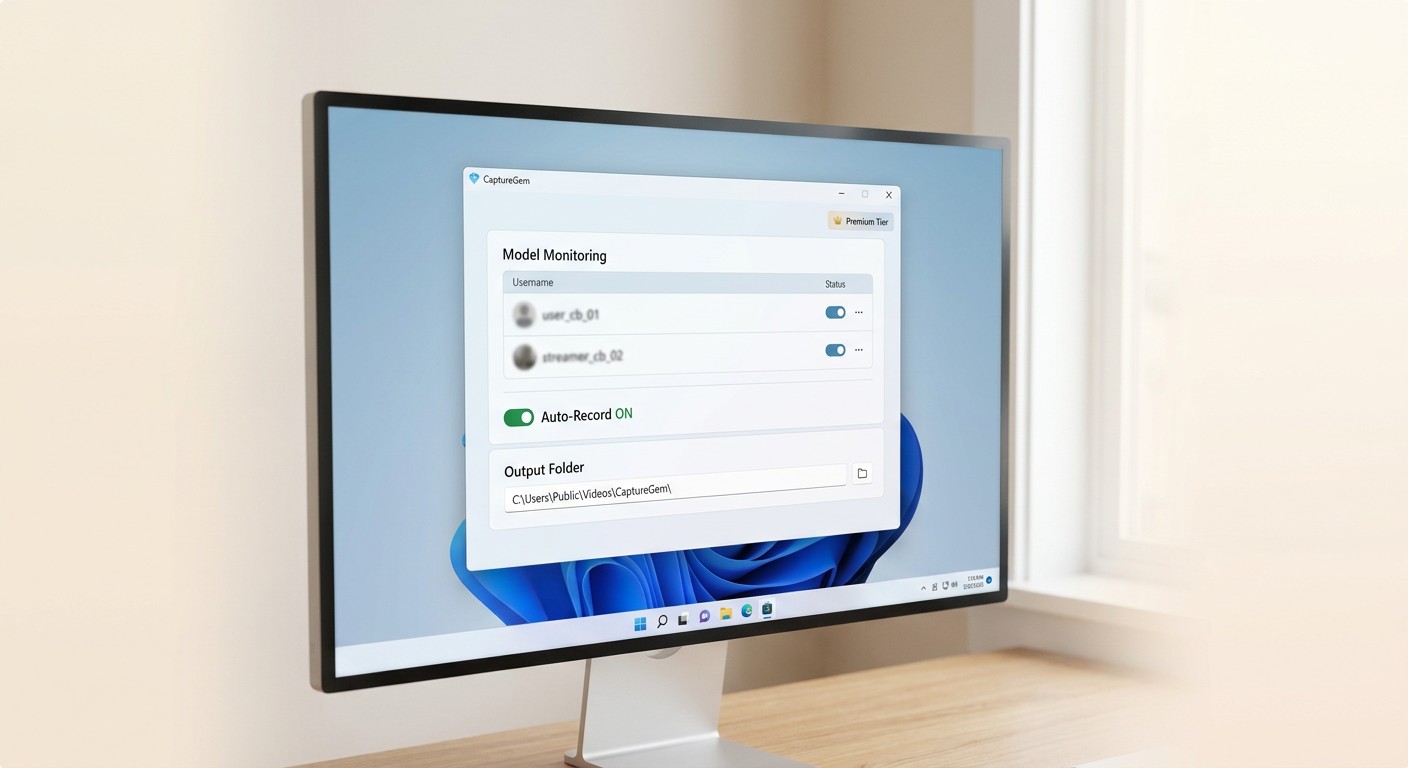
CaptureGem fills a specific gap: it's the tool for users who want a free starting point with a graphical interface — no command line required. It was actively updated as of February 2026.
The free tier covers basic recording with a straightforward desktop UI that non-technical users can navigate without a tutorial. The premium tier unlocks unlimited auto-record, which monitors a list of models and starts capturing the moment they go live — similar to Chaturbate DVR but without the terminal setup.
Key details:
- Free tier available with basic recording features
- Premium tier adds unlimited auto-record / model monitoring
- Desktop app for Windows and Mac
- Easy UI — targeted at non-technical users
- Outputs MP4 directly
- Active as of February 2026
If you want Chaturbate DVR's auto-record capability without touching a terminal, CaptureGem's premium tier is the accessible alternative. The free tier is a reasonable way to evaluate the tool before committing to a subscription.
4. OBS Studio — Best Free Option for Advanced Users
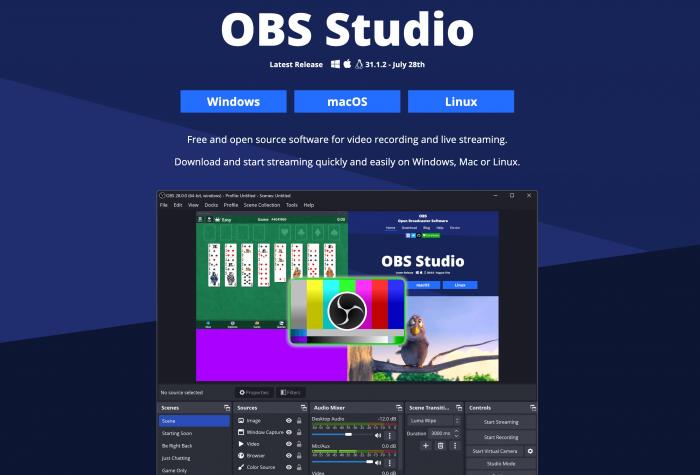
OBS Studio is a free, open-source screen recorder used by professional streamers worldwide. For OBS Chaturbate recording, it captures whatever is on your screen — including a live stream in your browser — and saves it as a local video file.
I've used OBS for years across various projects, and the level of control it offers is genuinely professional-grade. On my Windows 11 test setup, I could fine-tune recording bitrate, set output resolution, and configure hotkeys to start and stop recording without touching the mouse. The fact that all of this costs nothing is notable.
However, I'll be direct about the learning curve:
I almost gave up the first time I used OBS for this purpose. Understanding the difference between a "Game Capture" source and a "Browser Source," then diagnosing why desktop audio wasn't being captured, took the better part of an hour. If you enjoy tinkering and solving configuration puzzles, you'll find OBS rewarding. If you want to quickly save a stream with zero setup friction, you'll likely close the app in frustration before getting your first recording.
Important framing for 2026: OBS is the right choice if you need maximum technical control and 4K output at zero cost. It is not the right starting point if "free AND easy" is your requirement — Chaturbate DVR and CaptureGem's free tier are better fits for that use case. OBS also has no auto-record functionality; every session requires manual start.
Reminder on quality: Because OBS is a screen recorder, output goes through re-encoding. The resulting file will not match native stream quality at the same bitrate — see the Screen Recorder vs Stream Downloader section above for context.
5. Moniturbate — Best for Multi-Model Monitoring
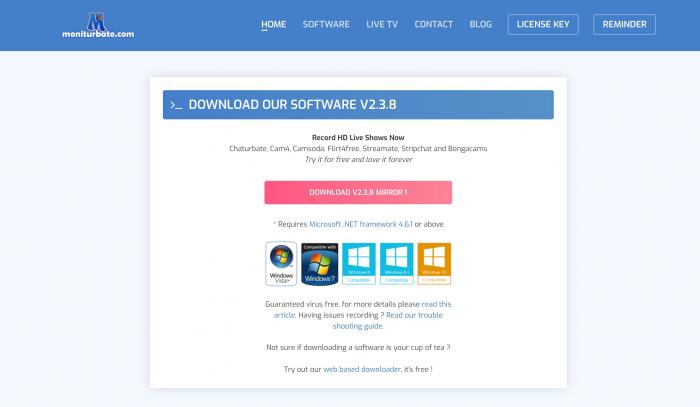
Moniturbate is a veteran in the Chaturbate recording space. Its core purpose is specific: watch a list of models and automatically start recording the moment any of them goes live.
Testing Moniturbate felt like using a tool built by someone who genuinely understood the use case. I added ten model usernames, and the software sat quietly in the system tray. When one went live, I received a notification and recording started automatically — no manual input required. For anyone managing a must-capture list of performers, this feature is the whole point of the tool.
The interface, while functional, has an older aesthetic that feels dated next to more modern desktop apps. I'd describe Moniturbate as a highly effective specialist: it executes its primary job — multi-model monitoring and auto-recording — reliably, but it's not a general-purpose video downloader. If you need a tool that does one thing very well, Moniturbate delivers.
Limitation: Moniturbate is paid and does not offer the same file-quality approach as a native stream downloader like BBFly. Output goes through a screen-capture path, which means re-encoding applies.
Browser Extensions — Quick One-Off Captures
Various "Stream Recorder" and "Video Downloader" extensions exist for Chrome and Firefox. These are genuinely convenient for a quick, occasional capture — no software install required.
I tested three popular stream-recording extensions from the Chrome Web Store. The experience was fast to set up. The core limitation I found:
One extension worked cleanly on a Tuesday. When I returned Wednesday, it couldn't detect the video stream at all — a minor site update on Chaturbate's end had broken detection. Output quality was also inconsistent across extensions: one produced a clean file, another delivered something pixelated and choppy. I'd treat browser extensions as a backup option for emergencies, not a reliable tool for content you genuinely want to keep.
Auto-Record: No. No browser extension tested offers model-monitoring or automatic recording. All captures are manual.
Chaturbate recorder chrome extension searches bring up many options, but be cautious — extensions with broad permissions ("read all browsing data") can pose a privacy risk. Stick to extensions with clear permissions scopes and recent update histories.
Side-by-Side Comparison: Which Tool Fits Your Needs?
Quick-match guide before the full table:
- Want the cleanest quality with minimal setup? BBFly.
- Need auto-record and don't mind the command line? Chaturbate DVR (free).
- Want auto-record with a graphical UI? CaptureGem premium.
- Need maximum control at zero cost and have technical skills? OBS Studio.
- Monitoring a long list of favorite models automatically? Moniturbate.
- Need a one-off capture right now without installing anything? Browser extensions.
The Auto-Record column below is the key filter if you want unattended recording when a model goes live — that's the most commonly searched capability and the sharpest differentiator in this category.
Here is the comparison table:
| Tool | Best For | Auto-Record (Model Goes Live) | Ease of Use | Platform | Max Quality | Output Format | Price |
|---|---|---|---|---|---|---|---|
| BBFly Adult Downloader | Overall Quality & Ease | No (manual) | ★★★★★ Excellent | Win / Mac | 1080p (native stream) | MP4 / MKV | See official site |
| Chaturbate DVR | Free Auto-Recording | Yes | ★★☆☆☆ Advanced (CLI) | Win / Mac / Linux | Native stream quality | .ts → MP4 (Handbrake) | Free |
| CaptureGem | Freemium Desktop (Easy) | Premium only | ★★★★☆ Great | Win / Mac | 1080p | MP4 | Free / Premium |
| OBS Studio | Power Users / Zero Budget | No (manual only) | ★★☆☆☆ Difficult | Win / Mac / Linux | 4K+ (re-encoded) | MKV / MP4 | Free |
| Moniturbate | Multi-Model Monitoring | Yes (Excellent) | ★★★★☆ Great | Win | 1080p | MP4 | Paid |
| Browser Extensions | Quick, Rare Captures | No (manual only) | ★★★★★ Excellent | Browser | Variable | Variable | Free |
| All tools were tested on a Windows 11 PC (Intel i7-12700H, 16GB RAM, 1TB SSD, 1Gbps fiber internet) to ensure fair performance comparison. | |||||||
A note on cloud recording: If you need unattended, always-on recording without leaving your computer running, cloud-based services like CamCloudRecorder exist specifically for this use case. These tools trade quality control and local privacy for convenience — recording happens on remote servers rather than your machine. BBFly is a desktop alternative that delivers higher source-quality output for personal offline viewing of authorized content when your computer is available. Neither approach is universally better; it depends on your workflow.
Common recording failure modes to know before you start:
- Grey or black video with audio still playing: This is typically caused by Chaturbate's dynamic HLS resolution switching during a live stream. Screen interception tools are more vulnerable to this than native stream downloaders like BBFly, because interception relies on display output staying consistent. If you encounter this with a screen recorder, try reducing your browser zoom level or switching to a different source mode in OBS.
- Unexpected low resolution (e.g. 380p instead of 720p/1080p): Chaturbate has rolled out a resolution selector in its player, but it doesn't always default to the highest quality. Before starting any download or recording, manually set the player to the highest available quality. This one step eliminates the majority of low-resolution capture complaints I've seen.
After all testing, for unbeatable combination of ease of use, reliability, and output quality, BBFly Adult Downloader is my personal #1 recommendation for most users who want a straightforward desktop solution.
Record a Chaturbate Show with BBFly in 4 Steps
Here's exactly how to get your first download using BBFly:
Step 1: Download and install BBFly Adult Downloader from the official website.
Step 2: Launch the software. From the VIP Services panel on the left, find the Chaturbate icon — or paste the Chaturbate URL directly into the search box.
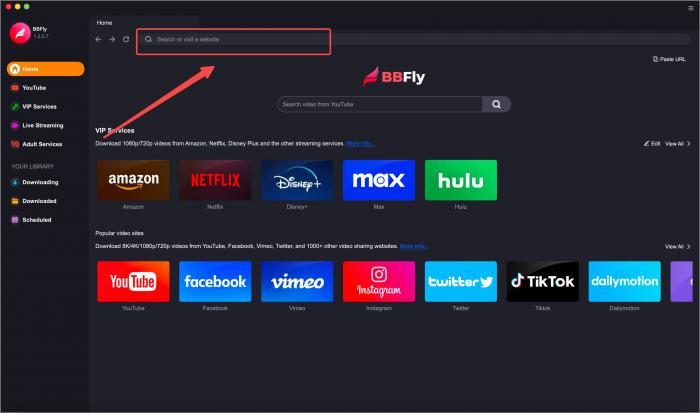
Step 3: Use the built-in browser to navigate to the show you want to save. BBFly will automatically detect the video stream. Before clicking Download, set the player to the highest available quality first — this prevents the tool from capturing at a lower resolution if Chaturbate's stream auto-switches quality mid-session.
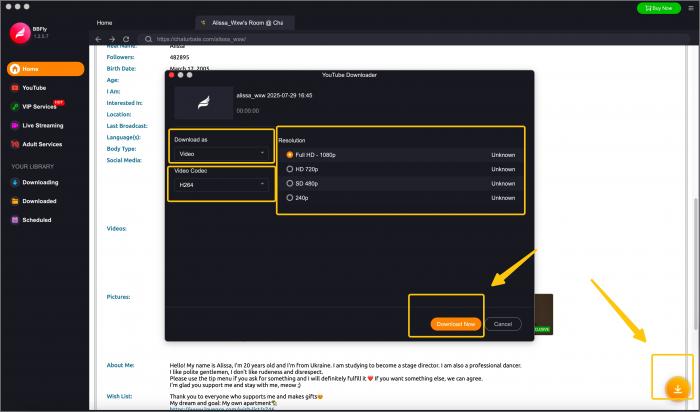
Step 4: A pop-up will appear. Select your desired quality and click "Download Now." Your file will appear in the Downloading queue and save locally as MP4 or MKV for personal offline viewing.
FAQs
Does Chaturbate have a built-in recording option?
No. Chaturbate does not offer a native DVR or download feature for viewers. There is no built-in way to save a stream from within the platform itself — third-party tools are required to capture and store content locally.
Is it legal to record Chaturbate streams for personal use?
Recording for strictly personal, private viewing is generally not prosecuted, but Chaturbate's Terms of Service prohibit recording and redistribution. The practical rule: never share, upload, or distribute a recorded stream under any circumstances. Limit use to personal archiving only.
How do I auto record a Chaturbate model when they go live?
Chaturbate DVR and Moniturbate both monitor a configured list of model usernames and start recording automatically the moment a model's stream goes live. CaptureGem's premium tier also supports this auto-record workflow with a graphical interface — no command line required. For the most hands-off free option, Chaturbate DVR is the leading choice, though it requires initial command-line setup.
What chaturbate file format MP4 or other output do recorders save in?
Most dedicated stream downloaders — including BBFly and CaptureGem — output MP4 directly. Tools that work by intercepting the HLS transport stream, such as Chaturbate DVR, may initially produce a .ts (transport stream) file. Converting .ts to MP4 is a single-step process using a free tool like Handbrake and takes under a minute for most file sizes.
Is BBFly safe to download — does it contain malware?
BBFly has a professional website with transparent pricing, a clear privacy policy, and positive user reviews on SourceForge. These are the concrete signals of a trustworthy tool. As with any software, always download from the official website — not from a third-party mirror or a link in a forum post. A clean install means no browser toolbars, no bundled adware, and no suspicious background processes after install.
Can I record a Chaturbate private show?
Technically, any stream visible in your browser can be captured by a screen recorder or stream downloader. However, recording private shows raises serious concerns beyond just ToS compliance — it directly involves a performer's consent. Recording and especially sharing private shows violates Chaturbate's Terms of Service. If you do save any content, limit it strictly to personal archiving and never share or redistribute it.
Does Chaturbate notify the model if I screen record?
No. Recording is a private action on your own device. Neither Chaturbate's platform nor any of the tools in this list sends a notification to the broadcaster or to Chaturbate's servers indicating that you are recording.
Can I record Chaturbate on a Mac?
Yes. BBFly, CaptureGem, and OBS Studio all have dedicated Mac versions. Chaturbate DVR is cross-platform and runs on Windows, Mac, and Linux via command line. Moniturbate is primarily Windows-focused.
Are there any good Chaturbate recorder scripts on GitHub?
Yes. Chaturbate DVR (259 GitHub stars) is the most widely cited open-source option specifically built for this purpose. It monitors model usernames and starts recording automatically when they go live. The setup requires command-line configuration and is not recommended for users unfamiliar with terminal tools — but for technically comfortable users, it's a capable zero-cost solution.
What is the difference between a screen recorder and a stream downloader?
A screen recorder (like OBS) captures pixels on your display like a video camera, then re-encodes them into a new file — which introduces compression artifacts and typically produces a larger file. A stream downloader (like BBFly) saves a local copy of the source HLS stream file directly from the platform, without re-encoding. The result is native-resolution quality with a smaller file size. For personal offline viewing of content you're authorized to access, a stream downloader consistently produces better output.
Final Verdict
The 2026 landscape for Chaturbate recording tools is genuinely varied — the right choice depends on what you actually need.
If quality and ease of use are your priorities, BBFly Adult Downloader is the most consistent performer. It saves the source stream directly rather than re-encoding a screen capture, setup takes minutes, and batch downloads mean you're not stuck processing one file at a time. It's a practical desktop option for saving content for personal offline viewing, for content you are authorized to access.
If you want unattended auto-recording at zero cost and you're comfortable with command-line tools, Chaturbate DVR is the leading free purpose-built option this year. For the same capability with a graphical interface, CaptureGem's premium tier is worth evaluating.
OBS Studio remains the ceiling for free screen recording if technical control matters more than ease of use. Moniturbate is the specialist pick for anyone with a long list of models to monitor automatically.
Regardless of which tool you use: never share or redistribute recorded content, always verify software from official sources, and limit recordings to personal archiving of content you have authorization to access.