How to Download Paramount+ with Showtime Videos on PC and Mac (2026)
Table of Contents
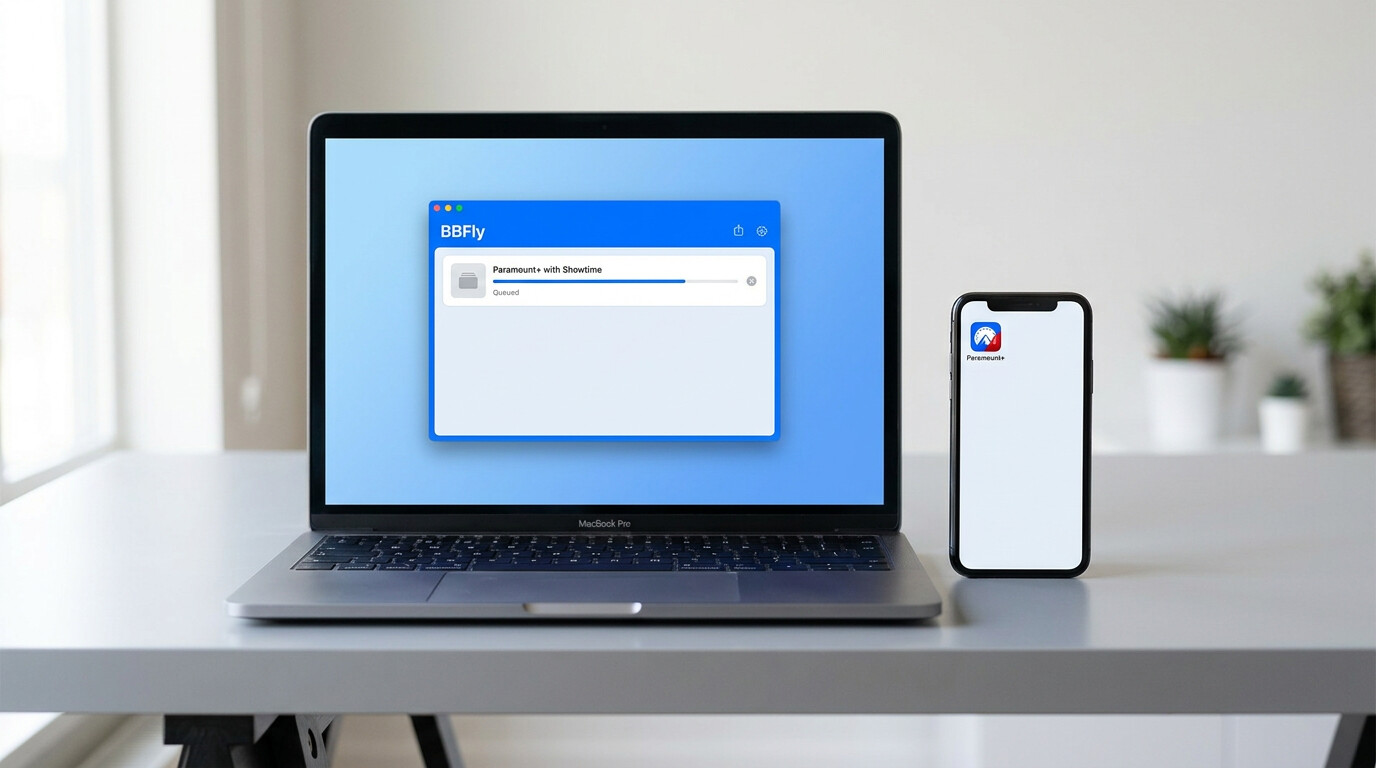
Quick answer: In the US, Showtime content lives inside Paramount+ with Showtime, and official offline downloads are limited to the iOS and Android apps on the Premium plan. There is no download button on the desktop site. For Windows and Mac, BBFly Showtime Downloader is one practical workaround that saves a local MP4 or MKV for personal offline viewing of content you are authorized to access.
Showtime in 2026: Now Part of Paramount+
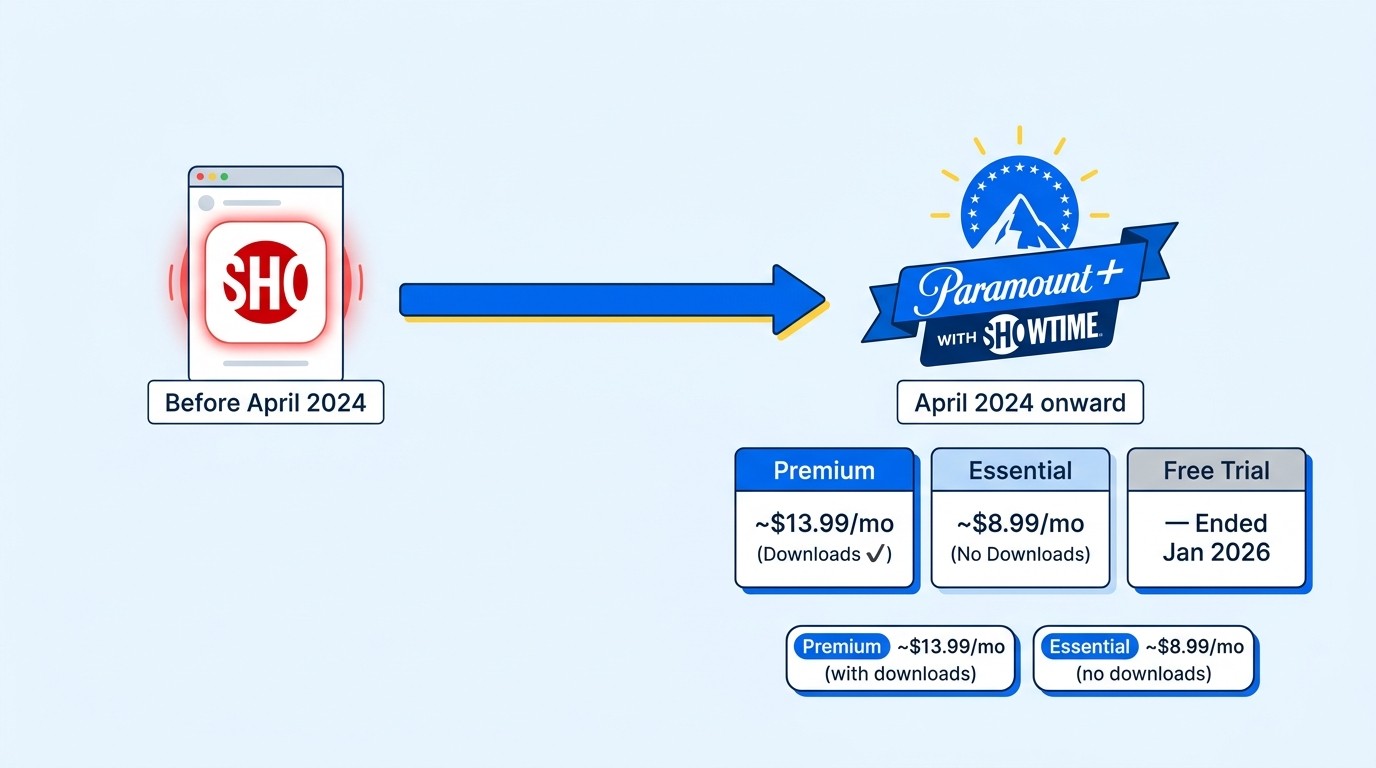
If you searched for "Showtime app" and ended up on a Paramount+ page, you are not lost. Showtime as a standalone US streaming service was folded into Paramount+ with Showtime in April 2024. The old standalone app, the $10.99 plan, and the 30-day trial that older guides still reference are gone.
Here is the lay of the land as of June 2026 (verify current figures on paramount.com before subscribing):
- Paramount+ with Showtime Premium — around $13.99 per month, the tier that unlocks offline downloads on mobile.
- Paramount+ Essential — around $8.99 per month, ad-supported, and does not include downloads.
- Free trial — Paramount ended its direct free trial in January 2026. Promotions still appear through partners, but there is no advertised standalone trial on paramount.com.
Why this matters before you go hunting for a downloader: every workflow that older articles describe ("sign up via Roku, open the Showtime app, hit download") is built on a service that no longer exists. Pricing, plan structure, and the download surface have all shifted, so any guide that still names a $7.99 Showtime + Paramount+ bundle is working from a 2023 map.
Showtime vs. SkyShowtime: Which Platform Are You On?
The naming overlap trips people up. Showtime (now Paramount+ with Showtime) is the US service operated by Paramount. SkyShowtime is a separate platform available across roughly 20 European and Nordic markets, run as a Comcast/Sky and Paramount joint venture. Catalogues overlap in places but are not identical, and the apps, accounts, and download rules are completely separate.
If you travel between the US and Europe, or you hold subscriptions to both, that distinction matters: a tool that only handles Paramount+ leaves your SkyShowtime library stranded. BBFly covers Paramount+ with Showtime and SkyShowtime in the same desktop tool, which spares you switching apps depending on which continent your account belongs to.
Official Download Limits You Need to Know First
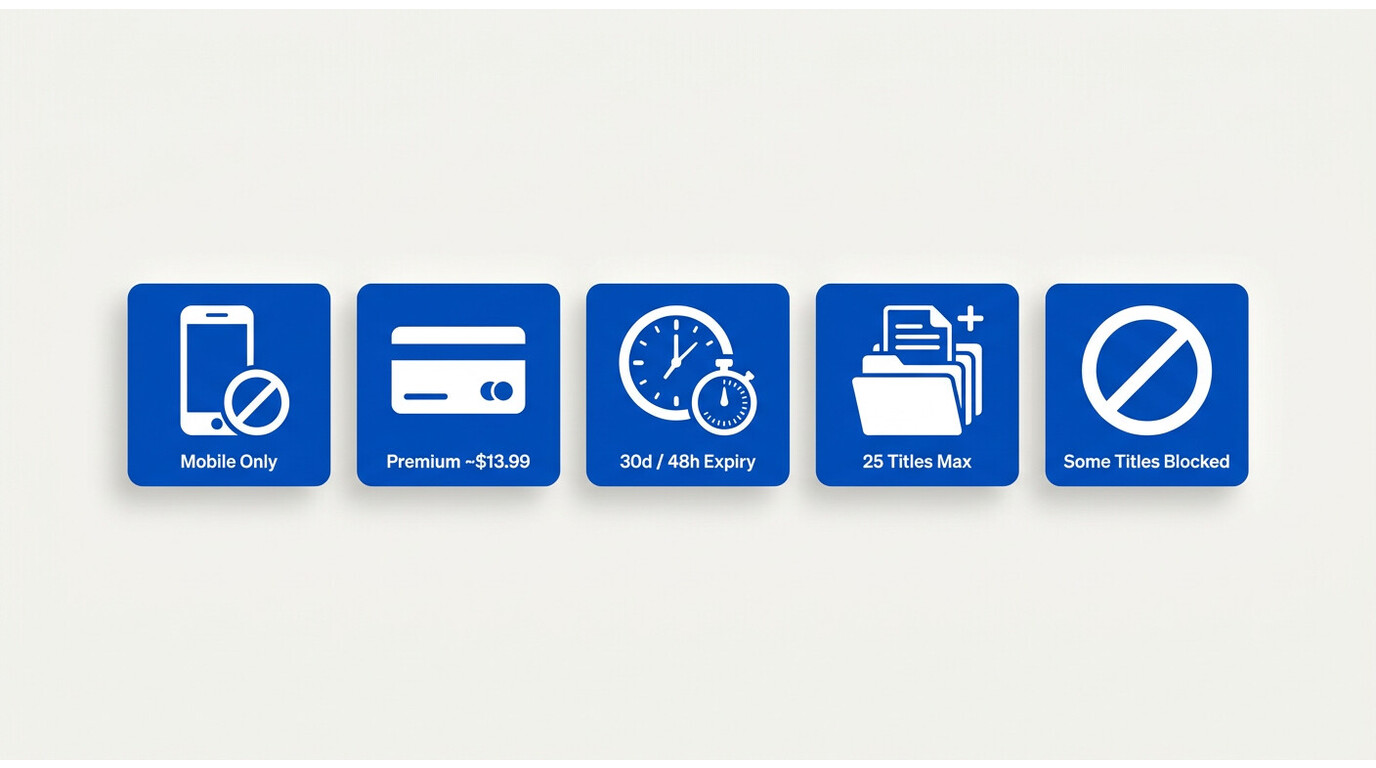
Before any third-party option enters the picture, you should know exactly what the official app does and does not do. Most reader complaints I have seen are not about quality — they are about hitting a limit nobody flagged up front.
- Mobile only. Downloads work in the Paramount+ apps for iOS and Android. There is no download button in the web player.
- Premium plan required. The cheaper Essential tier streams only; downloads sit behind the roughly $13.99/month Premium tier (as of June 2026, subject to change).
- Expiry timers. A downloaded title expires 30 days after saving if you have not played it, and 48 hours after you start watching it.
- 25 titles per device. The app caps how many downloads you can hold on a single device at a time.
- Title-by-title licensing. Some films, sports, and licensed series simply do not show a download button, even on Premium.
I hit the 48-hour rule on a transatlantic flight last year — saved three episodes the night before, watched one in the cab, and by the time I opened the laptop somewhere over Greenland the other two had already expired. That is when the search for a desktop alternative stopped being theoretical.
Why There's No Download Button on PC or Mac
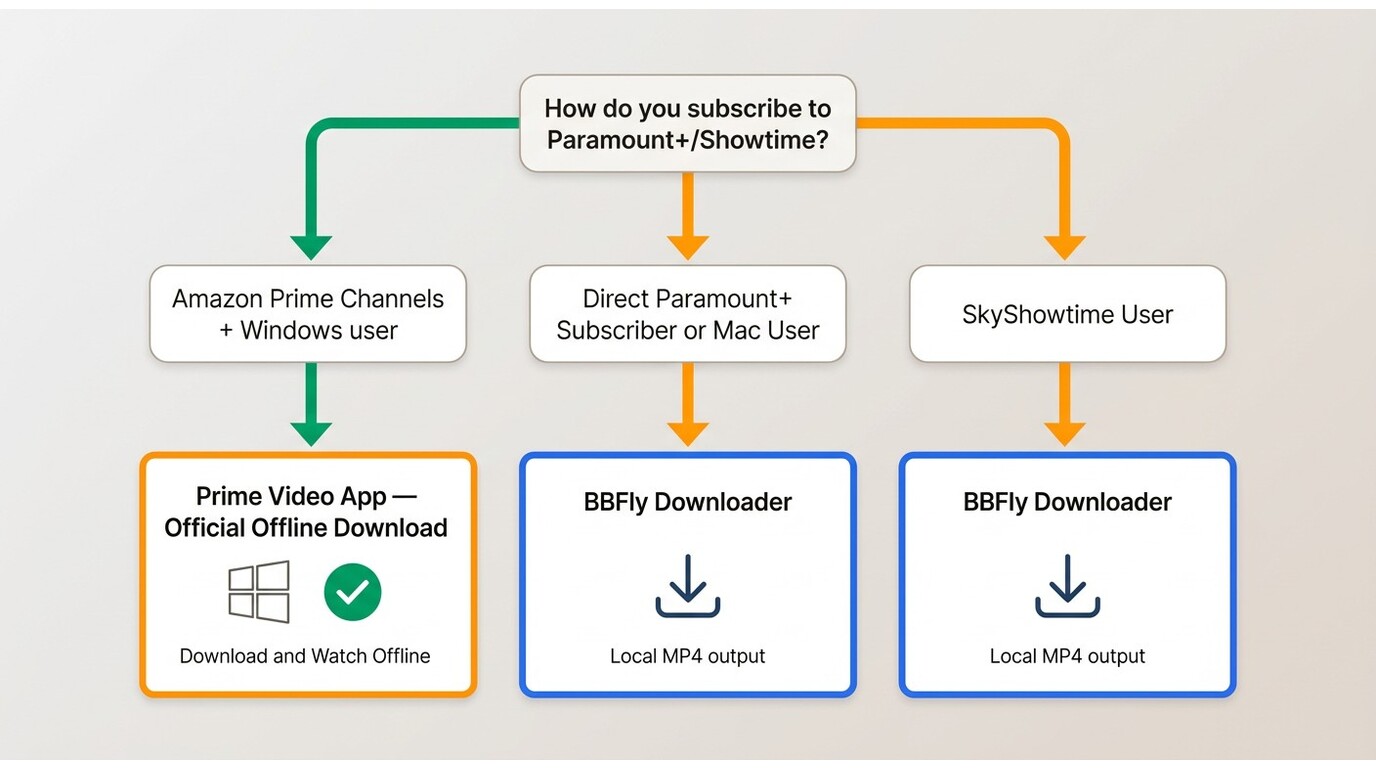
Paramount+ never shipped a desktop download client. The Windows app that briefly existed years ago is gone, the macOS app never offered offline saves, and the browser player is stream-only by design. If you live on a laptop — a lot of frequent travellers and students do — the official answer is essentially "watch it on your phone."
One narrow exception is worth knowing: subscribers who access Paramount+ through Amazon Prime Video Channels can use the Prime Video Windows app to save titles officially. It is a real, legitimate path, but it only applies if you billed through Amazon and you are on Windows. Direct Paramount+ subscribers, Prime Channels subscribers on Mac, and anyone on SkyShowtime are all back to square one.
The 30-Day and 48-Hour Expiry Rules Explained
Paramount+ counts the 30-day clock from the moment the download finishes, not from when you signed up or last opened the app. Tap play even once and the app switches that title to a 48-hour countdown — the shorter of the two timers wins. There is no "renew this download" button: when it expires you re-download it (which counts toward the 25-title cap again) or you re-stream it.
For weekend trips and commutes this is usually fine. For a two-week holiday with patchy Wi-Fi, or a long-haul flight with a layover, the math gets tight fast.
BBFly Showtime Downloader as a Desktop Alternative
This is where a third-party tool earns its place. BBFly Showtime Downloader runs on Windows and Mac and saves up to 4K/HDR10 with Dolby Atmos to a standard MP4 or MKV — the same audio and video tier the Premium mobile app gives you, just as a local file you can manage in Finder or Explorer. It covers both Paramount+ with Showtime and SkyShowtime in a single tool, which is the part that matters if your watching life crosses the Atlantic.
The honest framing: BBFly is not a substitute for a Paramount+ subscription. You sign into your own account inside the tool, and it is intended for personal, non-commercial offline viewing of content you are authorized to access, where local law and the Paramount+ Terms of Use permit it. If the Amazon Prime Channels workaround above fits your setup, use it — that is the simpler path. BBFly is for everyone else: direct Paramount+ subscribers, Mac users, and SkyShowtime accounts the Prime workaround does not cover. Free trial is 30 days with up to three full movies per platform, so you can test it on your own library before paying.
Step-by-Step: Download with BBFly on Windows or Mac
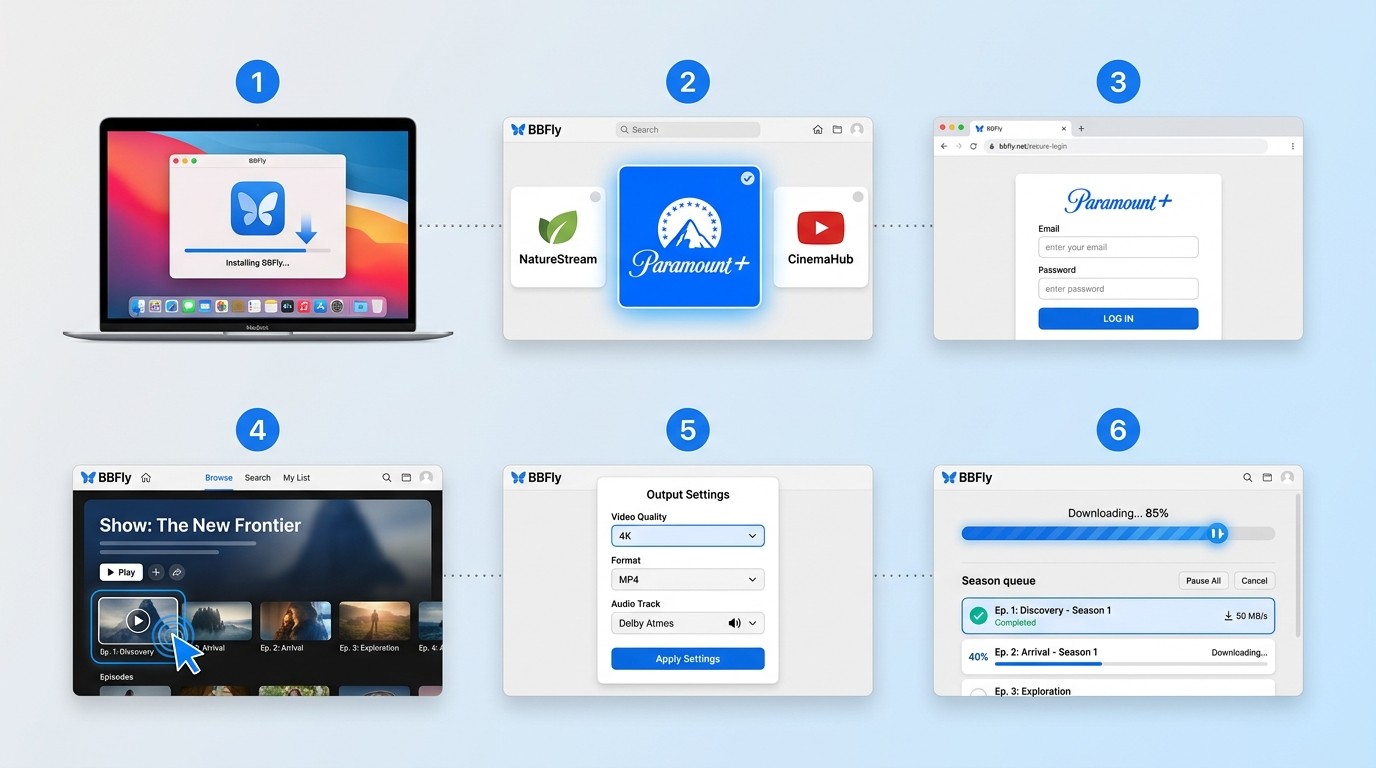
- Install BBFly Showtime Downloader on your Windows PC or Mac and launch it.
- From the platform list, pick Paramount+ (or SkyShowtime if your account is in Europe).
- Sign into your own Paramount+ account inside the built-in browser, the same way you would in Chrome.
- Open the title page for the episode or film you want to keep.
- Choose output settings — resolution up to 4K, MP4 or MKV, audio track, and subtitle languages.
- Click download. Queue a full season if you want; the tool batches them.
On a recent test with a 2024 MacBook Air (M3, macOS Sequoia 15.3) on a 100 Mbps home connection, a one-hour Paramount+ with Showtime episode finished in roughly the time it took to make a coffee, and the saved MP4 played cleanly in VLC and Infuse without re-encoding. Speeds vary with your network and the title's source bitrate, but the workflow does not require babysitting.
BBFly vs. the Official Paramount+ Download: Side by Side
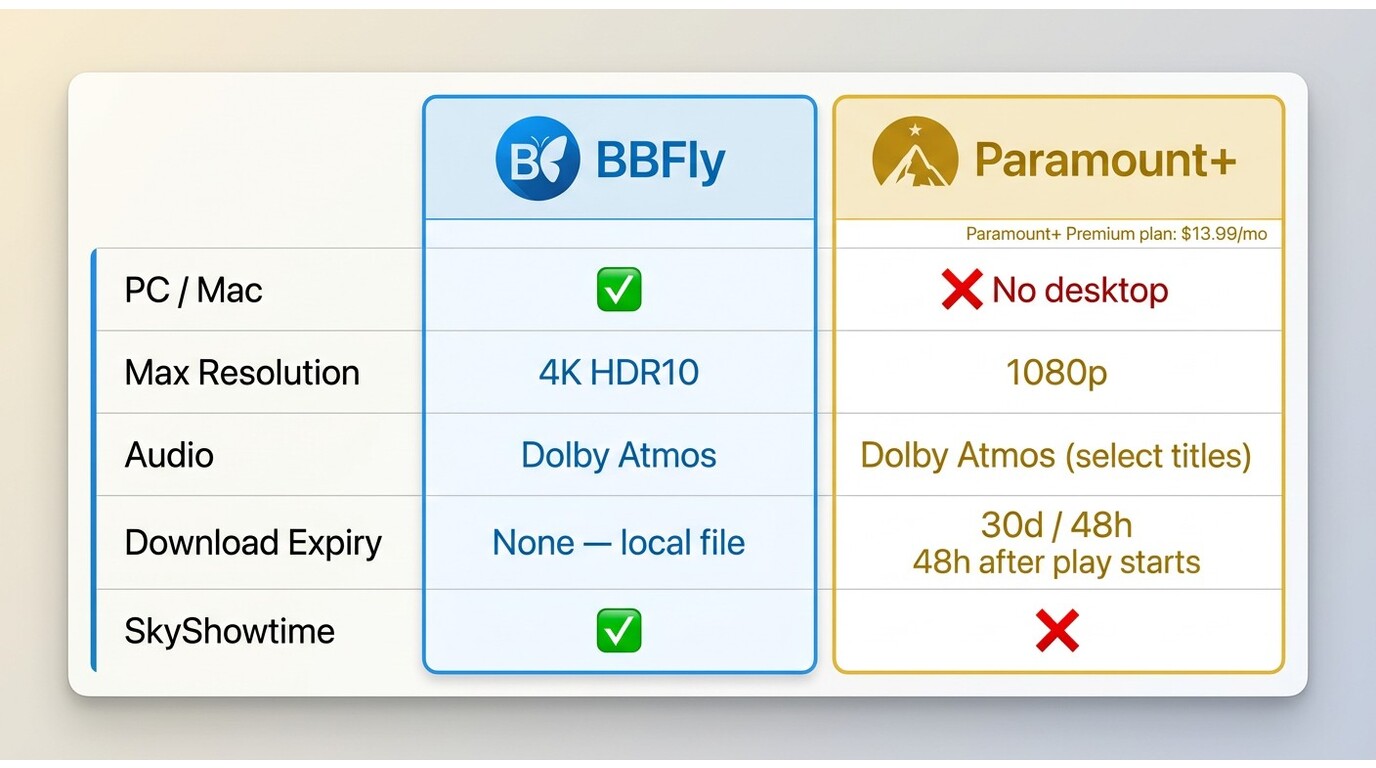
The comparison below is the one I wish every "how to download Showtime" article opened with. Pricing and policies were accurate as of June 2026 — confirm current figures on paramount.com before you act on them.
| Dimension | BBFly Showtime Downloader | Paramount+ with Showtime app |
|---|---|---|
| PC / Mac support | Yes — native Windows and Mac apps | No desktop download surface |
| Mobile support (iOS & Android) | Not the target use case | Yes, on Premium |
| Maximum resolution | Up to 4K with HDR10 | Up to 1080p on mobile (varies by title) |
| Audio quality | Dolby Atmos, EAC3 5.1, AAC 2.0 | Up to Dolby Atmos on supported titles |
| Download expiry | Local file you manage yourself; no platform-enforced playback timer | 30 days unwatched, 48 hours after first play |
| Title availability | Broader within your subscribed library | Some titles blocked from offline by licensing |
| Offline storage location | MP4 / MKV in any folder, NAS, or external drive | Inside the Paramount+ app only |
| Plan required | Active Paramount+ or SkyShowtime account + BBFly license | Paramount+ Premium (~$13.99/mo, as of June 2026) |
My read: the official app is the right call for someone who watches mostly on a phone or tablet, on Premium, and inside a 30-day window. BBFly is the practical desktop alternative when none of those line up — long trips, Mac-first households, frequent flyers, or anyone juggling both Paramount+ and SkyShowtime.
Personal Use, Platform Terms, and What You Should Know
A few ground rules I would set for anyone using a tool like this. BBFly is designed for saving a local copy of content you are authorized to access through your own active subscription, for personal, non-commercial offline viewing only, where applicable law permits it. Sharing the resulting files, uploading them, using them commercially, or playing them in a public setting goes outside that scope and against the Paramount+ Terms of Use.
Two specific things worth flagging. First, your subscription status still matters — this is a way to be flexible about when and where you watch what you already pay for, not a way to keep accessing the catalogue after you cancel. Second, the streaming platforms update their players regularly, and any third-party downloader needs to keep pace. A tool with a slow update cycle will start failing on new releases; that is a useful trust signal when you evaluate options. Always confirm the current rules in the Paramount+ Terms of Use before relying on any download workflow.
Frequently Asked Questions
Can I download Paramount+ with Showtime shows on a MacBook or Windows PC?
Not through the official Paramount+ surface. The app only offers downloads on iOS and Android with a Premium subscription, and the desktop site is stream-only. A desktop tool like BBFly Showtime Downloader fills that gap for Windows and Mac users who want a local copy for personal offline viewing of content they are authorized to access.
Does Paramount+ with Showtime still offer a free trial in 2026?
Paramount ended its direct free trial in January 2026, and as of June 2026 there is no standalone trial advertised on paramount.com — partner promotions (mobile carriers, Walmart+, etc.) come and go, so check there. If you want to test a downloader risk-free, BBFly's own 30-day trial includes up to three full movies per platform, which is enough to verify quality and subtitle handling before paying.
How long do Paramount+ with Showtime downloads last before they expire?
Official downloads expire 30 days after saving if unwatched, or 48 hours after you start playing them, whichever comes first. The app also caps you at 25 active downloads per device. With BBFly, the local file you save does not have a platform-enforced playback timer — it remains accessible for personal offline viewing of content you are authorized to access, for as long as the file is on your drive.
Why can't I find the download button on some Showtime titles?
Licensing. Even on Premium, certain films, live events, and licensed series are not cleared for offline use, so the app simply hides the button on those titles. It is not a bug on your account, and signing out and back in will not bring it back — that restriction applies platform-wide.
What is the difference between Showtime and SkyShowtime?
Showtime in the US is now part of Paramount+ with Showtime, operated by Paramount. SkyShowtime is a separate service available in roughly 20 European and Nordic markets, operated by a Comcast/Sky and Paramount joint venture. The accounts, apps, catalogues, and download rules are independent; BBFly handles both inside one desktop tool.
Is it legal to use BBFly to download Paramount+ with Showtime videos?
BBFly is designed for saving a local copy of content you are authorized to access through your own subscription, for personal, non-commercial offline viewing, where local law permits it. Distributing the files, uploading them, or using them commercially would violate the Paramount+ Terms of Use. The honest short answer: review the Terms of Use and your local copyright rules before you start, and stay inside the personal-use scope.
The Bottom Line
Showtime in 2026 is Paramount+ with Showtime, and the official download story has not caught up with how people actually watch. If you live in the Paramount+ mobile app on Premium, you are well served. If you are on a MacBook in a hotel room, on a long flight with a Windows laptop, or balancing accounts across the US and Europe, the official path runs out fast. A desktop tool like BBFly Showtime Downloader is one practical workaround for that gap — used for personal offline viewing of content you already subscribe to. Try the 30-day trial against your own library before you commit, and you will know inside an evening whether it fits how you actually watch.