
How to Download ABC Videos in Easy Steps
Table of Contents
In short, downloading ABC videos now starts with the source, not the downloader: the standalone apps are gone, and ABC Network episodes, live channels, and ABC News use different access paths. I would confirm browser playback first; it prevents most dead-end troubleshooting.
This guide explains where ABC content is available now, how ABC Network and ABC News differ, when official viewing is the better choice, and how to use an ABC video downloader for a supported playable URL when you need an authorized local-file workflow.

Where ABC Content Is Available Now
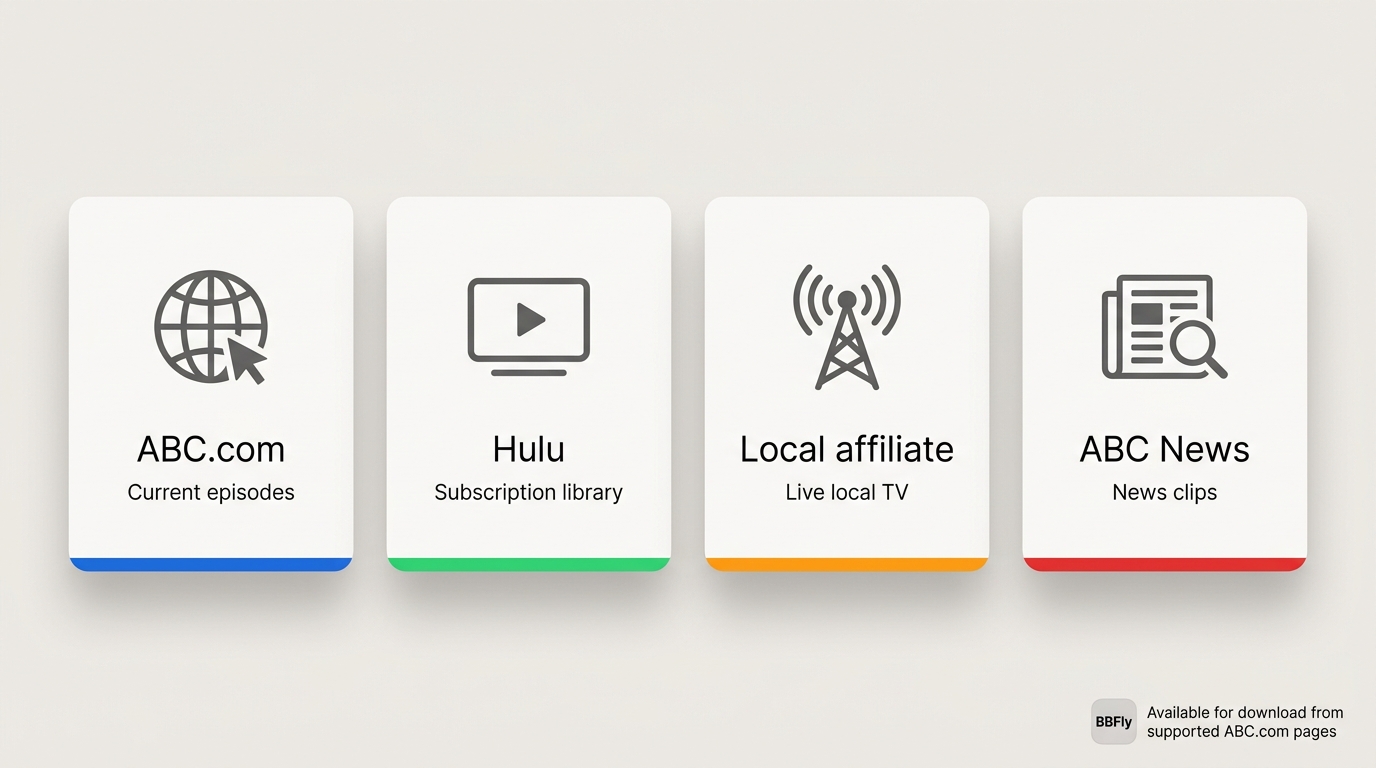
As of July 2026, the standalone ABC mobile and streaming-device apps are no longer available. To watch ABC without an app, use ABC.com for current network programming, Hulu or a participating live-TV service for eligible streaming access, a local affiliate where available, or the separate ABC News experience for news video.
ABC.com, Hulu, and Live-TV Access
ABC.com may offer current episodes and live channels, but access can vary by title, location, and provider eligibility. Hulu and participating live-TV services are often the better fit when you want regular streaming access rather than a local file. Local affiliates may also carry ABC programming, especially for live broadcasts.
What Replaced the ABC Apps
The change did not turn ABC into one single streaming destination. Network entertainment, live TV, affiliate programming, and ABC News remain separate viewing paths, so the page you start with matters before you try to save anything offline.
ABC Network and ABC News Serve Different Needs
Before choosing a workflow, identify which ABC source the page belongs to. Network entertainment, live channels, news video, and third-party streaming access each have their own availability and account rules, and a local-file workflow only fits a narrow subset of them.
| Source | Typical content | Current access path | Account or availability limits | Best-fit workflow | Local-file eligibility |
|---|---|---|---|---|---|
| ABC.com network episodes | Current prime-time and daytime series | Browser on ABC.com | Some titles require a participating TV provider sign-in; rotation varies | Official browser viewing | Only when the specific page is a supported playable URL |
| ABC.com live channels | Live network feed and event coverage | Browser on ABC.com with eligible sign-in | Provider sign-in and regional availability apply | Official live viewing | Not a fit for a local-file workflow |
| ABC News clips and streams | News segments, briefings, and live news streams | ABC News website or app | Live streams and some segments are time-limited or region-limited | Official ABC News viewing | Only for supported on-demand pages; live streams excluded |
| Hulu or live-TV provider | Next-day episodes or a live ABC channel | Hulu app or a participating live-TV service | Active subscription and market coverage required | Streaming through the provider | Not applicable through third-party providers |
| BBFly desktop workflow | Authorized on-demand ABC pages you can play in a browser | Windows or Mac app with the supported page URL | Requires supported page type, authorized access, and current compatibility | Local file for personal offline viewing | Yes, only when all conditions above are met |
In my experience, identifying the source first is the most reliable step: ABC Network, ABC News, and provider-based access don't behave the same way, and a downloader can't change what a given page is or how it's gated.
Choose the Right Offline Workflow
When Official Viewing Is Enough
Use ABC.com, Hulu, a live-TV provider, a local affiliate, or ABC News when you simply need current streaming access. That is usually the sensible choice for live programming, account-gated pages, and titles that are unavailable through a supported local-file workflow.
When a Desktop Local-File Workflow Fits
An ABC downloader for PC can make sense when you have a supported playable URL and need a local file for personal offline viewing. BBFly is available for Windows and Mac, but it is not a fit for unavailable archives, unsupported live pages, or content you cannot lawfully access. If it were my own watchlist, I would use official viewing for anything live or uncertain and reserve a desktop workflow for the titles I am authorized to access and genuinely need offline.
BBFly Download Workflow for Supported ABC Videos
Before starting, confirm that the ABC page plays in your browser through an authorized source. Use this workflow only for content you are authorized to access, where permitted by platform terms and applicable law.
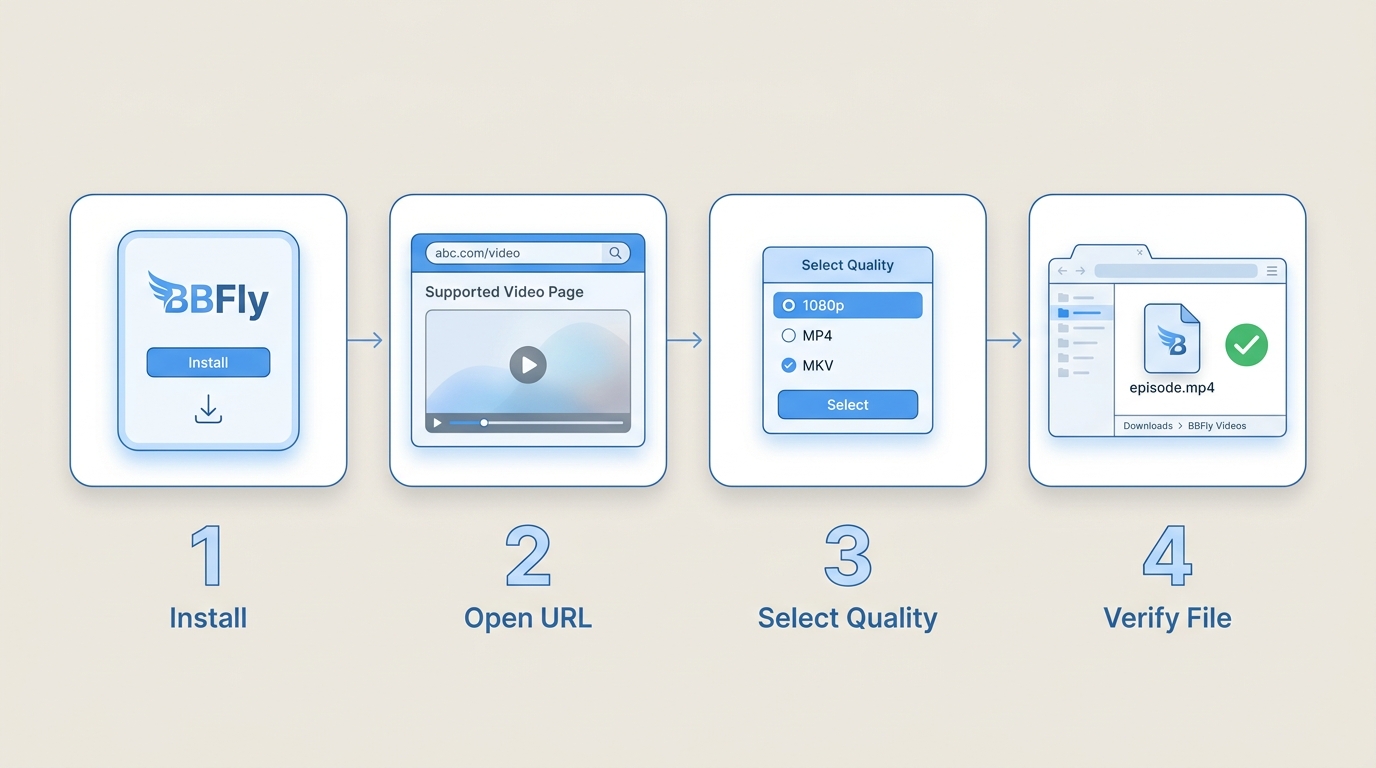
Step 1: Install and Open BBFly
Download and install BBFly on your Windows or Mac computer, then open the app. Installing the software prepares the desktop workflow; it does not download an ABC video by itself.
Step 2: Open a Playable ABC URL
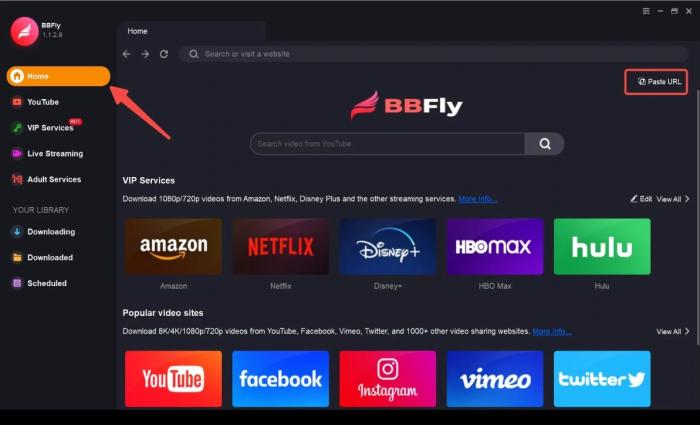
Open the specific ABC Network or ABC News page in your browser and make sure the video plays with your available access. Then copy the page URL or use BBFly’s built-in browser to open it. This check saves time: a browser playback or access problem is not something a downloader can solve.
Step 3: Choose Available Output Settings
When BBFly recognizes the page, select from the available video quality, audio language, subtitle tracks, and MP4 or MKV container options. What appears depends on the source page rather than a universal ABC setting.
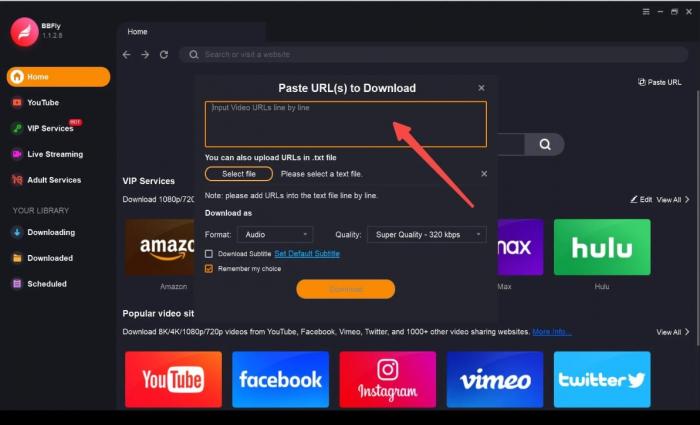
Paste the confirmed page URL into BBFly or continue from the built-in browser, then let the app analyze the supported video options before proceeding.
Step 4: Start and Verify the Download
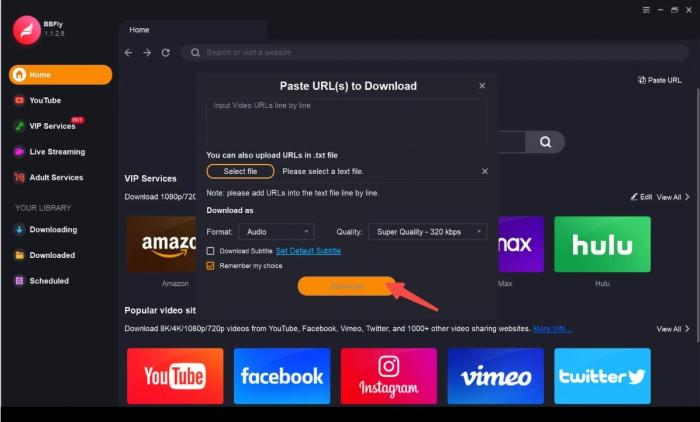
Start the task after confirming the selected options. When it finishes, open the saved file in your preferred player and check that the video, selected audio, and subtitles behave as expected.
A task can start only when the source remains playable and supported, access requirements are met, and the current site workflow is compatible.
Quality, Formats, and Practical Limits
Verified Output Options
| Capability | What the workflow supports |
|---|---|
| Desktop systems | Windows and Mac |
| Video quality | Up to 4K when the supported source provides it |
| Containers | MP4 and MKV |
| Audio and subtitles | Selectable source-provided audio tracks and subtitles when available |
| Task handling | Batch downloads for supported pages |
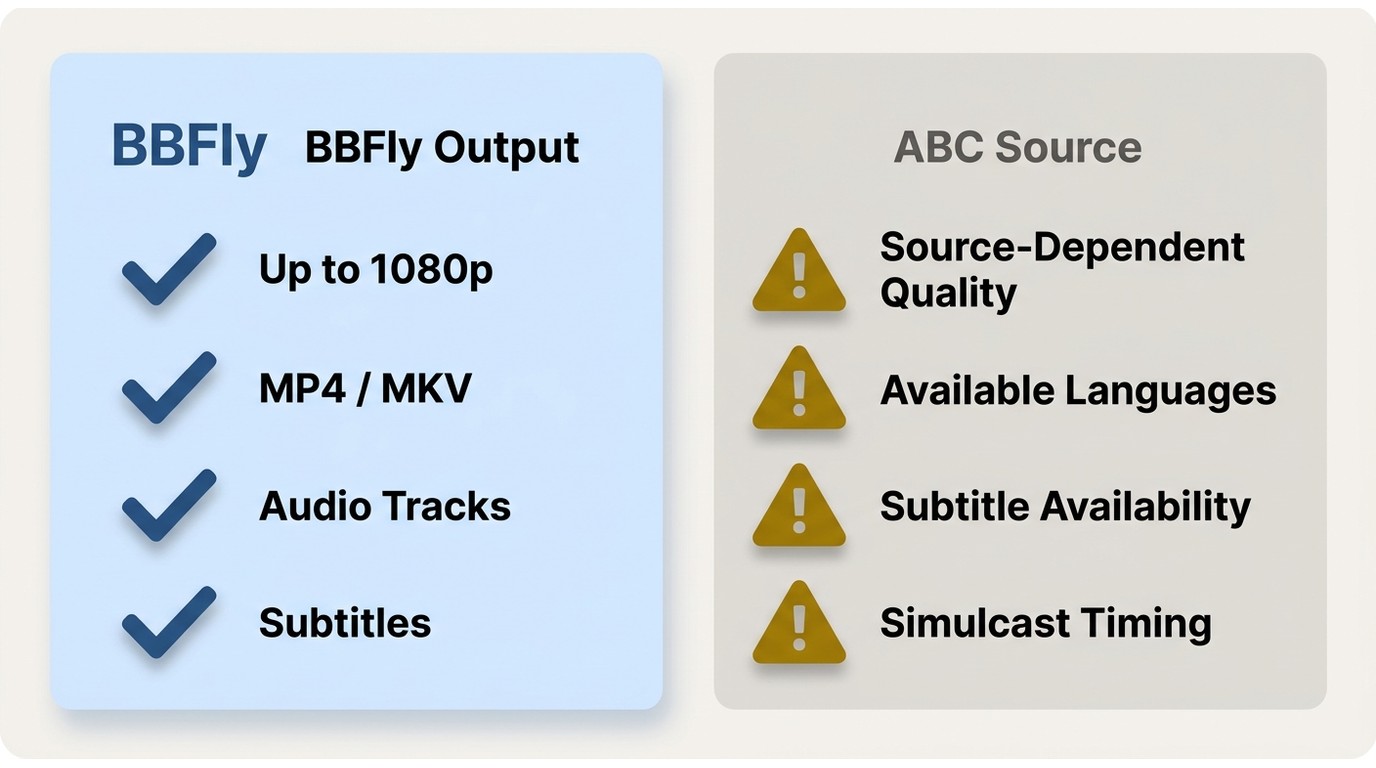
BBFly is a Windows and Mac desktop app that saves supported playable videos as MP4 or MKV, with available source-provided audio and subtitle tracks and quality up to 4K where the source provides it. One app covering many streaming services means I'm not juggling a different tool per network, but the tradeoff is honest: BBFly can preserve the options a compatible page supplies, and it cannot make an ABC page offer quality, languages, or subtitles that are not there.
Availability and Compatibility Limits
Output depends on the source, a playable supported URL, account and regional availability, and current compatibility. Older episodes that are no longer online cannot be recovered, and platform changes can temporarily affect a page that previously worked. This is not the right workflow for live pages, inaccessible titles, or archive hunting.
Fix Common ABC Download Problems
The URL Is Unsupported or Unavailable
First, confirm that you copied the page URL rather than an unrelated search, schedule, or account page. Then verify browser playback and identify whether the source is ABC Network or ABC News. If the title is account-gated, unavailable in your region, live, or no longer online, use the official access path instead of repeatedly retrying the same URL.
Playback Files Cannot Be Retrieved
If a page plays in your browser but BBFly cannot retrieve the required playback files, update BBFly and retry the supported page. Site changes, stale software, temporary compatibility issues, and source-specific delivery can all affect retrieval. A downloader does not create access rights or turn an unsupported page into a supported one.
Quality or Hardware Acceleration Fails
When analysis or playback behaves inconsistently, restart the task after confirming the available source options. If hardware acceleration appears to be the conflict, disable it in the app settings and try again. Proxy or VPN prompts are a sign to review your normal account and regional access, not a reason to work around platform controls.
Legal and Personal-Use Boundaries
Use a local-file workflow only for content you're authorized to access, where permitted by platform terms and applicable law. Copyright, account access, and platform rules still apply. BBFly does not create permission, substitute for an eligible subscription or provider login, or restore content that is no longer available.
FAQ
Can I save an ABC episode without a cable-provider login?
It depends on the title and source page. Some ABC content may play without a provider login, while locked episodes and live feeds can require an eligible account. A local-file workflow does not grant access to content that your account cannot play.
Why does an ABC link play in my browser but fail in a downloader?
Browser playback confirms that the page is available to you, but it does not guarantee that the page type is currently supported. Check whether it is an ABC Network page, ABC News clip, or live stream; update BBFly; and retry the exact playable URL. Site changes, account limits, regional availability, and compatibility can also affect the result.
Can BBFly find older ABC episodes that are no longer online?
No. BBFly can work only with content that remains available through a supported playable source. It cannot restore removed episodes or create archive access where none exists.
Is there a free way to try downloading an ABC video?
BBFly offers a 30-day trial with three full titles per streaming service, subject to supported source availability and authorized access. That limited trial is separate from any free official streaming access ABC may offer for a particular page.
Final Recommendation
Choose official viewing when the content is live, account-gated, unavailable, or unsupported. I would consider BBFly only when I have a supported playable URL and a legitimate personal-use need for a local file on Windows or Mac. It is not for recovering old ABC archives or replacing normal account access, so begin by playing the exact page in your browser and let that result determine the next step.